Reference Electronics · Volume 1
System Architecture — What the Board Has to Do, and Why
One USB light gun, five electrical domains, and the requirements the OpenFIRE firmware fixes before a single trace is drawn
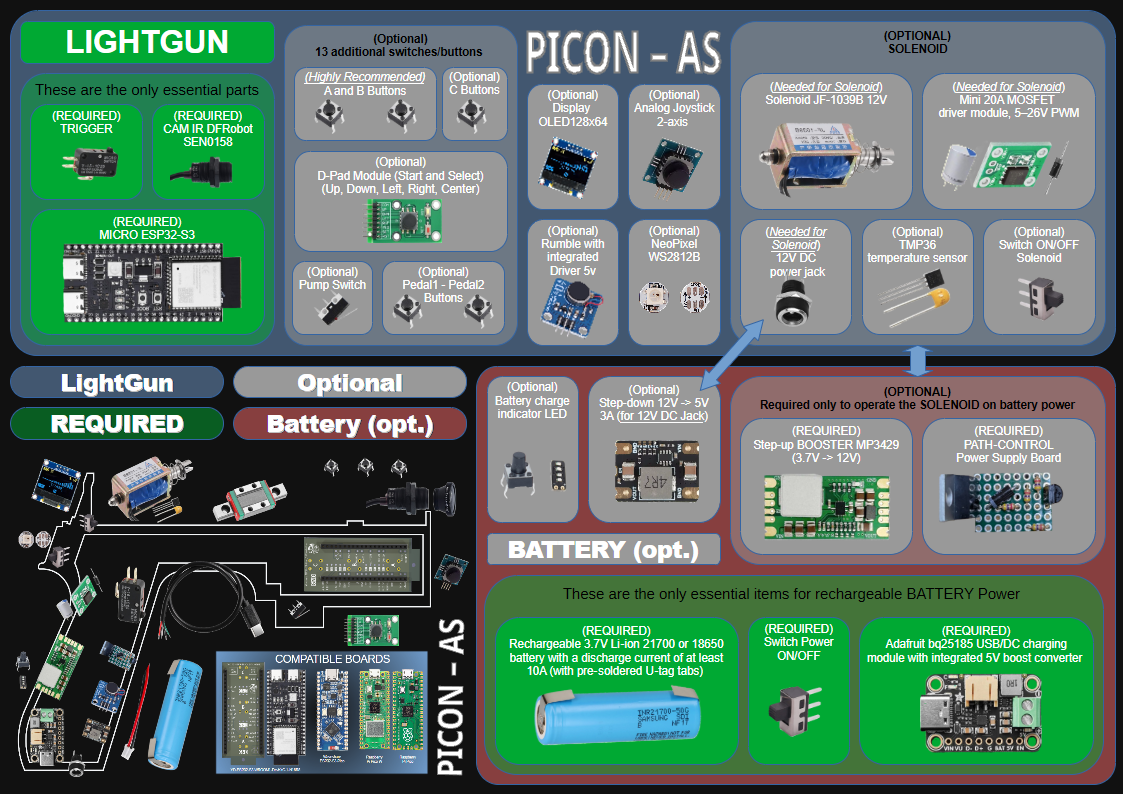
1.1 What This Dive Is For
A DIY infrared light gun is, electrically, a small USB peripheral with three unusual neighbours: a camera that has to see four dots of infrared light across a living room, a solenoid that pulls several amps for a few tens of milliseconds every time the trigger breaks, and a handful of switches mounted wherever a gun’s ergonomics put them rather than where a circuit board would like them. Every build in the Light Guns category shares that electrical core, whether it ends up in an airsoft donor, a printed shell or a machined aluminium body.
This dive is that shared core. It covers the microcontroller board, the camera and its wiring, the input wiring, the driver stages for the solenoid and the rumble motor, the infrared emitter bar that sits at the screen, a breadboard bring-up plan, a proposed schematic and PCB outline, and a full bill of materials with part numbers, sources and dated prices.
The division of labour is fixed. Schematic capture and PCB layout are done in Altium; the physical build is Michael’s. Nothing in this dive has been built or measured yet. Everything here is design work from datasheets and from the firmware’s own source code, and every place where a bench result belongs is marked as owed.
Several neighbouring dives own material this one leans on, and it links to them rather than repeating them:
- Open-Source Firmware owns the firmware survey, OpenFIRE’s internals, flashing, the configuration app, licences, and the camera modules and LED layouts as the firmware defines them.
- Solenoid Recoil owns solenoid physics, selection, pulse timing, heat and the theory behind flyback and driver behaviour.
- Power Supplies owns the wall bricks, boost converters, pulse-bank capacitors and brown-out.
- MP7 Donor Build owns the airsoft donor and the conversion.
This dive owns the circuits: what is connected to what, with which part, and why.
1.2 The System in One Diagram
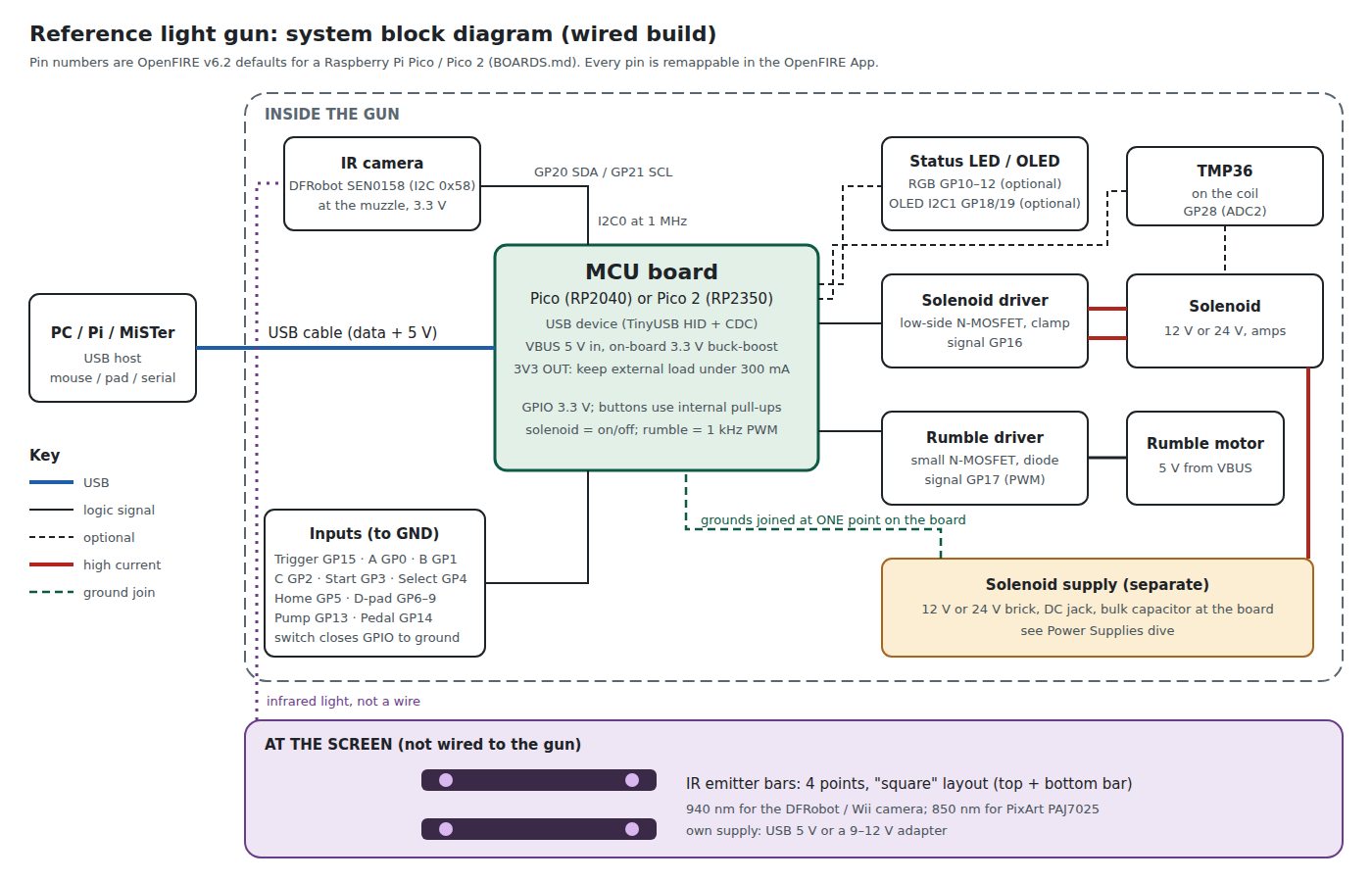
The diagram is organised by domain, because the domains are what the PCB has to keep apart:
- USB and logic (5 V and 3.3 V). The host supplies 5 V on VBUS and enumerates the gun as a composite USB device. The microcontroller board turns VBUS into 3.3 V for the processor and for the low-current peripherals.
- The camera (3.3 V, I2C). A small module at the muzzle reports the positions of up to four infrared points over I2C. It is the only peripheral whose wiring is long, sensitive and fast at the same time.
- The inputs. Trigger, buttons, D-pad, pump and pedal are plain switches to ground. The firmware enables the processor’s internal pull-ups.
- High current (12 V or 24 V). The solenoid and its driver. This is the domain that causes resets, USB disconnects and noise if it is laid out carelessly, and it has its own supply.
- The screen. Four infrared emitter points around the display. It shares nothing electrical with the gun.
1.3 The System in One Table
Every pin below is a default, quoted from the firmware’s board file; the OpenFIRE App can move any of them. The defaults matter because a board that uses them works with a stock firmware image and an unconfigured app.
Table 1 — 1.3 The System in One Table
| Function | Default Pico pin (OpenFIRE v6.2) | Electrical character | Where the detail is |
|---|---|---|---|
| Camera SDA / SCL | GP20 / GP21 (I2C0) | 3.3 V I2C at 1 MHz, to the muzzle | Vol 3 |
| Peripherals SDA / SCL (OLED) | GP18 / GP19 (I2C1) | 3.3 V I2C | Vol 4 |
| Trigger | GP15 | switch to ground, internal pull-up (this build moves it to GP26 for a Hall sensor) | Vol 4 |
| Buttons A, B, C | GP0, GP1, GP2 | switch to ground | Vol 4 |
| Start, Select, Home | GP3, GP4, GP5 | switch to ground | Vol 4 |
| D-pad up, down, left, right | GP6, GP7, GP8, GP9 | switch to ground | Vol 4 |
| Pump action, pedal | GP13, GP14 | switch to ground | Vol 4 |
| RGB status LED R, G, B | GP10, GP11, GP12 | 3.3 V outputs, common anode by default | Vol 5 |
| Solenoid signal | GP16 | on/off logic output | Vol 5 |
| Rumble signal | GP17 | PWM output | Vol 5 |
| Temperature sensor (TMP36) | GP28 (ADC2, labelled “A2”) | analog input, 3.3 V reference | Vol 4 and 5 |
| Unmapped | GP22, GP26 (A0), GP27 (A1) | free | Vol 2 |
This is the firmware’s default map. The first gun moves a few functions, for a Hall trigger on an ADC pin, a NeoPixel, an ejection-port output and a Wii camera clock; Volume 2’s pin budget gives the Stage 1 assignment and the reasons.
The same map, as drawn in the firmware’s own BOARDS.md, is reproduced in Volume 2 next to the machine-readable table it is generated from. The two agree.
1.4 What the Firmware Fixes Before Design Starts
Most of a light gun’s electrical requirements are not free choices. The firmware has already made them, and a board that ignores them either needs a firmware fork or does not work. Reading OpenFIRE’s source (tag v6.2, released 2026-04-19) gives these:
The camera bus runs at 1 MHz. The board file sets DFROBOT_IR_IIC_CLOCK 1000000 for RP2040-class processors, with the comment “even with cheap clips and the full length IR cam cable 1MHz is fine”. That is Fast-mode Plus. It sets the pull-up value and the cable length the board must tolerate (Volume 3).
The camera pins must be a legal I2C pair. The function that attaches the camera checks two bits of the pin numbers. SDA must be the even GPIO and SCL the next odd one, both belonging to the same I2C controller, or the camera is never started and the firmware prints an IR error. Any re-pinning in Altium has to respect this; Volume 2 lists the legal pairs.
Inputs are active-low with internal pull-ups. The button library calls pinMode(pin, INPUT_PULLUP) for every mapped button. A switch closes its pin to ground. No external pull-up is required, and the firmware’s own hardware guide says so.
The solenoid output is on/off; the rumble output is PWM. The solenoid is driven with digitalWrite(HIGH/LOW) and timed in milliseconds (defaults: 45 ms on, 80 ms off, 500 ms hold between single shots). The rumble motor gets analogWrite() at a strength from 0 to 255, which on the Arduino-Pico core is a 1 kHz PWM by default. The driver stages in Volume 5 are sized for exactly that.
The temperature sensor is a TMP36 read against 3.3 V. The conversion in the source is (((analogValue * 3.3) / 4096) - 0.5) * 100, which assumes a 3.3 V ADC reference, a 12-bit reading and the TMP36’s 500 mV offset and 10 mV/°C slope. Readings outside 100 to 2500 counts are treated as a sensor fault and lock the solenoid out; the default warning and shutdown thresholds are 38 °C and 45 °C.
The output pins are released during a settings save. When the app saves settings, the firmware sets the solenoid and rumble pins back to inputs, restarts the camera and then makes them outputs again. For a moment the MOSFET gates are held only by whatever pull-down the hardware provides. Volume 2 shows why that matters more on a Pico 2 than on a Pico.
1.5 Requirements for the Reference Board
The requirements below are derived from the build plan (a wired gun first, wireless later), from the firmware constraints above, and from the target enclosure. Each is numbered so that later volumes can refer to it.
Table 2 — 1.5 Requirements for the Reference Board
| # | Requirement | Derived from |
|---|---|---|
| R1 | Wired USB first. One USB cable carries data and logic power. | Build plan; the wireless architectures are separate dives |
| R2 | Run unmodified OpenFIRE v6.2 firmware, with the Stage 1 pin assignment set once in the app; the features stock firmware lacks (analog trigger, ejection-port output, second TMP36) come from the fork and degrade gracefully without it. | Keeps the stock UF2 and app usable; the fork (decision D10) adds, never replaces |
| R3 | Camera on a legal I2C pair at 1 MHz, powered from 3.3 V. | Firmware source (1.4) |
| R4 | Every switch input is a contact to ground; no external pull-ups needed. | Firmware source |
| R5 | The solenoid can never fire at power-up, during a settings save, or with the USB cable unplugged and the solenoid supply live. | Safety; firmware behaviour in 1.4 |
| R6 | The solenoid supply is separate from USB, enters through its own connector, and its ground joins logic ground at one defined point. | Firmware README’s EMI note; the hardware guide; good practice |
| R7 | Solenoid wiring no thinner than 24 AWG. | OpenFIRE README, quoted in Volume 5 |
| R8 | Fits inside an MP7-size gun, with the camera at the muzzle, the board in the receiver and the cable leaving through the magazine base plate. | Build plan; decision D6 |
| R9 | Every off-board item is on a connector, so a shell can be opened without a soldering iron. | Michael builds and services it |
| R10 | Test points on every rail and every driven node, reachable with the board installed. | Bring-up and debugging on the bench (Volume 7) |
| R11 | A temperature sensor on the solenoid, read by the firmware’s TMP36 path. | Firmware feature; printed shells soften with heat |
| R12 | Nothing in the hardware that stops a later move to the ESP32-S3 wireless port. | Wireless dives come later |
| R13 | A Hall-effect trigger from the first board. | Decision D8 (Volume 4) |
| R14 | A second power output for the ejection port, usable with stock firmware (in parallel with the solenoid) and with the fork (its own command). | Decision D5 (Volume 5) |
R5 deserves emphasis because it is the one most often met by accident rather than design. A solenoid that fires when the gun is plugged in is a nuisance on a bench and a startle inside a shell held next to a face.
1.6 Power Domains and the Current Budget
Table 3 — 1.6 Power Domains and the Current Budget
| Domain | Source | Loads | What is known |
|---|---|---|---|
| VBUS, 5 V | USB host | Pico input, rumble motor, NeoPixels (optional) | USB 2.0 port budget is the host’s to give; the motor current is not published for a generic “5 V rumble motor” and must be measured |
| 3.3 V | Pico’s on-board buck-boost (RT6150) | RP2040, camera, TMP36, OLED, RGB LED | Raspberry Pi recommends keeping the load on the 3V3 pin under 300 mA; DFRobot gives the camera as 44 mA at 3.3 V |
| Solenoid rail, 12 V or 24 V | separate adapter | solenoid only | Peak current is the solenoid’s, and labels understate it: the PICON-AS author reports a JF-1039B labelled 400 mA drawing about 2 A |
| Screen bar | USB 5 V adapter or 9 to 12 V adapter | four emitter points | 100 mA per string with the parts in Volume 6 |
The 3.3 V rail is comfortable. The camera’s 44 mA plus a TMP36 (under 50 µA per its datasheet) and an OLED leave a wide margin under the 300 mA guidance.
The USB rail is where a wired gun can get into trouble, and the rumble motor is the reason. Nothing in this dive assumes a motor current. It is the first measurement in the bring-up plan.
The solenoid rail is owned by the Power Supplies dive. What this dive needs from it is a voltage (12 V or 24 V), a peak current with margin, and a bulk capacitor at the board’s input connector so that the pulse is served locally rather than through the adapter’s cable.
1.7 What Is Out of Scope Here
- Which solenoid, and how hard it kicks. Solenoid Recoil.
- Which buttons go where, and what each does in which game. Controls and Inputs, not yet written. This dive covers how a switch is wired, not what it is for.
- Batteries, USB-C Power Delivery, wireless links. The Power and Connectivity dives.
- How the camera’s coordinates become a cursor. Aiming Maths and Calibration and IR Point Tracking, not yet written.
- Licences for a kit. Licensing, IP and Kits. OpenFIRE is LGPL-2.1 according to its repository, and its README asks that products using it credit the original authors; that is a matter for the licensing dive.
1.8 The Corrections This Dive Rests On
These are the findings that a reader cannot get from a parts list or a forum build. Each is argued in the volume named.
- The DFRobot SEN0158 camera is not currently buyable from DFRobot. As of 2026-10-18 its product page shows “Notify Me” and says a new version is in development; the maintainer of the ESP32 port writes that it is no longer made. Every OpenFIRE build guide still names it. (Volume 3)
- The PixArt PAJ7025 cameras are not supported by OpenFIRE itself. Support for them is in a separate community ESP32-S3 port, over SPI, with 850 nm emitters. The TeamOpenFIRE v6.2 firmware has a driver only for the DFRobot/Wii camera. (Volume 3)
- “SFH 4547 with 5.6 Ω” only works as three LEDs in series per point on 5 V. One LED with 5.6 Ω on 5 V would run several times over its 100 mA rating. The PICON-AS parts list confirms three per transmitter. With only about half a volt across the resistor, the current depends heavily on the forward voltage, and the scheme fails outright if the LED type changes. (Volume 6)
- The MOSFET most often used in solenoid modules is not specified for 3.3 V drive. The AOD4184A’s threshold reaches 2.6 V and its on-resistance is guaranteed only from 4.5 V of gate drive. The IRLZ44N is specified down to 4 V. Neither is guaranteed at 3.3 V. (Volume 5)
- On an early Pico 2 a weak gate pull-down does not hold. Erratum RP2350-E9 (silicon stepping A2) lets an input pad float to about 2.2 V against a pull-down weaker than 8.2 kΩ. OpenFIRE releases the solenoid pin to an input during every settings save. The 100 kΩ pull-down in the community wiring guide is too weak for that case. (Volume 2 and 5)
- A TVS across the coil can exceed a 60 V MOSFET’s rating on a 24 V supply. The MOSFET sees the supply plus the clamp voltage. The clamp belongs from drain to ground. (Volume 5)
- A low-power Hall-effect switch is the wrong part for a trigger. TI’s DRV5032 samples the field at 5, 20 or 80 Hz, so a trigger built on it could be up to 200 ms late. A continuous part such as the DRV5023 (30 kHz bandwidth, open drain) behaves like a switch to ground and needs no firmware change. (Volume 4)
- OpenFIRE has no analog trigger and no third output. Its complete list of pin functions has three analog entries (two stick axes and the temperature sensor) and two force-feedback outputs. A linear Hall trigger and a separate ejection-port actuator are therefore fork changes; the board is laid out so that stock firmware still works with a digital Hall switch in the same footprint; the port actuator waits for the fork, because firing it in parallel with the solenoid would break decision D16. (Volumes 2, 4 and 5)
- The camera every guide names has a working substitute on stock firmware, but not one a kit can be built on. A camera harvested from a genuine Wii Remote, on a small community carrier board and clocked at 25 MHz from a Pico pin, is the same class of sensor with the same field of view; it is this build’s bench stopgap. The only light-gun-class tracking camera in production with a datasheet is PixArt’s PAJ7025, and of its two lenses the R3 is the one that sees four emitters from a normal distance; PixArt’s own “140 degrees” is a diagonal, 113° across. (Volume 3)
- Regulated solenoid current needs no exotic part. A brushed-motor H-bridge with an integrated current mirror and a fixed off-time (TI’s DRV8251A) holds a set current with slow decay and releases the coil fast by coasting its energy back into the supply, from the stock firmware’s plain on/off output. (Volume 5)
The owner’s decisions this dive applies (2026-10-18; the full log is the category’s DECISIONS.md): D2, a Pico (RP2040) to start (Volume 2); D3, the camera chosen by comparison (Volume 3); D5, both ways of moving the ejection port tried (Volume 5); D6, the cable out through the magazine base plate (Volume 8); D7, a Pico on a carrier first and a custom board later (Volume 8); D8, a Hall-effect trigger from the start (Volume 4); D9, the bench built around the Analog Discovery Pro ADP3450 and programmable supplies (Volume 7); D10, firmware changes in the project’s own fork; D13, regulated solenoid current (Volume 5); D14, a 24 V-class rail (Volume 5); D16, the two power stages never fire together (Volume 5); D18, a camera that can be bought in quantity (Volume 3); D19, what boards to buy (Volume 2); D20, a four-layer carrier (Volume 8); D25, the ESP32 dongle trial as it bears on the microcontroller (Volume 2).
Sources
- TeamOpenFIRE, OpenFIRE-Firmware, tag v6.2 (2026-04-19):
README.md,BOARDS.md,OpenFIREmain/OpenFIREprefs.h,OpenFIREmain/OpenFIREFeedback.cpp,OpenFIREmain/OpenFIREcommon.cpp,libraries/OpenFIREPosition/OpenFIREBoard.h,libraries/LightgunButtons/LightgunButtons.cpp. https://github.com/TeamOpenFIRE/OpenFIRE-Firmware (read 2026-10-18). - TeamOpenFIRE, OpenFIRE-Boards,
OpenFIREshared.hat commit a019e91 (the submodule pinned by firmware v6.2). https://github.com/TeamOpenFIRE/OpenFIRE-Boards (read 2026-10-18). - Alessandro Satanassi, OpenFIRE-Firmware-ESP32,
README.mdandlightgun/README.md(v7.0.0-rc5, 2026-10-16). https://github.com/alessandro-satanassi/OpenFIRE-Firmware-ESP32 (read 2026-10-18). - Alessandro Satanassi, PICON-AS: Hardware & Wiring. https://alessandro-satanassi.github.io/OpenFIRE-PICON-AS-ESP32/hardware---wiring.html (read 2026-10-18).
- Raspberry Pi Ltd, Raspberry Pi Pico Datasheet and Raspberry Pi Pico 2 Datasheet, section on powering the board. https://datasheets.raspberrypi.com/ (read 2026-10-18).
- DFRobot, Gravity: IR Positioning Camera For Arduino (SEN0158), product page and wiki. https://www.dfrobot.com/product-1088.html (read 2026-10-18).
- Arduino-Pico core documentation, Analog I/O. https://arduino-pico.readthedocs.io/en/latest/analog.html (read 2026-10-18).
Comments (0)