Reference Electronics · Volume 6
The Screen IR Emitter Bar — Wavelength, Current and Layout
940 or 850 nm, what \"SFH 4547 with 5.6 Ω\" actually means, and a constant-current bar that does not care which LED or which adapter it gets

6.1 What the Emitters Are For
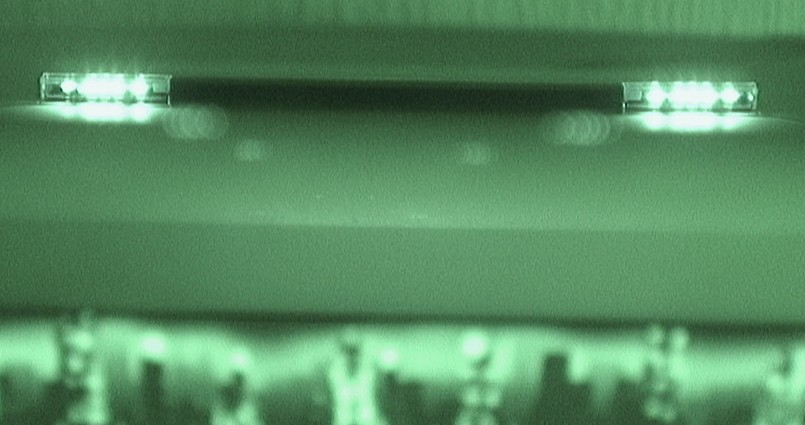
The camera in the gun (Volume 3) reports the positions of up to four bright infrared points. The firmware assumes those points sit at known places around the screen and works out, from where they appear in the camera’s view, where the gun is pointing. The emitters are therefore part of the measuring system: their geometry is a calibration input, their brightness decides the range at which the camera sees them, and anything else bright in the infrared (a window, a halogen lamp, a reflection off a glossy bezel) is a fifth point that corrupts the measurement.
The emitter assembly has no electrical connection to the gun. It needs only a supply, current control and a mechanical mounting.
6.2 Layouts
OpenFIRE’s README (v6.2) gives two arrangements:
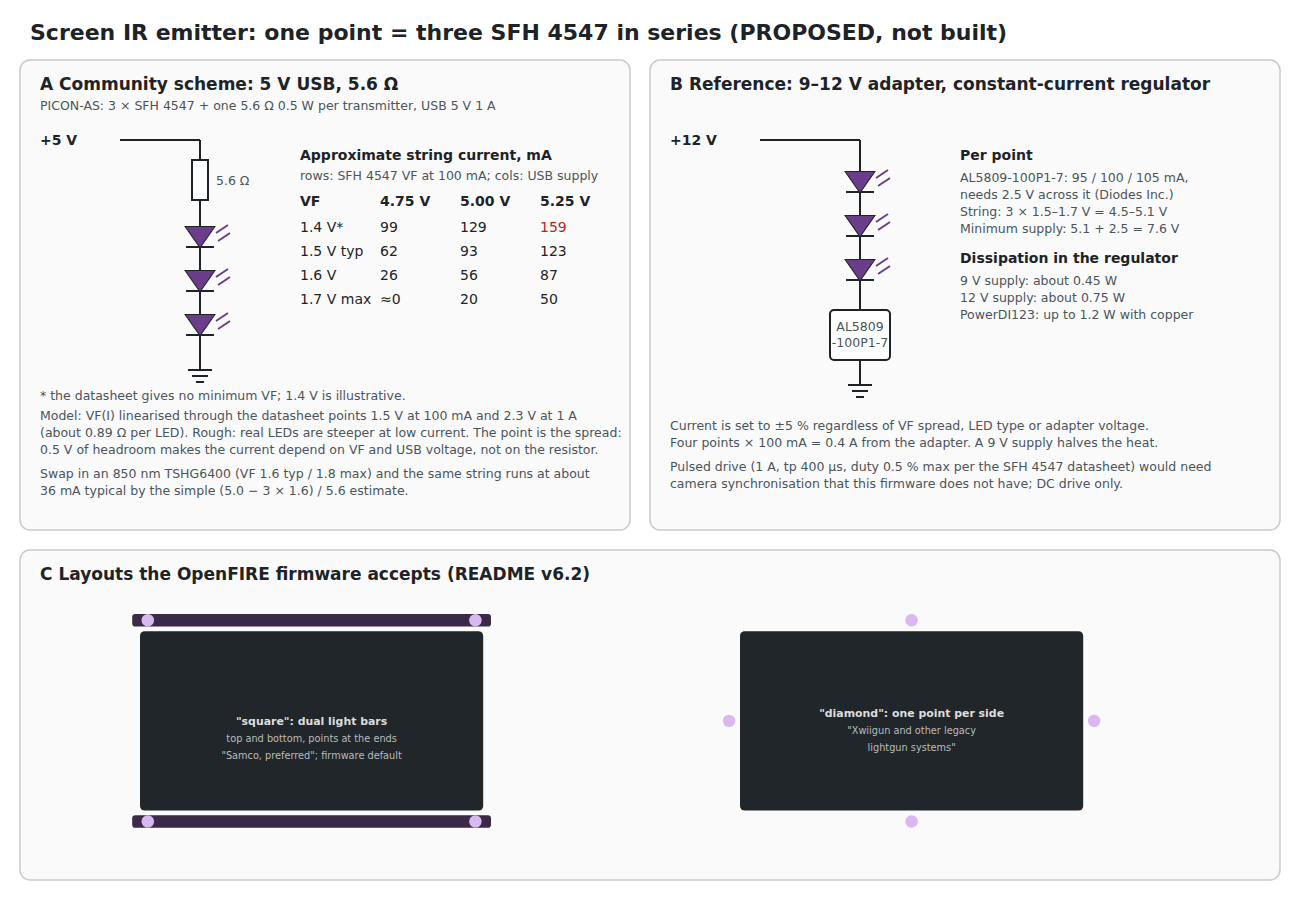
- “As dual lightbars, or “square” layout (Samco, preferred)”
- “At four separate points on the display, or “diamond” layout (Xwiigun and other legacy lightgun systems)”
and adds: “if you’re playing on a small PC monitor, you can use 2 Wii sensor bars; one on top of your screen and one below. However, if you’re playing on a TV, you should consider building or buying a set of high power black IR LEDs and arranging them like (larger) sensor bars at the top and bottom of the display.”
The default calibration profile in OpenFIREprefs.h uses the square layout. The app has an alignment assistant (“Help->Open IR Emitter Alignment Assistant”), and the README also points to an online guide at diylightgun.com. The detailed geometry each layout assumes, and how the tracking code uses it, is the Open-Source Firmware dive’s to describe; this volume builds the hardware that sits at those points.
6.3 Wavelength: 940 nm or 850 nm
The wavelength is set by the camera, not chosen freely. The OpenFIRE ESP32 port’s README is explicit: “4 infrared LEDs, 940 nm for DFRobot / Wii Cam and 850 nm for PixArt PAJ7025R2 / R3 … Wii sensor bars suit the DFRobot/Wii camera only … Example: the OSRAM SFH 4547 (940 nm) suits DFRobot/Wii, not the PixArt cameras.” The camera library’s README, citing the WiiBrew wiki, says the DFRobot camera “works best with 940nm infrared emitters”.
For the bench stopgap, a Wii camera (Volume 3), the answer is 940 nm, and the SFH 4547 bar below is that bar. The kit camera is now the PixArt PAJ7025R3 (decision D18, Volume 3), whose datasheet’s filter passes 835 to 870 nm and says nothing for 940 nm, so a kit bar is an 850 nm bar. The constant-current circuit of 6.6 serves both; only the LED changes, to the TSHG6400 or another 850 nm part chosen when the kit camera is confirmed on the bench.
Two practical notes on the choice. A 940 nm emitter is dimmer to the eye than an 850 nm one, which at 850 nm usually shows a faint red glow; for a living-room bar this is a reason to prefer 940 nm where the camera allows. And a bar built for one camera is not neutral to the other: changing cameras means changing LEDs.
6.4 The SFH 4547
The OpenFIRE README recommends one emitter by name: “it’s HIGHLY recommended to use SFH 4547 LEDs w/ 5.6Ω (ohm) resistors.” The ams OSRAM datasheet (version 1.7, 2022-08-08; “Full production” on the maker’s page on 2026-10-18) gives:
Table 1 — The OpenFIRE README recommends one emitter by name: "it's HIGHLY recommended to use SFH 4547 LEDs w/ 5.6Ω (ohm) resistors." The ams OSRAM datasheet (version 1.7, 2022-08-08; "Full production" on the maker's page on 2026-10-18) gives
| Parameter | Value |
|---|---|
| Package | Radial T1¾ (5 mm), black epoxy |
| Peak / centroid wavelength | 950 nm / 940 nm |
| Spectral bandwidth (FWHM) | 42 nm |
| Half angle | ±30° |
| Forward current, DC maximum | 100 mA |
| Forward current, pulsed | 1 A at tp ≤ 400 µs, duty ≤ 0.005 |
| Forward voltage at 100 mA | 1.5 V typical, 1.7 V maximum |
| Forward voltage at 1 A, 100 µs | 2.3 V typical, 2.9 V maximum |
| Radiant intensity at 100 mA | 28 to 112 mW/sr (50 typical), in bins T, U and V |
| Total radiant flux at 100 mA | 55 mW |
| Power dissipation, maximum | 180 mW |
| Temperature coefficients | VF −1.3 mV/K; brightness −0.5 %/K |
| Thermal resistance, junction to ambient | 450 K/W |
The “940 nm” in the part’s description is the centroid; the peak is 950 nm. The ±30° half angle is wide enough for a player who moves across a room, which is why this part rather than a narrow-beam emitter is the community choice. A narrow part such as ams OSRAM’s SFH 4550 (860 nm, a 6° beam according to its product page) concentrates its output in a cone too tight to cover a sofa.
The brightness bins span a factor of four. Four points from mixed bins will not be equally bright, and the camera sees that. Buying all the LEDs for a bar from one reel, or at least one order, is the cheap way to keep them matched; the datasheet notes “Only one group in one packing unit.”
6.5 What “SFH 4547 with 5.6 Ω” Means
The README does not say what supply the 5.6 Ω resistor is for, or how many LEDs share it. That matters, because one SFH 4547 with 5.6 Ω on 5 V would carry several hundred milliamps: the forward voltage lies between 1.5 V at 100 mA and 2.3 V at 1 A, so the resistor would see roughly 3 V. That is several times the 100 mA DC rating.
The PICON-AS parts list resolves it: twelve SFH 4547s, “3 per transmitter, 4 transmitters”, with four 5.6 Ω 0.5 W resistors, “One in series per transmitter”, powered from a “USB 5V 1A adapter”. Three LEDs in series at 1.5 V each leave about 0.5 V across 5.6 Ω, which is about 89 mA, just under the rating.
It works, and the arithmetic shows why it is fragile. With only half a volt across the resistor, the current is set mostly by the LEDs’ forward voltage and the USB supply, not by the resistor. Panel A of the figure tabulates a rough model (forward voltage linearised through the datasheet’s two points). Across the datasheet’s forward-voltage range and the USB tolerance of 4.75 to 5.25 V, the string current runs from nearly nothing to well over 100 mA. Three effects make it worse in use:
- Temperature. The forward voltage falls by 1.3 mV per kelvin per LED, so a warm string draws more current, which warms it further. The 5.6 Ω limits this but with little margin.
- A different LED. Substitute an 850 nm TSHG6400 (forward voltage 1.6 V typical, 1.8 V maximum) and the same circuit gives about 36 mA by the simple estimate: a third of the intended brightness.
- A different adapter. A USB adapter at 5.25 V and one at 4.85 V produce visibly different bars.
None of this means the community scheme is wrong. It is cheap, it uses a USB supply that every household has, and it has been built many times. It means the brightness of a 5.6 Ω bar is an accident of the parts it was built from, and that it should be measured rather than assumed.
6.6 A Constant-Current Bar
The fix is a current regulator per point, which needs more headroom than a USB supply gives three LEDs. The reference design uses Diodes Incorporated’s AL5809, a two-terminal linear constant-current driver. Its datasheet gives:
- operation from 2.5 V to 60 V between its two terminals;
- ±5 % current tolerance over temperature;
- fixed-current versions including AL5809-100P1-7 (95 / 100 / 105 mA) and -90P1-7 (90 mA), in the PowerDI123 package, rated up to 1.2 W;
- for high-side or low-side use, a minimum supply of the LED chain voltage plus 2.5 V.
For three SFH 4547s the chain is 4.5 V typical and 5.1 V maximum, so the supply must be at least 7.6 V. On a 9 V adapter each regulator dissipates about 0.45 W; on 12 V, about 0.75 W, which needs the copper area the datasheet’s thermal figures assume. Four points draw 0.4 A in total.
With the regulator in place the current is set to within ±5 % whatever the forward voltage, the bin, the temperature, the adapter or the LED type. A bar built this way can be fitted with 850 nm LEDs for a PixArt experiment and stays at 100 mA per point.
An alternative regulator is onsemi’s NSI45090JDT4G: 90 mA nominal (76.5 to 103.5 mA) at 7.5 V across it, adjustable up to 160 mA with a resistor on its Radj pin, 45 V, in DPAK, rated to 2.7 W with copper. Its datasheet notes it reaches 20 % of regulation at only 0.5 V, so it is gentler than the AL5809 when the supply sags.
Why not pulse it? The SFH 4547 can take 1 A for 400 µs at 0.5 % duty, which would make each point several times brighter. But the brightness the camera integrates over its exposure is what matters, and pulsing only helps if the pulses are synchronised with the camera’s exposure. OpenFIRE has no such synchronisation. The bar is driven DC.
6.7 Why This, and Why Not the Others
The criteria for the emitter bar: the wavelength the chosen camera sees best (940 nm for the stopgap Wii camera, 850 nm for the PixArt kit camera; Volume 3); a wide enough beam that the gun stays inside it from any normal playing position; a current that stays put whatever the LED bin, temperature or adapter; and parts that can be bought from stock.
Table 2 — 6.7 Why This, and Why Not the Others
| Function | Pick | Alternatives | Why the pick, and why not the others |
|---|---|---|---|
| Emitter | ams OSRAM SFH 4547, 940 nm, ±30° | Vishay TSHG6400 (850 nm, ±27°); ams OSRAM SFH 4550 (860 nm, 6° beam); a genuine Wii sensor bar | The SFH 4547 matches the Wii-camera sensor’s 940 nm preference and is the part the firmware README names. The TSHG6400 is the right LED for the PixArt kit camera’s bar (decision D18), and becomes this table’s pick for a kit; the SFH 4547 stays for the stopgap. The SFH 4550’s 6° beam would put the gun outside the cone with a small step sideways. A Wii bar has the right wavelength but the wrong spacing for the square layout on a television. |
| Current setting | Diodes AL5809-100P1-7, one per point, on a 9 to 12 V adapter | 5.6 Ω per three LEDs on USB 5 V (the community scheme); onsemi NSI45090JDT4G | The AL5809 holds 100 mA within ±5 % across LED bins, temperature and supply (6.6). The 5.6 Ω scheme has about half a volt across the resistor, so the current moves with every one of those (6.5). The NSI45090JDT4G is a good second choice, gentler in a sag and adjustable, but larger (DPAK) and nominally 90 mA. |
| Drive mode | DC | pulsed at up to 1 A | Pulsing helps only if synchronised to the camera’s exposure, which OpenFIRE does not do (6.6). |
6.8 Mechanical Notes
- Aim. The LEDs face the player, perpendicular to the screen. With a ±30° half angle, tilting each bar slightly toward the usual playing position is worth more than any current increase.
- Spacing and alignment. The firmware assumes the points are where the layout says. The app’s alignment assistant is the tool; the bar’s job is to hold the points still.
- Reflections and other sources. The firmware README’s test mode is described as useful for “observing possible reflections”. Gloss bezels, glass cabinet fronts, windows in sunlight and some lamps show up as extra points.
- The Wii sensor bar. A genuine bar has the right wavelength for the DFRobot camera, and the README allows two of them for a small monitor. On a television its spacing is wrong for the square layout and its brightness is limited.
6.9 Where to Buy
Table 3 — 6.9 Where to Buy
| Item | Seller | Price (2026-10-18) | Notes |
|---|---|---|---|
| ams OSRAM SFH 4547 | ams OSRAM product page | maker page lists no price | ”Full production”; ordering code Q65111A1141 |
| SFH 4547 | Mouser 720-SFH4547 (linked by the OpenFIRE README) | not captured | Mouser refused automated reading |
| Diodes AL5809-90P1-7 | LCSC C156312 | $0.2709 each (5+) | 155 in stock |
| Diodes AL5809-100P1-7 | Mouser part 621-AL5809-100P1-7 | not captured | not found at LCSC |
| onsemi NSI45090JDT4G | onsemi distributors | not captured | |
| Vishay TSHG6400 (850 nm, PixArt path) | Vishay distributors | not captured | ±27°, datasheet Rev 1.5, 2025 |
Sources
- TeamOpenFIRE, OpenFIRE-Firmware v6.2:
README.md(requirements),OpenFIREmain/README.md(“IR Emitter setup”),OpenFIREmain/OpenFIREprefs.h,libraries/DFRobotIRPositionEx/README.md(read 2026-10-18). - Alessandro Satanassi, OpenFIRE-Firmware-ESP32,
lightgun/README.md(read 2026-10-18); PICON-AS: Hardware & Wiring (read 2026-10-18). - ams OSRAM, SFH 4547 datasheet, version 1.7, 2022-08-08, and product page (read 2026-10-18).
- ams OSRAM, SFH 4550 product page (read 2026-10-18).
- Vishay Semiconductors, TSHG6400 datasheet, Rev. 1.5, 17-Mar-2025 (read 2026-10-18).
- Diodes Incorporated, AL5809 datasheet (read 2026-10-18).
- onsemi, NSI45090JD datasheet (read 2026-10-18).
- LCSC product page C156312 (read 2026-10-18).
Comments (0)