Open-Source Light-Gun Firmware · Volume 3
Hardware as OpenFIRE Defines It — Boards, Pin Presets, the Camera, the Emitters and the Hardware Guide's Circuits
Every supported board and its default pin map quoted from the project's own files, the DFRobot camera and the Wii-sensor alternative, the two emitter layouts, and the solenoid, rumble and button wiring exactly as OpenFIRE's Hardware Guide v1.3 draws it
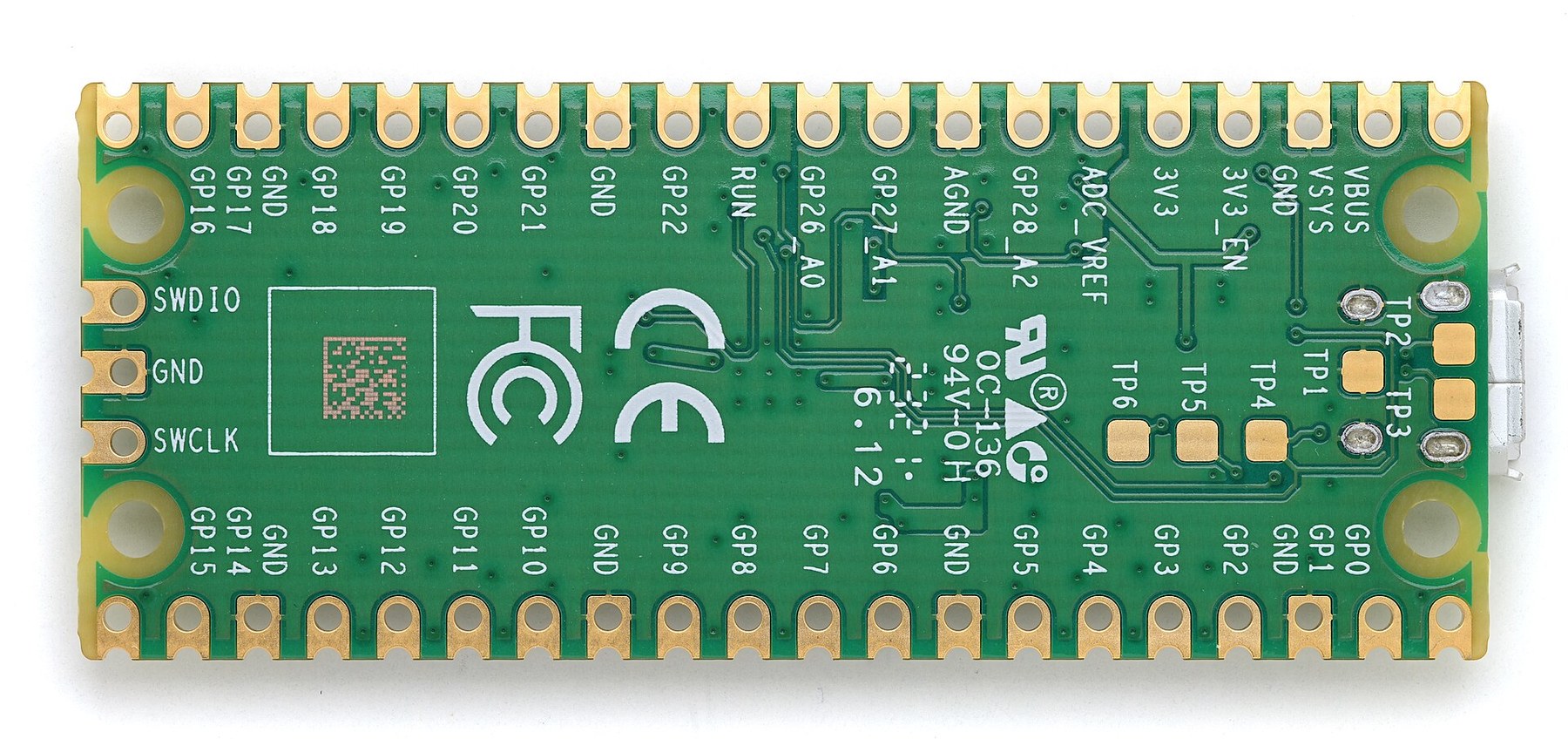
3.1 Whose definition this is
This volume records what the OpenFIRE project itself says about hardware: which boards it supports, which pin does what by default, which camera and emitters it expects, and how its own Hardware Guide wires the solenoid and rumble motor. Four documents define that, and each is quoted with its name:
BOARDS.mdin the firmware repository — the default pin maps as ASCII board drawings.OpenFIREshared.hin the OpenFIRE-Boards repository — the same maps as the code that both the firmware and the App actually load (boardsPresetsMap), at the commit firmware v6.2 pins.- The firmware
README.md— the parts list. - The OpenFIRE Hardware Guide, version 1.3 — a 15-page illustrated wiring guide published on openfirelightgun.org; the PDF is dated 17 October 2026, the day before this was written. All of its drawings use a Raspberry Pi Pico.
Two siblings own the design work this volume deliberately does not do. Reference Electronics owns the build’s own circuit — the driver stages, the camera interface, the emitter bar and the schematic for Altium — and treats what follows as one input. Solenoid Recoil and Power Supplies own the solenoid and its supply. Where the project’s drawings raise an engineering question, it is flagged here and answered there.
3.2 Supported boards
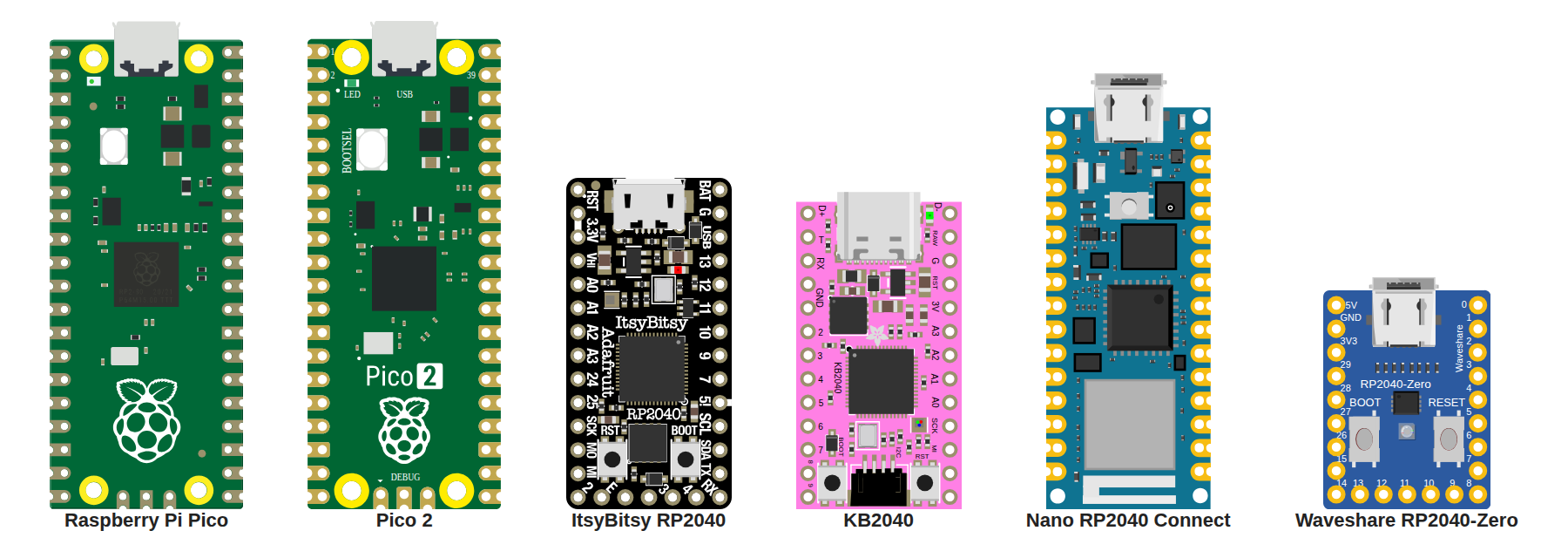
Firmware v6.2 ships eleven UF2 images. The board a UF2 is built for decides its default pin map; every pin can then be remapped in the App (Volume 5), so a “generic” image works on any RP2040 or RP2350 board once its pins are set by hand.
Table 1 — 3.2 Supported boards
UF2 (OpenFIREfw.*.uf2) | Board | Chip | Default layout | Notes from the project |
|---|---|---|---|---|
rpipico | Raspberry Pi Pico and clones | RP2040 | Yes | README: “cheapest, most pins available” |
rpipico2 | Raspberry Pi Pico 2 | RP2350 | Yes, pin-identical to Pico | v6.0 notes: the team had no Pico 2 boards to test on at release |
rpipicow-noBT | Pico W, USB only | RP2040 | Yes, as Pico | Bluetooth build is a known issue: “TinyUSB/Serial fails to initialize properly when connected via USB” |
rpipico2w-noBT | Pico 2 W, USB only | RP2350 | Yes, as Pico | |
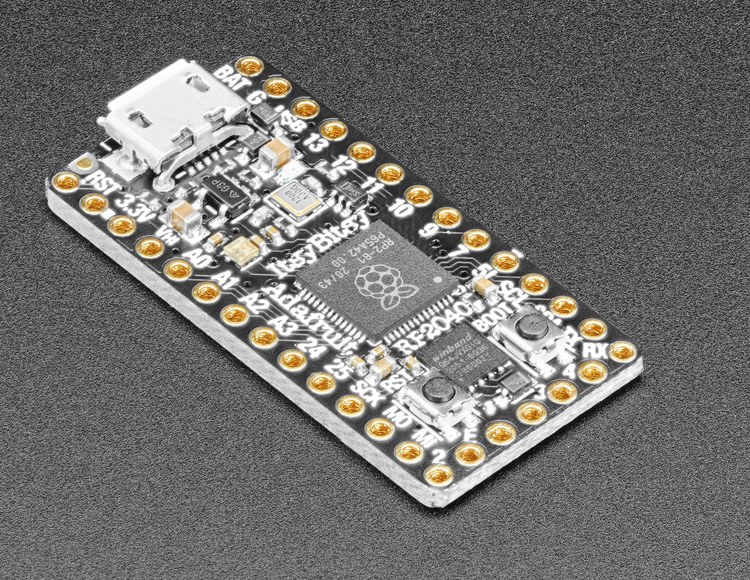
adafruitItsy | Adafruit ItsyBitsy RP2040 | RP2040 | Yes (SAMCO 2.0); SAMCO 1.1 as an App preset | Fits SAMCO carrier boards |
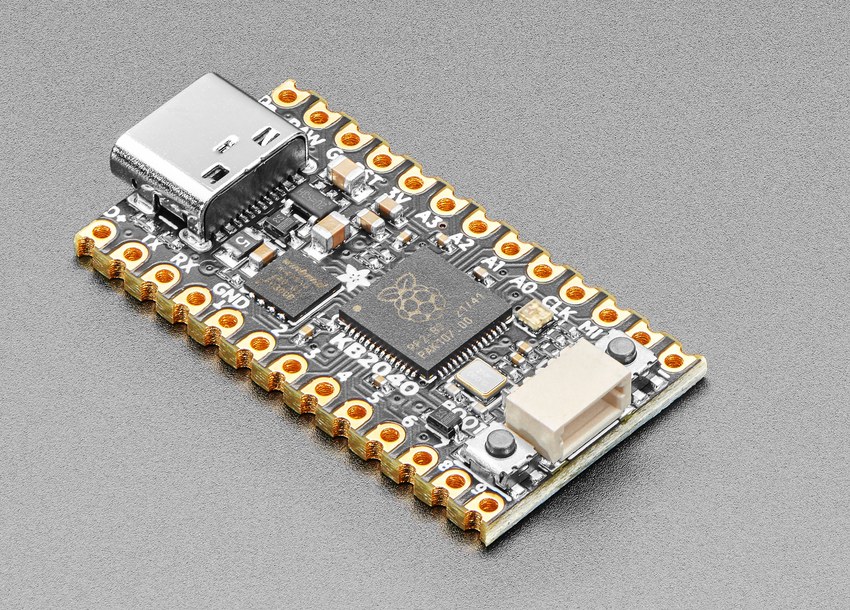
adafruitKB2040 | Adafruit KB2040 “Kee Boar” | RP2040 | Yes | Pro Micro footprint, for other carrier boards |
arduinoNano | Arduino Nano RP2040 Connect | RP2040 | Yes | Pins handled by the NINA Wi-Fi chip “are not yet exposed” |
waveshareZero | Waveshare RP2040-Zero | RP2040 | Yes | Underside pads 17–25 “not yet exposed to the OpenFIRE App” |
vccgndYD | VCC-GND YD RP2040 (“the Chinese Pico clone with embedded NeoPixel”) | RP2040 | No — BOARDS.md: “no default layout yet” | Map every pin in the App |
generic | Any other RP2040 | RP2040 | No | ”may or may not work” |
generic_rp2350 | Any other RP2350 | RP2350 | No | As above |
The shared header also carries presets for three ESP32-S3 boards (Espressif DevKitC-1, Waveshare ESP32-S3-Pico and ESP32-S3-Zero). They serve the ESP32 port described in Volume 1; the TeamOpenFIRE firmware has no ESP32 build.
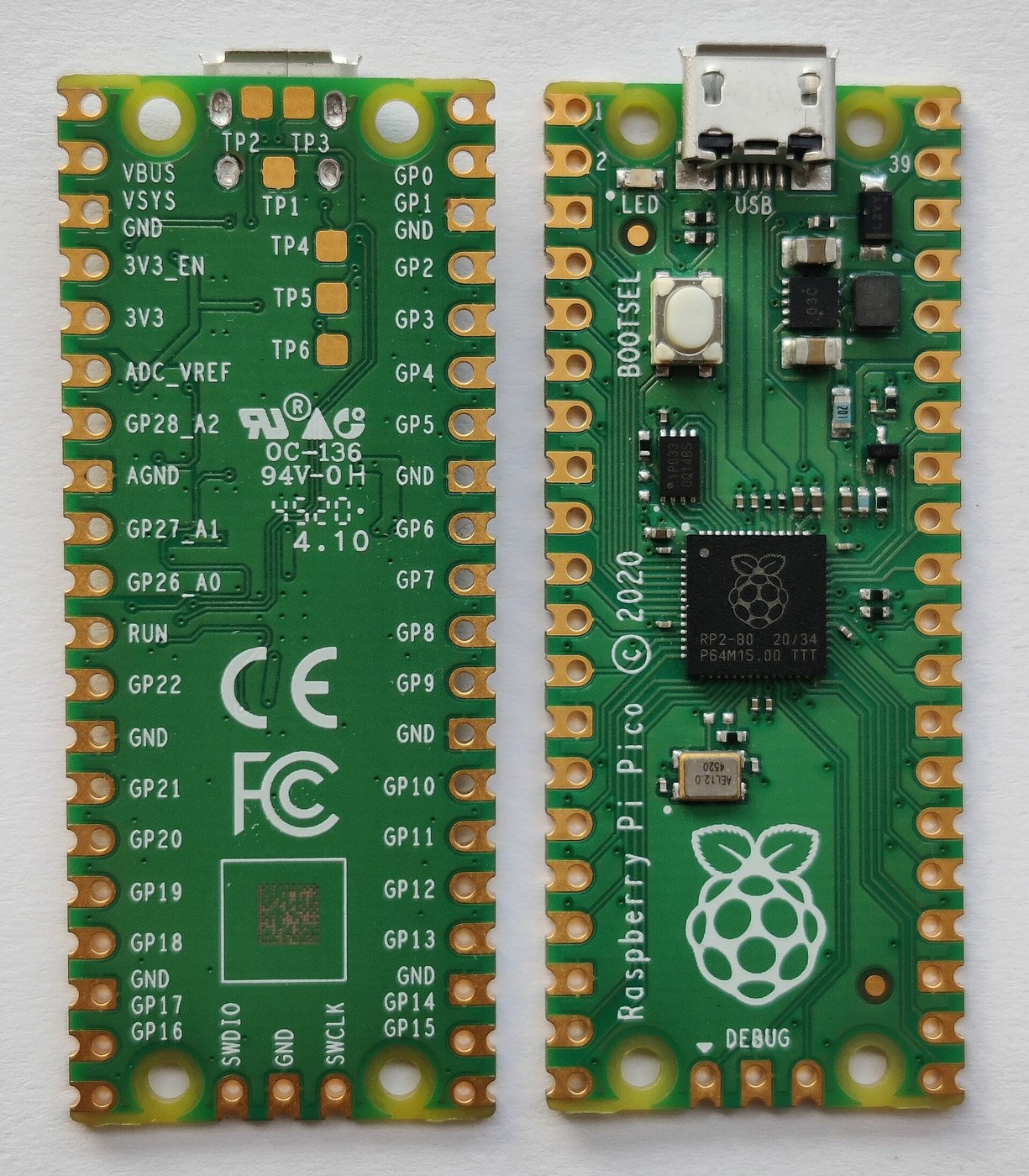
For this build the board is decided: a Raspberry Pi Pico (RP2040) to start, on a carrier board, with any microcontroller acceptable later if it has enough inputs and outputs. The pin budget that proves the Pico has enough is in Reference Electronics. The Pico 2 is pin-identical and OpenFIRE treats it identically, so it stays a drop-in trial: the RP2350’s faster Cortex-M33 cores and floating-point unit give headroom for anything a fork adds (heavier filtering, a second camera, the maths in Aiming Maths and Calibration).
Why this, and why not the others. Criteria: a release UF2 with a full default pin map; enough GPIO for every button, the Hall trigger, two power stages, rumble and status; the board every OpenFIRE gun in the field has run; price and stock.
Table 2 — 3.2 Supported boards
| Board | Verdict | Reason |
|---|---|---|
| Raspberry Pi Pico (RP2040) | Pick | rpipico UF2 with the full default map; the README’s “cheapest, most pins available”; what every OpenFIRE gun in the field runs; $4.00–4.60 (3.11) |
| Raspberry Pi Pico 2 (RP2350) | Drop-in later | Same map and same UF2 family; the team’s v6.0 notes say they had not tested Pico 2 boards at release, and it was out of stock at Adafruit on 2026-10-18 |
| Pico W / Pico 2 W | Rejected | Only -noBT builds ship, because Bluetooth is a known issue in the README; the radio adds nothing to a wired gun |
| Adafruit KB2040, ItsyBitsy RP2040 | Rejected | Fewer pins; they matter only for a carrier or shell built around their footprints (SAMCO boards for the ItsyBitsy) |
| Waveshare RP2040-Zero, Arduino Nano RP2040 Connect | Rejected | Pins the App cannot yet assign: the Zero’s underside pads and the Nano’s NINA-handled pins |
| VCC-GND YD RP2040, generic RP2040/RP2350 | Rejected | No default layout; every pin mapped by hand, “may or may not work” |
| ESP32-S3 boards | Not for the first gun | Only the separate ESP32 port supports them; its PixArt camera support is the reason to revisit (Volume 1) |
The KB2040 and ItsyBitsy matter only if a carrier board or shell is designed around their footprints.
3.3 The Pico’s default pin map
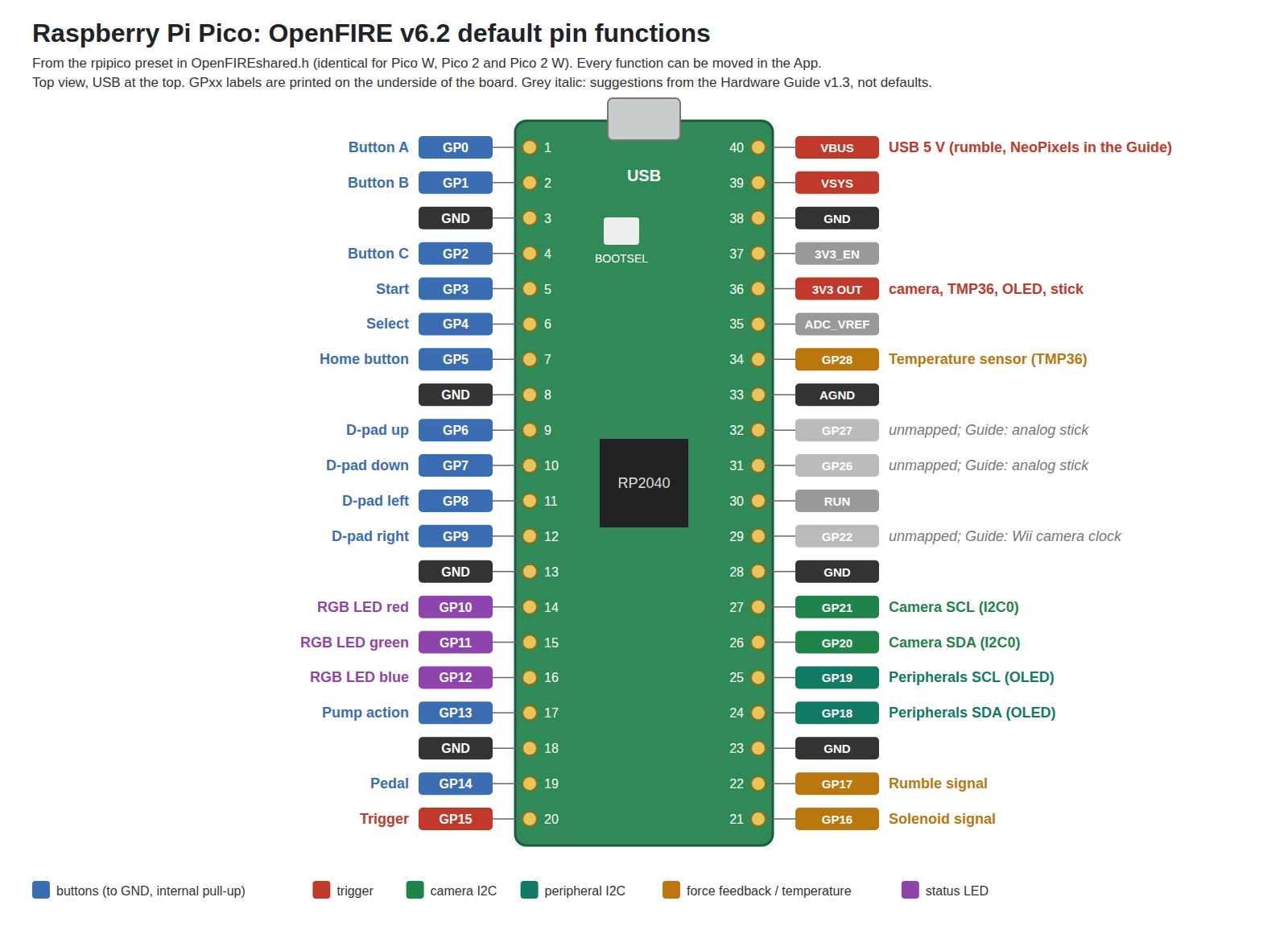
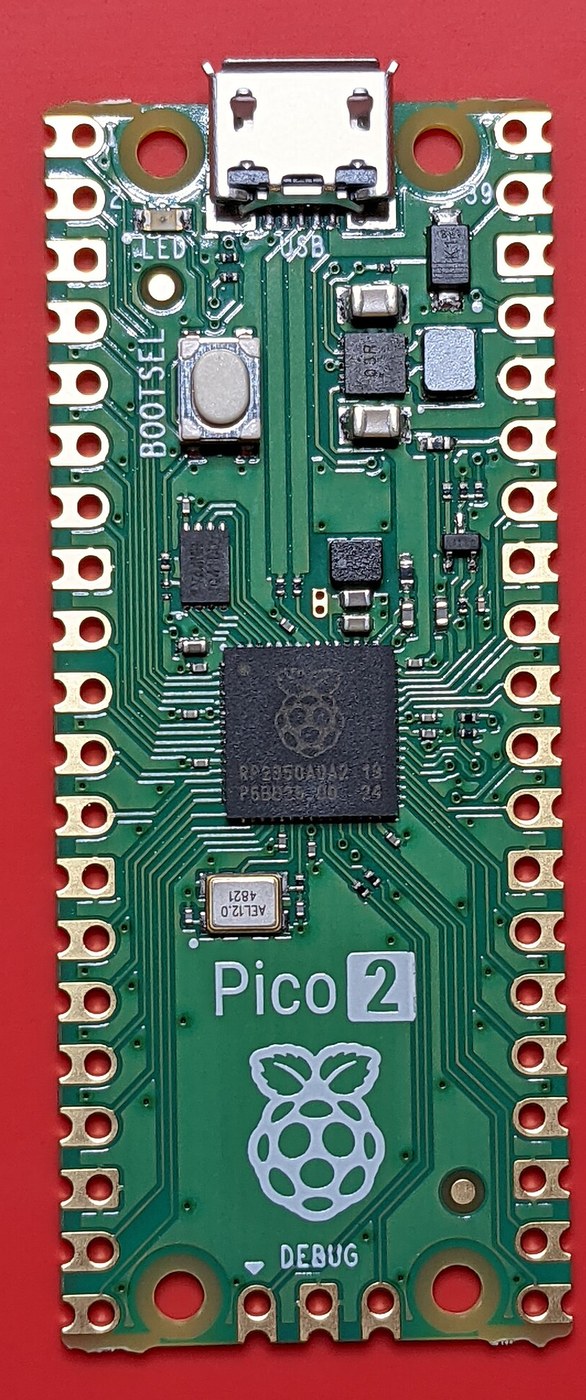
BOARDS.md draws the Pico’s defaults as ASCII art; quoted exactly, with the legend “(x) = GND/No Connect | (-) = GPIO | (p) = Power”:
                   A Button     0  |-)   *USB*   (-| VBUS (USB voltage)
                   B Button     1  |-)           (-| VSYS (Input from Battery/Output to NeoPixels)
                               GND |x)           (x| GND
                   C Button     2  |-)           (x| 3V3 En
                   Start        3  |-)           (p| 3V3 Out (to Display/Cam/Analog Inputs)
                   Select       4  |-)           (x| ADCVREF
                   Home Button  5  |-)           (-|  A2 Temp Sensor
                               GND |x)           (x| AGND (for ADC VREF)
                   D-Pad Up     6  |-)           (-|  A1 *Unmapped*
                   D-Pad Down   7  |-)           (-|  A0 *Unmapped*
                   D-Pad Left   8  |-)           (x| RUN
                   D-Pad Right  9  |-)           (-|  22 *Unmapped*
                               GND |x)           (x| GND
                   RGB Red     10  |-)           (-|  21 Camera SCL
                   RGB Green   11  |-)           (-|  20 Camera SDA
                   RGB Blue    12  |-)           (-|  19 Peripherals SCL
                   Pump Action 13  |-)           (-|  18 Peripherals SDA
                               GND |x)           (x| GND
                   Pedal       14  |-)           (-|  17 Rumble Signal
                   Trigger     15  |-)   _|_|_   (-|  16 Solenoid Signal
The code agrees. The rpipico row of boardsPresetsMap maps GP0–GP9 to A, B, C, Start, Select, Home and the four D-pad directions; GP10–GP12 to the RGB LED; GP13 pump action, GP14 pedal, GP15 trigger, GP16 solenoid, GP17 rumble, GP18/GP19 peripheral SDA/SCL, GP20/GP21 camera SDA/SCL, GP22 unmapped, GP23–25 “unavailable” (not brought out on the Pico), GP26 and GP27 unmapped, GP28 the temperature sensor, and GP29 unavailable. A header comment notes that “pin 29/A3 is used for builtin chipset temp monitor” — on the Pico that ADC channel actually reads VSYS through a divider, and either way it is not offered to the user. The Pico W, Pico 2 and Pico 2 W rows are identical.
Two practical points from COMPILING.md. The numbers are GPIO numbers, not physical pin numbers: “on many boards, including the Raspberry Pi Pico and the Adafruit Itsybitsy RP2040, these are the silkscreen labels on the underside of the microcontroller (marked GP00-29)”. And A0–A3 are aliases for GP26–GP29. The App’s board previewer (Help → View Compatible Boards) shows the same map interactively, highlighting each pin as the cursor passes over its label.
For a gun with a custom PCB, the defaults are a convenience, not a constraint. The things that are fixed by hardware are: the camera’s SDA and SCL must be an even/odd pair on one I²C block (Volume 2); the temperature sensor and an analog stick need ADC pins (GP26–GP28 on a Pico); and a Wii camera clock needs a pin whose PWM slice is free. Everything else is a free choice, which is how Reference Electronics can route the PCB first and set the pin map to match.
3.4 Every assignable function
The functions the App can assign to a pin are fixed by the boardInputs_Strings table in OpenFIREshared.h, with their names exactly as the App shows them:
Table 3 — The functions the App can assign to a pin are fixed by the boardInputsStrings table in OpenFIREshared.h, with their names exactly as the App shows them
| Group | Functions |
|---|---|
| Buttons | Trigger · Button A · Button B · Button C · Start · Select · D-Pad Up / Down / Left / Right · Pedal · Alt Pedal · Pump Action · Home Button |
| Force feedback outputs | Rumble Signal · Solenoid Signal |
| Hardware toggles | Rumble Switch · Solenoid Switch · Autofire Switch |
| Lights | External NeoPixel · RGB LED Red · RGB LED Green · RGB LED Blue |
| Buses | Camera SDA · Camera SCL · Peripherals SDA · Peripherals SCL |
| Analog | Analog Stick X · Analog Stick Y · Temperature Sensor |
| Clock | Wii Cam Clock |
Buttons are active-low with the RP2040’s internal pull-ups; the Hardware Guide puts it as “Buttons are all assigned internal pull-up resistors so no extra hardware is needed. Any momentary, normally open button will work.” The toggle switches are read the same way (a closed switch means the feature is on). How switches, triggers and debounce should be chosen for this build is Controls and Inputs.
3.5 The camera
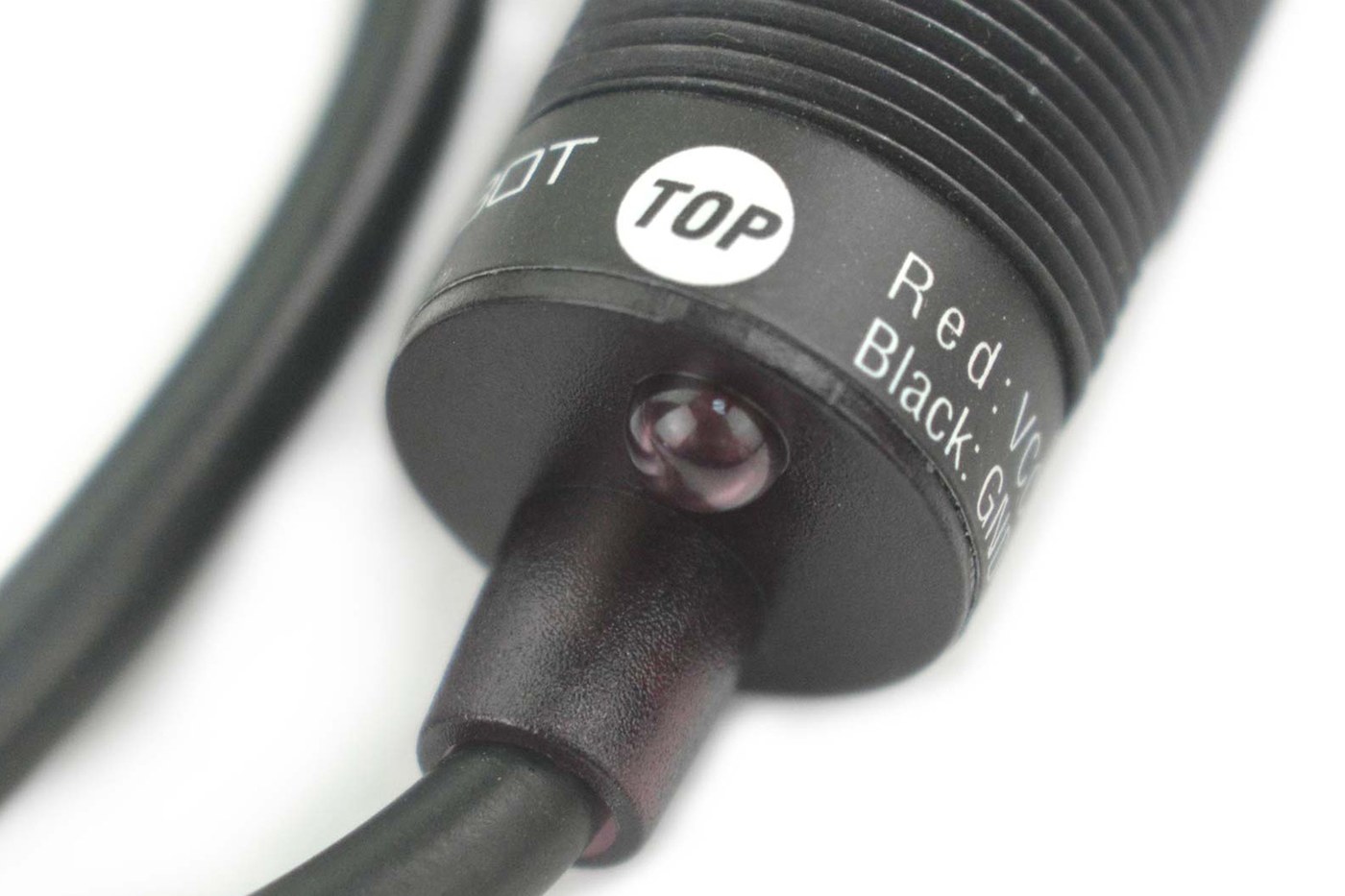
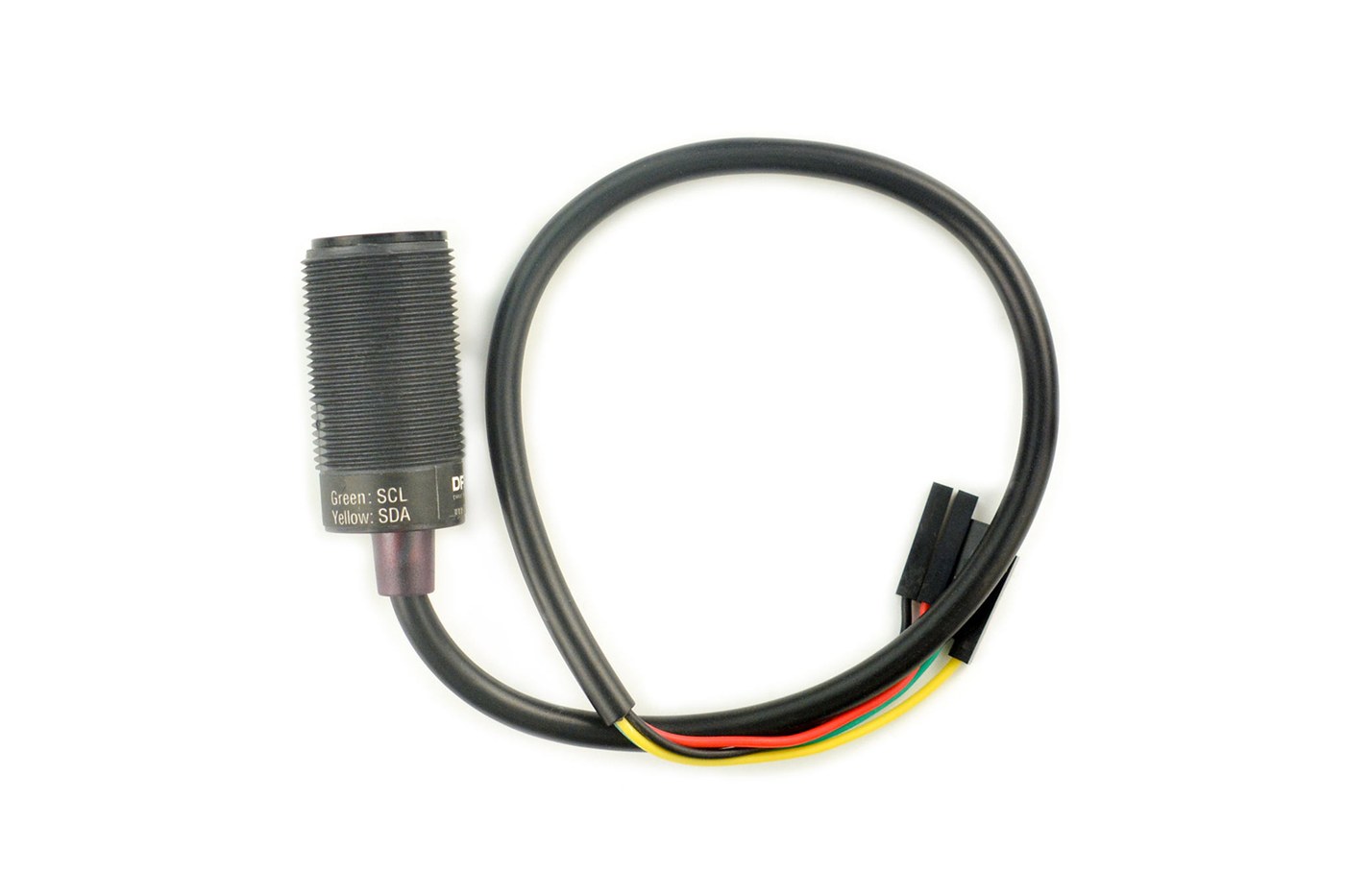
OpenFIRE’s README names one camera: the DFRobot IR Positioning Camera, SEN0158, linked to Mouser as the US distributor and to DFRobot’s own shop. DFRobot’s page describes it as an I²C module running from 3.3 to 5 V, with a sensor “Resolution is 128x96 pixel” that tracks up to four infrared objects, a detecting distance of 0 to 3 m, and a field of view of 33° horizontal by 23° vertical. The 1024 × 768 coordinates the driver reads are the sensor’s own sub-pixel interpolation of that 128 × 96 array. Inside is the PixArt sensor from the Wii Remote, and the driver’s register values come from the Wii Remote reverse-engineering effort (Volume 2).
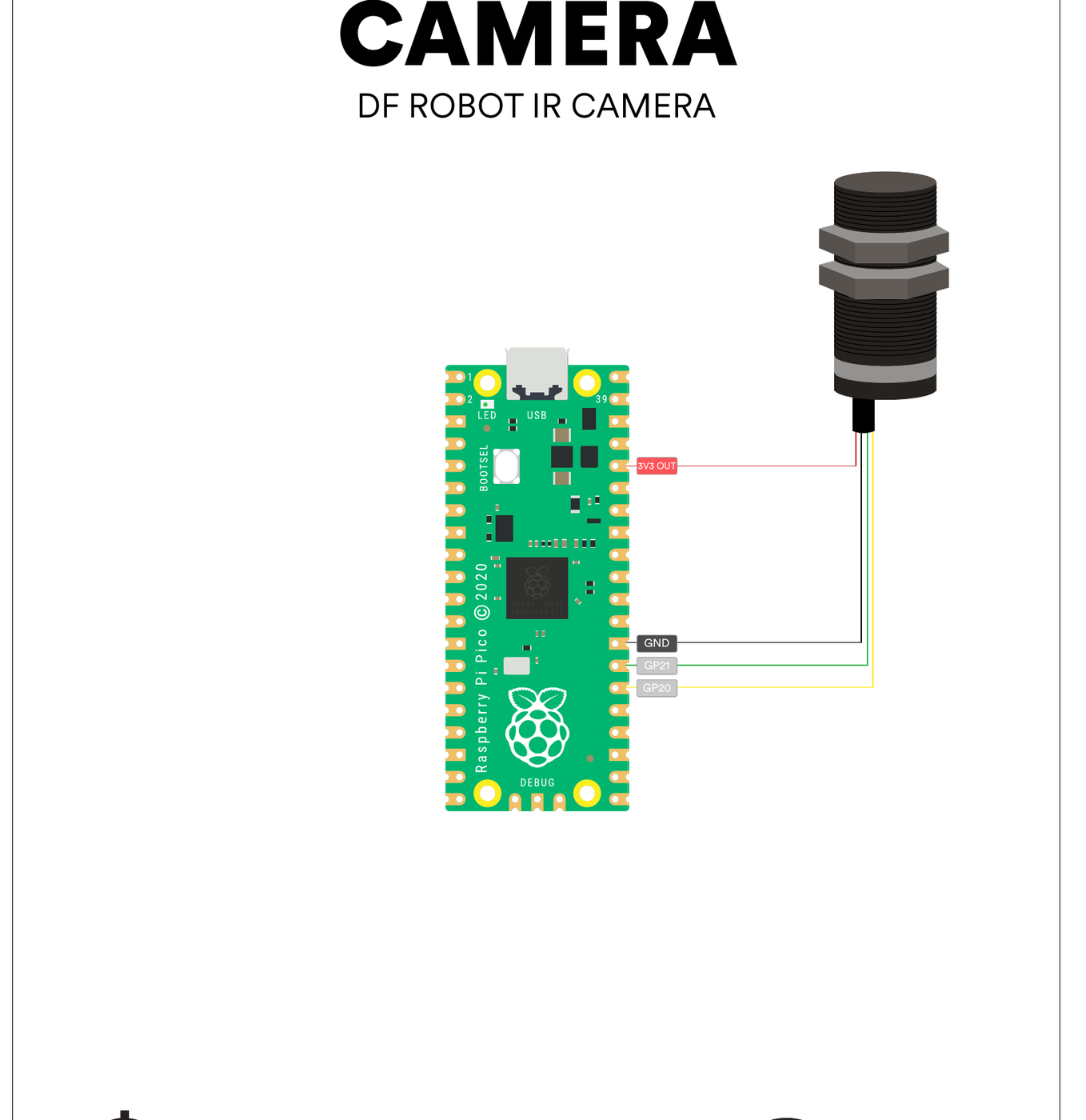
The Hardware Guide wires it as: red to 3V3 OUT, black to GND, green (SCL) to GP21, yellow (SDA) to GP20, with the note “Camera Alignment (test in App after construction for best results)”. Powering it from 3.3 V rather than 5 V keeps the I²C lines at the Pico’s logic level; the module’s own pull-ups and level handling are a question for Reference Electronics, which should also decide whether 1 MHz I²C over the cable a long barrel needs is acceptable.
Availability. On 18 October 2026 DFRobot’s page lists the SEN0158 at US$23.55 but shows a “Notify Me” button rather than an add-to-cart, and says “A new version of Gravity: IR Positioning Camera is currently in development.” Nothing on the page says when, or whether the new version will be register-compatible. Every open firmware in Volume 1 depends on this module or on the Wii sensor inside it, so its availability is the single largest supply risk in the build. The fallbacks, in order of how much of OpenFIRE they keep:
- Distributor stock of the current SEN0158 (Mouser is the README’s link; its page could not be read for this dive).
- A Wii Remote sensor wired as the Hardware Guide shows (3.6). Same chip, same driver, but it needs its own clock and careful soldering.
- A PixArt PAJ7025R2 or R3, which the ESP32 port supports and the TeamOpenFIRE firmware does not. That route means either the ESP32-S3 or a port of that camera code to the RP2040 in Our Firmware.
The camera for this build. The camera is being researched and chosen against alternatives because of exactly this supply risk. The Reference Electronics dive’s proposal for the first prototype is fallback 2: a harvested genuine Wii Remote camera on a small carrier board, clocked from GP22 — the only buyable part that stock OpenFIRE supports, with the same sensor and field of view as the SEN0158. A SEN0158 from remaining stock is the backup, and a PAJ7025R3 on an ESP32-S3 is the later option for the wider field of view a large television needs. The comparison and its reasons are in that volume. The sensor families themselves are compared in IR Point Tracking.
3.6 The Wii Remote sensor as a camera
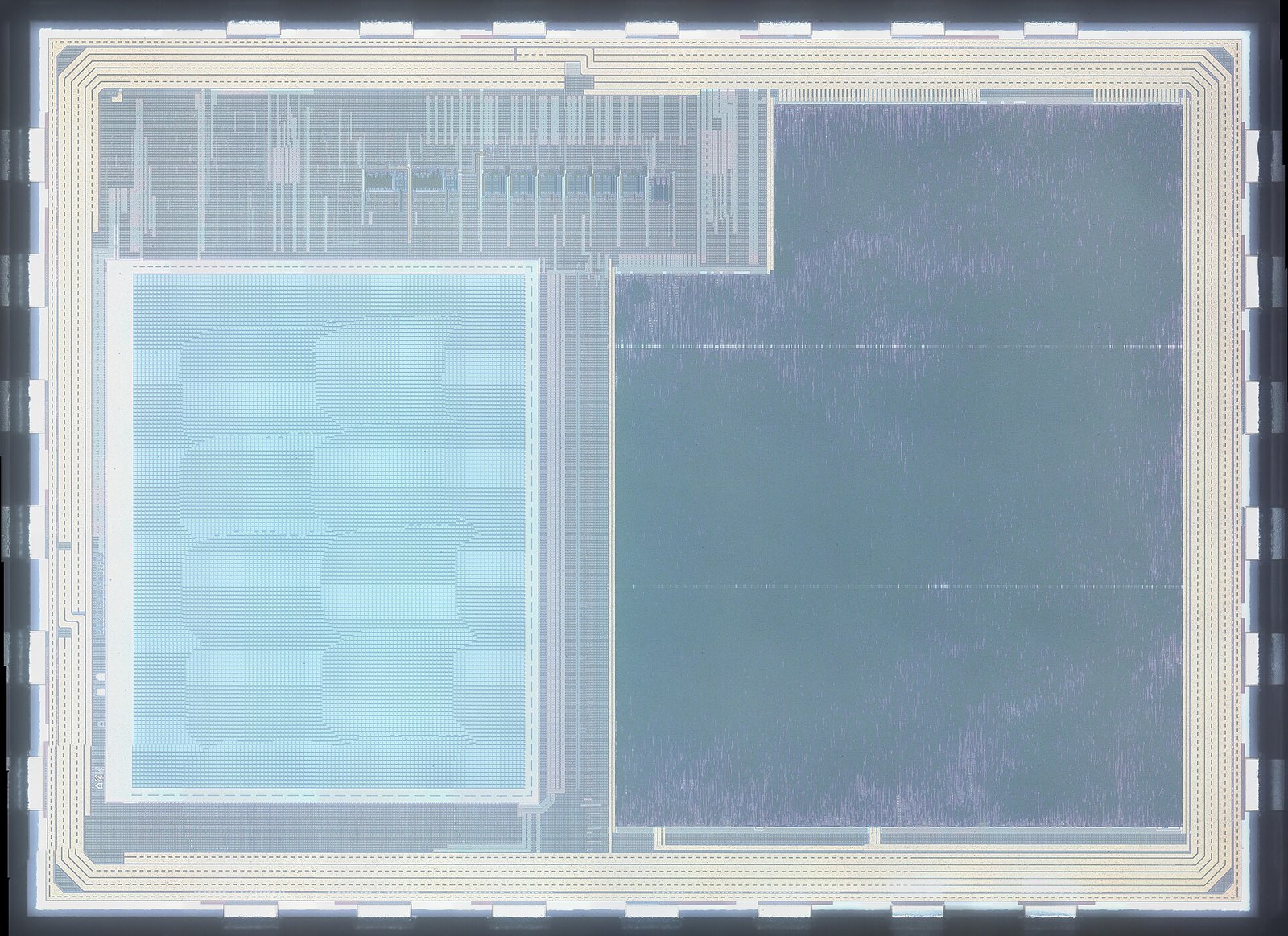
The Hardware Guide gives two ways to use a sensor salvaged from a Wii Remote in place of the DFRobot module. Both use the same I²C pins (SDA GP20, SCL GP21) and 3V3; they differ in where the sensor’s clock comes from.
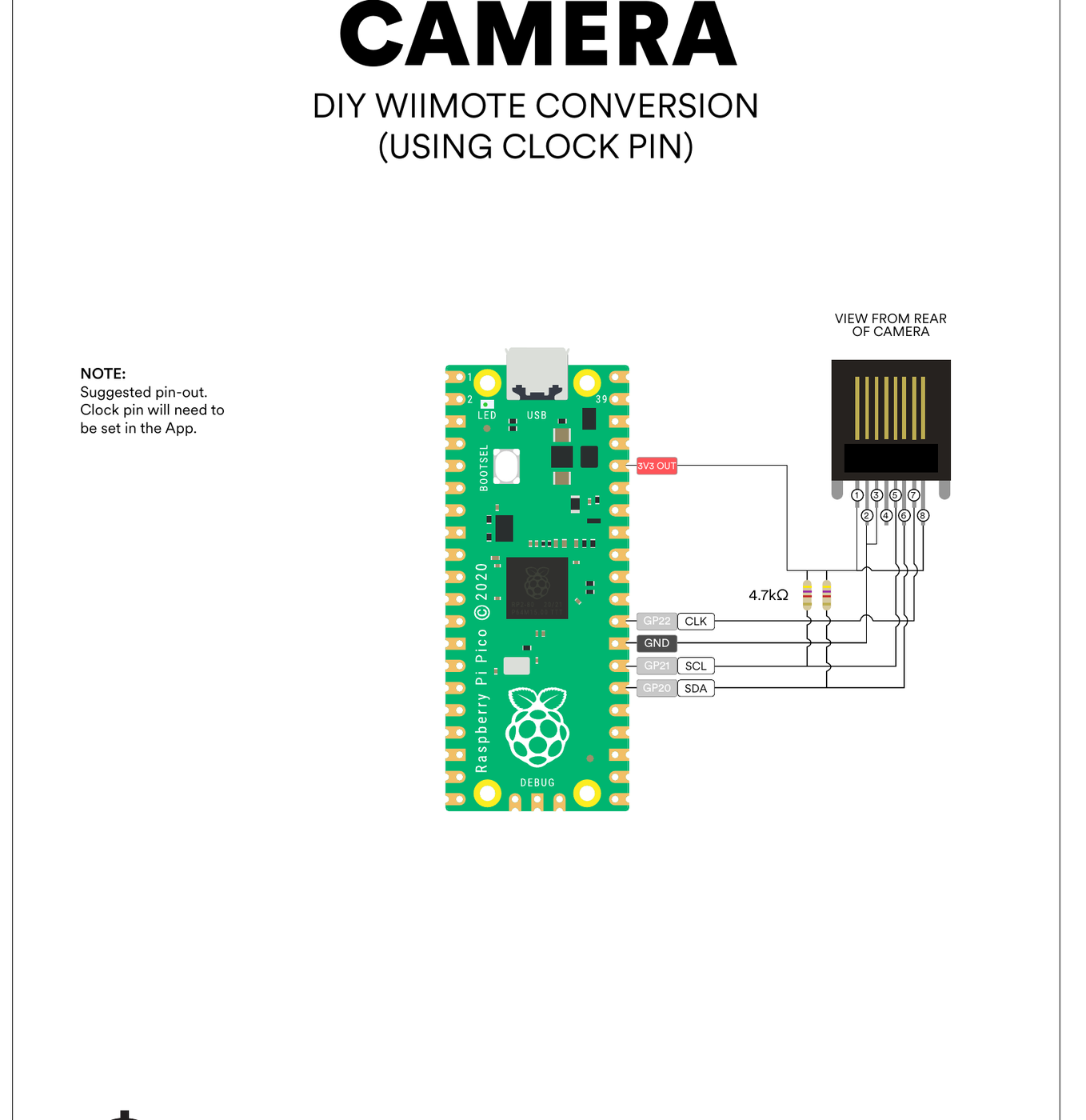
Clock from the Pico. The sensor’s clock input is driven from a GPIO — the guide suggests GP22 — mapped in the App to “Wii Cam Clock”. The firmware then generates the clock itself: it drops the system clock to 125 MHz and runs that pin as PWM with a period of five system clocks, giving 25 MHz (Volume 2). The guide labels this a “Suggested pin-out”; any pin with a usable PWM channel will do.
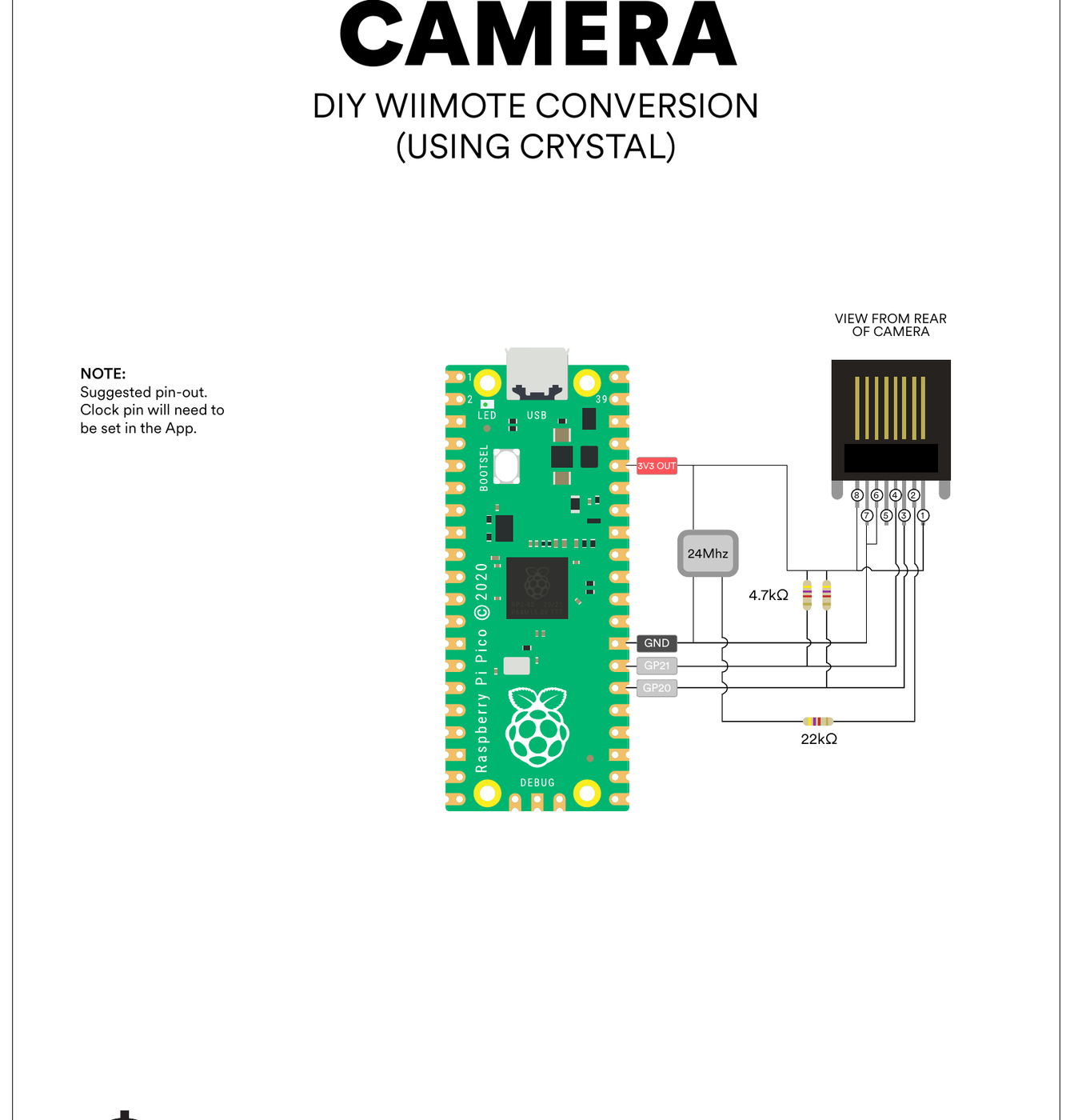
Clock from a crystal. The alternative drawing uses a separate 24 MHz oscillator and frees the Pico’s pin and its system clock. The project’s two sources therefore disagree on frequency — 25 MHz generated in code, 24 MHz in the crystal drawing — and both are presented as working. The Wii Remote’s own clock frequency is a fact for IR Point Tracking to establish from a primary source; until it does, the 25 MHz the firmware generates is the configuration the code was written and tested against.
3.7 Emitter layouts and the emitters
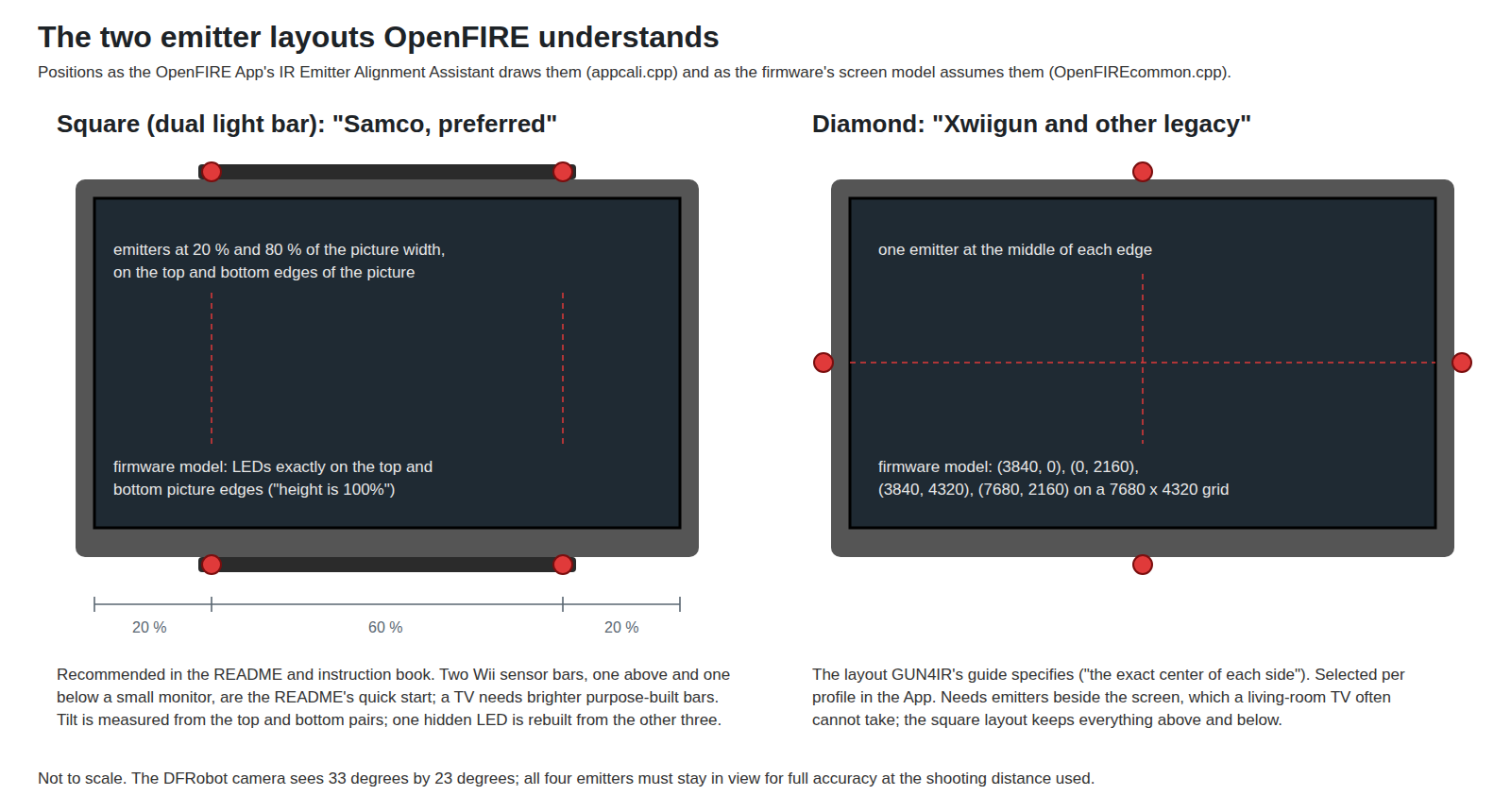
OpenFIRE tracks four emitters in one of two arrangements, chosen per profile:
- Square, which the instruction book calls “dual lightbars, or ‘square’ layout (Samco, preferred)” and the README “double lightbar (recommended!)”: two emitters above the picture and two below. The App’s IR Emitter Alignment Assistant (
appcali.cpp) draws the target boxes at 20 % and 80 % of the picture width on the top and bottom edges. - Diamond, “four separate points on the display … (Xwiigun and other legacy lightgun systems)”: one emitter at the middle of each edge.
The project’s own home page describes the default as “arranged in a rectangle pattern with two on top and two on bottom”. The layout Michael’s brief describes as common for Samco-style builds — “one IR point at the middle of each screen edge” — is the diamond, not the one OpenFIRE recommends.
The placement rule that follows from the code. The firmware’s screen model puts the square layout’s emitters exactly on the top and bottom edges of the picture, and calibration works out their horizontal spacing from what the camera sees (Volume 2). So the emitters should be as close to the top and bottom edges of the picture as the bezel allows, centred, and roughly at the 20/80 % marks. Exact spacing does not matter — calibration measures it — but the bars should be parallel, level and symmetric, because the model assumes a rectangle. Distance from the picture edge is absorbed by the edge-shot offsets, at some cost in linearity near the corners.
With the exact inverse map (Aiming Maths and Calibration, Volume 4), placement stops affecting accuracy, though it still matters for the camera’s field of view; the rule above is the right one for v6.2’s map.
The emitters. The README: “regular Wii sensor bars might work for small distances, but it’s HIGHLY recommended to use SFH 4547 LEDs w/ 5.6Ω (ohm) resistors”. The instruction book adds that two Wii sensor bars work for “a small PC monitor”, while a TV calls for “a set of high power black IR LEDs … arranged like (larger) sensor bars”. The OSRAM SFH 4547 is a 940 nm, 5 mm emitter rated for 100 mA continuous with a typical forward voltage of 1.5 V at that current (datasheet). A 5.6 Ω resistor cannot be meant for one SFH 4547 on 5 V — that would pass well over half an amp — so the figure implies a series string; three in series from 5 V leave about 0.5 V across 5.6 Ω, or roughly 90 mA. The README does not say so, and that is arithmetic, not the project’s statement. It is also a sensitive design: a ±0.1 V tolerance on each of three forward voltages moves the resistor’s voltage between about 0.2 and 0.8 V and the current between about 35 and 145 mA. The emitter bar is designed properly in Reference Electronics; 850 versus 940 nm and sunlight are in IR Point Tracking.
3.8 The solenoid, as the Hardware Guide draws it
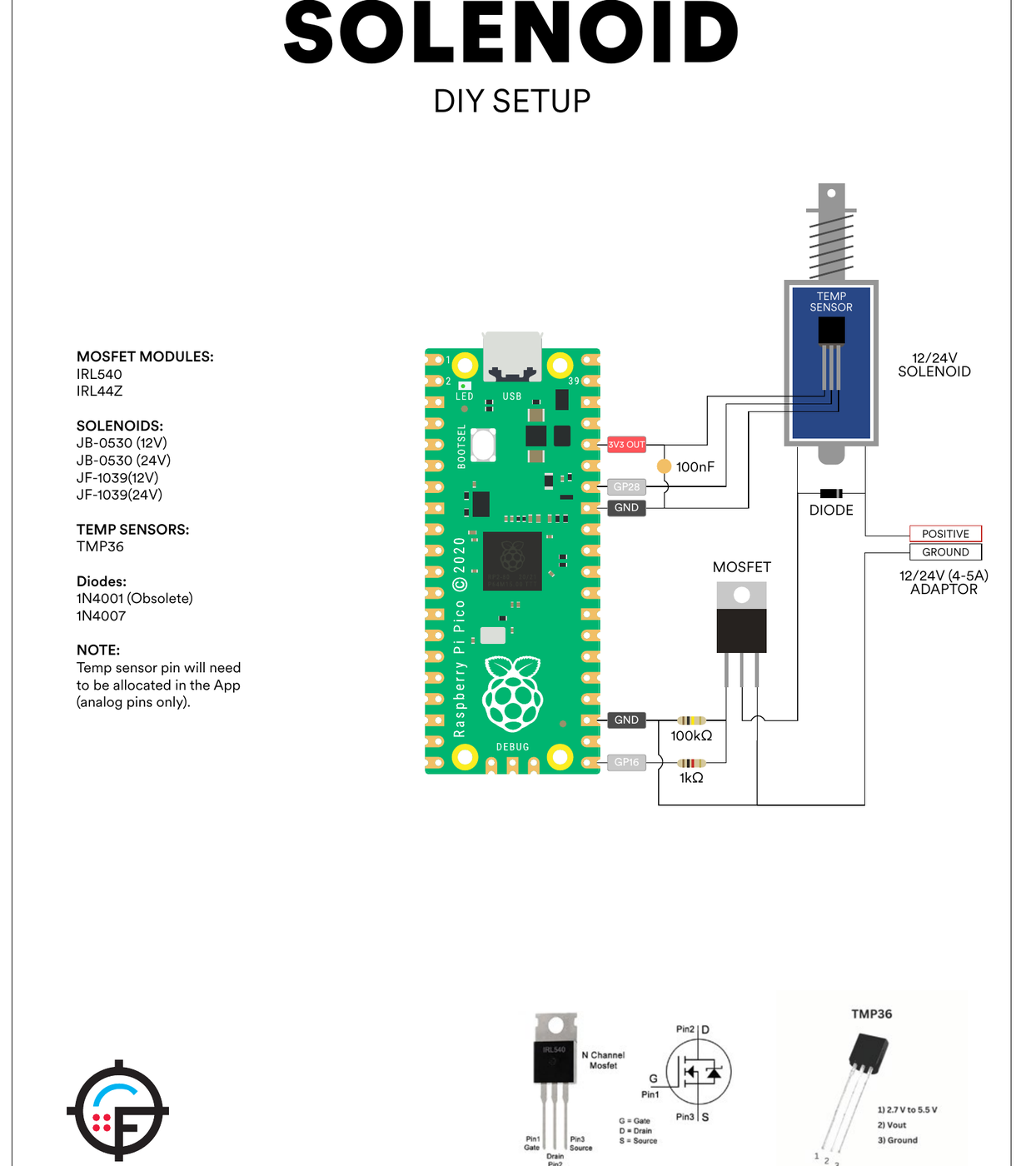
The Hardware Guide draws two solenoid circuits on the Pico, both with the solenoid signal on GP16:
DIY: a logic-level N-channel MOSFET — the guide lists IRL540 and a part printed as “IRL44Z” — with 1 kΩ in series from GP16 to the gate and 100 kΩ from gate to ground; the solenoid between the supply’s positive and the drain, with a diode (1N4007; “1N4001 (Obsolete)”) across it; a 12 V or 24 V, 4–5 A adaptor whose ground is common with the Pico’s. Solenoids named: JB-0530 and JF-1039, each in 12 V and 24 V versions.
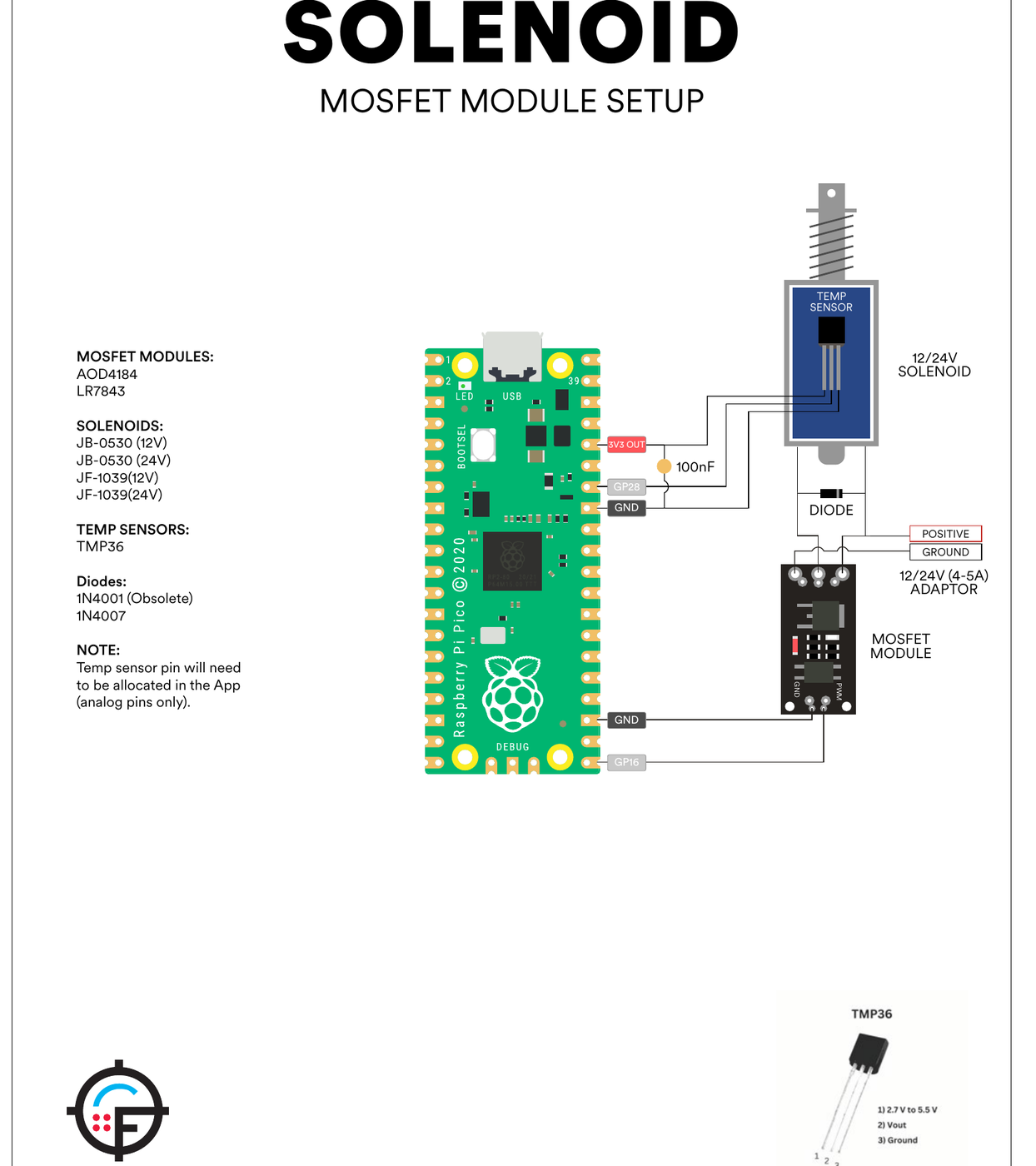
MOSFET module: the same, with a ready-made module built around an AOD4184 or LR7843 taking GP16 on its PWM input.
Both drawings put a TMP36 on the solenoid body, powered from 3V3 OUT with its output on GP28, and note: “Temp sensor pin will need to be allocated in the App (analog pins only).” The 100 nF in these drawings is the TMP36’s decoupling capacitor between 3V3 and ground; there is no capacitor across the solenoid or its supply in either drawing.
Things to carry into the sibling dives rather than act on here:
- “IRL44Z” is not a part number that could be found. It is probably the IRLZ44N, a common logic-level MOSFET; the guide should be read as “an IRL540 or an IRLZ44N-class logic-level part” until the authors say otherwise.
- Gate resistors. Michael’s brief uses about 100 Ω series and 10 kΩ pull-down; the project uses 1 kΩ and 100 kΩ. Both hold the gate low at boot. The trade between switching speed and ringing belongs to Solenoid Recoil.
- The firmware drives GP16 with plain
digitalWrite, not PWM: the module’s “PWM” input simply sees a logic-level on/off. Pulse timing (45 ms on by default) is set in the App (Volume 5). - Wiring gauge. The README: “Solenoid may cause EMI disconnects with too thin of wiring. Cables for this run specifically should be 24AWG at its thinnest - or else the cables will become antennas under extended use, which will trip USB safety thresholds in your PC to protect the ports.” The symptom (USB drop-outs when the solenoid fires) is widely reported; the explanation is the project’s. Supply droop and ground bounce on a shared return are the more conventional suspects, and Power Supplies measures them.
- The README also links two OSH Park driver boards (solenoid and rumble). Their designs were not inspected for this dive.
3.9 Rumble
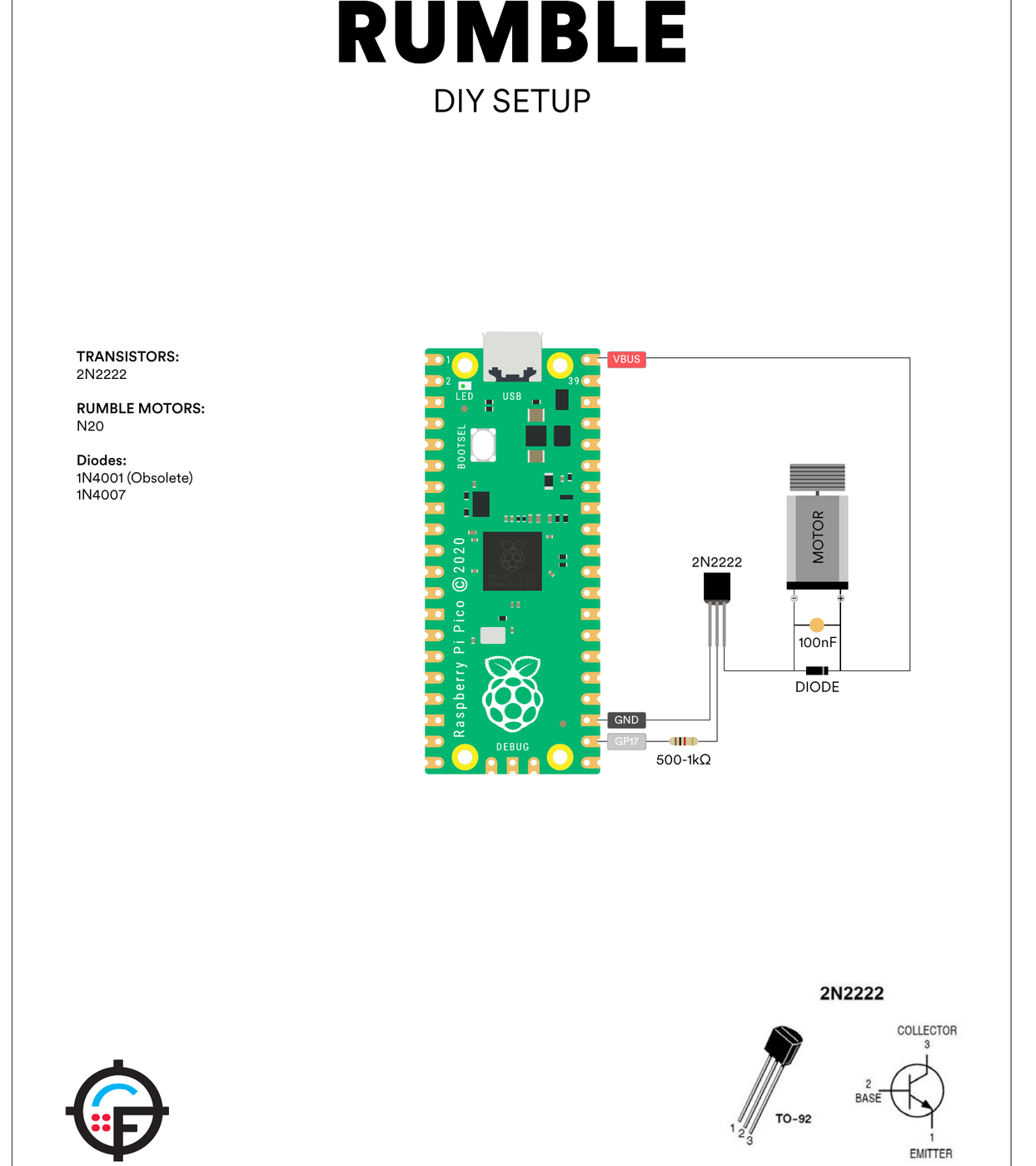
The rumble motor’s signal is GP17. The Hardware Guide’s DIY circuit runs an N20 motor from VBUS — the USB 5 V — through a 2N2222 NPN transistor with 500 Ω–1 kΩ in the base, and puts a diode and 100 nF across the motor. A MOSFET-module version uses the same AOD4184 or LR7843 modules as the solenoid. Unlike the solenoid, the rumble output is PWM: the firmware writes analogWrite(rumblePin, rumbleStrength), 255 by default, so the App’s strength setting sets the duty cycle. The README asks for “Any 5V gamepad rumble motor”. The motor’s current comes out of the host’s USB port, which is a budget to check against the Pico’s own draw, the camera and any NeoPixels; Motors and Rumble covers the motor.
3.10 Buttons, status LED, NeoPixels, OLED and stick
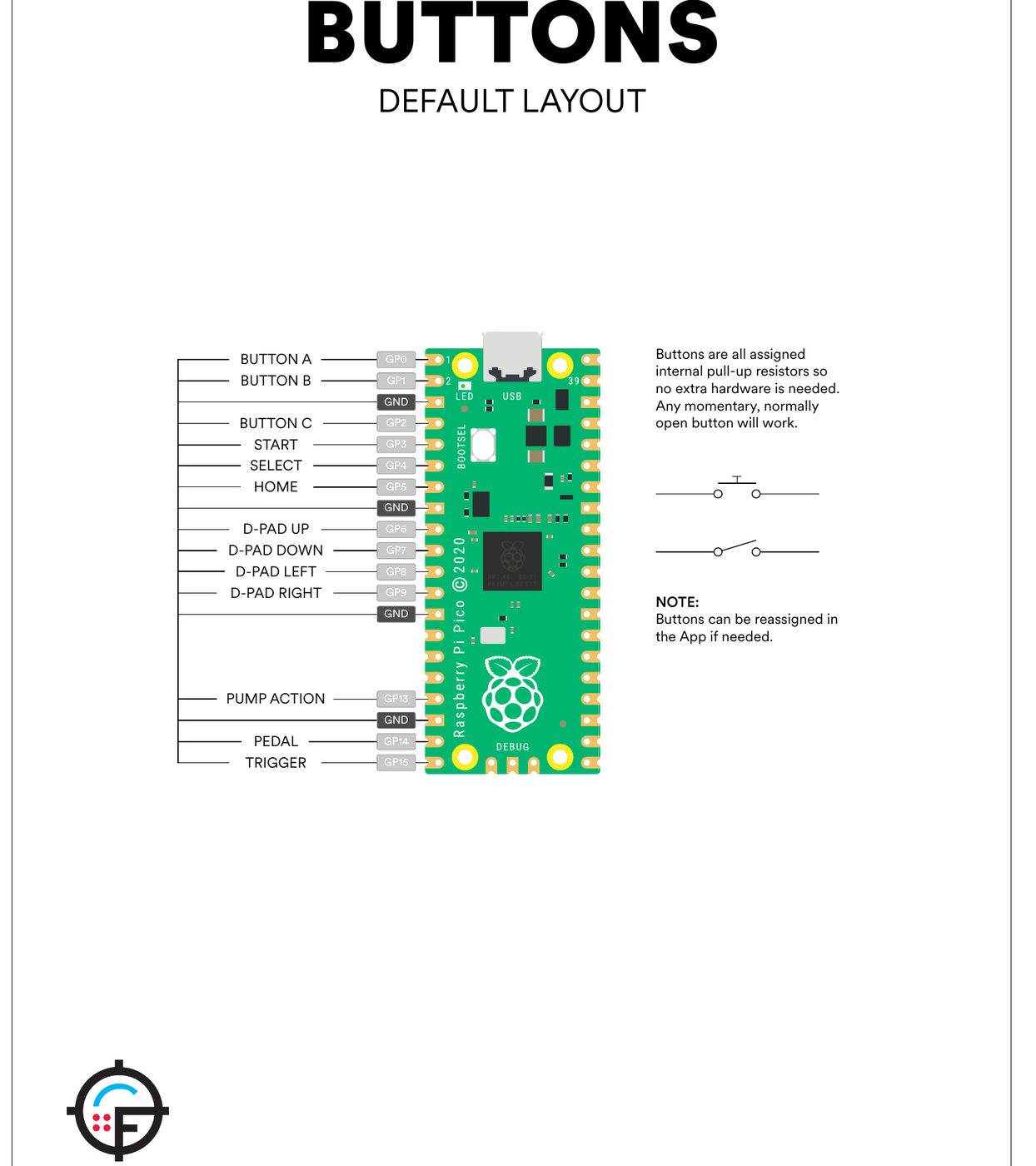
The rest of the Hardware Guide, briefly, all on the Pico:
Table 4 — The rest of the Hardware Guide, briefly, all on the Pico
| Item | As drawn | Notes in the guide |
|---|---|---|
| Buttons | Switch from each GPIO to GND (defaults as 3.3) | Internal pull-ups; “Any momentary, normally open button will work” |
| Status LED, common cathode | GP10/GP11/GP12 through 220 Ω, cathode to GND | Pins reassignable |
| Status LED, common anode | Same, anode to 3V3 OUT | The firmware’s default toggle is common anode (LEDAnode true); a common-cathode LED needs the toggle changed in the App |
| NeoPixel (WS2812B) | Data from GP10, power from VBUS | ”Up to three/four NeoPixels can be run directly off VBUS - any additional pixels should be driven by external voltage due to USB amp draw limitations”; pin and count set in the App |
| SSD1306 OLED, 1.3 in, 128 × 64, I²C | SDA GP18, SCL GP19, 3V3 | ”Your pin-outs may differ” |
| Analog stick | GP26, GP27, 3V3 | ”There are many versions of these so check your pin-outs carefully”; must be ADC pins |
The defaults leave the second I²C bus (GP18/GP19) free for the OLED so the camera’s bus carries only the camera, which matches the two-core design in Volume 2.
3.11 Where to buy, with dated prices
Prices are from each seller’s own page on 18 October 2026, in US dollars, single quantity. The full bill of materials for this build, with alternates, belongs to Reference Electronics.
Table 5 — 3.11 Where to buy, with dated prices
| Part | Maker’s page | Price and stock (seller, 2026-10-18) |
|---|---|---|
| Raspberry Pi Pico (RP2040) | raspberrypi.com/products/raspberry-pi-pico | Adafruit #4864 $4.00, out of stock; SparkFun DEV-17829 $4.60, in stock |
| Raspberry Pi Pico 2 (RP2350) | raspberrypi.com/products/raspberry-pi-pico-2 | Adafruit #6006 $6.25, out of stock |
| Adafruit KB2040 | adafruit.com/product/5302 | Adafruit $8.95, in stock |
| Adafruit ItsyBitsy RP2040 | adafruit.com/product/4888 | Adafruit $9.95, “64 in stock” |
| DFRobot SEN0158 IR Positioning Camera | dfrobot.com/product-1088.html | DFRobot $23.55, “Notify Me” (not orderable) |
| OSRAM SFH 4547 emitter | (README links Mouser 720-SFH4547) | Mouser’s page did not load for this dive; not quoted |
Michael’s brief put the whole electronics at “about US$50 to $60 … (from a late-2024 forum report in probably AUD)”. At October 2026 prices the two core parts alone are $4.00 to $6.25 for the board and $23.55 for the camera, when it can be bought.
3.12 What could not be verified
- The identity of the “IRL44Z” in the Hardware Guide (probably IRLZ44N).
- Whether the Wii sensor should be clocked at 25 MHz (firmware) or 24 MHz (Hardware Guide crystal drawing); both are the project’s.
- The OSH Park solenoid and rumble driver boards linked from the README; designs not inspected.
- Mouser and DigiKey stock and prices for the SEN0158 and SFH 4547 (the pages could not be read).
- When DFRobot’s “new version” of the camera will ship and whether OpenFIRE’s driver will work with it.
Sources
- TeamOpenFIRE,
OpenFIRE-Firmwarev6.2:README.md,BOARDS.md,COMPILING.md,OpenFIREmain/README.md,OpenFIREmain/OpenFIREprefs.h,OpenFIREFeedback.cpp,OpenFIREcommon.cpp, https://github.com/TeamOpenFIRE/OpenFIRE-Firmware — read 2026-10-18. Release notes for v6.0 and v6.2. - TeamOpenFIRE,
OpenFIRE-Boards,OpenFIREshared.handboardPics/*.svg, https://github.com/TeamOpenFIRE/OpenFIRE-Boards — read 2026-10-18. - TeamOpenFIRE,
OpenFIRE-Appsrc/appcali.cpp(alignment assistant geometry), https://github.com/TeamOpenFIRE/OpenFIRE-App — read 2026-10-18. - OpenFIRE Hardware Guide, version 1.3, https://openfirelightgun.org/wp-content/uploads/2026/10/OpenFIRE-Hardware-Guide_1.3.pdf (PDF created 2026-10-17) — read 2026-10-18.
- OpenFIRE project home page, https://openfirelightgun.org/ — read 2026-10-18.
- DFRobot, “Gravity: IR Positioning Camera For Arduino” (SEN0158), https://www.dfrobot.com/product-1088.html — read 2026-10-18.
- ams OSRAM, SFH 4547 datasheet (940 nm, 5 mm IRED).
- Seller pages, 2026-10-18: https://www.adafruit.com/product/4864, /6006, /5302, /4888; https://www.sparkfun.com/raspberry-pi-pico.html.
Comments (0)