Open-Source Light-Gun Firmware · Volume 6
Host Integration — USB HID Modes, MiSTer, Multiple Guns, and the Serial Language of Game-Driven Recoil
What the computer sees when an OpenFIRE gun is plugged in, how buttons map on-screen, off-screen and as a gamepad, how MiSTer switches the gun into its own mode, how to run two guns at once, and the full MAMEHooker serial command set with MAMEHooker, QMamehook and DemulShooter
6.1 Two conversations
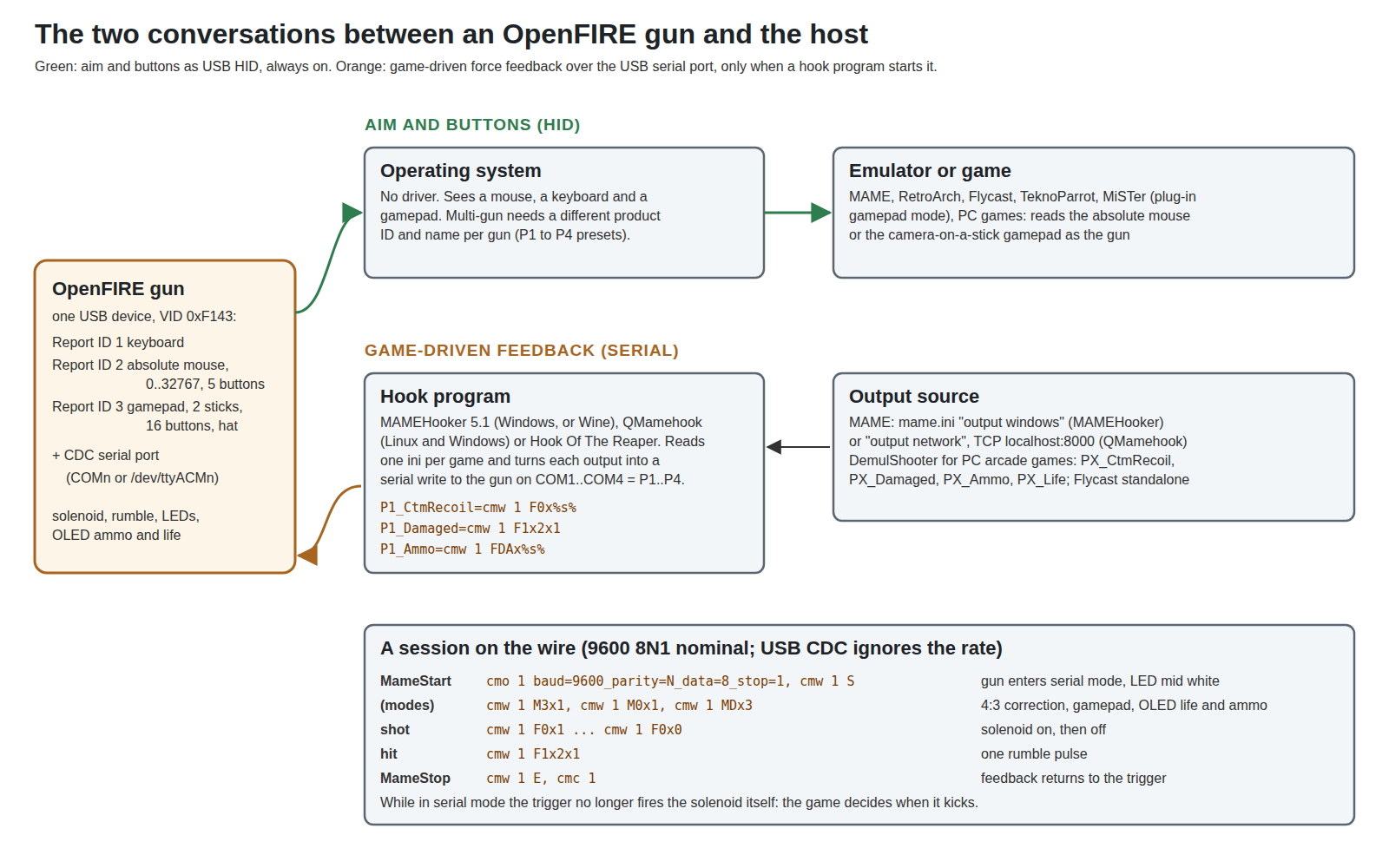
An OpenFIRE gun talks to the host in two independent ways. The first is always on: it is a USB human-interface device, and every operating system and emulator that can read a mouse or a gamepad can read the gun. The second is optional: a serial port over the same USB cable, through which a program on the host can take over the gun’s recoil, rumble, lights and display so that they follow the game rather than the trigger. This volume covers both from the host’s side. Platform-by-platform set-up — Windows, Linux and the retro distributions, MiSTer, original consoles — belongs to the Platform Support dives; this is what the firmware offers them.
6.2 What the computer sees
The gun is one USB device with a fixed vendor ID, 0xF143, a manufacturer string “OpenFIRE”, and a product ID and name that the user sets (Volume 5). Its HID interface carries three report types, from the TinyUSB_Devices library:
Table 1 — The gun is one USB device with a fixed vendor ID, 0xF143, a manufacturer string "OpenFIRE", and a product ID and name that the user sets ([Volume 5](/light-guns/building-the-electronics/open-source-firmware/vol-5/)). Its HID interface carries three report types, from the TinyUSBDevices library
| Report ID | Device | Contents |
|---|---|---|
| 1 | Keyboard | Standard keyboard report |
| 2 | Absolute mouse (“AbsMouse5”) | X and Y each with a logical range of 0 to 32767, five buttons |
| 3 | Gamepad (“Gamepad16”) | Two analog sticks (±32767), sixteen buttons, a hat switch |
It also exposes a USB CDC serial port, which Windows numbers as a COM port and Linux as /dev/ttyACM<n>. The firmware queues input changes and sends reports at most every millisecond (POLL_RATE 1); the v6.0 release notes say that in gamepad mode the gun can “send a true, near-precisely 1000hz worth of inputs”, shared between the three devices.
The absolute mouse is the heart of it. A relative mouse reports movement, so a game must integrate it and the cursor drifts; an absolute mouse reports a position, like a touch screen or graphics tablet, so the cursor is wherever the gun points. Operating systems map the 0–32767 range across the whole desktop (or the screen the device is mapped to), and emulators with light-gun support read it directly.
6.3 Button mapping: on-screen, off-screen and gamepad
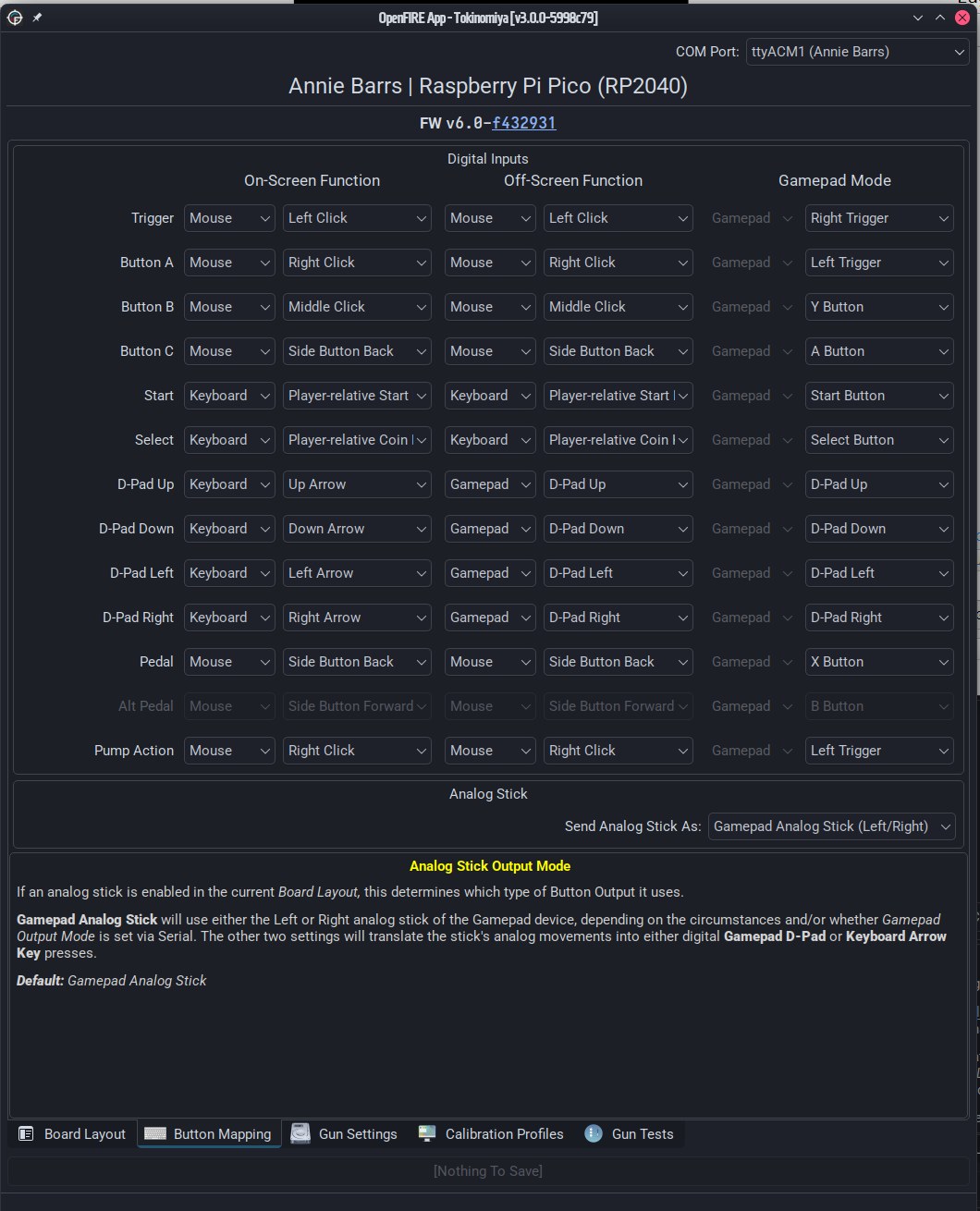
Every input has three assignments, which the App’s Button Mapping tab shows as columns: On-Screen Function, Off-Screen Function and Gamepad Mode. Each can be any button of any of the three devices. The defaults, from the firmware’s button table (OpenFIREprefs.h):
Table 2 — Every input has three assignments, which the App's Button Mapping tab shows as columns: On-Screen Function, Off-Screen Function and Gamepad Mode. Each can be any button of any of the three devices. The defaults, from the firmware's button table (OpenFIREprefs.h)
| Input | On-screen and off-screen (mouse mode) | Gamepad mode | Debounce |
|---|---|---|---|
| Trigger | Left mouse button | Right trigger | 15 ms |
| Button A | Right mouse button | Left trigger | 15 ms |
| Button B | Middle mouse button | Y | 15 ms |
| Button C (reload) | Mouse button 4 (back) | A | 15 ms |
| Start | Player-relative start key (1 for P1) | Start | 20 ms |
| Select | Player-relative coin key (5 for P1) | Select | 20 ms |
| D-pad | Gamepad D-pad in the v6.2 firmware table; the instruction book and the App’s v6.0 screenshot show arrow keys | D-pad | 20 ms |
| Pedal | Mouse button 4 | X | 15 ms |
| Alt pedal | Mouse button 5 (forward) | B | 15 ms |
| Pump action | Right mouse button | Left trigger | 15 ms |
| Home | Internal (pause mode) | — | 15 ms |
“Off-screen” is decided by the cursor: when the computed position is pinned at an edge of the 0–32767 range, the gun is treated as pointing off the screen (Volume 2). By default the off-screen assignments equal the on-screen ones, because most games read an off-screen left click as a reload by checking the cursor themselves. Two settings change that. Offscreen Button Mode, set by the game through serial command M1x2, makes an off-screen trigger pull send Button A’s assignment instead — the “true offscreen reload” some games need. Low Buttons Mode (Volume 5) makes A and B act as Start and Select off-screen, for guns with few buttons. The release notes for v5.2 single out Virtua Cop 3 as the game that needs both, “with a single button gun + pedal”.
Custom maps survive in the gun’s flash (/btns.conf) and can be exported as a file from the App, which is the way to give a second gun the same mapping.
6.4 Mouse mode and gamepad mode
By default the gun is a mouse and keyboard. A game or script can switch it with serial command M0:
Table 3 — By default the gun is a mouse and keyboard. A game or script can switch it with serial command M0
| Command | Mode |
|---|---|
M0x0 | Mouse and keyboard (the default) |
M0x1 | Gamepad, with the camera position on an analog stick; M0x1L selects the other stick (an OpenFIRE extension) |
M0x2 | ”Hybrid” — in OpenFIRE, the same as mouse and keyboard |
M0x9 | The “MiSTer optimized” gamepad mode (6.5) |
In gamepad mode the aim point is reported as a stick position across its full range, which is how emulators that only accept gamepads — or that need several guns on one machine without fighting over “the” mouse — can still use the gun as a light gun. A physical analog stick on the gun, if fitted, goes to the other stick, or can be turned into D-pad or arrow-key presses in the App.
The display-ratio correction from Volume 5 is also a host-side command, M3x1 (on) and M3x0 (off). With it on, the firmware narrows one axis to the 4:3 window inside the profile’s display shape. The windows, in the firmware’s 7680 × 4320 model-screen units (OpenFIREcommon.cpp), compared with a centred 4:3 window:
Table 4 — The display-ratio correction from [Volume 5](/light-guns/building-the-electronics/open-source-firmware/vol-5/) is also a host-side command, M3x1 (on) and M3x0 (off). With it on, the firmware narrows one axis to the 4:3 window inside the profile's display shape. The windows, in the firmware's 7680 × 4320 model-screen units (OpenFIREcommon.cpp), compared with a centred 4:3 window
| Profile display ratio | Axis narrowed | Firmware window | Centred 4:3 window |
|---|---|---|---|
| 16:9 | X | 966 – 6720 | 960 – 6720 |
| 16:10 | X | 655 – 7048 | 640 – 7040 |
| 3:2 | X | 438 – 7264 | 427 – 7253 |
| 5:4 | Y | 148 – 4182 | 135 – 4185 |
| 4:3 | none | full range | full range |
The firmware’s windows sit within about a fifth of a percent of the geometric ones. Whether the small offsets were tuned by eye on real games or are rounding was not established.
6.5 MiSTer
OpenFIRE support is built into the MiSTer FPGA platform’s main program. The MiSTer commit that added it (Main_MiSTer e484d703, “input: Add support for OpenFIRE lightguns”, February 2025, by the OpenFIRE maintainer) explains the method: “Guns are detected as light guns based on static VID and OpenFIRE name prefix, as the PID can be any number of different values depending on the user. Because OpenFIRE guns can be polled through serial devices, a basic (read: hacky) heuristic is used to poll for serial port paths and send a signal to compatible guns to enable their MiSTer compatible mode.” In the code, MiSTer looks for input devices with vendor ID 0xF143 whose name contains “OpenFIRE ”, opens the matching /dev/serial/by-id/ path and writes M0x9. The firmware’s parser calls that case the “official ‘MiSTer optimized’ mode”: gamepad output with a fixed button layout (trigger A, Button A B, Button B X, reload Y, Start and Select, the D-pad, pedals on the shoulder buttons).
Two consequences for this build. The manufacturer name must stay “OpenFIRE” and the vendor ID 0xF143, or MiSTer will not recognise the gun — the same reason the firmware’s comments give for not changing them. And the v6.0 release notes list the limits: “you’ll have to calibrate against the screen dimensions on a per-core basis and map the gun for each core”, and calibration “currently has to be done against the desired display from a different device — ergo, a Pi or PC running on the same display”. MiSTer FPGA covers the set-up.
For a kit: keep 0xF143 now, own a vendor ID before any sale (decision D24, 18 October 2026). Kits may be sold, so USB rules are binding on this project, not advisory. A product sold as a USB device normally carries a vendor ID assigned to its maker, and 0xF143 is OpenFIRE’s choice, hard-coded so that the App, MiSTer and QMamehook can find the gun. It does not appear in the public usb.ids list (version 2026-06-26), and whether the USB-IF has assigned it to anyone was not confirmed for this dive. The consequence of the decision: every bench and personal gun keeps 0xF143 and works with MiSTer and the App unchanged; before the first kit is sold, the project obtains an assigned vendor ID, and at that point MiSTer’s detection, the App and the hook programs must be taught the new ID (or the OpenFIRE authors, who ask kit sellers to talk to them first, consulted on another arrangement; Volume 1, section 1.12). That work belongs to Licensing, IP and Kits and Our Firmware.
6.6 More than one gun
Two identical guns look like one device to any program that tells mice apart by ID, and the instruction book warns that “apps like RetroArch and TeknoParrot that read individual mouse devices will get VERY confused.” Each gun needs its own identity, set in the App’s Gun Settings tab (Volume 5):
- Simple USB Identifier Presets, P1 to P4. Each sets a different product ID and name and moves Start and Select to that player’s keys (1 & 5, 2 & 6, 3 & 7, 4 & 8).
- Custom Product ID and Product Name, for more than four guns or personal names. Start and Select stay on player 1’s keys unless remapped, which the
XR<n>serial command (6.8) can do at run time.
The vendor ID cannot change: the App, MiSTer and the hook programs all find OpenFIRE guns by it. For game-driven feedback, each gun’s serial port must also line up with its player number (6.9).
6.7 Serial handoff
Normally the gun’s firmware decides when to fire the solenoid: on a trigger pull while pointing at the screen (Volume 5). That is fine for a pistol and wrong for many arcade games — a machine gun that kicks per bullet the game actually fires, a shotgun that only kicks when loaded, a gun that rumbles when the player is hit. Arcade emulators know these events, and MAME publishes them as named outputs (P1_GunRecoil, P1_Damaged and so on). A hook program on the host listens for the outputs and sends the gun short serial commands.
The gun enters this serial handoff mode when it receives the start command S and leaves it on E. The instruction book: “The gun will automatically hand off control to an instance of Mame Hooker that’s connected once a start code has been detected! If available, the onboard LED and any non-static external NeoPixels will change to a mid-intensity white to signal serial handoff mode”. While handed off, the trigger still sends its button press to the game, but no longer fires the solenoid itself (TriggerFire() skips FFBOnScreen() when serialMode is set); the game decides when the gun kicks. On E, “Any force feedback ongoing will get shut off” and the gun goes back to its own rules.
6.8 The command set
The OpenFIRE wiki documents the language in full, noting that “Other gun systems have already established a common ‘language’ … OpenFIRE follows the preexisting syntax, and adds a few extra commands”. Commands are short ASCII strings; x separates fields; several can be joined in one write (F0x1xF1x1 fires the solenoid and starts the motor).
Table 5 — 6.8 The command set
| Command | Meaning | OpenFIRE notes |
|---|---|---|
S (S0–S6) | Start serial mode | Only the S matters; the digit is ignored |
E | End serial mode | Stops all feedback |
M0x0 / x1 / x2 | Output mode: mouse & keyboard / gamepad / hybrid | M0x1L camera on the other stick; M0x9 MiSTer mode |
M1x2 | Offscreen button mode (off-screen trigger = Button A’s assignment) | x0, x1, x3: normal off-screen behaviour |
M2x0 / x1 / x2 | Pedal as mapped / as right mouse / as middle mouse | x2 is OpenFIRE’s |
M3x0 / x1 | Aspect correction off / 4:3 | Uses the profile’s display ratio (6.4) |
M4, M5 | Temperature sensor, auto reload | Not used by OpenFIRE |
M6x0 / x1 | Solenoid allowed / rumble-only mode | |
M8x0 / x1 / x2 | Autofire off / on / always rapid | x1 enables three-round burst in OpenFIRE |
MDx1 / x2 / x3 (B) | OLED: life only / ammo only / both; B = life as a bar | OpenFIRE’s |
R0–R4 x0x<ms> / x1x<ms> | Override pulse ON / OFF length for solenoid, rumble, red, green, blue | For this session only |
F0x0 / x1 / x2x<n> | Solenoid off / on / queue n pulses (0–255) | “Solenoids will forcefully shut off after a set time” |
F1x0 / x1 / x2x<n> | Rumble off / on / n pulses | |
F2–F4 x0 / x1x<0–255> / x2x<n> | Red, green, blue LED off / level / n pulses | Reflected on the four-pin LED and non-static NeoPixels |
FDAx<n> / FDLx<n> | OLED ammo count / life count | OpenFIRE’s |
XR<n> | Remap to player n (Start/Select keys) | OpenFIRE’s |
XI0 / XI1 | Autofire wait normal / doubled | OpenFIRE’s |
Three details matter for force feedback. F0x1 is not “on until told otherwise”: SerialHandling() forces the solenoid off after SERIAL_SOLENOID_MAXSHUTOFF, which is 2000 ms (OpenFIREserial.h), protecting the coil from a game that never sends F0x0. Two seconds at full current is still a long time for a small 24 V solenoid in a printed shell; Solenoid Recoil should say whether the chosen part survives it, and Our Firmware may want it shorter. Serial commands respect the temperature states differently from the trigger: with a TMP36 mapped, F0x1 is accepted normally when safe, only every other time in the warning state, and not at all above the shutoff threshold — stricter than the trigger path in Volume 5 — while F0x2 pulse trains are not temperature-checked at all. And v5.2 changed solenoid pulses (F0x2) so that they “will always initiate a normal solenoid event cycle using the gun’s solenoid timer settings”, which lets a solenoid stand in for the motor some games expect without unsafe on-times. The M8x1 burst mode is the path affected by the off-time reading in Volume 2, section 2.9. The pulse-train code for F0x2 contains the same << ... ? 1 : 0 construction, but there it sits inside a comparison (millis() - last >= off << wait ? 1 : 0), and because >= binds tighter than ?: the result is the comparison itself — so the serial pulse train does honour the configured off time.
6.9 MAMEHooker
MAMEHooker (version 5.1, by the arcadecontrols.com community) is the long-standing Windows program that turns MAME outputs into device commands. The OpenFIRE wiki’s set-up notes:
- Windows: run it with administrator privileges, “otherwise, you’ll have an abstract error regarding a DLL file.”
- Linux: it runs in Wine, in a prefix with the
vbrun6(Visual Basic 6 runtime) winetricks verb, and “will only work with games running in the same prefix”. - COM ports by player. “If your gun is intended to be Player 1, it has to be COM1, Player 2 is COM2, etc. Mamehook will only see up to COM4”. On Windows the port number is set in Device Manager (the port’s Advanced settings); in Wine, by registry entries under
HKEY_LOCAL_MACHINE\Software\Wine\Portsmapping COM ports to/dev/ttyACM<n>. - MAME must publish its outputs: in
mame.ini,output windows. - Per-game ini files in
MAMEHOOKER/ini/MAME, named after the MAME ROM (term2.inifor Terminator 2) or, for PC games hooked by DemulShooter, the DemulShooter-romname (sgg.ini).
The anatomy of an ini, from the wiki, for player 1:
[General]
MameStart=cmo 1 baud=9600_parity=N_data=8_stop=1, cmw 1 S,
MameStop=cmw 1 E, cmc 1
[Output]
P1_LmpStart=cmw 1 F3x0|cmw 1 F3x2x1
P1_GunRecoil=cmw 1 F0x%s%
P1_CtmRecoil=cmw 1 F0x%s%
P1_Damaged=cmw 1 F1x%s%cmo, cmw and cmc open, write and close a COM port. %s% is replaced with the output’s state, so F0x%s% becomes F0x1 when the game fires and F0x0 when it stops. A | gives separate commands for each state, left for “off” and right for “on”: F3x0|F3x2x1 pulses the green LED when the start lamp lights and turns it off otherwise. The wiki’s health-bar example drives the red and green LEDs through five states. Which outputs exist depends on the game: MAME’s own GunRecoil and GunMotor, and for PC arcade games run through DemulShooter, CtmRecoil (“custom solenoid feedback … provided by DemulShooter”), Damaged, Ammo and Life. MAMEHooker and QMamehook fill in the available output names in a game’s ini the first time it runs.
6.10 QMamehook and Hook Of The Reaper
QMamehook is the OpenFIRE maintainer’s own replacement: “A bare-bones implementation of a MAME network output client, made primarily for compatible lightgun systems, using MAMEHOOKER-compatible gamename.ini files” (LGPL-2.1, last updated August 2025). Its README lists why: cross-platform, Qt-based, “no admin privileges necessary”, and it reads the same ini files “verbatim”. It listens to the MAME network output standard — events over TCP on localhost port 8000 — so MAME needs output network rather than output windows, and it works with MAME standalone and its RetroArch core, Flycast standalone, and DemulShooter v12.0 or later with network outputs enabled. It does not work with TeknoParrot. It detects only devices with the OpenFIRE, GUN4IR or Blamcon vendor IDs, and its player numbers are the order of detected guns, not Windows COM numbers. For a Linux or Batocera-style set-up with native emulators it is the only option in this list that does not need Wine.
Hook Of The Reaper, which the OpenFIRE README also names, now lives at Fusion-Lightguns/Hook-Of-The-Reaper (GPL-3.0); its description is “To fully include all MameHooker features, and support the new default light gun format”. It was not examined further for this dive.
6.11 Commands from a script
The same commands can be sent without any hook program, which is the quickest bench test of the serial side and the easiest way to set a mode before launching a game. The wiki: on Windows, echo commandsHere > COM#; on Linux, echo commandsHere > /dev/ttyACM#, where the number “can change depending on the order the guns have been plugged in”. (v6.1 fixed commands sent this way from Windows batch files, per its release notes.)
A useful first check on the bench, before any game is involved:
echo S > /dev/ttyACM0          # gun enters serial mode, LED goes white
echo F0x2x3 > /dev/ttyACM0     # three solenoid pulses at the gun's own timings
echo F1x2x1 > /dev/ttyACM0     # one rumble pulse
echo E > /dev/ttyACM0          # back to normal
6.12 A wireless trial: the ESP32-S3 port’s dongle
Decision (D25, 18 October 2026): try the OpenFIRE ESP32 port’s wireless dongle, as a bench trial that feeds the Fully Wireless dive. The port is Alessandro Satanassi’s (Volume 1, section 1.7), LGPL-2.1, at 7.0.0 release candidate 5 at the time of writing (16 October 2026; the last full release is v6.2.1).
What the dongle is. A small ESP32-S3 board on the PC’s USB port that “receives the gun’s data over ESP-NOW and presents it to the computer as standard USB devices”: the same mouse, keyboard and gamepad as a cabled gun, plus the serial port, so MAMEHooker-style feedback still works, and no drivers. The port’s README gives the update rate as “209 times per second”, against the cabled OpenFIRE gun’s 1 ms polling (6.2). One dongle per gun, up to four guns.
The catch for this build: the gun must be an ESP32-S3 too. The README is explicit that “RP2040 boards build only for wired USB play”. The trial therefore needs a second gun controller, not a firmware option on the Pico (decision D2), and it runs the ESP32 port’s firmware, not this project’s OpenFIRE fork. Fully Wireless adds three things found since: the dongle presents the gun’s own USB vendor and product IDs and name, so decision D24 carries through the gun’s firmware; the port can select Wi-Fi channels 12 and 13, which the US module grants do not cover; and a wireless pedal has been added. It is run as a separate track (D30, 19 October 2026): the port is used as released, and the fixes made in the fork are not carried across to it. The trial has one question to answer, whether the wireless link is good enough to play on, and an unmodified port answers it; the fork stays the one firmware being fixed (D10). If the link earns a place in the finished gun, porting the fixes becomes its own piece of work then.
What to buy, as of 2026-10-18:
Table 6 — What to buy, as of 2026-10-18:
| Role | Part | Price and source | Why |
|---|---|---|---|
| Dongle (plug and play) | LILYGO T-Dongle S3, with the 0.96 in ST7735 LCD (variant K193) | $11.99 at lilygo.cc, shown sold out, shipping from China only | The port’s first-named dongle; the LCD shows the player, gun name and link status, which the port calls “optional but highly recommended” |
| Dongle (DIY alternative) | Waveshare ESP32-S3-Zero (4 MB flash, 2 MB PSRAM; or the N8R8) | $5.49–7.99 at waveshare.com | Supported as a DIY dongle with a USB cable; in stock as a fallback while the T-Dongle is sold out |
| Gun controller | Waveshare ESP32-S3-Pico (ESP32-S3R2, 16 MB flash, 2 MB PSRAM, USB-C) | $8.99–9.99 at waveshare.com | A supported gun board with a preset in the shared OpenFIRE-Boards header; Pico-like format. Whether its pins line up with the Pico carrier was not checked, so treat it as its own breadboard build |
The port also names the “ESP32-S3 Pocket Dongle S3” and the ESP32-S3-DevKitC-1; no maker page for the Pocket Dongle was read.
How to flash. Three ways, from the port’s dongle guide: the Web Flasher (Chrome, Edge or Opera; choose Dongle, the exact board and its flash/PSRAM variant), which the port recommends; a per-board “Simplified Procedure” ZIP from the Releases page that runs a flash_firmware script (.bat on Windows, .sh on Linux); or the board’s single .bin written at address 0x0 with esptool. If the flasher sticks at “Connecting…”, hold the board’s BOOT button. The dongle, the gun and any pedal must all run firmware from the same release.
How it pairs. Plug the dongle in and wait about 15 seconds while it picks the least congested radio channel; then switch on the gun without its USB cable. The first free dongle answers and the two pair exclusively. Replugging the dongle restarts pairing, so the gun must be power-cycled after it. Wires or metal near either antenna cut range and reliability, which matters for a board inside an MP7 receiver.
Why this, and why not the others. The criteria for a first wireless trial: the same HID and serial behaviour as the cabled gun, an open licence, a working release, and parts that can be bought.
Table 7 — 6.12 A wireless trial: the ESP32-S3 port's dongle
| Option | Verdict | Why |
|---|---|---|
| OpenFIRE ESP32 port + its dongle | Trial (D25) | Same outputs and serial commands as OpenFIRE by its README; open (LGPL-2.1); released; dongle boards cost $5–12 |
| Bluetooth HID straight to the PC | Not tried | No dongle, but Bluetooth pairing and latency vary with the PC’s radio, and GUN4IR’s guide carries only gamepad mode over Bluetooth (Volume 1, section 1.8); no route for the serial feedback channel was found |
| OpenFIRE’s own Bluetooth on a Pico W | Rejected for now | OpenFIRE ships only -noBT Pico W builds, because Bluetooth is a known issue in its README (TinyUSB/serial fails when connected by USB; Volume 3, section 3.2); the radio path is not usable today |
| Staying wired | The baseline | The trial is judged against it |
What the trial has to answer. Latency and dropped shots against the cabled gun; whether the dongle’s USB devices carry vendor ID 0xF143 and the “OpenFIRE” name (the dongle guide does not say), because MiSTer and the App find the gun by them (6.5) and decision D24 governs what a kit may ship; range from a sofa with the board inside a donor; and what the gun’s radio does to the battery budget, which is the LiPo Batteries dive’s question.
6.13 What could not be verified
- Hook Of The Reaper’s behaviour with OpenFIRE beyond its repository description.
- The origin of the small offsets in the firmware’s 4:3 windows.
- The ESP32 dongle’s USB vendor and product IDs, its measured latency, and the “Pocket Dongle S3” (no maker page read). Whether the Waveshare ESP32-S3-Pico is pin-compatible with the Pico carrier.
Sources
- TeamOpenFIRE, MAMEHOOKER Documentation and wiki Home page, https://github.com/TeamOpenFIRE/OpenFIRE-Firmware/wiki — read 2026-10-18.
- TeamOpenFIRE,
OpenFIRE-Firmwarev6.2:OpenFIREmain/OpenFIREserial.cpp,OpenFIREmain/OpenFIREmain.ino(TriggerFire),OpenFIREcommon.cpp(aspect windows),OpenFIREprefs.h(button table),libraries/TinyUSB_Devices/,OpenFIREmain/README.md; release notes v5.1, v5.2, v6.0, v6.1 — read 2026-10-18. - TeamOpenFIRE,
OpenFIRE-Appv3.0.3,src/appmainwindow.ui(Button Mapping and USB identity labels) and README screenshots. - MiSTer-devel,
Main_MiSTercommit e484d703f728afeb7fd960bebf03efd6bb0c7775, “input: Add support for OpenFIRE lightguns (#964)”, 2025-02-05, https://github.com/MiSTer-devel/Main_MiSTer/commit/e484d703f728afeb7fd960bebf03efd6bb0c7775 — read 2026-10-18. - That One Seong,
QMamehookREADME, https://github.com/SeongGino/QMamehook — read 2026-10-18. - Fusion-Lightguns,
Hook-Of-The-Reaper(repository metadata), https://github.com/Fusion-Lightguns/Hook-Of-The-Reaper — read 2026-10-18. - MAMEHooker 5.1, http://dragonking.arcadecontrols.com/static.php?page=aboutmamehooker (as linked by the OpenFIRE wiki).
- Alessandro Satanassi,
OpenFIRE-Firmware-ESP32README anddongle/README.md, 7.0.0 release candidates (rc1–rc5, the latest 16 October 2026; the last full release is v6.2.1, 30 June 2026), https://github.com/alessandro-satanassi/OpenFIRE-Firmware-ESP32 ; Web Flasher https://alessandro-satanassi.github.io/OpenFIRE-ESP32-WebFlasher/?lang=en — read 2026-10-18. - LILYGO, “T-Dongle S3”, https://lilygo.cc/products/t-dongle-s3 ; Waveshare, “ESP32-S3-Pico”, https://www.waveshare.com/esp32-s3-pico.htm , and “ESP32-S3-Zero”, https://www.waveshare.com/esp32-s3-zero.htm — prices and stock read 2026-10-18.
Comments (0)