Open-Source Light-Gun Firmware · Volume 5
Configuration, Calibration and Force Feedback — Every Setting in the OpenFIRE App and What the Firmware Does With It
Profiles, the six-shot calibration, sensitivity and smoothing, then the solenoid and rumble parameters with their defaults, how the timing actually behaves, the temperature cut-outs, autofire, and the pause menus
Every setting below is quoted twice: by the label the OpenFIRE App v3.0.3 shows (from its interface file, appmainwindow.ui) and by what the firmware v6.2 does with it (from the source). Where the App’s own help text and the firmware disagree, both are given. The physics of the solenoid — why 45 ms, what stroke, how hot — belongs to Solenoid Recoil; this volume is about the knobs.
5.1 Gun-wide settings and per-profile settings
The firmware stores two kinds of settings. Per profile: the calibration (four offsets, the two LED anchors, the aim point), the emitter layout, the camera sensitivity, the run mode, the display ratio, a colour and a name. Gun-wide: the pin map, the toggles, every force-feedback timing, the lighting, the display and the USB identity. The instruction book: “The currently selected calibration profile is saved as the default for when the light gun is plugged in - gun settings (pins mapping, force feedback, etc.) applies to all profiles.” So one gun can be calibrated for a living-room TV in one profile and a desk monitor in another, but its recoil feels the same on both.
5.2 The four profiles
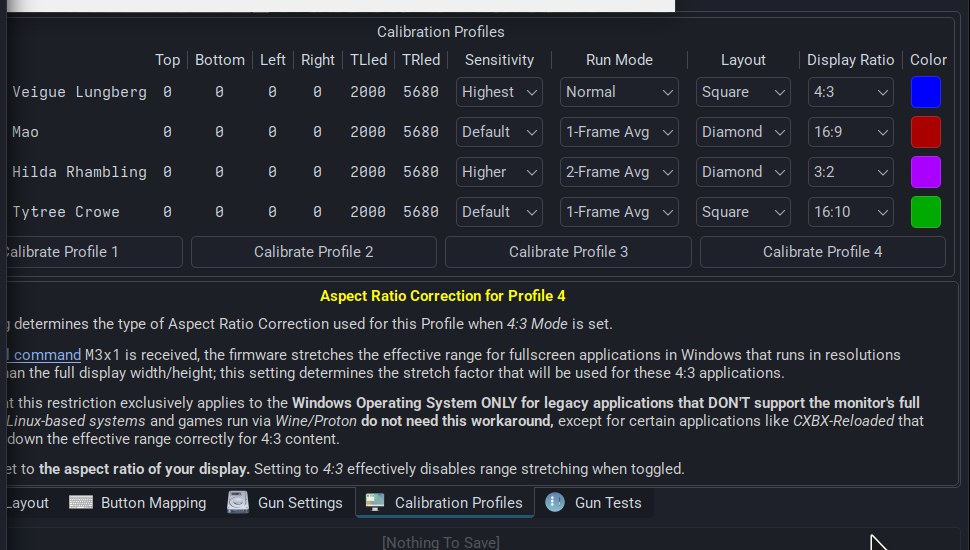
There are four profiles, selected on the gun from pause mode by the A, B, Start and Select buttons, which is why the firmware’s default names are “Profile A”, “Profile B”, “Profile Start” and “Profile Select”. In the App’s table each has:
Table 1 — There are four profiles, selected on the gun from pause mode by the A, B, Start and Select buttons, which is why the firmware's default names are "Profile A", "Profile B", "Profile Start" and "Profile Select". In the App's table each has
| Column | Firmware field | Default | Set by |
|---|---|---|---|
| Top, Bottom, Left, Right | topOffset … rightOffset | 0 (uncalibrated) | Calibration |
| TLled, TRled | TLled, TRled | 2000, 5680 | Calibration (square layout) |
| Sensitivity | irSens | Default (0) | App, or pause-mode hotkeys |
| Run Mode | runMode | 1 = “1-Frame Avg” | App, or pause-mode hotkeys |
| Layout | irLayout | Square | App |
| Display Ratio | aspectRatio | 16:9 | App |
| Color | color | red, green, blue, magenta | App |
| (name) | name, 15 characters | as above | App |
The name is shown in pause mode on an OLED; the colour is what the status LED shows when the profile is selected. Since App v3.0.1 the App flags a calibration whose values look implausible as “Malformed Calibration”, but the release note is explicit that this is “purely an App visual thing; it’s still technically committed to the gun anyways” — the firmware’s own check at boot only resets offsets of ±32768 or beyond (Volume 2).
5.3 Calibration
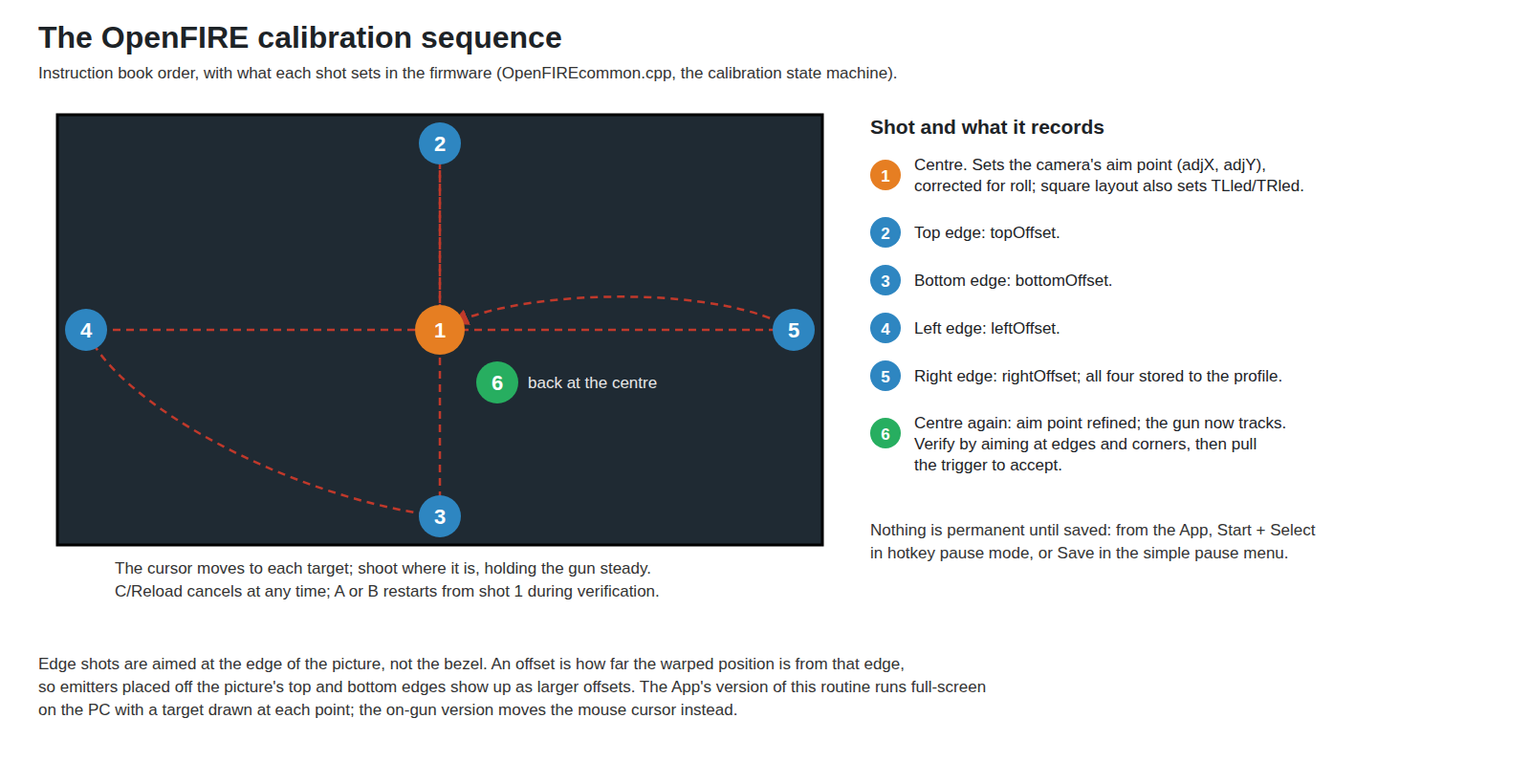
Calibration can be started three ways: from the App’s Calibrate Profile buttons, by pulling the trigger in hotkey pause mode, or from the first item of the simple pause menu. A brand-new gun starts it on the first trigger pull (Volume 4). The instruction book’s procedure:
- “Shoot the pointer at center of the screen and press the trigger while keeping a steady aim.”
- “The mouse should move to the four edges of the screen; first topmost, bottommost, leftmost, rightmost. Shoot the edge of the screen where the cursor is at.”
- “When the cursor returns to the center, shoot the cursor to finish calibration.”
- Verify: “A good sign of a good calibration is maintaining as close to line-of-sight accuracy as possible when aiming at the screen edges and corners.” Pull the trigger to accept; A or B restarts from the centre; C/Reload cancels at any time.
- Save. “Remember to save your calibration and current profile afterwards” — from the App, with Start + Select in hotkey pause mode, or the Save item in the simple pause menu. A calibration that is not saved is lost at power-off.
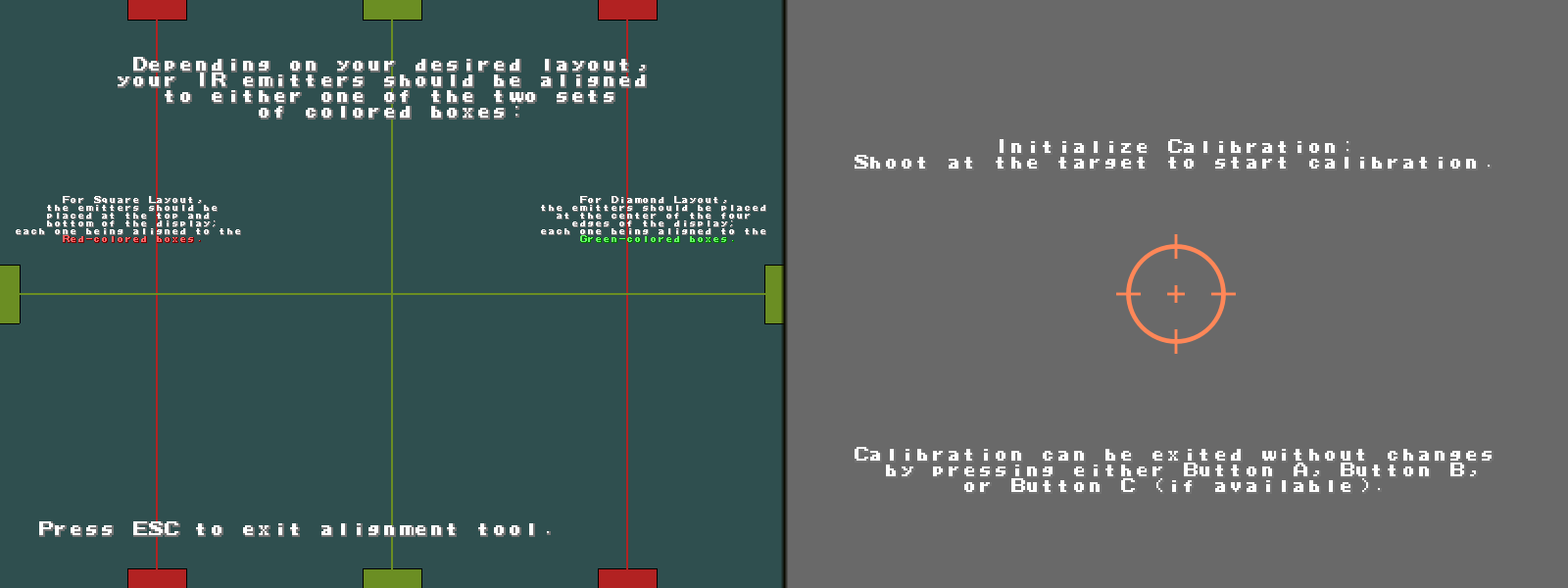
The App’s version runs full-screen on the PC and draws a target at each point, which is easier to hit precisely than the mouse cursor the on-gun version uses; it is the better choice whenever the App is available on the machine connected to the display. What each shot records is in the figure above; the mathematics is in Volume 2 and its error behaviour in Aiming Maths and Calibration.
Two habits follow from how the firmware works. Hold the gun at the distance and height it will be used from, because the warp is exact only for the geometry it was calibrated at. And shoot the edges of the picture, not the bezel: the offsets are measured against the picture, and in the square layout the firmware has already assumed the emitters sit on its top and bottom edges (Volume 3).
5.4 Sensitivity and smoothing
Sensitivity has three levels, shown in the App as Default, Higher and Highest; they set three of the camera’s registers (Volume 2). The instruction book’s guidance is to go “as high as possible”: too low and “the pointer moves in noticeable coarse steps, as if it has a low resolution”, too high and “the pointer jumps around erratically”, typically only when aiming at certain parts of the screen — the signature of a reflection. “Obviously, the best solution is to eliminate the reflective surface”, and the App’s IR camera tester shows the four points as the camera sees them, which makes a stray fifth source obvious. If coarse steps persist at the maximum, “the IR emitters may not be bright enough.”
Set sensitivity in the App, not with the hotkey. The pause-mode hotkey documented as “B + Up: Increase IR camera sensitivity” calls the same sens-1 as the decrease hotkey in v6.2, and from the default level it stores an invalid value (Volume 2, section 2.9). The App’s drop-down writes the level directly.
Run mode sets smoothing per profile: Normal (no averaging), 1-Frame Avg (the firmware’s “Averaging”: this frame and the previous one) and 2-Frame Avg (“Averaging2”: twice this frame plus the two before, over four). The firmware default is 1-Frame Avg. The instruction book: “The averaging modes are subtle but do reduce the motion jitter a bit without adding much if any noticeable lag.” At 209 Hz each frame of averaging is about 4.8 ms of history.
5.5 Display ratio
The App’s Display Ratio (16:9, 16:10, 3:2, 5:4, 4:3) only does anything when a game, through the serial command M3x1, asks for 4:3 correction. The App’s help text explains when that is: “this restriction exclusively applies to the Windows Operating System ONLY for legacy applications that DON’T support the monitor’s full” resolution and are stretched to fill the screen; “Linux-based systems and games run via Wine/Proton do not need this workaround”. With correction on, the firmware maps the gun’s range to the 4:3 window inside the chosen display shape, so the cursor stays under the sights when a 4:3 game is pillar-boxed. “Setting to 4:3 effectively disables range stretching when toggled.” The window constants are listed in Volume 6.
5.6 The solenoid settings
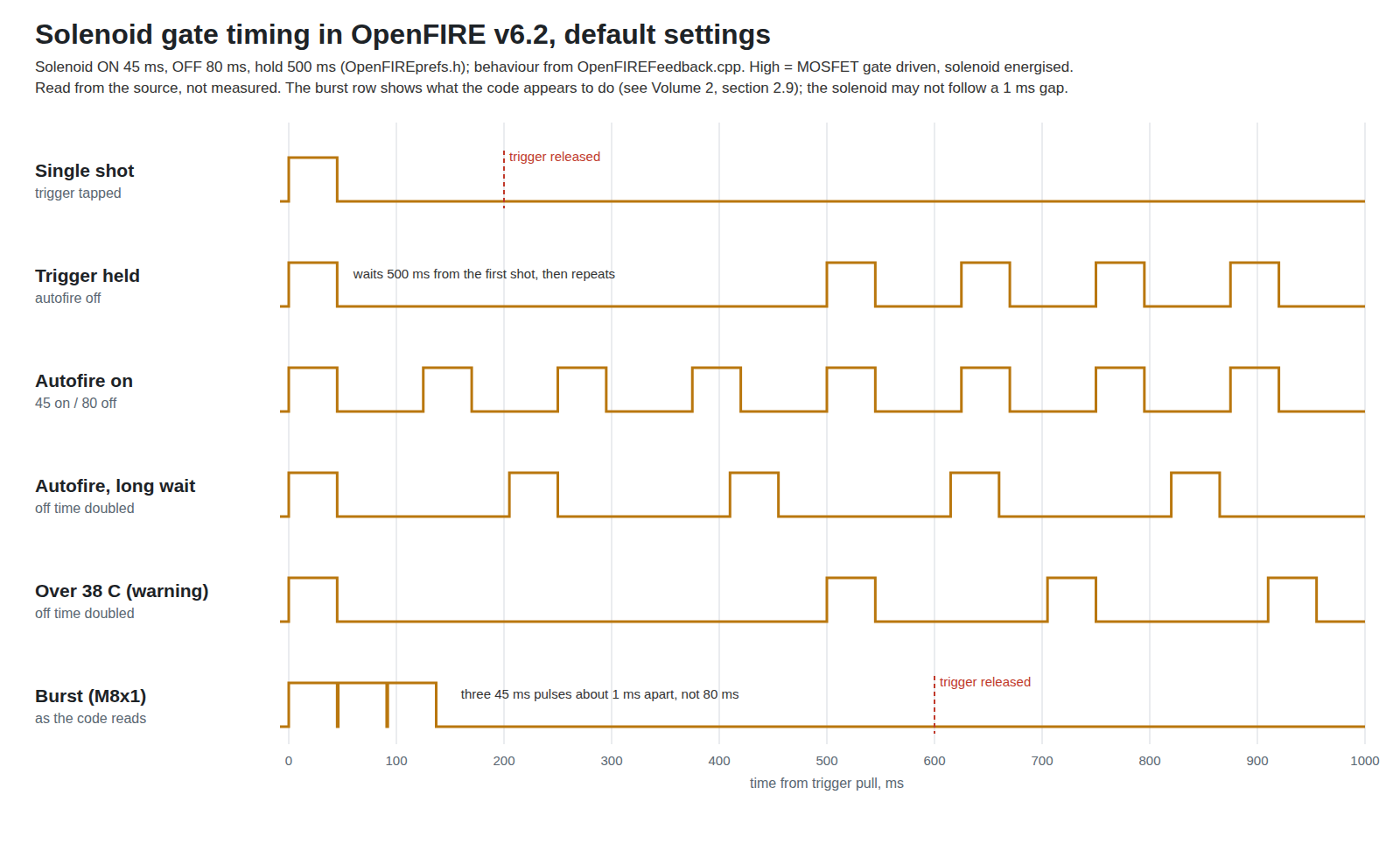
The solenoid output is a plain logic level on its pin — digitalWrite HIGH for on, LOW for off — with every timing measured against millis(), so resolution is one millisecond and there is no PWM, no peak-and-hold and no current control in the firmware. Whatever drive stage follows the pin must do those things if the build wants them; that is a design question for Solenoid Recoil and Reference Electronics.
Table 2 — 5.6 The solenoid settings
| App label | Setting key | Default | What the firmware does |
|---|---|---|---|
| Solenoid Enabled | Solenoid toggle | on | Master enable; a mapped Solenoid Switch overrides it |
| Solenoid ON Length | SolOn | 45 ms | Time the pin is high for each shot |
| Solenoid Autofire Wait Time | SolOff | 80 ms | Time low between shots in sustained fire and autofire |
| Solenoid Hold-to-Autofire Length | SolHold | 500 ms | After a single shot with the trigger still held, how long before sustained fire starts, measured from the first shot |
The behaviour, from OF_FFB::FFBOnScreen() and SolenoidActivation():
- A trigger pull on-screen fires immediately. The first shot takes an “instant solenoid fire path” that sets the pin high without waiting for any timer.
- Holding the trigger (autofire off) gives one shot, then — 500 ms after it began — sustained fire at 45 ms on, 80 ms off: a 125 ms period, 8 shots a second, 36 % duty. The App’s help text describes this as “When depressed for the length of Solenoid Hold Length, the solenoid will fire rapidly for as long as the trigger is held”.
- Releasing the trigger ends the cycle as soon as the current on-time has run.
- An off-screen pull does not fire the solenoid. Off-screen, the gun rumbles instead (5.8), and if the solenoid happens to be on it is switched off as at the end of a cycle.
- In serial (MAMEHooker) mode the game drives the solenoid, through the commands in Volume 6; the trigger no longer fires it directly.
The defaults are the firmware’s, not a recommendation for any particular solenoid. A 12 V solenoid on a short stroke and a 24 V solenoid throwing a slide want different on-times, and the duty cycle at sustained fire decides how hot the coil gets. Measuring that is the job of Solenoid Recoil; this table is where its numbers will be entered.
5.7 Temperature protection
With a TMP36 mapped to an analog pin (GP28 on the Pico, as the Hardware Guide draws it, taped to the solenoid body), the firmware reads it every 250 ms, averages four readings, and acts on two thresholds:
Table 3 — With a TMP36 mapped to an analog pin (GP28 on the Pico, as the Hardware Guide draws it, taped to the solenoid body), the firmware reads it every 250 ms, averages four readings, and acts on two thresholds
| App label | Key | Default | Firmware behaviour |
|---|---|---|---|
| Temperature Warning Threshold | TempWarning | 38 °C | Off time between sustained shots doubled (SolOff << 1) until 5 °C below the threshold |
| Temperature Shutoff Threshold | TempDanger | 45 °C | Solenoid held off entirely until 5 °C below the threshold |
The App’s help text describes the warning state differently: “The ‘reduced’ firing rate is automatically calculated as Solenoid ON Fast Length * 4.” The firmware code doubles the off time instead; it does not touch the on-time or multiply anything by four. Where the two disagree, the code is what the gun does.
Three more details from the code. The first shot of every trigger pull is never temperature-checked, in any state — the source comment reasons that “it’s probably safe to shoot regardless of temps”. The App’s help says that above the shutoff threshold “solenoid activations will not be allowed for either single or sustained shots”; in the v6.2 code the shutoff blocks sustained fire and autofire, but each new trigger pull still gets its 45 ms pulse. A player tapping the trigger eight times a second puts the coil at the same duty as sustained fire, with no thermal limit. That makes the TMP36 a protection against held-trigger fire only, and it is a fix worth making in Our Firmware. A reading outside the ADC range of 100 to 2500 (about −40 to 150 °C) is treated as a sensor fault and puts the gun in the shutoff state (with the same first-shot exception); v6.2’s main change was this faulty-sensor detection, and App v3.0.3 shows the warning. And with no temperature pin mapped, there is no thermal protection at all. The App’s tooltips put it plainly: setting the thresholds too high “WILL reduce the lifespan of the connected solenoid!”
Whether 38 and 45 °C on the coil body are the right numbers for a given solenoid and shell plastic is a measurement, not a setting. PLA softens not far above these figures, which is one reason the thermal design belongs to Solenoid Recoil.
5.8 Rumble
Table 4 — 5.8 Rumble
| App label | Key | Default | Firmware behaviour |
|---|---|---|---|
| Rumble Enabled | Rumble toggle | on | Master enable; a mapped Rumble Switch overrides it |
| Rumble Intensity | RumbPwr | 255 (of 255) | PWM duty on the rumble pin (analogWrite) |
| Rumble Length | RumbTime | 150 ms | Length of one rumble event |
| Rumble-based Force Feedback | RumbFFB toggle | off | Use the motor instead of a solenoid for on-screen shots |
By default the motor runs for one 150 ms event when the trigger is pulled off-screen — a reload in most games — and in some pause-menu feedback. A held trigger does not repeat it. With Rumble FF on, the motor takes the solenoid’s place for on-screen shots, for half the rumble length per shot; the App notes that the solenoid “takes priority over this setting”, so Rumble FF only works with the solenoid disabled. That is the useful mode for a gun with a motor and no solenoid, or for quiet play. The motor itself is in Motors and Rumble.
5.9 Autofire, switches and the toggles
Autofire (Autofire toggle, or an Autofire Switch) makes every on-screen pull fire continuously at the on/off timings from the first shot, with no hold delay. The App: “When enabled, the solenoid will always fire off automatically, as if the trigger has been held”. A “wait factor” doubles the off time; it is set by the XI1 serial command or the hardware switch (Volume 6).
Hardware switches. Three functions — Rumble Switch, Solenoid Switch and Autofire Switch — can be mapped to SPDT switches on the gun. When one is mapped, it overrides the App toggle and the pause-menu toggle for that feature. Without them, the pause menu’s Left and Right toggle rumble and solenoid in software.
The other toggles on the Gun Settings tab are covered where they act: Low Buttons Mode, Simple Pause Menu and Hold to Pause below; the four-pin LED’s common-anode toggle and the OLED toggles in 5.11.
5.10 Pause mode
Pause mode is how settings are changed from the gun itself. There are three ways in, per the instruction book and the App’s help: C + Select (the default hotkey); the Home button, if one is mapped (“regardless of setting, Pause Mode can always be accessed by pressing the Home Button”); or, with Hold to Pause enabled, holding the trigger and A with no IR points in view for the hold length (2500 ms default) — “pointing the gun towards the ground is recommended here”. Buttons in pause mode act when the last button of a combination is released, which is how combinations are told apart from single presses.
Hotkey pause mode (the default):
Table 5 — Hotkey pause mode (the default)
| Press | Effect |
|---|---|
| A, B, Start, Select | Select profile A, B, Start or Select |
| Start + Down | Run mode Normal |
| Start + Up | Averaging; press again to switch between the two averaging modes |
| B + Down | Decrease camera sensitivity |
| B + Up | Documented as “Increase”; in v6.2 it decreases (5.4) |
| Left / Right | Toggle rumble / solenoid (when no hardware switch is mapped) |
| Trigger | Begin calibration |
| Start + Select | Save settings to flash |
| C / Reload | Exit pause mode |
Simple pause menu (the Simple Pause Menu toggle) replaces the hotkeys with a scrolling list for guns with few buttons: A and B move up and down, the trigger selects, C exits. Its items are: calibrate the current profile; switch profile; save settings; toggle rumble; toggle solenoid; and “Send escape key signal to the PC”. The App warns that it “requires an LED or OLED Display for visual feedback!”
Low Buttons Mode makes A and B send Start and Select when the gun is pointed off-screen — “recommended for lightguns with two or less sub buttons” — so a minimal gun can still start a game.
Any serial terminal shows the gun’s text output while it is paused or calibrating; the instruction book suggests the Arduino Serial Monitor, PuTTY or screen.
5.11 Lights, display and USB identity
Four-pin RGB LED. The LEDAnode toggle is on by default (common anode). The App’s help says to enable it “if your 4-pin LED is a Common Anode type (with common connected to 5V)”, while the Hardware Guide wires the common anode to the Pico’s 3V3 OUT. The guide’s wiring is the one to follow: with the anode at 5 V, a GPIO that can only rise to 3.3 V cannot reliably turn a red LED (forward voltage around 2 V) fully off.
NeoPixels. Strand length (default 1), how many are static colours, the static colours themselves, and whether the static ones are the first or last in the strand. The App warns that “Changes to NeoPixel settings may require a power cycle to update properly!”, matching a known issue in the firmware README.
OLED. Enable OLED Display (SSD1306 128x64) on the peripheral I²C pins. The firmware’s default address is 0x3C; an alternate address toggle tries 0x3D. The App notes that “the firmware has no way of knowing whether the device successfully initialized or not”, so a blank screen is the only symptom of a wrong address.
USB identity. Either a Simple USB Identifier Preset, P1 to P4, which also changes the Start and Select keys (1 & 5, 2 & 6, 3 & 7, 4 & 8), or a custom Product ID (hexadecimal) and Product Name (15 characters). “For Multiplayer, make sure each gun has its own unique identifier!” The vendor ID is fixed at 0xF143. Multi-gun set-ups are in Volume 6.
5.12 A first-tuning sequence for this build
The firmware’s defaults are a reasonable place to start, and nothing above needs changing to get a working gun. For the first tuning pass on Michael’s build, the order that keeps each change separate is:
- Calibrate profile A at the real shooting distance with the App’s full-screen routine, at sensitivity Highest, and save.
- Check for reflections in the IR camera tester; step sensitivity down only if a stray point appears.
- Pick a run mode: try Normal and 1-Frame Avg on a fast game and keep the one that feels better.
- Map the TMP36 before the first sustained-fire test, and confirm a plausible room temperature in Gun Tests.
- Set the solenoid on-time from measurement, not by feel: the shortest on-time that gives the full stroke on the bench supply, with margin, as Solenoid Recoil works out. Then the off-time and hold, by feel in games.
- Rumble last, intensity first and length second.
- Export the custom pin layout and note every setting, so an upgrade or a second gun starts from the same place.
5.13 What could not be verified
- None of the behaviour in this volume has yet been measured on this build’s hardware; it is read from the v6.2 source and the App v3.0.3 interface text.
- The App’s “ON Fast Length * 4” description of the warning state against the code’s doubled off time: the code was read; the App’s description was not traced to any code path.
- Whether a solenoid follows the roughly 1 ms gap in burst mode.
Sources
- TeamOpenFIRE,
OpenFIRE-Firmwarev6.2:OpenFIREmain/README.md(the instruction book),OpenFIREprefs.h(defaults),OpenFIREFeedback.cpp(solenoid, rumble, temperature),OpenFIREcommon.cpp(calibration),OpenFIREmain.ino(pause mode), https://github.com/TeamOpenFIRE/OpenFIRE-Firmware — read 2026-10-18. - TeamOpenFIRE,
OpenFIRE-Appv3.0.3:src/appmainwindow.ui(labels and help text),src/appcali.cpp; release notes v3.0.1 and v3.0.3; README screenshots, https://github.com/TeamOpenFIRE/OpenFIRE-App — read 2026-10-18. - TeamOpenFIRE,
OpenFIRE-Boards,OpenFIREshared.h(setting keys). - OpenFIRE Hardware Guide v1.3 (TMP36 placement, LED wiring), openfirelightgun.org, PDF dated 2026-10-17.
Comments (0)