Open-Source Light-Gun Firmware · Volume 2
Inside OpenFIRE — Three Repositories, Two Cores, One Camera and a Homography
The v6.2 source read file by file: what runs where, how the camera is read at 209 Hz, how four dots become a cursor, and three things in the code that do not do what the comments say
Volume 1 placed OpenFIRE in its family. This volume opens it. It is written for someone who will change the code — the Our Firmware dive starts where this one stops — so it names files, functions and constants, and quotes them rather than paraphrasing. The theory of four-point IR tracking (why four points, how the homography is derived, how errors propagate) belongs to Aiming Maths and Calibration and the sensor itself to IR Point Tracking; what follows is what OpenFIRE actually does.
2.1 Which code this volume reads
Everything here is from OpenFIRE firmware v6.2 (“Long Bridge”, released 19 April 2026). On 18 October 2026 the repository’s default branch, OpenFIRE-dev, was identical to the v6.2 tag — GitHub’s compare reported it zero commits ahead and zero behind — so “the current source” and “the released firmware” are the same thing. The board presets come from the OpenFIRE-Boards commit the v6.2 tree pins as a submodule (a019e917, 13 January 2026); later commits to that repository only add an ESP32-S3 board. OPENFIRE_VERSION in OpenFIREDefines.h reads 6.2.
2.2 The source tree
The firmware is an Arduino sketch, OpenFIREmain/OpenFIREmain.ino, with its own modules beside it and six local libraries under libraries/. Four more libraries (Adafruit NeoPixel, SSD1306, GFX and BusIO) and the board-preset repository are git submodules.
Table 1 — 2.2 The source tree
| Path | Lines | What it does |
|---|---|---|
OpenFIREmain/OpenFIREmain.ino | 1,426 | setup(), the core-1 loop, the run, pause, docked and calibration loops, the camera timer |
OpenFIREmain/OpenFIREcommon.cpp/.h | 1,358 | FW_Common: camera set-up, GetPosition(), calibration, mode changes, feedback set-up |
OpenFIREmain/OpenFIREserial.cpp/.h | 1,514 | OF_Serial: the App’s docking protocol and the MAMEHooker command parser |
OpenFIREmain/OpenFIREFeedback.cpp/.h | 345 | OF_FFB: solenoid, rumble, burst fire, TMP36 temperature |
OpenFIREmain/OpenFIREprefs.cpp/.h | 422 | OF_Prefs: defaults, profiles, LittleFS load and save |
OpenFIREmain/OpenFIRElights.cpp/.h | 287 | Four-pin RGB LED and NeoPixels |
OpenFIREmain/OpenFIREdisplay.cpp/.h | 1,130 | SSD1306 OLED menus, life and ammo |
OpenFIREmain/OpenFIREDefines.h | 98 | Build options (2.3) |
OpenFIREmain/boards/ (submodule) | — | OpenFIREshared.h: board names, pin presets, setting names, serial command codes; GPL v3 |
libraries/DFRobotIRPositionEx | 330 (.cpp) | Camera driver (2.6) |
libraries/OpenFIREPosition | 690 (.cpp) | OpenFIRE_Square, OpenFIRE_Diamond, OpenFIRE_Perspective: the positioning maths (2.7) |
libraries/LightgunButtons | 376 (.cpp) | Debounced buttons with per-button report types |
libraries/TinyUSB_Devices | 502 (.cpp) | Composite HID: keyboard, five-button absolute mouse, 16-button gamepad (Volume 6) |
Line counts are from the v6.2 tree. The split is clean enough to fork along: the positioning maths, the camera driver and the USB devices are self-contained libraries, and nearly everything board-specific lives in one shared header.
2.3 Build-time switches
OpenFIREDefines.h decides what gets compiled. The release builds have everything switched on:
Table 2 — OpenFIREDefines.h decides what gets compiled. The release builds have everything switched on
| Define | Release | Effect |
|---|---|---|
DUAL_CORE | on | Buttons, feedback, USB reports and serial move to core 1 on RP2040/RP2350 |
MAMEHOOKER | on | Serial command parsing. The file warns it “has a chance of making the board lock up if TinyUSB hasn’t been patched”, which is why the project’s own core fork is mandatory (Volume 7) |
USES_SWITCHES, USES_RUMBLE, USES_SOLENOID, USES_TEMP | on | Hardware toggles, rumble, solenoid, TMP36 tempering |
USES_ANALOG, FOURPIN_LED, CUSTOM_NEOPIXEL, USES_DISPLAY | on | Analog stick, RGB LED, NeoPixel strand, OLED |
PLAYER_NUMBER | off | Hard-wires a gun to player 1–4 (Start/Select keys 1/5, 2/6, 3/7, 4/8) |
MANUFACTURER_NAME, DEVICE_NAME, DEVICE_VID | ”OpenFIRE”, “FIRECon”, 0xF143 | USB identity; the file says the name and VID “must be kept at the default values” for compatibility with whitelists that recognise OpenFIRE |
Every feature compiled in can still be switched off at run time from the App, so a builder never needs a custom build just to omit hardware.
2.4 Boot
setup() runs in this order, all on core 0:
- Load presets and settings.
OF_Prefs::LoadPresets()takes the board’s default pin map fromOpenFIREshared.h;InitFS()mounts LittleFS, and the profiles, toggles, pins, settings and button maps are read from files on the board (2.8). Each profile is sanity-checked: offsets of ±32768 or beyond are zeroed, a sensitivity above the maximum is reset to the default, an out-of-range run mode is reset to Normal. - Set the USB identity. The manufacturer string “OpenFIRE”, VID
0xF143, and a product ID and name from the saved settings — “FIRECon P1” and PID 1 unless changed. On a Pico W build the code checks for USB power (VBUS) and only falls back to Bluetooth if it is absent; the released-noBTimages do not include the Bluetooth path at all. - Open the serial port at the nominal 9600 baud MAMEHooker expects (USB CDC ignores the figure).
- Start the camera (
FW_Common::CameraSet(), 2.6), the buttons, the feedback outputs and the LEDs. - Start the 209 Hz camera timer —
startIrCamTimer(209)— with the comment “IR camera maxes out motion detection at ~300Hz, and millis() isn’t good enough”. The timer is PWM slice 0 run as an interval timer: its wrap interrupt does nothing but setirPosUpdateTick = 1. - First-boot check. If the current profile’s four offsets are all zero, the gun has never been calibrated: it blinks the LED orange and waits for a trigger pull (or for the App to dock and calibrate it). Otherwise it goes straight to run mode. Volume 4 describes this from the builder’s side.
2.5 The two cores
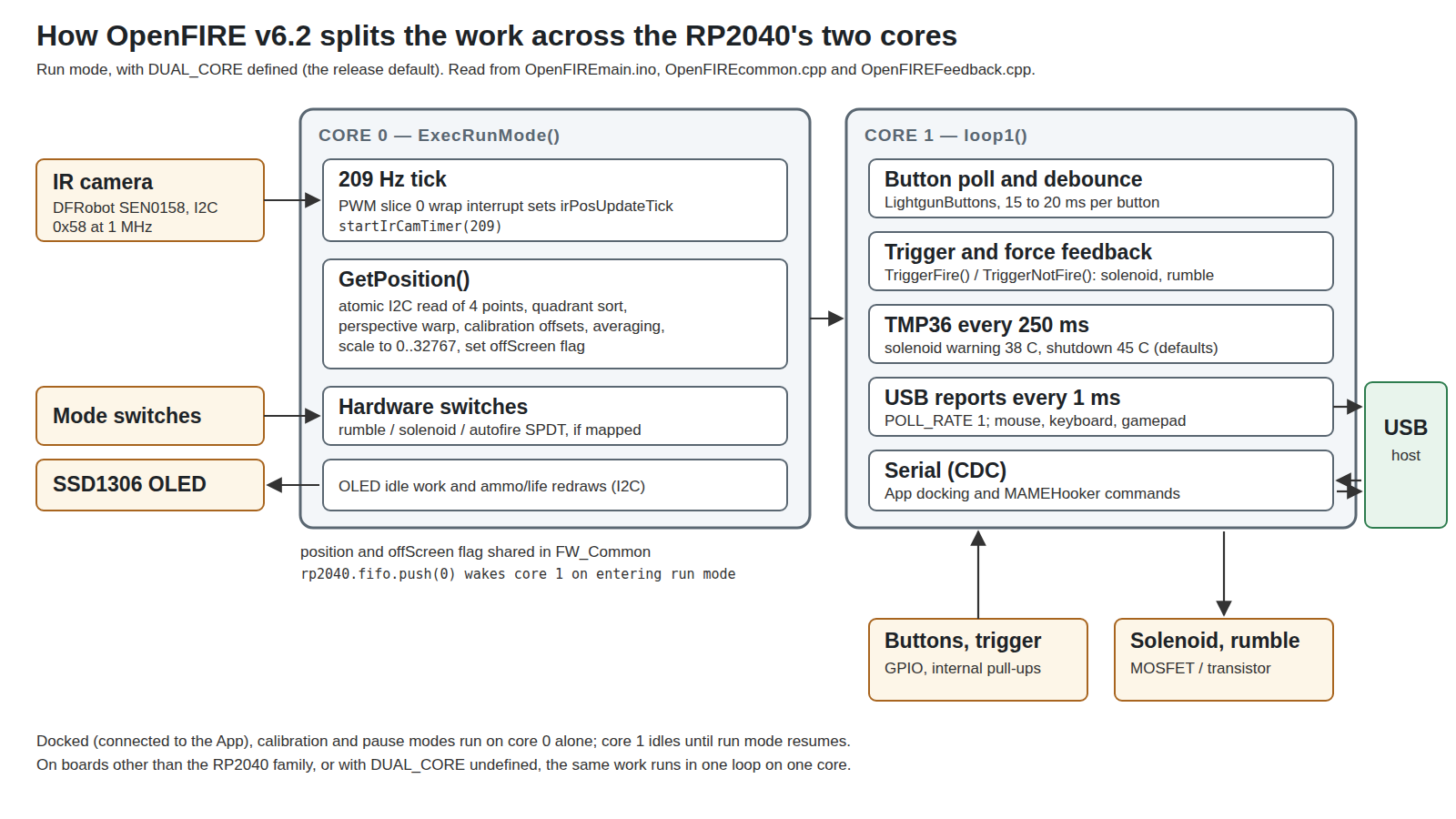
The README describes the split as “using its second core for input polling & queuing and serial handling, and the main core for camera and peripherals processing”. In code: when ExecRunMode() starts it pushes a word into the inter-core FIFO (rp2040.fifo.push(0)) to wake core 1, whose loop1() blocks on rp2040.fifo.pop() and then loops for as long as the gun is in run mode. setup1() is empty, with the comment “does… nothing, since timing is kinda important”.
Core 0’s loop is short: read any hardware toggle switches, and when irPosUpdateTick is set, clear it and call GetPosition(). Between ticks it services the OLED. Core 1’s loop polls the buttons, reads the TMP36, handles the trigger and its force feedback (TriggerFire() / TriggerNotFire()), sends HID reports when at least POLL_RATE (1 ms) has passed, and processes serial input. The two cores share the cursor position and the offScreen flag through static members of FW_Common, with no locking; the values are single machine words, so a torn read is not a concern on a 32-bit core.
The design choice that matters for a fork is that the camera I²C transaction never waits behind USB or serial work, and the trigger-to-solenoid path never waits behind an I²C read. The code also records one place where that was not enough: OLED ammo updates are drawn on core 0 because “Solenoid feedback on the second core is hella wonky when ammo updates are performed there likely due to blocking I2C transactions”.
2.6 The camera driver
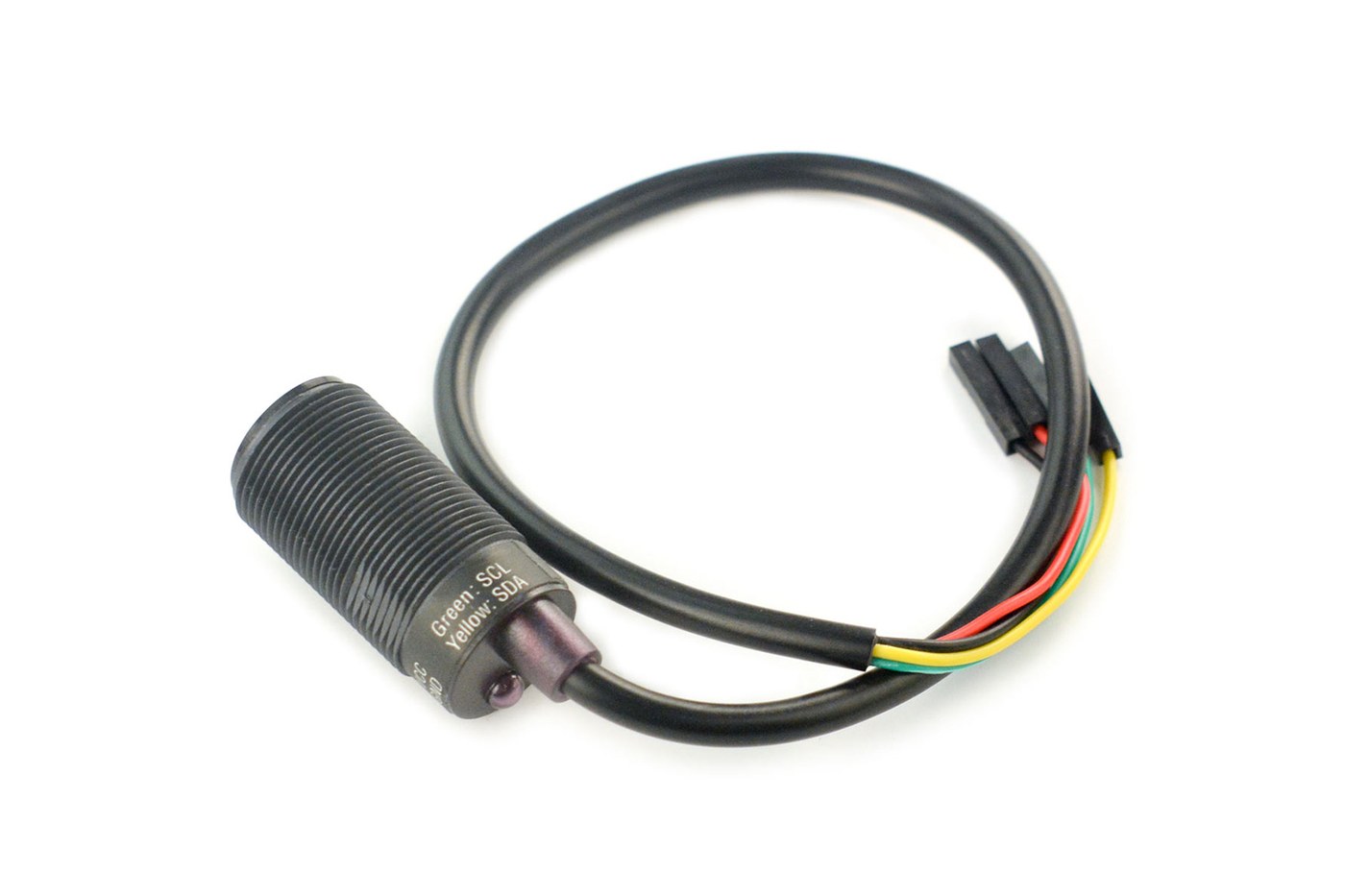
OpenFIRE talks to the camera through DFRobotIRPositionEx, Mike Lynch’s 2021 rewrite of DFRobot’s library. The module is the Wii Remote’s PixArt tracking sensor on a small board, and the driver’s register settings come from the WiiBrew wiki.
Address and start-up. The I²C address is 0xB0 >> 1, i.e. 0x58. begin() sets the bus clock (on the RP2040 “the clock must be set before calling begin()”, the reverse of AVR and SAMD), writes 0x30 = 0x01, writes the three sensitivity registers, selects the data format, writes 0x30 = 0x08, and waits 100 ms. If the very first write is not acknowledged, begin() returns false and the firmware reports a camera error — this is what “camera not detected” means at the bus level.
Bus speed. OpenFIREBoard.h sets DFROBOT_IR_IIC_CLOCK to 1 MHz on RP2040-class boards (“even with cheap clips and the full length IR cam cable 1MHz is fine”) and 400 kHz elsewhere. 1 MHz is Fast-mode Plus; whether a given cable and pull-up arrangement supports it is a question for the bench and for Reference Electronics.
Data format. OpenFIRE uses the camera’s basic format, which packs two points into five bytes (low bytes of X and Y for each, plus one byte of shared high bits), so all four points arrive in an 11-byte read from register 0x36 (DFRIRdata_LengthBasic = 11: one header byte and two five-byte frames). The extended format adds a blob size per point and costs 13 bytes; OpenFIRE does not need the sizes. At 1 MHz an 11-byte read plus its address and register write is on the order of 0.15 ms of bus time, so even the worst-case three reads leave the 4.8 ms tick almost idle.
Atomic reads. This is the driver’s real contribution. The camera updates its output registers while the host is reading them, so a read can return the high bits of one frame and the low bits of the next. Lynch’s README describes the symptoms — Y values from 768 to about 800 on a 768-line sensor, and an apparent frame rate that rose as the I²C clock was slowed — and the fix: read until two consecutive reads agree, three at most. OpenFIRE calls basicAtomic(DFRobotIRPositionEx::Retry_2) every tick. With coherent reads, the camera’s true update rate measured about 209 Hz, which is where the timer frequency comes from.
Sensitivity. Three levels, each a set of values for registers 0x06, 0x08 and 0x1A, credited in the source to the WiiBrew contributors who found them:
Table 3 — Sensitivity. Three levels, each a set of values for registers 0x06, 0x08 and 0x1A, credited in the source to the WiiBrew contributors who found them
| Level | Name in the code | 0x06 | 0x08 | 0x1A | Credited to |
|---|---|---|---|---|---|
| 0 | Sensitivity_Default (= Min) | 0x90 | 0xC0 | 0x40 | ”Marcan” |
| 1 | Sensitivity_High | 0x90 | 0x41 | 0x40 | ”inio” |
| 2 | Sensitivity_Max | 0xFF | 0x0C | 0x00 | ”Kestrel” |
The App labels these Default, Higher and Highest. The instruction book’s advice is to run “as high as possible” and step down only if reflections make the cursor jump (Volume 5).
Pin rules. CameraSet() will only create the camera object if the SDA and SCL pins form a valid pair for one of the RP2040’s two I²C blocks: SCL must be an odd GPIO and SDA an even one, and bit 1 of the pin number (which selects I2C0 or I2C1 on the RP2040’s repeating pin map) must match for both. A pair that fails the check produces a camera error rather than a hang. The Pico default, GP20 SDA and GP21 SCL, is on I2C0.
The Wii camera clock. If a pin is mapped to the “Wii Cam Clock” function, CameraSet() drops the system clock to 125 MHz and runs that pin as a PWM output with a wrap of 4 and a level of 2 — 25 MHz at 40 % duty. That is the clock a bare Wii Remote sensor needs (the DFRobot module carries its own); with no clock pin mapped, the system clock is set to 133 MHz. The project’s Hardware Guide draws both a clock-pin conversion and an alternative with a separate 24 MHz crystal (Volume 3).
2.7 From four dots to a cursor
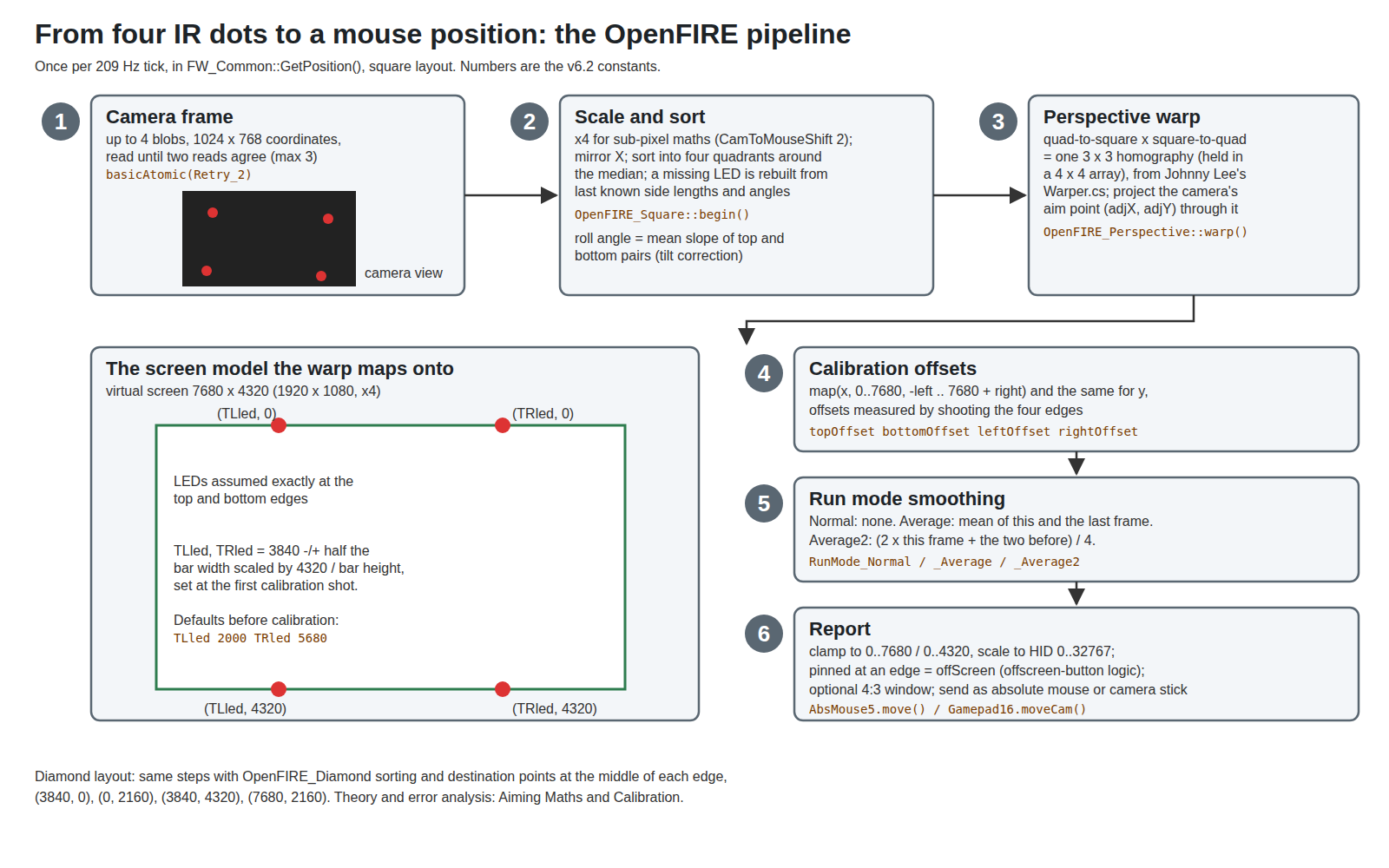
FW_Common::GetPosition() runs the whole chain. The numbers below are the v6.2 constants from OpenFIREConst.h.
Scale. Camera coordinates (0–1023, 0–767) are shifted left by two (CamToMouseShift = 2) so the maths has four times the resolution to work with; the comment explains that “since the median is an average of 4 values, use 2 more bits”. The model screen is res_x = 1920 << 2 = 7680 by res_y = 1080 << 2 = 4320, a 16:9 frame in the same quarter-pixel units.
Sort and repair. OpenFIRE_Square::begin() (copyright Sam Ballantyne) mirrors X — the camera sees the scene reversed relative to the screen — and assigns each point to a quadrant by comparing it with the median of all four. It waits until all four LEDs have been seen at least once before producing anything. When an LED drops out (the gun aimed near a corner, or a hand over an emitter), it rebuilds the missing corner from the last good side lengths and angles of the quadrilateral; those are refreshed only after five consecutive frames with all four points visible, so one glitchy frame cannot corrupt them. This is what lets the cursor keep tracking when part of the emitter set leaves the camera’s 33° × 23° field of view. The same function computes the roll angle as the mean slope of the top and bottom pairs, which calibration uses for tilt correction.
Warp. OpenFIRE_Perspective::warp() is, by its header, “Derived from Wiimote Whiteboard library … Ported from Johnny Lee’s C# WiiWhiteboard project (Warper.cs file)”. It builds a quad-to-square matrix from the four camera points and a square-to-quad matrix from four destination points, multiplies them into one projective transform (a 3 × 3 homography stored in a 4 × 4 array), and pushes a single source point through it:
dstX = r0 / r3; dstY = floorf(r1 / r3);The source point is not the camera’s centre but (adjX, adjY) — the centre corrected at calibration for where the camera actually points and for roll — so the result is “where on the screen the barrel points”, not “where the screen is in the camera”.
The screen model. For the square layout the destination corners are (TLled, 0), (TRled, 0), (TLled, 4320) and (TRled, 4320). In other words the firmware’s model of the world puts the two emitter bars exactly on the top and bottom edges of the picture. At the first calibration shot it sets TLled and TRled from the bar’s measured aspect, “assuming height is 100%”: TLled and TRled = 3840 ∓ (bar width × 4320 / bar height) / 2. Before any calibration they default to 2000 and 5680, about 26 % and 74 % of the width. The diamond layout uses the middle of each edge instead: (3840, 0), (0, 2160), (3840, 4320), (7680, 2160).
This assumption is the single most useful thing to know about emitter placement. Bars that sit above and below the screen bezel, rather than on the picture edges, do not break the gun; the four edge shots of calibration absorb the difference as offsets. But the closer the emitters are to the model, the less work the offsets do and the more nearly linear the correction is across the screen. Volume 3 turns this into a placement rule.
Offsets. Calibration records how far the warped position is from each screen edge when the gun is aimed at it, and the output is stretched with map(x, 0, 7680, -leftOffset, 7680 + rightOffset) and the same for Y.
Smoothing. The profile’s run mode chooses Normal (no averaging), Average (mean of this frame and the last), or Average2 (twice this frame plus the two before, divided by four). The instruction book says the averaging modes “do reduce the motion jitter a bit without adding much if any noticeable lag”; at 209 Hz a two-frame average adds about 2.4 ms of effective delay.
Report. The result is clamped to the model screen and scaled to 0–32767, the logical range of the absolute-mouse report. A value pinned at 0 or 32767 on either axis sets offScreen, which is what makes an off-screen trigger pull behave differently (a reload in many games, a rumble rather than a solenoid kick by default). When 4:3 correction is enabled by serial command, X (or Y, for 5:4) is mapped from a narrower window instead. The window constants in the code are close to, but not exactly, the nominal ones — 966 to 6720 for 16:9, against a centred 960 to 6720 — and are reproduced in Volume 6.
The peak cursor rate is the camera rate. The instruction book puts it as “the mouse position updates at 209Hz, or roughly every ~4.8ms”; USB reports go out every millisecond, so a new position waits at most a millisecond for the bus. The full latency budget — camera exposure, I²C, maths, USB, the game, the display — is worked through in Aiming Maths and Calibration.
The mathematics behind this section is worked through in Aiming Maths and Calibration. Two findings there bear on v6.2: the offset map() is right only to first order and leaves an error at the screen edges that grows with how far the emitters sit outside the picture (Volume 4), and rotating the centre shot by the calibration cant adds error rather than removing it (Volume 4). The ESP32 port already uses the exact inverse map.
2.8 Modes and the stored settings
The gun is always in one of a handful of modes (FW_Const::GunMode_e): Init, Run, Calibration, Verification, Pause, and Docked when the App holds the serial port. In Docked mode the camera is off unless the App asks for its IR test view.
Settings live in LittleFS files in the flash area reserved by the build (which is why the build must allocate a file system, Volume 7): /toggles.conf, /pins.conf, /settings.conf, /btns.conf, plus the profile data and USB identity. Each is written as named key-value pairs using the strings in OpenFIREshared.h (“SolOn”, “RumbPwr”, “CustomPins” and so on), which is what lets the App and the firmware evolve without breaking each other’s saved data — except at v6.0, when the format changed and every saved setting was lost on upgrade (Volume 4).
There are four calibration profiles, named “Profile A”, “Profile B”, “Profile Start” and “Profile Select” after the buttons that select them in pause mode, each with its own offsets, LED anchors, sensitivity, run mode, layout, aspect ratio, colour and name. Pins, force-feedback settings and toggles are global to the gun.
2.9 Three places the code and the comments disagree
These are readings of the v6.2 source, made carefully but not yet confirmed on hardware. Each has a bench test, and each is a candidate fix for Our Firmware.
1. The “increase sensitivity” hotkey decreases it. In OpenFIREmain.ino:
void IncreaseIrSensitivity(const uint32_t &sens)
{
    if(sens < DFRobotIRPositionEx::Sensitivity_Max)
        FW_Common::SetIrSensitivity(sens-1);
}
DecreaseIrSensitivity() also passes sens-1. The instruction book documents B + Up in pause mode as “Increase IR camera sensitivity”. From level 1 the hotkey therefore steps down to 0; from the default level 0 it stores −1, and sensitivityLevel() — which clamps only values above the maximum — then indexes its three register tables at −1, an out-of-bounds read that writes whatever bytes precede the tables into the camera. The boot-time sanity check (2.4) only rejects values above the maximum, so a saved −1 survives a reboot. The ancestors got it right: Prow Enhanced and IR-GUN4ALL both use sens++. The App’s per-profile sensitivity selector writes the value directly and is unaffected; until fixed, set sensitivity from the App, not the hotkey.
2. Burst fire’s off time is one millisecond. In OF_FFB::BurstFire():
SolenoidActivation(OF_Prefs::settings[OF_Const::solenoidOffLength] << autofireDoubleLengthWait ? 1 : 0);In C++ the shift binds tighter than the conditional operator, so this reads as (offLength << wait) ? 1 : 0 — which is 1 whenever the off length is non-zero. The interval passed for the solenoid’s off phase during a three-round burst is therefore 1 ms, not the configured 80 ms. The autofire path a few lines up has no conditional and passes the shifted off length correctly. What the solenoid does with a 1 ms gap depends on its mechanics; Solenoid Recoil owns that question. Burst mode is only reachable by serial command (M8x1, Volume 6).
3. The temperature average is a second, not twelve milliseconds. OF_FFB::TemperatureUpdate() reads the TMP36 when more than TEMP_UPDATE_INTERVAL (250 ms) has passed and averages every four readings; the comment says “average out temperature from four samples taken 3ms apart from each other”. At 250 ms per sample the average spans about a second, which is a sensible thermal time constant for a solenoid body but not what the comment describes. Harmless, and worth knowing when reading a log.
A fourth, found by the ESP32 port: switching run modes can write past the end of the mode index and freeze the cursor in v6.2. It is described in Aiming Maths and Calibration, Volume 6.
2.10 What could not be verified
- The three findings in 2.9 are code readings; none has been run on hardware for this dive.
- The 209 Hz camera rate is the driver author’s measurement, not repeated here.
- Whether 1 MHz I²C is reliable on the cable length a long-barrelled shell needs. The source comment asserts it for “the full length IR cam cable”; it has not been measured here.
Sources
- TeamOpenFIRE,
OpenFIRE-Firmwarev6.2:OpenFIREmain/OpenFIREmain.ino,OpenFIREcommon.cpp,OpenFIREFeedback.cpp,OpenFIREprefs.h,OpenFIREDefines.h,OpenFIREmain/README.md;libraries/DFRobotIRPositionEx/(source and README),libraries/OpenFIREPosition/(OpenFIREBoard.h,OpenFIREConst.h,OpenFIRE_Square.cpp,OpenFIRE_Perspective.cpp), https://github.com/TeamOpenFIRE/OpenFIRE-Firmware — read 2026-10-18. - TeamOpenFIRE,
OpenFIRE-Boards,OpenFIREshared.h, commit a019e917 as pinned by v6.2, https://github.com/TeamOpenFIRE/OpenFIRE-Boards. - GitHub REST API, compare
v6.2...OpenFIRE-dev(ahead 0, behind 0), 2026-10-18. - Mike Lynch,
Prow7/ir-light-gun,SamcoEnhanced.ino(IncreaseIrSensitivity), and SeongGino/ir-light-gun-plus,SamcoEnhanced.ino— read 2026-10-18. - DFRobot, SEN0158 product page, https://www.dfrobot.com/product-1088.html — specification, read 2026-10-18.
- WiiBrew, “Wiimote — IR Camera”, http://wiibrew.org/wiki/Wiimote#IR_Camera — cited by the driver as the source of the register values.
Comments (0)