Border Tracking · Volume 2
The Image Pipeline — Colour Match, Rectangle, Corners and the Mapping
What the host does with each camera frame, from Sinden's own settings and source-level reading of the open projects, and whether a microcontroller in the gun could do the same job
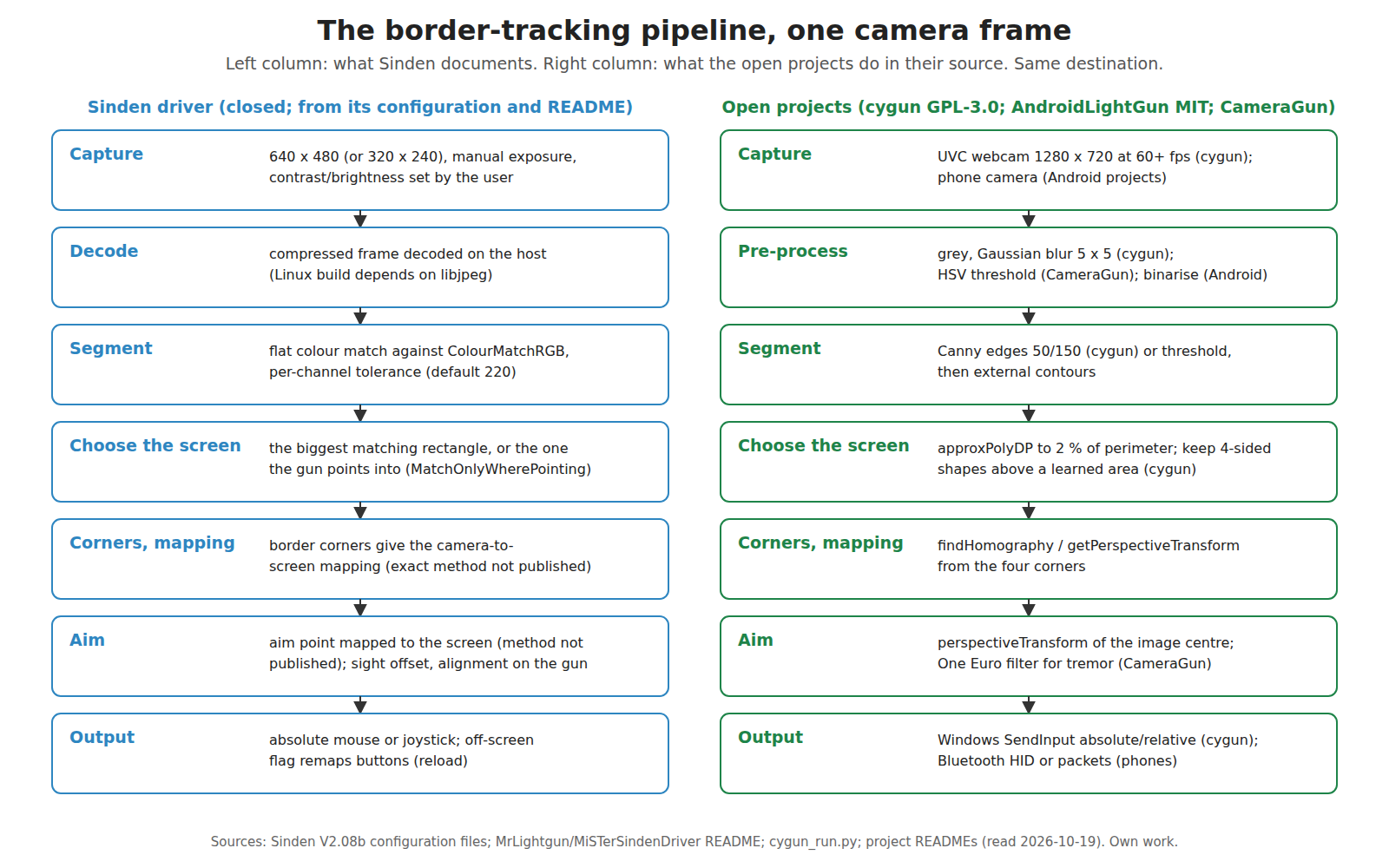
2.1 What the pipeline must produce
Every frame must yield two things: a position on the screen, and a verdict on whether the gun is aimed at the screen at all. The second matters as much as the first, because light-gun games reload when the trigger is pulled off the screen, and because a frame in which the border cannot be found must not move the cursor somewhere absurd. Sinden’s MiSTer driver, for example, reports a fixed “no-lock sentinel (X=32767,Y=32767)” when it cannot isolate the border.1
2.2 Capture: resolution, compression, exposure
The Linux configuration file sets CameraRes to 640,480 with the comment “recommend 640,480 unless device is weak, then 320,240”; the Windows software offers the same choice as “640x480 High” in a drop-down.23 The frames arrive compressed: the Linux and Raspberry Pi builds depend on libjpeg (Fedora users are told to install libjpeg8 specifically), which a driver needs only if it decodes JPEG-compressed video, the motion-JPEG format that USB webcams commonly use.45 Decoding is therefore part of the host’s per-frame work.
Exposure is set manually. The Linux file documents CameraExposureAuto (1 for manual, 3 for automatic) and CameraExposure with the values “19 very low, 39 low, 79 default, 159 high”, next to brightness (default 100, suggested range 80 to 120) and contrast (default 50, 40 to 60). Its advice is short: “if your tv is a bit dim or a projector, then increase exposure/brightness/contrast. If you have too much noise light in background, reducing exposure/brightness/contrast, may help reduce.”2 What the numbers mean in milliseconds, and why the exposure matters for latency, is in Volume 4.
Manual exposure is the right choice for this job, and the reason is worth stating. An automatic exposure loop tries to make the average scene mid-grey. A screen showing a dark game in a dark room would be brightened until the border saturates and bleeds into its surroundings; a bright game would be darkened until the border sinks towards the threshold. A tracker needs the border’s brightness in the camera to stay put while the picture inside it changes, which only a fixed exposure gives.
2.3 Segmentation: the flat colour match
Sinden’s README for its MiSTer driver states the rule exactly: “border detection is a flat colour match against ColourMatchRGB (default 255,255,255) within ColourMatchRange (default 220).” It goes on: “ColourMatchRange is a per-channel tolerance, so at the stock 220 any pixel with all channels >= 35 counts as white.”1 The Linux configuration says the same in fewer words (“How strictly it matches above color, lower is stricter”), and the Windows software calls the same setting the “Border Colour Match Radius”.23
So the first stage is not edge detection at all. Each pixel passes if its red, green and blue values are all within the tolerance of the target colour. Against white at the default tolerance, that accepts anything that is not quite dark in any channel. The default is loose because it is set for the stock camera at the stock exposure, where a dark room really does sit below 35. The README records what happens when that assumption fails: a replacement camera module that is brighter “can be over half of a 320x240 frame, which makes the border impossible to isolate.”1
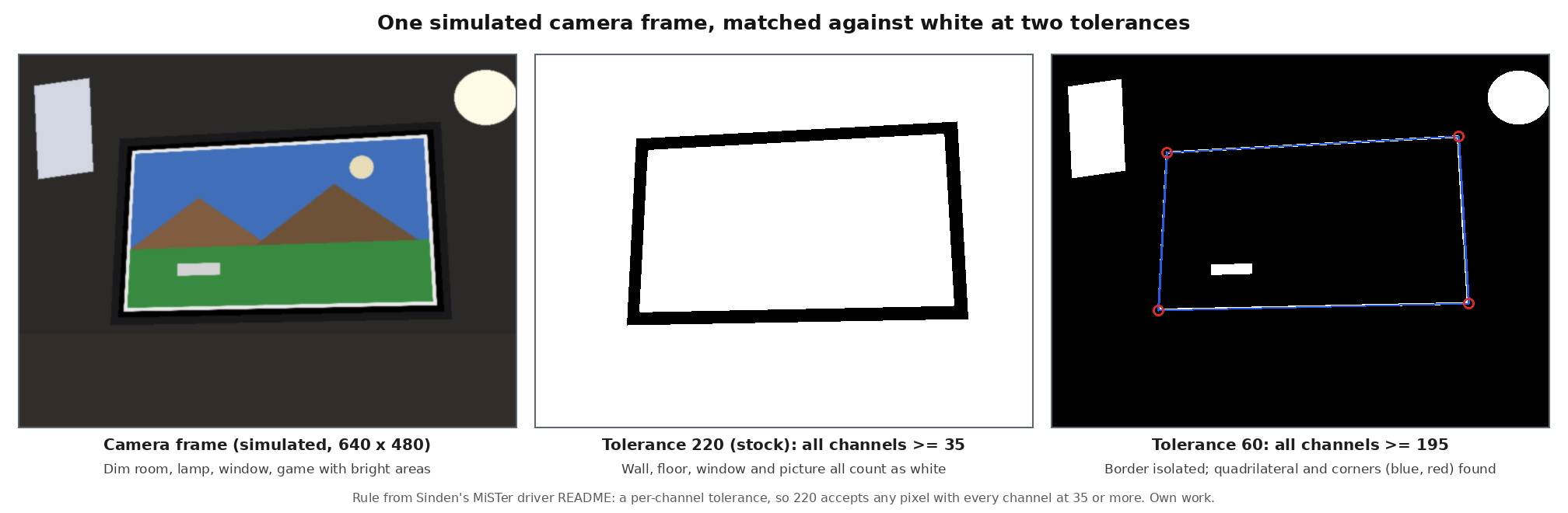
The simulation above makes two practical points.
- The black outer band is not decoration. With a loose tolerance, the only thing separating the white border from a bright picture and a lit wall is a dark gap on both sides of it. Sinden’s Windows software draws a black “secondary” border, 3 % of the screen height by default, outside the white one, and its border tab notes it “may need this if your screen bezel is extremely thin.”67 A television’s own black bezel does the same job when it is wide enough. The MiSTer README puts it in a sentence: “Having black around the outside of the white border helps lightgun performance anyway.”1
- The tolerance is the camera’s sensitivity in disguise. Brightness, contrast and exposure scale the pixel values before the comparison; the tolerance sets where the cut falls. A darker exposure and a looser tolerance can give the same mask as a brighter exposure and a tighter one. Sinden’s troubleshooting advice moves all four.8
The border need not be white. ColourMatchRGB takes any colour; Sinden ships cyan RetroArch overlays as “SindenBorderBlue” and lists a “Blue Border” example profile, and the libretro shader collection added a lightgun border in red, yellow, green, cyan, blue or magenta in September 2024 (Volume 6).9710 A coloured border trades brightness for selectivity: fewer things in a room are saturated cyan than are white, but a coloured border puts less light into the camera than a white one, and only one or two of the camera’s colour channels carry it.
2.4 Choosing the screen
After the mask, the driver must decide which bright region is the screen. Sinden’s Linux configuration documents two behaviours behind the MatchOnlyWherePointing switch: by default the driver takes the biggest matching rectangle; switched on, it “Assumes the rectangle you are pointing at is the target rather than biggest”, which “may help with recognition, if difficult background such as bright window.”2
Sinden’s MiSTer README gives the only measurement of these settings that was found. On one unit fitted with a brighter replacement camera module, held still and pointed at the screen:1
Table 1 — 2.4 Choosing the screen
ColourMatchRange = 220 (stock) | = 60 with MatchOnlyWherePointing = 1 | |
|---|---|---|
| Position standard deviation, holding still (% of screen) | 5.5 to 6.7 % | 2 to 4 % |
| Samples more than 3000 of 32767 from the median | 3.3 % | about 1 % |
| Driver CPU on the MiSTer | 69 % | 49 % |
The README adds that lowering the tolerance to 60 took that unit “from no position lock to a 100% lock rate,” and that restricting the search to where the gun points “costs less CPU.” The numbers come from one unit on the MiSTer’s slow processor, probably at 320 × 240, and are not a specification of the gun; they show the direction and the size of the effect.
2.5 From corners to an aim point
Four points on a plane, seen through a camera, fix the perspective mapping (the homography) between the camera image and that plane: eight unknowns, two equations per point. With the border’s four corners located in the image and their screen positions known, the driver can map any image point onto the screen. The point it maps is the one the barrel is aimed at; for a camera whose axis runs along the bore, that is close to the centre of the image, and calibration (2.6) corrects the rest. The mathematics, including how to solve the mapping robustly and how distortion and tilt enter it, belongs to the planned Aiming Maths and Calibration dive, and the infrared counterpart, which builds the same kind of mapping from emitter dots, is described in Open-Source Firmware, Volume 2.
Two things are specific to the border method.
- Corners from lines, not from points. An infrared camera reports a handful of dot centroids, and the four reference points arrive ready-made. A border tracker has hundreds of edge pixels along each side and must reduce them to four corners. Fitting a straight line to each side and intersecting neighbouring lines uses every edge pixel, which averages away noise and allows sub-pixel corners; taking the extreme pixel of a blob uses one pixel and inherits its noise. How Sinden does it is not published. The open projects use OpenCV’s polygon approximation (2.8), which returns contour vertices rather than fitted lines.
- The lens bends straight edges. The raw camera view in the wiki’s setup guide (Volume 1) shows the border visibly bowed: the module’s lens has barrel distortion. A pure homography assumes straight lines stay straight, so a corner found by fitting straight lines to bowed edges is displaced, and the error grows towards the edges of the camera’s view. Undistorting the edge points first, from a one-time lens calibration, removes the error; whether Sinden’s driver does so is not stated.
2.6 Calibration, sight offset and the other corrections
The documents show five corrections between the mapped point and the cursor.
Table 2 — 2.6 Calibration, sight offset and the other corrections
| Correction | What it is for | Where it is documented |
|---|---|---|
| Centre calibration | Hold the D-pad left, then shoot the centre target; the result is stored on the gun (“Calibration is stored on the lightgun”) | Linux configuration; Steam Deck readme; wiki211 |
| Sight offset | The camera is not on the line of the sights. The Windows configuration carries txtYSightOffset 4.9 with chkEnableSightOffset on, alongside the screen’s size (txtTvDiag 50, txtTvHeight 24.51, in inches) | Windows configuration6 |
| Alignment | A tab that lines the cursor up with the sights, then “Burn to Lightgun” so the alignment travels with the gun | Visual Setup Guide3 |
| Offset and ratio | Shift and scale for multi-monitor desktops and for games whose window does not match the border | Linux configuration; troubleshooting page28 |
| Gangsta mode | The gun held on its side, left- or right-handed: the image is rotated before mapping | Linux configuration2 |
The screen-size fields deserve a note. A camera mounted above the bore looks along a line parallel to the sights, a fixed physical distance away from them. On the screen, that fixed distance is a fixed number of millimetres, so the cursor correction it needs is a fixed fraction of the screen height that depends on how tall the screen is. That is presumably why the driver asks for the television’s size, with 24.51 in as the height of a 50 in 16:9 picture (which is correct). The interpretation is this dive’s, not Sinden’s. Parallax of this kind is independent of distance only if the axes are parallel; any angle between them adds an error that grows with distance, which the centre calibration then absorbs at one distance only.
The Windows interface also exposes a “Minimum Move %” field (0.5 in the wiki’s screenshots), evidently a dead band to suppress tremor, and the wiki records that an older “Anti Jitter” option “has been removed from the latest versions of the Sinden Software (v2.05+)” after it was “known to cause issues.”35
2.7 Off the screen, and two guns
When the gun points beyond the picture, the aim point falls outside the mapped rectangle. The driver then remaps the buttons: the configuration has a full set of ...Offscreen assignments (by default the trigger becomes a right click), an OffscreenReload switch that makes “offscreen … another assigned action,” and a Windows option chkNewOffscreen labelled in the interface as “Use New Offscreen.”263 The geometry of what the camera can still see when it aims past an edge is in Volume 3.
Two guns can share one screen and one border: each gun runs its own pipeline on its own camera, and since version 2.5e one instance of the software runs both. The release notes for 2.08a record that Windows, Linux and Batocera now support “2 lightguns with the same cameraID,” which had previously caused conflicts.12
2.8 The open pipelines, read from their source
No open project reproduces Sinden’s product, but several implement the method, and their code shows how simple the core can be.
cygun (GPL-3.0, Python, Windows; “an early alpha”) reads a USB webcam and an Arduino for the buttons. Its run loop, read from cygun_run.py, does exactly this per frame: convert to grey; flip; Gaussian blur, 5 × 5; Canny edges with thresholds 50 and 150; external contours; for each contour, approxPolyDP with a tolerance of 2 % of its perimeter; keep the first four-sided shape whose area exceeds a threshold learned during setup; then findHomography from the four corners to the screen and perspectiveTransform of the image centre to get the cursor. The setup script learns the expected area by growing a white rectangle on a black screen until it fills the display, and a “startsync” routine has the player shoot four corner targets. It asks for “a USB webcam that delivers at least 60 FPS at 1280x720,” and its own example camera measured 122 fps at that size, 187 fps at 640 × 360.13
AndroidLightGun (MIT, Android with OpenCV 4.12) turns a phone into the gun: greyscale, binarise, contours, a border test, then aim, sent over Bluetooth as a HID device, with the trigger detected through the phone’s microphone input. Its companion LightGunHost (MIT, Windows) places the game in a 1856 × 1044 window on a white 1920 × 1080 background, giving a border of 32 pixels at the sides and 18 at the top and bottom. The README advises a darker room.1415
CameraGun, another Android project, uses an HSV colour threshold on a coloured border, approxPolyDP with a convex-hull check, getPerspectiveTransform, and a One Euro filter against tremor; it claims “<10ms” without a method, and no licence file was visible.16 LightGun-CV (Qt and OpenCV, no licence file) describes its first version as working only “aslong as the frame is always in the camera view.”17
Table 3 — 2.8 The open pipelines, read from their source
| Project | Segmentation | Corner finding | Mapping | Smoothing | Licence | State |
|---|---|---|---|---|---|---|
| Sinden driver | Flat per-channel colour match | Not published | Not published | Dead band (“Minimum Move %“) | Closed | Product |
| cygun | Grey, blur, Canny | approxPolyDP, largest 4-gon above a learned area | findHomography | None found | GPL-3.0 | Alpha, last push 2025-01 |
| AndroidLightGun | Grey, binary threshold | Contours | Not stated | Not stated | MIT | v1.0.0, 2026-08 |
| CameraGun | HSV threshold | approxPolyDP plus convex hull | getPerspectiveTransform | One Euro filter | None visible | 0 stars |
| LightGun-CV | Not documented | ”boundry tracking” in v2 | Not documented | Not documented | None visible | Experimental |
None of them runs inside a gun. All process on a PC or a phone, and none is close to the maturity of OpenFIRE on the infrared side (Open-Source Firmware, Volume 1). The comparison with what this build needs is in Volume 8.
2.9 Could the gun do it itself?
The category plan asks whether border tracking could run on the gun’s own microcontroller, which would make a border gun a plain USB pointer like an infrared one. The arithmetic for a greyscale camera is:
Table 4 — The category plan asks whether border tracking could run on the gun's own microcontroller, which would make a border gun a plain USB pointer like an infrared one. The arithmetic for a greyscale camera is
| Frame | Pixels per second | Cycles per pixel, RP2040 (2 × 133 MHz) | Cycles per pixel, ESP32-S3 (2 × 240 MHz) | One 8-bit frame |
|---|---|---|---|---|
| 320 × 240 at 60 fps | 4.6 million | 58 | 104 | 75 KiB |
| 640 × 480 at 50 fps | 15.4 million | 17 | 31 | 300 KiB |
| 640 × 480 at 60 fps | 18.4 million | 14 | 26 | 300 KiB |
(From 04-templates/calc_border.py.) Several conclusions follow.
- Canny on the whole frame is out of reach on either microcontroller at these rates; it needs tens of operations per pixel before contours are traced.
- A threshold and a scan are not. A pipeline that thresholds each pixel as it arrives and records only where each row and column crosses the border needs no stored frame and a handful of operations per pixel. Four least-squares line fits through a few hundred edge points, four intersections and an eight-unknown solve are trivial afterwards.
- The RP2040 has no camera port. Its programmable I/O can clock in a parallel bus, but the 264 KB of SRAM (Reference Electronics, Volume 2) cannot hold a 640 × 480 frame, so it would have to stream. The RP2350’s 520 KB holds one greyscale VGA frame with little to spare.
- The ESP32-S3 has one. Espressif’s camera driver supports the ESP32-S3 with sensors that include 640 × 480 monochrome parts (SmartSens SC031GS, Himax HM0360) and the common OV2640, though “Except when using CIF or lower resolution with JPEG, the driver requires PSRAM.”18 The project already considered and set aside an OV2640 on the ESP32-S3 as the kit’s infrared camera, for want of published frame rates and latency (Reference Electronics, Volume 3); the same gap applies here.
- A single-board computer in the gun (a Raspberry Pi with a camera) would run Sinden-class software, but adds power, heat, boot time and cost inside a shell already crowded with a solenoid.
So an in-gun border tracker is feasible on paper at 320 × 240 with a streaming threshold-and-scan design, marginal at 640 × 480 on an RP2040, and plausible on an ESP32-S3. Nobody has published one. That is a research project in its own right, and it belongs to Experimental Sensing if it is ever attempted.
2.10 What could not be verified
- How Sinden’s driver finds corners and computes the mapping, and whether it corrects lens distortion.
- What the sight-offset value 4.9 is measured in, and the exact role of the screen-size fields (the interpretation in 2.6 is this dive’s).
- Whether “Minimum Move %” is a dead band, as its name suggests.
- The Windows driver’s internal processing resolution when the camera runs at 640 × 480.
- Frame rates for any ESP32-S3 camera in a tracking configuration.
Sources
Footnotes
-
MrLightgun (Sinden Technology), “MiSTerSindenDriver”, README, https://github.com/MrLightgun/MiSTerSindenDriver (read 2026-10-19). ↩ ↩2 ↩3 ↩4 ↩5
-
Sinden Lightgun software V2.08b,
LightgunMono.exe.config(Linux PC build), comments in the file; https://www.sindenlightgun.com/software/SindenLightgunSoftwareReleaseV2.08b.zip, downloaded 2026-10-19. ↩ ↩2 ↩3 ↩4 ↩5 ↩6 ↩7 ↩8 -
Sinden Lightgun wiki, “Visual Setup Guide”, Internet Archive raw capture, read 2026-10-19 (interface screenshots and text). ↩ ↩2 ↩3 ↩4 ↩5
-
Same package,
ARMversion/Pi/Lightgun/setup-lightgun.sh. ↩ -
Sinden Lightgun wiki, “FAQ”, Internet Archive raw capture, read 2026-10-19. ↩ ↩2
-
Same package,
SindenLightgunWindowsV2.08/SindenLightgun/Lightgun.exe.config(default values). ↩ ↩2 ↩3 -
Sinden Lightgun wiki, “Visual Setup Guide”, screenshot of the Border tab (file Border_tab5.jpg), Internet Archive raw capture, read 2026-10-19. ↩ ↩2
-
Sinden Lightgun wiki, “Sinden Troubleshooting”, Internet Archive raw capture, read 2026-10-19. ↩ ↩2
-
Same package,
Tools/Borders/RetroArchBorders/(file names and pixel content). ↩ -
libretro, slang-shaders,
border/shaders/lightgun-border.slang, added 2024-09-10 (“add small, colored border shader (#635)”), https://github.com/libretro/slang-shaders (read 2026-10-19). ↩ -
Same package,
SteamdeckVersion/readme.txt. ↩ -
Same package,
ChangeLog.txt. ↩ -
Cynobs-repo, “cygun”, README and
cygun/cygun_run.py,cygun/setup_framedetection.py, https://github.com/Cynobs-repo/cygun (GPL-3.0; last pushed 2025-01-07; read 2026-10-19). ↩ -
mingrizaizao, “AndroidLightGun”, README, https://github.com/mingrizaizao/AndroidLightGun (MIT; read 2026-10-19). ↩
-
mingrizaizao, “LightGunHost”, README, https://github.com/mingrizaizao/LightGunHost (MIT; read 2026-10-19). ↩
-
LazenFajri, “CameraGun”, README, https://github.com/LazenFajri/CameraGun (read 2026-10-19). ↩
-
netpipe, “LightGun-CV”, README, https://github.com/netpipe/LightGun-CV (read 2026-10-19). ↩
-
Espressif, “esp32-camera”, README, https://github.com/espressif/esp32-camera (read 2026-10-19). ↩
Comments (0)