Border Tracking · Volume 4
Latency — From Exposure to Cursor, and How to Measure It
What Sinden claims, what the software's own counters show, what each stage costs in principle, how the MiSTer's low-power modes trade latency for processor time, and a bench method for the ADP3450
4.1 What Sinden says
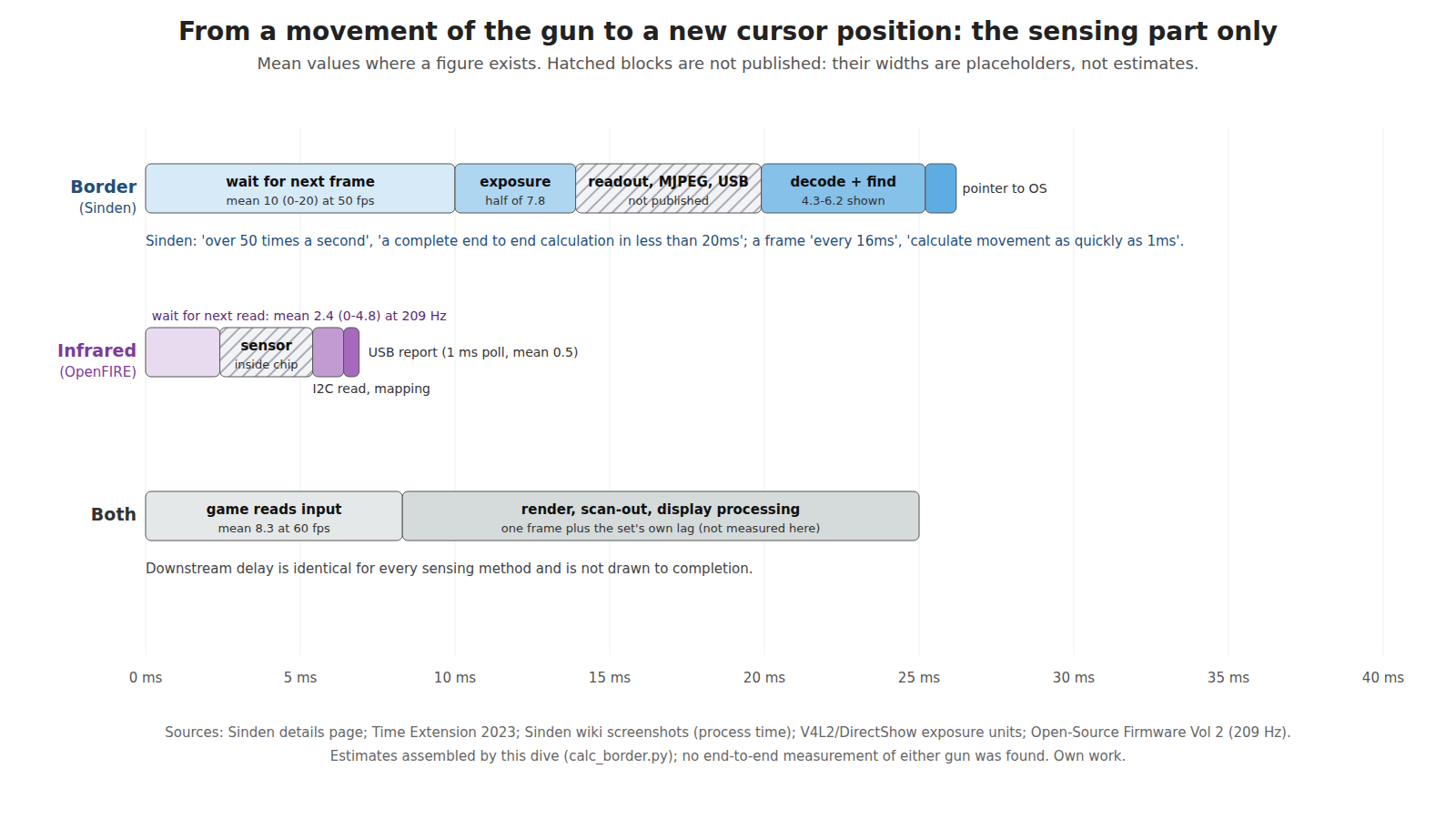
Sinden’s details page makes two claims: the gun “calculates where you are pointing on the screen over 50 times a second” and “provides a complete end to end calculation in less than 20ms.”1 Interviewed for a 2023 review, the company put it differently: “the software within the gun captures a frame every 16ms and can calculate movement as quickly as 1ms.”2 Neither statement says where the clock starts or stops, and no published measurement of the gun’s latency was found, by Sinden or anyone else. The fan-built PlayStation adapter that uses a Sinden gun on original consoles also publishes no figures (Modding Classic Light Guns, Volume 5).
4.2 The frame rate, and why the sources disagree
Table 1 — 4.2 The frame rate, and why the sources disagree
| Source | Date | Frame rate |
|---|---|---|
| Hackaday, on the first public prototype | 2018 | ”it seems to use a fairly standard 30fps camera”3 |
| Sinden, via Time Extension | 2023 | a frame “every 16ms” (about 60 per second)2 |
| Sinden’s details page | current | ”over 50 times a second”1 |
| The wiki’s Visual Setup Guide | current | ”If it drops below 45 you may find the gun tracking feels sluggish in games. 50+ FPS is recommend. It is common to jump between 48-50 FPS and this is fine.”4 |
| Counters in the wiki’s screenshots | various | 48.47, 49.10, 49.31, 49.49 and 59.24 fps45 |
The figures are not necessarily in conflict. The 2018 figure is Hackaday’s reading of an early prototype, hedged with “seems”. The software shows the camera’s achieved rate, and a webcam’s achieved rate under manual exposure depends on whether the exposure fits inside the frame period. The counters cluster near 49 and one shows 59, which is consistent with a camera that runs at up to 60 frames per second and falls to about 50 under some settings or hosts. Which modules run at which rate is not published. This dive uses 50 frames per second for its budget, the figure the wiki tells owners to expect.
4.3 Exposure, in milliseconds
The exposure values in Sinden’s two configurations can be translated, because each uses its platform’s standard camera control.
- Linux:
CameraExposuretakes “19 very low, 39 low, 79 default, 159 high”.6 The Video4Linux absolute-exposure control is specified in “100 µs units” and “is limited by the frame interval,” so these are 1.9, 3.9, 7.9 and 15.9 ms.7 - Windows: the change log records that for SindenCamA and SindenCamB modules “I slightly increased the default exposure setting from -8 to -7 to help with dimmer displays,” and the wiki’s troubleshooting page gives “Exposure to -7 to -9 (range is -5 to -9).”85 The Windows camera exposure control is specified “in log base 2 seconds,” so −7 is 7.8 ms, −8 is 3.9 ms, −9 is 2.0 ms and −5 is 31 ms.9
The two defaults agree to within a tenth of a millisecond, about 7.8 ms, which is good evidence that the translation is right. (It is this dive’s translation; Sinden does not state units.) Two things follow.
- Motion blur. An exposure of 7.8 ms smears the border across the image by however far the aim moves in that time. A quick swing of 90° per second moves the camera’s view by 0.7° during the exposure, about 9 camera pixels at the 52° field assumed in Volume 3. The border is 4 to 5 pixels wide at the recommended distance. A fast swing therefore blurs the border to a fraction of its contrast, which is one reason a shorter exposure and a brighter screen help in action games.
- The −5 setting does not fit. At 31 ms, the exposure is longer than one frame at 50 frames per second; the camera must drop its frame rate. The troubleshooting page’s range stops at −5, and its recommended −7 to −9 all fit comfortably.
4.4 The budget, stage by stage
From the moment the gun moves to the moment the operating system has the new pointer position:
Table 2 — From the moment the gun moves to the moment the operating system has the new pointer position
| Stage | Border gun (Sinden pattern) | Basis |
|---|---|---|
| Waiting for the next frame to start | 0 to 20 ms, mean 10 ms | 50 frames per second |
| Exposure, to its centre | about 3.9 ms | half of the 7.8 ms default (4.3) |
| Sensor readout, compression in the camera, USB transfer | not published | a rolling-shutter sensor reads its rows out over up to one frame period |
| Decode and border finding on the host | 4.3 to 6.2 in the screenshots | ”Last 100 Frames Average Process Time”, unit not shown, presumably ms4 |
| Pointer injection | under 1 ms | an operating-system call |
| Total, known parts | about 19 ms mean, plus the unpublished stage |
The known parts alone make about 19 ms on average, which sits beside Sinden’s “less than 20ms” if that figure means from exposure to output rather than from movement to output. Either way, the dominant term is not processing but the frame rate: at 50 frames per second, the wait for the next frame is on average longer than everything else combined. A camera at 120 frames per second would cut the mean wait to about 4 ms; cygun’s documentation shows an ordinary USB webcam reaching 122 fps at 1280 × 720 (Volume 2), so faster capture is available, at the cost of more host work per second.
The processing time in the screenshots is worth comparing with the frame period. About 5 ms of host work per 20 ms frame is a quarter of one processor core on the PCs in those screenshots, for one gun. Two guns double it.
4.5 Against infrared
OpenFIRE reads its camera about 209 times a second, so the mean wait for a fresh position is 2.4 ms; the position is computed in the gun and goes out in a USB report that the host polls every millisecond (Open-Source Firmware, Volume 2). The infrared camera’s own exposure and internal processing are not published either, but they sit inside a frame period of under 5 ms. On the sensing side alone, then, an infrared gun of this pattern delivers a fresh position several times as often as a border gun at 50 frames per second, and roughly 10 to 15 ms sooner on average. That is under one frame of a 60 Hz game, and the wiki’s own advice on tracking that “feels sluggish” below 45 frames per second shows that players can feel the difference near the margin.4
4.6 The MiSTer modes: latency bought with processor time
Sinden’s MiSTer driver runs on the board’s 800 MHz ARM processor and offers three modes, described in its README and on the wiki.1011
Table 3 — 4.6 The MiSTer modes: latency bought with processor time
| Mode | What it does | Cost |
|---|---|---|
| Low resource | ”only processes video when the trigger is pulled" | "only 4% CPU core usage” |
| Medium resource (default) | “continuously crunches video, providing ready coordinates when the trigger is pulled” but “doesn’t crunch every video frame” | larger footprint, “still doesn’t interfere with MiSTer processing” |
| Normal | processes continuously | ”may potentially affect games like PSX that also rely on the ARM CPU” |
Low-resource mode is a clean illustration of the latency budget. A position is computed only after the trigger is pulled, so every shot carries at least one frame’s wait, the exposure, the transfer and the processing on the slow processor before the game has a position. The wiki notes that it suits “16-bit and under games that have a slow screen flash”, because those games, written for CRT guns, themselves spend a frame or more on the flash after the trigger (CRT Timing, Volume 4); a game that needs a moving cursor, like Terminator 2, “can be played by simply holding down the trigger.”11
4.7 Things that add delay outside the gun
These are not part of the sensing budget, but they are added by the border method’s own requirements.
- Drawing the border through the compositor. A border drawn by a desktop overlay forces the game through the operating system’s compositor. The author of a GNOME extension that draws a Sinden border warns that it means “Applications cannot bypass the compositor”, with “input latency implications,” and that it “will prevent VRR from activating.”12 Sinden’s own overlay on Windows raises the same question; the wiki tells MAME users to avoid exclusive full-screen modes because they hide the border (Volume 6).
- The display’s own lag. Common to every method, and a property of the set and its game mode. No primary measurement was read for this dive, as CRT Timing, Volume 6 also records.
- Run-ahead. The wiki’s RetroArch page suggests RetroArch’s run-ahead setting to “reduce latency… Your mileage may vary.”13 That reduces the emulator’s internal delay, not the gun’s.
4.8 A bench method
No end-to-end figure exists for any border gun, so measuring one is worth doing before the method is ruled in or out for anything. The project’s bench has what it needs: the Analog Discovery Pro ADP3450 and the fast photodiode front end set out in CRT Timing, Volume 8.
The border-step test. It measures from a change on the screen to the new pointer position, which is the sensing latency plus the display’s lag; the display’s lag is then measured separately with the same photodiode and subtracted.
- Mount the gun rigidly, aimed at the screen at the playing distance.
- Run a small test program that draws the border and, on command, shifts the whole border sideways by a known amount (say 5 % of the width). The computed aim jumps by the same fraction.
- Tape the photodiode over a spot that the moving border edge crosses, and record its output on one analogue channel of the ADP3450. That timestamps when the shift actually appeared on the screen.
- Have the same program log, with a high-resolution clock, the moment the pointer position it reads changes, and pulse one of the ADP3450’s digital lines (driven from the program through the WaveForms SDK) at that moment.
- The interval from the photodiode edge to the digital pulse is the sensing latency, from light on the screen to pointer in the program. Repeat a few hundred times: the spread should be about one frame period wide, because the shift lands at a random point in the camera’s frame.
The same rig measures an infrared gun if the step is made in the emitters instead: switch one emitter bar between two positions, or switch emitters on and off, with the photodiode replaced by a monitor on the emitter drive.
4.9 What could not be verified
- Sinden’s camera frame rate per module; the 30 fps reading of 2018 against 50 to 60 since.
- The unit of the “Process Time” counter (milliseconds is inferred).
- The units of the exposure values (inferred from the platform standards; the agreement between the two defaults supports the inference).
- Readout, on-camera compression and USB transfer times.
- Any measured end-to-end latency for a border gun.
Sources
Footnotes
-
Sinden Lightgun, “Details”, https://sindenlightgun.com/details/ (read 2026-10-19). ↩ ↩2
-
Damien McFerran, “Sinden Light Gun”, review, Time Extension, 24 December 2023, https://www.timeextension.com/reviews/sinden-light-gun-old-school-arcade-blasting-on-your-modern-day-tv (read 2026-10-19). ↩ ↩2
-
Zoe Skyforest, “A Lightgun for LCDs Thanks to Maths”, Hackaday, 28 June 2018, https://hackaday.com/2018/06/28/a-lightgun-for-lcds-thanks-to-maths/ (read 2026-10-19). ↩
-
Sinden Lightgun wiki, “Visual Setup Guide”, text and interface screenshots, Internet Archive raw capture, read 2026-10-19. ↩ ↩2 ↩3 ↩4
-
Sinden Lightgun wiki, “Sinden Troubleshooting”, text and screenshots, Internet Archive raw capture, read 2026-10-19. ↩ ↩2
-
Sinden Lightgun software V2.08b,
LightgunMono.exe.config(Linux PC build); https://www.sindenlightgun.com/software/SindenLightgunSoftwareReleaseV2.08b.zip, downloaded 2026-10-19. ↩ -
Linux kernel documentation, “Camera Control Reference”,
V4L2_CID_EXPOSURE_ABSOLUTE, https://www.kernel.org/doc/html/latest/userspace-api/media/v4l/ext-ctrls-camera.html (read 2026-10-19). ↩ -
Same package,
ChangeLog.txt, version 1.8. ↩ -
Microsoft Learn, “CameraControlProperty enumeration (strmif.h)”,
CameraControl_Exposure, https://learn.microsoft.com/en-us/windows/win32/api/strmif/ne-strmif-cameracontrolproperty (read 2026-10-19). ↩ -
MrLightgun (Sinden Technology), “MiSTerSindenDriver”, README, https://github.com/MrLightgun/MiSTerSindenDriver (read 2026-10-19). ↩
-
Sinden Lightgun wiki, “MiSTer”, Internet Archive raw capture, read 2026-10-19. ↩ ↩2
-
Aaron Paden, “White Border Overlay” (GNOME Shell extension), README, https://github.com/AaronBPaden/whiteborder-aaronbpaden.gmail.com (read 2026-10-19). ↩
-
Sinden Lightgun wiki, “Retroarch”, Internet Archive raw capture, read 2026-10-19. ↩
Comments (0)