Border Tracking · Volume 6
Drawing the Border — Overlays, Emulators, Shaders, Scalers and FPGA Cores
The border must be on the panel whenever the gun is used. The four places it can be drawn, what each costs, and the settings that make each one work
6.1 Four places to draw it
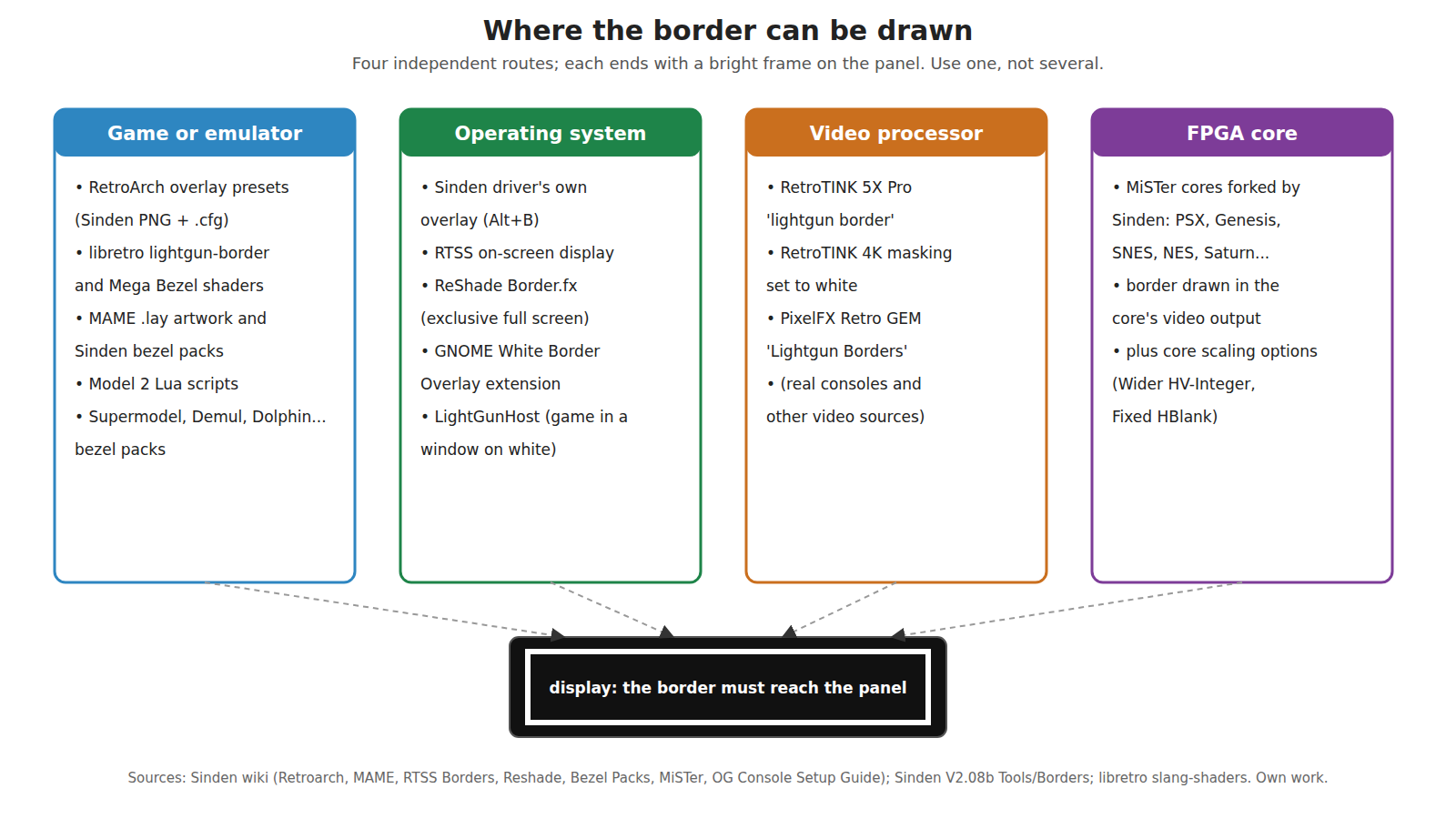
The border has to be bright, the right colour, the right width, continuous on all four sides, and aligned with the area that the game treats as its screen. The closer to the game it is drawn, the more exactly it matches the game’s own coordinates; the further away, the more games it covers without per-game work. Light-gun players use all four routes, and the Sinden wiki documents each of them.
6.2 The Sinden driver’s own overlay
Sinden’s Windows software draws the border itself as a window on top of everything else. It is toggled with Alt+B (configurable), which steps through the 16:9 border, the 4:3 border and none; the Windows configuration also has options to hide the taskbar while the border is on, to choose which monitor gets the border, and to draw a border image instead of a plain frame.12
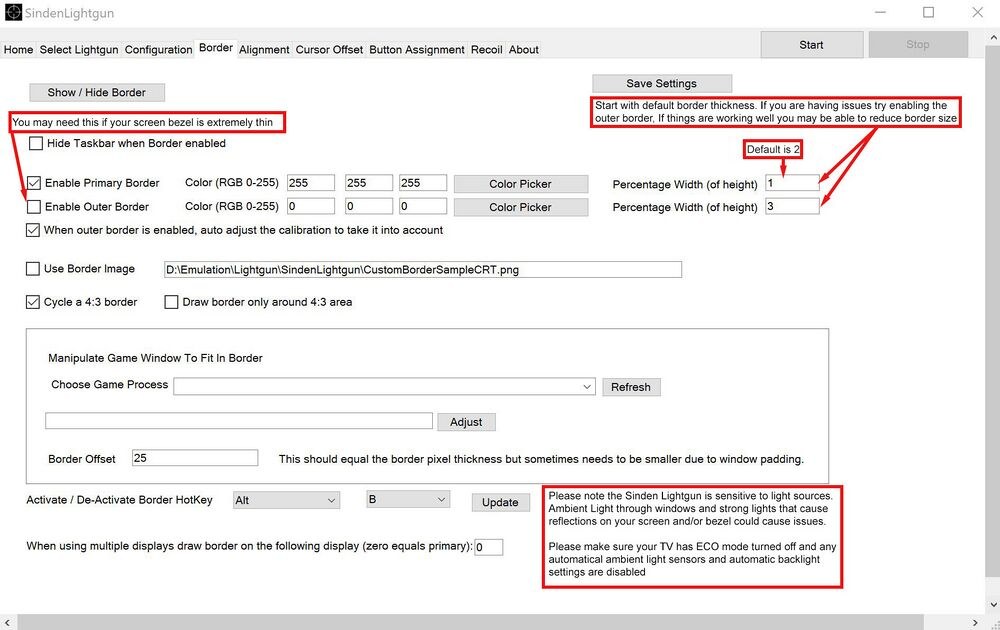
The overlay’s weakness is the one every desktop overlay has: a game in exclusive full-screen mode draws straight to the display and the overlay disappears. The FAQ: “Some emulators/games use exclusive fullscreen and hide the Sinden border. In MAME use a video mode other than OpenGL.”3 The usual remedy is borderless-window full screen, which the wiki’s RetroArch guide also sets (“Windowed Fullscreen Mode ON”); the latency cost of routing a game through the compositor is discussed in Volume 4.4
6.3 RetroArch
Sinden’s package ships RetroArch overlays: PNG images at 1920 × 1080 with matching .cfg files, in white (super-thin, thin, medium, large), cyan (“Blue”) and a CRT-styled frame, each in a 4:3 version and a “_Wide” version.5 Measured from the images, the white borders are roughly 4 to 7 pixels (super-thin), 11 to 13 (thin), 21 to 24 (medium) and 24 to 40 (large) at 1080 lines, or about 0.5, 1, 2 and 3 to 3.7 % of the height. The wiki’s procedure: copy them to RetroArch’s overlay folder, turn Display Overlay on, choose a Sinden preset (“for widescreen monitors, choose a ‘wide’ preset”), and set “Overlay Opacity value to 1.0 so it’s fully opaque and the white color is properly rendered”; then save a per-core override so each console’s games keep their border.4
RetroArch’s own shader collection offers two alternatives. A small lightgun-border shader, added in September 2024, draws a border of adjustable thickness (default 0.5 % of the height on each edge, aspect-corrected) in red, yellow, green, cyan, blue or magenta; it has no white option, so a Sinden gun would need its match colour changed to suit.6 The large Mega Bezel shader package has “Sinden_Border” presets, with parameters for the border’s thickness and brightness and an “empty tube compensation.”6 A shader border is drawn inside the emulator’s own output, so it survives exclusive full screen.
On a Raspberry Pi 4, Sinden’s own notes record a RetroArch quirk, a pointer that “is slightly off to the side BUT as soon as you go all the way to the left hand screen it lines up,” traced to RetroArch’s X11 light-gun code path, with a patched build and a note that the problem may since have been fixed upstream.7
6.4 MAME
MAME draws artwork from layout (.lay) files, and that is the border route for full MAME. Sinden’s package includes templates: for Alien 3 and Terminator 2, a layout with an “OriginalAspectRatio” view that places the 4:3 game at 1152 × 864 inside a 1600 × 900 bezel image with the white frame, and a “Stretched” view with a 25-pixel frame around a stretched game.5 The community bezel packs extend this to the whole light-gun catalogue, with “an integrated 4:3 white border” and a choice of bezel darkness; the wiki advises starting “with the darkest bezel level (70-80%) and wide border.”89 (Separate packs exist for MAME up to 0.224 and from 0.225, and the menu path changed in 0.229.)
Two MAME-specific notes from the wiki. Map the gun’s inputs with the border showing and the gun aimed at the screen, because the off-screen remapping (Volume 2) otherwise turns the trigger into the reload button during mapping. And turn crosshairs off: “Crosshairs will always trail behind your aim as you quickly move around your screen.”83
6.5 Other emulators and PC games
- Sega Model 2 emulator: Lua scripts that draw the border as image bars every frame. Sinden’s House of the Dead script draws 25-pixel white bars positioned 15 pixels off each edge, leaving 10 visible, with commented-out variants including a “Thicker border with an outer black border.”5
- Supermodel, Demul (Naomi and Atomiswave), Mesen, DuckStation, ePSXe and PCSXR, Snes9x, PCSX2: community bezel packs with the border built in, “created for use with a 16:9 screen only.”9
- PC games with a light-gun mode: the driver’s overlay, in borderless-window mode where the game allows it, otherwise ReShade (6.6).
6.6 Desktop-level overlays: RTSS, ReShade, GNOME
- RivaTuner Statistics Server. The overlay engine behind MSI Afterburner’s frame-rate display can draw a border image as its on-screen display, and the wiki reports that this “works with 99% of games and emulators just by having RTSS running in the background,” though it labels the method experimental. Presets for different resolutions and aspect ratios can be put on hotkeys.10
- ReShade. A post-processing injector that hooks the game’s graphics API, so its
Border.fxeffect is drawn inside the game’s own frame and survives exclusive full screen. The wiki gives a working preset,border_color=1.000000,0.999990,0.999990andborder_width=13.000000,13.000000, for when ReShade’s menu key fails.11 - GNOME White Border Overlay. A GNOME Shell extension that draws a border over everything on Linux desktops. Its author’s warnings belong in any comparison of routes: “Applications cannot bypass the compositor while this extension is active. Native overlay support is still preferred,” with “input latency implications,” and it “will prevent VRR from activating.”12
- LightGunHost. An open Windows tool that turns the whole screen white and places a chosen game window inside it, so that the uncovered white margin is the border (Volume 5).13
6.7 Video processors, for real consoles
Original consoles do not draw a border, so something between the console and the display must. The Sinden wiki’s console guide names three video processors with the feature: the RetroTINK 5X Pro’s “lightgun border” (on firmware that has it), the RetroTINK 4K’s masking colour set to white and shown always, and the PixelFX Retro GEM’s “Lightgun Borders”. What those settings are, the fan-built SindenPS adapter that lets a Sinden gun drive original PlayStation G-Con 45 and G-Con 2 games, and the fact that a scaler draws a border rather than rescuing a CRT gun, are covered in Modding Classic Light Guns, Volume 5 and not repeated here.
From the border’s point of view, a video processor is attractive because it covers every game on a console with no per-game work, and because it sits in the video path, not the game, so it cannot be hidden by an exclusive full-screen mode. Its costs are the processor’s own latency (not measured for this dive) and the fact that it frames the whole active picture, not the area a particular game uses.
6.8 MiSTer: the border in the FPGA core
On the MiSTer, Sinden forked the PlayStation, Mega Drive/Genesis, SNES, NES, Master System, Mega-CD, Atari 7800 and Saturn cores, among others; the Saturn fork’s description is “Sega Saturn core for MiSTer with a Sinden border.”14 The border is generated in the core’s own video output, which makes it exact and immune to any software overlay problem. The wiki and the driver README add two core-specific notes: on the NES core, “If your border is not showing clearly because the edges are cut off… setting scale to ‘Wider HV-Integer’ helps in most cases,” and on the PlayStation core, “If you tweak the ‘Fixed HBlank’ setting, then you can normally get the game window to perfectly match the white border, which helps accuracy.”1516 The second note shows the general rule in miniature: the border should enclose exactly the area the game treats as its screen.
6.9 Choosing a route
Table 1 — 6.9 Choosing a route
| Route | Covers | Survives exclusive full screen | Matches the game’s own area | Cost |
|---|---|---|---|---|
| Emulator overlay or shader (RetroArch, MAME artwork, bezel packs) | One emulator; per-core or per-game setup | Yes (drawn in the emulator’s output) | Yes, when set up per game | Setup time |
| Sinden driver overlay | Everything on the desktop | No | Only if the game fills the screen or the 4:3 area | Compositor latency, possibly no VRR |
| RTSS / ReShade | Most PC games and emulators | ReShade yes; RTSS reported to (“99%“) | Approximately | Third-party hooks |
| Video processor | Every game on a real console | Yes | The whole active picture | The processor’s latency and price |
| FPGA core | That core’s games | Yes | Yes, after core tuning | Only on cores that have it |
The rule underneath every row is the same: for a border gun, a light-gun game is not ready until its border is, and the border must be checked on the panel, in the raw camera view, not assumed from a menu setting.
6.10 What could not be verified
- Whether every Sinden MiSTer core fork is current with its upstream core.
- The latency of any of the video processors with the border feature on.
- RTSS’s behaviour with exclusive full-screen games beyond the wiki’s “99%” claim.
- Which RetroArch video drivers and platforms show the X11 offset problem today.
Sources
Footnotes
-
Sinden Lightgun wiki, “Getting Started”, Internet Archive raw capture, read 2026-10-19. ↩
-
Sinden Lightgun software V2.08b,
SindenLightgunWindowsV2.08/SindenLightgun/Lightgun.exe.config(chkHideTaskbar,txtSelectMonitorForBorder,chkShowBorderImage,cbBorderKey); https://www.sindenlightgun.com/software/SindenLightgunSoftwareReleaseV2.08b.zip, downloaded 2026-10-19. ↩ -
Sinden Lightgun wiki, “FAQ”, Internet Archive raw capture, read 2026-10-19. ↩ ↩2
-
Sinden Lightgun wiki, “Retroarch”, Internet Archive raw capture, read 2026-10-19. ↩ ↩2
-
Sinden Lightgun software V2.08b,
Tools/Borders/(RetroArch overlays, MAME templates, Model 2 Lua scripts,borders_readme.txt); pixel widths measured from the PNG files for this dive. ↩ ↩2 ↩3 -
libretro, “slang-shaders”,
border/shaders/lightgun-border.slang(added 2024-09-10) andbezel/Mega_Bezel/resource/param_values/lightgun/sinden-border-basic.params, https://github.com/libretro/slang-shaders (read 2026-10-19). ↩ ↩2 -
Sinden Lightgun software V2.08b,
ARMversion/Pi/Lightgun/RetroArchPatch/readme.txt. ↩ -
Sinden Lightgun wiki, “MAME”, Internet Archive raw capture, read 2026-10-19. ↩ ↩2
-
Sinden Lightgun wiki, “Sinden Bezel Packs”, Internet Archive raw capture, read 2026-10-19. ↩ ↩2
-
Sinden Lightgun wiki, “RTSS Borders”, Internet Archive raw capture, read 2026-10-19. ↩
-
Sinden Lightgun wiki, “Reshade”, Internet Archive raw capture, read 2026-10-19. ↩
-
Aaron Paden, “White Border Overlay”, README, https://github.com/AaronBPaden/whiteborder-aaronbpaden.gmail.com (read 2026-10-19). ↩
-
mingrizaizao, “LightGunHost”, README, https://github.com/mingrizaizao/LightGunHost (read 2026-10-19). ↩
-
MrLightgun (Sinden Technology), repository list, https://github.com/MrLightgun (read 2026-10-19). ↩
-
MrLightgun, “MiSTerSindenDriver”, README, https://github.com/MrLightgun/MiSTerSindenDriver (read 2026-10-19). ↩
-
Sinden Lightgun wiki, “MiSTer”, Internet Archive raw capture, read 2026-10-19. ↩
Comments (0)