Positional and Inertial Aiming · Volume 1
Aiming Without Looking — What Position and Motion Sensors Actually Measure
A light gun needs one number pair: where on the screen the barrel points. A camera in the gun measures it; angle sensors, gyroscopes, accelerometers, magnetometers and room trackers each measure something else and have to infer it. The map of the methods, the geometry that turns an angle into a pixel, and why every one of them ends up needing an absolute reference
1.1 The Question in One Paragraph
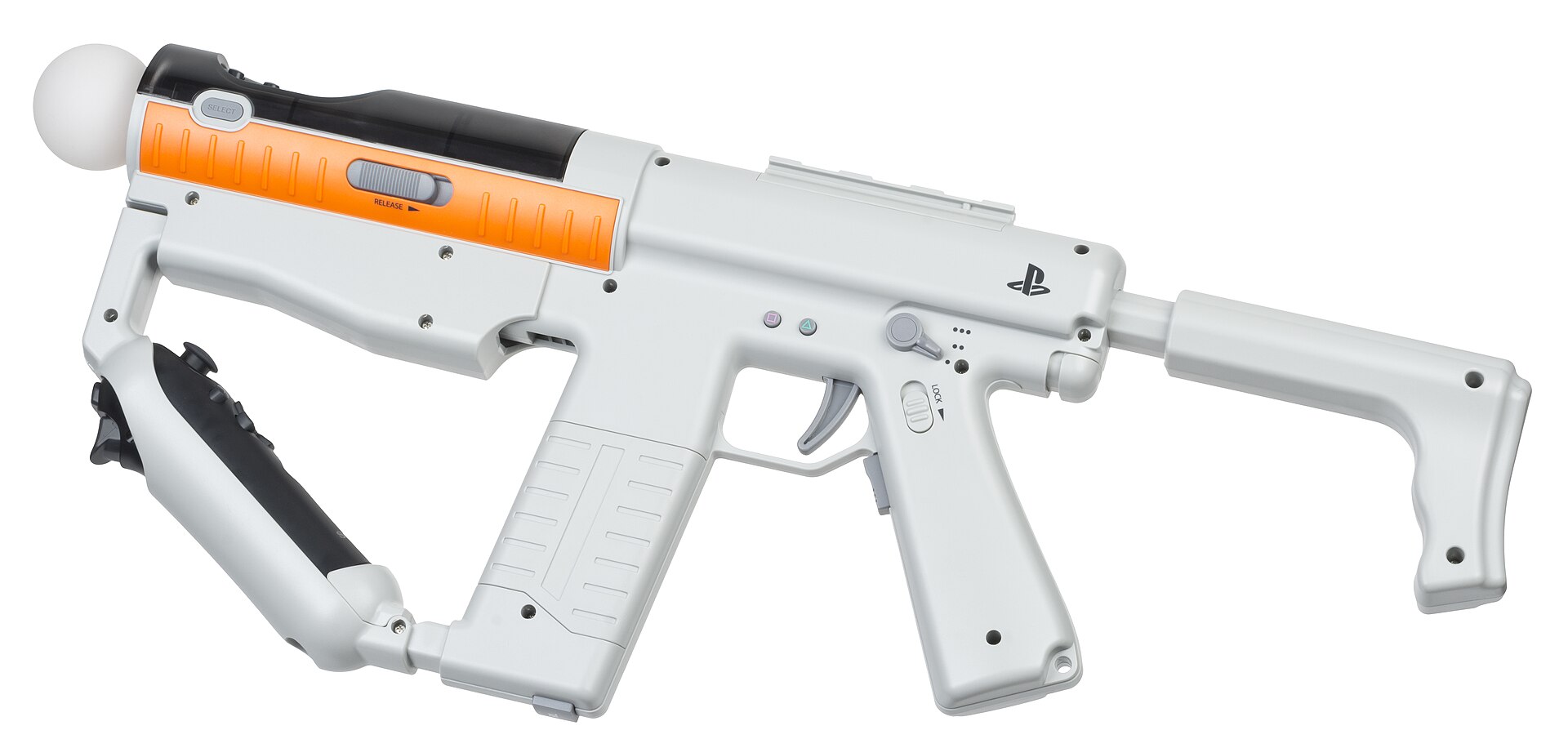
A light gun has to tell the host one thing: the point on the screen where a line along its barrel meets the picture. Three generations of light gun have measured that point directly, by timing a raster (CRT Timing) or by imaging markers or a border from the gun (IR Point Tracking, Border Tracking). Everything else that has ever been used to aim at a screen measures something different — the angle of a shaft, the rate at which the gun is turning, the direction of gravity or of magnetic north, the position of the gun in the room — and then infers the aim point through a model. This dive is about those indirect methods: what each one actually measures, how well the datasheets say it measures it, how the errors grow, and where one of them earns a place beside the camera in the gun this project is building.
1.2 What This Dive Owns, and What It Links To
This dive owns aiming by position and motion sensing rather than by optics:
- Angle sensors on a mount — potentiometers, encoders and magnetic (Hall-effect) angle sensors, as engineering: resolution, linearity, wear, gearing, and the geometry of a fixed pivot (Volume 2).
- Inertial sensors — MEMS gyroscopes and accelerometers, why integrating a gyroscope drifts, worked drift examples from three current datasheets, accelerometer tilt, and the limits of a magnetometer indoors (Volume 3).
- Sensor fusion — complementary, Mahony and Madgwick filters, and gyro assistance on top of an optical fix as the Wii MotionPlus, PlayStation Move and gyro “air mice” did it (Volume 4).
- Other positioning — ultrasonic, magnetic-field, ultra-wideband and optical-flow tracking, with the evidence for any pointer or game use (Volume 5).
- An IMU for this build — what an inertial sensor could add to the OpenFIRE gun with the PixArt PAJ7025R3 camera, the candidate parts and why, and the bus and pin cost on the Pico (Volume 6).
It links to, and does not repeat:
- Arcade Light Guns, Volume 3 — the potentiometer guns themselves (Taito’s Operation Thunderbolt and Space Gun, SNK’s Beast Busters, Sega’s Line of Fire and Alien3, Midway’s Terminator 2 and Revolution X, and the 2014 flat-panel fixed-gun cabinets), with their 5 kΩ pots, gear trains and three-point calibration from the service manuals. Volume 2 here is the engineering behind them, not the catalogue.
- History of Light Guns, Volume 7 — the Wii Remote, Wii Zapper, GunCon 3, PlayStation Move and Top Shot Elite as history. Its §7.5 draws the distinction this dive starts from: a marker-tracking gun measures where it points, while a Move “measures where the controller is and, separately, which way it is turned”.
- Aiming Maths and Calibration — the camera-to-screen maths, calibration and the smoothing filters (averaging, One-Euro). Fusion filters here feed it; its filters are not re-derived here.
- Reference Electronics, Volume 2 — the Pico’s pin budget, which Volume 6 here has to fit an IMU into.
- Solenoid Recoil, Volume 6 — measuring kick with an analogue accelerometer on the bench. An IMU in the gun (Volume 6 here) is a different job with a different part.
1.3 The Map of Methods
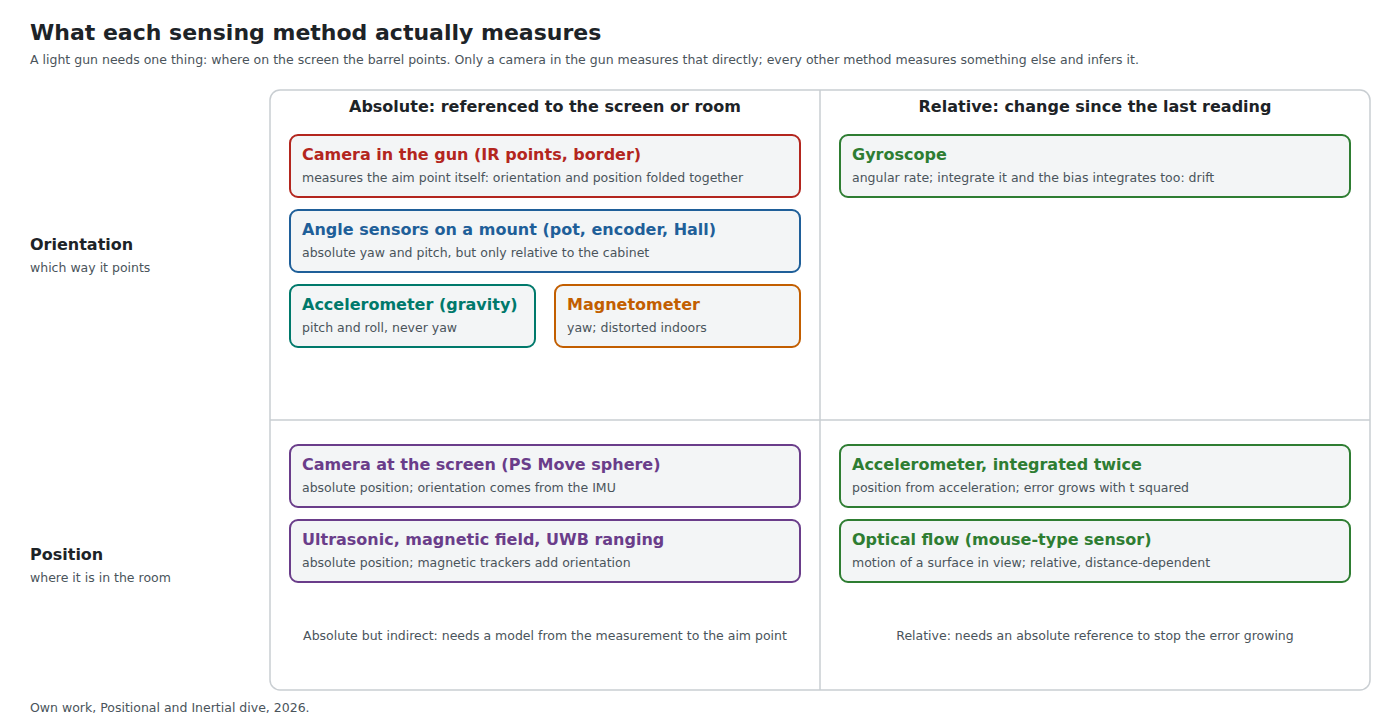
Two questions sort every aiming method.
Does it measure which way the gun points, or where the gun is? The aim point depends on both. A gun held at the same angle but stepped half a metre to the left points at a different spot on the screen. Orientation sensors (angle sensors, gyroscopes, accelerometers used for tilt, magnetometers) know nothing about that step; position sensors (a camera at the screen, ultrasonic or radio ranging) know nothing about the angle.
Is the reading absolute or relative? An absolute reading is referenced to something fixed — the cabinet, gravity, the Earth’s field, the screen — and its error does not grow with time. A relative reading is a change since the last sample, and has to be summed (integrated) to become an angle or a position, which means its errors are summed too.
The camera in the gun is the odd one out. It does not measure orientation or position separately: the markers’ positions in its image are a function of both, and the homography the firmware computes from four of them recovers the aim point without ever separating the two (Aiming Maths and Calibration). That is why every product that tried to aim without one ended up adding one. Nintendo’s own designers said so of the Wii Remote: they “would need an absolute reference point near the TV in order to improve reliability of control” — the Sensor Bar — because without one “you won’t know where the pointer is directed due to the margin of error that arises” (quoted in History of Light Guns, Volume 7, §7.1).
Table 1 — 1.3 The Map of Methods
| Method | Measures | Reference | Error over time | Typical use |
|---|---|---|---|---|
| Camera in the gun | the aim point | the screen (markers or border) | bounded | every modern light gun |
| Angle sensors on a mount | yaw and pitch of the mount | the cabinet | bounded | arcade fixed guns (Arcade Vol 3) |
| Gyroscope | angular rate | none | grows with time | motion assist, “gyro as mouse” |
| Accelerometer, static | pitch and roll | gravity | bounded (when still) | tilt, gestures |
| Accelerometer, integrated twice | position | none | grows with time squared | useless beyond a fraction of a second |
| Magnetometer | heading | magnetic north | bounded but distorted indoors | heading for drones and phones |
| Camera at the screen | position (and some orientation) | the screen | bounded | PlayStation Move |
| Ultrasonic, magnetic, UWB | position (magnetic: also orientation) | a base station | bounded | Power Glove, Razer Hydra, UWB tags |
1.4 From an Angle to a Pixel
Every orientation method, from a potentiometer to a gyroscope, delivers an angle. Turning that angle into a screen position needs the geometry of the room, and the numbers matter enough to fix a reference room for the whole dive.
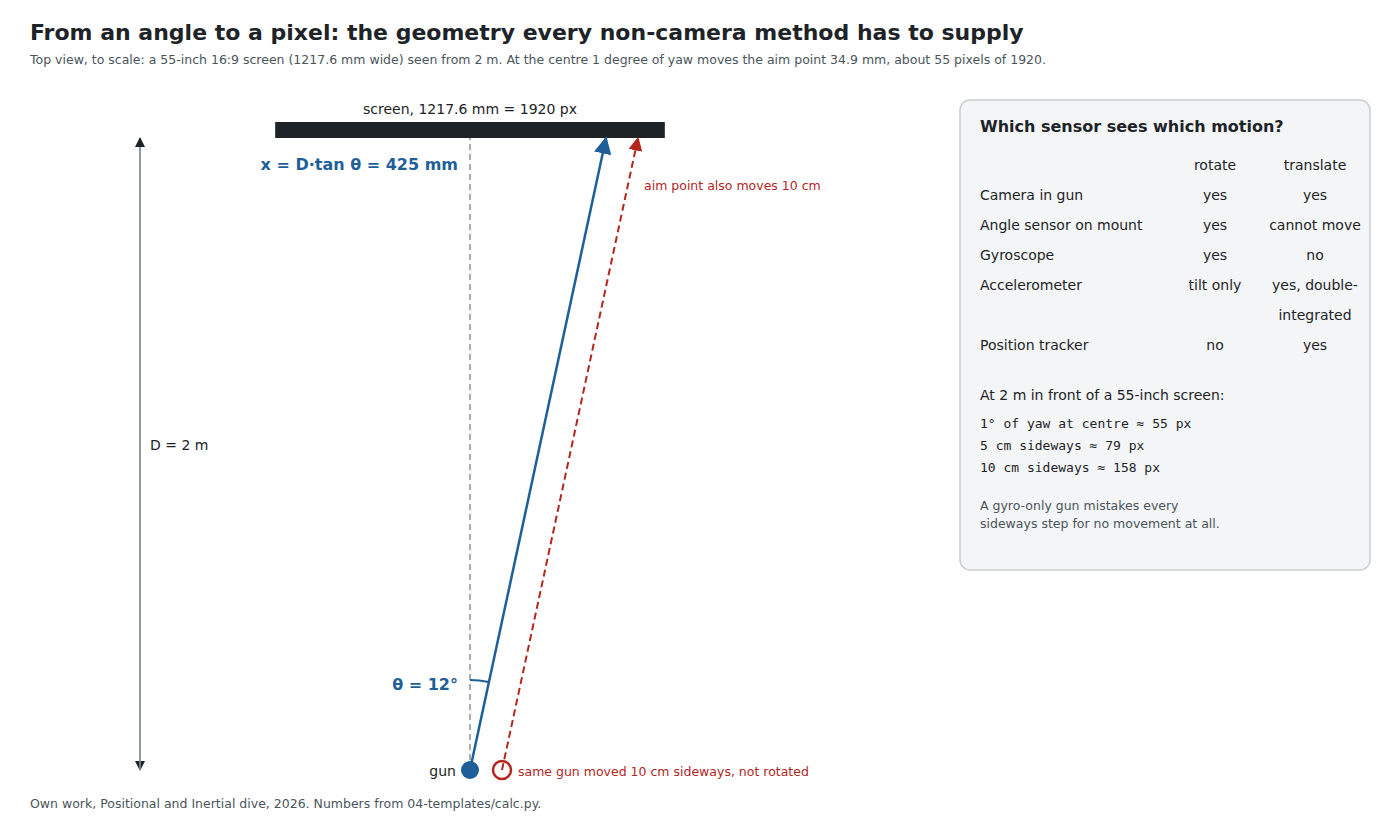
A 55-inch 16:9 panel is 1217.6 mm by 684.9 mm. At 1920 pixels across, one pixel is 0.634 mm. From a pivot on the screen’s centre line at distance D, a yaw of θ puts the aim point at x = D·tan θ from the centre. Near the centre that is D·(π/180) per degree:
Table 2 — A 55-inch 16:9 panel is 1217.6 mm by 684.9 mm. At 1920 pixels across, one pixel is 0.634 mm. From a pivot on the screen's centre line at distance D, a yaw of θ puts the aim point at x = D·tan θ from the centre. Near the centre that is D·(π/180) per degree
| Distance | Screen width subtends | 1° of yaw at the centre |
|---|---|---|
| 1.5 m | 44.2° | 26.2 mm, 41 px |
| 2.0 m | 33.9° | 34.9 mm, 55 px |
| 2.5 m | 27.4° | 43.6 mm, 69 px |
| 3.0 m | 22.9° | 52.4 mm, 83 px |
(From the dive’s calculation script, 04-templates/calc.py.)
Fifty-five pixels per degree at 2 m is the conversion used through the rest of the dive. It is what makes inertial aiming hard: a gyroscope whose zero has wandered by half a degree per second puts the cursor 28 pixels off after one second and 275 pixels off after ten (Volume 3). It is also what makes mount sensors easy: a 12-bit magnetic angle sensor resolves 0.088° per count, about 5 pixels, before any gearing (Volume 2).
The relation is a tangent, not a straight line. Across the half-width of the reference screen the difference between D·tan θ and a straight line through the centre and the edge is under 7 mm at 2 m but 25 mm at 1 m, which matters for a mounted gun close to a projection screen (Volume 2, §2.6).
1.5 Rotation Is Not the Whole Story
The figure above has a second gun in it, moved 10 cm to the right without turning. Its aim point moves 10 cm too: 158 pixels. A camera in the gun sees that, because the markers shift in its image. An angle sensor on a mount cannot experience it, because the mount does not move. A gyroscope sees nothing at all, because nothing rotated.
For a handheld gun this is not a corner case. A player who steps sideways, leans, or swings the gun from the shoulder rather than the wrist translates it by centimetres. A gyroscope-only aim reads all of that as “no change”. That is the deep reason the gyroscope-aiming community treats the gyroscope as a relative input — a mouse — and not as a pointer: “The mouse doesn’t know its absolute position on the mousepad; the gyro doesn’t need to know its absolute orientation” (Jibb Smart, GyroWiki, 2019).1 A mouse-like cursor is fine for a first-person game. A light gun is judged by whether the cursor sits where the barrel points, and rotation alone cannot keep it there.
Recovering the translation from an accelerometer means integrating twice, and the error then grows with the square of time: an uncorrected bias of 1 mg is 4.9 mm of position error after one second and 20 mm after two; the 20 mg zero-g tolerance the datasheets quote is 98 mm after one second (Volume 3, §3.7). Position has to come from somewhere absolute.
1.6 Absolute and Relative, and Why Relative Always Drifts
A gyroscope reports angular rate. Turned into an angle by summing samples, every constant error in the rate — the zero-rate offset, or bias — becomes an angle error that grows linearly with time, and every random error becomes an angle error that grows with the square root of time. The datasheets give both:
- Zero-rate offset. ±0.5 °/s for the TDK InvenSense ICM-42688-P and the Bosch BMI270, ±1 °/s for the ST LSM6DSO, at 25 °C.234
- Its change with temperature. ±0.005, ±0.015 and ±0.010 °/s per °C respectively.
- Rate noise density. 0.0028, 0.007 and 0.0038 °/s/√Hz.
Calibrating the offset while the gun is still removes the first. Warming the gun by 10 °C after calibration brings back 0.05 to 0.15 °/s of it. The noise is small: its angle random walk is a few thousandths of a degree after one second. Bias, not noise, is what makes inertial aiming drift, and Volume 3 works the numbers through.
An absolute reference stops the growth. Gravity stops it for pitch and roll whenever the gun is not accelerating, which is how every fused orientation estimator keeps “down” right. Nothing in a room stops it for yaw except a magnetometer (unreliable indoors, Volume 3, §3.8) or a camera. The WiiBrew documentation of the Wii MotionPlus says exactly this: the matrix will “drift a little, so you should reset the matrix’s pitch and roll (but not yaw)” from the accelerometers when the remote is still.5 Yaw — left and right across the screen, the axis that matters most for a light gun — is the axis with no free reference.
1.7 Where the Eye Comes In
None of these methods, the camera included, measures what the player sees. The player aligns an eye, a sight and a target; the sensors measure the barrel. For a camera gun the two are tied together by calibration and by the player learning the gun. For a mounted positional gun, Arcade Light Guns, Volume 3 records the consequence: “The gun reports its own angle, not where the player’s eye sees the sight; a calibration taken from one stance is a compromise for all others.”
The geometry is simple. The sight line and the bore line are roughly parallel and separated by the height of the sights plus any cheek offset; at the screen they hit points separated by the same few centimetres, which calibration absorbs as a constant offset. What calibration cannot absorb is the player moving their head, because the eye is not on the pivot. That is why positional and inertial games draw a crosshair on the screen and let the player aim the cursor, rather than expecting the sights to line up. The camera gun this project is building does the same in practice; the Aiming Maths and Calibration dive treats the offset maths.
1.8 The Volumes
Table 3 — 1.8 The Volumes
| Vol | Title | What it settles |
|---|---|---|
| 1 | Aiming without looking | The map, the geometry, the reference room |
| 2 | Angle sensors on a mount | Pot, geared pot, magnetic, encoder: resolution, wear, the tangent law, a choice for a mounted gun |
| 3 | Gyroscopes and accelerometers | How MEMS sensors work, three datasheets side by side, drift worked in pixels, tilt, magnetometers indoors |
| 4 | Sensor fusion | Complementary, Mahony, Madgwick; gyro assistance over an optical fix; MotionPlus, Move, Freespace |
| 5 | Other ways to find a gun in a room | Ultrasonic, magnetic field, UWB, optical flow: the evidence and the error budget |
| 6 | An IMU for this gun | What it adds, which part and why, the bus and pin cost, firmware and bench tests |
1.9 What Could Not Be Verified
- Sony’s own technical description of how the PlayStation Move combines the camera’s position with the inertial orientation. The sensor list is from Sony’s specification as reprinted (Volume 3, §3.8); the algorithm is not public.
- Whether any light gun, commercial or open-source, has shipped with an IMU used for aiming. None was found (searches of the OpenFIRE source, GitHub and the web, 2026-10-19; Volume 6, §6.1).
Sources
Footnotes
-
Jibb Smart, “Good Gyro Controls Part 1: The Gyro is a Mouse”, GyroWiki, 23 May 2019 (with a 2021 update), http://gyrowiki.jibbsmart.com/blog:good-gyro-controls-part-1:the-gyro-is-a-mouse, read 2026-10-19. ↩
-
TDK InvenSense, ICM-42688-P Datasheet, DS-000347, revision 1.6, 20 June 2021, §3.1 gyroscope specifications, https://product.tdk.com/system/files/dam/doc/product/sensor/mortion-inertial/imu/data_sheet/ds-000347-icm-42688-p-v1.6.pdf, read 2026-10-19. TDK’s document listing shows a revision 1.8 (27 July 2023) that could not be downloaded; figures are from 1.6. ↩
-
Bosch Sensortec, BMI270 Data Sheet, BST-BMI270-DS000, revision 1.6, March 2026, Table 3 (gyroscope characteristics), https://www.bosch-sensortec.com/media/boschsensortec/downloads/datasheets/bst-bmi270-ds000.pdf, read 2026-10-19. ↩
-
STMicroelectronics, LSM6DSO, DS12140 revision 3, June 2024, Table 2 (mechanical characteristics), https://www.st.com/resource/en/datasheet/lsm6dso.pdf, read 2026-10-19. ↩
-
WiiBrew wiki, “Wiimote/Extension Controllers/Wii Motion Plus”, https://wiibrew.org/wiki/Wiimote/Extension_Controllers/Wii_Motion_Plus, read 2026-10-19 (community documentation, secondary). ↩
Comments (0)