CRT Timing · Volume 8
The Bench — Measuring a CRT, a Sensor and a Classic Gun
Procedures for the Analog Discovery Pro ADP3450 that replace this dive's estimates with measurements: phosphor pulses by colour, the patch burst and photocurrent at range, sync-to-edge delay and jitter histograms, the Zapper's envelope, and the same sensor on a flat panel; plus a fault-finding order for a classic gun
8.1 What the bench is for
Every number in Volumes 2 to 5 that is marked as an estimate can be measured with the instruments already on the bench. This volume sets out how. Nothing below has been done yet; each procedure ends with a figure slot for the capture it should produce, and Section 8.10 lists which estimate each one replaces.
Table 1 — 8.1 What the bench is for
| Procedure | Replaces | Volume |
|---|---|---|
| A, light per colour | the schematic phosphor curves; “red is nearly invisible” | 2 |
| B, burst and photocurrent | the 20-line patch; the photocurrent estimate | 1, 3 |
| C, delay and jitter | the jitter budget’s electronic terms; threshold walk | 3, 5 |
| D, Zapper envelope | the 19–26-line envelope; the drain-out into vertical blank | 4 |
| E, flat panel | the schematic LCD and OLED traces | 6 |
8.2 Safety first: measure from outside the glass
A colour CRT runs its final anode at tens of kilovolts and the tube stores charge after the set is switched off. Nothing in this volume requires opening a television, touching its chassis, or connecting an instrument to anything inside it. All optical measurements are made with a sensor in front of the glass, and all electrical ones on the low-voltage video and controller signals of the console. A set that needs internal adjustment (convergence, focus, a 100 Hz mode that cannot be switched off) is a job for someone qualified to work on CRT televisions, not a step in these procedures.
The ADP3450’s analogue inputs are single-ended and referenced to ground, with an input range of ±25 V,1 so every probe ground goes to the console’s signal ground. The console and the instrument should share one mains earth, or the console should be battery- or isolated-supply powered, to avoid ground loops that show up as line-rate hum: exactly the frequency being measured.
8.3 The setup
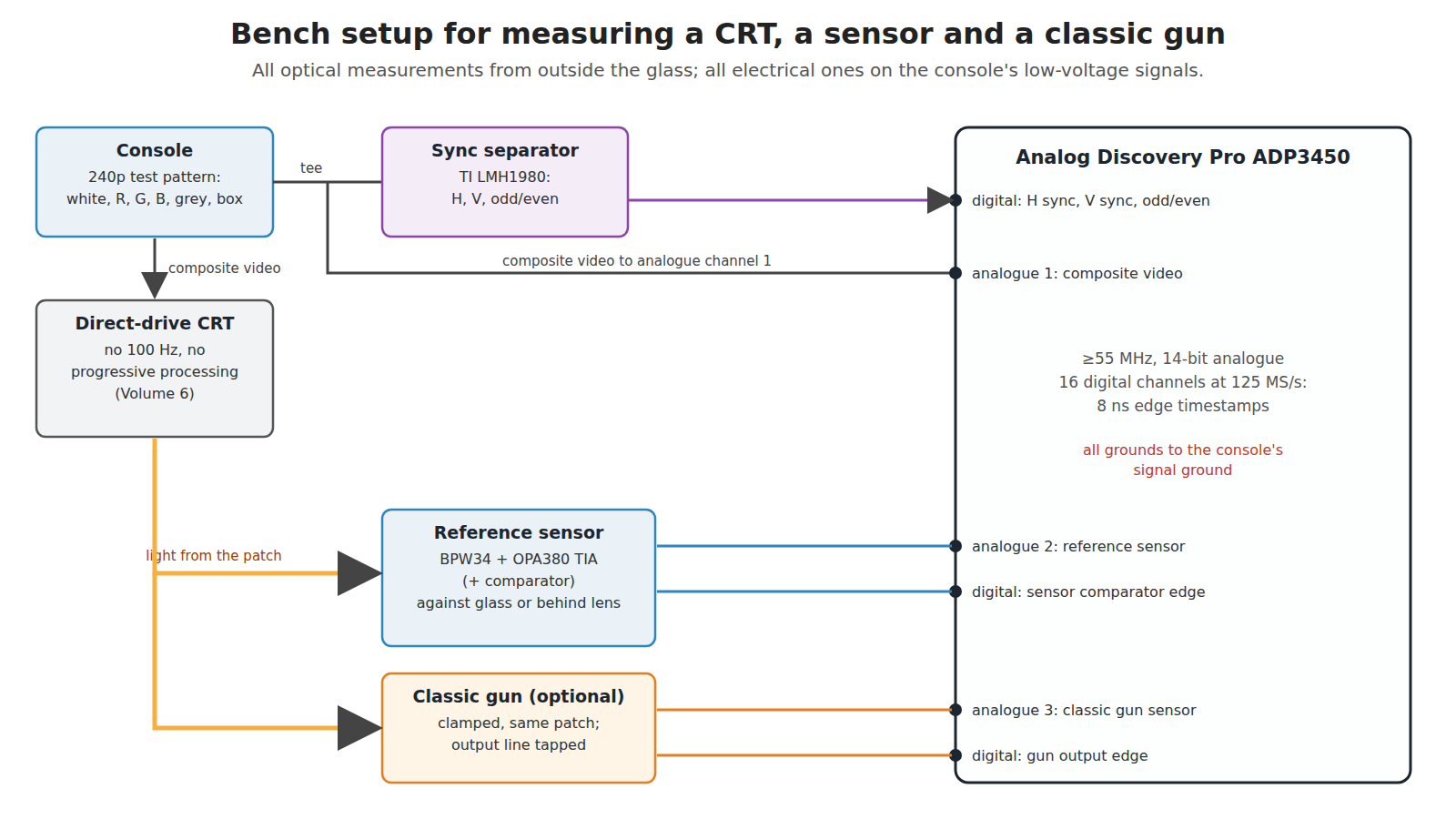
Table 2 — 8.3 The setup
| Item | Role | Notes |
|---|---|---|
| Digilent Analog Discovery Pro ADP3450 | the instrument | four 14-bit analogue channels, ≥55 MHz bandwidth, up to 125 MS/s per channel; 16 digital channels at up to 125 MS/s (8 ns resolution), per Digilent’s specification sheet as quoted in Reference Electronics, Volume 71 |
| Analog Discovery 2 | a second instrument if more channels are needed | the other Digilent unit on the bench (owner decision D9)1 |
| Direct-drive CRT | the display | any set with no 100 Hz or progressive processing (Volume 6); note make, model, size and whether its tube is a shadow mask or an aperture grille |
| A console and a 240p test pattern | the source | the NESdev wiki notes that Artemio Urbina’s 240p test suite has been ported to the NES;2 a full-screen white, red, green, blue and grey field and a small white box on black are what these procedures need |
| Reference sensor | known-fast light detector | BPW34 and OPA380, RF about 47 kΩ, with a fast comparator for the digital channel (Volume 3, §3.9) |
| Sync separator | digital H, V and odd/even | TI LMH1980 (ACTIVE); check it against the analogue sync before trusting it on 240p, which TI does not state it supports (Volume 3, §3.9) |
| Lens and rail | to reproduce a gun’s patch at range | any lens of known focal length; the Super Scope’s was 150 mm3 |
| Small aperture | to look at the phosphor itself | a 1–2 mm hole in black card, the sensor pressed to the glass behind it |
| Classic gun (optional) | device under test | a Zapper, Light Phaser or GunCon, powered by its own console |
8.4 Procedure A: one line’s light, colour by colour
Purpose. Measure what Volume 2 could only draw: the light from one line of each phosphor, its rise, and its decay over five decades of time.
- Display a full white field. Press the reference sensor, behind the small aperture, against the glass at the centre of the screen.
- Trigger channel 2 (sensor) on channel 1’s composite sync with a holdoff, and set the delay to place the sensor’s pulse on screen. At 1 µs/div the pulse from one line should be visible: note its rise time (10–90 %) and width.
- Change the field to pure red, then green, then blue, at full level, without moving anything. Capture each at 1 µs/div and again at 100 µs/div and 2 ms/div.
- For the decay, use averaging over many frames and the 14-bit range: capture a single line at the top of a white box on black, so that later lines do not add their own light, and read the trace on a logarithmic vertical scale in post-processing.
- Repeat at half and quarter grey to check that the shape scales.
Expect, from Volume 2: blue and green with a sub-microsecond rise and most of their light within the first microsecond, then a long tail; red with no fast part at all, its light spread over hundreds of microseconds and reaching about 1 % at 1.9 ms by Sony’s figures.4 If red shows a fast edge, Volume 2’s §2.6 is wrong and should be corrected.
8.5 Procedure B: the patch burst and photocurrent at range
Purpose. Measure the burst a gun actually sees, and the photocurrent that sets the amplifier’s gain.
- Mount the reference sensor behind the lens on the rail, focused on the screen at 3 m. Display a full white field.
- At 200 µs/div, capture one burst. Count the pulses: that is the number of lines crossing the patch. Measure the widest pulse’s width; at 10.4 mm/µs on a 27-inch set it gives the patch diameter (Volume 1, §1.5). Scale to the set’s real width.
- Read the peak voltage of the widest pulse; divide by RF to get the peak photocurrent. Compare with Volume 3’s estimate of a few microamperes.
- Repeat at 1 m and 5 m. The pulse count and widths should scale with range (Volume 3, §3.2); the peak current should not, while the target fills the patch (§3.3).
- Replace the full field with a white box smaller than the patch, and repeat at 1, 3 and 5 m: now the peak current should fall with range.
8.6 Procedure C: sync-to-edge delay and its jitter
Purpose. Measure the electronic part of a latch gun’s error budget (Volume 5, §5.4 and §5.8) directly, as a histogram.
- Keep the setup of Procedure B at 3 m, aimed at the centre of a full white field.
- Use the logic analyser: the sync separator’s horizontal-sync output on one digital channel, the reference sensor’s comparator output on another. At 125 MS/s each sample is 8 ns.
- Capture a few frames and export the edge times. For each line in each burst, compute the delay from the horizontal sync edge to the sensor’s rising edge. Plot a histogram for one chosen line of the patch (say the eighth, as the Menacer latches) across many frames.
- The histogram’s mean is the fixed delay a calibration shot would remove; its spread is the jitter. Expect the spread to be tens of nanoseconds, well under one 186 ns Super NES dot, if Volume 5 is right that the electronics are not the limit.
- Change the field to 50 % grey, then to pure green, then to a white box half-filling the patch. Each shifts the mean: that shift is threshold walk (Volume 3, §3.7), measured.
- Repeat step 3 using the analogue composite sync on channel 1 as the reference instead of the separator. The difference between the two means is the separator’s own delay, and the difference in spread is its added jitter.
- If a classic gun is available, clamp it beside the reference sensor aimed at the same patch, connect its output line (the Light Phaser’s TH, a Super Scope receiver’s latch output, or a GunCon’s light input at its chip) to a third digital channel, and record its edges alongside. The difference between its mean delay and the reference sensor’s is the gun’s chain delay; its spread is the gun’s jitter.
8.7 Procedure D: the Zapper’s envelope and frame timing
Purpose. Measure the flash-frame method’s timing from Volume 4 on a real NES.
- With a Zapper plugged into an NES running Duck Hunt or a test ROM, tap the controller-port signals through a passive breakout (no series components): the light-sense and trigger lines to two digital channels, and the composite video to analogue channel 1.
- Aim the Zapper at a duck from 2 to 3 m and fire. At 5 ms/div, capture the trigger, the check frame, each test frame and the light bit’s activity.
- Measure the light bit’s active duration in lines (divide by 63.5 µs) for a white box, then for the test ROM’s grey boxes. The NESdev figures to check are 26, 24 and 19 lines.5
- Aim at a box near the bottom of the screen and measure how far into vertical blank the light bit stays active (Volume 4, §4.3).
- Point the Zapper at a desk lamp, a fluorescent tube and an LED bulb in turn, with the console running: the light bit should stay inactive. That confirms the band-pass filter is working.
The Zapper’s light-sense line is read by the console, and its exact pin on the NES controller port should be taken from the NESdev wiki’s pinout before connecting anything.
8.8 Procedure E: the same sensor on a flat panel
Purpose. Show Volume 6’s requirements failing on real hardware, which is more persuasive than any diagram.
- Connect the same console to an LCD or OLED television or monitor, with a full white field, and set the reference sensor at the same range.
- Capture at 2 ms/div and at 10 µs/div, triggered on the console’s composite sync. On the CRT the 10 µs/div trace shows line-rate pulses; on the panel it should show a steady level, perhaps with backlight PWM ripple.
- Switch the console between a black and a white field once a second and capture the transition at 10 ms/div, triggered on the console’s vertical sync. The delay from the sync to the panel’s light changing is the panel’s lag, and the slope is its pixel response. Repeat many times: the spread of that delay is the number that rules out calibration (Volume 6, §6.7).
- Try the set’s game mode and its normal mode: the lag should change.
8.9 Fault-finding a classic gun on a CRT
The makers’ own care and troubleshooting instructions for console guns are collected in Console Light Guns, Volume 7, and the arcade operators’ manuals’ fault tables in Arcade Light Guns, Volume 2. The order below follows the chain of Volume 3 from the screen inwards, so that each step rules out everything before it. It is a reasoned order, not a maker’s procedure.
Table 3 — 8.9 Fault-finding a classic gun on a CRT
| Step | Check | How | If it fails |
|---|---|---|---|
| 1 | The display is direct-drive | no 100 Hz, progressive or “digital” processing; try another known-good CRT | Volume 6 |
| 2 | The target is bright and blue-green | aim at a white area | red or dark targets are not a fault (Volume 2) |
| 3 | The game has been calibrated at the playing distance | run its calibration | patch and parallax offsets (Volume 5, §5.5) |
| 4 | The lens and window are clean | inspect | clean per the maker’s manual |
| 5 | The sensor produces line-rate pulses | Procedure B with the gun’s own sensor output | sensor, amplifier or supply fault |
| 6 | The output edge reaches the console with the right polarity | Procedure C step 7 | output transistor, cable, connector |
| 7 | The delay and jitter match a known-good gun | Procedure C histogram | a slow or failing component shifts the mean; a noisy one widens the spread |
8.10 Where the results go
Raw captures and exported edge times belong in this dive’s 02-inputs/bench/ folder, dated, with the set, console, range and sensor recorded for each. When a procedure is done, the estimate it replaces is updated in the volume named in the table in §8.1, the figure slot there is filled, and the estimate is kept beside the measurement so the difference is visible.
Sources
Footnotes
-
Reference Electronics, Volume 7, which quotes Digilent’s ADP3450/ADP3250 specification sheet (rev. 0924) and records the bench instruments (owner decision D9). ↩ ↩2 ↩3
-
NESdev Wiki, “NTSC video”, https://www.nesdev.org/wiki/NTSC_video, read 2026-10-19 via the Internet Archive. ↩
-
Nintendo of America, Super NES Development Manual, Book II, Section 4, “Super NES Super Scope”. Internet Archive item
SNESDevManual, read 2026-10-19. ↩ -
Katsutoshi Ohno and others (Sony Corporation), US Patent 5,825,124 (1998), Table 1, read by OCR 2026-10-19. ↩
-
NESdev Wiki, “Zapper”, https://www.nesdev.org/wiki/Zapper, read 2026-10-19 via the Internet Archive. ↩
Comments (0)