Controls and Inputs · Volume 2
Where the Controls Go — the Real MP7 as the Reference, and a Layout for the Printed Gun
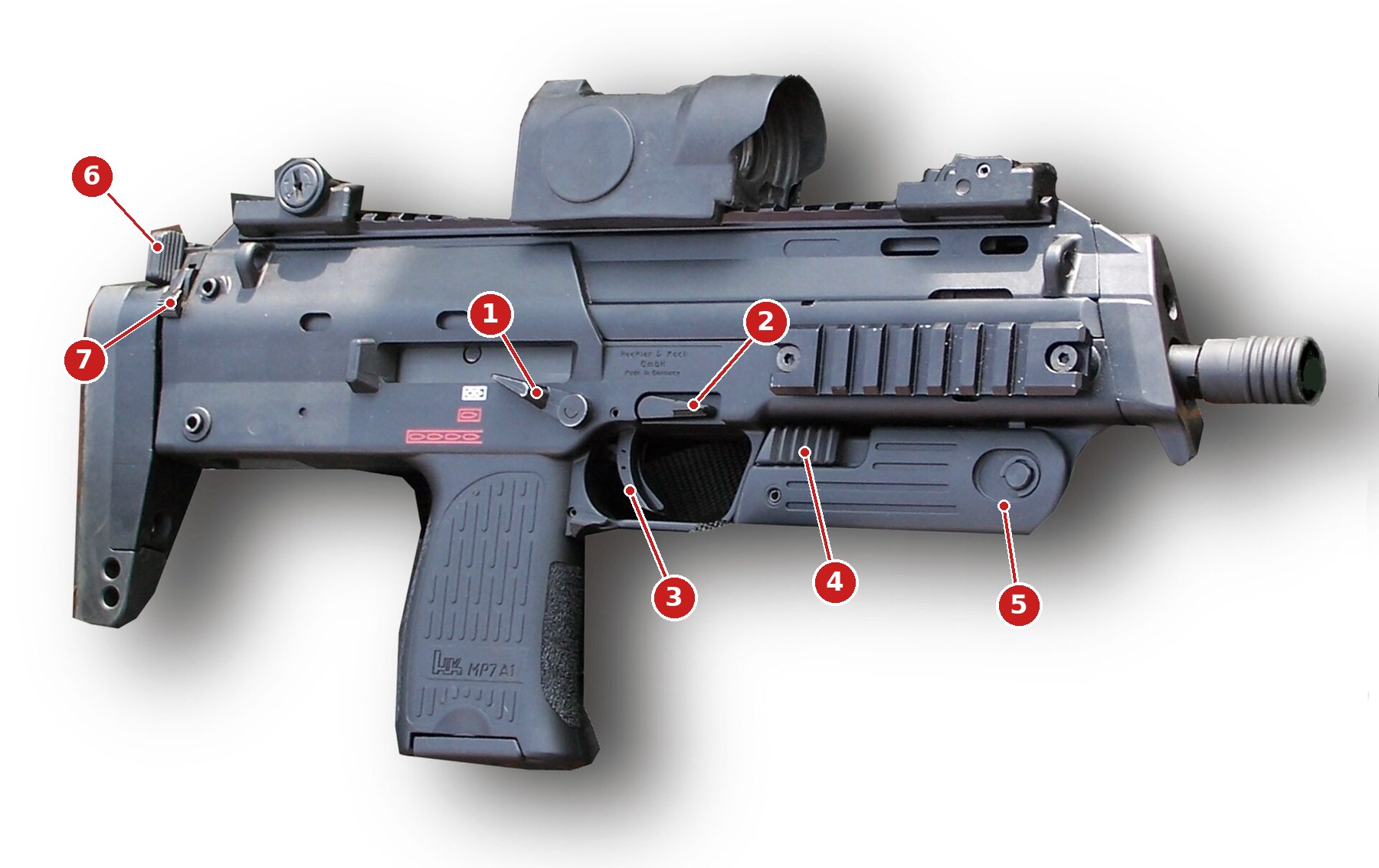
H&K placed every MP7 control where one hand can work it without letting go. A light gun built in that shell inherits the placement for free: the magazine catch becomes the reload, the selector becomes the recoil and autofire switch, and only three inputs need a new hole
2.1 The Principle
A player picks up a light gun shaped like a real weapon and holds it the way that weapon is held: firing hand on the grip, index finger along the frame or on the trigger, support hand under the fore-end. Every control that can be worked from that grip without shifting it is cheap to use; every control that needs a hand to move costs the player a moment and, in a cover shooter, a life.
That makes a real gun’s control layout the best ergonomic data available, and the MP7 is a particularly good source. H&K’s operator’s manual describes it as giving “both left-handed and right-handed users a fully ambidextrous weapon system” and as able to be fired “with one or both hands”. Its designers had a decade of trials to put each control where a hand finds it. The light gun is a 3D-printed MP7 (decision D35, 2026-10-19), so the shell can carry those controls exactly where H&K put them, and each can be given a light-gun job close to its real one. The aim of this volume is to use the real gun’s placement wherever there is a match, and to add as few new holes as possible.
For the real gun’s mechanism and history, see the H&K MP7 dive. For what the printed shell itself is and how it is made, see MP7 Printed Build.
2.2 The Real MP7’s Controls
The English operator’s manual for the MP7A1 (a 2011 faxed copy, read in the H&K MP7 dive’s research) lists the controls on its exterior views and describes how each is worked. In its words, corrected from the scan:
Table 1 — The English operator's manual for the MP7A1 (a 2011 faxed copy, read in the H&K MP7 dive's research) lists the controls on its exterior views and describes how each is worked. In its words, corrected from the scan
| Control | The manual | Worked by |
|---|---|---|
| Safety/selector lever (ambidextrous) | may be set at “SAFE”, “SEMI AUTO” and “BURST FIRE” | firing-hand thumb |
| Magazine catch (ambidextrous) | “For release of the magazine the ambidextrous magazine catch is pushed down with the index finger of the hand holding the pistol grip” | firing-hand index finger |
| Trigger with safety latch | firing-hand index finger | |
| Bolt catch/release lever (ambidextrous) | “the open bolt is released pressing the ambidextrous bolt catch/release lever all the way to the bottom” | either hand |
| Folding grip and its release (ambidextrous) | “In its folded position the grip is slightly locked, in its extended position the folding grip is firmly locked” | support hand |
| Charging handle | ”located at the rear of the receiver above the butt stock”; “the rear end of the charging handle is pressed between thumb and index fingers and pulled all the way to the rear” | support hand |
| Butt stock release lever | ”on the rear of the receiver”; the stock “can be fixed in an intermediate and fully extended position” | support hand |
H&K’s product page gives the real trigger pull as 30 to 45 N (6.7 to 10.1 lbf). Volume 4 explains why a light-gun trigger should be nowhere near that.
Two observations matter for a light gun. First, three controls fall to the firing hand without moving it: the selector (thumb), the magazine catch and the trigger (index finger). Those are the right places for the most frequent inputs. Second, the rear controls need the support hand to leave the fore-grip. They are the right places for the least frequent inputs: things done between games, not during them.
2.3 What Each Control Becomes
Table 2 — 2.3 What Each Control Becomes
| Real control | Light-gun input | Why it fits | Volume |
|---|---|---|---|
| Trigger | Trigger | It is the trigger | 4 |
| Magazine catch | Reload (Button C) | The real reload starts here; index finger, no grip change | 2.4 |
| Selector | Recoil off / normal / autofire (two hardware toggles) | Three positions that already mean “safe”, “single” and “continuous” | 2.5 |
| Bolt catch/release lever | B | A lever pushed down, reachable by either hand; on the real gun it is pressed at the moment of a reload | 2.3 |
| Folding fore-grip | Pump (on the printed build only) | The support hand is already on it | 6 |
| Charging handle | Start | A deliberate two-finger pull at the rear: impossible to do by accident in play | 2.8 |
| Stock release lever | Select | The same: at the rear, deliberate, rarely needed | 2.8 |
| Magazine base plate | Cable exit (decisions D6, D31) | The cable already leaves here; the pedal joins that cable, here or at its far end | 6 |
The bolt catch as B deserves a sentence. On the real MP7 it is pressed exactly when a soldier has just changed magazines and wants the bolt to run forward. A game’s secondary action is not the same thing, but the lever’s position, above the trigger guard, means a right-handed player presses it with the firing hand’s index finger lifted off the trigger, or with the support-hand thumb, without moving the grip. The other candidate for B, the folding-grip release, is worked by the support hand and is needed by the pump (Volume 6).
2.4 The Magazine Catch as a Reload
The magazine catch is the most realistic reload a light gun can have, and the obvious one: Aiming Maths and Calibration, Volume 7, §7.8 concludes that for a realistic MP7 “a button is arguably the better design, and the off-screen shot a convenience”, and the reference board already wires Button C to the magazine release (Reference Electronics, Volume 2).
It has one problem the other buttons do not. On the real gun the catch releases the magazine, and in this build the magazine is not a magazine. It carries the cable out of the gun through its base plate (decision D6) with one locking connector for USB and the 24 V rail (D31). A catch that drops it would hang the gun from its own cable. Three designs avoid that:
- A catch that cannot release. In the printed shell the catch pivots exactly as the real one does, but a hard stop ends its travel just after it operates a switch and before it clears the magazine’s notch. The magazine is held by the catch’s spring as usual and removed only by a separate service step (a screw or a pin). The feel is the real catch; the function is a button. Proposed.
- A magazine held some other way. The dummy magazine is screwed in and the catch is a free, spring-returned paddle with a switch behind it. Simpler to print; the catch no longer engages anything, so its feel is whatever the spring gives it.
- A magazine-presence switch in the well: drop the magazine and slap it back for a reload, which is the “real” reload. It is incompatible with a cable through the magazine, as the MP7 Donor Build, Volume 1 notes, and would only return on a wireless gun (Fully Wireless).
The switch behind the catch is chosen in Volume 3: a pin-plunger subminiature switch with gold contacts, the Omron D2F-01F, under a short catch arm. The catch’s own return spring sets the force a player feels, and the switch’s operating force (0.74 N maximum on the “F” version) adds little to it.
2.5 The Selector as a Switch
The selector’s three positions map onto OpenFIRE’s hardware toggles with almost no translation (Open-Source Firmware, Volume 5, §5.9): “Solenoid Switch” and “Autofire Switch” each read a switch to ground, closed is on, and a mapped switch overrides the pause-menu setting.
Table 3 — 2.5 The Selector as a Switch
| Selector | Solenoid Switch | Autofire Switch | Effect |
|---|---|---|---|
| SAFE | open | open | No recoil. The gun still aims and fires in the game |
| SEMI AUTO | closed | open | Recoil on, one kick per pull |
| BURST FIRE | closed | closed | Recoil on; a held trigger fires continuously |
Two notes. “SAFE” does not stop the gun firing in the game. OpenFIRE has no input that disables the trigger, and a light gun that went dead at “safe” would confuse a player more than it helped. What the position removes is the kick and its noise, which is what a person handing the gun to a child or playing late at night actually wants. “BURST” on the real MP7 means continuous fire, as the H&K MP7 dive’s reading of the manual shows (the function check describes the hammer released every time the bolt locks while the trigger is held). OpenFIRE’s autofire behaves the same way.
The selector needs a two-contact switch that changes state at the lever’s detents. The printed build can carry a small two-pole rotary or two pin-plunger switches read by cams on the selector shaft; the shaft and its detent are a printed-build matter and the switches are chosen in Volume 3. On the kit-camera carrier the Autofire Switch has no pin (Volume 1, §1.6), and the BURST position then behaves like SEMI.
2.6 The Inputs With No Real Counterpart
Three inputs have no MP7 control to borrow: A, the D-pad and Home. Each costs a visible addition to the shell, and each is placed where the cost is lowest.
- A goes under the firing-hand thumb, on the left side above the grip, where a right-handed player’s thumb rests when it is not on the selector. It is the most frequently used of the three in play (grenades, weapon changes), so it has the best spot. It is mirrored on the right for a left-handed player (2.8).
- The D-pad and Home share one five-way navigation switch (four directions plus a centre press), which is how the ESP32 OpenFIRE port describes its own D-pad, “a 5-way navigation switch (Up, Down, Left, Right, and Centre, used as the Home button)” (Reference Electronics, Volume 4, §4.5). It goes further back on the left side, behind the selector, reachable by the thumb but out of its resting path. The D-pad is used in menus, not in play, so it can be a stretch.
Where Start and Select did not go. The GunCon 2 put Start and Select as small buttons on the left side of the gun (Volume 1). On an MP7 they fit better on the two rear controls, which a player cannot press without letting go of the fore-grip. Start is pressed once per game; a gun that pauses because the player squeezed it is worse than one that needs a deliberate pull.
2.7 The Layout, Drawn
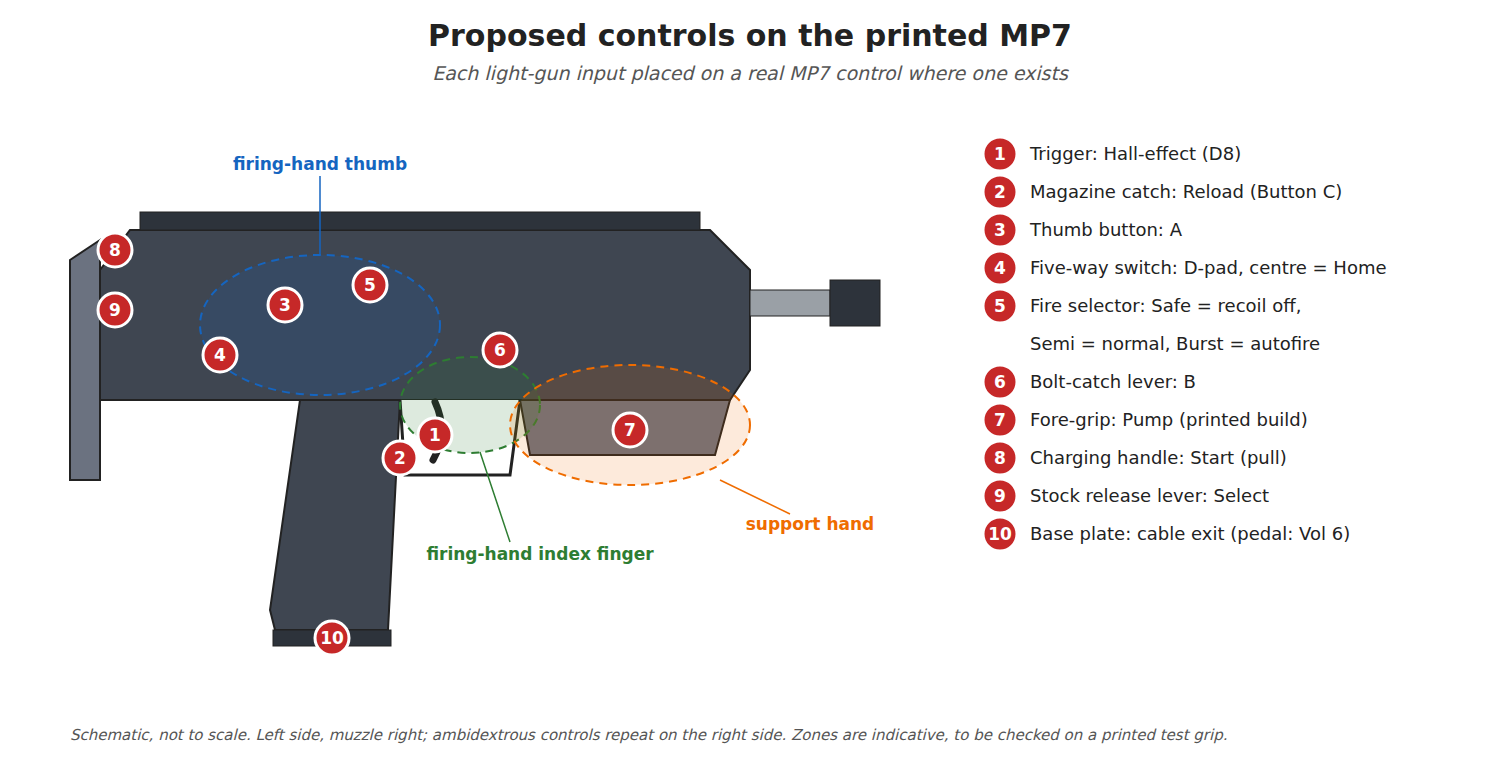
The reach zones in the drawing are indicative. No anthropometric source was found that gives thumb reach on an MP7-sized grip, and the real proof is a printed test grip: a cheap print of the grip and left receiver panel with the switch positions marked, handed to both builders and to anyone left-handed who will play.
2.8 Accidental Presses
Three things press buttons that nobody meant to press.
The grip squeeze. A player under pressure grips hard. Any button where the palm or the lower fingers land will be pressed. The layout keeps every button above the grip’s top line and the A button out of the thumb’s resting position, where it is pressed by a deliberate move rather than by clenching.
The recoil kick. A solenoid kick is a shock along the bore axis, and a lever with mass and a weak return spring can operate its switch under it. Omron rates its switches’ shock resistance against malfunction in g (the D2F: 300 m/s², about 30 g, “Close or open circuit of the contact is 1ms max”), but that is the switch body, not a printed lever on top of it. The lever that matters most is the magazine catch, which sits close to the impact path and in front of the switch. A return spring firm enough that the catch is not moved by the kick, checked on the bench with the solenoid at full strength, is the defence. Firmware debounce (Volume 5) will not catch a lever that stays down for longer than its lockout.
The set-down. A gun put down on its left side presses whatever is on its left side. Flush or slightly recessed caps on A and the five-way switch, and nothing on the bottom of the grip, are the defence. The rear controls (Start and Select) are protected by their motion: a pull or a lever throw, not a press.
Left-handed players. The real MP7 is fully ambidextrous; the light gun is not, because each mirrored button costs a pin. The proposal mirrors only what a left-handed player needs in play: the magazine catch (the real catch is ambidextrous anyway, one mechanism, one switch) and A, wired in parallel with the right-hand A to the same pin. The D-pad stays on the left, where a left-handed player’s support hand reaches it.
2.9 Why This, and Why Not the Others
Table 4 — 2.9 Why This, and Why Not the Others
| Choice | Picked | Rejected, and why |
|---|---|---|
| Reload | Magazine catch, with a hard stop (2.4, design 1) | Off-screen shot only: the edge problem, and no reload in console games that read a button. Design 2: loses the catch’s real feel. Design 3: incompatible with the cable through the magazine (D6, D31) |
| Recoil and autofire toggles | The fire selector | A separate slide switch: a new hole for a function the real gun already has a control for |
| B | Bolt-catch lever | Folding-grip release: the support hand is busy with the pump |
| Start, Select | Charging handle and stock release lever | GunCon 2-style side buttons: pressed by a squeezing hand or a set-down; a new hole each |
| D-pad and Home | One five-way switch behind the selector | Four separate tact switches under a printed cross: more holes, more parts; the five-way switch is one part (Volume 3) |
| Pump | Sliding fore-grip, printed build only | The real folding grip does not slide; the pump is a realism compromise and is optional (Volume 6) |
| Ambidexterity | Mirror the catch and A only | Full mirroring: pins the budget does not have |
2.10 What Could Not Be Verified
- The H&K manual text is OCR from a faxed scan; the quotations above follow the H&K MP7 dive’s corrected reading.
- No source was found for thumb reach or finger force on an MP7-sized grip. The zones in 2.7 are drawn from the controls’ own positions and must be checked on a printed test grip.
- How the magazine catch’s travel compares with the depth to its notch on a printed magazine is unknown until the shell is drawn.
- Whether the solenoid’s kick moves the catch or the bolt-catch lever has not been measured.
Sources
- Heckler & Koch, Close Range Weapon MP7 A1, Caliber 4.6 mm x 30, Operators Manual (fax copy dated 2011-08-08), sections 3.1 to 3.6 and exterior views (Figs. 4 and 5). Read via the H&K MP7 dive’s research file,
Actual-Firearms/SMGs-and-PDWs/HK_MP7/02-inputs/sources/mp7a1_operators_ocr.txt(2026-10-19). - Heckler & Koch, MP7 product page, specification “trigger pull 30–45 N”, as recorded in the H&K MP7 dive’s research file
research-specs-ammo.md(accessed there 2026-10-18). - KrisfromGermany, H&K MP7.jpg, public domain, https://commons.wikimedia.org/wiki/File:H%26K_MP7.jpg.
- Omron, D2F Ultra Subminiature Basic Switch datasheet, Cat. No. B036-E1-12, characteristics table (read 2026-10-19).
- TeamOpenFIRE, OpenFIRE-Firmware v6.2 and the ESP32 port README, as read in Reference Electronics Vol 4 and Open-Source Firmware Vol 5.

Comments (0)