Controls and Inputs · Volume 1
What a Light Gun Needs — Every Input, by Game, Genre and Platform
A trigger and a way to reload are the whole interface of most arcade light-gun games; everything else on a modern gun exists for menus, consoles, emulators and a handful of games. What each input is for, who needs it, and the input set for the printed MP7
1.1 What This Dive Owns
The light gun in this category is being built as a working instrument, so every control on it has three lives: a human-interface life (what the player needs and where a finger finds it), a mechanical life (what switch, what force, what travel, how long it lasts) and an electrical and firmware life (which pin, which pull-up, what the firmware reports to the computer). This dive owns the first two. The third is owned elsewhere, and this dive links to it rather than repeating it:
- The wiring of every input — the pull-ups, the optional RC filter, the Hall-effect trigger circuit, the connectors and the pin budget — is in Reference Electronics, Volume 4 and Volume 2.
- What each button sends to the computer — the on-screen, off-screen and gamepad assignments in the OpenFIRE App, the off-screen reload modes, Low Buttons Mode — is in Open-Source Firmware, Volume 6 and Volume 5.
- Repairing the switches in classic guns is in Modding Classic Light Guns, Volume 2.
- Reloading by shooting off the screen, and why the edge needs hysteresis, is in Aiming Maths and Calibration, Volume 7.
- A motion sensor as an input (point-down reloads, a flick for a pump) is in Positional and Inertial, Volume 6; the owner has decided to fit one to the first carrier (decision D36).
The volumes of this dive run in the order a designer meets the questions: what inputs a gun needs (this volume), where they go on an MP7 (Volume 2), what switches to build them from (Volume 3), how the trigger should feel (Volume 4), how bounce and timing are handled (Volume 5), pumps and pedals (Volume 6), and feedback, accessibility and the final input map (Volume 7).
1.2 The Arcade Minimum: a Trigger and a Way to Reload
The arcade games that defined the genre were designed for a cabinet with a gun, a start button and sometimes a pedal. That is worth stating first, because it means the large majority of the light-gun library needs two inputs: something to fire and something to reload.
Namco’s operator manuals for its Time Crisis cabinets describe the whole player interface in three lines. From the Time Crisis II manual (section 7-2-1, “How to control”):
- Step on the pedal = attack position: At this position, you can shoot the enemy. You are also subject to an enemy attack.
- Release the pedal = defence position: At this position, you are hidden behind an object. You are not subject to an enemy attack. Releasing the pedal recharges the gun.
The Time Crisis 4 deluxe cabinet manual uses the same two states and then loads further functions onto them rather than adding buttons. Weapon selection is “releasing the pedal and pressing the trigger”; in a sniper event, “When the pedal is pressed, the screen zooms toward the target. When the pedal is released, the ammunition will be reloaded”; the special machine gun “shoots continuously, while the trigger is pressed”. A four-weapon game with zoom and cover, played with one trigger and one foot switch, is the clearest evidence that the arcade designers treated every extra control as a cost.
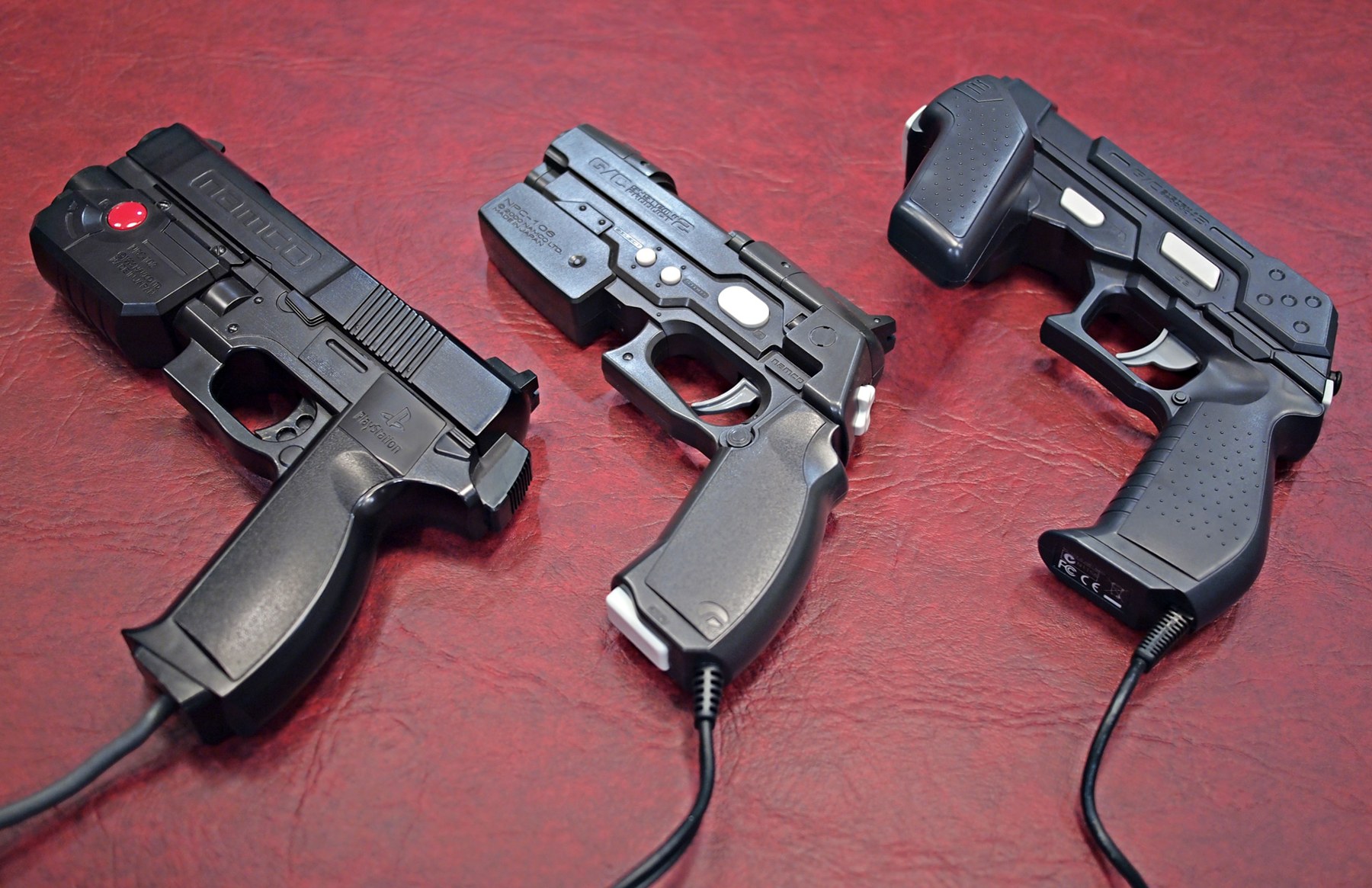
Games without a pedal reload with the gun itself. The common convention is the off-screen shot: point the gun away from the picture and pull the trigger. It needs no extra hardware at all, which is why the original GunCon could ship with two side buttons that, in Wikipedia’s description, both performed the same function. On a camera gun the off-screen shot is a computed state, not a sensor reading, and it has a known weakness at the edge of the screen (Aiming Maths and Calibration, Volume 7, §7.8). A dedicated reload button removes the geometry from the problem, which is the argument for one in Volume 2.
1.3 Every Input, One by One
OpenFIRE, the firmware the build runs (Open-Source Firmware), knows fourteen button functions, three hardware toggles and two analog axes (boardInputs_Strings in OpenFIREshared.h, read in Reference Electronics, Volume 4, §4.2). Taking them in the order a player meets them:
Table 1 — OpenFIRE, the firmware the build runs ([Open-Source Firmware](/light-guns/building-the-electronics/open-source-firmware/)), knows fourteen button functions, three hardware toggles and two analog axes (boardInputsStrings in OpenFIREshared.h, read in [Reference Electronics, Volume 4, §4.2](/light-guns/building-the-electronics/reference-electronics/vol-4/)). Taking them in the order a player meets them
| Input | What it is for | Who needs it | Firmware name |
|---|---|---|---|
| Trigger | Fire. Also the “OK” of every calibration step and many menus | Every game | Trigger |
| Reload | Reload without leaving the screen | Games that reload off-screen (any gun can), console games that read a button, players who want the edge problem gone | none; usually Button C or a pedal |
| A, B | Secondary actions: grenade, weapon change, special | PC titles and console games; a few arcade ports | Button A, Button B |
| C | A third action; on GunCon 2 it sits at the bottom of the grip | Console games written for the GunCon 2 | Button C |
| Start, Select | Start a game, insert a credit, pause | Every emulated arcade game (the cabinet had them), every console game | Start, Select |
| D-pad | Menus, map screens, cursor nudging | Console games, front-ends, the firmware’s own pause menu | D-Pad Up/Down/Left/Right |
| Home | Enter the firmware’s pause and calibration menu | The gun itself, not games | Home Button |
| Pump | A shotgun slide: reload, or cock | Shotgun games; Sinden users map reload to it | Pump Action |
| Pedal | Cover (Time Crisis), or reload | Cover shooters; any game as a reload | Pedal |
| Alt pedal | A second foot function | A few titles; rare | Alt Pedal |
| Rumble, solenoid, autofire switches | Hardware toggles that override the pause menu | A gun handed to other people | Rumble/Solenoid/Autofire Switch |
| Analog stick X and Y | A thumbstick | GunCon 3 games | Analog Stick X/Y |
Three points from the table shape everything that follows.
The firmware has no “reload” function. A reload is whatever the game decides it is: an off-screen trigger, a mouse button, a key. OpenFIRE’s defaults send Button C as mouse button 4 and the pedal as mouse button 4 too (Open-Source Firmware, Volume 6, §6.3), so in mouse mode a magazine-release switch wired as Button C and a foot pedal arrive at the game as the same button. That is a useful default: one game binding covers both.
Start and Select are not optional on an emulated arcade game. The cabinet had start buttons and a coin slot. On an emulator they are keys, and OpenFIRE sends them as player-relative keys (1 and 5 for player 1). A gun without them forces the player back to the keyboard between every credit.
Home is for the gun, not the game. It enters OpenFIRE’s pause mode, where calibration, profiles and the toggles live (Open-Source Firmware, Volume 5). It should be reachable but hard to press by accident, a point Volume 2 returns to.
1.4 By Genre
Table 2 — 1.4 By Genre
| Genre | Typical titles | Inputs used | Notes |
|---|---|---|---|
| Rail shooter, off-screen reload | Virtua Cop, The House of the Dead series | Trigger; reload by off-screen shot | The whole game on one switch. A reload button is a convenience |
| Cover shooter | Time Crisis series | Trigger, pedal | Pedal held = out of cover; released = hide and reload (Namco manuals). Without a pedal, a button stands in (1.5) |
| Party and gallery | Point Blank | Trigger, start | Namco’s Point Blank operator’s manual names only the gun trigger and the 1- and 2-player start buttons |
| Shotgun games | hunting and shotgun titles | Trigger, pump | A pump is the realistic reload; any reload button works |
| Console games written for the GunCon 2 | PS2 titles | Trigger, A, B, C, Start, Select, D-pad | The D-pad and C exist because these games had menus and extra actions |
| GunCon 3 games | PS3 titles | Trigger, two sticks, six buttons | The only common use for analog sticks on a gun |
| Modern PC light-gun games | e.g. Railbreak | Trigger, reload, two or more side buttons | A Steam discussion of Railbreak with the Sinden maps front-left (or pump) to reload, rear-left to grenade, front-right to weapon switch |
| Emulator front-ends and the gun’s own menus | RetroArch, MAME, OpenFIRE pause mode | D-pad, Start, Select, Home, trigger | The reason a D-pad earns its place on a gun with a mouse cursor |
Virtua Cop 3 is the edge case the firmware’s own release notes single out: OpenFIRE v5.2 added off-screen and low-button modes for it, “with a single button gun + pedal” (Open-Source Firmware, Volume 6).
1.5 By Platform
Arcade cabinets. Gun, cabinet start buttons, pedal where the game had one. The guns themselves were simple: Namco’s parts list for the Time Crisis SD cabinet gives the gun’s switch as one microswitch, an Omron SS-01GL2T (Volume 3 explains why that part matters), and the pedal as a plunger pressing a second microswitch.
PlayStation. Wikipedia’s account of the GunCon family gives the progression. The original GunCon had “buttons A and B, both performing the same function”, below the barrel on either side. When Time Crisis came home without a pedal, a button command replaced it; Wikipedia reports reviewers split between a joypad button under the foot and the GunCon’s own button, GameSpot preferring the latter “because it encourages a two-handed grip”. The GunCon 2 moved A and B rearward “to a position directly above the trigger”, added “two new smaller buttons, SELECT and START” on the left side, a D-pad at the back of the barrel and a C button at the bottom of the handle. The GunCon 3 added “an analog stick and two shoulder buttons” on a sub-grip under the barrel, a second stick at the rear with buttons B1 and B2, and C1 and C2 on the left of the barrel.
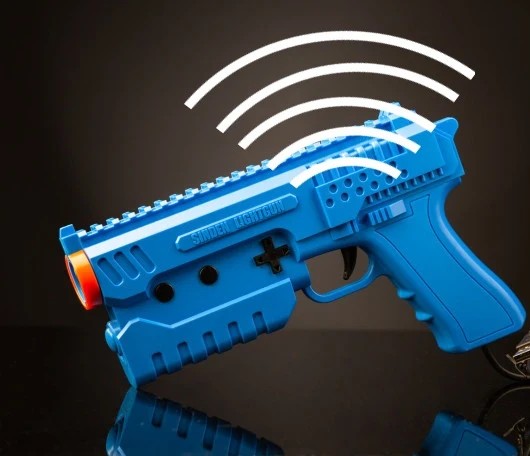
The Sinden Lightgun, the commercial border-tracking gun, has, in Time Extension’s review, “four buttons – two on either side of the barrel – as well as a D-pad”, and a “pump-action bar on the base of the gun”; reload in Time Crisis can be “the button on the side or the aforementioned pump-action bar”. Sinden sells a separate USB pedal (Volume 6).
The open firmware. OpenFIRE’s default Pico map gives every one of its fourteen button functions a pin except Alt Pedal (Open-Source Firmware, Volume 3, §3.10). Its defaults are a close copy of the GunCon 2’s set plus a pump and a pedal. That is the right reading of it: a gun built to that list can play everything above except the GunCon 3’s stick games.
1.6 The Input Set for This Build
The first gun is a 3D-printed MP7 (decision D35, 2026-10-19), built on a Pico with a Hall-effect trigger (D2, D8). The set below is what this dive proposes for it. Volume 2 places each one on the gun, Volume 3 chooses each switch and Volume 7 assembles the final map.
Table 3 — 1.6 The Input Set for This Build
| # | Input | On the MP7 | Firmware function | Required for |
|---|---|---|---|---|
| 1 | Trigger | the trigger, Hall-effect | Trigger | everything |
| 2 | Reload | the magazine catch | Button C | console and PC games; the edge problem |
| 3 | A | left thumb, above the grip | Button A | secondary actions |
| 4 | B | right side, above the grip (index finger, left-handed: thumb) | Button B | secondary actions |
| 5–8 | D-pad | left side of the receiver, thumb reach | D-Pad | menus |
| 9 | Home | centre press of the same five-way switch | Home Button | the firmware’s own menu |
| 10, 11 | Start, Select | rear of the receiver, both hands off the grip | Start, Select | every emulated arcade game |
| 12 | Pump | the folding fore-grip, pulled back | Pump Action | shotgun games; a second reload |
| 13 | Pedal | a 3.5 mm jack on the gun’s cable, to a floor pedal | Pedal | cover shooters |
| 14 | Alt pedal | unassigned | Alt Pedal | |
| T1 | Autofire | the fire selector at its “burst” position | Autofire Switch | a held trigger fires continuously |
| T2 | Recoil off | the fire selector at its “safe” position | Solenoid Switch | quiet play; handing the gun over |
Counted against the pin budget (Reference Electronics, Volume 2, §2.5), that is the analog trigger plus fourteen digital inputs: the thirteen the budget already carries (A, B, C, four D-pad, Start, Select, Home, Pump, Pedal and the Solenoid Switch) and one more, the Autofire Switch. The stopgap build’s one spare pin, GP15, takes it. The kit-camera build has 26 functions on 26 pins and no spare, so on that board autofire stays a pause-menu setting and the selector’s “burst” position does nothing until a pin is found. Alt Pedal is left unwired on both. Volume 7 counts it again against the final carrier.
1.7 Why This, and Why Not the Others
Table 4 — 1.7 Why This, and Why Not the Others
| Option | Verdict | Reason |
|---|---|---|
| Trigger + off-screen reload only (arcade minimum) | Rejected as the whole set | Plays the arcade library, but not console games, front-ends or the firmware’s menus, and leaves the edge problem in every reload |
| The OpenFIRE default set (GunCon 2 + pump + pedal) | Adopted, with Alt Pedal unwired | Covers every genre in 1.4 except GunCon 3 stick games; every function already exists in stock firmware |
| Analog sticks (GunCon 3) | Rejected for the first gun | Two ADC pins; the Pico has one spare analog input after the Hall trigger and TMP36, and the kit-camera budget has none (Reference Electronics, Volume 2). Only GunCon 3 games use them |
| More side buttons (Sinden’s four) | Rejected | No firmware function to send them as beyond A, B and C, and no pin for them |
| A second pedal on the same gun | Deferred | Alt Pedal exists in firmware; it is the cheapest addition if a game needs it, since a pedal is a jack and one pin |
| An IMU as a reload gesture | Complement, not substitute | The owner chose an IMU on the carrier (D36). A point-down reload works with the camera blind (Positional and Inertial, Volume 6), but it is firmware work in the fork and cannot replace a button on day one |
1.8 What Could Not Be Verified
- The Sinden button list comes from a review and a Steam discussion, not from Sinden’s own documentation; Sinden’s site pages read on 2026-10-19 did not describe the controls.
- Sinden’s reference image in the owner’s file has no recorded source.
- The Railbreak mapping is one user’s configuration, quoted as an example of how side buttons get used, not as the game’s default.
- No game-by-game survey of input use across the whole light-gun library exists; 1.4 is built from the manuals and sources named.
Sources
- Namco, Time Crisis II Operation Manual (arcade), §7-2-1 “How to control” and §8 maintenance. Central Library,
namco-time-crisis-ii-operation-manual-arcade(read 2026-10-19). - Namco, Time Crisis 4 DX Operators Manual, Issue 2 (part no. 90500167), “How to Play”. Central Library,
namco-time-crisis-4-dx-manual-issue-2-arcade(read 2026-10-19). - Namco, Time Crisis SD Operation Manual, §9-4 Pedal Assy and §9-5 Gun Assy parts lists. Central Library,
namco-time-crisis-sd-operation-manual-arcade-gun-solenoid(read 2026-10-19). - Namco, Point Blank Operators Manual (part no. 90500078), test-mode and setup sections. Central Library,
namco-point-blank-operators-manual-90500078-arcade(read 2026-10-19). - Wikipedia, “GunCon”, https://en.wikipedia.org/wiki/GunCon (read 2026-10-19).
- Wikipedia, “Time Crisis (video game)”, https://en.wikipedia.org/wiki/Time_Crisis_(video_game) (read 2026-10-19).
- Time Extension, “Sinden Light Gun” review, https://www.timeextension.com/reviews/sinden-light-gun-old-school-arcade-blasting-on-your-modern-day-tv (read 2026-10-19).
- Steam Community discussion of Railbreak with the Sinden Lightgun, https://steamcommunity.com/app/2587170/discussions/0/4031348734037664585 (search result, 2026-10-19).
- TeamOpenFIRE, OpenFIRE-Firmware v6.2,
OpenFIREmain/OpenFIREprefs.h(button descriptor table), and OpenFIRE-BoardsOpenFIREshared.h(read 2026-10-19).
Comments (0)