Aiming Maths and Calibration · Volume 7
The Budgets — Accuracy from Sensor to Pixel, Latency from Hand to Picture, and Shooting Off the Screen
Every error source in the dive gathered into one accuracy budget for the Wii-class camera at living-room distance and the PAJ7025R3 up close; the latency chain from the camera frame to the television with the gun's share bounded; and how off-screen detection and reloading actually work in the code
7.1 From Sensor to Screen
An error enters the aiming chain at one of five places, and each has a different signature:
Table 1 — An error enters the aiming chain at one of five places, and each has a different signature
| Where | Example | How it behaves |
|---|---|---|
| The sensor | Centroid noise, quantisation | Random frame to frame: jitter |
| The geometry | Lens distortion, emitters out of place or out of plane | Fixed for a given position; changes as the player moves |
| The gun | Camera beside the sight line (parallax) | Zero at the calibration distance, grows away from it |
| The calibration | One-frame shots, a biased boresight, the v6.2 offset map | Fixed until the next calibration; some change as the player moves |
| The processing | Filter lag | Proportional to how fast the gun is moving |
Volumes 1 to 6 put numbers on each. This volume adds the sensor floor and then assembles them.
7.2 Quantisation and Centroid Noise
Quantisation. The camera reports positions in whole units; one unit, seen from 2.5 m, is 1.41 mm on the screen for the Wii-class camera, 0.41 mm for the R2 and 1.17 mm for the R3 at the centre of its field (aim_maths.py section 12; the R3’s figure grows toward the edges). Rounding to the nearest unit adds a uniform error of ±½ unit to each coordinate, a standard deviation of 1/√12 of a unit, about 0.29 unit. With four points averaged through the homography, quantisation contributes well under a millimetre, and in practice less than the noise it sits under.
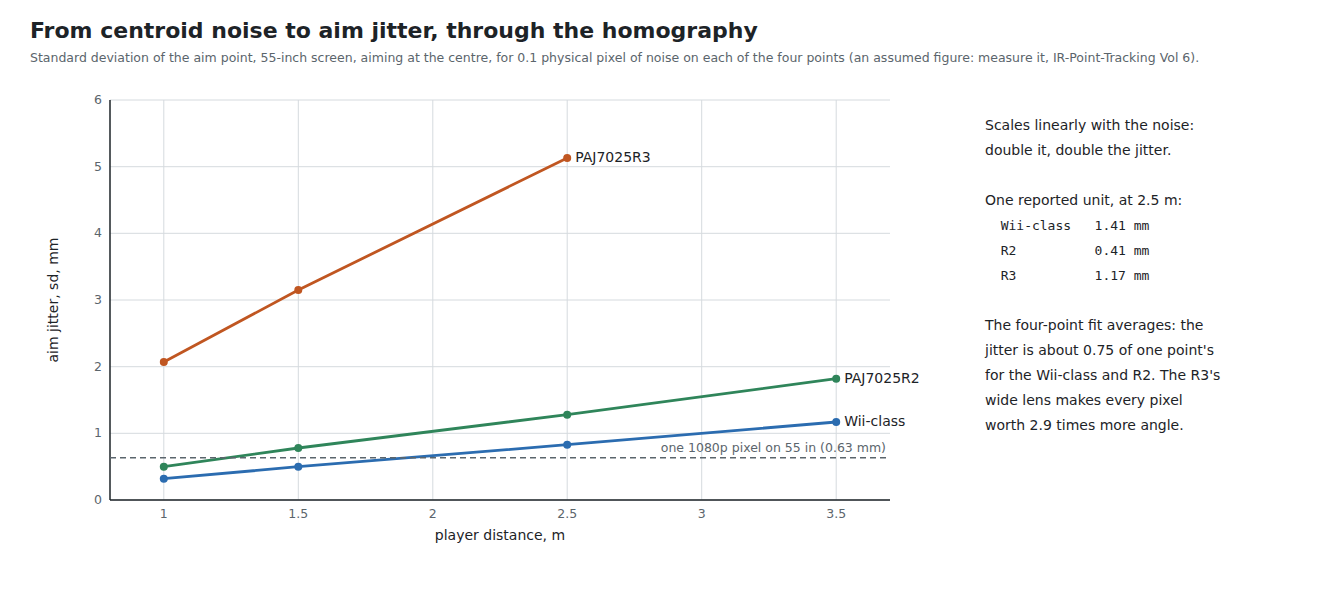
Centroid noise. The real floor. Each blob’s centroid wanders from frame to frame by an amount set by its brightness, its size in pixels and the sensor’s read noise (IR Point Tracking, Volume 1 on sub-pixel centroiding, Volume 6 on measuring it). No published figure was found for any of the three cameras. The simulation assumes 0.1 physical pixel standard deviation per coordinate per point and pushes it through the full v6.2 homography by Monte Carlo (2,000 draws):
Table 2 — Centroid noise. The real floor. Each blob's centroid wanders from frame to frame by an amount set by its brightness, its size in pixels and the sensor's read noise ([IR Point Tracking, Volume 1](/light-guns/sensing-and-aiming/ir-point-tracking/vol-1/) on sub-pixel centroiding, [Volume 6](/light-guns/sensing-and-aiming/ir-point-tracking/vol-6/) on measuring it). No published figure was found for any of the three cameras. The simulation assumes 0.1 physical pixel standard deviation per coordinate per point and pushes it through the full v6.2 homography by Monte Carlo (2,000 draws)
| Camera | 1.0 m | 1.5 m | 2.5 m | 3.5 m |
|---|---|---|---|---|
| Wii-class | 0.32 mm | 0.50 mm | 0.83 mm | 1.17 mm |
| PAJ7025R2 | 0.50 mm | 0.78 mm | 1.28 mm | 1.82 mm |
| PAJ7025R3 | 2.07 mm | 3.15 mm | 5.13 mm | — |
Standard deviation of the aim point, the larger of X and Y, aiming at the centre of a 55-inch screen; aim_maths.py section 11. Aiming at a corner from 2.5 m, the Wii-class figure rises to 1.5 mm: the corner is outside the emitter rectangle, and the homography extrapolates.
Three patterns are worth noting. The jitter grows linearly with distance, because a fixed angle covers more screen further away. The four-point fit averages: for the Wii-class camera and the R2 the aim jitter is about three-quarters of what one point’s noise alone would produce. For the R3 it is not, because at 2.5 m its emitters are only nine or so pixels apart (IR Point Tracking, Volume 3 §3.6) and the fit’s lever arm is short. And the R3’s wide field costs it at every distance: each of its pixels covers 1.12°, against 0.39° for the R2 and 0.26° for the Wii-class camera. The R3 buys the short minimum distance that Reference Electronics, Volume 3 chose it for, and pays in jitter, which the filter of Volume 6 must then remove. The bench comparison of R3 and R2 in decision row P-RE16 should measure centroid noise in screen millimetres at the playing distance for exactly this reason, as IR Point Tracking also recommends.
7.3 The Accuracy Budget: Wii-Class at 2.5 m
A concrete case: the stopgap bench camera (decision row P-RE17), a 55-inch picture, the square layout with bars 30 mm outside the picture, the camera 15 mm below the sight line, calibrated at 2.5 m head-on, played anywhere from 1.5 to 3.5 m.
Table 3 — 7.3 The Accuracy Budget: Wii-Class at 2.5 m
| Source | v6.2 as shipped | With this dive’s fixes | Where |
|---|---|---|---|
| Centroid noise (0.1 px assumed), sd | 0.8 mm | 0.6 mm after Average | 7.2, Vol 6 |
| Calibration noise, one frame per shot, sd | 0.6 mm | 0.07 mm averaged | Vol 4 §4.7 |
| v6.2 offset map, at the edges | 3.9 mm | 0 | Vol 4 §4.3 |
| Boresight from the mean, if calibrated 30° aside and played head-on | 9.8 mm | 0 | Vol 4 §4.5 |
| Boresight rotated by a 10° cant at calibration, 2° camera tilt | 3.2 mm | 0 | Vol 4 §4.6 |
| Parallax, d = 15 mm, 1.5–3.5 m | 6.0 mm | 6.0 mm (design it out: Vol 5) | Vol 5 |
| Lens distortion | not known, small | not known, small | Vol 1 §1.6 |
| One emitter 10 mm out of place | 5–8 mm | 1.5 mm with a four-corner calibration | Vol 4 §4.8–4.9 |
| Filter lag at the moment of stopping (Average) | 2.7 mm | 2.7 mm | Vol 6 |
Simulated; 1 mm is 1.6 pixels of 1080p on this screen. The calibration-dependent rows apply only when their condition holds; the emitter row only to a badly mounted bar.
The budget’s lesson is in the right-hand column. Once the three calibration fixes are in, the largest remaining error for a well-mounted bar is parallax — a hardware matter decided by where the camera goes — and after it the camera’s own noise. Every other source is below a millimetre or can be made so. On v6.2 as shipped, a player who calibrates carefully, head-on and level, sees only the offset-map error, about 4 mm at the edges with these bars; one who calibrates from the sofa and plays standing sees ten.
7.4 The Accuracy Budget: R3 at 1 m
The proposed kit camera (P-RE16) at the distance it was chosen for: 55-inch picture, 1.0 m, the same bars and camera position, calibrated at 1.0 m, played from 0.8 to 1.3 m.
Table 4 — 7.4 The Accuracy Budget: R3 at 1 m
| Source | Value | Note |
|---|---|---|
| Centroid noise (0.1 px assumed), sd | 2.1 mm | Four times the Wii-class camera at 2.5 m; the filter’s job |
| Lens distortion, uncorrected | 12.9 mm | Vol 1 §1.8; 18.7 mm after moving 30° aside |
| Lens distortion, with the port’s correction | 0.2 mm | If the real lens resembles the datasheet; unmeasured |
| Parallax, d = 15 mm, 0.8–1.3 m | 4.5 mm | 0.3 · d |
| v6.2 offset map, at the edges | 3.9 mm | The same as at 2.5 m: it does not depend on distance |
Close to a large screen the R3 needs its lens correction more than anything else, and then its noise. A kit built on it needs both the ESP32 port’s correction (or a measured one) and a filter tuned to its noise, and should be bench-checked at 1 m before it is sold.
7.5 The Latency Chain
Table 5 — 7.5 The Latency Chain
| Stage | Range | Average | Source |
|---|---|---|---|
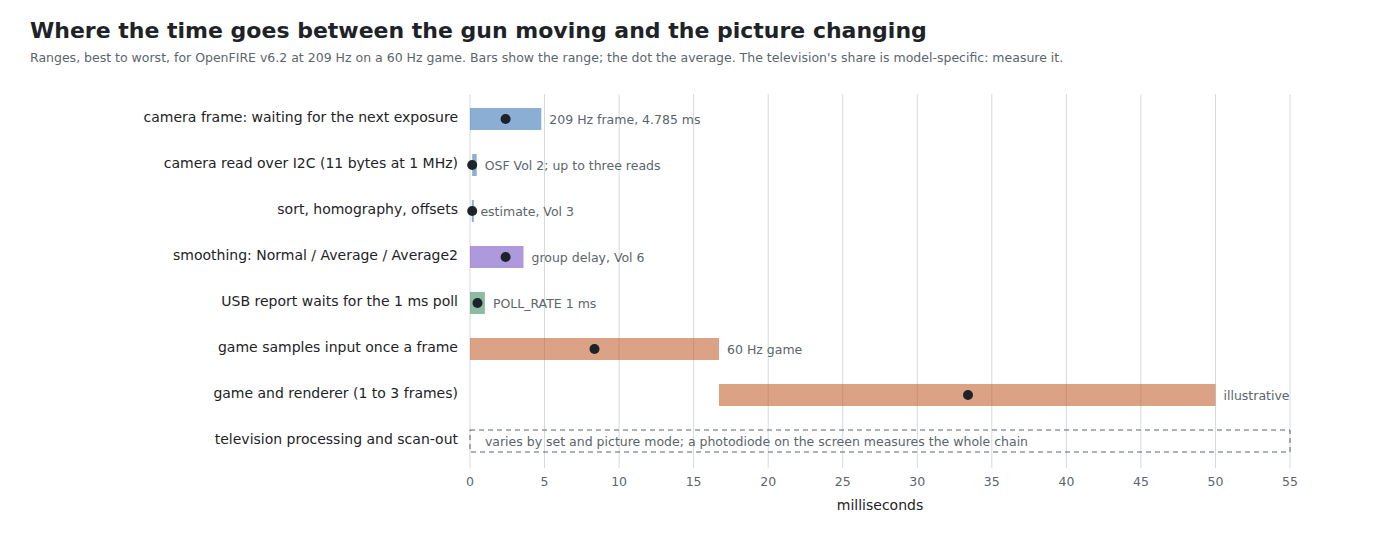
| Waiting for the next camera frame | 0–4.8 ms | 2.4 ms | 209 Hz timer (Open-Source Firmware, Volume 2) |
| Exposure | not known | half the exposure time | The cameras’ integration times are not published for these modes |
| Camera read over I²C | 0.15–0.45 ms | 0.15 ms | 11 bytes at 1 MHz, up to three reads for coherence (OSF Vol 2) |
| Sort, homography, offsets | about 0.15 ms | Vol 3 §3.7, estimate | |
| Smoothing | 0 / 2.4 / 3.6 ms | Normal / Average / Average2 (Vol 6) | |
| USB report waiting for the host’s poll | 0–1 ms | 0.5 ms | POLL_RATE 1 (OpenFIREmain.h line 41) |
| The gun’s share, with Average | 2.7–8.8 ms | about 5.6 ms | |
| Game samples input once per frame | 0–16.7 ms | 8.3 ms | 60 Hz game |
| Game logic and rendering | one to three frames | Game-specific; illustrative | |
| Television processing and scan-out | Varies by set and picture mode; measure it |
Two facts frame the numbers. First, the gun’s share is small: around 5 ms on average, of which half is the camera’s frame period and most of the rest is smoothing. Running the camera faster would cut the first; choosing Normal would cut the second, at the price of jitter. Second, the camera-based gun shares the whole of the game’s and the television’s latency, which the CRT gun did not: a raster-timing gun knew where it pointed within microseconds of the beam passing. CRT Timing, Volume 7 draws the distinction that matters for the player: a fixed delay is learned and forgiven; a variable one is felt. Of the gun’s share, the frame wait and the USB poll are variable (uniform over their ranges, a combined spread of about ±3 ms); the smoothing is fixed.
The latency does not move the shot. The trigger and the cursor travel through the same USB report, so the game sees both at the same instant, and a shot lands where the cursor was when the trigger was read — behind the gun by the gun’s share times the swing rate (Volume 6, 6.9). The latency the player feels is the time from moving the gun to seeing the cursor, or the target react, on the screen, and that is dominated by the game and the television.
7.6 Measuring Latency
The end-to-end figure is easy to measure and hard to split. Open-Source Firmware, Volume 2 has a figure slot for the end-to-end trigger-to-photon measurement. For the aiming chain, the gun’s own share can be isolated on the bench:
- Mount the gun on a rest. Switch one emitter of the bar from a GPIO through its driver, so the bar’s appearance can be stepped at a known instant; with a three-point fallback disabled in a debug build, the step moves the computed cursor.
- Record the GPIO edge on one channel of the Analog Discovery Pro ADP3450 and, on another, a spare GPIO the fork’s debug build raises when a USB report carrying the changed position is queued.
- The interval is the gun’s share, from the light changing to the report leaving. Repeat a few hundred times; the spread should be uniform over about one camera frame plus one USB poll.
7.7 Off the Screen
In OpenFIRE v6.2 “off-screen” is not a separate measurement. It is a property of the clamped cursor (GetPosition(), lines 743–754): after the offsets, the position is clamped to the model screen and scaled to the absolute-mouse range 0–32767, and if either axis is pinned at 0 or 32767 the flag offScreen is set. Everything that behaves differently off the screen — the reload behaviour of many games, a rumble in place of a solenoid kick by default — keys on that flag (Open-Source Firmware, Volume 6 covers the button mapping). When a game asks for 4:3 correction, the clamp is applied to the 4:3 window inside the picture (lines 710–741), so the pillar-box bars count as off the screen.
Two consequences follow from that design.
The homography must still be running. To know that the gun points 100 mm above the picture, the firmware must compute where it points, which needs all four corners, real or rebuilt. With the Wii-class camera on a 55-inch picture from 2.5 m, the vertical field (about ±11.5°) covers ±509 mm around the aim point, while the bottom bar is about 745 mm below the top one; aiming at or above the top edge already puts the bottom bar outside the view, and the firmware is working from rebuilt corners (Volume 2, 2.7). Off-screen detection therefore depends on the missing-point rebuild, which is accurate while the player stands still and degrades if he moves (IR Point Tracking, Volume 4 sizes the envelope). When all four points have gone, a reading of OpenFIRE_Square::begin() suggests the last corners are kept and the cursor holds its last position, so a gun swung well away from the screen stays “off-screen” if it left across an edge; this was not tested.
v6.2’s offset map moves the edge. Because its map pulls the cursor toward the centre (Volume 4, 4.3), aiming exactly at the edge of the picture leaves the cursor short of the clamp by the edge error — 3.9 mm with bars 30 mm out, 22 mm with bars 80 mm out — and the player must aim that far past the edge before the gun counts as off-screen. With the exact map, the edge of the picture is the edge.
7.8 Reloading, Hysteresis and the Edge
The flag has no hysteresis: it is set or cleared every frame by whether the clamped value is at the limit. A gun held near the edge, with 0.8 mm of jitter, will flip between on and off every few frames whenever it is within about 2 mm of the boundary. In a game that reloads on an off-screen shot, a trigger pulled at that moment may reload or may fire, at random. Players learn to point well off the screen to reload, which is the workaround.
The fix is ordinary and cheap: enter the off-screen state only when the unclamped position is beyond the edge by a margin, and leave it only when it comes back inside by the same margin. A margin of 1 % of the screen dimension (about 12 mm horizontally on a 55-inch picture) is fifteen times the jitter and imperceptible to a player reaching for a reload. The firmware already has the unclamped position (mouseX, mouseY before line 704), so the change is a few lines and a new state variable.
GUN4IR’s user guide describes two off-screen behaviours: aiming at the lower-left corner, or pressing a button (Open-Source Firmware, Volume 1). The button is the reliable one and needs no geometry at all; OpenFIRE can map a reload button too (OSF Volume 6). For a realistic MP7, where the magazine release is the natural reload, a button is arguably the better design, and the off-screen shot a convenience.
7.9 What This Dive Proposes
Gathered from Volumes 1 to 7, in order of value for this build, all for Our Firmware or the hardware dives:
Table 6 — Gathered from Volumes 1 to 7, in order of value for this build, all for [Our Firmware](/light-guns/building-the-electronics/our-firmware/) or the hardware dives
| # | Change | Removes | Volume |
|---|---|---|---|
| AM-1 | Exact offset map (the ESP32 port’s MapCalibratedAxis()) | 4 mm at the edges (bars 30 mm out), 22 mm (80 mm out), at every distance | 4 §4.3 |
| AM-2 | Boresight from the diagonal intersection, not rotated by the calibration cant | Up to 19 mm after calibrating at an angle; 3–12 mm after a canted calibration with a tilted camera | 4 §4.5–4.6 |
| AM-3 | Camera within about 8 mm of the sight line in the MP7 shell | Parallax: 0.6 · d over a 2.5 : 1 range of distances | 5 |
| AM-4 | R3 lens correction (the port’s model, coefficients from a bench fit) | 13 mm at 1 m on a 55-inch screen | 1 §1.7–1.9 |
| AM-5 | Average each calibration shot over the held trigger | Calibration noise and the trigger jerk | 4 §4.7 |
| AM-6 | Fix the run-mode index bug (the port’s fix) | A frozen cursor after switching profiles | 6 §6.3 |
| AM-7 | Off-screen hysteresis | Random reload or fire at the edge | 7 §7.8 |
| AM-8 | A One-Euro run mode on the cursor, tuned on the bench | Jitter at rest without lag at speed | 6 |
| AM-9 | Code hygiene: cyclic corner order, degenerate-input guards, 3 × 3 product, 1.0f | Traps for later changes; about a quarter of the maths’ cycles | 3 |
| AM-10 | Optional four-corner calibration | Emitter misplacement | 4 §4.9 |
These are proposals awaiting a decision; they are listed in this dive’s CLAUDE.md as candidate rows for the category’s decision log.
7.10 What Could Not Be Verified
- Centroid noise for every camera; all jitter figures scale with the assumed 0.1 physical pixel.
- The cameras’ exposure times, and therefore the exposure term of the latency chain.
- Game and television latency; the figure’s rows for them are illustrative.
- The behaviour of
OpenFIRE_Square::begin()when no point is visible (7.7), read from the code and not tested. - How often the off-screen flag flickers in practice; it depends on the real jitter at the edge.
Sources
- TeamOpenFIRE,
OpenFIRE-Firmwareat8b651a25(v6.2):OpenFIREmain/OpenFIREcommon.cpp(GetPosition, lines 648–760),OpenFIREmain/OpenFIREmain.h(POLL_RATE) — read 2026-10-19. - Own simulation,
04-templates/aim_maths.py, sections 2b, 5, 7, 11, 12, 13 and 21, run 2026-10-19. - Sibling dives as linked: Open-Source Firmware Vols 1, 2 and 6; IR Point Tracking Vols 1, 3, 4 and 6; Reference Electronics Vol 3; CRT Timing Vol 7.
Comments (0)