Mobile and Handhelds · Volume 1
How Android Sees the Gun — The Rule That Drops an Absolute Mouse, and What Survives
What an Android phone, tablet, TV box or handheld does with an OpenFIRE gun plugged into its USB port: the one test in Android's input reader that decides whether a pointing device is a mouse, why the gun's absolute mouse fails it, what the keyboard and gamepad halves still deliver, what Sinden found when it tried, the port's power, and how to check a device on the bench
1.1 What this dive covers
The Platform Support dives each take the project’s gun (a Raspberry Pi Pico running a private fork of OpenFIRE, a PixArt infrared camera aimed at emitters around the screen, a regulated 24 V solenoid on its own brick) to one kind of host. PC-Windows is the reference; Linux and Retro Distros covers the Raspberry Pi, Batocera and the Steam Deck; MiSTer FPGA, Arcade Hardware and Original Consoles cover the rest.
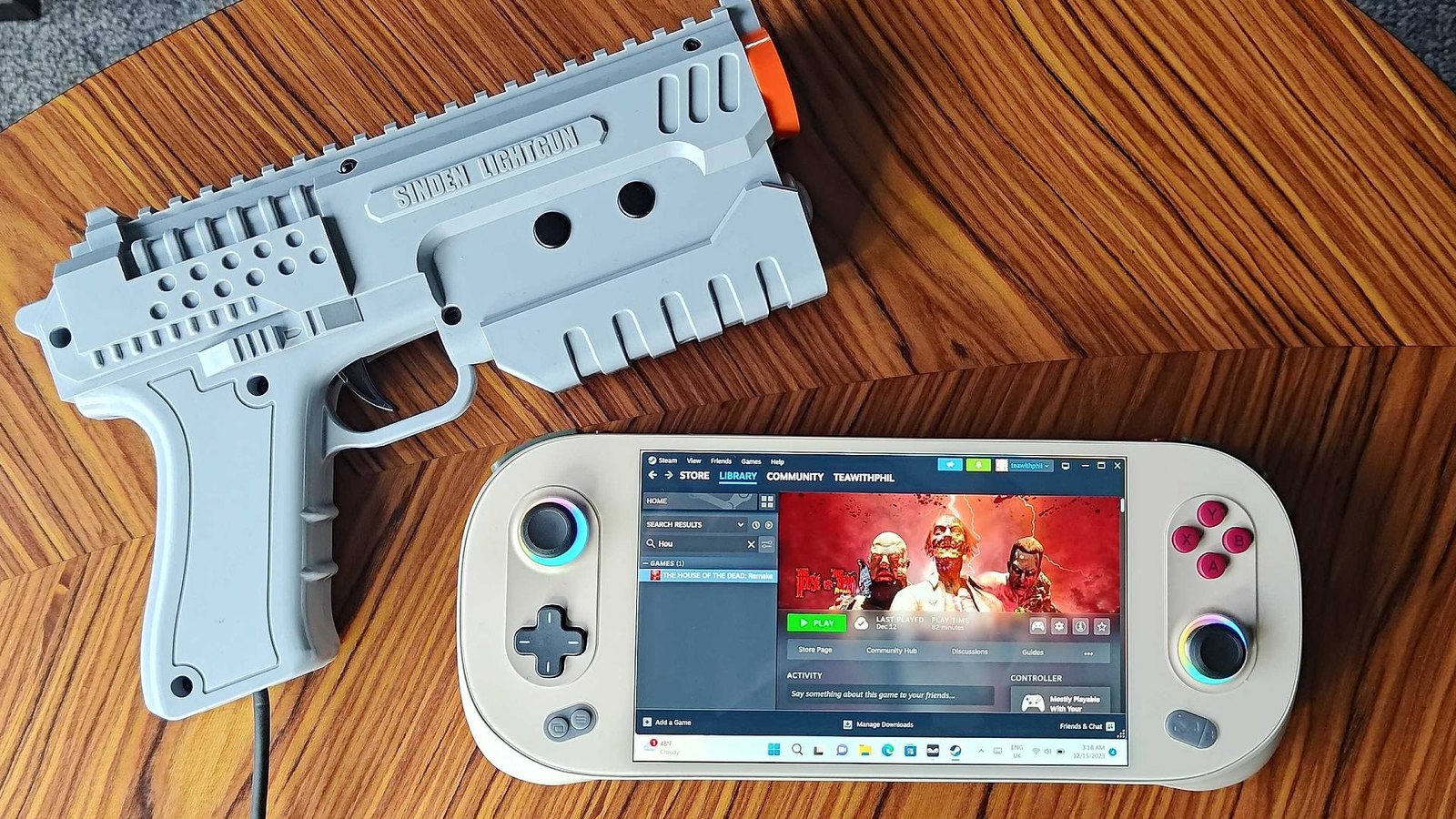
This dive covers what is left: phones, tablets and television boxes running Android; iPhones, iPads and the Apple TV; Windows and Linux handheld PCs and the small Linux handhelds; and the Nintendo Switch. The answer differs sharply between them, and the reason is almost always the same question: does the operating system accept an absolute pointing device as a pointer? Windows and desktop Linux do. Android, as shipped, does not, and the next three sections show the line of source code that decides it.
The plan:
Table 1 — The plan
| Vol | Covers |
|---|---|
| 1 | Android’s input stack and the gun (this volume) |
| 2 | Getting the gun into Android games anyway: gamepad mode, a touchscreen mode for the fork, the emulators, TV boxes and Android handhelds |
| 3 | Apple (iPad, iPhone, Apple TV) and Nintendo Switch: why there is no route, and what exists instead |
| 4 | Handheld PCs and Linux handhelds: Windows handhelds, Knulli and ROCKNIX, the port’s power budget, docks |
| 5 | Screen size, docking and casting, calibration per display, and the “where it runs” table |
Nothing in this dive has been run with the project’s gun, which is not built yet. Where a bench result belongs, a marker says what to capture.
1.2 The gun, as a USB device
The gun enumerates as one USB device (vendor ID 0xF143, manufacturer “OpenFIRE”) with a HID interface carrying three report types and a CDC serial interface. Open-Source Firmware, Volume 6 has the full account; what matters here is the shape of the mouse. The report descriptor in OpenFIRE’s TinyUSB_Devices.h (TUD_HID_REPORT_DESC_ABSMOUSE5) declares a Generic Desktop Mouse application containing five buttons and an X and a Y, each 16 bits, logical range 0 to 32767, both flagged Absolute. There is no wheel and no relative axis of any kind.
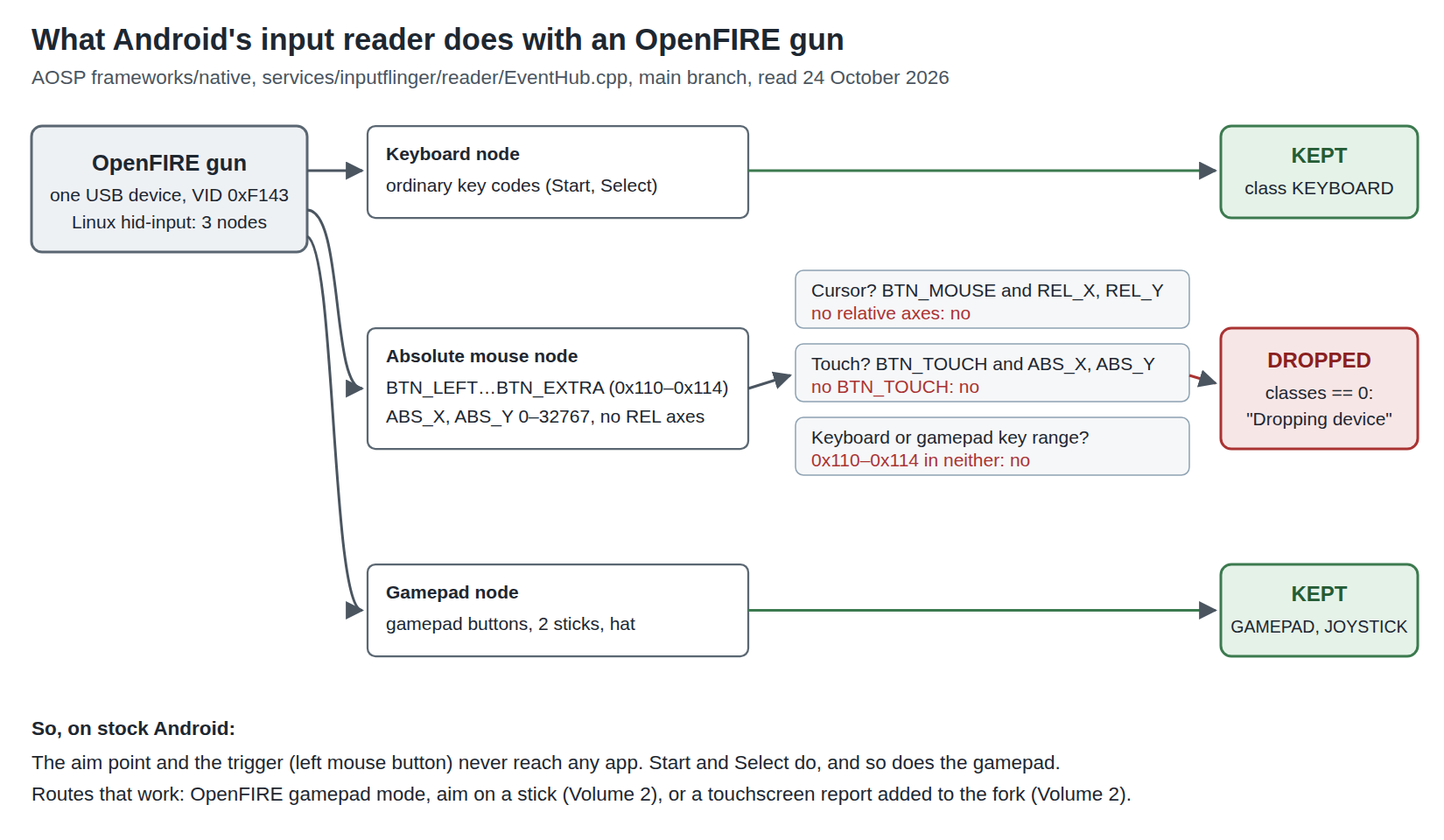
On a Linux kernel, and every Android device runs one, hid-input turns that collection into an input device whose capabilities are: key codes BTN_LEFT through BTN_EXTRA (0x110–0x114), and absolute axes ABS_X and ABS_Y. The keyboard collection becomes a second input device with ordinary key codes, and the gamepad collection a third, with gamepad buttons, two sticks and a hat. Linux and Retro Distros, Volume 1 shows the same three nodes on a desktop. Android sees exactly the same three /dev/input/event nodes; what differs is the layer above the kernel that decides what to do with them.
1.3 Android’s input reader and the cursor test
Android does not use libinput, X or Wayland. Its input stack is inputflinger, and the component that opens each event node and decides what kind of device it is lives in EventHub.cpp. The classification, read in AOSP’s main branch on 24 October 2026, is a series of tests on the device’s capability bits. The one that matters:
// See if this is a cursor device such as a trackball or mouse.
if (device->keyBitmask.test(BTN_MOUSE) && device->relBitmask.test(REL_X) &&
    device->relBitmask.test(REL_Y)) {
    device->classes |= InputDeviceClass::CURSOR;
}
A device is a mouse, to Android, only if it has the left button and relative X and Y. The following tests look for touch devices: a multi-touch screen reports ABS_MT_POSITION_X/Y; an old-style single-touch screen reports BTN_TOUCH with ABS_X and ABS_Y. Keyboards are recognised by key codes below BTN_MISC or above BTN_WHEEL, and gamepads by buttons in the BTN_MISC and BTN_JOYSTICK ranges. Then:
// If the device isn't recognized as something we handle, don't monitor it.
if (device->classes == ftl::Flags<InputDeviceClass>(0)) {
    ALOGV("Dropping device: id=%d, path='%s', name='%s'", ...);
    return;
}
The cursor mapper that turns a mouse’s events into pointer motion (CursorInputMapper.cpp) has no code for absolute axes at all; the word does not occur in it.
1.4 Applying the test to the gun’s three devices
Table 2 — 1.4 Applying the test to the gun's three devices
| Gun device | Capabilities | Cursor? | Touch? | Keyboard or gamepad? | Result |
|---|---|---|---|---|---|
| Keyboard | ordinary key codes (Start “1”, Select “5”, arrows) | no | no | keyboard | kept: keys reach apps |
| Absolute mouse | BTN_LEFT…BTN_EXTRA, ABS_X, ABS_Y | no (no REL_X/Y) | no (no BTN_TOUCH) | no (0x110–0x114 is in neither range) | dropped |
| Gamepad | gamepad buttons, two sticks, hat | no | no | gamepad and joystick | kept: buttons and sticks reach apps |
So on an Android device as shipped, an OpenFIRE gun in its default mode delivers its Start and Select keys and nothing else of use. The aim and the trigger both live on the mouse device (the trigger is the left mouse button in the firmware’s default table, Open-Source Firmware, Volume 6), and the mouse device never leaves the input reader. No app sees a cursor; there is nothing to configure in RetroArch, because RetroArch never receives an event.
This is an inference from source, not a test: no account of an OpenFIRE gun plugged into an Android device was found. It is a strong inference, because the code path is short and unconditional, and because two independent sources (next section) report exactly the behaviour it predicts. The bench check in section 1.10 settles it in two commands.
Two things survive that matter for Volume 2. The gamepad device is fully usable: OpenFIRE can put the aim point on an analog stick in its gamepad mode, and Android passes sticks to apps per device. And the keyboard is usable, so Start and Select work in any mode.
1.5 What other people found
An Arduino absolute mouse, 2020. In the issue tracker of NicoHood’s HID library for Arduino, a user reported on 10 October 2020 that the library’s absolute-mouse example “did work w/ Ubuntu 20 but not with Android 8.0/9.0 nor ios14”. A month later two users reported that a multi-touch digitizer descriptor (a sketch named Touchy.ino) worked on Android 10 and Android 7.0. That is the classification rule seen from outside: the absolute mouse fails the cursor test; a digitizer passes the touch test.
Sinden’s Android driver, 2022. Sinden’s own Android readme (in AndroidBeta.zip, dated 6 September 2022) says: “My early investigations made me think that absolute mouse support in Android emulators is poor so I have also added joystick support to Sinden Lightgun.” Its firmware v1.09 added a joystick mode for that reason, and the Android package ships four builds: absolute mouse or joystick, each with manual or automatic start. Sinden put the blame on the emulators; the source above suggests that for a mouse with no relative axes the operating system drops it before any emulator could try.
Android-x86, 2018. The Android-x86 project, a port of Android to PCs, carried its own patch to inputflinger titled “treat tablet-style inputs as absolute coordinate mouse pointer” (commit 6084c3ff, 26 December 2018), which classifies a device with BTN_MOUSE, ABS_X, ABS_Y and a wheel as a cursor, so that virtual machines’ absolute pointers would work. It exists because stock AOSP does not do this, and it was never part of AOSP; the main branch read for this volume has no such test. It also would not help the gun, which has no wheel.
1.6 What a configuration file can and cannot change
Android reads per-device input configuration files (.idc) matched by vendor and product ID, and they are the usual way to tune a touchscreen. They cannot rescue the gun’s mouse. The only device.type values EventHub acts on before classification are rotaryEncoder and externalStylus; the touch settings (touch.deviceType = pointer and the like) apply only to a device already classified as touch. The system’s .idc directories are read-only without root in any case.
What would work, in order of how much of the device it takes over:
Table 3 — What would work, in order of how much of the device it takes over
| Route | What it does | Cost |
|---|---|---|
| Gun in gamepad mode | Aim on a stick; Android passes it to apps | Only apps that can treat a stick as an absolute pointer (Volume 2) |
| A touchscreen report in the gun’s firmware | Android classifies it as an external touchscreen | A firmware change in the private fork; touch, not mouse, semantics (Volume 2) |
| An app that reads the device directly | UsbManager lets an app claim a USB interface, but the HID interface is held by the kernel’s driver | Only the CDC serial interface is realistically claimable without root |
A patched inputflinger or kernel | As Android-x86 did | A custom ROM; outside this project |
| Root and a userspace bridge | Read the event node, inject touch | Root; per-device; fragile |
1.7 Bluetooth does not change the answer
The same classification applies to a Bluetooth HID device: the Bluetooth stack hands Android a uhid input device built from the same report descriptor, and EventHub tests its bits in the same way. OpenFIRE’s source does contain a Bluetooth Classic HID path for the Pico W (TinyUSBDevices_::beginBT() in TinyUSB_Devices.cpp, advertising itself with class-of-device 0x2580, a mouse), and its Bluetooth report map carries the same absolute mouse. It would be dropped for the same reason. Open-Source Firmware, Volume 6 records that OpenFIRE ships only -noBT Pico W builds because Bluetooth is a known issue in its README, so this is academic for now; the radio options the project is actually trialling are in Fully Wireless, and they arrive at the host as a USB dongle, which brings the question straight back to section 1.4.
1.8 The other guns on Android: Sinden, GUN4IR, AimTrak
Table 4 — 1.8 The other guns on Android: Sinden, GUN4IR, AimTrak
| Gun | What reaches Android | Status found |
|---|---|---|
| Sinden (border camera) | A UVC camera plus a serial port, processed by Sinden’s own app into a mouse or joystick | ”A very raw beta” (Sinden’s driver page); needs Android 9+, a kernel with V4L2 USB video support (“I do not know any way to add these without a Kernel rebuild”), and probably setenforce 0 and chmod 777 on the device nodes after every re-plug. “The device being rooted would strongly help.” Two guns may need a kernel patch for USB bandwidth. Runs the camera at 320 × 240. Sinden’s FAQ lists Android as not supported. |
| GUN4IR | An absolute mouse by default, with gamepad and keyboard modes | Same classification as OpenFIRE: mouse dropped, gamepad kept. No Android account found. |
| AimTrak (Ultimarc), Bluetooth version | A Bluetooth “composite-HID-over-GATT” device that “should show as an additional HID mouse” | Ultimarc’s Bluetooth guide lists Android and iOS “All recent versions” as tested hosts. That is a connectivity statement: whether its pointer is absolute and what an emulator does with it are not stated. The Bluetooth upgrade kit “does not support recoil”. |
The Sinden is the instructive one. Because it does its image processing on the host, it needs a camera driver and raw device access on Android, which is a far higher bar than an infrared gun that computes its own aim point. An OpenFIRE gun needs nothing from Android but acceptance of one HID device, and that one acceptance is exactly what fails. Border tracking’s host dependence is covered in Border Tracking, Volume 1.
1.9 Power from a phone’s port
The gun’s electronics draw about 0.75 W, 150 mA at 5 V, by the estimate in Power Supplies, Volume 1, and the solenoid runs from its own 24 V brick by decision D17 (no USB-only gun). So the only question for a phone is whether its port supplies 150 mA, and any USB host port must: 100 mA before configuration and 500 mA after on USB 2.0 (Power Supplies, Volume 3 has the table). The questions that do bite on a phone are different:
- One port. A phone or Android handheld usually has one USB-C port, used both to charge and to host the gun. A USB-C hub with a power-delivery input lets the device charge while it hosts, but only if the device accepts being a power sink and a data host at once; most current phones do, not all, and the only test is the device in hand.
- The 24 V brick still needs a wall. A phone on a table with a mains-powered gun beside it is not portable. A battery inside the gun, with only a thin USB lead to the host, is the Wireless Power Only architecture; the cell and charger are LiPo Batteries.
- Sinden’s recoil gun is different. Sinden’s own documentation says “each recoil lightgun requires a continual draw of 500mA” from USB (quoted in Border Tracking), which a phone may refuse or brown out on. The project’s gun avoids this by design.
1.10 Checking a device on the bench
Two commands over adb settle section 1.4 for any given Android device, phone, TV box or handheld. With the gun plugged in:
adb shell getevent -p          # lists every event node with its capability bits
adb shell dumpsys input        # lists the devices inputflinger kept, with their classes
The expected result: getevent -p shows three nodes named “OpenFIRE FIRECon P1 Keyboard”, “OpenFIRE FIRECon P1 Mouse” and “OpenFIRE FIRECon P1” (for the App’s first preset), the mouse with KEY (0001): 0110 0111 0112 0113 0114 and ABS (0003): 0000 0001; dumpsys input lists the keyboard and the gamepad under its event hub devices and does not list the mouse. If the mouse is listed, the device’s vendor has patched inputflinger, and the rest of this dive should be re-read with that in mind.
1.11 Why this, and why not the others
This volume chooses no part. It sets a constraint for the firmware and for every later volume: on Android, the gun must arrive as a gamepad or a touchscreen, not as a mouse. The alternatives considered:
Table 5 — This volume chooses no part. It sets a constraint for the firmware and for every later volume: on Android, the gun must arrive as a gamepad or a touchscreen, not as a mouse. The alternatives considered
| Approach | Verdict | Why |
|---|---|---|
| Rely on the absolute mouse | Rejected | AOSP drops it (section 1.3); no configuration file can change that (1.6) |
| Add a relative mouse to the firmware | Rejected | Android would accept it, but would apply pointer acceleration and let the cursor drift from the aim point; a light gun’s whole point is an absolute position |
| Gamepad mode | Volume 2 route 1 | Kept by Android; needs an app that maps a stick to a pointer |
| A touchscreen report | Volume 2 route 2 | Kept by Android as an external touchscreen; needs a firmware change |
| Custom ROM or root | Out of scope | Per-device, and nothing a kit buyer could be asked to do |
1.12 What could not be verified
- Any Android device’s actual behaviour with an OpenFIRE gun (section 1.10 is the test).
- Whether any phone or TV-box vendor has modified
EventHubclassification; Android-x86’s patch shows it can be done. - The “absolute mouse fails on Android 8/9” report is one user’s, from 2020; the source read is from 2026.
- Whether Ultimarc’s Bluetooth AimTrak reports absolute or relative coordinates.
- Which current phones accept charging through a hub while hosting a device.
Sources
- AOSP,
frameworks/native,services/inputflinger/reader/EventHub.cppandmapper/CursorInputMapper.cpp, branchmain, https://android.googlesource.com/platform/frameworks/native/+/refs/heads/main/services/inputflinger/reader/ — read 2026-10-24. - TeamOpenFIRE,
OpenFIRE-Firmware,libraries/TinyUSB_Devices/TinyUSB_Devices.h(TUD_HID_REPORT_DESC_ABSMOUSE5) andTinyUSB_Devices.cpp(beginBT), https://github.com/TeamOpenFIRE/OpenFIRE-Firmware — read 2026-10-24. - NicoHood, HID, issue #123 “Capacitive Touch Screen Emulation”, comments of 10 October, 6 November and 9 November 2020, https://github.com/NicoHood/HID/issues/123 — read 2026-10-24.
- Sinden Technology, “Driver Software”, https://sindenlightgun.com/drivers/, and
AndroidBeta.zip,readme.txtdated 6 September 2022 — read 2026-10-24. - Android-x86,
frameworks/nativecommit 6084c3ff, “inputflinger: treat tablet-style inputs as absolute coordinate mouse pointer”, 26 December 2018 (listing on osdn.net; the commit page itself was not opened). - Ultimarc, Bluetooth Light Gun (AimTrak Bluetooth guide), https://www.ultimarc.com/AimtrakBluetooth.pdf, undated — read 2026-10-24.
- Phil Hayton, “I made an arcade light gun setup using a handheld, and you can too over Christmas”, GamesRadar+, 24 December 2023, republished by Yahoo Tech (photograph).
Comments (0)