Mobile and Handhelds · Volume 2
Getting the Gun Into Android Games — Gamepad Mode, a Touchscreen Mode for the Fork, the Emulators, TV Boxes and Android Handhelds
The two routes Android leaves open, what each emulator can do with them, a touchscreen output for the private fork and the descriptor it needs, calibrating with no cursor on the screen, why there is no game-driven recoil on Android, and the TV boxes and handhelds that run it
2.1 Two routes left open
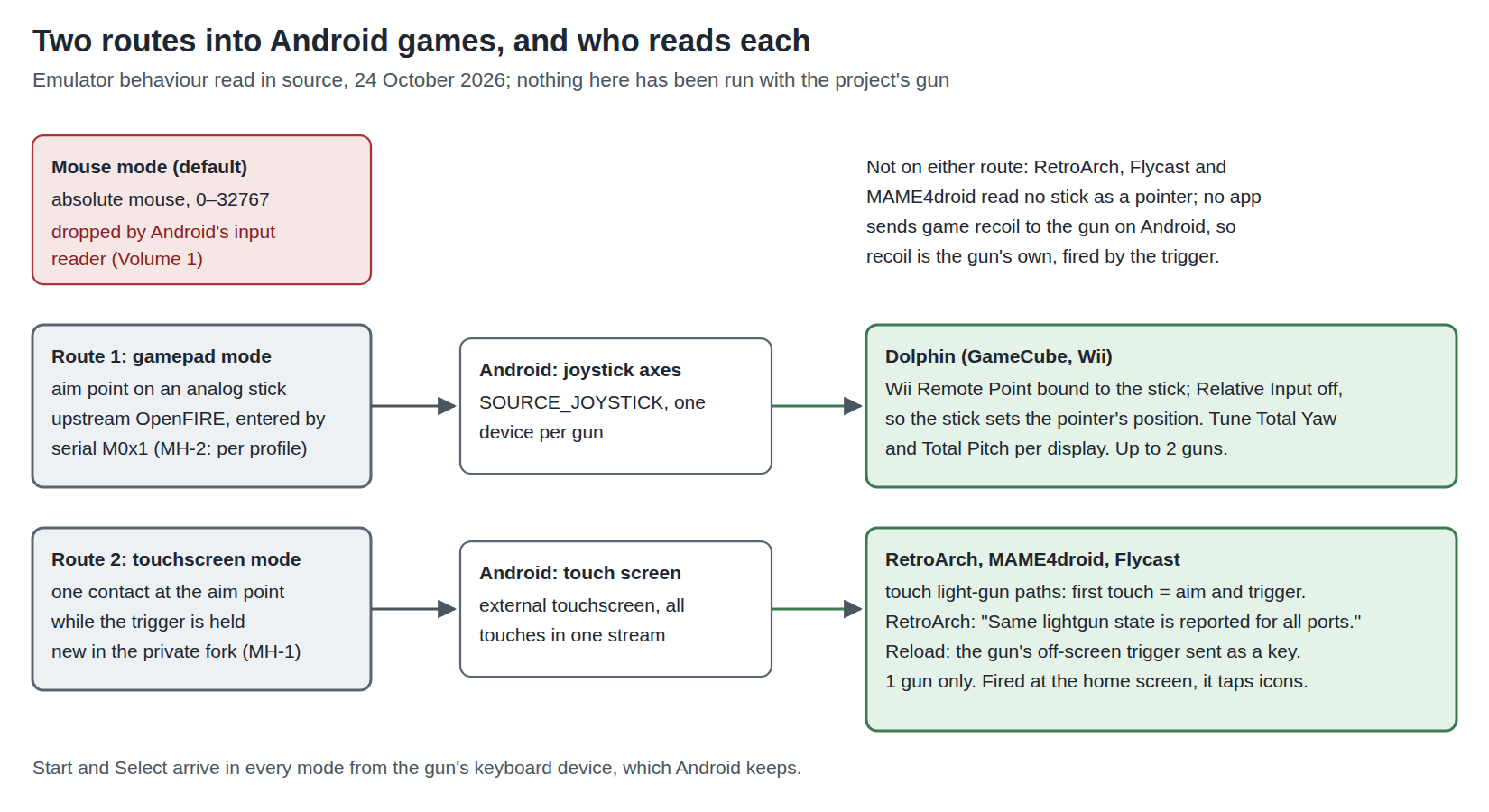
Volume 1 showed that Android’s input reader keeps the gun’s keyboard and gamepad and drops its absolute mouse. That leaves two ways for an aim point to reach an Android game:
- As a stick. OpenFIRE’s gamepad mode reports the aim point as an analog stick position across its full range (Open-Source Firmware, Volume 6, section 6.4). Android passes it to apps as joystick axes, each gun a separate device.
- As a touch. A touchscreen report, which upstream OpenFIRE does not have and the private fork could add, would be classified by Android as an external touchscreen.
Neither is what the emulators’ authors had in mind, and each works with a different set of programs. The rest of this volume sorts out which.
2.2 Route 1: gamepad mode, and who can use a stick as a pointer
A stick is a position from −1 to +1 on each axis, reported continuously. If a program maps that position directly to a screen position, the gun aims exactly as it does as a mouse. Most programs do not: a stick normally sets the cursor’s velocity, which turns a light gun into a very awkward joystick.
The programs read for this volume:
Table 1 — The programs read for this volume
| Program (Android) | Reads a stick as an absolute pointer? | Evidence |
|---|---|---|
| Dolphin (GameCube and Wii) | Yes: the Wii Remote’s Point group | ControllerInterface/Android/Android.cpp exposes every Android input device separately, with its joystick axes named “Axis”; the Point group (ControlGroup/Cursor.cpp) has “Relative Input” off by default, so a bound stick sets the pointer’s position directly, scaled by its “Total Yaw” and “Total Pitch” settings |
| RetroArch | No | Its Android light-gun state comes from the mouse or the touchscreen only (section 2.6) |
| Flycast | No | Light gun from its one Android mouse or the touchscreen (section 2.6) |
| MAME4droid | No | Light gun from the touchscreen; its mouse is relative (section 2.6) |
So route 1 is, in practice, the Wii’s light-gun-style games in Dolphin: the pointer games that a Wii Zapper shell was sold for, which PC-Windows and Linux and Retro Distros treat as ordinary Dolphin games. Because Dolphin sees each Android device separately, two guns in gamepad mode can be bound to two Wii Remotes, which no other Android route allows.
The catch is the scaling. Dolphin’s Point group converts the stick to an angle (Total Yaw by Total Pitch) and the game converts that angle to a screen position through its own assumptions about the Wii’s sensor bar. Getting the gun’s full-range stick to land on the picture’s edges is a matter of tuning those two numbers until the centre and the four edges line up, once per display. The OpenFIRE firmware’s own calibration still does the hard part, turning the camera’s view into a 0–full-scale stick position for the picture it was calibrated against; Dolphin’s settings only have to map full scale to the game’s edges.
2.3 Switching modes with no host program
Upstream OpenFIRE enters gamepad mode only when the host sends serial command M0x1 (or M0x9 for MiSTer’s variant): the README says the gun “can be signaled to output using its corresponding HID Gamepad device using a Serial Feedback Distributor program such as MAMEHOOKER”, and in the source the flag that switches it (buttons.analogOutput) is set only in OpenFIREserial.cpp. There is no pause-menu toggle for it.
On Windows or Linux a hook program sends that command. On Android nothing does: there is no MAMEHooker, no QMamehook, no OpenFIRE App. An Android app could open the gun’s CDC serial interface through UsbManager (the kernel’s HID driver holds the HID interface, but the CDC interface can be claimed by an app with the user’s permission), and send M0x1 itself, but no such app was found and writing one is a separate project.
The simpler fix belongs in the private fork: let each of OpenFIRE’s four calibration profiles carry an output mode (mouse, gamepad, or the touchscreen mode of section 2.4), chosen in the pause menu and saved to flash, so the gun comes up in the right mode for whatever it is plugged into. This is proposed as MH-2. It also helps on any host that has a gamepad path but no hook program.
2.4 Route 2: a touchscreen output for the fork
A touchscreen reports a position only while a finger is down. That maps onto a light gun more naturally than it first appears: most light-gun games care where the gun pointed when the trigger was pulled, and many are played with the crosshair off. So the fork’s touchscreen mode would:
- report one contact, at the aim point, while the trigger is held, and no contact otherwise;
- leave the aim point unreported between shots (there is nothing to draw a crosshair from);
- send the off-screen shot (reload) as something other than a touch, because a touch at the screen’s edge is still a touch on the screen: OpenFIRE already gives every input a separate off-screen function (Open-Source Firmware, Volume 6, section 6.3), so the trigger off-screen can send a keyboard key or a gamepad button bound to reload;
- keep the keyboard (Start, Select) and the gamepad buttons exactly as now.
Two cautions come with it. A touch is a touch everywhere: fired at the home screen, the gun taps whatever icon it is aimed at, so the mode should be one the user chooses, not a default. And it is one player: Android merges touches into one touchscreen stream per display, and every emulator in section 2.6 reads one light gun from it.
This is a firmware change in the private fork (decision D10), proposed as MH-1, and the descriptor needs care, because Linux and Android between them have three ways to read a digitizer and only one gives a touchscreen.
2.5 Which descriptor: the Linux and Android rules together
Two layers decide what a HID digitizer becomes. The Linux kernel’s hid-input.c (master, read 24 October 2026) sets an input property from the digitizer’s application usage: a Digitizer (0x0D/0x01) gets INPUT_PROP_POINTER, a Pen (0x0D/0x02) gets INPUT_PROP_DIRECT, and a Touch Screen (0x0D/0x04) handled by the generic driver gets neither. A descriptor with a Contact Identifier is claimed instead by hid-multitouch, which marks a touchscreen direct. Android’s TouchInputMapper.cpp then picks the device’s mode from those properties: INPUT_PROP_DIRECT makes it a touch screen, anything else a pointer, which Android drives like a laptop’s touchpad.
Table 2 — 2.5 Which descriptor: the Linux and Android rules together
| Descriptor | Linux gives | Android makes it | Fit for the gun |
|---|---|---|---|
| Digitizer application (0x0D/0x01) | INPUT_PROP_POINTER | a touchpad (relative-feeling pointer) | No |
| Touch Screen application, no contact ID | no property | a touchpad (“a touch pad of unknown purpose”) | No |
| Pen application (0x0D/0x02) | INPUT_PROP_DIRECT, BTN_TOOL_PEN | a touch screen, tool type stylus | Possible, but RetroArch’s Android driver handles styluses separately (hover and proximity rules) |
| Touch Screen with one contact (Contact ID, Tip Switch, X, Y, Contact Count) | hid-multitouch, direct | a touch screen, tool type finger | Yes |
The last row is the shape of Microsoft’s sample touch digitizer descriptor, and it is the one reported working on Android 7.0 and 10 in the NicoHood thread cited in Volume 1. It is proposed in MH-1 with one contact and a contact count of one.
Where the touches land is the last question. An external touchscreen with no configuration is associated with an external display if Android has one as a separate display, and falls back to the internal display otherwise (TouchInputMapper.cpp, “fallback to internal one for the external viewport is not found”). That matters when a phone or handheld is docked to a television, and Volume 5 takes it up.
2.6 The emulators, one by one
All read in their source on 24 October 2026.
RetroArch. The Android input driver (input/drivers/android_input.c) answers every light-gun query the same way for every port, and says so: “Same lightgun state is reported for all ports.” It favours a mouse if one has ever moved (“Favor mouse for lightgun control”); otherwise the aim is the first touch pointer, the trigger is one finger down (or a quick tap), Start is two fingers, Reload three. With the gun in touchscreen mode, then, the trigger works and the position arrives with it; Start and Select come from the gun’s keyboard and can be bound as RetroArch’s light-gun Start and Select (the light-gun binds are listed in Linux and Retro Distros, Volume 2). One gun. The cores are the same libretro cores as on any platform; their light-gun device types and options are in PC-Windows, Volume 3.
MAME4droid (the current MAME-based build, seleuco/MAME4droid-Current). Light gun from the touchscreen (input/TouchLightgun.java); its mouse support uses Android’s captured-pointer API for relative motion (input/Mouse.java). Touchscreen mode only; one gun.
Flycast (Dreamcast, NAOMI, Atomiswave). One Android mouse device for all mice (android_mouse, fed with absolute positions), plus a touch mouse when the device has a touchscreen (jni/src/android_input.cpp). Touchscreen mode only, since the absolute mouse never arrives; one gun.
Dolphin. Gamepad mode, per section 2.2; up to two guns.
Table 3 — 2.6 The emulators, one by one
| Emulator | Gun mode | Guns | Notes |
|---|---|---|---|
| RetroArch | touchscreen | 1 | Light-gun device type per core; Start/Select from the gun’s keys |
| MAME4droid | touchscreen | 1 | Touch light gun |
| Flycast | touchscreen | 1 | Touch mouse |
| Dolphin | gamepad | 2 | Point bound to the stick, tune Total Yaw and Pitch |
PlayStation 2 emulation on Android was not read for this volume; GunCon 2 games are a PC-Windows job.
2.7 Calibrating with no cursor
OpenFIRE’s on-gun calibration asks the player to shoot the centre of the picture, then its top, bottom, left and right edges as the mouse cursor visits them, then the centre again (Open-Source Firmware, Volume 5). The cursor is only a prompt: what the firmware records is where the camera saw the emitters at each shot, against the edges of the picture. On Android the cursor never appears, because the mouse is dropped, but the sequence is fixed, so the calibration can be done blind against any full-screen image, counting the shots.
Two refinements, both in the fork’s gift:
- Prompt on the gun. The OLED kept for the ammo count (decision D37) can show “CENTRE”, “TOP”, “BOTTOM”, “LEFT”, “RIGHT”, “CENTRE” during calibration, which makes calibration independent of the host entirely. Proposed in MH-2.
- Calibrate against the display in use, at the distance played from, and store it in its own profile: a phone’s screen, a handheld’s screen and the television it docks to are three different calibrations (Volume 5).
In touchscreen mode the gun’s 0–full-scale range should map onto the whole display Android associates the touchscreen with, because that is the space Android’s touch coordinates cover, and the emulator then maps the display to its own picture. Calibrating to the edges of the full screen, not to a 4:3 game inside it, keeps that chain consistent.
2.8 Recoil on Android
Game-driven recoil on Windows and Linux runs through a hook program that reads the game’s outputs and writes force-feedback commands to the gun’s serial port (PC-Windows, Volume 5; Linux and Retro Distros, Volume 6). None of that exists on Android: no hook program, no MAME output system in RetroArch, and no app that opens the gun’s serial port.
What remains is gun-driven recoil: the firmware fires the solenoid when the trigger is pulled, single shot or autofire by the gun’s own setting, which is OpenFIRE’s default with no host at all. All of decision D13’s protections (regulated current, the firmware’s timing limits) stay in the gun. For the Sinden on Android, its readme gives a hold-D-pad-right-for-six-seconds toggle between off, single shot and automatic, the same idea.
2.9 Android TV boxes
A television box is the most natural Android host for a light gun: it is already under the television, the picture is the television’s, and the gun’s emitters sit at the screen as they would for a PC.
Table 4 — 2.9 Android TV boxes
| Box | USB for the gun | Note |
|---|---|---|
| NVIDIA SHIELD TV Pro | ”Two USB 3.0 Ports (Type A)“ | Tegra X1+, 3 GB RAM, Android 11 (NVIDIA’s page, read 2026-10-24). The best-equipped box: two guns plug straight in. |
| Google TV Streamer | One USB-C, listed as power/data | Needs a USB-C hub with power pass-through; Google confirmed external storage through a hub to 9to5Google in August 2024; a gun through a hub was not confirmed |
| Other Android TV boxes | Usually USB-A | Same Android rules; quality of the Android build varies |
Everything in Volume 1 and this volume applies unchanged; the boxes run the same inputflinger. A box’s advantage is that the picture is already on the television, so the gun is calibrated to the television once and never has to deal with a mirrored phone screen.
2.10 Android handhelds
Retroid’s, AYN’s and Anbernic’s Android handhelds run ordinary Android with a game-controller shell around it, so they take the gun exactly as a phone does: through their USB-C port, with the mouse dropped and the keyboard and gamepad kept. Three things are particular to them:
- They already have a gamepad built in. The handheld’s own controls and the gun’s gamepad are two Android devices; Dolphin binds them separately, RetroArch assigns ports by device. In gamepad mode the gun must be the device bound to the Wii Remote’s pointer, not the handheld’s own stick.
- They have a touchscreen built in. In touchscreen mode the gun is a second touchscreen. Its touches go to the display Android associates it with (section 2.5), which on an undocked handheld is the handheld’s own screen.
- Most have video out over USB-C, which is the docked case of Volume 4 and Volume 5: the single port then carries video, the gun and charging at once, through a dock.
2.11 Why this, and why not the others
Table 5 — 2.11 Why this, and why not the others
| Option | Verdict | Why |
|---|---|---|
| Touchscreen mode in the fork (MH-1) | Propose | The only route into RetroArch, MAME4droid and Flycast on Android; a contained firmware change; Microsoft’s single-contact touchscreen shape is the one that becomes a direct touchscreen on both Linux and Android |
| Output mode stored per profile, chosen in the pause menu, OLED calibration prompts (MH-2) | Propose | Android has no host program to send M0x1; a gun that remembers its mode works on any host |
| Gamepad mode as it is | Keep, for Dolphin | Already in upstream; the only two-gun route on Android |
| An Android helper app on the CDC port | Not now | Would give mode switching and game recoil, but there are no game outputs on Android to forward, and it is a separate app to write and sign |
| Relative mouse | Rejected | Android accelerates it; aim drifts (Volume 1) |
| Pen descriptor | Rejected | Direct, but RetroArch’s stylus handling would get in the way |
2.12 What could not be verified
- Every row of section 2.6 on hardware with the gun; all are from source.
- That Dolphin’s Total Yaw and Pitch can be tuned to put a full-range stick exactly on the picture’s edges for every Wii pointer game.
- Whether RetroArch’s Android driver honours keyboard binds for the light-gun Reload and Aux buttons alongside its built-in mouse and finger rules (not traced through the generic input layer).
- That a single-contact
hid-multitouchtouchscreen from an RP2040 behaves on current Android as the 2020 Arduino reports did. - Whether the Google TV Streamer hosts a HID gamepad or touchscreen through a hub.
- PS2 emulation on Android (not read).
Sources
- libretro, RetroArch,
input/drivers/android_input.c, master (last change 74b7b06fa, 24 October 2026), https://github.com/libretro/RetroArch — read 2026-10-24. - Dolphin Emulator Project,
Source/Core/InputCommon/ControllerInterface/Android/Android.cppandSource/Core/InputCommon/ControllerEmu/ControlGroup/Cursor.cpp, master at e1d35f666 (22 October 2026), https://github.com/dolphin-emu/dolphin — read 2026-10-24. - flyinghead, Flycast,
shell/android-studio/flycast/src/main/jni/src/android_input.cpp,android_gamepad.h,periph/InputDeviceManager.java, master at e88b0ced2 (24 October 2026), https://github.com/flyinghead/flycast — read 2026-10-24. - seleuco, MAME4droid (
MAME4droid-Current),android-MAME4droid/app/src/main/java/com/seleuco/mame4droid/input/Mouse.javaandTouchLightgun.java, pushed 20 September 2026, https://github.com/seleuco/MAME4droid-2024 — read 2026-10-24. - TeamOpenFIRE, OpenFIRE-Firmware,
OpenFIREmain/README.md,OpenFIREserial.cpp,OpenFIREcommon.cpp, https://github.com/TeamOpenFIRE/OpenFIRE-Firmware — read 2026-10-24. - Linux kernel,
drivers/hid/hid-input.c, master (last change d89f04ac41e3, 19 August 2026), https://github.com/torvalds/linux — read 2026-10-24. - AOSP,
services/inputflinger/reader/mapper/TouchInputMapper.cpp, branchmain— read 2026-10-24. - NVIDIA, “SHIELD TV Pro”, https://www.nvidia.com/en-us/shield/shield-tv-pro/ — read 2026-10-24.
- Google Store, Google TV Streamer technical specifications (USB-C power/data), via search listing; 9to5Google, “Google TV Streamer external storage”, 7 August 2024 — read 2026-10-24.
- Sinden Technology,
AndroidBeta.zip,readme.txt, 6 September 2022 — read 2026-10-24.
Comments (0)