Mobile and Handhelds · Volume 3
Apple and Nintendo — iPad, iPhone, Apple TV and Switch, and Why the Gun Has No Way In
What iPadOS does with a mouse since 13.4, why Apple's game-controller mouse API gives only deltas, what an absolute HID pointer and a HID touchscreen do on iOS, the Apple TV with no USB port and no mouse, and the Nintendo Switch: gyro aiming, Joy-Con 2 mouse mode, USB mice per game, and what a Pico could pretend to be
3.1 The short answer
Table 1 — 3.1 The short answer
| Platform | Can the gun aim? | Why |
|---|---|---|
| iPad (iPadOS 13.4 and later) | No | A mouse is a relative pointer; absolute HID pointers are reported not to move it; Apple’s game API gives apps deltas only |
| iPhone | No | A pointer only through AssistiveTouch, an accessibility feature; same limits |
| Apple TV | No | No USB port; no mouse among the accessory types Apple lists |
| Nintendo Switch and Switch 2 | No | No light-gun or absolute-pointer input class; games aim with gyro, sticks, or per-game mouse support |
Each “no” has a different cause, and the causes matter for what to do instead, which in every case is to play the same games on another host.
3.2 iPadOS: a pointer since 13.4, but a relative one
Apple added mouse and trackpad support to the iPad with iPadOS 13.4; Apple’s support page says “Connecting a Bluetooth accessory to your iPad requires iPadOS 13.4 or later.” The pointer it drives is the iPad’s own circular pointer, moved by relative motion and accelerated by the system, as on a Mac.
For a game, Apple’s interface to a mouse is GCMouse in the Game Controller framework (iOS and iPadOS 14.0 and later, tvOS 14.0, macOS 11.0). Apple’s documentation of its input profile, GCMouseInput, is explicit: “This profile provides only raw mouse movement delta values.” An app can also follow the system pointer’s position over its own views, but that position is the accelerated, relative one.
So even if iPadOS accepted the gun’s reports, an emulator would receive how far the gun had moved, not where it pointed, and would have to integrate those deltas into a position that drifts. A light gun is useful only as an absolute device.
3.3 What an absolute pointer or a touchscreen does on iOS
Two kinds of report would carry an absolute position, and both are reported not to work:
- An absolute mouse, which is what the gun sends. A developer on Apple’s forums (July 2020) built a Bluetooth mouse that worked with AssistiveTouch, changed its HID input from relative to absolute, and found “the mouse stopped moving on my iPad”; two others reported the same in October 2020 and September 2021, and Apple did not answer. In the Arduino HID library thread cited in Volume 1, the absolute-mouse example failed on iOS 14.
- A HID touchscreen (the route that works on Android, Volume 2). In the same thread a user reported the multi-touch digitizer sketch working on Android 7.0 but not on iOS 14, and that the digitizer “is not supported on iOS since version 14”.
Neither report is Apple’s own statement, and neither has been tested with the project’s gun. They agree with each other and with the API: iOS offers no documented path for an external absolute pointer. Apple’s Pencil is a first-party digitizer handled outside the HID route.
Ultimarc lists iOS as a tested host for its Bluetooth AimTrak (“IOS All recent versions”); that is a pairing claim, and on the evidence above the pointer it drives would be iPadOS’s relative one.
3.4 The emulators on iPhone and iPad
Apple’s App Review Guidelines now allow emulators (guideline 4.7: “retro game console and PC emulator apps can offer to download games”), and RetroArch, Delta, PPSSPP and others reached the App Store in 2024. For a light gun they change nothing, because they run on top of the input APIs above.
RetroArch’s Apple input driver (input/drivers/cocoa_input.m, read 24 October 2026) shows the mechanism: on iOS a mouse arrives through GCMouse, described in the code as “A mouse with no position of its own moved the pointer by @dx, @dy (iOS, GCMouse)”, and the light-gun position is the running sum of those deltas. It also says “There is the one mouse”. Its touchscreen light gun (a finger on the screen) is the other light-gun path, and it is a finger, not a gun.
3.5 Apple TV
The Apple TV 4K has no USB port. Apple’s specification page (read 24 October 2026) lists HDMI 2.1, Gigabit Ethernet, an IR receiver, Wi-Fi 7, Bluetooth 6 and Thread; the only USB-C connector is on the Siri Remote, for charging. A wired gun, or the USB dongle of the Fully Wireless trial, has nothing to plug into.
Over Bluetooth, the accessory types in Apple’s Apple TV User Guide are game controllers (Apple names the DualShock 4, DualSense, Xbox Wireless, Xbox Elite Series 2 and Xbox Adaptive controllers, and MFi controllers), keyboards and headphones; no mouse is listed, although GCMouse exists on tvOS 14 and later. An OpenFIRE gun is none of the listed controllers. The Apple TV is not a light-gun host.
3.6 Nintendo Switch: no light-gun input at all
The Switch and Switch 2 run Nintendo’s own operating system, not Linux or Android, and they accept only the input devices Nintendo supports: Joy-Con, Pro Controllers and licensed wired controllers, USB keyboards, and on Switch 2, USB mice in games that support them. There is no light-gun class, no absolute-pointer class, and no emulator layer the player can configure. A cathode-ray-tube light gun cannot work either, because the Switch drives flat panels.
The light-gun games that have reached the Switch were adapted to that. The House of the Dead: Remake (2022) aims with gyro (one Joy-Con, a pair, or a Pro Controller) or with a stick, with gyro reset, sensitivity and aim-assist settings; reviewers noted drift and the need to recentre. Plastic gun shells that hold a Joy-Con are sold for such games; they change the grip, not the sensing.
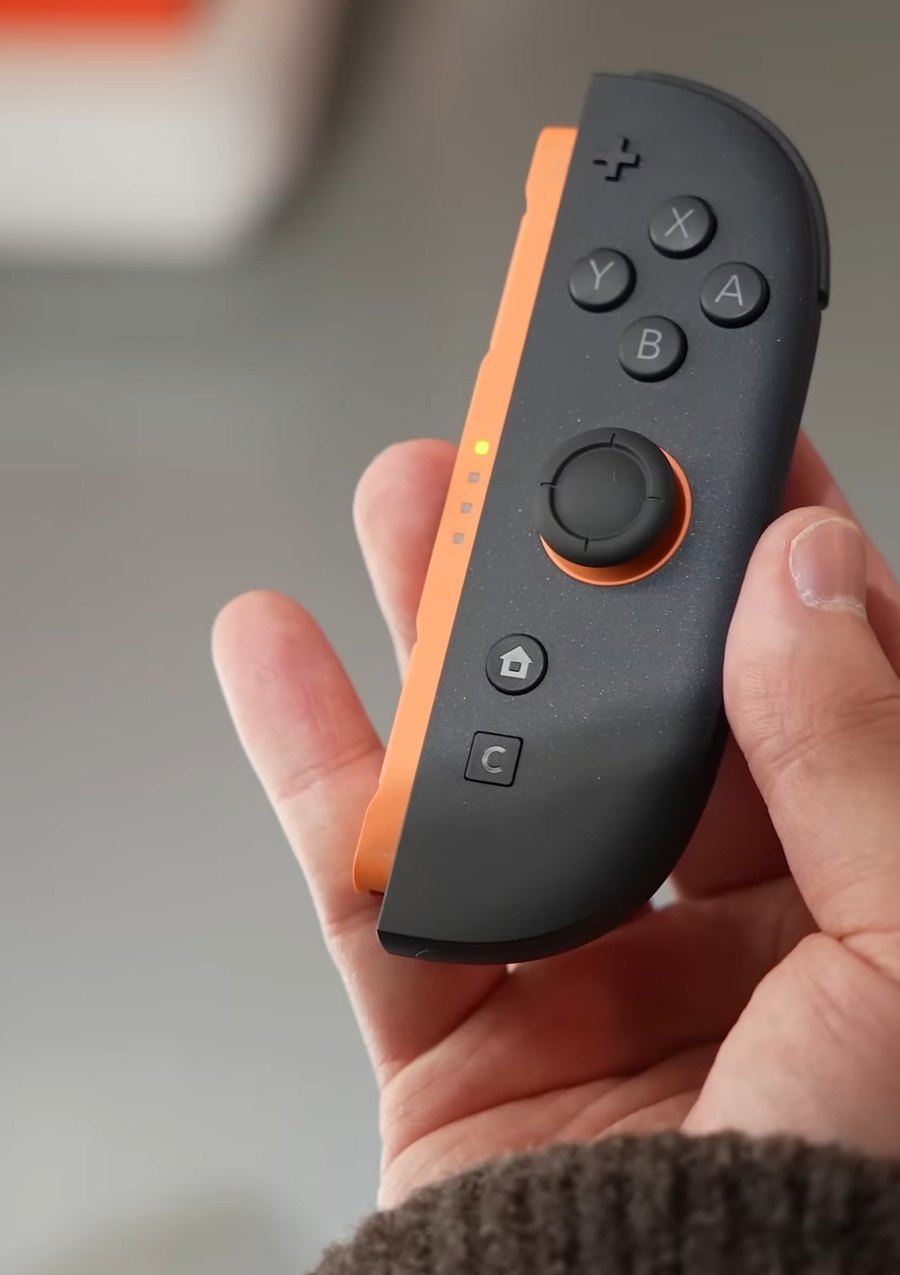
3.7 What the Switch has instead: gyro, Joy-Con 2 mouse mode, USB mice
Table 2 — 3.7 What the Switch has instead: gyro, Joy-Con 2 mouse mode, USB mice
| Input | What it is | Light gun? |
|---|---|---|
| Gyro aiming | Joy-Con or Pro Controller angular rate, integrated by the game | No: relative, drifts, recentred by a button |
| Joy-Con 2 mouse mode (Switch 2) | “a mouse sensor on its side” that turns “surfaces like a table or your lap into a mouse pad”; both Joy-Con can be mice at once; “Only in compatible games” (Nintendo’s Switch 2 features page) | No: an optical mouse, relative |
| USB mouse (Switch 2) | Supported per game; reported at launch in May 2025 for Nobunaga’s Ambition: Awakening Complete Edition, with a USB mouse taking priority over Joy-Con 2 mouse mode | Not as an absolute device: no evidence the system or any game accepts an absolute HID pointer |
| Right Joy-Con IR camera (Switch 1) | An infrared camera in the base of the original right Joy-Con | No game found that uses it to aim at the screen |
The closest a Switch comes is the gun’s own inertial unit (decision D36) imitating gyro aiming, which is a motion controller, not a light gun, and would need the gun to pass for a Nintendo controller (next section).
3.8 What a Pico could pretend to be on a Switch
An RP2040 can present itself to a Switch as a supported wired controller: GP2040-CE, the open firmware for RP2040 arcade sticks, has a “Switch” input mode selected by holding a button at plug-in. A fork of the gun’s firmware could do the same, with the aim point on a stick. The game would then read the stick as it reads any stick, as a velocity for its crosshair, which is the awkward joystick of Volume 2, section 2.2, not an aim point. Imitating a Joy-Con’s or Pro Controller’s motion reports, so that gyro-aimed games took the gun’s IMU, would be more useful and much more work, and would still inherit gyro aiming’s drift and recentring.
Neither is proposed. The Switch’s light-gun-style games are better played as intended, with a Joy-Con in a shell, and the gun’s games played on a host that takes it.
3.9 Why this, and why not the others
Table 3 — 3.9 Why this, and why not the others
| Option | Verdict | Why |
|---|---|---|
| Treat Apple and Nintendo hosts as unsupported | Propose (MH-6) | No documented absolute-pointer path on iOS or tvOS; no USB on Apple TV; no light-gun input on Switch |
| A relative-mouse mode for iPad | Rejected | Deltas through an accelerated system pointer drift from the aim point; the gun’s purpose is lost |
| A Switch controller mode in the fork | Rejected | A stick on Switch is a velocity; gyro imitation is large work for a drifting result |
| AirPlay or screen mirroring from an iPad to a television | Not a fix | Moves the picture, not the input; mirroring adds latency (Volume 5) |
3.10 What could not be verified
- Apple’s own statement on absolute HID pointers or HID touchscreens in iPadOS; the evidence is developer reports from 2020–2021 and the API documentation.
- Whether recent iPadOS releases changed pointer handling (no Apple documentation of a change was found).
- Whether any Switch 2 game reads an absolute HID mouse correctly.
- Whether any Switch game uses the original right Joy-Con’s IR camera to aim.
- Nintendo’s own list of Switch 2 USB-mouse-compatible games (only news reports were read).
Sources
- Apple, “Connect a Bluetooth mouse or trackpad to your iPad”, https://support.apple.com/en-us/108938 — read 2026-10-24.
- Apple Developer Documentation,
GCMouseandGCMouseInput(Game Controller framework), https://developer.apple.com/documentation/gamecontroller/gcmouseinput — read 2026-10-24. - Apple Developer Forums, “Is absolute mouse positioning supported over bluetooth in IOS?”, thread 652700 (July 2020, replies October 2020 and September 2021), https://developer.apple.com/forums/thread/652700 — read 2026-10-24.
- NicoHood, HID, issue #123, comments of 10 October and 9 November 2020, https://github.com/NicoHood/HID/issues/123 — read 2026-10-24.
- Apple, App Review Guidelines, 4.7, https://developer.apple.com/app-store/review/guidelines/ — read 2026-10-24.
- libretro, RetroArch,
input/drivers/cocoa_input.m, master, https://github.com/libretro/RetroArch — read 2026-10-24. - Apple, “Apple TV 4K — Technical Specifications”, https://www.apple.com/apple-tv-4k/specs/ — read 2026-10-24; Apple TV User Guide, connecting Bluetooth devices (via search listing).
- Ultimarc, Bluetooth Light Gun, https://www.ultimarc.com/AimtrakBluetooth.pdf — read 2026-10-24.
- Nintendo, “Nintendo Switch 2 — Features”, https://www.nintendo.com/us/gaming-systems/switch-2/features/ — read 2026-10-24.
- Video Games Chronicle, “Switch 2 supports USB mouse controls, developer reveals”, May 2025; heise online, “Switch 2 also supports USB mice”, May 2025 (news reports, via search listing).
- GoNintendo, “House of the Dead Remake’s controls, voice acting, options and more detailed” (developer FAQ, 2022); God is a Geek, The House of the Dead: Remake review (2022).
- GP2040-CE, “Usage” (input modes), https://gp2040-ce.info/usage/ — read 2026-10-24.
- matt beat, “Nintendo Switch 2 – rechter Joy-Con 2”, Wikimedia Commons, CC BY 2.0, 5 April 2025 (photograph).
Comments (0)