Mobile and Handhelds · Volume 5
Screen Size, Docking and Casting, and Where It Runs
Why a phone at arm's length looks to the gun's camera much like a television across a room, and why it is still the wrong target; aiming at the television a phone or handheld is connected to, whose coordinates the gun's range then covers, one calibration profile per display path, why wireless casting is out, the host-by-host table, what to test first, and the proposed decisions
5.1 Which screen does the gun aim at?
A phone, a tablet and a handheld each carry a screen, and each can usually put its picture on a television too. The gun can be aimed at either, and the choice decides more than the input stack does: where the emitters go, how the gun is calibrated, and what the host’s coordinates must cover. This volume takes the small screen first, then the television, then the table.
5.2 Aiming at a small screen
For an infrared-point gun, what limits aim is the angle the picture fills in the camera’s view, not the picture’s size. IR Point Tracking, Volume 4 gives the camera figures: the PixArt PAJ7025R3 the project chose has a half-angle of 56.5° and an average native pixel of 1.15°. Applied to small screens, with the square emitter layout and the minimum-distance rule of that volume:
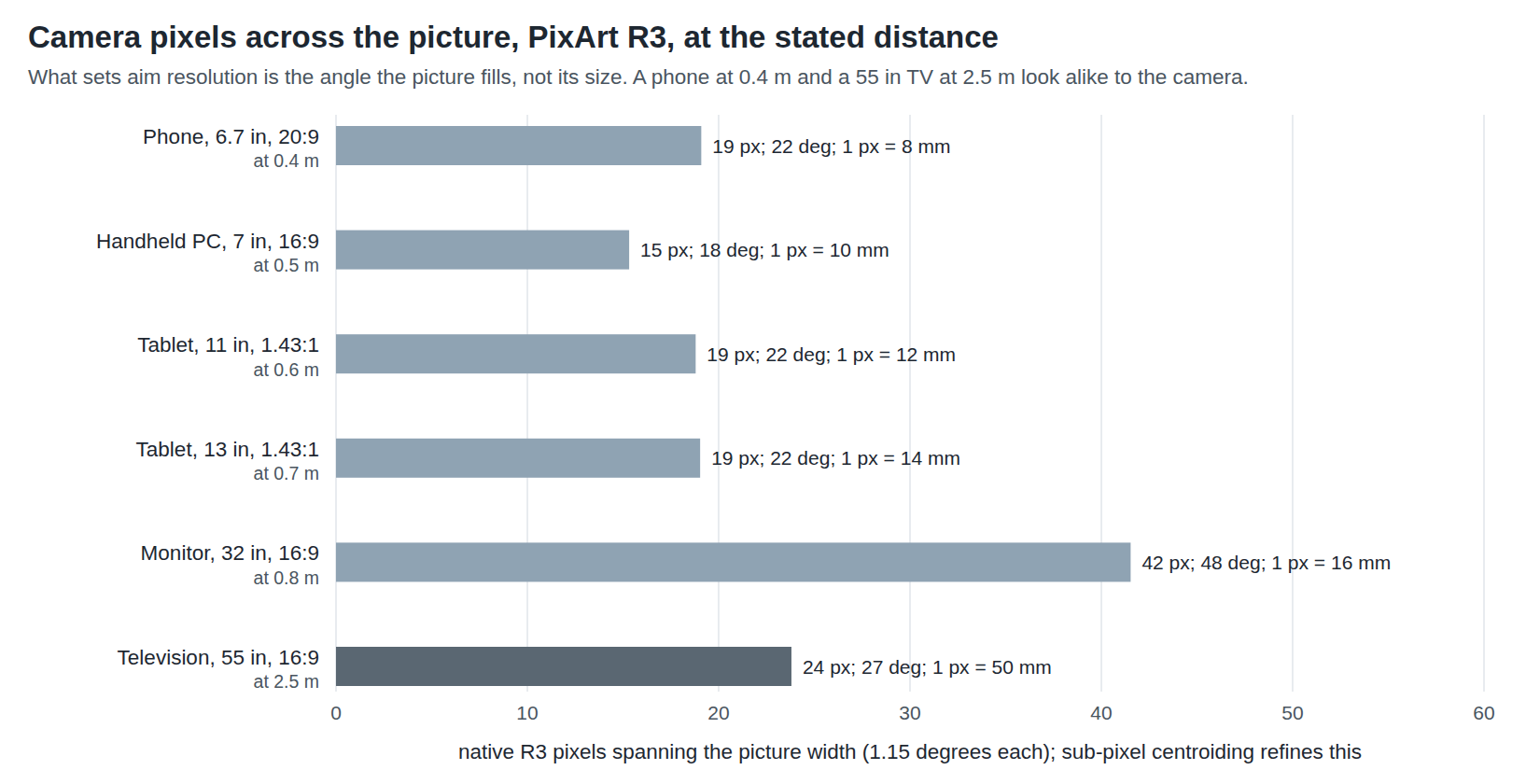
Table 1 — 5.2 Aiming at a small screen
| Screen | Picture, mm | R3 minimum distance, square layout | Wii-class camera minimum | Distance that fills the same angle as a 55 in TV at 2.5 m | Sinden’s 1.5–2 × width |
|---|---|---|---|---|---|
| Phone, 6.7 in, 20:9 | 155 × 70 | 0.08 m | 0.42 m | 0.32 m | 0.23–0.31 m |
| Handheld PC, 7 in, 16:9 | 155 × 87 | 0.08 m | 0.43 m | 0.32 m | 0.23–0.31 m |
| Tablet, 11 in | 229 × 160 | 0.12 m | 0.79 m | 0.47 m | 0.34–0.46 m |
| Tablet, 13 in | 271 × 189 | 0.14 m | 0.93 m | 0.55 m | 0.41–0.54 m |
| Television, 55 in, 16:9 | 1218 × 685 | 0.64 m | 3.37 m | 2.50 m | 1.83–2.44 m |
The 55-inch row reproduces IR Point Tracking’s figures, which is the check on the arithmetic. Read plainly, geometry does not rule out a small screen: a phone 30 to 40 cm from the gun gives the R3 as much to work with as a television across a living room, and the R3 keeps all four emitters in view down to a few centimetres. The Sinden’s recommended distance, scaled to a phone, lands in the same place.
What rules it out in practice is everything else:
- Emitters around a phone. The square layout puts emitters above and below the picture at 20 % and 80 % of its width (IR Point Tracking, Volume 4): on a phone, four emitters 93 mm apart, a few millimetres off a 70 mm-tall picture. The project’s emitter bars are built for televisions (Reference Electronics); a phone needs its own frame.
- Too much light, too close. IR Point Tracking’s range problem is the far limit; at 0.3 m the problem inverts, and television-strength emitters will flood the camera’s blobs. The emitter current and the camera’s gain would be set for the distance, a bench question.
- The phone must stand still. The calibration is a fixed geometry between emitters and picture. The phone goes on a stand with its emitter frame, the player stands back, and the gun is aimed at a picture the size of a playing card.
- It is not what a light gun is for. Every reason for building a full-size MP7 is undone by aiming it at a 15 cm target from arm’s length.
A border gun has a version of the same problem: Sinden needs its white border visible around the picture, which on a phone means a few millimetres of an already small screen, and its camera’s own limits at 0.3 m were not found documented.
5.3 Aiming at the television instead
The better arrangement is the one in Volume 4’s photograph: the device runs the game, its picture goes to the television, and the gun and its emitters work exactly as they do for a PC. The television is where the emitters already are, where the calibration already fits, and where the gun was designed to point. The device becomes a small computer under the set.
There are three ways to get the picture there, and they are not equal:
Table 2 — There are three ways to get the picture there, and they are not equal
| Path | How | Latency added | Suits the gun? |
|---|---|---|---|
| Wired video out | USB-C DisplayPort Alt Mode to HDMI, directly or through a dock | The television’s own processing only | Yes |
| A separate display (extended) | The same cable, with the device treating the television as a second screen | As above | Yes, if the host maps the gun to it (5.4) |
| Wireless casting | Miracast, Chromecast, AirPlay | An encode, a radio hop and a decode | No (5.6) |
5.4 Whose coordinates: the three display paths
The gun’s range has to cover the picture the player aims at. Who decides what it covers depends on the host:
Windows (handheld docked). The full range maps onto the primary display (PC-Windows, Volume 1, section 1.4). Make the television primary, or turn the built-in panel off with “Second screen only” (Volume 4, section 4.2).
Linux and Batocera (Steam Deck, Linux handhelds). Programs that read the event node map the 0–32767 range onto their own window; on a single television output, that is the television (Linux and Retro Distros, Volume 1).
Android in touchscreen mode. An external touchscreen is associated with an external display when Android runs one as a separate display, and with the internal display otherwise (Volume 2, section 2.5). That gives two cases:
- Mirroring. The television shows the phone’s own screen, scaled to fit, with bars where the shapes differ: a 20:9 phone on a 16:9 television leaves black bands above and below. The gun’s touches land on the phone’s display, which is the picture on the television inside the bars. The emitters sit around the television, not the mirrored picture, but that is what OpenFIRE’s calibration absorbs: it measures the offsets from the emitters to the edges of the picture actually shot at (Open-Source Firmware, Volume 5). So calibrate by shooting the edges of the mirrored picture, not the television’s.
- A separate display. Where Android drives the television as its own display (desktop-style modes on some phones and handhelds), the gun’s touches go to that display, and the game must be running there.
Which of these a given phone or handheld does, and whether its emulator then draws on the display that has the gun, is a per-device bench check.
5.5 One calibration profile per display path
OpenFIRE keeps four calibration profiles, each with its own calibration, run mode and camera sensitivity, selected from the pause menu (Open-Source Firmware, Volume 5). The display paths above are different calibrations: the same television is a full-screen picture from a PC, a barred mirror from a phone, and perhaps a 4:3 window from a handheld that will not change its output shape. So the proposal (MH-3) is to give each path its own profile and to name them on the OLED:
Table 3 — OpenFIRE keeps four calibration profiles, each with its own calibration, run mode and camera sensitivity, selected from the pause menu ([Open-Source Firmware, Volume 5](/light-guns/building-the-electronics/open-source-firmware/vol-5/)). The display paths above are different calibrations: the same television is a full-screen picture from a PC, a barred mirror from a phone, and perhaps a 4:3 window from a handheld that will not change its output shape. So the proposal (MH-3) is to give each path its own profile and to name them on the OLED
| Profile | Display path | Mode (MH-2) |
|---|---|---|
| 1 | PC or docked Windows handheld, television full screen | Mouse |
| 2 | Batocera (Steam Deck or Pi) on the same television | Mouse |
| 3 | Android device mirrored or extended to the television | Touchscreen or gamepad |
| 4 | Spare: a second television, or a monitor | As needed |
The firmware’s own advice holds for each: calibrate from the distance and height the gun will be used at, and shoot the picture’s edges, not the bezel.
5.6 Wireless casting
A light gun’s error is the distance the target moves between the frame the player shot at and the frame the game judged; every frame of latency in the picture path is a frame of that (PC-Windows, Volume 6 sets out the budget on a PC). Wireless casting adds a video encoder, a radio link and a decoder to that path. The one hands-on measurement found is old and on Windows, not a phone: Steve Paine, testing Miracast from Windows 10 to an Actiontec ScreenBeam Pro in May 2015, measured “around 120 ms in a stopwatch image test”, about seven frames at 60 Hz, and wrote that larger screen changes raised it. Modern casting may well be faster; no measurement of current Chromecast, AirPlay or Miracast latency from a primary source was found.
Even at half that figure, casting is several frames worse than a cable for no gain, and the gun’s purpose is an aim that lands where it pointed. For gun play, use a wired video path (MH-7). Casting a phone to the television is fine for the menus.
5.7 Where it runs
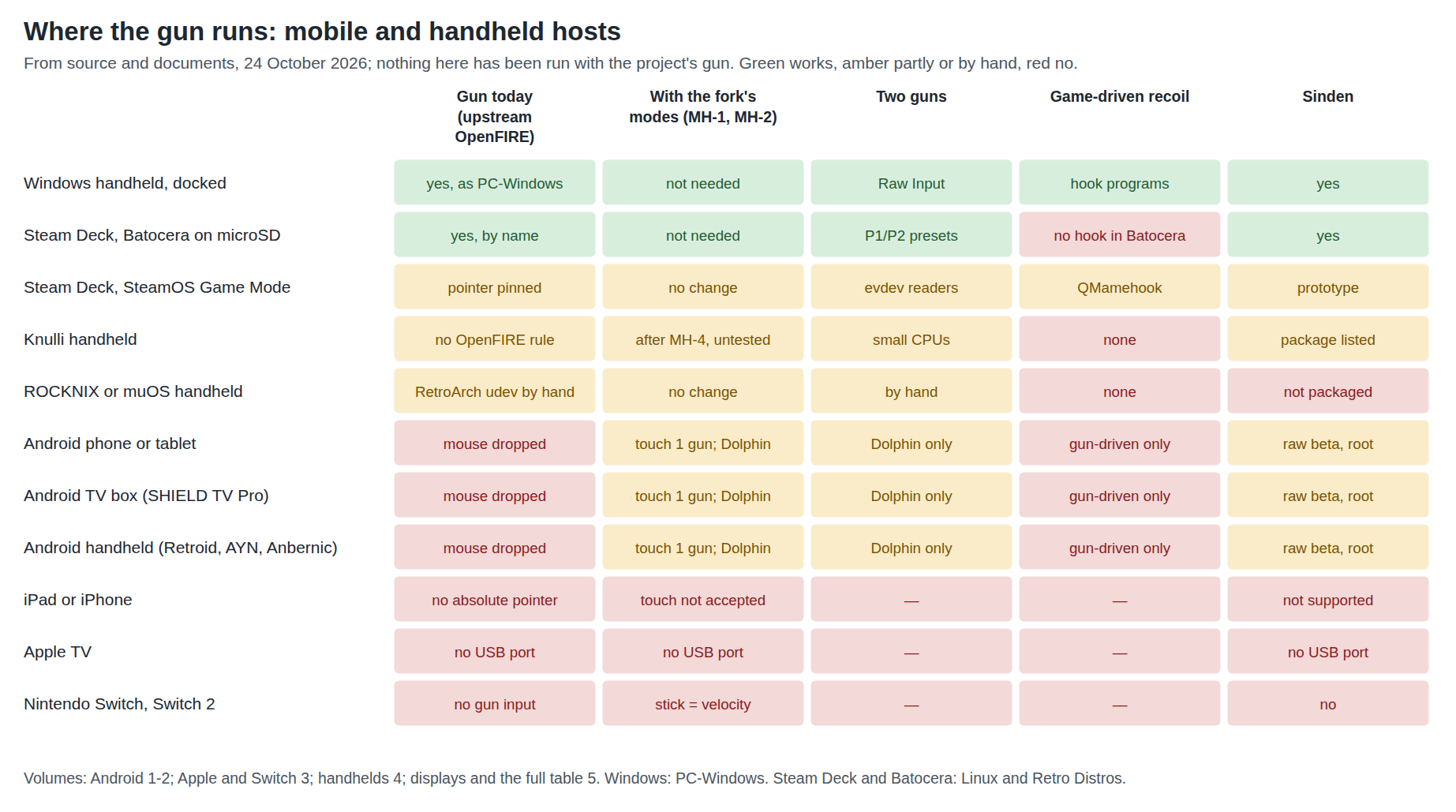
Table 4 — 5.7 Where it runs
| Host | Gun today | With MH-1/MH-2 | Two guns | Game recoil | Sinden | GUN4IR | Covered in |
|---|---|---|---|---|---|---|---|
| Windows handheld, docked | Yes, as on a PC | Not needed | Yes, Raw Input | Yes, hook programs | Yes | Yes | PC-Windows; Vol 4 |
| Steam Deck, Batocera on microSD | Yes, recognised by name | Not needed | Yes, P1/P2 presets | No: Batocera has no hook | Yes | Yes | Linux and Retro Distros, Vol 5 |
| Steam Deck, SteamOS Game Mode | Partly: pointer expected to be pinned | No change | evdev readers | QMamehook | Prototype driver | As the gun | Linux and Retro Distros, Vol 5 |
| Knulli handheld | By hand: no OpenFIRE rule | After MH-4 (untested) | Small processors | None | Package listed | Package listed | Vol 4 |
| ROCKNIX or muOS handheld | By hand: RetroArch udev | No change | By hand | None | Not packaged | By hand | Vol 4 |
| Android phone or tablet | No: mouse dropped | Touch: 1 gun (RetroArch, MAME4droid, Flycast); gamepad: Dolphin | Dolphin only | Gun-driven only | Raw beta, root, kernel support | Gamepad mode only | Vols 1–2 |
| Android TV box (SHIELD TV Pro) | No: mouse dropped | As Android, two USB-A ports | Dolphin only | Gun-driven only | Raw beta | Gamepad mode only | Vol 2 |
| Android handheld | No: mouse dropped | As Android | Dolphin only | Gun-driven only | Raw beta | Gamepad mode only | Vol 2 |
| iPad, iPhone | No | No | — | — | Not supported | No | Vol 3 |
| Apple TV | No: no USB port | No | — | — | No | No | Vol 3 |
| Nintendo Switch, Switch 2 | No: no gun input | No | — | — | No | No | Vol 3 |
GUN4IR’s column follows from its being an absolute mouse by default with gamepad and keyboard modes, like OpenFIRE; Batocera and Knulli carry a gun4ir-guns package. No GUN4IR account on any of these hosts was read.
5.8 Per-system notes
Game-by-game settings belong to the sibling dives and are the same on a handheld as on the machine the sibling covers: PC-Windows, Volume 6 for Windows, Linux and Retro Distros, Volume 7 for Batocera and Linux. What is particular to Android:
Table 5 — Game-by-game settings belong to the sibling dives and are the same on a handheld as on the machine the sibling covers: [PC-Windows, Volume 6](/light-guns/platform-support/pc-windows/vol-6/) for Windows, [Linux and Retro Distros, Volume 7](/light-guns/platform-support/linux-and-retro-distros/vol-7/) for Batocera and Linux. What is particular to Android
| System | Android route | Note |
|---|---|---|
| NES (Zapper), SNES (Super Scope), Mega Drive (Menacer, Justifier), Master System (Light Phaser) | RetroArch, touchscreen mode | The libretro cores’ light-gun device types as on PC (PC-Windows, Volume 3); one player |
| PlayStation (GunCon, Justifier) | RetroArch Beetle PSX or PCSX ReARMed, touchscreen mode | One player |
| Sega Saturn (Virtua Gun) | RetroArch Beetle Saturn, touchscreen mode | Demanding on phone processors |
| Arcade (MAME) | MAME4droid or RetroArch’s MAME cores, touchscreen mode | One player |
| Dreamcast, NAOMI, Atomiswave | Flycast, touchscreen mode | One player (its touch mouse) |
| Wii pointer games | Dolphin, gamepad mode | Two players; tune Total Yaw and Pitch per display |
| PlayStation 2 (GunCon 2) | Not read | Use a PC |
5.9 What to test first
In order, each step cheap and each settling a question the next depends on:
- Android classification (MH-8):
getevent -panddumpsys inputon one Android device with the upstream gun plugged in (Volume 1, section 1.10). If the mouse is dropped, as expected, Android work waits for MH-1. - Docked Windows handheld or a laptop standing in for one: the television as the only display, the gun calibrated to it in profile 1, the same tests as PC-Windows, Volume 6.
- Dolphin on Android in gamepad mode, which needs no firmware change: send
M0x1from a PC, plug the gun into the Android device, bind Point, tune Total Yaw and Pitch. - The touchscreen mode (MH-1) on the bench: Linux first (
evtestshould show a direct touchscreen withBTN_TOUCH), then Android (dumpsys inputshould show it as a touch screen), then RetroArch with the NES core. - Knulli with the OpenFIRE package added (MH-4), if a Knulli handheld is to hand.
5.10 Proposed decisions
All Proposed; merged into the category’s DECISIONS.md.
Table 6 — 5.10 Proposed decisions
| # | Area | Proposal | Why, and why not the alternatives |
|---|---|---|---|
| MH-1 | Android aim route | Add an optional touchscreen output to the private fork: one contact (Microsoft’s single-contact touchscreen shape, so Linux binds hid-multitouch and marks it direct), reported only while the trigger is held, off-screen trigger sent as a key; chosen per profile, never the default | Android drops the absolute mouse (Vol 1); a Digitizer or plain Touch Screen descriptor becomes a touchpad, a Pen descriptor a stylus that RetroArch treats separately (Vol 2 §2.5); a relative mouse drifts |
| MH-2 | Output mode without a host | Store the output mode (mouse, gamepad, touchscreen) in each of the four profiles, selectable in the pause menu; show calibration prompts on the OLED (D37) | Upstream enters gamepad mode only by serial M0x1, which no Android program sends; the OLED makes calibration host-independent (Vol 2 §§2.3, 2.7) |
| MH-3 | Calibration per display path | One profile per display path (PC full screen, Batocera, Android mirrored or extended, spare), named on the OLED | The same television is a different picture rectangle on each path; calibration is exact only for what it was shot against (§5.5) |
| MH-4 | Knulli | Offer Knulli a two-line change: source openfire-guns/Config.in and select BR2_PACKAGE_OPENFIRE_GUNS under “batocera guns support” | Knulli builds sixteen Batocera gun packages but not OpenFIRE’s; evsieve is already built (Vol 4 §4.4); a local patch would be lost at every update |
| MH-5 | Portable host | A Windows handheld docked to the television, the television the only display, is the recommended portable host; Batocera on a Steam Deck second | Everything in PC-Windows works, including game recoil; the primary-display trap is removed (Vol 4) |
| MH-6 | Apple and Nintendo | Record iOS, iPadOS, tvOS and Switch as unsupported; no firmware work for them | No absolute-pointer path on iOS (relative pointer, GCMouse deltas only); no USB on Apple TV; no light-gun input on Switch (Vol 3) |
| MH-7 | Picture path | Wired video only for gun play; no wireless casting | Casting adds an encode, a hop and a decode, measured at about 120 ms in the one hands-on test found (§5.6) |
| MH-8 | Android bench check | Before any Android work, run getevent -p and dumpsys input with the upstream gun on one device and file the output | Confirms the source-derived finding on real hardware and catches a vendor-patched input reader (Vol 1 §1.10) |
5.11 What could not be verified
- Every row of the table with the project’s gun.
- The R3’s behaviour at 0.3 m from television-strength emitters (saturation, blob size).
- Which phones and Android handhelds run a docked television as a separate display, and where their emulators then draw.
- Current wireless-casting latency from a primary measurement.
- GUN4IR on any host in the table.
Sources
- IR Point Tracking, Volume 4, camera half-angles and pixel sizes (PixArt PAJ7025R3 and R2 datasheets; WiiBrew), this site.
- Own arithmetic:
04-templates/calc_screen_geometry.pyand04-templates/make_where_it_runs.py, 2026-10-24. - Sinden Lightgun wiki, FAQ (recommended distance 1.5 to 2 times the screen width), as read for Border Tracking, 2026-10-19.
- Steve Paine, “Casting in Windows 10 greatly improved: MS Miracast / Actiontec test”, UMPCPortal, 1 May 2015, https://www.umpcportal.com/2015/05/casting-and-in-windows-10-greatly-improved-ms-miracast-actiontec-test/ — read 2026-10-24.
- AOSP,
services/inputflinger/reader/mapper/TouchInputMapper.cpp, branchmain— read 2026-10-24. - TeamOpenFIRE, OpenFIRE-Firmware,
OpenFIREmain/README.md(profiles, calibration), https://github.com/TeamOpenFIRE/OpenFIRE-Firmware — read 2026-10-24. - Knulli and Batocera repositories as cited in Volume 4 — read 2026-10-24.
Comments (0)