Home-Computer Light Guns · Volume 1
The Light Pen — From SAGE to the Home Computer
Why a pen on a 1950s air-defence console needed no position hardware, why a pen on a television did, and why the home computers that built that hardware into their video chips had light guns before most consoles
1.1 What this dive covers
A light gun for a home computer is a light pen with a lens on the front and a trigger underneath. That sentence is the whole of this dive’s argument, and the six volumes are the evidence for it, machine by machine: which connector pin carried the pen’s signal, which chip froze the beam’s position when it arrived, how a program read the result, which games used it, and which guns were sold.
The neighbours divide the subject. The narrative history of light guns, from the 1930s shooting galleries to the present, is in History of Light Guns; its Volume 3 sets out the two schools of 8-bit gun, the Zapper’s “decide in software” and the light pen’s “decide in silicon”, and mentions the home computers in passing. This dive is the port-level detail behind that passing mention. Console guns, including the identification table for Atari’s XG-1 as a console accessory, are in Console Light Guns, and arcade cabinets have their own dive, Arcade Light Guns. The circuits of the sensor chain, redrawn for a modern build, belong to CRT Timing.
Table 1 — What this dive covers
| Vol | Covers |
|---|---|
| 1 | The light pen from SAGE to the home computer; every machine on one page |
| 2 | Atari 400/800, XL, XE and the XE Game System: ANTIC, the CX75 pen, the XG-1 as a computer peripheral |
| 3 | Commodore: PET, VIC-20, C64 and C128, Amiga; the C64’s guns and games |
| 4 | Sinclair and Amstrad: the Spectrum’s latchless guns, the CPC’s 6845, the Plus range and GX4000 |
| 5 | BBC Micro, MSX, Apple II, Thomson and the Atari STE |
| 6 | Side by side, and using one today: pinouts, latch formats, calibration, emulation, testing |
Pin assignments in this dive come from the machine maker’s own manual or the chip maker’s datasheet, quoted with the source. Where the only evidence for a gun’s wiring is a magazine article, an emulator’s source code or a collector wiki, the text says so.
1.2 The pen on a random-scan screen
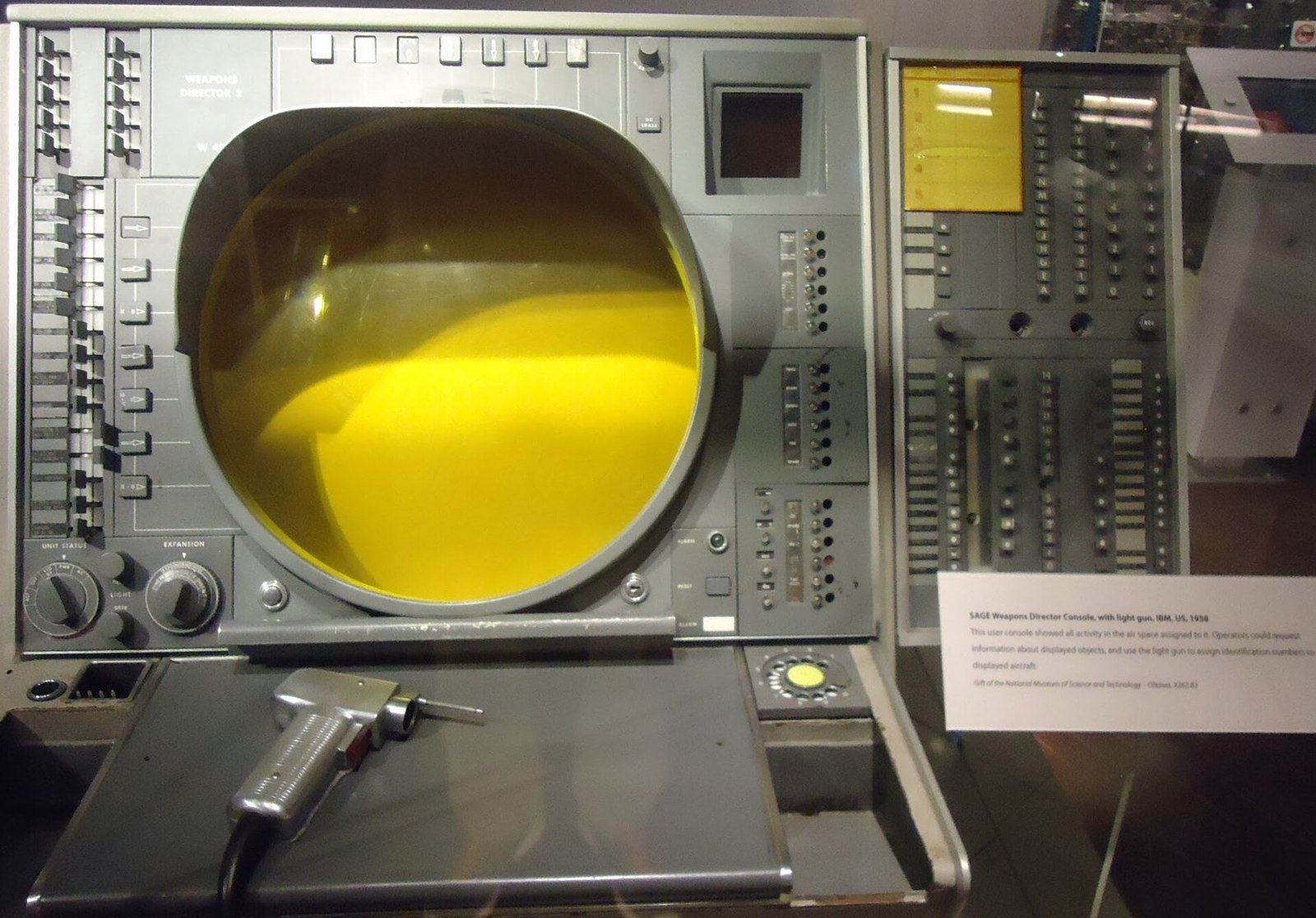
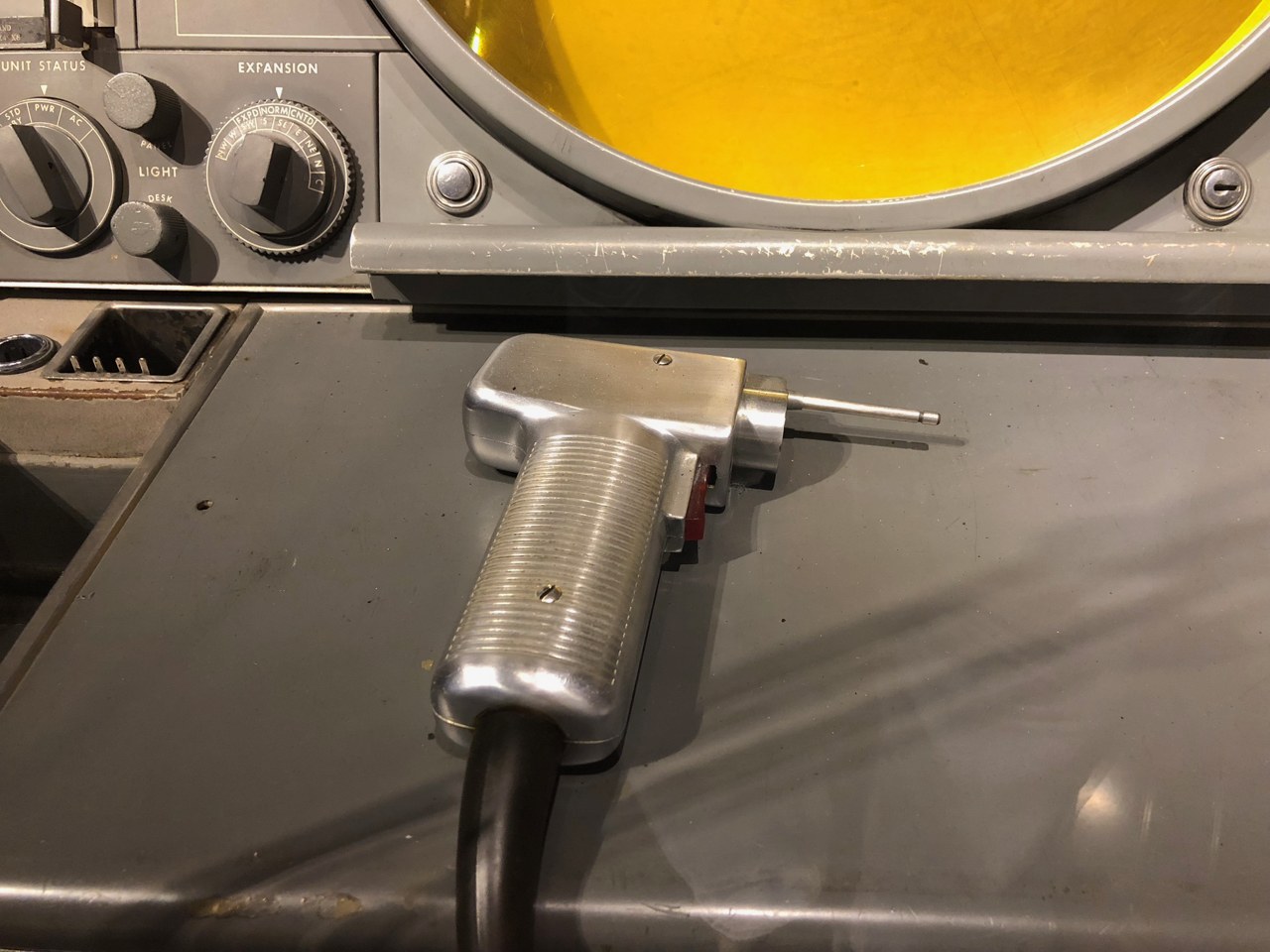
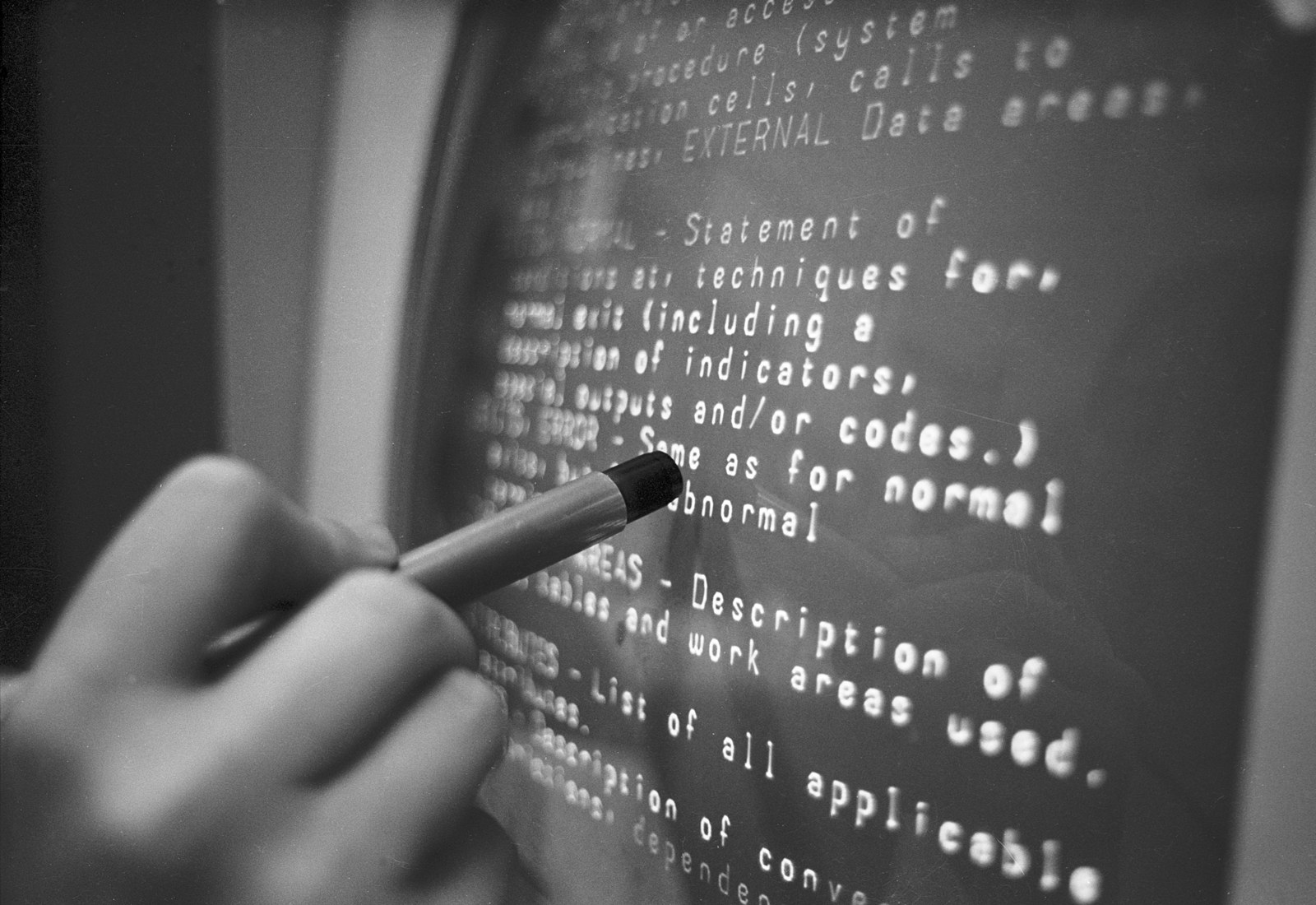
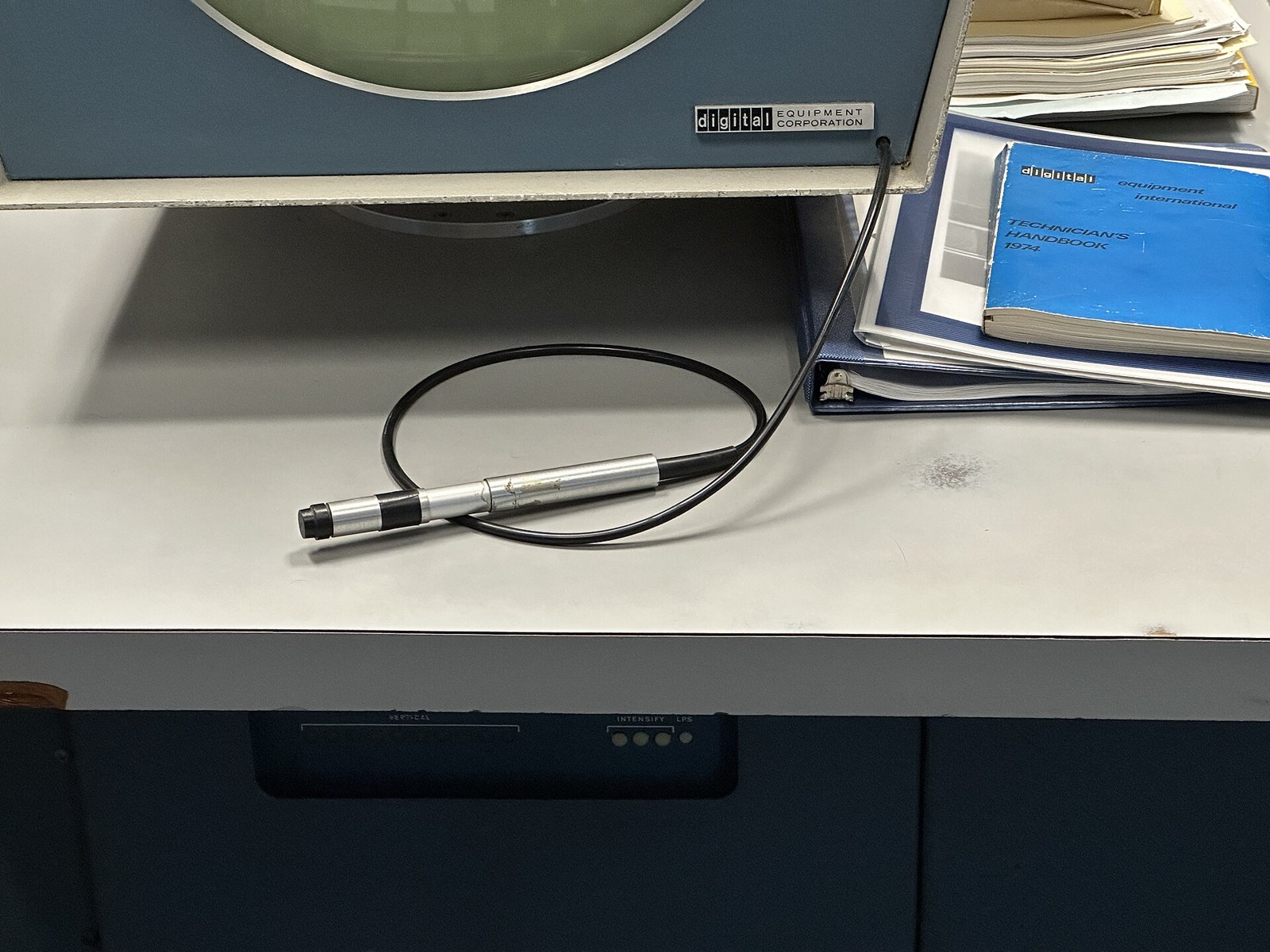
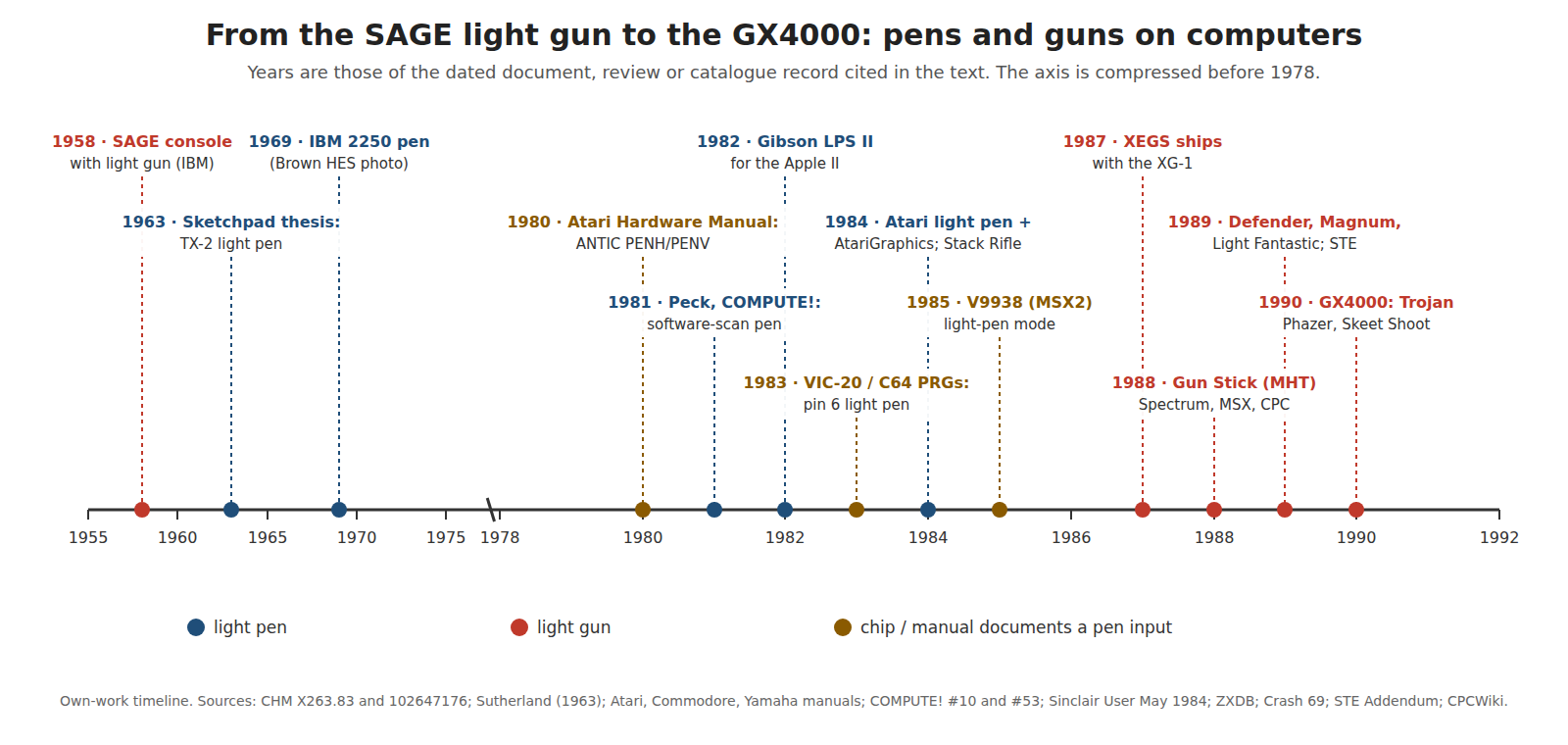
The light pen is older than the raster display it later had to be adapted to. The Whirlwind computer at MIT, operational in 1951, displayed radar tracking data on large cathode-ray tubes, and the Computer History Museum’s account of it describes “a pointing device they called a Light Gun for selecting targets on the screen”.1 The same account explains the device’s limit in one line: “The Light Gun can only detect spots on the screen that are lit”. Whirlwind became the prototype for the US Air Force’s SAGE air-defence system, and the IBM weapons director console made for SAGE in 1958, now in the same museum, is catalogued “With Light Gun”: a pistol grip on a cable, resting on a shelf below the display.2
These were not raster displays. Whirlwind’s and SAGE’s screens, like the TX-2’s at MIT’s Lincoln Laboratory and the IBM 2250 that followed in the 1960s, drew spots and strokes one at a time, in whatever order the program chose: a random-scan or point-plot display. On such a screen the computer already knows the position of every spot, because it has just put it there. All the pen has to report is “I saw that one”.
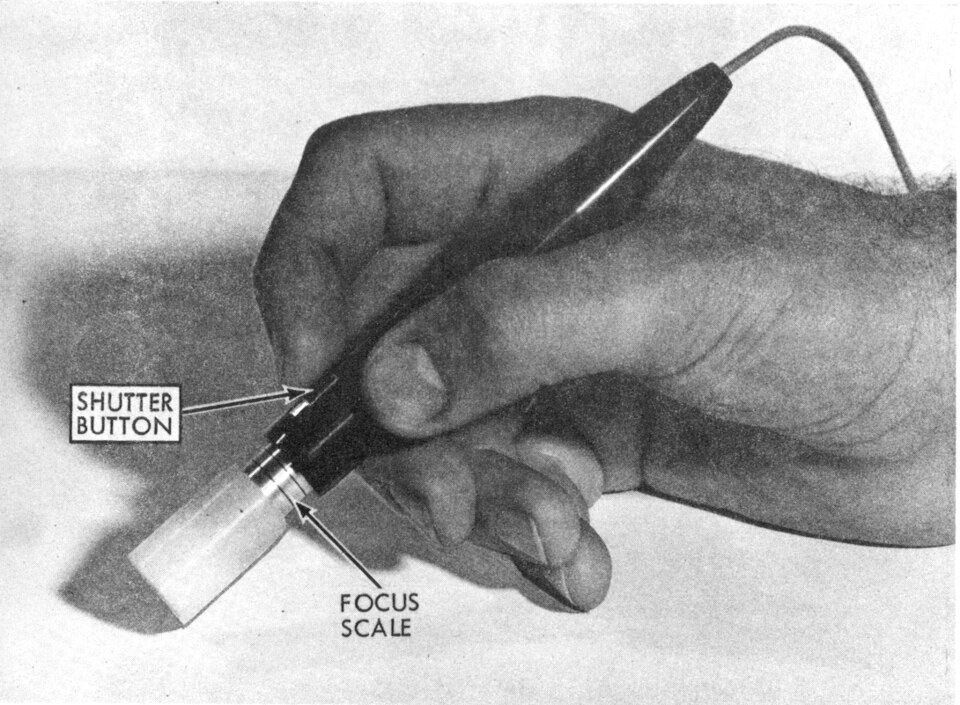
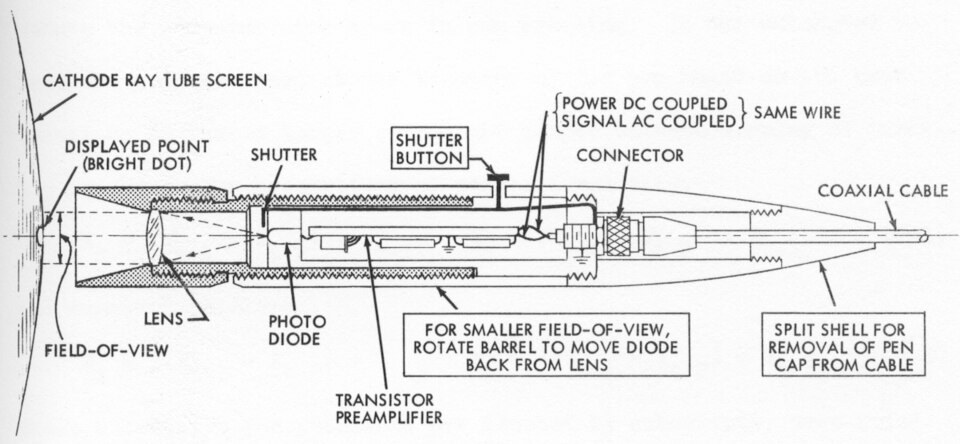
Ivan Sutherland’s 1963 thesis describing Sketchpad, the drawing program he wrote for the TX-2, gives the clearest contemporary account of how that worked.3 “The light pen is a hand held photocell which will report to the computer whenever a spot on the display system falls within its small field of view.” His pen held “a photodiode and transistor preamplifier mounted in the pen housing and connected to the computer by a length of small coaxial cable”, and it had a shutter button on the barrel. On timing:
Since spots on the display system are intensified one after another in time sequence, whether or not each spot is seen by the pen is individually reported just after intensification of that spot. The light pen amplifier is designed so that the pen is sensitive only to the bright blue flash of the first intensification of a display spot and not to the dim yellow afterglow. The amplifier output is strobed only when a display spot has been intensified to minimize room light pickup.
Three ideas in that paragraph return in every home-computer gun of the 1980s. The sensor must respond to the fast rise of freshly excited phosphor, not to its afterglow; the output is meaningful only at a known moment; and gating it to that moment is what rejects room light. Sutherland also noted that “some computers require an interrogation of a pen flip-flop to find out if a spot was seen”, while the TX-2 used an interrupt. To track a moving pen, Sketchpad drew a small cross around it about 100 times a second and watched which arms the pen saw; at his fastest hand speed “the maximum pen speed is thus 20 inches per second”.
The tracking cross is the Nintendo Zapper’s method, two decades early. The Zapper’s game draws a white box where each target is and asks the gun whether it sees light (History of Light Guns, Volume 3); Sketchpad drew a cross and asked the pen which arms it saw. Both work because the program knows what it has just drawn.
By the early 1960s, Sutherland wrote, “display systems and light pens were relatively common”. Commercial graphics terminals of the next decade kept them.
1.3 The raster problem, and the latch that solved it
A home computer of 1979 drove a domestic television. A television is a raster display: every frame, the beam draws every line, left to right and top to bottom, whatever the program wants. The program no longer chooses the order of the spots, so “I saw that one” no longer identifies anything. The pen’s pulse says only that the beam has just passed under the tip, and the position must be worked out from when.
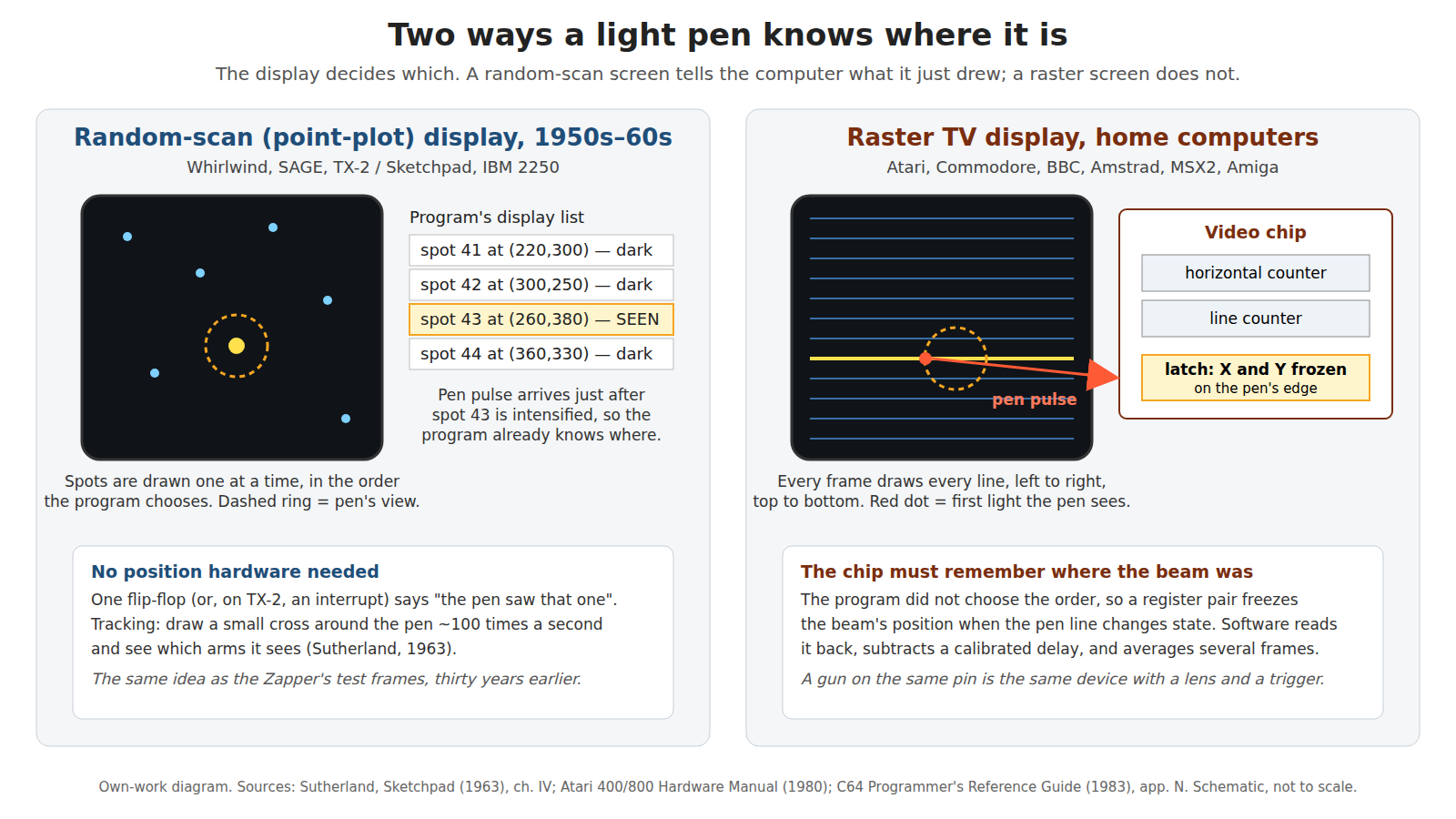
The home computers’ answer was to put a latch in the video chip. The chip already counts the beam’s position, horizontally in clock cycles and vertically in lines, because it needs those counts to fetch and draw the picture. A pen input that freezes those counters into a readable register costs a handful of gates. Atari’s ANTIC had one in 1979; so did Commodore’s VIC and VIC-II, the Motorola 6845 CRT controller used by the BBC Micro and the Amstrad CPC, Yamaha’s V9938 in the MSX2, and the Amiga’s custom chips. Atari’s 1980 hardware manual states the whole mechanism in two sentences: “When any one of the joystick trigger lines (pin 6) is pulled low, the ANTIC chip takes the current VCOUNT value and stores it in PENV. The horizontal color clock value (0-227 decimal) is stored in PENH.”4
The same manual then lists the practical problems that every pen and gun in this dive inherits:
Since there are a number of delays involved in displaying the data and changing the light pen register, each system must be calibrated. Software which uses the light pen should contain a user-interactive calibration routine. … The pen will not work if it is pointed at a black area of the screen, since the electron beam is turned off. It is a good idea to read two (or more) values and average them, since the user will probably not hold the pen perfectly steady.
Calibration, dark targets and averaging: a light gun has all three problems, worse, because it is held across the room. Those are the subjects of Volume 6.
Because the latch was in the video chip, a light gun was a cheap accessory for any computer that had one. The gun needed no counter, no clock and no knowledge of the video timing: only a photodiode, an amplifier fast enough to produce a clean edge, a trigger switch, and a plug that put the edge on the right pin. History of Light Guns, Volume 3 calls this the “decide in silicon” school, and it is why the home computers had light guns before most consoles did.
1.4 A pen with no latch: the software scan
Not every machine had the latch, and pens were sold for those that did not. In March 1981 COMPUTE! printed Robert A. Peck’s “Basics of Light Pen Operation”, written for any 6502 computer with “a single bit input port”.5 Peck set aside a hardware latch (“A set of three 74175’s could be used here”) as too complex and used software instead:
Instead of using a hardware-based scan technique, we will use a software based scan as follows.
The program blanks one region of the screen at a time and watches the pen input for “about 1/60 or 1/30 second”. If the pulses stop while a region is dark, the pen is pointing at it. Peck also filtered room light by counting transitions: unless more than one and fewer than 50 occurred in one scan, he treated the input as stray light. It is the random-scan method again, applied to a raster: the program makes the screen tell it something by changing what is drawn, then asks the pen.
The same split runs through the guns. The ZX Spectrum had no latch, and its guns either timed the pulse in software or flashed targets in turn, as the Zapper does (Volume 4). The Spanish Gun Stick went further: it put its light sensor on a joystick direction line, not on the latch pin, so the same gun could work on machines with a latch and machines without one.
1.5 From pen to gun
A pen touches the glass and sees a few millimetres of phosphor. A gun is held a metre or more away and must see a small patch of screen through a lens, which brings less light to the sensor and adds the problem of aim. Atari’s XE Game System manual of 1987 recommended “three to five feet from your video display screen” and advised turning up brightness and contrast “to ensure the light gun’s effectiveness”.6 The Magnum Light Phaser’s manual gave 2 to 4 feet.7
What else changes is the trigger. A pen’s button, or the pressure switch in its tip, tells the program that the user means it. A gun’s trigger does the same job, and on most home-computer guns it went to a second pin of the same connector. Which pin varied from gun to gun, and that, more than anything, is why one maker’s gun so often failed with another maker’s games. The details are in each machine’s volume and side by side in Volume 6.
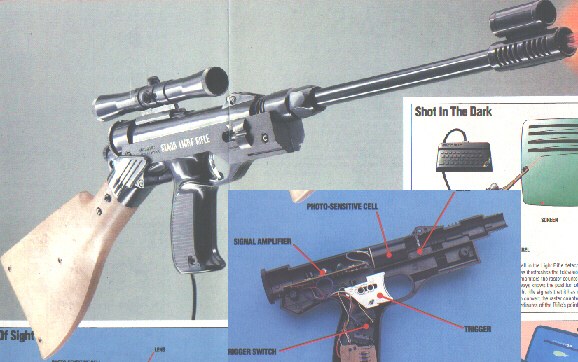
The inside of the Stack Light Rifle shows the whole of a 1983-vintage home-computer gun: a “photo-sensitive cell” at the back of the barrel with “a small plastic lens” in front of it, a “signal amplifier” board and a trigger switch.8 On the Spectrum, which had no latch, Stack put “two chips and a couple of simple components” in the connector.
1.6 The machines on one page
Table 2 — The machines on one page
| Machine | Where the pen or gun plugs in | Line | Latching chip and registers | Pens | Guns | Vol |
|---|---|---|---|---|---|---|
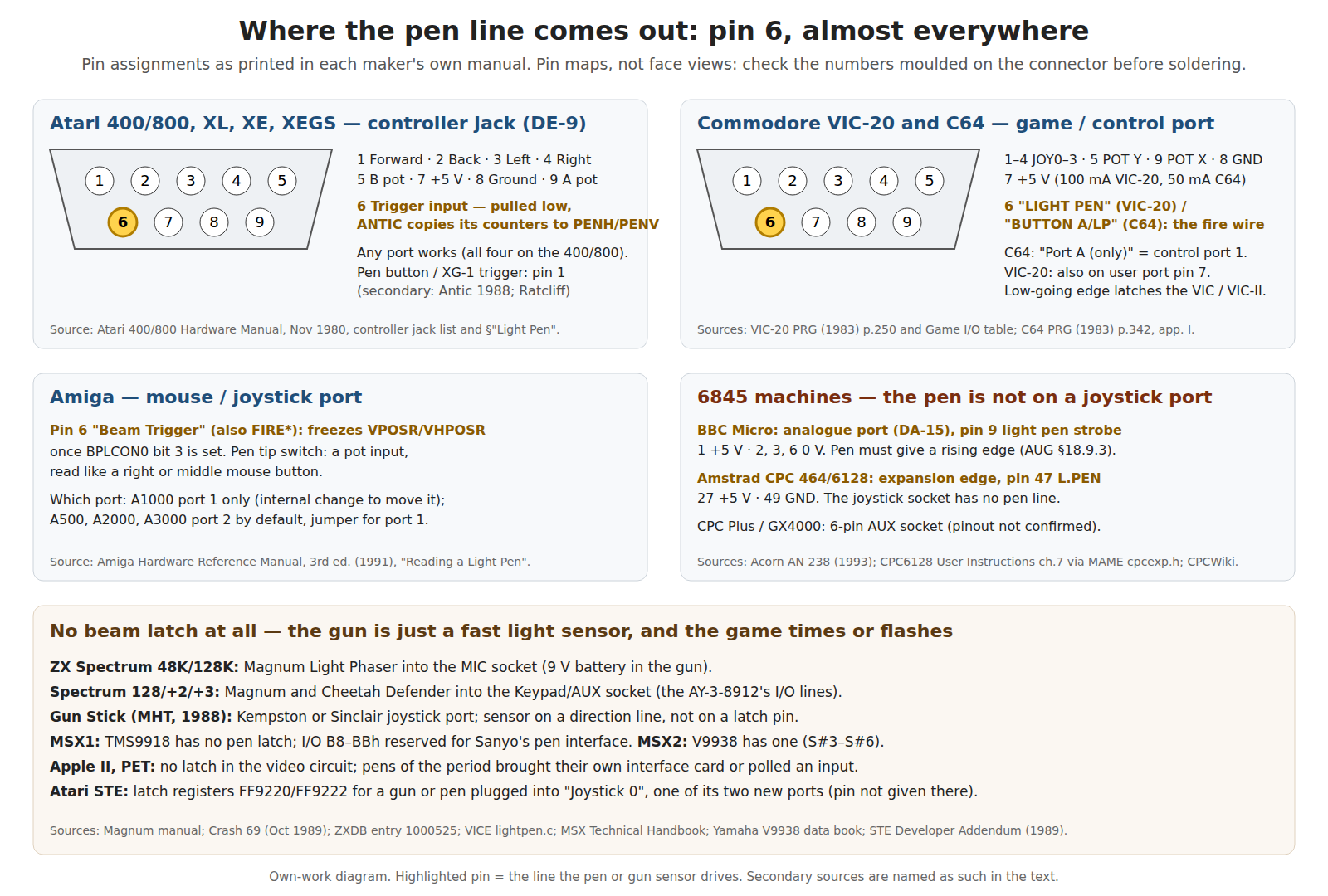
| Atari 400, 800, XL, XE, XEGS | Any controller jack (DE-9) | Pin 6, “Trigger Input” | ANTIC: PENH $D40C, PENV $D40D; OS shadows LPENH 564, LPENV 565 | CX70; CX75 with AtariGraphics | XG-1 | 2 |
| Commodore VIC-20 | Game port (DE-9); also user port pin 7 | Pin 6, “LIGHT PEN” | VIC 6560/6561: $9006 (X), $9007 (Y) | Several third-party | Stack Light Rifle | 3 |
| Commodore 64, C128 | Control port 1 only | Pin 6, “BUTTON A/LP” | VIC-II: LPX $D013, LPY $D014 | Inkwell, Datel and others | Stack, Magnum, Defender 64, Trojan, Gun Stick, XG-1 | 3 |
| Commodore PET | No pen input found in its documentation | — | — | Not confirmed | — | 3 |
| Amiga | Port 1 on the A1000; port 2 by default on the A500, A2000, A3000 | Pin 6, “Beam Trigger” | VPOSR $DFF004, VHPOSR $DFF006 when BPLCON0 bit 3 is set | Yes | Trojan Phazer (secondary sources) | 3 |
| ZX Spectrum 48K | MIC socket, or a joystick interface | — (no latch) | None: software timing or flashed targets | — | Stack, Magnum, Defender, Gun Stick | 4 |
| Spectrum 128, +2, +3 | Keypad/AUX socket, or joystick port | — (no latch) | None | — | Magnum, Defender, Gun Stick | 4 |
| Amstrad CPC 464, 664, 6128 | Expansion connector | Pin 47, “L.PEN” | 6845 CRTC: R16, R17 (a memory address) | LP-1 | Magnum, Gun Stick | 4 |
| Amstrad CPC Plus, GX4000 | 6-pin AUX socket | Not confirmed | CRTC light-pen input (CPCWiki) | — | Trojan Phazer | 4 |
| BBC Micro | Analogue port (DA-15) | Pin 9, light pen strobe | 6845 CRTC: R16, R17 | R.H. Electronics, Datapen, Robin, Stack | Stack Light Rifle (BBC version, per MAME) | 5 |
| MSX1 | Maker-specific (I/O B8–BBh reserved) | — | TMS9918 has no latch | Sanyo | Gun Stick (software method) | 5 |
| MSX2 | Maker-specific | V9938 light-pen input | V9938 S#3–S#6 | Yes | — | 5 |
| Apple II | Its own interface card | — | None in the Apple II | Gibson LPS II and others | — | 5 |
| Thomson TO7, TO7/70, MO5 | Its own pen socket; the TO7/70’s pen lives in a drawer in the case | — | Not researched | Supplied with the machine | — | 5 |
| Atari STE | ”Joystick 0”, one of its two new ports | Not given in Atari’s addendum | $FF9220 (X), $FF9222 (Y) | Yes | Yes (addendum) | 5 |
A pattern stands out. Every DE-9 machine with a latch put the pen on pin 6, the joystick fire line: Atari, both Commodore 8-bits and the Amiga. No document found calls this a standard. Commodore’s ports follow the Atari joystick pinout, on which pin 6 is the fire button, already the one line meant for a momentary input, and the Amiga kept the arrangement. The two 6845 machines, the BBC Micro and the CPC, took the strobe out on a different connector altogether, and the Spectrum, MSX1 and Apple II had no latch to connect to.
1.7 Forty years in one picture
1.8 What could not be verified
- The date of Whirlwind’s light gun and who built it. It is attributed to the Whirlwind team, sometimes to Robert Everett by name, in secondary sources; no Whirlwind report naming it was read for this dive.
- Whether the SAGE gun’s sensor was a photomultiplier or a photodiode, and how the console gated its output. The museum records describe the console, not the gun’s internals.
- The PET entry in the table. No light pen for the PET, and no pen input on any PET connector, was found in a primary source; the absence is reported, not proven.
- The Amiga Trojan Phazer, the Atari STE guns and the GX4000 AUX pinout rest on collector and emulator sources; see each machine’s volume.
Sources
Footnotes
-
Guy Fedorkow, “Gambling on Whirlwind: How the US Navy Spent $3 Million+ and Got a Computer Game”, Computer History Museum blog, 22 October 2019, https://computerhistory.org/?p=12879, read 2026-10-19. ↩
-
Computer History Museum catalogue X263.83, “SAGE Weapons Director Console - With Light Gun”, IBM, 1958 (made); “This console was the user interface to the SAGE (Semi- Automatic Ground Environment) computer system known as the “FSQ-7."" Gift of the National Museum of Science and Technology, Ottawa. https://www.computerhistory.org/collections/catalog/X263.83, read 2026-10-19. ↩
-
Ivan E. Sutherland, Sketchpad: A man-machine graphical communication system, PhD thesis, MIT, January 1963; republished as University of Cambridge Computer Laboratory Technical Report UCAM-CL-TR-574, 2003, chapter IV “Light Pen”, https://www.cl.cam.ac.uk/techreports/UCAM-CL-TR-574.pdf, read 2026-10-19. ↩
-
Atari, Inc., Atari 400/800 Computer System Hardware Manual, November 1980, section “Light Pen” and register descriptions PENH and PENV, https://archive.org/details/Atari400800HardwareManualNovember1980, read 2026-10-19. ↩
-
Robert A. Peck, “Basics of Light Pen Operation”, COMPUTE! No. 10, March 1981, p. 36, https://www.atarimagazines.com/compute/issue10/018_1_BASICS_OF_LIGHT_PEN_OPERATION.php, read 2026-10-19. ↩
-
Atari Corporation, XE Game System owner’s manual, 1987 (C033514-0A1), “Light Gun”, https://archive.org/details/atari-xegs, read 2026-10-19. ↩
-
Magnum Light Phaser instructions (Sinclair Action Pack), distributed by Virgin Mastertronic, transcription at https://spectrumcomputing.co.uk/pub/sinclair/hardware-info/m/MagnumLightPhaser_Manual.txt, read 2026-10-19. ↩
-
World of Spectrum, Hardware Feature 8, “Stack Light Rifle”, quoting Sinclair User, May 1984, and Home Computer Advanced Course, 1984, https://worldofspectrum.org/hardware/feat8.html, read 2026-10-19. ↩
Comments (0)