Home-Computer Light Guns · Volume 2
Atari 400/800, XL, XE and the XE Game System
ANTIC's light-pen latch on the joystick trigger line, Atari's own light pens, and the XG-1 light gun as a computer peripheral: pins, registers, software and games
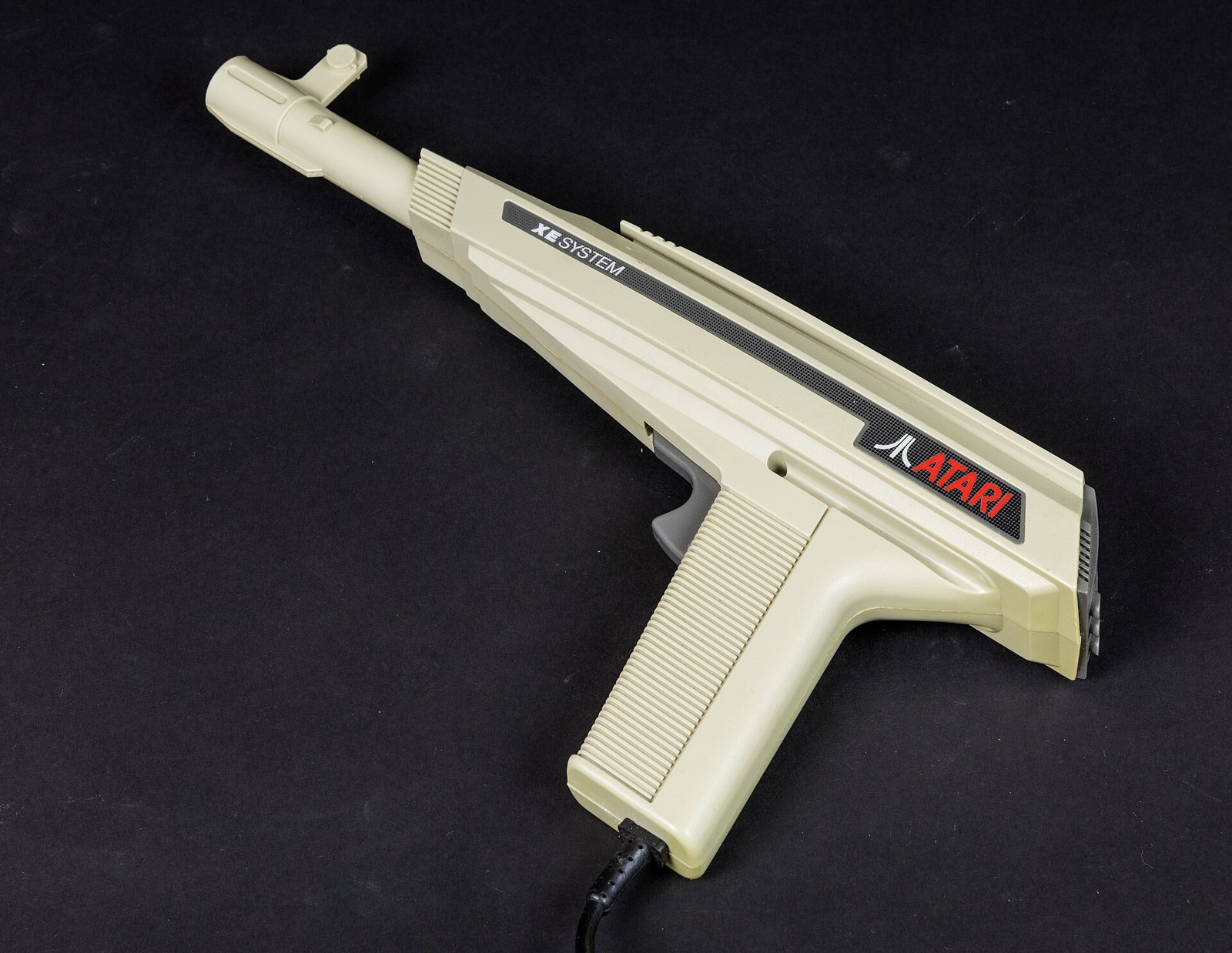
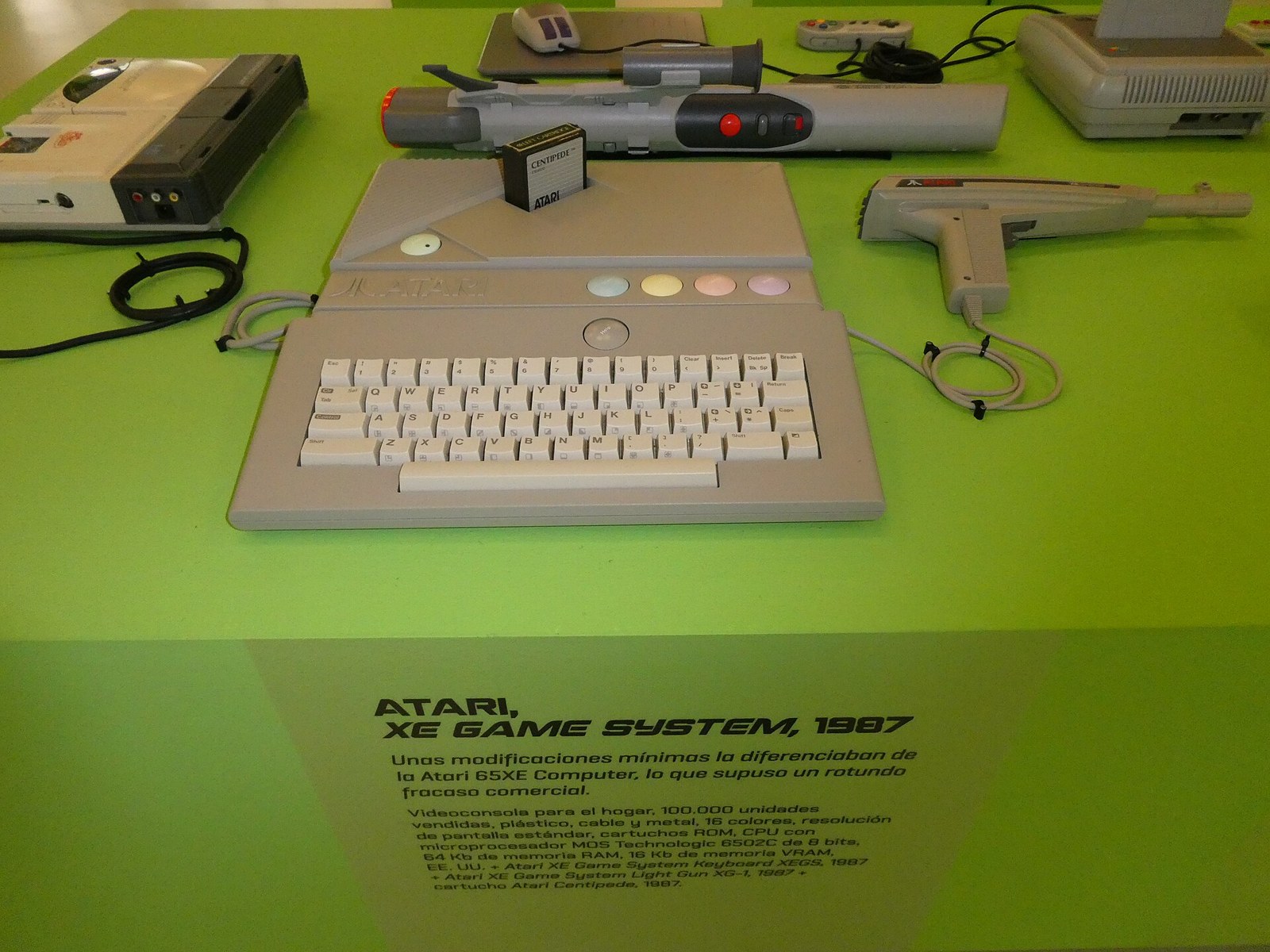
Atari’s 8-bit line is where the home-computer light gun is easiest to see whole. The 1979 Atari 400 and 800 had a light-pen latch in the video chip from the start, documented in Atari’s own hardware manual with the pin and both registers; Atari sold its own pens for it; and in 1987 it put a light gun in the box with the XE Game System, which is an XE computer in a console case. The XG-1’s identification table, model history and collector prices are in Console Light Guns, Volume 2, and its place in the story is told in History of Light Guns, Volume 3. This volume is the computer side: what the hardware does, how a program reads it, and how the gun is wired.
2.1 ANTIC’s light-pen input
The Atari 400/800 hardware manual of November 1980 describes the light pen in its own section:1
A light pen is a device that can detect the electron beam as it sweeps across the TV screen. It is used to point directly at an image on the TV display. Applications include selecting menu items and drawing lines. The ATARI 400/800 hardware was designed so that a light pen can be plugged into any of the joystick controller ports.
When any one of the joystick trigger lines (pin 6) is pulled low, the ANTIC chip takes the current VCOUNT value and stores it in PENV. The horizontal color clock value (0-227 decimal) is stored in PENH. The least significant bit is inaccurate and should be ignored.
The register descriptions in the same manual give the addresses and resolution:
Table 1 — The register descriptions in the same manual give the addresses and resolution
| Register | Address | Contents (Atari’s words) | OS shadow |
|---|---|---|---|
| PENH | $D40C (54284) | “Light Pen Horizontal Color Clock Position … The values range from 0 to decimal 227. Wraparound occurs when the pen if near the right edge of a standard-width screen.” | LPENH, $234 (564) |
| PENV | $D40D (54285) | “Light Pen Vertical TV Line Position … (8 most significant bits, same as VCOUNT)”; “LP0 not read. Two line resolution supplied.” | LPENV, $235 (565) |
Three facts in those entries shape everything a program or a gun does on an Atari.
- The pen is on the trigger line. The jack’s own pin list in the same manual reads: 1 Forward, 2 Back, 3 Left, 4 Right, 5 B potentiometer, 6 Trigger input, 7 +5 volts, 8 Ground, 9 A potentiometer. The light pen’s sensor pulls pin 6 low; a joystick’s fire button does the same thing. “PENH and PENV are modified when any of the joystick trigger lines is pulled low”, so pressing fire on a joystick in another port moves the pen registers too.
- Horizontal is in colour clocks. PENH counts colour clocks, 0 to 227 across the whole line including the blanked parts, so the visible screen spans only part of that range. The bottom bit is unreliable, so the useful horizontal step is two colour clocks.
- Vertical is in pairs of lines. PENV holds the top eight bits of the line counter, so a pen reading resolves two scan lines. Matthew Ratcliff, writing about the XG-1, put it as “The Y readings for the gun are more predictable, equal to half the number of the currently displayed scan line.”2
The 400 and 800 had four controller jacks and the XL and XE computers two; the XE Game System manual says “The XE comes with two game controller ports”, and tells the user to plug a controller into port 1.3
2.2 Reading it from a program
From Atari BASIC the operating system does the work. During each vertical blank it copies the hardware registers into LPENH and LPENV, so a program reads PEEK(564) and PEEK(565) whenever it likes. Antic magazine’s 1988 note on the XG-1 says the same: “memory locations LPENV (565) and LPENH (564) are always updated by the operating system”.4 A machine-code program can read PENH and PENV directly, but it has to do so at a sensible point in the frame, since the registers change whenever the line is pulled low.
The button needs a second input, and on Atari’s pens and gun that input is the joystick’s forward line, read with STICK(n). Antic’s note describes what a program sees: “whenever the light gun is plugged into any port, that port’s joystick reading will be 14 instead of 15”; “whenever the gun’s trigger button is pressed, the joystick reading for that port goes to 15”. A joystick reading of 15 means no direction pressed; 14 means forward held. So the gun holds the forward line low while it is idle and releases it when the trigger is pulled. The History of Light Guns, Volume 3 quotes the same note for the gun’s place in the story.
Atari’s manual is direct about what the program must add:1
Since there are a number of delays involved in displaying the data and changing the light pen register, each system must be calibrated. Software which uses the light pen should contain a user-interactive calibration routine. For example, the user could point the light pen at a crosshair in the center of the screen and the program could compute the required horizontal offset. PENH will wrap around from 227 to 0 near the right hand edge of a standard width display because of the delay. The pen will not work if it is pointed at a black area of the screen, since the electron beam is turned off. It is a good idea to read two (or more) values and average them.
Ratcliff’s complaint about the XG-1 is that calibration in practice: “You’ll find that it often shoots to the left or right, depending on the software you’re running.”2 A game that did not calibrate assumed one delay for every gun and every television, and the error showed up horizontally, exactly where Atari’s manual said it would. Calibration, averaging and dark targets are compared across machines in Volume 6.
2.3 Atari’s light pens: CX70 and CX75
Atari sold its own pens for the 8-bit computers. The first was the CX70; its operator’s manual carries the Atari document number C016367, according to the AtariMania accessories list.5 The second, the CX75, came with the AtariGraphics cartridge in 1984.
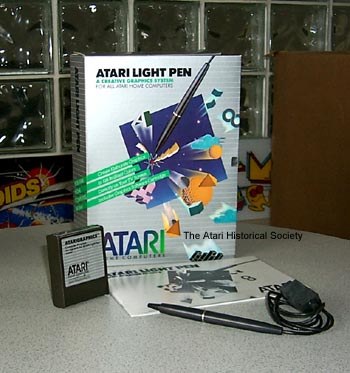
COMPUTE! reviewed it in October 1984 (Tom R. Halfhill): the pen “plugs into a joystick port with a 46-inch cord”, comes with “AtariGraphics software on a snap-in ROM cartridge”, and has a pressure-sensitive tip in place of a button: “The pen’s pressure-sensitive tip registers your choice.”6 The list price was $99.95 in that review. Halfhill’s caveats are the pen’s physics: calibration by pointing at a spot on the screen, “Response can vary from screen to screen, static electricity can interfere with the readings”, and some dark colours would not register at all.
The VICE emulator’s source code describes the CX75’s button as wired to the joystick “up” line, the same line the XG-1 uses for its trigger.7 That is consistent with Atari’s own convention, though no Atari schematic of the pen was found.
2.4 The XG-1 on the computers
The XE Game System of 1987 is an XE computer in a console case, with a detachable keyboard; the set in the photograph at the top of this volume includes the XG-1. Its owner’s manual is Atari’s own description of the gun:3
In some games, the XG-1 light gun is used to start the game as well as play it. Plug in the gun, then aim it at an on-screen target. When you pull the trigger, an invisible beam strikes the target. Aim accurately by lining up the gun’s front sight between the two arms of the rear sight.
There is no beam. The gun emits nothing; it is the screen’s light going into the gun. The manual’s practical advice is accurate: “The recommended shooting range for the light gun is three to five feet from your video display screen. You may want to increase your video display’s brightness and contrast to ensure the light gun’s effectiveness. Warning: Do not expose the light gun’s lens to any intense light other than that of the video display.”
Because the XEGS is an XE computer, the gun works on the XL and XE computers too, and Atari said so on the games. The Bug Hunt manual lists its system requirements as “Atari XE game system console, or XL™ or XE computer”, a colour television or monitor, and the “XG-1™ light gun”.8 Ratcliff’s summary for computer owners was blunt: “The XG-1 is simply a specialized light pen.”2 Any program written for an Atari light pen reads the gun, and any gun program reads a light pen, provided both use the forward line for the button.
2.5 How the XG-1 is wired
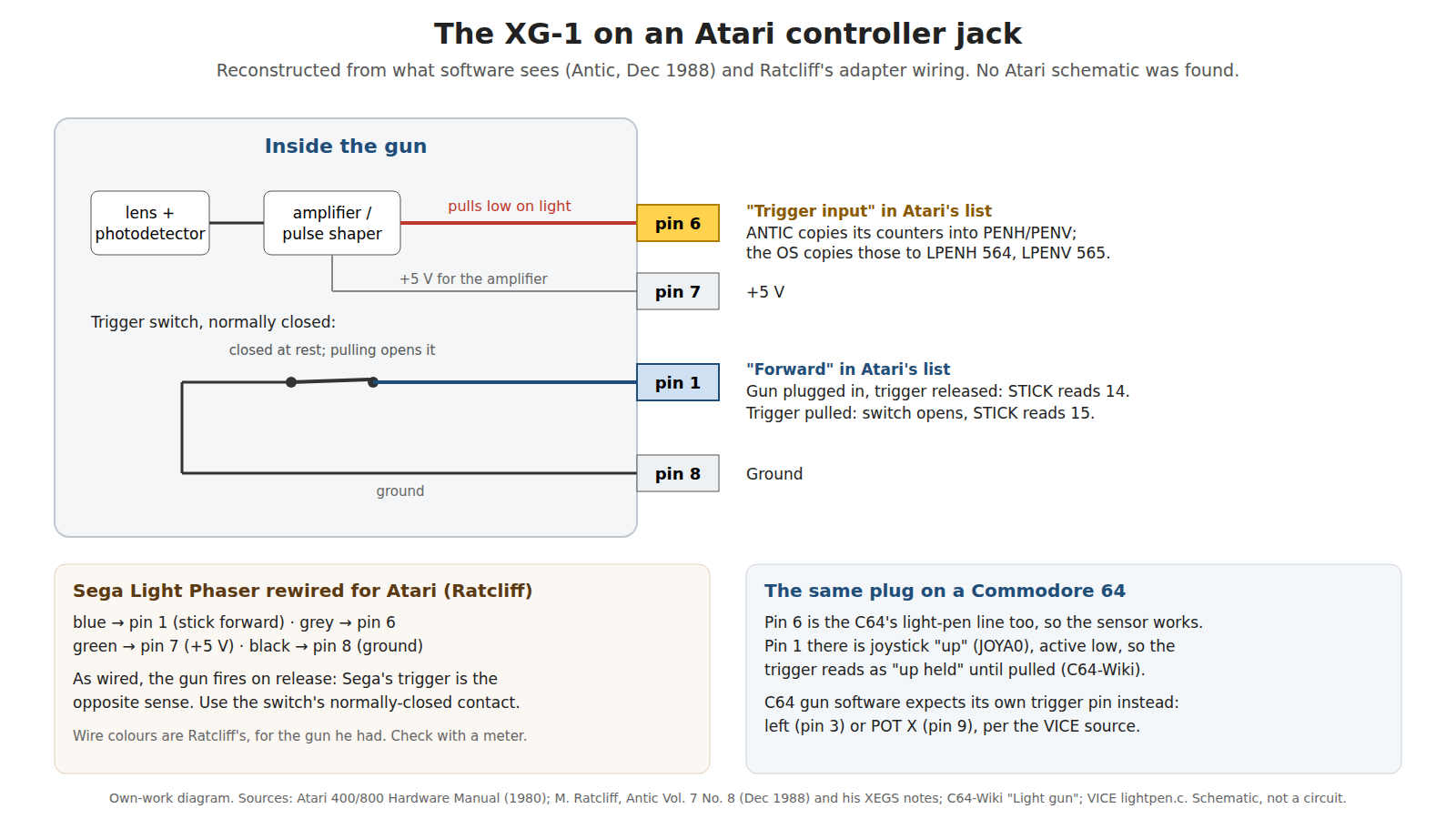
No Atari schematic or service document for the XG-1 was found for this dive, and Console Light Guns lists its pinout as unconfirmed from an Atari document. The pinout can be reconstructed with good confidence from three independent pieces of evidence:
- Atari’s jack pinout puts the latch on pin 6 and the forward switch on pin 1, with +5 V on pin 7 and ground on pin 8.1
- The software behaviour Antic documented: plugged in and idle, the port reads 14 (forward held); trigger pulled, 15. The trigger is therefore a normally-closed switch from pin 1 to ground that opens when pulled.4
- Ratcliff’s wiring for a Sega gun on an Atari: “Blue wire Pin 1 stick FWD / Gray wire Pin 6 trigger / Green wire Pin 7 +5 volts / Black wire Pin 8 Ground”, with the warning that “you’ll notice that gun fires when you release the trigger, which is annoying. The Sega trigger wiring is the opposite of what the Atari light gun uses. Wire to the normally closed contacts instead of normally open.”2 Here “trigger” is Atari’s name for pin 6, the line the Sega gun’s sensor drives.
Table 2 — How the XG-1 is wired
| XG-1 function | Atari jack pin | Atari’s name for the pin | Evidence |
|---|---|---|---|
| Light sensor output, pulls low on light | 6 | Trigger input | Hardware manual (latch on pin 6); Ratcliff wiring |
| Trigger switch, normally closed to ground | 1 | (Joystick) Forward input | Antic reading 14/15; Ratcliff’s NC instruction |
| Supply for the amplifier | 7 | +5 volts | Ratcliff wiring |
| Ground | 8 | Ground | Ratcliff wiring |
A 2003 AtariAge forum post gives the same four pins (1 trigger, 6 light sensor, 7 +5 V, 8 ground).9 Before soldering anything to an original gun, check it with a meter; the reconstruction is consistent, but it is a reconstruction.
The same convention explains the XG-1’s behaviour on other machines. On a Commodore 64, pin 6 is also the light-pen line, so the sensor works, but pin 1 is joystick up, and the C64-Wiki notes that “the fire key isn’t compatible, because pin 1 active-low is used by the control port” (Volume 3).10 On the Atari 7800 and 2600 the gun has its own console games, catalogued in Console Light Guns.
2.6 Games
The gun’s software on the computers is short. Titles that can be confirmed from a manual or a labelled cartridge image:
Table 3 — The gun's software on the computers is short. Titles that can be confirmed from a manual or a labelled cartridge image
| Title | Year | Evidence | Notes |
|---|---|---|---|
| Bug Hunt | 1987 | Atari’s manual: XEGS or XL/XE computer plus XG-1 | Fire at “Player 1” or “Player 2” to start |
| Barnyard Blaster | 1987 (8-bit cartridge) | Cartridge dump labelled “lightgun” on archive.org | Also a 7800 game |
| AtariGraphics | 1984 | COMPUTE! review | Drawing program for the CX75 pen, not a game |
Secondary sources add Crossbow and Crime Buster for the 8-bit computers, and Ratcliff’s XEGS article mentions Missile Command, the XEGS’s built-in game, alongside Bug Hunt and Barnyard Blaster. Which of these read the gun on which machine varies between sources, so check per title. The 7800 and 2600 gun games are console titles and are listed in Console Light Guns.
2.7 Other guns on an Atari jack
Because the Atari arrangement is simple, other guns can be adapted to it: any gun whose sensor output pulls a line low on light can drive pin 6, and any switch can drive pin 1. Ratcliff’s article is the worked example, converting a Sega Master System Light Phaser by cutting off its plug and wiring a DE-9 by colour, and reversing the trigger contacts so that the switch is closed at rest.2 He added a mechanical warning for the XEGS: “Because of the close-fitting connections for the XEGS ports, don’t wire in a DB9 female connector that has ‘ears.’”
The reverse also works in principle: a modern gun built around an RP2040, as in Open-Source Firmware, does not see a raster and cannot drive pin 6 at the right instant. A CRT-era gun is the only kind that works on an unmodified Atari; the reasons are in History of Light Guns, Volume 6.
2.8 What could not be verified
- The XG-1’s pinout from an Atari document. The table above is reconstructed from the hardware manual, Antic’s software note and Ratcliff’s wiring, all consistent; no Atari schematic was read.
- The CX70’s release date and connections. Only its manual’s document number, from a collector list, was found.
- The CX75 button wiring. From the VICE source, not from Atari.
- The game list. Only Bug Hunt (manual) and Barnyard Blaster (labelled dump) were confirmed; Crossbow, Crime Buster and gun support in the XEGS Missile Command rest on secondary sources.
- Ratcliff’s article. The text read is a plain-text file of his XEGS article from an Atari archive, without the magazine name, issue or date; his December 1988 Antic note on the XG-1 is separate.
Sources
Footnotes
-
Atari, Inc., Atari 400/800 Computer System Hardware Manual, November 1980: section “Light Pen”; register entries PENH (D40C) and PENV (D40D); controller jack pin list. https://archive.org/details/Atari400800HardwareManualNovember1980, read 2026-10-19. ↩ ↩2 ↩3
-
Matthew Ratcliff, article on the XE Game System, plain-text copy “xegs.doc” in the University of Michigan Atari archive mirror, https://sunsite.icm.edu.pl/packages/umich-atari/8bit/Unverified/Cislib_b/xegs.doc, read 2026-10-19. Ratcliff is described in the file as “a St. Louis aerospace engineer and a longtime ANTIC contributing writer”; no issue or date is given. ↩ ↩2 ↩3 ↩4 ↩5
-
Atari Corporation, XE Game System owner’s manual, 1987, part C033514-0A1, “Using Game Controllers” and “Light Gun”, https://archive.org/details/atari-xegs, read 2026-10-19. ↩ ↩2
-
Matthew Ratcliff, “XG-1 Light Gun Finder”, Antic Vol. 7, No. 8, December 1988, https://atarimagazines.com/v7n8/xg1light.php, read 2026-10-19. ↩ ↩2
-
AtariMania, FAQ 6.3, “What accessories/kits did Atari make for their 8-bit computers?”, https://www.atarimania.com/faq-atari-400-800-xl-xe-what-accessories-kits-did-atari-make-for-their-8-bit-computers_60.html, read 2026-10-19 (search excerpt; collector source). ↩
-
Tom R. Halfhill, “Atari Touch Tablet And Light Pen” (review), COMPUTE! No. 53, October 1984, p. 106, https://www.atarimagazines.com/compute/issue53/039_1_REVIEWS_Atari_Touch_Tablet_And_Light_Pen.php, read 2026-10-19. ↩
-
VICE emulator source,
vice/src/joyport/lightpen.c(Hannu Nuotio, Marco van den Heuvel; GPL-2), table of pen types, “Pen with button Up (e.g. Atari CX75)”, https://github.com/VICE-Team/svn-mirror/blob/main/vice/src/joyport/lightpen.c, read 2026-10-19. ↩ -
Atari Corporation, Bug Hunt game manual, 1987, “System Requirements”, https://archive.org/details/Bug_Hunt_1987_Atari_US, read 2026-10-19. ↩
-
AtariAge forums, topic 23003 “Light gun pinout”, 2003 (search excerpt), https://forums.atariage.com/topic/23003-light-gun-pinout/, read 2026-10-19. Forum post; corroboration only. ↩
-
C64-Wiki, “Light gun”, https://c64-wiki.com/wiki/Light_gun, read 2026-10-19. ↩
Comments (0)