PC (Windows) · Volume 1
The Gun as Windows Sees It — One Device, Three Readers, a COM Port and the Primary Monitor
What a Windows PC makes of an OpenFIRE light gun, the three different ways programs read it, why two guns need two identities, why the gun's screen must be the primary monitor, and a first map of what runs where
This dive is about one gun on one kind of computer: the light gun being built for this category (a Raspberry Pi Pico running a private fork of OpenFIRE, a camera that sees infrared emitters at the screen, and a regulated 24 V solenoid) plugged into a Windows PC. It covers what Windows makes of the gun, the emulators and loaders that play light-gun games, how game-driven recoil reaches the solenoid, what latency Windows adds, and, at the end, a game-by-game table of what works.
It is the first of the Platform Support dives. The firmware’s side of the same conversation, what the gun sends and what it accepts, belongs to Open-Source Firmware, Volume 6 and is linked rather than repeated. Linux and the retro distributions, MiSTer, original consoles and arcade hardware each have their own dive.
1.1 Why Windows is the reference platform
Nearly every program that plays light-gun games well was written for Windows first, and several were written only for Windows. MAME’s per-device light-gun input on Windows comes from the Windows Raw Input API; Supermodel’s README says plainly that multiple mice or PC light guns need Raw Input, “supported only on Windows”; TeknoParrot, DemulShooter, the Model 2 emulator, Demul and MAMEHooker are Windows programs; and the OpenFIRE App ships a Windows build (OpenFIREapp-win64.zip) beside its Linux AppImages in release v3.0.3. Flycast, DuckStation and RetroArch run elsewhere too, but their multi-gun paths on Windows are the Raw Input ones described in this dive.
So Windows is where the most games work with the least effort, where every feature of the gun (two players, game-driven recoil, lights) has a working route, and where the first bench tests of the finished gun will most likely be run. It is also where the gun’s behaviour is easiest to measure, because the hook programs and emulators publish their outputs in readable text (Volume 5).
1.2 What Windows enumerates
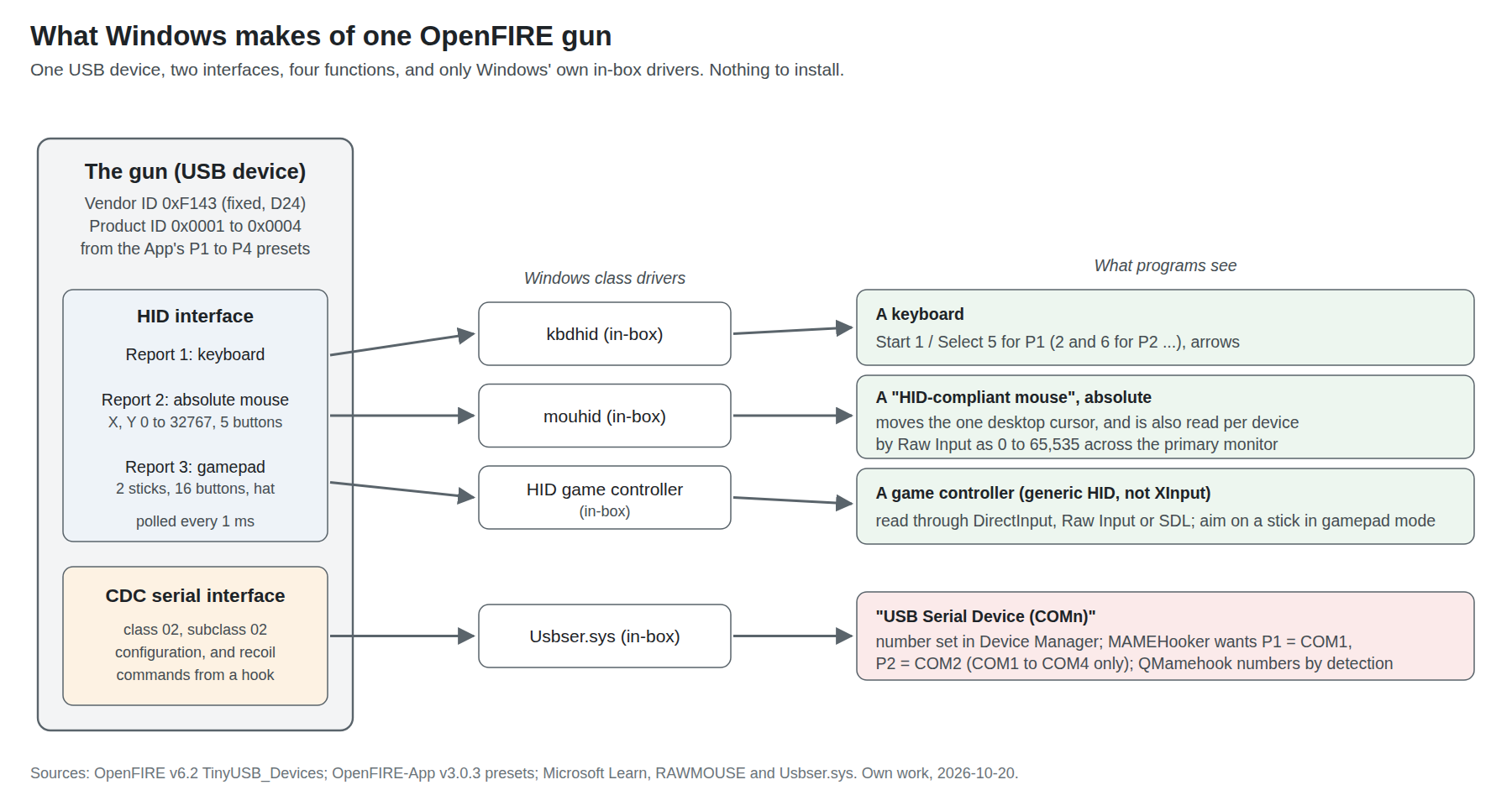
The gun is one USB device with OpenFIRE’s fixed vendor ID 0xF143, the manufacturer string “OpenFIRE”, and a product ID and name that the App sets. The HID report layout (keyboard, absolute mouse with a 0–32767 range, sixteen-button gamepad) and the 1 ms polling interval are documented in Open-Source Firmware, Volume 6, section 6.2. What matters here is what Windows does with them:
Table 1 — The gun is one USB device with OpenFIRE's fixed vendor ID 0xF143, the manufacturer string "OpenFIRE", and a product ID and name that the App sets. The HID report layout (keyboard, absolute mouse with a 0–32767 range, sixteen-button gamepad) and the 1 ms polling interval are documented in [Open-Source Firmware, Volume 6, section 6.2](/light-guns/building-the-electronics/open-source-firmware/vol-6/). What matters here is what Windows does with them
| Interface | Windows driver | Appears as | Who reads it |
|---|---|---|---|
| HID keyboard | kbdhid (in-box) | A keyboard in Device Manager | Every program; Start, Select and the D-pad as keys |
| HID absolute mouse | mouhid (in-box) | A “HID-compliant mouse” | The desktop cursor, and any program reading Raw Input per device |
| HID gamepad | HID game controller (in-box) | A game controller, read through DirectInput, Raw Input or SDL | Emulators that accept generic controllers |
| CDC serial | Usbser.sys (in-box) | “USB Serial Device (COMn)“ | The OpenFIRE App, MAMEHooker, QMamehook, a batch file |
No driver needs installing. Microsoft’s documentation for Usbser.sys says the in-box driver loads automatically for any function with class code 02 and subclass 02, “You don’t need to write your own INF file”, and the HID classes are among Windows’ standard class drivers. That is also why the gun works on any Windows PC a kit buyer owns, which matters under decision D11 (kits may be sold).
One consequence of the gamepad being a generic HID gamepad, not an Xbox-class one: programs or game profiles that only read XInput will not see it. XInput is Microsoft’s API for Xbox controllers; a generic HID gamepad is reached through DirectInput, Raw Input or SDL. Where a loader offers a choice of input API (TeknoParrot does, per game: DirectInput, XInput or RawInput), the gun’s route is RawInput for the mouse or DirectInput for the gamepad, never XInput. This follows from the device classes and was not tested.
The absolute mouse’s 0–32767 logical range is rescaled by Windows. Raw Input reports an absolute mouse as normalised coordinates “between 0 and 65,535”, with (0,0) at the top-left of the display and (65535,65535) at the bottom-right (Microsoft, RAWMOUSE). Every program in this dive works in those units or in pixels derived from them.
1.3 Three readers: the cursor, Raw Input and the gamepad
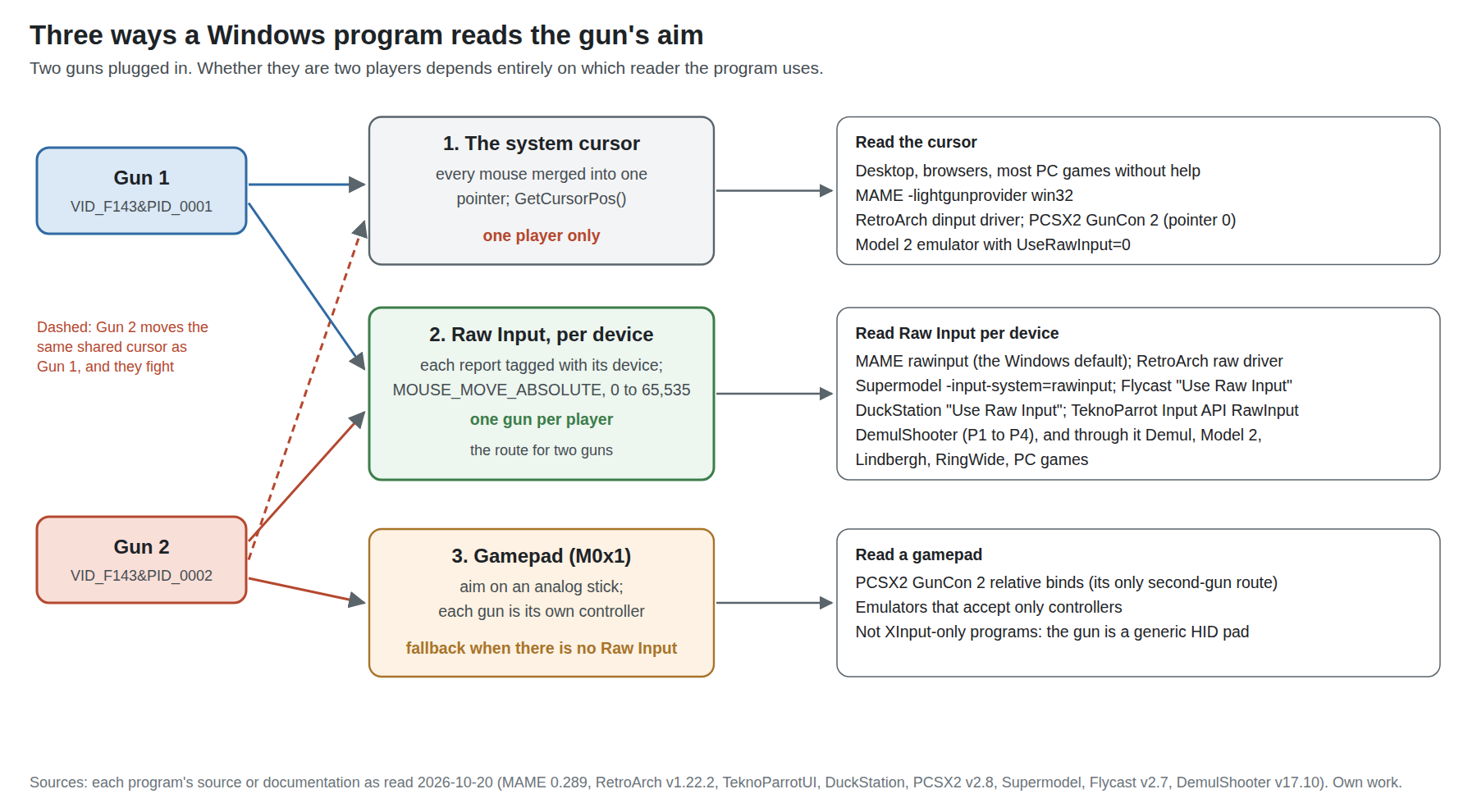
Everything that goes wrong with light guns on Windows traces back to which of three readers a program uses.
The system cursor. Windows merges every mouse on the machine into one cursor. An absolute mouse moves it to where the gun points, which is why the gun works in a browser, on the desktop and in any game that uses the mouse pointer, with no set-up at all. But there is only one cursor. A program reading it (MAME’s win32 light-gun provider, which calls GetCursorPos(); RetroArch’s dinput driver; PCSX2) can only ever have one gun, and a second gun plugged in fights the first for the same pointer. DemulShooter’s configuration page puts it exactly: devices that report relative positions “will share the same axis values (i.e : Windows Cursor position). So this method is not meant to be used in order to obtain multiplayer-separated values”.
Raw Input. Windows’ Raw Input API delivers each mouse’s reports separately, tagged with the device they came from, before they are merged into the cursor. A program that registers for Raw Input can tell Player 1’s gun from Player 2’s. Every serious multi-gun path on Windows uses it, and each was read in source for this dive:
Table 2 — Raw Input. Windows' Raw Input API delivers each mouse's reports separately, tagged with the device they came from, before they are merged into the cursor. A program that registers for Raw Input can tell Player 1's gun from Player 2's. Every serious multi-gun path on Windows uses it, and each was read in source for this dive
| Program | Where the Raw Input handling is | What it does with an absolute report |
|---|---|---|
| MAME 0.289 | src/osd/modules/input/input_rawinput.cpp, lightgun_input_rawinput | Every mouse becomes its own light gun; position taken only when MOUSE_MOVE_ABSOLUTE is set |
| RetroArch v1.22.2 and master | input/drivers/winraw_input.c | Each mouse published by index; a port reads “the mouse at its Mouse Index” |
| TeknoParrot (master, 2026-10-19) | InputListenerRawInput.cs | An absolute report goes to the P1–P4 light-gun binding for that device path |
| DuckStation | src/util/win32_raw_input_source.cpp | Each mouse becomes “Raw Input Pointer n”, honouring the virtual-desktop flag |
| Supermodel, Flycast, DemulShooter | per their documentation (Volume 4, Volume 5) | Per-device mapping; DemulShooter lists “only devices supporting RawInput data” |
The gamepad. OpenFIRE’s gamepad mode (serial command M0x1, or the App) puts the camera’s aim on an analog stick. A program that takes only gamepads can then still be aimed, and two guns become two controllers with no cursor contention. It is the fallback for programs with no Raw Input (PCSX2’s second gun is the clearest case, Volume 4), and the price is that the aim arrives as a stick deflection the program must treat as an absolute position. Open-Source Firmware, Volume 6, section 6.4 has the modes.
The rule that follows: for one player, anything works; for two, use a program’s Raw Input path, or put the second gun in gamepad mode.
1.4 The primary-monitor rule
Microsoft’s documentation for the Raw Input mouse structure is unambiguous: absolute coordinates map onto “the display surface”, and “In a multimonitor system, the coordinates map to the primary monitor”, unless the device also sets the virtual-desktop flag, in which case they span every monitor. A HID absolute mouse like the gun’s does not set that flag in anything read for this dive, so on a desk with two monitors the gun’s full range covers the primary monitor only.
The consequence is simple and is the first thing to check when the aim is wildly wrong on a multi-monitor PC: make the gun’s screen the primary display (Settings, System, Display, “Make this my main display”), or run the games on whichever display is primary. Programs that map coordinates themselves (TeknoParrot and DuckStation both read the virtual-desktop flag in their source) behave the same way for this gun, because the flag is not set. A television connected as a second display for a living-room set-up is the common trap.
1.5 Identity: one gun is easy, two guns are not
A single gun can keep the firmware’s default identity (product ID 1, name “FIRECon P1”). Two guns with the same identity look like one device to anything that tells devices apart by their IDs, and the OpenFIRE instruction book warns that programs such as RetroArch and TeknoParrot “will get VERY confused” (Open-Source Firmware, Volume 6, section 6.6).
The App’s “Simple USB Identifier Presets” fix this in one click. Its source (appmainwindow.cpp, v3.0.3) shows what each preset writes:
Table 3 — The App's "Simple USB Identifier Presets" fix this in one click. Its source (appmainwindow.cpp, v3.0.3) shows what each preset writes
| Preset | Product ID | Product name | Start / Select keys |
|---|---|---|---|
| P1 | 0x0001 | FIRECon P1 | 1 / 5 |
| P2 | 0x0002 | FIRECon P2 | 2 / 6 |
| P3 | 0x0003 | FIRECon P3 | 3 / 7 |
| P4 | 0x0004 | FIRECon P4 | 4 / 8 |
So on Windows the two guns appear with hardware IDs USB\VID_F143&PID_0001 and USB\VID_F143&PID_0002, and Raw Input device paths that contain those strings. That substring is what MAME’s stable-ID mapping matches on (Volume 2): MAME’s documentation gives the identical pattern for two Ultimarc AimTrak guns (VID_D209&PID_1601, VID_D209&PID_1602).
Why not leave the IDs the same and rely on the USB port? Because enumeration order is not stable. MAME’s documentation says device numbers change with “disconnecting and reconnecting USB or Bluetooth devices, changing ports/hubs, and even just restarting the computer”. A product ID baked into each gun survives all of that.
The vendor ID stays 0xF143. It is how the App, MiSTer and the hook programs find OpenFIRE guns; decision D24 (18 October 2026) keeps it for every personal and bench gun and requires an assigned vendor ID before any kit is sold. On Windows the change would be invisible to Raw Input programs, which match on any device, but not to MAME mapdevice lines written with VID_F143, to QMamehook (which detects OpenFIRE, GUN4IR and Blamcon vendor IDs only), or to the App, so it is a fleet-wide change when it comes. Our Firmware, Volume 6 and Licensing, IP and Kits own it.
1.6 The COM port
The serial interface is how the App configures the gun and how hook programs drive its recoil. Windows numbers it in arrival order, so a gun may be COM3 today and COM7 after moving it to another port. Two things depend on the number:
- MAMEHooker wants Player 1’s gun on COM1, Player 2’s on COM2, and sees only up to COM4, per the OpenFIRE wiki. The number is changed in Device Manager, under the port’s Properties, Port Settings, Advanced. Open-Source Firmware, Volume 6, section 6.9 has the rule and the ini anatomy.
- QMamehook ignores COM numbers and numbers players by the order it detects guns, so the product-ID presets above are what keep P1 as P1.
Windows keeps the assigned number for that device on that USB port, so set it once with each gun in the port it will live in. Re-check it after any change of hub or port.
A quick serial test from a Command Prompt, before any game is involved, uses the commands in Open-Source Firmware, Volume 6, section 6.11: echo S > COM3 puts the gun in serial mode and its LED goes white; echo E > COM3 returns it. (v6.1’s release notes record a fix for commands sent this way from Windows batch files.)
1.7 The screen: no border, the right picture, the right shape
No border is needed. The gun finds the screen by infrared emitters fixed around it, not by anything drawn on it. The white-border overlays, shaders and layout files that camera guns such as the Sinden need, which Border Tracking, Volume 6 covers for every emulator, do nothing for this gun and can be left off. That removes a whole layer of per-emulator configuration and is one of the practical arguments for infrared that Border Tracking records in its comparison.
Fill the screen, or tell the gun what shape the picture is. The gun’s calibration maps its aim onto the whole display. A program that draws a 4:3 game with black bars on a 16:9 screen still receives coordinates across the full width, so either the program scales them into the picture, or the aim drifts outward toward the sides. There are three fixes, in order of preference:
- Let the program handle it. TeknoParrot’s source says its emulators “publish their exact screen-space content viewport. This keeps absolute and relative gun input aligned with letterboxed output.”
- Use the gun’s 4:3 correction. OpenFIRE narrows its output to the centred 4:3 window when sent
M3x1(or set in the profile); Open-Source Firmware, Volume 6, section 6.4 gives the exact windows. A hook program’s start command can send it per game. - Stretch the picture. Every emulator here can stretch to the full screen, at the price of a distorted picture.
Which programs need which is part of the per-game table in Volume 6. That MAME’s full-screen pillarbox needs fix 2 or 3 is expected from how it scales Raw Input coordinates (Volume 2), and should be confirmed on the built gun.
Exclusive full screen is not needed for low latency on current Windows, which Volume 6 explains, so borderless windowed modes are fine; but the game window must cover the screen the gun was calibrated to.
1.8 Calibrating on Windows
Calibration happens in the gun, not in Windows. The App’s calibration screen draws targets at the centre and the four edges and stores the result in the gun’s flash, per profile; the procedure and what each shot records are in Open-Source Firmware, Volume 5, section 5.3, and the mathematics in Aiming Maths and Calibration. The App for Windows is the OpenFIREapp-win64.zip release asset; installing and docking are in Open-Source Firmware, Volume 4.
Three Windows-specific habits:
- Calibrate on the screen the games will use, at its native resolution, and with that screen primary. The App’s full-screen targets are drawn on the display the App window is on; if that is not the primary monitor, the targets and the gun’s coordinate range disagree (1.4).
- Turn off display scaling surprises. Calibration is against the physical picture, so Windows’ DPI scaling does not affect it, but a television’s overscan does: set the TV to its “just scan”, “screen fit” or PC mode so the desktop’s edges are on the glass.
- Some games also calibrate themselves. Arcade software run under Demul, the Model 2 emulator and Supermodel often has its own gun calibration in the game’s test menu, which DemulShooter’s documentation tells the player to run “the first time you run a game”. That is a second calibration on top of the gun’s, done once per game (Volume 4).
Windows’ mouse settings (pointer speed, “Enhance pointer precision”) do not touch the gun’s aim: Raw Input events “are not subject to the effects of the mouse speed set in the Control Panel”, per Microsoft, and an absolute position has no acceleration to apply.
1.9 The software, on one page
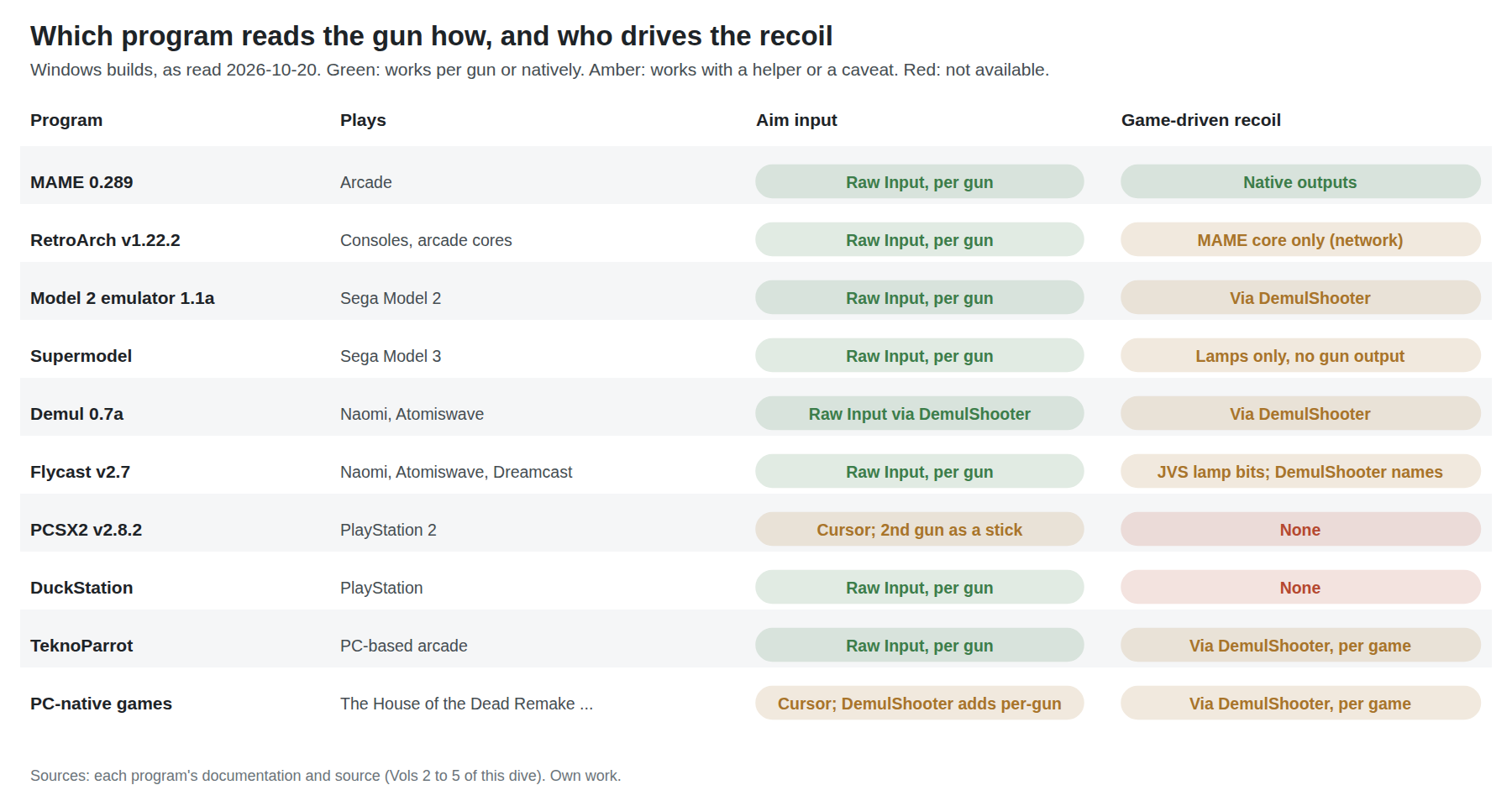
Table 4 — 1.9 The software, on one page
| Program | Plays | Version read | Gun input on Windows | Two guns | Game-driven recoil | Volume |
|---|---|---|---|---|---|---|
| MAME | Arcade, including most 1980s–2000s gun games | 0.289 (30 July 2026) | -lightgunprovider rawinput | Yes | Native outputs (-output windows or network) to a hook | 2 |
| RetroArch | Consoles and arcade through cores | v1.22.2 (20 November 2025) | raw input driver, Mouse Index per port | Yes | Not from RetroArch itself (MAME-core network outputs only, per QMamehook) | 3 |
| Model 2 emulator | Sega Model 2 (House of the Dead, Virtua Cop 1 and 2) | 1.1a | Its own Raw Input option, or DemulShooter | Yes | Through DemulShooter | 4 |
| Supermodel | Sega Model 3 (The Lost World) | 0.3a git build (20 October 2026) | -input-system=rawinput | Yes | Not from the emulator: its outputs are lamps and the drive board only | 4 |
| Demul | Naomi, Atomiswave | 0.7a 180428 | Through DemulShooter | Yes | Through DemulShooter | 4 |
| Flycast | Naomi, Atomiswave, Dreamcast | v2.7 (19 August 2026) | “Use Raw Input” | Yes | Raw JVS output bits (lamp0, lamp1 …) on TCP 8000; DemulShooter names them | 4 |
| PCSX2 | PlayStation 2 (GunCon 2) | v2.8.2 (4 September 2026) | System cursor; second gun by relative (stick) binds | Partly | No | 4 |
| DuckStation | PlayStation (GunCon, Justifier) | rolling build (13 October 2026) | “Use Raw Input” | Yes | No | 4 |
| TeknoParrot | PC-based arcade (Lindbergh, RingEdge, Namco ES3/ES4, Raw Thrills…) | master (19 October 2026) | Per-game Input API = RawInput | Yes | Through DemulShooter, game by game | 5 |
| DemulShooter | Hooks games in the above and PC games | v17.10 (14 October 2026) | Raw Input, P1–P4 | Up to four | Genuine and custom outputs | 5 |
| PC-native games | The House of the Dead Remake, Operation Wolf Returns, others | per game | Mostly the cursor; DemulShooter adds per-gun input | Through DemulShooter | Through DemulShooter | 5 |
Volume 5 also covers the hook side (MAMEHooker, QMamehook, Hook Of The Reaper, OutputHooker) as it runs on Windows; Volume 6 has latency, multi-gun assignment end to end, troubleshooting, and the game-by-game table.
1.10 Why this, and why not the others
The project’s first platform is Windows. The criteria were: the most games with a working light-gun path, two-player support, a working route for game-driven recoil, the OpenFIRE App available, and measurability on the bench.
Table 5 — 1.10 Why this, and why not the others
| Platform | Verdict | Why |
|---|---|---|
| Windows PC | First | Every program above has a Windows build; Raw Input gives per-gun input in all the major emulators; MAMEHooker, QMamehook and DemulShooter’s outputs all work; the App’s Windows build is a release asset |
| Linux and retro distributions | Second | MAME, RetroArch, Flycast, Supermodel and QMamehook run natively, but TeknoParrot, DemulShooter, Demul and MAMEHooker need Wine, and MAMEHooker in Wine “will only work with games running in the same prefix” (OpenFIRE wiki); the Linux and Retro Distros dive owns it |
| MiSTer | Later | OpenFIRE support is built into MiSTer’s main program, but calibration “has to be done against the desired display from a different device”, per the v6.0 release notes, which is to say a PC; MiSTer FPGA |
| Original consoles | Not directly | An absolute-mouse gun cannot be a GunCon or a Zapper without protocol emulation hardware; Original Consoles |
1.11 What could not be verified
- Whether the OpenFIRE gun’s HID absolute mouse ever sets the virtual-desktop flag on Windows (assumed not, from the firmware’s report descriptor having no such concept; to confirm by reading
usFlagsin a Raw Input logger on the built gun). - That a generic HID gamepad is invisible to XInput-only programs is stated from the API definitions and was not tested with this gun.
- MAME’s behaviour with a pillarboxed 4:3 game and an absolute gun, stated as expected and to be confirmed.
Sources
- Microsoft, “RAWMOUSE structure (winuser.h)”, Microsoft Learn, updated 26 June 2024, https://learn.microsoft.com/en-us/windows/win32/api/winuser/ns-winuser-rawmouse — read 2026-10-20.
- Microsoft, “USB Serial Driver (Usbser.sys)”, Microsoft Learn, updated 18 July 2025, https://learn.microsoft.com/en-us/windows-hardware/drivers/usbcon/usb-driver-installation-based-on-compatible-ids — read 2026-10-20.
- TeamOpenFIRE,
OpenFIRE-Appv3.0.3,src/appmainwindow.cpp(USB identifier presets) and release assets, https://github.com/TeamOpenFIRE/OpenFIRE-App — read 2026-10-20. - TeamOpenFIRE, MAMEHOOKER Documentation, OpenFIRE-Firmware wiki, https://github.com/TeamOpenFIRE/OpenFIRE-Firmware/wiki/MAMEHOOKER-Documentation — read 2026-10-20.
- MAMEdev,
src/osd/modules/input/input_rawinput.cpp,input_win32.cpp, anddocs/source/advanced/devicemap.rst(“Stable Controller IDs”), MAME master after 0.289, https://github.com/mamedev/mame — read 2026-10-20. - libretro,
input/drivers/winraw_input.cat tag v1.22.2 and master, https://github.com/libretro/RetroArch — read 2026-10-20. - teknogods,
TeknoParrotUImaster (pushed 19 October 2026):TeknoParrotUi.Common/InputListening/InputListenerRawInput.cs, https://github.com/teknogods/TeknoParrotUI — read 2026-10-20. - Connor McLaughlin (stenzek), DuckStation,
src/util/win32_raw_input_source.cpp, https://github.com/stenzek/duckstation — read 2026-10-20. - argonlefou, DemulShooter wiki, “Configuration” (v17.10), https://github.com/argonlefou/DemulShooter/wiki/Configuration — read 2026-10-20.
- The Supermodel project (Bart Trzynadlowski and contributors),
Docs/README.txt, https://github.com/trzy/supermodel — read 2026-10-20. - Release dates from each project’s GitHub releases, read 2026-10-20.
- Damien McFerran, “Sinden Light Gun review”, Time Extension, 24 December 2023, https://www.timeextension.com/reviews/sinden-light-gun-old-school-arcade-blasting-on-your-modern-day-tv (photograph).
Comments (0)