PC (Windows) · Volume 6
Latency, Two Guns End to End, Troubleshooting, and Where Every Game Runs
What Windows adds between the gun and the picture and which settings take it away, a single checklist for keeping Player 1 and Player 2 straight across every program, the faults that recur and their causes, and a game-by-game table of the documented route, the second gun and the recoil source
6.1 Where the time goes on Windows
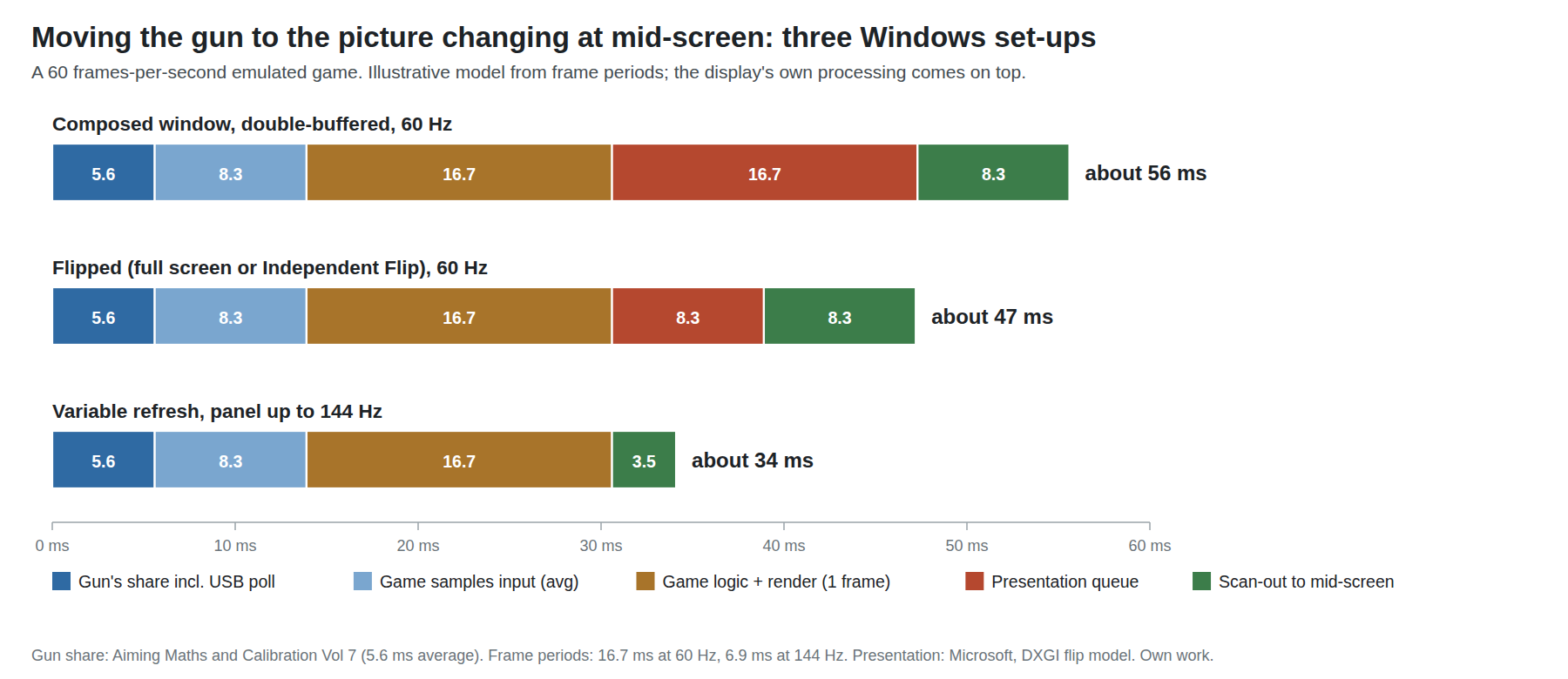
The whole chain from hand to picture, and why a fixed delay is forgiven while a variable one is felt, are worked out in Aiming Maths and Calibration, Volume 7, section 7.5, and the cable’s share in Fully Wired, Volume 5. The gun’s share is about 2.7 to 8.8 ms, 5.6 ms on average with averaging on, including the up-to-1 ms wait for the PC’s USB poll. Windows itself adds almost nothing to the input: Raw Input delivers the report as it arrives; what Windows and the emulator decide is how long the picture takes.
The model in the chart, for a game running at 60 frames per second (one frame = 16.7 ms):
Table 1 — The model in the chart, for a game running at 60 frames per second (one frame = 16.7 ms)
| Stage | Composed window, double-buffered, 60 Hz | Flipped (full screen or borderless, Independent Flip), 60 Hz | Variable refresh, panel up to 144 Hz |
|---|---|---|---|
| Gun’s share, including USB poll | 5.6 ms | 5.6 ms | 5.6 ms |
| Game samples input once per frame (average) | 8.3 ms | 8.3 ms | 8.3 ms |
| Game logic and rendering (one frame) | 16.7 ms | 16.7 ms | 16.7 ms |
| Waiting in the presentation queue | 16.7 ms (one frame) | 8.3 ms (average wait for the next refresh) | about 0 (the panel refreshes when the frame is ready) |
| Scan-out to mid-screen | 8.3 ms | 8.3 ms | 3.5 ms (half of 6.9 ms) |
| Total before the display’s own processing | about 56 ms | about 47 ms | about 34 ms |
The numbers are illustrative: they are frame periods and the gun’s design figures, not a measurement, and many games take two or three frames of internal lag, not one. But the differences between the columns are real and come from the frame arithmetic. Two points stand out. Getting the presentation right is worth one to two frames, more than the whole gun. And variable refresh helps an emulator twice: the frame no longer waits for a fixed refresh tick, and a 144 Hz panel scans each 60 Hz frame out in 6.9 ms rather than 16.7 ms, so the middle of the screen, where the targets are, updates about 5 ms sooner. Most gun games ran on 60 Hz arcade monitors, so a VRR panel runs them at exactly their own rate with none of the judder a fixed 144 Hz refresh would add.
6.2 Presentation: composed, flipped, or variable refresh
Microsoft’s guidance for developers explains the middle column. With the flip presentation model, “windowed mode [is] effectively equivalent or better when compared to the classic ‘fullscreen exclusive’ mode”: when a window covers the screen, Windows can skip desktop composition and send the program’s frames “directly to the screen, independently, with the same efficiency as fullscreen exclusive”, a mode called Independent Flip, in which “you can get down to 1 frame of latency”. An older blt-model program in a window is composed by the desktop window manager and pays the extra queueing in the first column.
Three practical consequences for a gun on Windows:
- Borderless full screen is fine in any program that presents with the flip model. Whether a given emulator does was not established program by program for this dive; the Direct3D 11/12 and Vulkan back ends that MAME (
bgfx), RetroArch, Flycast, DuckStation and PCSX2 offer are the likely candidates. Which mode is actually in use is shown by Microsoft’s PresentMon tool, which the same page recommends. - Variable refresh (G-Sync, FreeSync, HDMI 2.1 VRR) is enabled in the graphics driver and the display, then per program: RetroArch’s “Sync to Exact Content Framerate (G-Sync, FreeSync)”, and MAME’s
lowlatency, which “is particularly effective with VRR (Variable Refresh Rate) displays”. - Television game mode. A television’s picture processing can exceed everything in the table above. Its game or PC mode is the single most important setting, and it must be measured rather than assumed (6.4).
Exclusive full screen remains available in most programs and does no harm, but on current Windows it is no longer the only route to the lowest latency, and borderless modes make Alt-Tabbing to a hook program’s window painless.
6.3 The settings, program by program
Table 2 — 6.3 The settings, program by program
| Program | Settings for low latency with a gun |
|---|---|
| MAME 0.289 | lowlatency 1 (“draw a new frame before throttling to reduce input latency”; may jitter in some 3D systems, hence off by default); waitvsync 1 with a fixed-refresh display, syncrefresh only for games at the display’s rate; video d3d or bgfx |
| RetroArch v1.22.2 | VRR sync on; Max Swapchain Images 2 (1 where allowed); Frame Delay as high as the PC allows; Run-Ahead where the core supports it; Polling Behavior Late (Volume 3, section 3.7) |
| Flycast, DuckStation, PCSX2 | Each has a “Vsync” and a frame-pacing or low-latency option in its graphics settings; use VRR where available. Their exact option names were not compared for this dive |
| TeknoParrot games | Run the game’s own renderer; use the profile’s windowed or full-screen setting and VRR in the driver |
| Everything | Crosshair off once the gun is calibrated (Volume 2, section 2.9): it makes the lag visible without reducing it |
6.4 Measuring it on the bench
The end-to-end number is easy to get with the lab’s Analog Discovery Pro ADP3450: one channel on the trigger switch (or the solenoid gate, which the firmware fires on the trigger), another on a fast photodiode taped to the screen where a game flashes or a target reacts. A shooting gallery game that flashes the screen on every shot (the Model 2 games do; DemulShooter’s Lua scripts can remove that flash, Volume 4) gives a clean edge. Fifty shots per configuration give a histogram whose median is the latency and whose width is the variable part.
To separate the display from the PC, the same measurement with the photodiode replaced by the GPU’s own output (a frame counter on a capture card, or the display’s input-lag figure from its own test pattern) leaves the PC’s share. Aiming Maths and Calibration, Volume 7, section 7.6 isolates the gun’s share from the PC entirely.
6.5 Two guns, end to end
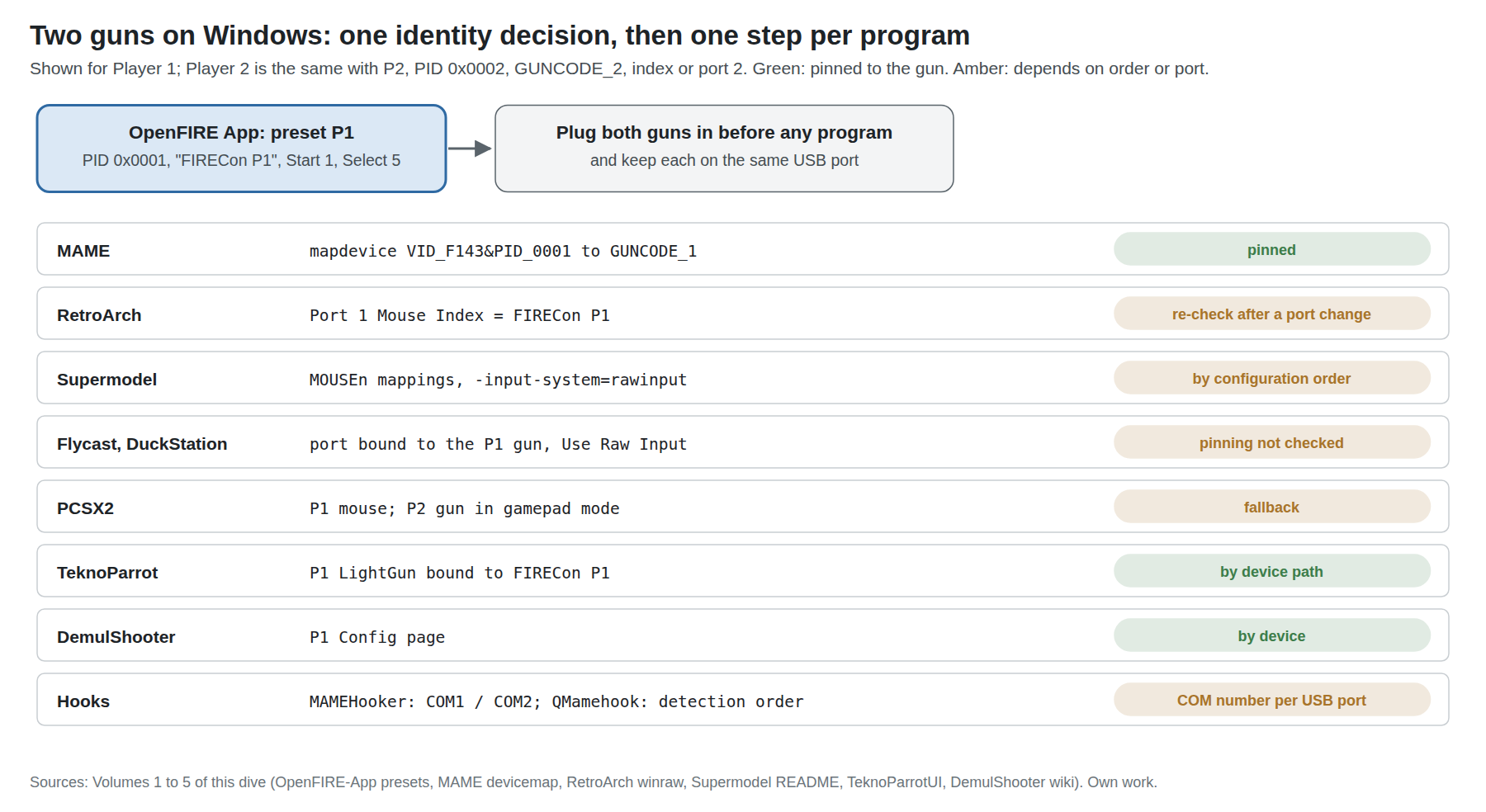
Every program in this dive tells the guns apart its own way. The one decision that serves all of them is to give each gun a distinct identity, and then to do each program’s step once:
Table 3 — Every program in this dive tells the guns apart its own way. The one decision that serves all of them is to give each gun a distinct identity, and then to do each program's step once
| Where | Player 1 gun | Player 2 gun | Pinned against replugging? | Volume |
|---|---|---|---|---|
| OpenFIRE App, USB identity | Preset P1: PID 0x0001, “FIRECon P1”, Start 1 / Select 5 | Preset P2: PID 0x0002, “FIRECon P2”, Start 2 / Select 6 | Yes (in the gun) | 1 |
| Windows Device Manager, COM port | COM1 (for MAMEHooker) | COM2 | Per USB port | 1 |
| MAME | mapdevice VID_F143&PID_0001 to GUNCODE_1 | …PID_0002 to GUNCODE_2 | Yes | 2 |
| RetroArch | Port 1 Mouse Index = FIRECon P1 | Port 2 Mouse Index = FIRECon P2 | No: check after any change of port | 3 |
| Supermodel | MOUSEn mappings with -input-system=rawinput | the other n | By configuration order | 4 |
| Flycast, DuckStation | Port A / Port 1 bound to the P1 gun | Port B / Port 2 to the P2 gun | Not checked | 4 |
| PCSX2 | Mouse (pointer 0) | Gamepad mode, Relative axes | — | 4 |
| TeknoParrot | P1 LightGun bound to FIRECon P1 | P2 LightGun to FIRECon P2 | By device path | 5 |
| DemulShooter | P1 Config page | P2 Config page | By device | 5 |
| QMamehook | First gun detected | Second | Detection order | 5 |
Two habits remove most two-gun trouble: plug both guns in before starting any program, and keep each gun on the same USB port, ideally the PC’s own ports rather than a hub. MAME’s own documentation says that devices not connected at start-up “may not be numbered as expected”, and every program that stores a number (RetroArch, Supermodel) behaves the same way.
6.6 Troubleshooting
Table 4 — 6.6 Troubleshooting
| Symptom | Most likely cause | Fix | Where |
|---|---|---|---|
| Aim is fine on one monitor, wildly wrong on a multi-monitor PC | Absolute coordinates map to the primary monitor | Make the gun’s screen primary | 1.4 |
| Correct at the centre, drifts outward toward the sides | The game is pillarboxed but the gun covers the whole screen | Stretch the game, or M3x1 from the hook’s start command | 1.7, 2.3 |
| Desktop cursor right, game off by a constant amount | The arcade game’s own calibration | Recalibrate in its test menu; in Demul, quit cleanly so NVRAM saves | 4.1 |
| Two guns move one cursor, or only one gun works | The program is reading the system cursor | Use its Raw Input path; in RetroArch, raw driver and a non-SDL2 video driver | 1.3, 3.2 |
| Two guns work but swap players after a reboot | Enumeration order changed | MAME mapdevice; elsewhere, re-check the port mapping; keep guns on fixed ports | 2.6, 6.5 |
| RetroArch or TeknoParrot confused by two guns | Both guns have the same product ID | App presets P1 and P2 | 1.5 |
| The gun is invisible in a TeknoParrot profile | Input API set to XInput | Set Input API to RawInput | 5.2 |
| No recoil in a MAME game with a hook running | Wrong output setting for the hook, or the ini key is not the driver’s output name | output windows for MAMEHooker, network for QMamehook; let the hook write the ini’s names first | 2.10 |
| MAMEHooker shows a DLL error | Not run as administrator | Run as administrator (OpenFIRE wiki), or use QMamehook / OutputHooker | 5.7 |
| DemulShooter does not hook the game | Not administrator; renamed executable; started in the wrong order | Run as administrator; -pname=; start the hook, then DemulShooter, then the game | 5.3, 5.4 |
| MAMEHooker cannot find the gun | Gun is COM5 or higher | Renumber to COM1–COM4 in Device Manager | 1.6 |
| Off-screen reload does nothing | The gun pins at the screen edge, so the game never sees off-screen | MAME plugin; RetroArch Gun Reload; Supermodel InputAutoTrigger; off-screen trigger mapped to right click for DemulShooter games | 2.8, 3.6, 4.3, 5.4 |
| The solenoid stays engaged during a machine-gun burst, then cuts out | Hold-type output with F0x1; the firmware’s 2,000 ms limit | Map the “on” state to a pulse command instead | 2.10, 5.6 |
| Recoil fires twice per shot | The gun’s own trigger recoil and the hook’s both firing | The hook must send S at start (the gun’s LED turns white); and an ini line without a bar fires on both the “on” and “off” changes | OSF Vol 6 §6.7, 5.6 |
| Aim jumps erratically in parts of the screen | Reflections or a stray infrared source | The App’s IR camera view shows a fifth dot | OSF Vol 5 §5.4 |
6.7 Where it runs: the game-by-game table
What each project’s own documentation and source show for each game: the Windows route, whether a second gun has a documented path, and where game-driven recoil comes from. “Documented” means the route is in the program’s own documentation or code, not that it has been played with this gun; nothing has been, yet. Recoil sources are DemulShooter’s Outputs table (custom Recoil column), MAME’s driver source, or “gun’s own” where the game provides nothing and the gun fires on its trigger.
Table 5 — 6.7 Where it runs: the game-by-game table
| Game | Original platform | Windows route | Second gun | Game-driven recoil | Notes |
|---|---|---|---|---|---|
| Terminator 2: Judgment Day | Williams Y-unit | MAME | Yes (mapdevice) | MAME: Left_Gun_Recoil, Right_Gun_Recoil | Hold-type recoil: map to pulses |
| Alien3: The Gun | Sega System 32 | MAME | Yes | MAME: Player1_Gun_Recoil | ini\source\segas32.ini |
| Revolution X | Midway X-unit | MAME | Yes, and a third | MAME: three Player*_Gun_Recoil | |
| Beast Busters | SNK | MAME | Yes, and a third | MAME: three Player*_Gun_Recoil | |
| Point Blank 2 | Namco System 12 / 11 | MAME | Yes | MAME: Player*_Gun_Recoil (System 12) or recoil0/1 (System 11 sets) | |
| Ghoul Panic | Namco System 12 | MAME | Yes | MAME: Player*_Gun_Recoil | |
| Under Fire | Taito | MAME | Yes | MAME: P1_gun_recoil, P2_gun_recoil | |
| Lethal Enforcers | Konami | MAME | Yes | None found in the driver; gun’s own | Off-screen reload plugin, named in its documentation |
| The House of the Dead | Sega Model 2 | Model 2 emulator + DemulShooter | Yes | DemulShooter: Yes (genuine and custom) | Calibrate in test menu |
| Virtua Cop, Virtua Cop 2 | Sega Model 2 | Model 2 emulator + DemulShooter | Yes | DemulShooter: Yes | Named in MAME’s reload-plugin documentation too |
| Behind Enemy Lines | Sega Model 2 | Model 2 emulator + DemulShooter | Yes | DemulShooter: custom Yes, genuine No | Middle click = grenade |
| Gunblade NY | Sega Model 2 | Model 2 emulator + DemulShooter | Yes | DemulShooter: Yes | |
| Rail Chase 2 | Sega Model 2 | Model 2 emulator + DemulShooter | Yes | DemulShooter: custom No | ”aiming is…weird” |
| The Lost World | Sega Model 3 | Supermodel, Raw Input | Yes | None (Supermodel has no gun output); gun’s own | InputAutoTrigger for one-click reload |
| The House of the Dead 2 | Sega Naomi | Flycast (Raw Input) + DemulShooterX64, or Demul + DemulShooter | Yes | DemulShooter: Yes | |
| Confidential Mission | Sega Naomi | Demul + DemulShooter (Flycast listed in DemulShooter’s usage) | Yes | DemulShooter (Demul): Yes | |
| Death Crimson OX, The Maze of the Kings, Lupin the Third: The Shooting | Sega Naomi | Demul + DemulShooter; Flycast for Maze and Lupin | Yes | DemulShooter: Yes | |
| Ranger Mission, Sports Shooting USA, Extreme Hunting | Sammy Atomiswave | Demul 0.7a + DemulShooter | Yes | DemulShooter: No | Edge offset unless 4:3 window or DX11 plugin |
| The House of the Dead III, Virtua Cop 3, Ghost Squad | Sega Chihiro | Cxbx-Reloaded + DemulShooter | Yes | DemulShooter: Yes | |
| The House of the Dead 4, 4 Special | Sega Lindbergh | TeknoParrot + DemulShooter | Yes | DemulShooter: Yes | TeknoParrot OffScreenReloadHack option |
| The House of the Dead: EX | Sega Lindbergh | TeknoParrot + DemulShooter | Yes | DemulShooter: custom No, genuine Yes | |
| Let’s Go Jungle, Special | Sega Lindbergh | TeknoParrot + DemulShooter | Yes | DemulShooter: Yes | TeknoParrot: Intel GPUs “NO” |
| Too Spicy, Rambo | Sega Lindbergh | TeknoParrot + DemulShooter | Yes | DemulShooter: Yes | |
| Sega Golden Gun, Let’s Go Island, Transformers: Human Alliance | Sega RingWide | TeknoParrot + DemulShooter | Yes | DemulShooter: Yes | |
| Operation G.H.O.S.T., Target Bravo | Sega RingWide | TeknoParrot + DemulShooter | Yes | DemulShooter: custom Yes (no Damaged, Life, Ammo) | OpenFIRE wiki: GunRecoil “doesn’t work well” in Operation G.H.O.S.T. |
| Time Crisis 5 | Namco ES3X | TeknoParrot + DemulShooterX64 | Yes | DemulShooter: Yes | |
| Point Blank X | Namco ES4 | TeknoParrot + DemulShooter | Yes | DemulShooter: Yes | |
| Time Crisis 4 | Namco System Super 256 | TeknoParrot (embedded PCSX2) | Per TeknoParrot profile | Not in DemulShooter’s list | |
| Aliens Armageddon, Terminator Salvation, The Walking Dead, Jurassic Park (2015), Halo: Fireteam Raven | Raw Thrills PC | TeknoParrot + DemulShooter | Yes (Halo: four) | DemulShooter: Yes | |
| Luigi’s Mansion Arcade | Sega Nu | DemulShooterX64 (seganu) | Yes | DemulShooter: Yes | |
| Silent Hill: The Arcade | Taito Type X | DemulShooter (ttx) | Yes | DemulShooter: custom Yes (no Damaged, Life, Ammo) | Keyboard keys must be set |
| Time Crisis 2, 3, Crisis Zone, Vampire Night | PlayStation 2 (GunCon 2) | PCSX2 | Second gun only in gamepad mode | None; gun’s own | Calibration Shot bind |
| PlayStation GunCon and Justifier games | PlayStation | DuckStation (Raw Input) or Beetle PSX | Yes | None; gun’s own | |
| Duck Hunt and Zapper games | NES | RetroArch, FCEUmm | Yes (two ports) | None; gun’s own | |
| Super Scope and Justifier games | SNES | RetroArch, Snes9x | Yes | None; gun’s own | |
| Menacer, Justifier and Light Phaser games | Mega Drive, Master System | RetroArch, Genesis Plus GX | Yes | None; gun’s own | |
| Operation Wolf Returns: First Mission | Windows (Steam) | DemulShooterX64 + Unity plugin | Yes | DemulShooter: Yes | Non-VR version only |
| The House of the Dead: Remake | Windows (Steam) | Arcade Plugin + DemulShooterX64 | Yes | DemulShooter: Yes | Original release: no light guns |
| The House of the Dead II, III, Overkill (PC) | Windows | DemulShooter (windows) | Yes | DemulShooter: Yes | |
| Heavy Fire: Afghanistan | Windows | DemulShooter | Up to four | DemulShooter: Yes | Cover by aiming at a screen edge |
6.8 Proposed decisions
For the category’s decision log, each with its reason; none is an owner decision yet.
Table 6 — 6.8 Proposed decisions
| # | Area | Proposal | Why, and why not the alternatives |
|---|---|---|---|
| PW-1 | Hook program | QMamehook by default; OutputHooker trialled for Windows-message sources; MAMEHooker as fallback | No administrator rights and OpenFIRE-aware vs MAMEHooker’s admin requirement and COM1–4 limit (Volume 5) |
| PW-2 | MAME configuration | rawinput, lightgun_device lightgun, mapdevice on VID_F143&PID_000n | Per-gun input and stable P1/P2; win32 is one gun (Volume 2) |
| PW-3 | Game-driven recoil commands | Pulse on the output’s “on” state (`F0x0 | F0x2x1form), neverF0x1` holds, for every game |
| PW-4 | Bench display | A VRR-capable monitor as the reference display, with the TV’s game mode measured separately | One to two frames separate the presentation modes (6.1) |
| PW-5 | Second-gun fallback | Gamepad mode only where a program has no Raw Input (PCSX2) | Raw Input is per gun and absolute everywhere else (Volume 1) |
6.9 What could not be verified
- Every latency figure in 6.1 beyond the gun’s own share is a frame-period model, not a measurement.
- Whether each program named in 6.2 actually runs in Independent Flip on a given PC (check with PresentMon).
- Flycast’s, DuckStation’s and PCSX2’s own low-latency option names (6.3).
- Every row of 6.7 is a documented route, not a tested one; the recoil column is DemulShooter’s or MAME’s published capability, not observed on this gun.
Sources
- Microsoft, “For best performance, use DXGI flip model”, Microsoft Learn, updated 15 April 2026, https://learn.microsoft.com/en-us/windows/win32/direct3ddxgi/for-best-performance—use-dxgi-flip-model — read 2026-10-20.
- MAMEdev, MAME 0.289 documentation,
lowlatency,waitvsync,syncrefresh,devicemap— read 2026-10-20. - libretro, RetroArch v1.22.2
intl/msg_hash_us.h(latency settings) and the libretro “Latency” and “Run Ahead” guides — read 2026-10-20. - argonlefou, DemulShooter wiki v17.10, “Outputs” (extracted per game to
research-demulshooter-outputs.txt), “Usage”, “Model2”, “Demul”, “Windows games” — read 2026-10-20. - teknogods,
TeknoParrotUIgame profiles and metadata — read 2026-10-20. - The Supermodel project,
Docs/README.txt,Src/OSD/Outputs.cpp; flyinghead, Flycast source; PCSX2 and DuckStation source — read 2026-10-20. - MAME driver sources for output names, as listed in Volume 2 — read 2026-10-20.
- TeamOpenFIRE, MAMEHOOKER Documentation — read 2026-10-20.
- This category’s own volumes for the gun’s latency share: Aiming Maths and Calibration, Volume 7; Fully Wired, Volume 5.
Comments (0)