PC (Windows) · Volume 3
RetroArch on Windows — The raw Driver, Mouse Index, Gun Binds and the Light-Gun Cores
How RetroArch v1.22.2 reads two absolute-mouse guns on Windows, which input driver to pick and why, how a port finds its gun, the eleven gun binds, the core options that make each console's gun work, and what RetroArch cannot do for recoil
3.1 What RetroArch is good for here
RetroArch is a front end that runs emulators packaged as “cores”. For a light gun its value is the home consoles: the NES Zapper, the Super Scope and Justifier, the Menacer and Light Phaser, the PlayStation GunCon and Justifier, the Dreamcast gun, each in a core that already knows how to turn an absolute position into what the console expected. Arcade gun games are better served by standalone MAME (Volume 2) and the Sega emulators (Volume 4).
The reference is RetroArch v1.22.2 (20 November 2025), the latest release on 20 October 2026, and its Windows input driver read in source at that tag and at master.
3.2 The input driver: raw, and why not dinput
RetroArch’s input driver is chosen in Settings, Drivers, Input (“Input driver to use. Some video drivers force a different input driver. (Restart required)”). The libretro documentation’s table for Windows:
Table 1 — RetroArch's input driver is chosen in Settings, Drivers, Input ("Input driver to use. Some video drivers force a different input driver. (Restart required)"). The libretro documentation's table for Windows
| Driver | Several mice | Pointer device | Light-gun device |
|---|---|---|---|
raw | Yes, if the video driver is not sdl/sdl2 | Yes | Yes |
dinput | No | Yes | Yes |
sdl2 | No | Yes | ”Yes, button map is fixed” |
Use raw. It is the only Windows driver that keeps two guns apart. Its source (input/drivers/winraw_input.c) handles each mouse’s MOUSE_MOVE_ABSOLUTE reports separately, scaled to the RetroArch window, and publishes each mouse by index; at v1.22.2 the same handling is present.
The video driver can silently take the input away. A comment in the same file: the SDL2 video driver “calls RegisterRawInputDevices() and GetRawInputBuffer() internally, which takes the WM_INPUT stream away from this driver entirely.” With raw input, choose d3d11, d3d12, vulkan or gl for video, never sdl2. This is the first thing to check when RetroArch suddenly sees only one gun, or none.
dinput reads the one system cursor: one gun, fine for a single player.
3.3 How a port finds its gun
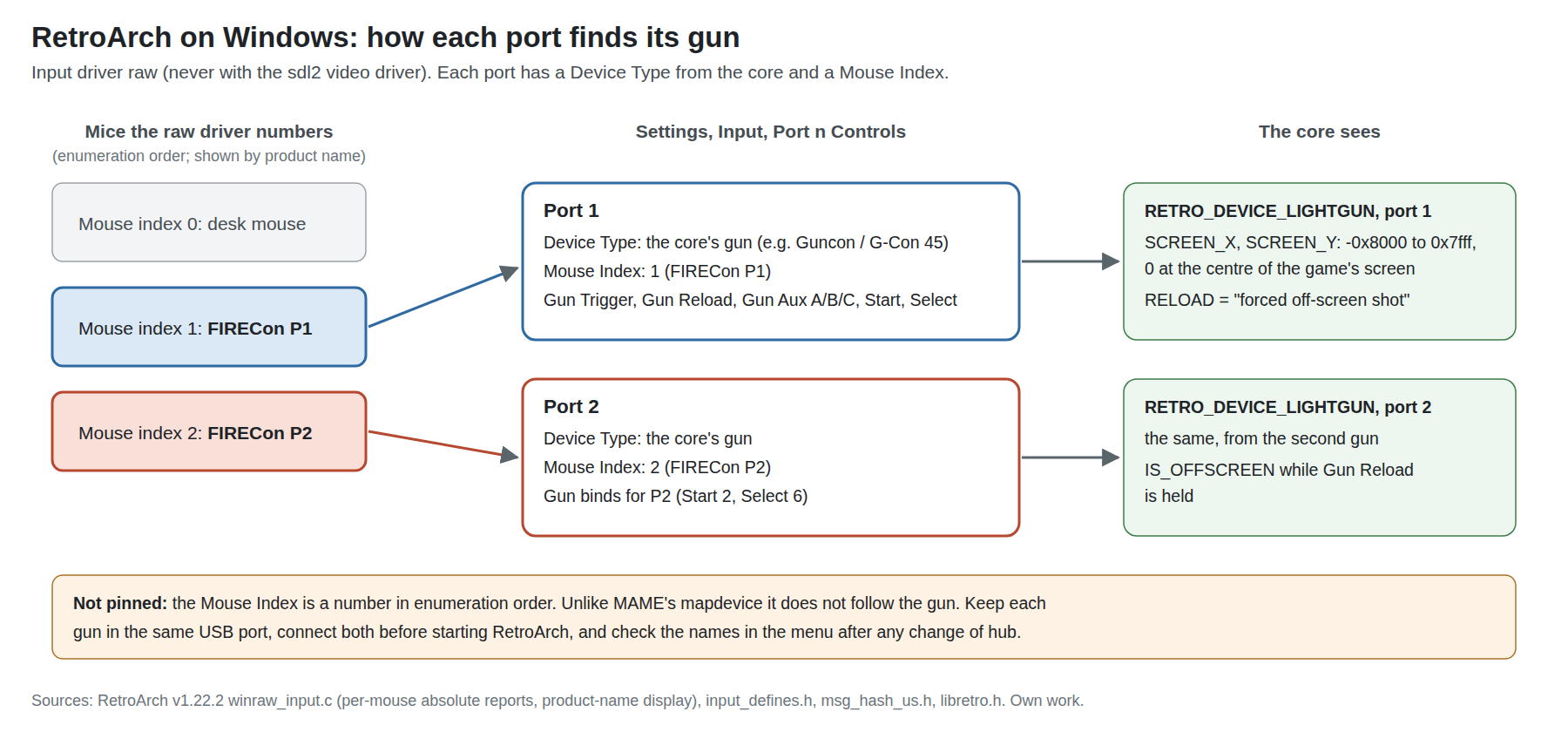
Two settings per player, both under Settings, Input, Port n Controls:
- Device Type (“Specifies the emulated controller type”): the list comes from the running core, so it shows “Zapper”, “SuperScope”, “Justifier”, “Menacer”, “Guncon / G-Con 45” or “Light Gun” as the core defines them (3.5). It is set with a game of that console loaded, and saved with a core override.
- Mouse Index (“The physical mouse as recognized by RetroArch”): which mouse feeds that port. With the
rawdriver the menu shows each mouse by its USB product name, which the driver reads withHidD_GetProductString(), so the App’s presets appear as FIRECon P1 and FIRECon P2 (Volume 1, section 1.5). The RetroArch log prints the same list at start-up ([WinRaw] Mouse #1: "FIRECon P1"in the v1.22.2 format).
The index is not pinned. Unlike MAME’s mapdevice (Volume 2), RetroArch stores a number, and the numbers follow Windows’ enumeration order. The names make a swap obvious in the menu, but they do not prevent it. Keep each gun in the same USB port, plug both in before RetroArch starts, and check Port 1 and Port 2 after any change of hub. An ordinary desk mouse is also a numbered mouse, usually index 0; the guns are then 1 and 2.
3.4 The gun binds
RetroArch has a dedicated set of light-gun binds for each port, at the bottom of the Port n Controls list (from input_defines.h and the menu strings):
Table 2 — RetroArch has a dedicated set of light-gun binds for each port, at the bottom of the Port n Controls list (from inputdefines.h and the menu strings)
| Bind | libretro ID | Typical OpenFIRE input |
|---|---|---|
| Gun Trigger | TRIGGER | Trigger (left mouse button) |
| Gun Reload | RELOAD — “Forced off-screen shot” | Button C (mouse 4) |
| Gun Aux A | AUX_A | Button A (right mouse button) |
| Gun Aux B | AUX_B | Button B (middle) |
| Gun Aux C | AUX_C | Pedal |
| Gun Start | START | Start (key 1 for P1) |
| Gun Select | SELECT | Select (key 5 for P1) |
| Gun D-Pad Up, Down, Left, Right | DPAD_* | The gun’s D-pad keys |
The aim itself needs no bind: a light-gun device reports its position “in screen space … in the range of [-0x8000, 0x7fff]. Zero is the center of the game’s screen and -0x8000 represents out-of-bounds” (libretro.h), and the raw driver fills that from the gun’s absolute reports.
Bind each port’s gun buttons with that port’s gun only, and save a remap per core so that the console’s gun keeps its layout.
3.5 The light-gun cores and their options
Each core’s light-gun handling, from its own source. Every one of them offers a “light gun” input mode and a “touchscreen” (pointer) mode; on Windows with a mouse-type gun, the light-gun mode is the one that respects Mouse Index.
Table 3 — 3.5 The light-gun cores and their options
| Console gun | Core | Device Type to choose | Core option (key) | Set it to |
|---|---|---|---|---|
| NES Zapper | FCEUmm | Zapper | Zapper Mode (fceumm_zapper_mode): clightgun (default), stlightgun, touchscreen, mouse | Light gun; crosshair off with fceumm_show_crosshair |
| Super Scope, Justifier | Snes9x | SuperScope, Justifier | snes9x_lightgun_mode: Lightgun or Touchscreen | Lightgun; crosshair per gun |
| Menacer, Light Phaser, Justifier | Genesis Plus GX | ”MD Menacer”, “MD Justifiers”, “MS Light Phaser” | genesis_plus_gx_gun_input: lightgun or touchscreen; genesis_plus_gx_gun_cursor | lightgun |
| PlayStation GunCon, Justifier | Beetle PSX | Guncon / G-Con 45, Justifier | ”Gun Input Mode” (beetle_psx_gun_input_mode): “Use mouse-controlled ‘Light Gun’ or ‘Touchscreen’ input” | Light Gun |
| Arcade (MAME 2003-Plus) | mame2003-plus | — | “X-Y Device” (mame2003-plus_xy_device): mouse (default), pointer, lightgun, disabled; “Show Lightgun Crosshairs” | lightgun |
| Arcade (FinalBurn Neo) | FBNeo | Light gun binds per game | Maps trigger, Aux A/B/C, Start, Select and D-pad to the light-gun IDs | — |
| Dreamcast and Naomi | Flycast core | Light Gun | (as standalone, Volume 4) |
Two notes on console guns specifically. The Zapper and the Super Scope were CRT-timing guns (CRT Timing); the cores replace the raster timing with the reported position, so they play correctly on a flat panel, and the FCEUmm option fceumm_zapper_tolerance exists because the core still simulates the Zapper’s light detection around the aim point. And the original guns’ quirks (the Justifier’s two-gun daisy chain, the Super Scope’s pause and turbo) are mapped onto Aux buttons by the cores; which button does what is per core, so check the core’s documentation before binding.
3.6 Off-screen reload in RetroArch
RetroArch solves the problem MAME needs a plugin for (Volume 2, section 2.8) with a bind: Gun Reload is a “Forced off-screen shot”. The core sees the gun as off-screen and the trigger pulled for as long as the button is held. Bind it to the gun’s reload button (C) and every core that implements RELOAD reloads on one button. GunCon games that reload by pointing off-screen, which an absolute gun cannot do, work this way.
3.7 Latency settings worth changing
RetroArch has more latency controls than any other program in this dive. The libretro documentation claims “next-frame response time (≤16ms!)” is achievable, and the menu strings explain each control. The ones that matter for a gun, in order of value:
Table 4 — RetroArch has more latency controls than any other program in this dive. The libretro documentation claims "next-frame response time (≤16ms!)" is achievable, and the menu strings explain each control. The ones that matter for a gun, in order of value
| Setting (menu name) | What it does | For a gun |
|---|---|---|
| Sync to Exact Content Framerate (G-Sync, FreeSync) | “No deviation from core requested timing. Use for Variable Refresh Rate screens” | On, with a VRR display (Volume 6) |
| Max Swapchain Images | ”Single buffering - 1, Double buffering - 2, Triple buffering - 3 … a big impact on latency” | 2, or 1 where the driver allows it |
| Frame Delay | ”Sets how many milliseconds to sleep before running the core after video presentation” | Raise until the PC stutters, then back off |
| Run-Ahead | Runs frames ahead and rolls back, using save states | Optional: needs a core with “deterministic save state support”; costs CPU per frame run ahead |
| Polling Behavior | Early, Normal or Late; “Early” or “Late” “can result in less latency” | Late |
| Hard GPU Sync | ”Hard-synchronize the CPU and GPU” (OpenGL) | On, if using the gl driver |
Run-Ahead removes the game’s internal frames of lag, which for many gun games is the largest single term after the display. It needs a fast PC and a core whose save states are clean; the libretro guide’s test for how many frames to run ahead (pause, hold an input, advance frame by frame until something moves) works for a gun with the trigger and a muzzle-flash.
3.8 Recoil: what RetroArch does not do
RetroArch has no output channel of its own for lamps or recoil. Two routes exist and neither is general:
- The MAME core can publish MAME’s network outputs, which QMamehook reads (its README lists “MAME standalone and its RetroArch core”). That covers arcade games in the MAME core only.
- Otherwise the gun fires its own solenoid on each trigger pull, the default behaviour (Open-Source Firmware, Volume 5). For console games, which never had recoil, that is the right behaviour anyway.
For game-driven recoil in arcade games, use standalone MAME (Volume 2) or the Sega emulators with DemulShooter (Volumes 4 and 5).
3.9 Why this, and why not the others
Table 5 — 3.9 Why this, and why not the others
| Option | Verdict | Why |
|---|---|---|
RetroArch, raw input driver, d3d11/vulkan video, light-gun Device Type, Mouse Index by name | Chosen for console guns | Two guns kept apart; the console cores’ gun emulation; Gun Reload solves off-screen reload with a button |
dinput input driver | One player only | One system cursor (3.2) |
sdl2 video driver with raw input | Rejected | Takes the raw input stream away (3.2) |
| RetroArch for arcade gun games | Not preferred | Standalone MAME has stable gun IDs (mapdevice) and native outputs; the MAME cores do not offer the same |
| Standalone console emulators (DuckStation for PlayStation, PCSX2 for PlayStation 2) | Alternatives | DuckStation has per-device Raw Input of its own; PCSX2 is the only PlayStation 2 route (Volume 4) |
3.10 What could not be verified
- The exact Device Type names each core shows in the menu (Zapper, SuperScope, Guncon / G-Con 45 and so on) are taken from each core’s source strings and may differ slightly in the menu.
- Whether the MAME 2003-Plus core’s lightgun X-Y mode respects Mouse Index with the
rawdriver was not confirmed for this gun. - Run-Ahead’s interaction with a light-gun core’s position input (a rolled-back frame re-reads the same position) was not examined.
Sources
- libretro, RetroArch v1.22.2 and master:
input/drivers/winraw_input.c,input/input_defines.h,intl/msg_hash_us.h,libretro-common/include/libretro.h, https://github.com/libretro/RetroArch — read 2026-10-20. - libretro documentation, “Input and controller drivers”, https://docs.libretro.com/guides/input-controller-drivers/ ; “Latency” and “Run Ahead” guides, https://github.com/libretro/docs/tree/master/docs/guides — read 2026-10-20.
- Core sources, read 2026-10-20: libretro
libretro-fceumm(src/drivers/libretro/libretro.c),snes9x(libretro/libretro.cpp),Genesis-Plus-GX(libretro/libretro.c),beetle-psx-libretro(libretro_core_options.h),mame2003-plus-libretro(src/mame2003/core_options.c),FBNeo(src/burner/libretro/retro_input.cpp). - That One Seong,
QMamehookREADME, https://github.com/SeongGino/QMamehook — read 2026-10-18 (via Open-Source Firmware, Volume 6). - libretro forums, “Configuring RA for multi-mouse (spinners, lightguns, trackballs)”, community guide, 2021 — cited as community background only.
Comments (0)