PC (Windows) · Volume 2
MAME on Windows — The Four Light-Gun Settings, Two Guns That Stay Put, Off-Screen Reload and the Outputs
How MAME 0.289 reads an absolute-mouse light gun on Windows, how to switch guns on only for gun games, how to pin Player 1 and Player 2 to their guns with mapdevice, how to reload off-screen, what the crosshair does, and the real output names a hook program must match
MAME emulates more light-gun arcade games than anything else, and on Windows it reads each gun separately with no helper program. This volume is MAME’s side only. The gun’s identities and the COM port are in Volume 1; the hook programs that turn MAME’s outputs into solenoid pulses are set up in Open-Source Firmware, Volume 6 and their Windows specifics are in Volume 5 of this dive.
2.1 Which MAME, and where its settings live
The reference is the official Windows build of MAME 0.289 (released 30 July 2026). Every option below is in its documentation (docs.mamedev.org, which identifies itself as 0.289) or its source.
Settings live in mame.ini next to mame.exe (create it with mame -createconfig), in more specific ini files that override it (2.7), and in per-system .cfg files that MAME writes itself when inputs are remapped in its menu. A setting can also be given on the command line, which overrides everything.
2.2 The four settings that matter
Table 1 — 2.2 The four settings that matter
| Setting | Values (Windows) | Default | What it does | For this gun |
|---|---|---|---|---|
lightgun | 0 / 1 | 0 | Use light-gun controllers at all | Leave 0 in mame.ini; let 2.4 turn it on |
lightgunprovider | auto, rawinput, win32, none (and sdl only in builds compiled with it) | auto = rawinput, falling back to win32 | Where light-gun input comes from | rawinput (or auto) |
lightgun_device | none, keyboard, mouse, lightgun, joystick | keyboard | What to enable automatically when a system has light-gun inputs | lightgun |
mouse | 0 / 1 | 0 | Use mice | Leave 0 for gun games |
The documentation’s warning on the last one matters because the gun is a mouse: “most lightguns also produce mouse input, so enabling mouse and lightgun controllers simultaneously (using -lightgun and -mouse together) may produce strange behaviour.” The cure is not to enable mouse input in gun games. mouse_device defaults to mouse, so a system that has mouse inputs (a trackball game, say) will still turn mouse input on by itself; that is harmless outside gun games.
multimouse does not apply to light guns. It separates mice when they are read as mice; the rawinput light-gun provider separates guns by itself (2.3).
2.3 rawinput, win32, and the old dual-gun option
MAME’s two Windows light-gun providers behave completely differently, and the source shows why.
rawinput (src/osd/modules/input/input_rawinput.cpp). The light-gun module enumerates every mouse Windows reports and creates one MAME light gun per device. For each report it takes a position only when Windows marks it MOUSE_MOVE_ABSOLUTE, normalising the 0–65,535 coordinates to MAME’s full axis range, and records buttons 1 to 5. Two OpenFIRE guns are therefore Gun 1 and Gun 2 with no further set-up; an ordinary mouse on the same PC also becomes a “gun” but sends no absolute positions, so it never moves anything.
win32 (input_win32.cpp). Reads the single Windows cursor with GetCursorPos() and converts it to the MAME window’s coordinates. One gun only. The Windows-only dual_lightgun option (-dual, default off) splits the one cursor’s buttons between two “guns” for a long-gone class of dual-gun hardware; it does not apply to two USB guns.
So on Windows, rawinput is the only provider for two guns, and auto already chooses it.
The full-screen picture. Because rawinput maps the gun’s full range onto MAME’s full axis range, a 4:3 game drawn with black bars on a 16:9 screen will see the edges of the screen as the edges of the game: the aim is correct in the centre and drifts outward toward the sides. Either stretch the game (keepaspect 0 for gun games), or turn on the gun’s 4:3 window (M3x1) from the hook’s start command (Volume 1, section 1.7). This is the behaviour expected from the source and should be confirmed on the built gun.
2.4 Guns on only for gun games
The cleanest mame.ini for a PC that plays everything:
lightgun                  0
lightgunprovider          rawinput
lightgun_device           lightgun
mouse                     0
lightgun_device lightgun tells MAME to switch light-gun input on automatically for any system that has light-gun controls, and only for those. The documentation: “These options can effectively set -mouse, -joystick and/or -lightgun depending on the type of inputs present on the emulated system”. Nothing else needs a per-game file just to enable the guns.
The one thing these options will not do is override an explicit nolightgun “at a higher priority level (e.g. in a more specific INI file or on the command line)”, so a stray lightgun 0 in a per-game ini will still win.
2.5 Buttons, and the keys that already match
MAME’s defaults for a light-gun game map Gun 1’s position to “Lightgun X” and “Lightgun Y” for Player 1 and its buttons to Player 1’s buttons. The OpenFIRE gun’s defaults (Open-Source Firmware, Volume 6, section 6.3) send the trigger as left mouse button (Button 1), Button A as right (Button 2), Button B as middle (Button 3), reload (C) as mouse button 4.
The keyboard side already lines up. MAME’s default arcade keys are 1 for Player 1 Start and 5 for Coin slot 1, 2 and 6 for Player 2 (MAME documentation, “Default Keys”), which are exactly the keys the OpenFIRE App’s P1 and P2 presets put on Start and Select (Volume 1, section 1.5). A gun on preset P1 can coin up and start without any remapping.
To remap anything, press Tab in a game, Input Settings, and select the input. One habit from the Sinden wiki applies here too: map buttons with the gun aimed at the screen, so the gun is not in its off-screen state while MAME listens (Border Tracking, Volume 6, section 6.4). With OpenFIRE’s default off-screen assignments equal to the on-screen ones it does not matter, but it does once Offscreen Button Mode is on.
2.6 Two guns that stay Player 1 and Player 2
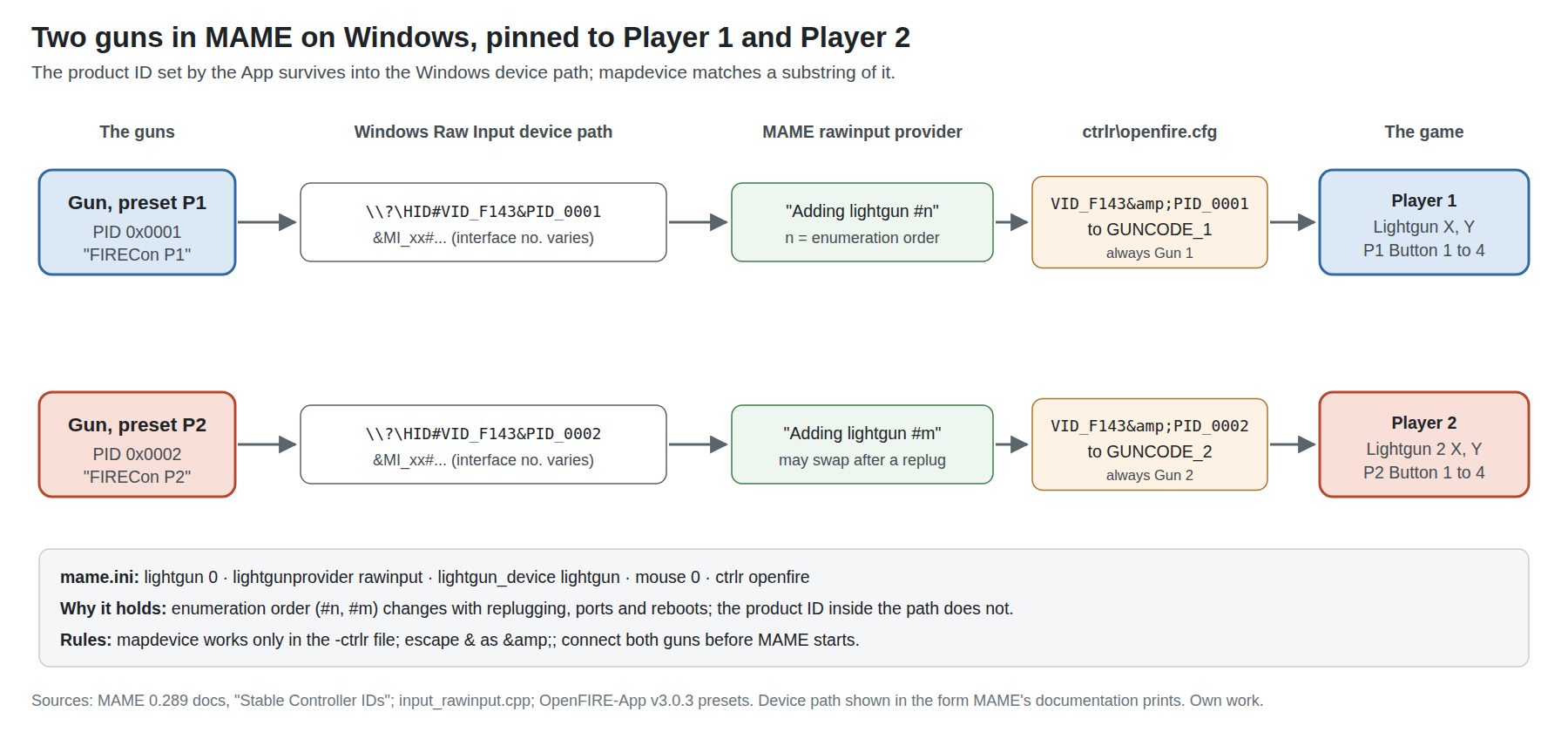
MAME numbers guns in the order Windows enumerates them, and its documentation is blunt that the order changes with “disconnecting and reconnecting USB or Bluetooth devices, changing ports/hubs, and even just restarting the computer”. The fix is the mapdevice element in a controller configuration file.
- Give the guns different identities with the App’s P1 and P2 presets (Volume 1, section 1.5).
- Find their device IDs: Tab, Input Settings, Input Devices, select a gun, Copy Device ID; or run
mame -vand read the “Input: Adding lightgun #n” lines. - Create
ctrlr\openfire.cfg:
<mameconfig version="10">
<system name="default">
<input>
<mapdevice device="VID_F143&PID_0001" controller="GUNCODE_1" />
<mapdevice device="VID_F143&PID_0002" controller="GUNCODE_2" />
</input>
</system>
</mameconfig>- Point MAME at it:
ctrlr openfireinmame.ini.
The device attribute may be “a substring of the device ID”, which is why VID_F143&PID_0001 is enough; the ampersand must be escaped as & because the file is XML. The pattern is copied from MAME’s own example, which pins two Ultimarc AimTrak guns the same way (VID_D209&PID_1601). Two cautions from the same page: mapdevice only works in the controller file (“ignored in system configuration files and the default configuration file”), and “If not all configured devices are connected when MAME starts, the devices that are connected may not be numbered as expected” — plug both guns in before launching.
2.7 Per-game and per-driver ini files
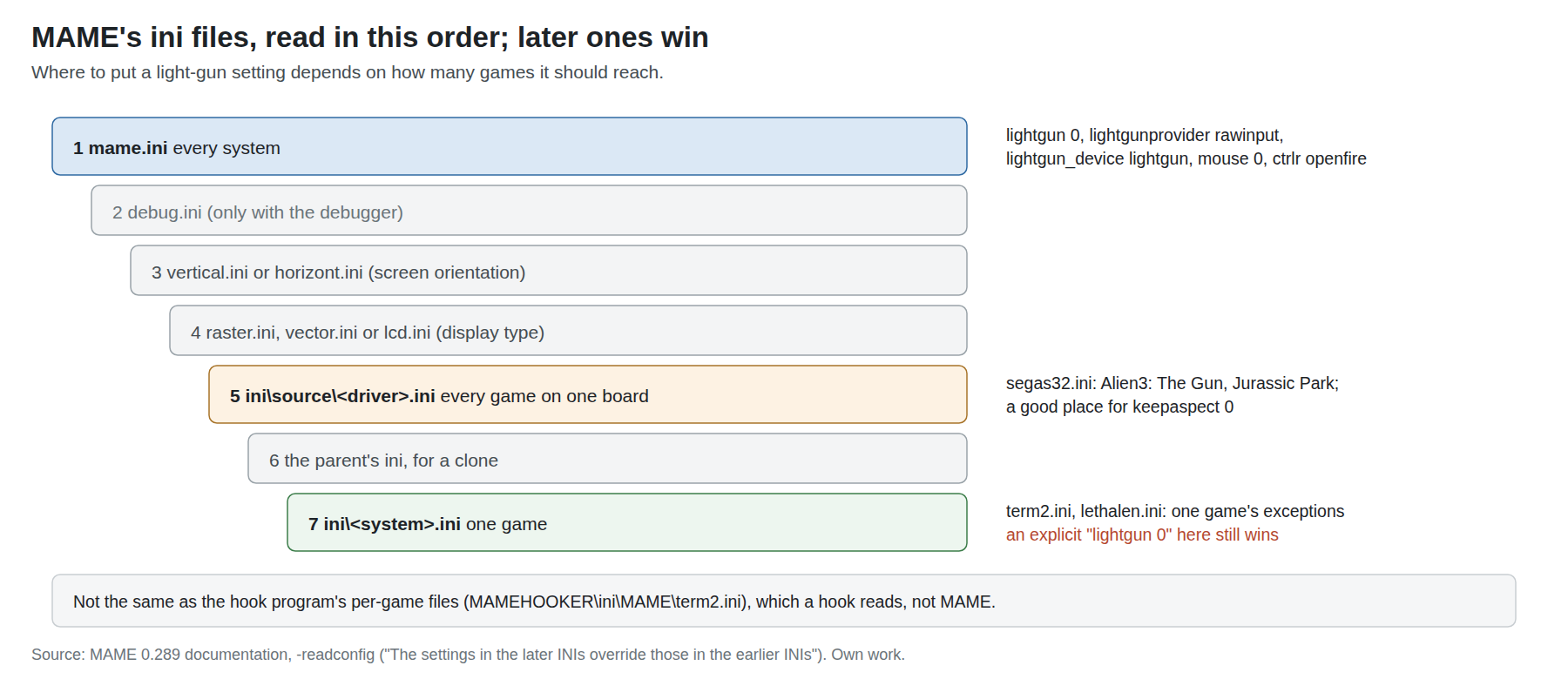
MAME reads, in order: mame.ini; debug.ini if the debugger is on; vertical.ini or horizont.ini; raster.ini, vector.ini or lcd.ini; the source-file ini (ini\source\<driver>.ini); the parent’s ini for a clone; and finally ini\<system>.ini. “The settings in the later INIs override those in the earlier INIs.”
For guns this gives three useful levels:
mame.inifor the four settings in 2.2 and the controller file.ini\source\<driver>.inifor everything on one board. Every Sega System 32 gun game (Alien3: The Gun, Jurassic Park) sharessegas32.cpp, soini\source\segas32.iniis one file for all of them. A good place forkeepaspect 0.ini\<system>.inifor one game, named after its short name (term2.ini,lethalen.ini).
The hook programs’ per-game files (MAMEHOOKER\ini\MAME\term2.ini) are a different thing in a different folder, read by the hook rather than by MAME (2.10).
2.8 Reloading off the screen
Many arcade gun games reload when the trigger is pulled with the gun pointed off the screen. An absolute-mouse gun cannot point off the screen in the game’s eyes: when the camera’s aim leaves the screen, the OpenFIRE firmware pins the cursor at the nearest edge (Open-Source Firmware, Volume 2). Three ways round it, in order of preference:
1. MAME’s Off-Screen Reload Helper plugin. It lets “a key or button combination … simulate aiming the lightgun away from the screen and pulling the trigger”. It works with games that “recognise the simple condition of pulling the lightgun trigger while one of the lightgun axes reports its minimum value”, naming Lethal Enforcers and Virtua Cop; for games with more complex conditions, such as Invasion: The Abductors, the documentation points to the Input Macro plugin instead. Enable plugins (Tab, Plugin Options), choose Off-Screen Reload Helper, Add reload helper, set the reload combination (Gun 1’s Button 4, the gun’s reload button C), the axis input (Lightgun Y) and the trigger input (P1 Button 1). It is saved per system as JSON in offscreenreload\<system>.cfg.
2. The pinned edge, for free, in some games. Because the plugin’s condition is “axis at its minimum”, and the firmware pins the cursor at the top or left edge when the gun leaves the screen on that side, aiming off the top or left of the screen and pulling the trigger may already reload in those games. Aiming off the bottom or right pins at the maximum, which they do not treat as off-screen. This is inferred from the two documented behaviours and is worth one test per game; it is not a substitute for the plugin.
3. OpenFIRE’s Offscreen Button Mode (M1x2, set by a hook’s start command) makes an off-screen trigger pull send Button A’s assignment instead (Open-Source Firmware, Volume 6, section 6.3). That helps games whose reload is a button (a pump or a side button on the original gun), not games that test the axis.
2.9 The crosshair
MAME draws a crosshair for each light-gun player. Its Crosshair Options menu (Tab, Crosshair Options) offers per-player Visibility “Never”, “Always” or “When moved”, and an Auto-Hide Delay. “When moved” is the default; the source (crsshair.cpp) comments that “every increment in auto_time is about .2s at 60Hz”, and the default of 15 works out at about 3 seconds after the gun stops moving. Custom bitmaps come from the crosshairpath folder.
For a calibrated infrared gun, Never is the arcade experience and hides the lag the crosshair otherwise makes visible: it trails the aim by the whole input-to-display latency (Volume 6). Leave it on while calibrating and checking a new game, then turn it off. Per-system choices are saved in that system’s .cfg.
2.10 Outputs: what MAME publishes, and the names a hook must match
MAME publishes lamp and recoil states as named outputs that a hook program turns into serial commands for the gun. The output setting chooses how:
Table 2 — MAME publishes lamp and recoil states as named outputs that a hook program turns into serial commands for the gun. The output setting chooses how
output | What happens | Use with |
|---|---|---|
windows | Windows messages to a listening program | MAMEHooker (OpenFIRE wiki: set output windows in mame.ini) |
network | Plain text on TCP port 8000 (“network port is fixed at 8000”) | QMamehook, Hook Of The Reaper, any telnet client |
console | Printed to the console | Testing |
none / auto | Off / the platform default |
MAME’s own documentation lists auto, none, console and network; windows is not in that list but is in the source (src/osd/modules/output/win32_output.cpp registers a provider named “windows”), and it is what MAMEHooker needs. network works on every platform and needs no administrator rights on the hook side, which is why QMamehook uses it (Volume 5).
The output names are whatever each driver calls them, and a hook’s ini line only fires if its key matches exactly. The OpenFIRE wiki’s ini anatomy uses generic keys such as P1_GunRecoil and P1_CtmRecoil, which are DemulShooter’s convention; MAME drivers name theirs individually. From MAME’s source:
Table 3 — The output names are whatever each driver calls them, and a hook's ini line only fires if its key matches exactly. The OpenFIRE wiki's ini anatomy uses generic keys such as P1GunRecoil and P1CtmRecoil, which are DemulShooter's convention; MAME drivers name theirs individually. From MAME's source
| Driver (source file) | Games | Recoil output names |
|---|---|---|
Williams Y-unit (midyunit.h) | Terminator 2: Judgment Day (term2) | Left_Gun_Recoil, Right_Gun_Recoil (plus gun LED outputs) |
Sega System 32 (segas32.cpp) | Alien3: The Gun, Jurassic Park | Player1_Gun_Recoil, Player2_Gun_Recoil |
Midway X-unit (midxunit.cpp) | Revolution X | Player1_Gun_Recoil to Player3_Gun_Recoil, Player1_Gun_LED… |
SNK (bbusters.cpp) | Beast Busters | Player1_Gun_Recoil to Player3_Gun_Recoil |
Namco System 12 (namcos12.cpp) | Point Blank 2, Ghoul Panic, Tenkomori Shooting | Player1_Gun_Recoil, Player2_Gun_Recoil |
Namco System 11 (namcos11.cpp) | Point Blank 2 variants and Gunbarl on System 11 | recoil0, recoil1 |
Taito (undrfire.h) | Under Fire | P1_gun_recoil, P2_gun_recoil |
Taito (opwolf.cpp) | Operation Wolf (a mounted gun) | Player1_Recoil_Piston |
So a term2.ini for the gun needs Left_Gun_Recoil=cmw 1 F0x%s% (and Right_Gun_Recoil=cmw 2 F0x%s%), not P1_GunRecoil. The practical way to get the names right is the one the OpenFIRE wiki gives: both MAMEHooker and QMamehook write the available output names into a game’s ini the first time it runs, and the commands are filled in after. The command language itself is in Open-Source Firmware, Volume 6, section 6.8.
Recoil outputs that turn on and stay on while the trigger is held (machine-gun cabinets) meet the firmware’s 2,000 ms serial solenoid limit (Open-Source Firmware, Volume 6, section 6.8); for those games, a line such as Left_Gun_Recoil=cmw 1 F0x0|cmw 1 F0x2x1 (left of the bar for “off”, right for “on”), which fires one pulse at the gun’s own timing each time the output turns on, is the safer mapping than F0x%s%. Whether the chosen solenoid survives repeated long holds is Solenoid Recoil’s question.
2.11 Game notes
Notes for MAME games that matter most for a recoil gun. Each one’s driver and output names are from the source table above; nothing here was played with the built gun yet.
Table 4 — 2.11 Game notes
| Game (short name) | Players | Recoil output | Off-screen reload | Notes |
|---|---|---|---|---|
Terminator 2 (term2) | 2 | Left_/Right_Gun_Recoil | Not checked | Machine-gun cabinet: hold-type recoil, see 2.10 |
Alien3: The Gun (alien3) | 2 | Player1_/Player2_Gun_Recoil | Not checked | ini\source\segas32.ini covers it and Jurassic Park |
Revolution X (revx) | 3 | Player1–3_Gun_Recoil | Not checked | Three guns: a third preset (P3) and GUNCODE_3 |
Point Blank 2 (ptblank2) | 2 | Player1_/Player2_Gun_Recoil | Not checked | A shooting-gallery game; single-shot recoil suits it |
Lethal Enforcers (lethalen) | 2 | none found in the driver | Required: the plugin (2.8) | Named in the plugin’s own documentation |
| Virtua Cop | 2 | — | Named in the plugin’s documentation | Sega Model 2: the Model 2 emulator with DemulShooter is the Windows route this dive covers (Volume 4) |
2.12 Why this, and why not the others
The criteria: two guns, stable player assignment, no extra program for input, and a route for recoil.
Table 5 — 2.12 Why this, and why not the others
| Option | Verdict | Why |
|---|---|---|
rawinput provider, lightgun_device lightgun, mapdevice in a controller file | Chosen | Per-gun input from the source’s own Raw Input module; guns enabled automatically only in gun games; P1/P2 pinned by product ID |
win32 provider | Rejected | One shared cursor, one gun (2.3) |
Gun in gamepad mode, lightgun_device joystick | Fallback only | Works, and two pads are two players, but the aim arrives as a stick and needs per-game analog sensitivity settings; no reason to accept that where Raw Input works |
mouse 1 with multimouse 1 | Rejected | The documentation warns against mouse and light-gun input together; games with light-gun inputs want light-gun devices |
| MAME’s RetroArch core instead of standalone MAME | Not for gun games | It inherits RetroArch’s port model (Volume 3) and lags standalone MAME’s version; standalone MAME is where the light-gun features above are documented |
2.13 What could not be verified
- The pillarbox drift with
rawinputandkeepaspect 1(2.3) is inferred from the source, not observed. - Whether pointing off the top or left edge reloads in Lethal Enforcers without the plugin (2.8) is an inference to test.
- Whether Lethal Enforcers’ driver publishes any recoil output: none was found by searching the source for “recoil”, which does not prove there is none under another name.
- How each game in 2.11 reloads, other than the two the plugin documentation names; marked “Not checked”.
Sources
- MAMEdev, MAME Documentation 0.289:
commandline/commandline-all(lightgun,lightgunprovider,lightgun_device,mouse,multimouse,output,lowlatency,crosshairpath,readconfig),advanced/devicemap(“Stable Controller IDs”),plugins/offscreenreload,usingmame/defaultkeys, https://docs.mamedev.org/ and https://github.com/mamedev/mame/tree/master/docs/source — read 2026-10-20. - MAMEdev, MAME source (master after 0.289):
src/osd/modules/input/input_rawinput.cpp,input_win32.cpp,src/osd/windows/winopts.cpp(dual_lightgun),src/osd/modules/output/win32_output.cpp,src/osd/modules/lib/osdobj_common.cpp,src/emu/emuopts.cpp,src/emu/crsshair.cpp/.h,src/frontend/mame/ui/miscmenu.cpp, and the driverswilliams/midyunit.h,sega/segas32.cpp,williams/midxunit.cpp,snk/bbusters.cpp,namco/namcos12.cpp,namco/namcos11.cpp,taito/undrfire.h,taito/opwolf.cpp— read 2026-10-20. - TeamOpenFIRE, MAMEHOOKER Documentation, https://github.com/TeamOpenFIRE/OpenFIRE-Firmware/wiki/MAMEHOOKER-Documentation — read 2026-10-20.
- MAMEdev, release
mame0289, 30 July 2026, GitHub releases — read 2026-10-20.
Comments (0)