Linux and Retro Distros · Volume 3
Batocera — How It Finds an OpenFIRE Gun, What It Remaps, and Which Systems Take a Gun
The udev rule that recognises the gun by its preset name and nothing else, the evsieve merge that turns three devices into one, the global button codes, per-launch configuration, pre-calibrated games, pedals, and what Batocera does not do for recoil
3.1 What Batocera is, for this purpose
Batocera is a Linux distribution built for nothing but emulation. It is built with Buildroot, boots straight into the EmulationStation front end, runs on x86-64 PCs, the Steam Deck, the Raspberry Pi and a long list of ARM boards, and launches every emulator through its own Python launcher, which writes the emulator’s configuration afresh for each game. That last point is why it is the strongest Linux platform for light guns: it can detect the guns that are plugged in at the moment of launch and configure the emulator for them, every time.
Versions, from Batocera’s changelog: v42 “Papilio Ulysses” (12 October 2025), v43 “Glasswing” (8 May 2026), v43.1 (30 May 2026); v44 “Malachite” was in development when this was written. Everything here is read from the master branch of batocera-linux/batocera.linux on 20 October 2026, so it describes v43 and what is coming in v44; where a feature arrived in a known version, the version is given.
OpenFIRE support arrived in v42. The changelog for that release lists, under “New light guns support”: RS3 Reaper, XGunner, OpenFIRE, Fusion P.I.G.S and OneHit. The package’s history is older: the first commit, “add initial support for OpenFIRE”, is from 8 November 2024; “update openFIRE to support multi-guns” from 28 March 2025; and “add P2-4 start and select buttons” from 8 August 2025. Batocera’s wiki lists the OpenFIRE gun with “Full support starting v42” and leaves its precision, minimum distance and price as question marks — no one has rated it there yet.
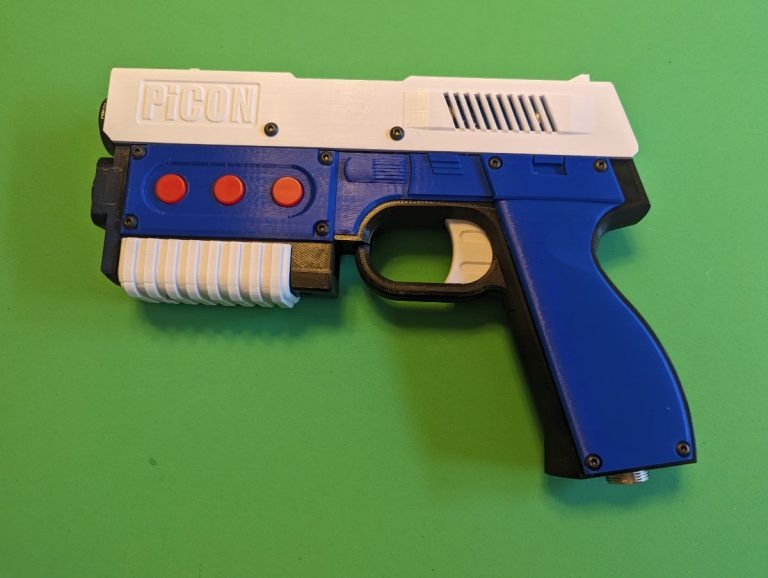
3.2 How an OpenFIRE gun is recognised
Batocera’s guns are declared to udev, one package per make, under package/batocera/controllers/guns/ (AE Lightgun, AimTrak, Blamcon, Dolphinbar, Fusion, GUN4IR, GunCon 2 and 3, OneHit, OpenFIRE, Retro Shooter, SAMCO, Sinden, the Steam Deck’s own trackpad, XGunner). The OpenFIRE file, 99-openfire-guns.rules, is short enough to read whole, and three of its lines decide everything:
# Three events at all time:
# Keyboard, Mouse and Gamepad. Merge only Keyboard and Mouse.
SUBSYSTEM=="input", ACTION=="add", ATTRS{name}=="OpenFIRE FIRECon P1 *", ENV{ID_INPUT_KEYBOARD}="0",
    ENV{ID_INPUT_KEY}="0", ENV{ID_INPUT_MOUSE}="0", RUN+="/usr/bin/virtual-openfire-add 1"
   (the same for P2, P3, P4)

# Gamepad event must be disabled, this mode is unsupported for now
SUBSYSTEM=="input", ACTION=="add", ATTRS{name}=="OpenFIRE FIRECon P[1-4]", ENV{ID_INPUT_MOUSE}="0", ENV{ID_INPUT_JOYSTICK}="0"

# Virtual Light Gun
SUBSYSTEM=="input", ACTION=="add", ATTRS{name}=="OpenFIRE light gun P[1-4]", MODE="0666",
    ENV{ID_INPUT_JOYSTICK}="0", ENV{ID_INPUT_KEYBOARD}="0", ENV{ID_INPUT_KEY}="0",
    ENV{ID_INPUT_MOUSE}="1", ENV{ID_INPUT_GUN}="1"
(Lines wrapped here for width.) Read against the kernel’s naming rule from Volume 1, section 1.2, the consequences are exact:
- The match is on the input device’s name, and only the four preset names match.
OpenFIRE FIRECon P1 *catchesOpenFIRE FIRECon P1 KeyboardandOpenFIRE FIRECon P1 Mouse;OpenFIRE FIRECon P[1-4]with no wildcard catches the gamepad, which the kernel names without a suffix. A gun given a custom product name in the OpenFIRE App — “Michael’s MP7”, say — produces names none of these rules match. It is then an ordinary keyboard, mouse and gamepad to Batocera: noID_INPUT_GUN, so Batocera does not treat it as a gun at all. The gun must use one of the App’s Simple USB Identifier Presets, P1 to P4, to work on Batocera. - The vendor ID is not checked. Nothing in the rule mentions 0xF143. A gun with a different vendor ID but the same manufacturer and product strings would be recognised. (MiSTer, the OpenFIRE App and QMamehook do check it; Open-Source Firmware, Volume 6.)
- The gamepad is switched off. “Gamepad event must be disabled, this mode is unsupported for now.” The gamepad node is stripped of its joystick and mouse tags, so nothing in Batocera reads it. Gamepad mode (
M0x1) and anything mapped only to the gamepad do nothing on Batocera. - The real keyboard and mouse nodes are hidden too (their keyboard, key and mouse tags set to 0), and the udev rule runs
virtual-openfire-addwith the player number taken from the preset. That script builds the gun Batocera actually uses.
3.3 Three devices become one: the merge
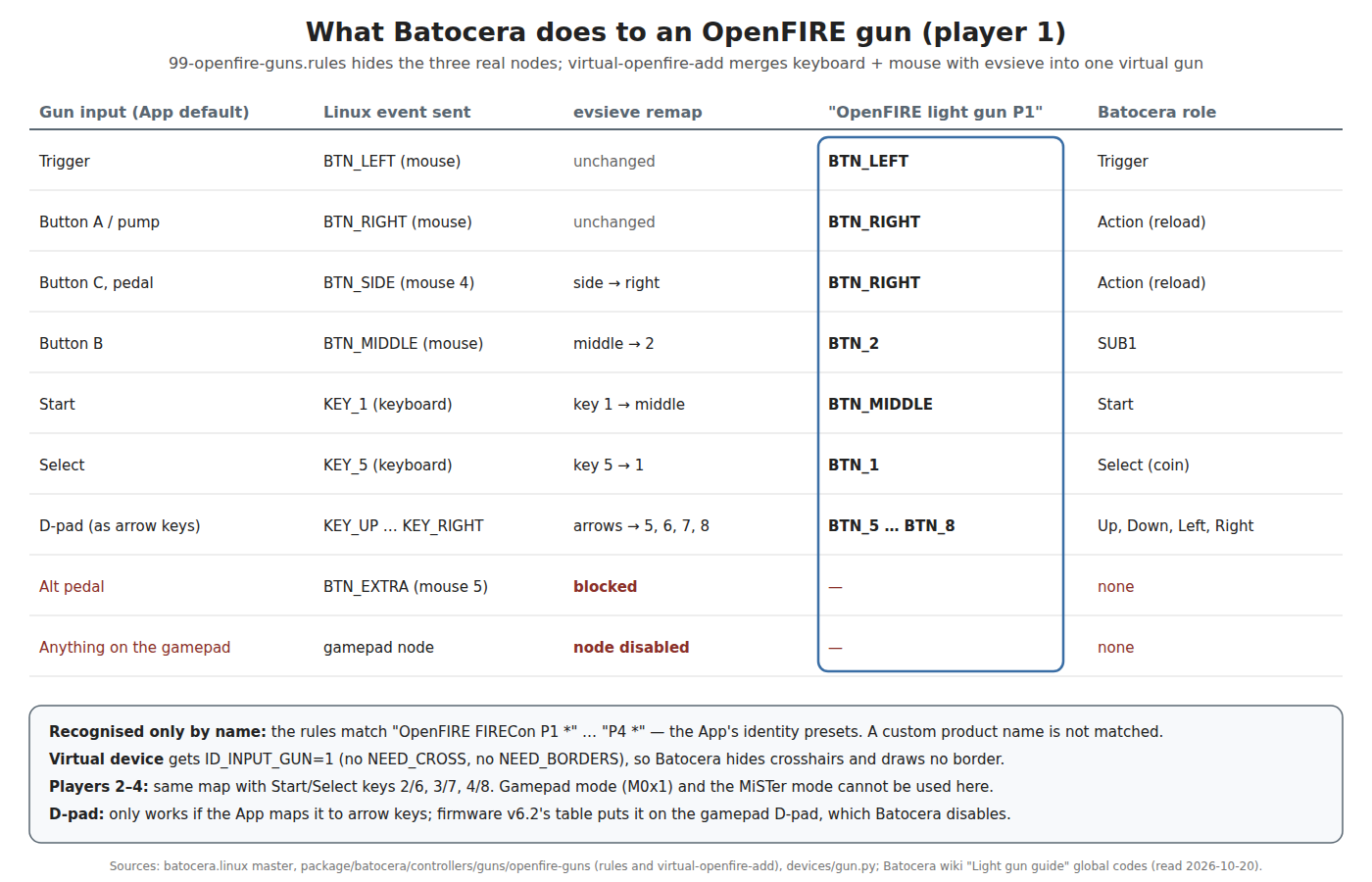
virtual-openfire-add uses evsieve, a small tool for reading, remapping and re-emitting input events, to read the gun’s keyboard and mouse nodes together (it deliberately drops the gamepad node, “it duplicates events”) and publish one new device, OpenFIRE light gun P<n>. The third rule above then marks that virtual device as a mouse and a gun (ID_INPUT_GUN=1), readable by every process (MODE="0666"). The remapping for player 1, from the script:
--map yield btn:middle  btn:2
--map yield btn:side    btn:right
--map yield key:1       btn:middle
--map yield key:5       btn:1
--map yield key:up      btn:5     (down 6, left 7, right 8)
--block btn:extra
--output name="OpenFIRE light gun P1"
The point of the remap is Batocera’s global light-gun codes. Every supported gun, whatever its make, is reduced to the same set of button codes, and each emulator’s launcher maps those codes to that emulator’s controls. From Batocera’s wiki: Trigger BTN_LEFT, Action BTN_RIGHT, Start BTN_MIDDLE, Select BTN_1, SUB1 to SUB3 BTN_2 to BTN_4, and the D-pad BTN_5 to BTN_8. The OpenFIRE script’s comment says its table is “Based on the enclosed instruction book from official Github”, and the result for an OpenFIRE gun with the App’s default button map is:
Table 1 — The point of the remap is Batocera's global light-gun codes. Every supported gun, whatever its make, is reduced to the same set of button codes, and each emulator's launcher maps those codes to that emulator's controls. From Batocera's wiki: Trigger BTNLEFT, Action BTNRIGHT, Start BTNMIDDLE, Select BTN1, SUB1 to SUB3 BTN2 to BTN4, and the D-pad BTN5 to BTN8. The OpenFIRE script's comment says its table is "Based on the enclosed instruction book from official Github", and the result for an OpenFIRE gun with the App's default button map is
| On the gun | Becomes | Batocera role |
|---|---|---|
| Trigger | BTN_LEFT | Trigger |
| Button A (and pump action) | BTN_RIGHT | Action — reload or secondary, by emulator |
| Button C and the pedal (both mouse 4) | BTN_RIGHT | Action — the same as Button A |
| Button B | BTN_2 | SUB1 |
| Start (key 1) | BTN_MIDDLE | Start |
| Select (key 5) | BTN_1 | Select (coin) |
| D-pad, if it sends arrow keys | BTN_5–BTN_8 | D-pad |
| Alternate pedal (mouse 5) | blocked | — |
Three practical consequences:
- The D-pad must be on arrow keys. The script only remaps arrow keys. Open-Source Firmware, Volume 6, section 6.3 found that the v6.2 firmware’s default table puts the D-pad on the gamepad’s D-pad, while the instruction book and the App’s v6.0 screenshot show arrow keys. If the gun sends gamepad D-pad events, they arrive on the node Batocera has disabled, and the D-pad does nothing. Map the D-pad to arrow keys in the App before using the gun on Batocera.
- The pedal is a reload, not a separate input. Button C and the pedal both send mouse 4, which becomes
BTN_RIGHT. Games that use the pedal for something other than reload (the Time Crisis cover pedal is the obvious case) need it on Batocera’s per-player pedal key instead (3.7). - Start and Select come from the player’s own keys. Player 2’s script maps keys 2 and 6, player 3’s 3 and 7, player 4’s 4 and 8 — which is exactly what the App’s P2–P4 presets send.
3.4 What happens at every game launch
Batocera’s launcher finds guns afresh for every game (batocera_launch/devices/gun.py). It lists every input device udev tags as a mouse, in event-number order, and keeps those tagged ID_INPUT_GUN=1. For each it records the device node, its mouse index (“retroarch uses mouse indexes into configuration files using ID_INPUT_MOUSE”), which of the global button codes it has, and two flags the Sinden package sets and the OpenFIRE package does not: ID_INPUT_GUN_NEED_CROSS (draw a crosshair) and ID_INPUT_GUN_NEED_BORDERS (draw the white border a camera gun needs). The OpenFIRE gun sets neither, so Batocera hides crosshairs and draws no border for it.
Then each emulator’s launcher uses that list:
- RetroArch:
input_driveris forced toudev(“udev required for guns”); for each player with a gun,input_player<n>_mouse_indexis set to that gun’s index, and the light-gun binds are written: trigger, off-screen shot, start, select, Aux A–C and the D-pad, as mouse buttons 1 to 11 of the virtual gun. The core’s port is switched to its light-gun device type, per system, from Batocera’s gun-mapping table, with per-game overrides from its game database. This is why the mouse-index problem in Volume 2, section 2.2 does not arise on Batocera. - MAME standalone: launched with
-lightgunprovider udev -lightgun_device lightgun -adstick_device lightgun— theudevprovider being Batocera’s own patch to MAME — and with each player’s controls givenGUNCODE_<n>_...sequences. - Flycast, DuckStation, PCSX2, Dolphin, RPCS3 and others: each through its launcher and, where upstream cannot read more than one gun on Linux, Batocera’s patch to the emulator (Volume 1, section 1.4).
The wiki recommends, though does not require, one ordinary controller per gun: “Each controller corresponds to each light gun in player order”, useful for the buttons a gun lacks.
3.5 Systems, emulators and the “Light gun” genre
Batocera’s wiki keeps a table of which emulator takes a gun on which system, the release that added it, whether a crosshair can be shown and whether more than one gun works. It is the best public record of light-gun support on Linux, and Volume 7 reproduces it with the board limits from Volume 4. In outline: arcade (MAME standalone, the MAME and MAME 2003 cores, FBNeo), Atomiswave and NAOMI, Dreamcast, Model 2, Model 3, Sega Lindbergh, Namco System 246/256, NES, Master System, Mega Drive, Mega-CD, SNES, Saturn, 3DO, PlayStation, PlayStation 2, PlayStation 3, Wii, Atari 2600, Commodore 64 and Amstrad CPC all have at least one emulator that takes a gun, and multi-gun works on most of the arcade and the newer console emulators. Not every default core is the gun-capable one: the table notes support “must be switched manually for systems using a default core not compatible with light guns”.
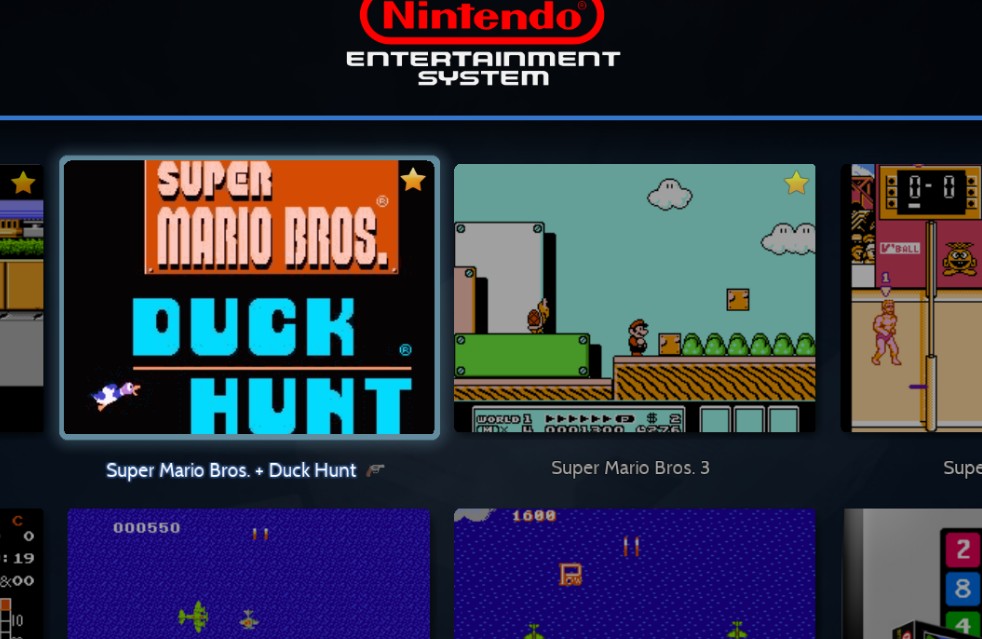
Games are marked as gun games in Batocera’s game database (resources/gamesdb.xml in batocera-emulationstation, last changed 11 October 2026), which carries a <gun/> element on 791 game entries — 528 under arcade, then Wii 40, NES 29, PlayStation 25, Amstrad CPC 22, Commodore 64 20, PS3 19, PS2 14, Master System, Saturn and SNES 13 each, and fewer elsewhere. (Entries are game IDs and include variants, so the count is not a count of distinct titles.) Some entries carry settings: a Justifier instead of a GunCon for Konami’s PlayStation games, the gun’s port, or Wii pointer geometry. “Games which are light gun compatible will belong to the light gun genre in EmulationStation”, and a “lightgun” collection can be shown as if it were a system.
3.6 Calibration and pre-calibrated games
Two different calibrations are involved, and it helps to keep them apart.
The gun’s own calibration maps the camera’s view of the emitters to the screen. For an OpenFIRE gun it is done on the gun (or in the App) and stored in the gun’s flash (Open-Source Firmware, Volume 5); Batocera does nothing for it. The wiki’s general rule applies: “One global calibration is required and is saved within the light gun itself.” It should be done on the television Batocera will drive, at the distance the player will stand.
The game’s own calibration is the arcade service-menu routine many gun games expect, which writes to the game’s emulated NVRAM. Batocera ships pre-made calibration saves and installs them on a game’s first launch: “From Batocera v36 and onwards, tested games will be pre-calibrated on first launch (existing calibration will not be overwritten).” The lightguns-games-precalibrations repository (pinned in Batocera at a 7 October 2026 commit) holds saves for 102 MAME files plus MAME 2003-Plus NVRAMs, 17 for Namco System 246/256, 12 Atomiswave, 11 NAOMI, 10 Model 2, 7 Chihiro and 5 Model 3. For a game not on the list, calibrate in its service menu once; the wiki’s per-game list notes the ones that need it (“Calibrate gun in service menu first” for Time Crisis 3; “Calibration required for older ROMset” for Line of Fire and CarnEvil).
3.7 Pedals, the exit combination and crosshairs
- Pedals (since v40): a USB foot pedal is mapped to a keyboard key per player — C, V, B and N for players 1 to 4 — changeable with
controllers.pedals1=cand so on inbatocera.conf. Pedal support by emulator, from the wiki: DuckStation, the libretro cores, MAME standalone and PCSX2 yes; Dolphin, Flycast, Hypseus Singe, model2emu, Play!, Supermodel and RPCS3 no. An OpenFIRE gun’s own pedal input is not this: it arrives as mouse 4 and becomes the gun’s Action button (3.3). To use the gun’s pedal as a true pedal on Batocera, it would have to send the player’s pedal key, which the OpenFIRE App’s button mapping can do (any input can send any key). - Leaving a game with only a gun (since v41): “hold TRIGGER, ACTION and START buttons for 2 seconds”.
- Crosshairs are turned off automatically for guns, as the wiki says (“The crosshair option will also be automatically disabled for the light guns”), unless the gun’s package asks for them; there is also a SHOW LIGHTGUN CROSSHAIRS option per system. An OpenFIRE gun, aimed by line of sight, should not need one.
- Off-screen reload in MAME: the ADVANCED SYSTEM SETTINGS → OFF-SCREEN RELOAD option loads MAME’s
offscreenreloadplugin, which Batocera patches to bind each player’s second gun button as the reload (Volume 2, section 2.6).
3.8 Recoil on Batocera
Batocera does nothing for game-driven recoil on an OpenFIRE gun. A search of the whole batocera.linux tree on 20 October 2026 found no QMamehook, no MAMEHooker, and no launcher that sets MAME’s output network; Batocera’s MAME launcher passes no -output option at all. What “recoil” there is in Batocera belongs to guns whose recoil is driven by their own software: the Sinden driver’s recoil settings (with a “No recoil” option) and the Retro Shooter’s on-gun recoil button. Batocera does package LEDSpicer 0.7.6, a Linux output program for cabinet lighting, but the drivers it is built with (Ultimarc’s PacDrive, PacLED64, NanoLed and Ultimate I/O, LedWiz, Howler and Adalight) are LED controllers, not the gun serial dialect.
So on Batocera, as shipped, the OpenFIRE gun’s recoil is the firmware’s own: the solenoid fires on a trigger pull while the gun points at the screen, with the timings set in the App (Open-Source Firmware, Volume 5). That is the right behaviour for a pistol and wrong for a machine gun or a game that only kicks when the gun has ammunition. Adding game-driven recoil means running a hook program alongside the emulator, which Volume 6 covers; on Batocera that is an unsupported modification (a QMamehook binary started from Batocera’s game-start scripts in /userdata/system/scripts/), and Batocera’s Qt 6 stack as configured in its build does not select the Qt serial-port module QMamehook needs. It has not been tried for this dive.
3.9 What this means for the project’s firmware
The project is changing OpenFIRE in a private fork (decision D10) and will need its own USB vendor ID before any kit is sold (D24). Batocera’s rules bear on both, and the conclusion should go to Our Firmware and Licensing, IP and Kits:
Table 2 — The project is changing OpenFIRE in a private fork (decision D10) and will need its own USB vendor ID before any kit is sold (D24). Batocera's rules bear on both, and the conclusion should go to [Our Firmware](/light-guns/building-the-electronics/our-firmware/) and [Licensing, IP and Kits](/light-guns/law-and-licensing/licensing-ip-and-kits/)
| Fork change | Effect on Batocera | Keep working by |
|---|---|---|
| New USB vendor ID (D24) | None — the rule does not check the VID | — (MiSTer, App and QMamehook do check it) |
| Manufacturer string changed from “OpenFIRE” | Gun not recognised | Keep “OpenFIRE” |
| Product name other than “FIRECon P1”–“P4” | Gun not recognised | Keep the presets, or upstream a rule to Batocera |
| D-pad left on the gamepad | D-pad dead | Default the D-pad to arrow keys |
| Gamepad-only features | Unavailable | Keep everything reachable in mouse-and-keyboard mode |
Asking Batocera to match on the vendor ID and the “OpenFIRE ” prefix (as MiSTer does) rather than on four exact names would remove the second and third rows; it is a small change to one rules file, and the kind of contribution the Batocera project takes through its GitHub issues.
3.10 Why this, and why not the others
The question: which Linux platform should the project’s gun be tested on first?
Table 3 — 3.10 Why this, and why not the others
| Option | Verdict | Why |
|---|---|---|
| Batocera on an x86-64 PC | First | Recognises an OpenFIRE gun with no set-up (presets P1–P4); configures every emulator for each launch; multi-gun in MAME, Flycast, DuckStation, PCSX2, Dolphin; the widest system list (Volume 7) |
| Batocera on a Raspberry Pi 5 | Second | Same software, fewer emulators (no PCSX2, no RPCS3, no Namco 246); Volume 4 |
| RetroPie or plain RetroArch | Third | Works through RetroArch’s udev driver, but every bind and index is set by hand (Volume 2) |
| Desktop Linux with standalone emulators | For development only | Upstream Flycast, DuckStation and PCSX2 get one gun on Linux (Volume 1, section 1.4) |
The question: what should the gun’s identity be on Batocera?
Table 4 — 3.10 Why this, and why not the others
| Option | Verdict | Why |
|---|---|---|
| Presets P1–P4 | Use | The only names Batocera matches |
| Custom product name | Reject on Batocera | Not recognised |
| Gamepad mode | Reject on Batocera | The node is disabled |
3.11 What could not be verified
- Batocera’s OpenFIRE support has not been tried with the project’s gun; everything above is read from Batocera’s source and wiki.
- How the v6.2 firmware’s D-pad actually reports (gamepad D-pad or arrow keys) with factory defaults — the firmware table and the instruction book disagree (Open-Source Firmware, Volume 6, section 6.3). A one-minute
evtestsettles it. - Whether QMamehook can be built or run on Batocera.
- The wiki’s per-gun precision ratings exist for other guns but not for OpenFIRE.
Sources
- Batocera,
package/batocera/controllers/guns/openfire-guns/(99-openfire-guns.rules,virtual-openfire-add,Config.in,openfire-guns.mk) and its commit history, batocera-linux/batocera.linux master — read 2026-10-20. - Batocera,
batocera-Changelog.md(v35–v44 light-gun entries) — read 2026-10-20. - Batocera,
python-src/batocera-launch/batocera_launch/devices/gun.py;python-src/batocera-launch-libretro/batocera_launch_libretro/emulator.py;python-src/batocera-launch-mame/batocera_launch_mame/emulator.pyandcontrollers.py— read 2026-10-20. - Batocera wiki, Light gun guide, wiki.batocera.org/emulators:lightgun_games (raw export) — read 2026-10-20.
- Batocera wiki, Tested games with light gun support, wiki.batocera.org/emulators:light_gun_game_spreadsheet; Launch a script, wiki.batocera.org/launch_a_script — read 2026-10-20.
- batocera-linux/batocera-emulationstation,
resources/gamesdb.xml(last commit 2026-10-11) — read 2026-10-20. - batocera-linux/lightguns-games-precalibrations (commit 8538cdad, pinned 2026-10-07) — read 2026-10-20.
- Batocera,
package/batocera/emulators/mame/005-lightgun-udev-driver.patch(N. Adenis-Lamarre, 2023-04-27) and009-offscreenreload-autoconfig.patch;package/batocera/utils/ledspicer/ledspicer.mk— read 2026-10-20. - Batocera,
package/batocera/core/batocera-system/Config.in(BR2_PACKAGE_BATOCERA_QT6) — read 2026-10-20.
Comments (0)