Linux and Retro Distros · Volume 2
RetroArch and MAME on Linux — Input Drivers, Mouse Indexes, Light-Gun Binds and Latency
Which RetroArch input driver sees two guns and which sees one, how a player port finds its gun, the binds that must be set by hand, MAME's sdl, x11 and udev light-gun providers, and what run-ahead and frame delay can and cannot buy
2.1 Which input driver
RetroArch separates the input driver (keyboard, mouse, pointer and light gun) from the controller driver (gamepads). For a light gun only the input driver matters, and on Linux the choice decides whether two guns are possible at all. RetroArch’s own table, from its documentation (current master):
Table 1 — RetroArch separates the input driver (keyboard, mouse, pointer and light gun) from the controller driver (gamepads). For a light gun only the input driver matters, and on Linux the choice decides whether two guns are possible at all. RetroArch's own table, from its documentation (current master)
| Input driver | When it applies | Multiple mice | Light-gun device |
|---|---|---|---|
udev | ”No desktop environment (KMS) or X11” | Yes | Yes |
x | X11 desktop, OpenGL or Vulkan video | Yes, after RetroArch 1.20.0, built with XInput | Yes |
wayland | Wayland desktop | No | ”Yes, button map is fixed” |
sdl | SDL or SDL2 video driver | No | ”Yes, button map is fixed” |
linuxraw | KMS | ”No mouse support at all” | No |
Two details from the source sharpen the table. The wayland driver’s code says of the light gun: “All ports report the same lightgun: its buttons are the mouse’s”, and it answers Reload with the middle mouse button, not the right — so on a Wayland desktop with the wayland driver, an OpenFIRE gun’s Button A (right mouse) is not reload; Button B (middle) is. A comment beside it explains why there is only one: “The one system-wide mouse is every port’s; several would be several Wayland seats”. And the udev driver, although documented for KMS or X11, reads /dev/input/event* itself and needs no help from the display server at all, which is why it is the driver every light-gun distribution uses: Batocera’s launcher writes input_driver = udev with the comment “udev required for guns”, and RetroPie’s documentation names it the one Linux driver with multi-mouse support and the RetroPie default.
For this gun: use udev. The rest of this volume assumes it.
2.2 The udev driver and the mouse index
Set-up is two lines in retroarch.cfg plus permissions:
input_driver = "udev"
input_player1_mouse_index = "0"      # which mouse device player 1 reads
input_player2_mouse_index = "1"
The driver needs read access to the event nodes: the input group or the uaccess rule in Volume 1, section 1.8. Without it, RetroArch runs but sees no mice and no keyboards at all.
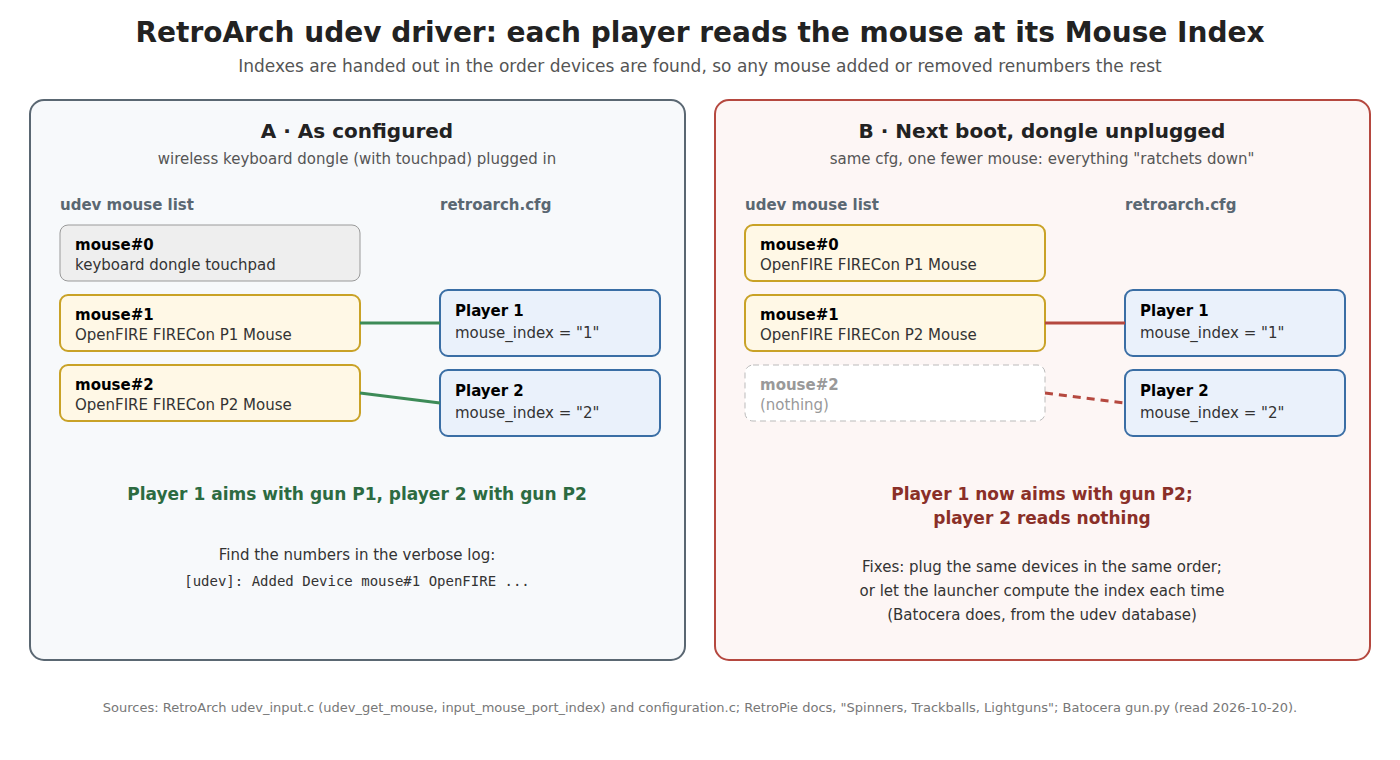
How a port finds its gun. The driver opens every input device udev tags as a mouse, touchpad or touch screen and numbers them in the order it adds them. Each player port then reads the device at its own index: udev_get_mouse() looks up input_mouse_port_index(port) in the driver’s list. The default index for player n is n − 1 (configuration.c). To find which index is which gun, RetroPie’s documentation gives the reliable method: launch with verbose logging and read the lines the driver prints,
[INFO] [udev]: Added Device mouse#0 ... (/dev/input/event9)
[INFO] [udev]: Added Device mouse#1 USB Laser Game Mouse (/dev/input/event14)
and look for the gun’s name (OpenFIRE FIRECon P1 Mouse). The catch, in RetroPie’s words: “The index of a specific device may change depending on what device you have attached to which port … if you boot the same system without the external mouse attached, everything might ratchet down.” A keyboard with a built-in touchpad, a wireless keyboard’s dongle, even a gamepad that exposes a mouse function, all take index numbers. Batocera avoids the problem by computing the index at every launch from the udev database and writing it into the config (Volume 3).
How the aim is scaled. For an absolute device the driver reads the axis range with EVIOCGABS(ABS_X) and EVIOCGABS(ABS_Y) when it adds the device, then scales the reported position onto the viewport: width × (x − x_min) / (x_max − x_min + 1). Because the range comes from the device, OpenFIRE’s 0–32767 needs no configuration. Off-screen is decided by RetroArch from the scaled position (input_driver_pointer_is_offscreen()), so a gun pinned at an edge of its range — which is how OpenFIRE signals off-screen — reads as off-screen to the core.
2.3 Light-gun binds
RetroArch’s light-gun buttons are separate binds, not the gamepad’s, and only two have defaults (config.def.keybinds.h):
Table 2 — RetroArch's light-gun buttons are separate binds, not the gamepad's, and only two have defaults (config.def.keybinds.h)
| RetroArch bind | Default | OpenFIRE input that sends it by default | Set |
|---|---|---|---|
| Trigger | left mouse button | Trigger | — |
| Reload (“Forced off-screen shot”) | right mouse button | Button A (and the pump action) | — |
| Aux A | unbound | Button B sends middle mouse | bind to mouse 3 |
| Aux B | unbound | Button C sends mouse 4 | bind to mouse 4 |
| Aux C | unbound | Alt pedal sends mouse 5 | bind to mouse 5, if fitted |
| Start | unbound | Start sends key 1 (P1) / 2 (P2) | bind to that key |
| Select | unbound | Select sends key 5 (P1) / 6 (P2) | bind to that key |
| D-pad | unbound | arrow keys or gamepad D-pad (firmware table differs by version) | bind if used |
The OpenFIRE defaults are from Open-Source Firmware, Volume 6, section 6.3. Start and Select arrive from the gun’s keyboard node as ordinary keys, so they are bound as keyboard keys in each player’s light-gun binds; the identity presets give each gun its own pair (1 and 5, 2 and 6, …) precisely so that player 2’s Start is not player 1’s. In retroarch.cfg the binds are input_player<n>_gun_trigger_mbtn, ..._gun_offscreen_shot_mbtn, ..._gun_aux_a_mbtn and so on, with _btn, _axis and plain keyboard variants.
A core only uses these binds when its port’s device type is a light gun (Zapper, Super Scope, GunCon and the like, section 2.5). With the device type left on a gamepad, the gun’s mouse buttons do nothing in the game.
2.4 Two guns on an X11 desktop: the x driver
On a desktop running X11 rather than Wayland, the x driver can also give one gun per player, by a route that sounds odd but is X’s own: create a second master pointer and move the second gun onto it. RetroArch’s documentation: “Use xinput create-master and xinput reattach commands to set up a second pointer and assign the physical device.” The driver tracks each master pointer’s position separately (x11_input.c keeps a position per master pointer, from XInput 2 events). The steps:
xinput list                                   # find "OpenFIRE FIRECon P2 Mouse" and its id
xinput create-master Gun2                     # adds "Gun2 pointer" and "Gun2 keyboard"
xinput reattach <id-of-P2-mouse> "Gun2 pointer"
The second gun then moves its own cursor on the desktop, and RetroArch maps master pointers to player ports. The arrangement does not survive a re-plug or log-out without a script, and nothing else on the desktop expects two cursors. It is the fallback for a desktop that must stay on X11; udev is simpler and does not depend on the session.
2.5 Cores
Which cores take a gun, and the core options that make them work, are the same on Linux and Windows and are set out in PC (Windows). The Linux-specific points:
- The core decides nothing about the platform. A core asks the frontend for
RETRO_DEVICE_LIGHTGUNpositions; the input driver answers. Everything in sections 2.1–2.4 applies to every core. - MAME (current) as a core has its own switch,
mame_lightgun_mode, with valuesnone,lightgunandtouchscreenand defaultnone(libretro_core_options.h). Left at the default, the core ignores the gun. A companion option sets where an off-screen gun is reported (free, top left, bottom right). - Flycast as a core has a known Linux gap for force feedback (Volume 6): its “Broadcast Digital Outputs” option does not send outputs on Linux (libretro/flycast issue #1189, open since January 2024).
- Batocera’s per-system table of which core takes a gun, with the version that added it, is the most complete public record for Linux and is reproduced in Volume 7.
2.6 MAME standalone on Linux
MAME’s light-gun input on Linux comes from one of its providers, chosen with -lightgunprovider. Its documentation lists, for Linux: auto (which on SDL builds means sdl), sdl, x11 and none.
Table 3 — 2.6 MAME standalone on Linux
| Provider | Guns | How | Use |
|---|---|---|---|
sdl (the default) | One | The system pointer | One player, any session |
x11 | Up to 8, by name | X’s input extension, per device; each slot is named with -lightgun_index1 … -lightgun_index8 | Two guns on an X11 desktop |
udev | Several | Reads the event nodes | Batocera only — added by Batocera’s patch, absent upstream |
The x11 provider maps a gun only if its slot is named. The code compares the configured name with the X device names after removing spaces, or takes a number as an X device ID, and warns “There are multiple devices named … please use the device ID instead” if two match. With presets P1 and P2:
# mame.ini (Linux, X11 session) — two OpenFIRE guns
lightgun                  1
lightgunprovider          x11
lightgun_index1           "OpenFIRE FIRECon P1 Mouse"
lightgun_index2           "OpenFIRE FIRECon P2 Mouse"
output                    network
xinput list shows the exact names. output network publishes the game’s recoil and lamp outputs on TCP port 8000 for QMamehook (Volume 6); MAME’s Linux builds include the network output module. MAME has no off-screen-reload command-line option; it has a Lua plugin, offscreenreload (“Off-screen reload helper plugin”, by Vas Crabb, off by default), enabled with -plugin offscreenreload and configured per game from the plugin’s menu. Batocera patches the plugin to configure itself — it binds each player’s GUNCODE_<n>_BUTTON2 as the off-screen reload — and turns it on from its OFF-SCREEN RELOAD option (Volume 3). The alternative is to let the gun do it, with OpenFIRE’s off-screen button mode (Open-Source Firmware, Volume 6, section 6.3). Crosshair options behave as on Windows (PC (Windows)). MAME’s documentation also warns that “most lightguns also produce mouse input, so enabling mouse and lightgun controllers simultaneously … may produce strange behaviour”, which applies here unchanged.
Under Wayland the x11 provider is not a supported route: it is an X11 input module and a Wayland desktop gives an X program only XWayland’s emulated devices. Whether XWayland exposes each physical gun as a separate XInput device was not tested for this dive; the safe statement is that MAME standalone gets two guns on Linux either in an X11 session or on Batocera.
2.7 Latency: what the settings do and what they cost
A light gun is less forgiving of lag than a gamepad, because the player sees the crosshair or the hit land behind where the gun points. The firmware side is already fast: OpenFIRE reads the camera and recomputes the aim point on a 209 Hz timer, under 5 ms per update (Open-Source Firmware, Volume 2), a fraction of one 16.7 ms frame. What remains is the emulator, the video path and the display.
RetroArch’s documentation states the ceiling: with its settings, “next-frame response time (≤16ms!)” is achievable, and, quoting a researcher, “At 60fps (16ms) this could be anywhere from 0ms to 16ms, which averages out to about 8ms”. The tools, and what each costs:
Table 4 — RetroArch's documentation states the ceiling: with its settings, "next-frame response time (≤16ms!)" is achievable, and, quoting a researcher, "At 60fps (16ms) this could be anywhere from 0ms to 16ms, which averages out to about 8ms". The tools, and what each costs
| Setting | What it does | Cost | Source |
|---|---|---|---|
Run-ahead (run_ahead_frames) | Runs the core ahead and rolls back, removing the game’s own internal frames of lag | ”Relies on save states”; “The higher the number of frames … the higher demands it places on your CPU” | libretro run-ahead guide |
| Second instance | Run-ahead with a second core instance; “works around some save states limitation” | More memory and CPU | same |
| Preemptive frames | A cheaper alternative to run-ahead offered in RetroArch’s latency menu | Core must support save states | RetroArch settings (preemptive_frames_enable) |
Frame delay (video_frame_delay, 0–15 ms) | Waits after vsync before running the core, so input is read later | ”Can reduce latency at cost of higher risk of stuttering” | retroarch.cfg |
| Max swapchain images | Two buffers instead of three | Three “generally increases input lag by one frame”; two risks stutter on slow hardware | RetroPie Input Lag page |
| KMS/DRM, no desktop | RetroArch drives the display directly | Some DRM contexts “allow for granular swapchain control” | libretro latency guide |
How many run-ahead frames a game needs is measured, not guessed: pause, hold an input, advance a frame at a time, and “the frames of lag are the amount of time you pushed “K” minus 1”. For a light-gun game the test input is the trigger: count frames until the shot registers (a muzzle flash, a hit). Setting more frames than the game’s lag produces visible rollback glitches.
On a Raspberry Pi the advice reverses. RetroPie’s documentation lists run-ahead and frame delay under “Unsupported Tweaks” because the Pi lacks the headroom: frame delay “can reduce input lag at the cost of CPU usage. Emulation on even a Raspberry Pi 3 has very little headroom”, and for run-ahead “A generally safe value to set (when the required CPU headroom is available) is 1 frames”. Volume 4 takes this up for the Pi 4 and Pi 5. And whatever the settings, the television’s game mode is usually worth more than any of them; RetroPie’s page puts it first.
2.8 Why this, and why not the others
The question: which RetroArch input driver for the OpenFIRE gun on Linux?
Table 5 — 2.8 Why this, and why not the others
| Option | Verdict | Why |
|---|---|---|
udev | Use it | One gun per player; works with or without a desktop; the absolute range is read from the device; the driver every light-gun distribution uses |
x with a second master pointer | Fallback on an X11 desktop | Works, but needs xinput set-up each session; X11 only |
wayland | One player only | No multi-mouse; light-gun buttons fixed, with Reload on the middle button |
sdl2 | One player only | No multi-mouse; light-gun buttons fixed |
linuxraw | Rejected | No mouse support |
The question: which MAME light-gun provider?
Table 6 — 2.8 Why this, and why not the others
| Option | Verdict | Why |
|---|---|---|
x11 with named slots | Upstream MAME, two guns | Per device, by name; needs an X11 session |
udev | Use on Batocera (automatic) | Not in upstream MAME |
sdl | One player only | The system pointer |
2.9 What could not be verified
- How RetroArch’s
udevdriver behaves inside a Wayland desktop session (the documentation lists KMS and X11; the code does not depend on the display server, but focus handling under Wayland was not tested). - Whether XWayland presents each physical gun as its own XInput device for MAME’s
x11provider. - The run-ahead frame counts for specific light-gun games: none is published by RetroArch or RetroPie; they are measured per game (2.7).
Sources
- libretro, Input and Controller Drivers, docs.libretro.com/guides/input-controller-drivers/ (libretro/docs) — read 2026-10-20.
- RetroArch master:
input/drivers/udev_input.c,input/drivers/x11_input.c,input/drivers/wayland_input.c,config.def.keybinds.h,configuration.c,retroarch.cfg— read 2026-10-20. Latest release v1.22.2 (2025-11-20). - libretro, RetroArch Run Ahead and Input latency guides, docs.libretro.com/guides/runahead/ and /guides/latency/ — read 2026-10-20.
- RetroPie, Spinners, Trackballs, Lightguns, and other Mouse Devices and Input Lag, RetroPie/RetroPie-Docs — read 2026-10-20.
- libretro/mame,
src/osd/libretro/libretro-internal/libretro_core_options.h(_lightgun_mode,_lightgun_offscreen_mode) — read 2026-10-20. - MAME,
plugins/offscreenreload/plugin.json,docs/source/commandline/commandline-all.rst,docs/source/commandline/sdlconfig.rst,src/osd/modules/input/input_x11.cpp,src/osd/modules/lib/osdobj_common.cpp, mamedev/mame master (docs 0.289) — read 2026-10-20. - Batocera,
python-src/batocera-launch-libretro/batocera_launch_libretro/emulator.py, batocera-linux/batocera.linux master — read 2026-10-20. - libretro/flycast issue #1189, “[Linux] Device Outputs aren’t being sent”, opened 2024-01-07, open on 2026-10-20.
Comments (0)