Linux and Retro Distros · Volume 1
How Linux Sees the Gun — Event Nodes, udev, Permissions and Stable Names
One OpenFIRE gun arrives on a Linux machine as three input devices and a serial port; which program reads which, who is allowed to, how two guns are told apart, and the bench checks that prove it before any emulator is involved
1.1 The gun this dive assumes
This dive is about running one specific gun on Linux-based systems: the project’s OpenFIRE gun, a Raspberry Pi Pico running the OpenFIRE firmware (v6.2, or the project’s private fork of it, decision D10), with an infrared camera, a bar of infrared emitters at the screen, a solenoid driven from a 24 V rail, and the USB serial port that lets a game drive the recoil. What the firmware offers a host, report by report and command by command, is set out in Open-Source Firmware, Volume 6; this dive does not repeat it. It picks up where that volume stops, at the point where the operating system and the emulator decide what to do with what the gun sends.
The Windows side of the same question, including MAME, RetroArch, TeknoParrot and DemulShooter settings in depth, is PC (Windows). Settings that are the same on both systems (a core option, a MAME .ini line) are pointed to there rather than copied. What is different on Linux, and there is a good deal, is here.
Seven volumes:
Table 1 — Seven volumes
| Vol | Covers |
|---|---|
| 1 | How the kernel and udev present the gun; permissions; telling guns apart; bench checks (this volume) |
| 2 | RetroArch and MAME on Linux: input drivers, mouse indexes, light-gun binds, latency settings |
| 3 | Batocera: how it detects an OpenFIRE gun, what it remaps, which systems take a gun |
| 4 | The Raspberry Pi: Pi 4 against Pi 5, Batocera, RetroPie and plain Raspberry Pi OS, power, latency |
| 5 | Steam Deck, SteamOS and desktop Linux |
| 6 | Recoil and lights on Linux: the network-output route and QMamehook |
| 7 | Where it runs: the per-system and per-game table |
1.2 One USB device, four Linux devices
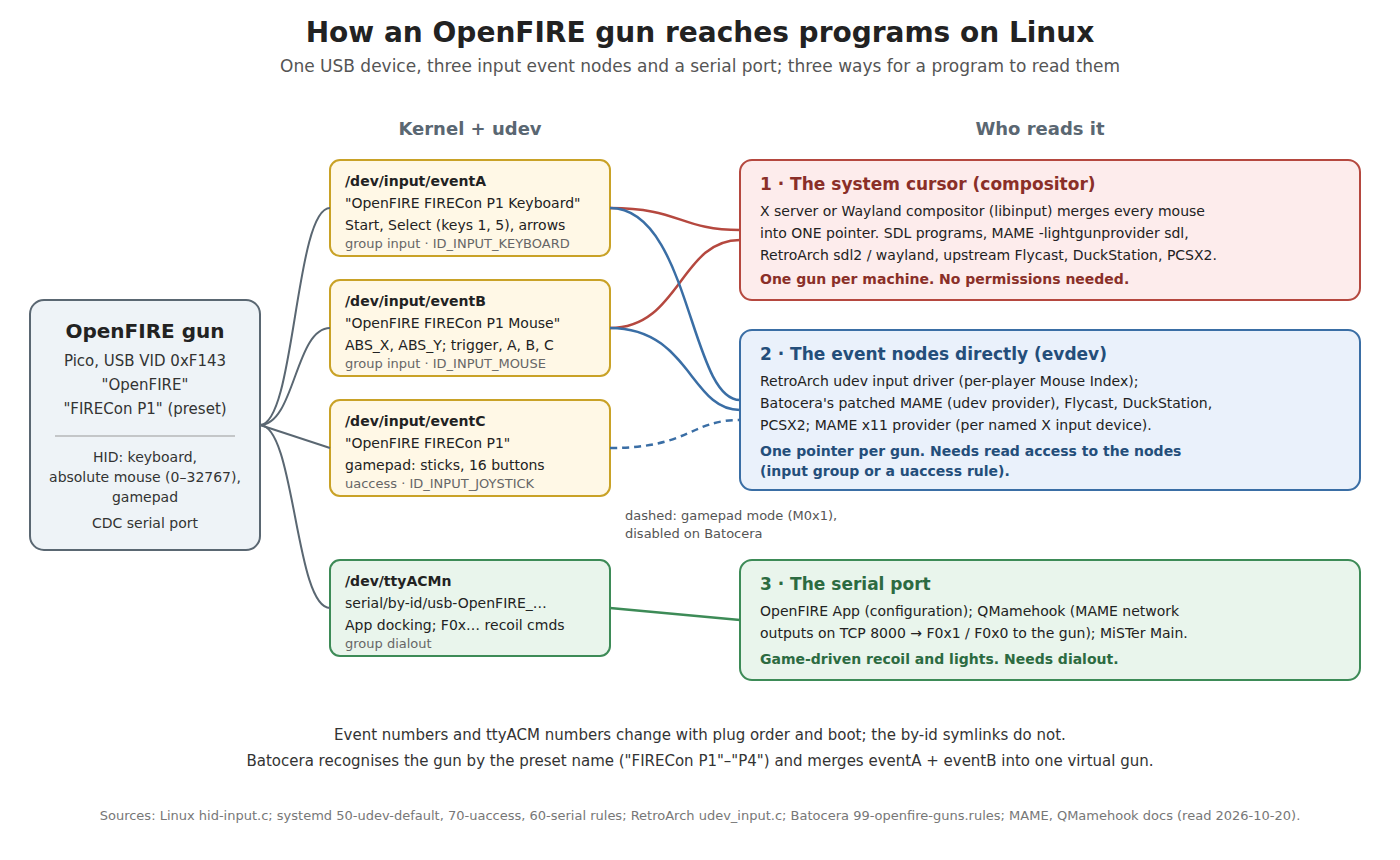
The gun enumerates as one USB device with vendor ID 0xF143 and a manufacturer string “OpenFIRE”, and its HID interface carries three report types: a keyboard, a five-button absolute mouse whose X and Y run from 0 to 32767, and a gamepad (Open-Source Firmware, Volume 6, section 6.2). Linux turns each of those three HID applications into its own input device, each with its own /dev/input/event<n> node. The kernel names them in drivers/hid/hid-input.c: the device’s name (manufacturer plus product) followed by a suffix for the kind of application — “Keyboard” for a keyboard collection, “Mouse” for a mouse, and no suffix at all for a gamepad or joystick. A gun left on the App’s first identity preset therefore appears as:
Table 2 — The gun enumerates as one USB device with vendor ID 0xF143 and a manufacturer string "OpenFIRE", and its HID interface carries three report types: a keyboard, a five-button absolute mouse whose X and Y run from 0 to 32767, and a gamepad ([Open-Source Firmware, Volume 6, section 6.2](/light-guns/building-the-electronics/open-source-firmware/vol-6/)). Linux turns each of those three HID applications into its own input device, each with its own /dev/input/event<n> node. The kernel names them in drivers/hid/hid-input.c: the device's name (manufacturer plus product) followed by a suffix for the kind of application — "Keyboard" for a keyboard collection, "Mouse" for a mouse, and no suffix at all for a gamepad or joystick. A gun left on the App's first identity preset therefore appears as
| Linux device | Name the kernel gives it | Node | What it carries |
|---|---|---|---|
| Keyboard | OpenFIRE FIRECon P1 Keyboard | /dev/input/event<a> | Start and Select (keys 1 and 5 for player 1), arrow keys |
| Absolute mouse | OpenFIRE FIRECon P1 Mouse | /dev/input/event<b> | ABS_X, ABS_Y (0–32767), five mouse buttons |
| Gamepad | OpenFIRE FIRECon P1 | /dev/input/event<c> | Two sticks, sixteen buttons, a hat |
| USB serial (CDC-ACM) | — | /dev/ttyACM<n> | The App’s docking protocol and the force-feedback commands |
Batocera’s udev rule for OpenFIRE guns states the same thing from the other side: “Three events at all time: Keyboard, Mouse and Gamepad.” (Volume 3 reads that rule line by line.)
Two properties of this arrangement shape everything that follows. First, the buttons are split across devices. The trigger and Buttons A and B are mouse buttons on the mouse node, but Start and Select are keystrokes on a different node. A program that opens only the mouse node gets aim and trigger but no Start; a program that takes “the keyboard” gets every keyboard’s keys, so two guns’ Start buttons arrive as different keys (1 and 2) on what looks like one keyboard. This is why OpenFIRE’s identity presets move Start and Select to a different pair of keys per player, and why Batocera merges each gun’s keyboard and mouse nodes into one virtual device (Volume 3). Second, the mouse is absolute. It reports where the gun points, not how far it moved. Linux handles absolute pointers well at the kernel level — a touch screen or graphics tablet is the same thing — but every layer above the kernel has to map the 0–32767 range onto something, and not every layer does it correctly (Volume 5 has the case that matters most, the Steam Deck’s game mode).
1.3 What udev adds
The kernel creates the nodes; udev, the device manager that runs alongside it, classifies them, sets their permissions and gives them stable names. Three things it does matter here.
Classification. udev’s input_id builtin tags each node with properties such as ID_INPUT_MOUSE=1, ID_INPUT_KEYBOARD=1 or ID_INPUT_JOYSTICK=1, read from the capabilities the node advertises. Every Linux program in this dive that looks for mice, keyboards or guns looks at these properties, not at the device’s name. Batocera goes further and adds a property of its own, ID_INPUT_GUN=1, which its launcher uses to decide what is a gun (Volume 3).
Permissions. systemd’s default rules (50-udev-default.rules) put every input node in the group input and every USB modem-class serial port (ttyACM* among them) in the group dialout. A logged-in desktop user is in neither by default. The seat-access rule (70-uaccess.rules) grants the person at the keyboard access to joysticks — SUBSYSTEM=="input", ENV{ID_INPUT_JOYSTICK}=="?*", TAG+="uaccess" — but deliberately not to mice and keyboards, because a program that can read raw keyboards can read passwords. The practical result for an OpenFIRE gun on an ordinary desktop distribution:
Table 3 — Permissions. systemd's default rules (50-udev-default.rules) put every input node in the group input and every USB modem-class serial port (ttyACM among them) in the group dialout. A logged-in desktop user is in neither by default. The seat-access rule (70-uaccess.rules) grants the person at the keyboard access to joysticks — SUBSYSTEM=="input", ENV{IDINPUTJOYSTICK}=="?", TAG+="uaccess" — but deliberately not to mice and keyboards, because a program that can read raw keyboards can read passwords. The practical result for an OpenFIRE gun on an ordinary desktop distribution
| Node | Readable by the logged-in user out of the box? | Why |
|---|---|---|
Gamepad (OpenFIRE FIRECon P1) | Yes | joystick nodes get uaccess |
| Mouse and keyboard nodes | No — only through the compositor’s cursor and key events | group input |
/dev/ttyACM<n> | No | group dialout |
That table explains the two set-up instructions that recur through every Linux light-gun guide. RetroArch’s documentation: “Only root and users in the group “input” are able to access raw input”, with the fix sudo usermod -a -G input \whoami`and a log-out. The OpenFIRE App and QMamehook both requiredialoutfor the serial port, and the App checks for it at start-up ([Open-Source Firmware, Volume 4](/light-guns/building-the-electronics/open-source-firmware/vol-4/)). Some distributions use a different group name for serial ports;ls -l /dev/ttyACM0` shows the one that applies.
Stable names. Event numbers and ttyACM numbers are handed out in the order devices appear, so they change with the order the guns were plugged in, with what else is attached, and from one boot to the next. udev adds symlinks that do not: /dev/input/by-id/ for input nodes and /dev/serial/by-id/ for serial ports, built (in 60-persistent-input.rules and 60-serial.rules) from the bus, the device’s vendor, model and serial-number strings, and the interface number. Section 1.6 uses them.
1.4 Who reads which node
Every program that uses the gun reads it in one of three ways, and which one decides almost every behaviour in this dive.
Table 4 — 1.4 Who reads which node
| Route | Programs (examples) | Sees each gun separately? | Needs |
|---|---|---|---|
| The system cursor — the compositor (X server or Wayland compositor) reads all mice, moves one pointer, and passes pointer events to the focused window | SDL-based programs by default; RetroArch with the sdl2 or wayland input driver, or x without a second X pointer set up; MAME’s default sdl light-gun provider; upstream Flycast, DuckStation and PCSX2 on Linux | No — every mouse moves the same pointer | Nothing extra; works on any desktop |
The event nodes directly — the program opens /dev/input/event* itself, through libudev and evdev | RetroArch’s udev input driver (and its x driver once each gun has its own X pointer, Volume 2); Batocera’s patched MAME, Flycast, DuckStation and PCSX2; MAME’s x11 provider (through X’s input extension rather than evdev, but per device) | Yes | Read access to the nodes (input group or a rule); for MAME x11, an X11 session |
| The serial port | OpenFIRE App; QMamehook; MiSTer’s main program | Yes (one port per gun) | dialout (or a rule) |
The upstream state of the standalone emulators on Linux is worth stating plainly, because the Windows dive describes per-gun “Raw Input” options that do not exist here. Flycast’s Raw Input option is Windows-only, and its Linux build reads mice through SDL (core/sdl/sdl.cpp); its evdev code is for gamepads and skips anything tagged ID_INPUT_MOUSE. DuckStation’s input sources are DirectInput, SDL, Win32 Raw Input and XInput — no Linux per-mouse source. PCSX2’s are DirectInput, SDL and XInput, and its input manager is compiled for MAX_POINTER_DEVICES = 1. MAME on Linux offers sdl (one pointer) or x11 (per device, X11 only). Batocera closes this gap with its own patches, each of which adds an evdev light-gun reader to the emulator: 004-evdev-lightgun.patch for Flycast, 014-lightguns-multi.patch for DuckStation, 005-lightguns.patch for PCSX2 (it raises the pointer limit to 2) and 005-lightgun-udev-driver.patch for MAME, which adds a whole udev light-gun provider that upstream MAME does not have. On Linux, multi-gun play in the standalone emulators is largely a Batocera feature, not an upstream one. Volume 3 has the detail; Volume 7 the consequences, system by system.
1.5 One cursor, or one gun per player
For one player, the system-cursor route is fine and needs no set-up: point the gun, the cursor follows, and the emulator reads the cursor. The absolute mouse maps the whole 0–32767 range across the desktop, so on a single-monitor machine the cursor goes where the gun points. On a machine with two monitors the range spans the whole desktop unless the compositor is told to map the device to one output, which is a per-desktop setting (X’s xinput map-to-output; each Wayland compositor its own). A light-gun machine is simpler with one display.
For two players, the cursor route fails in a specific way: both guns drive the same pointer, and the cursor jumps between where each gun points on every report. Two routes out:
- Read the event nodes (RetroArch
udev, Batocera’s emulators, MAMEx11with named devices). Each gun is its own pointer. It is the preferred route wherever it exists. - Gamepad mode. The firmware can report the aim point as an analog stick (
M0x1), and an emulator that takes a light gun on a stick can then have one gun per gamepad. This is how PCSX2 gets a second gun on Windows (see PC (Windows)). On Batocera it is unavailable: its rules disable the gun’s gamepad node outright (“this mode is unsupported for now”). Stick aim is also coarser in practice than an absolute mouse, because emulators apply deadzones and response curves meant for thumbsticks.
1.6 Telling two guns apart
The firmware’s identity presets (P1–P4) give each gun a different USB product ID and name, “FIRECon P1” to “FIRECon P4” (Open-Source Firmware, Volume 6, section 6.6). On Linux that difference shows up in three places, each used by different software:
- In the input device’s name (
OpenFIRE FIRECon P2 Mouse). Batocera matches on exactly this string; a gun with a custom product name is not recognised by Batocera at all (Volume 3, the most important single finding in this dive for the project’s firmware). - In the
by-idsymlinks, which embed the vendor, model and serial-number strings:/dev/input/by-id/usb-OpenFIRE_FIRECon_P1_<serial>-event-mouseand, for the serial port,/dev/serial/by-id/usb-OpenFIRE_FIRECon_P1_<serial>-if00(the shape follows systemd’s rules; the exact string should be read off the gun with the commands in 1.7). MiSTer’s main program finds OpenFIRE guns through/dev/serial/by-id/paths (Open-Source Firmware, Volume 6, section 6.5). - In enumeration order, which is what RetroArch’s “mouse index” and QMamehook’s player numbers actually use. RetroPie’s documentation warns that the index “may change depending on what device you have attached to which port … everything might ratchet down” when a mouse is added or removed. QMamehook numbers guns by the order it detects them, “always starting from “1"", not by name.
The serial-number string deserves a note. The Pico core OpenFIRE builds on fills it from the board’s unique flash ID (pico_get_unique_board_id_string() in the TeamOpenFIRE fork of the arduino-pico core). If the release build keeps that, two guns given the same preset still get different by-id paths, which makes the symlinks the most robust way to tell guns apart. Whether the OpenFIRE firmware’s own USB stack keeps the core’s serial number was not confirmed for this dive; the udevadm check in 1.7 settles it in seconds.
The rule for a two-gun machine, whatever the software: give the guns different presets (P1 and P2, never two P1s), plug them in the same order every time, and prefer software that can address a gun by name or by by-id path over software that counts.
1.7 Bench checks before any emulator
These prove each layer in order, and they are the first thing to run when an emulator “doesn’t see the gun”. All are standard tools (usbutils, evtest, udev).
lsusb -d f143:                              # the gun is on the bus: ID f143:0001 for preset P1
cat /proc/bus/input/devices | grep -A5 OpenFIRE   # three input devices and their eventN handlers
ls -l /dev/input/by-id/ | grep -i openfire   # stable names for the event nodes
ls -l /dev/serial/by-id/ | grep -i openfire  # stable name for the serial port
udevadm info /dev/input/event<b> | grep ID_INPUT   # ID_INPUT_MOUSE=1 on the mouse node
sudo evtest /dev/input/event<b>             # ABS_X/ABS_Y move 0..32767 as the gun sweeps the screen
groups                                       # input and dialout present?
echo S > /dev/ttyACM<n>; echo F0x2x3 > /dev/ttyACM<n>; echo E > /dev/ttyACM<n>   # three kicks
The last line is the serial bench test from Open-Source Firmware, Volume 6, section 6.11: the gun enters serial mode, fires three solenoid pulses at its own timings and returns to normal. If it works here, the force-feedback chain in Volume 6 of this dive is down to software.
What evtest should show on the mouse node, from the firmware’s report descriptor: ABS_X and ABS_Y each with minimum 0 and maximum 32767, and BTN_LEFT, BTN_RIGHT, BTN_MIDDLE, BTN_SIDE and BTN_EXTRA. If the axes report a different maximum, a program that scales by the advertised range (RetroArch’s udev driver does, from EVIOCGABS) will still be right; one that assumes a range will not.
1.8 Permissions: a rule for a desktop machine
Adding the user to input works, and it is what RetroArch’s documentation and every distribution guide say. It also gives every program that user runs the ability to read every keyboard on the machine. A narrower alternative is a udev rule that gives the logged-in user access to the gun’s nodes only, by the same uaccess mechanism systemd already uses for joysticks:
# /etc/udev/rules.d/70-openfire-guns.rules  (proposed; not yet bench-tested)
# The gun's input nodes and its serial port, for the user at the seat.
SUBSYSTEM=="input", ATTRS{idVendor}=="f143", TAG+="uaccess"
SUBSYSTEM=="tty",   ATTRS{idVendor}=="f143", TAG+="uaccess"
Then sudo udevadm control --reload-rules and re-plug the gun. The file name matters: uaccess tags are acted on by systemd’s 73-seat-late.rules, so the rule must sort before it. The rule is written for this dive from systemd’s own rule syntax and the gun’s vendor ID; it has not been tried on the gun, and it only works on systems with systemd-logind seats (every mainstream desktop distribution and SteamOS; not Batocera, which runs as root and does not need it).
The rule from RetroArch’s documentation, KERNEL=="event*", NAME="input/%k", MODE="666", makes every input device on the machine world-readable. It works, and on a single-purpose emulation box that may be acceptable; on a computer anyone also uses for anything else it is the widest possible fix for a narrow problem.
1.9 Why this, and why not the others
The question: how should a Linux machine give emulators access to the gun?
Table 5 — 1.9 Why this, and why not the others
| Option | Verdict | Why |
|---|---|---|
uaccess rule for VID 0xF143 (1.8) | Recommended for a desktop machine | Grants the seated user the gun’s nodes only; nothing else becomes readable. Untested — bench-check before relying on it |
User in input and dialout groups | Acceptable; the documented route | Works everywhere, including without logind; but every keyboard becomes readable by every program the user runs |
| World-readable rule from the RetroArch docs | Only on a dedicated emulation box | Every input device readable by every user and process |
| Run the emulator as root | Rejected | The OpenFIRE App refuses to run as root (“Running as root is not allowed!”); a root emulator is a large attack surface for no benefit |
| Rely on the system cursor only | For one player only | No permissions needed, but every gun drives one pointer (1.5) |
The question: how should two guns be told apart?
Table 6 — 1.9 Why this, and why not the others
| Option | Verdict | Why |
|---|---|---|
Different presets (P1, P2) and by-id paths | Recommended | Names survive re-plugging and reboots; Batocera requires the preset names anyway |
| Custom product names | Rejected for now | Batocera does not recognise them (Volume 3); nothing on Linux needs them |
| Enumeration order / mouse index | Accept where it is the only option | RetroArch and QMamehook count; plug the guns in a fixed order |
1.10 What could not be verified
- Whether the OpenFIRE v6.2 build’s USB serial-number string is the Pico’s unique ID (1.6). The core does that; the firmware’s USB stack may override it.
- The
uaccessrule in 1.8 has not been tried on a gun. - The exact
by-idfile names for an OpenFIRE gun; the shape is systemd’s, the strings come from the gun.
Sources
- Linux kernel,
drivers/hid/hid-input.c(input device naming and application suffixes), torvalds/linux master — read 2026-10-20. - systemd,
rules.d/50-udev-default.rules.in,rules.d/70-uaccess.rules.in,rules.d/60-persistent-input.rules,rules.d/60-serial.rules, systemd/systemd main — read 2026-10-20. - libretro, Input and Controller Drivers (Linux section and “Setting up udev permissions”), docs.libretro.com/guides/input-controller-drivers/ (source libretro/docs) — read 2026-10-20.
- RetroArch,
input/drivers/udev_input.c, libretro/RetroArch master — read 2026-10-20. - RetroPie, Spinners, Trackballs, Lightguns, and other Mouse Devices, RetroPie/RetroPie-Docs — read 2026-10-20.
- Batocera,
package/batocera/controllers/guns/openfire-guns/99-openfire-guns.rulesand patchesemulators/flycast/004-evdev-lightgun.patch,emulators/duckstation/014-lightguns-multi.patch,emulators/pcsx2/005-lightguns.patch,emulators/mame/005-lightgun-udev-driver.patch, batocera-linux/batocera.linux master — read 2026-10-20. - Flycast (
core/sdl/sdl.cpp,core/linux-dist/evdev.cpp), DuckStation (src/util/input sources), PCSX2 (pcsx2/Input/), upstream master branches — read 2026-10-20. - MAME,
docs/source/commandline/commandline-all.rst(-lightgunprovider) andsdlconfig.rst(-lightgun_index1–8), mamedev/mame master — read 2026-10-20. - That One Seong, QMamehook README, github.com/SeongGino/QMamehook — read 2026-10-20.
- Earle F. Philhower III et al., arduino-pico, and the TeamOpenFIRE fork (branch
tusb-fix),cores/rp2040/RP2040USB.cpp— read 2026-10-20.
Comments (0)