Linux and Retro Distros · Volume 4
The Raspberry Pi — Pi 4 Against Pi 5, Batocera, RetroPie, Plain Raspberry Pi OS, Power and Latency
Which emulators each Pi actually gets, why RetroPie needs a manual install on a Pi 5, what Raspberry Pi OS's switch to Wayland breaks for MAME, the USB current budget for two guns, and what the projects' own documents say about run-ahead and frame delay on a Pi
4.1 Which Pi
A Raspberry Pi is the cheapest way to put a light-gun machine under a television, and the gun itself is happy on one: everything in Volume 1 applies unchanged, and the OpenFIRE App has a native ARM build. What the Pi limits is the emulators, and the line between the Pi 4 and the Pi 5 is sharper than “faster”.
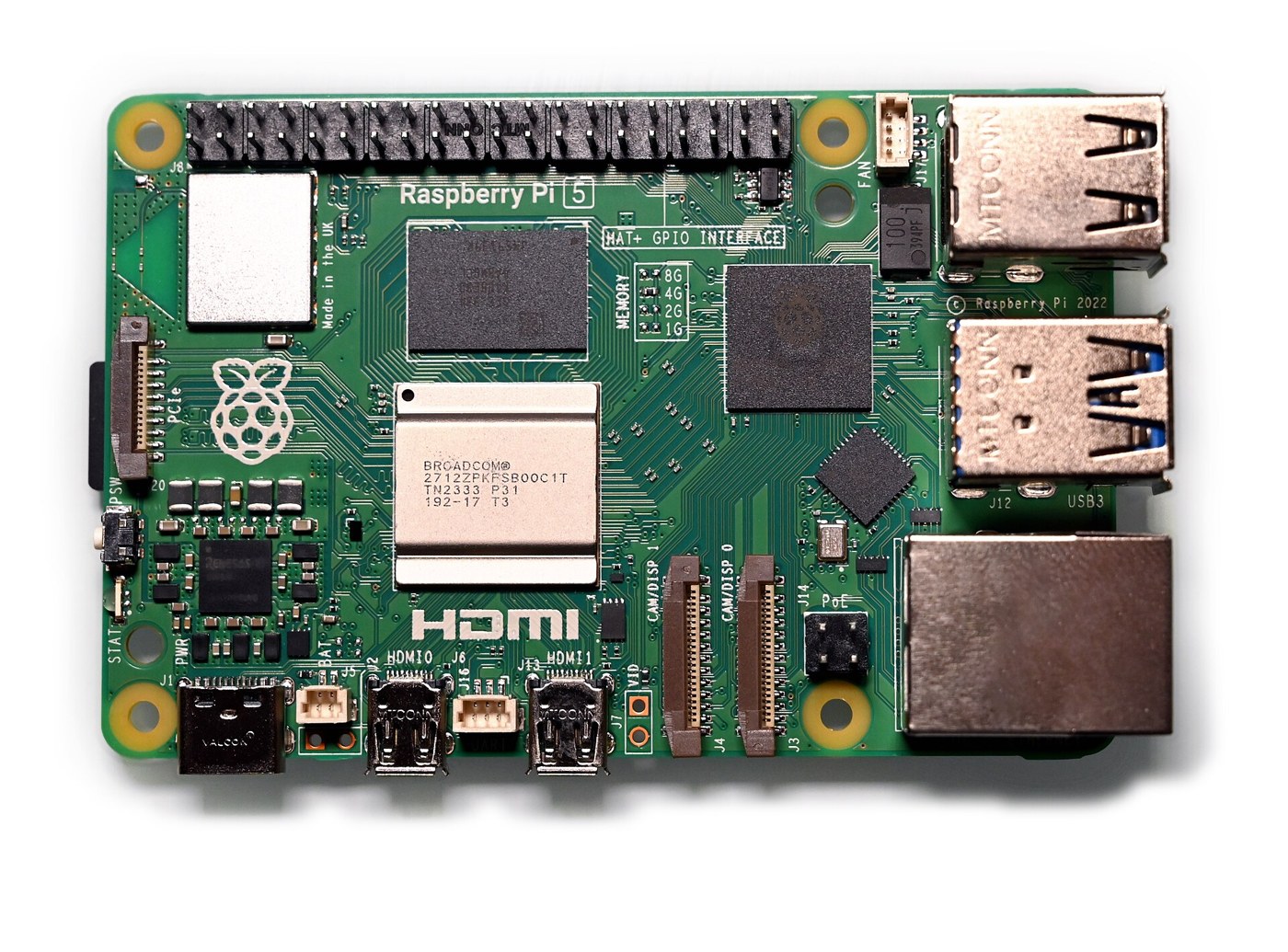
Table 1 — 4.1 Which Pi
| Raspberry Pi 4 Model B | Raspberry Pi 5 | |
|---|---|---|
| CPU | Broadcom BCM2711, 4 × Cortex-A72 | Broadcom BCM2712, 4 × Cortex-A76 at 2.4 GHz |
| Raspberry Pi’s comparison | — | “2–3× the speed of the previous generation” |
| GPU | VideoCore VI | VideoCore VII; OpenGL ES 3.1, Vulkan 1.3 |
| Recommended supply | 3.0 A | 5.0 A |
| Total current for USB peripherals | 1.2 A | 1.6 A with a 5 A supply; 600 mA otherwise |
| Batocera’s “fast CPU” class | No | Yes |
The last row matters most. Batocera’s build configuration defines a “fast CPU” class with the comment “at least Raspberry Pi 5 single-core performance, for the emulators that are bound by one thread”, and gates several emulators on it. Reading the configuration for both boards gives what each Pi actually ships with, for the systems that take a gun:
Table 2 — The last row matters most. Batocera's build configuration defines a "fast CPU" class with the comment "at least Raspberry Pi 5 single-core performance, for the emulators that are bound by one thread", and gates several emulators on it. Reading the configuration for both boards gives what each Pi actually ships with, for the systems that take a gun
| Gun-capable emulator | x86-64 PC | Pi 5 | Pi 4 | Pi 3 and earlier |
|---|---|---|---|---|
| RetroArch cores (NES, SNES, Mega Drive, Master System, PlayStation, Saturn and others) | Yes | Yes | Yes | Most |
| MAME standalone | Yes | Yes (Wayland build) | Yes (Wayland build) | Pi 2/3: yes by the build rule; Pi 1: no |
| MAME core (current) | Yes | Yes | Yes | Pi 2/3 yes, Pi 1 no |
| Flycast (Dreamcast, NAOMI, Atomiswave) | Yes | Yes | Yes | No |
| DuckStation (PlayStation) | Yes | Yes | Yes (needs GLES 3) | Older “legacy” build only |
| Dolphin (Wii) | Yes | Yes | No | No |
| Supermodel (Model 3) | Yes | Yes | v43: yes; from v44: no | No |
| SM2-Emu (Model 2, from v44) | Yes | Yes | No | No |
| PCSX2 (PlayStation 2) | Yes | No | No | No |
| Play! / PCSX2X6 (Namco System 246/256) | Yes | No | No | No |
| RPCS3 (PlayStation 3) | Yes | No | No | No |
| Hypseus Singe (laserdisc games) | Yes | Yes | Yes | Yes |
The Supermodel and Model 2 rows changed on 6 October 2026 (commit “gate sm2-emu and supermodel on pi 5 class cpus, not vulkan”): until then Supermodel was built for any board with Vulkan, the Pi 4 included, and Batocera’s wiki still notes that the Model 3 border for Sinden guns “is enabled on rpi4 and rpi5 starting v41”. From the next release the Pi 4 loses it. Batocera’s Model 2 emulator until v43 was the Windows model2emu run through Wine, which does not run on ARM; v44 replaces it with the native SM2-Emu, “bringing Model 2 emulation to more systems” — the Pi 5 among them, the Pi 4 not.
For a light-gun machine that will play the arcade gun games — Model 2’s House of the Dead and Virtua Cop, Model 3’s Lost World, NAOMI’s House of the Dead 2 — a Pi 5 is the minimum, and the PlayStation 2 and Namco System 246 libraries (Time Crisis 2 and 3, Vampire Night) need a PC.
4.2 Batocera on the Pi
Batocera publishes images for the Pi 1/Zero, 2, 3, 4 and 5 (board configurations bcm2835 to bcm2712). Pi 5 support arrived in v39 (March 2024); light guns on the Pi 4 in v35. On both current Pis Batocera runs a Wayland session under the labwc compositor with XWayland for X programs (the board files set BATOCERA_WAYLAND_LABWC and BATOCERA_XWAYLAND). That makes no difference to the gun: as Volume 1 explains, Batocera’s emulators read the guns’ event nodes directly, bypassing the compositor’s single cursor.
Everything in Volume 3 — recognition by preset name, the merged virtual gun, per-launch configuration, pre-calibrated games — is the same on a Pi as on a PC. The difference is the emulator list above, and the test coverage: Batocera’s per-game list says its games “were mainly tested on x86_64 and rpi4 architectures with default settings (except for MAME). Results may differ on other platforms.” No equivalent statement exists for the Pi 5.
Two Pi-specific notes from Batocera’s wiki concern Sinden guns but carry over to any pair of USB guns: “If using a Raspberry Pi, make sure you have enough power voltage”, and for two Sinden guns on a Pi 4, plug the first into a USB 3 port, wait ten seconds, then the second into a USB 2 port. An OpenFIRE gun is a much lighter USB load than a Sinden’s camera (section 4.5), so the power note is the one that matters.
4.3 RetroPie
RetroPie is the older, script-built alternative: Raspberry Pi OS Lite plus EmulationStation plus a large set of emulators compiled by the RetroPie-Setup script. For light guns it offers RetroArch’s udev input driver as its default and nothing gun-specific beyond that — no detection, no per-game mapping, no pre-calibration. Everything is set by hand, per Volume 2: the input driver, each player’s mouse index (from the verbose log, which RetroPie writes to /dev/shm/runcommand.log), the light-gun binds, and each core’s device type.
The state of the project matters for a Pi 5. RetroPie’s last SD-card image release is 4.8, from 14 March 2022, which predates the Pi 5, and its documentation’s image instructions stop at the Pi 4 (“select the RPI 4/400 image”). The RetroPie-Setup script is still maintained — its last merge was on 18 October 2026 — and it has a Pi 5 platform (platform_rpi5, Cortex-A76) and installs an extra package “for X11 support on Pi5” on Raspberry Pi OS. On a Pi 5, RetroPie is therefore a manual installation of the script onto Raspberry Pi OS, not an image. (The documentation’s manual-installation page still says “Raspberry Pi OS ‘bullseye’ release is not yet supported by RetroPie”, a note older than the script’s Pi 5 support.)
Two RetroPie notes specific to guns:
- AdvanceMAME cannot use a light gun. RetroPie’s documentation: “Unfortunately AdvanceMAME does not support absolute pointing devices such as used in many light guns”. Use the RetroArch MAME cores (
lr-mame2003-plus, with its X-Y device option set to light gun, or the current MAME core withmame_lightgun_modeset; Volume 2, section 2.5). - Indexes move. The documentation’s warning that mouse indexes “ratchet down” when a device is removed applies to every RetroPie gun set-up; plug the same devices in the same order.
Recommendation: on a Pi, use Batocera rather than RetroPie for a light-gun machine. RetroPie works, but it is the same RetroArch with every gun-specific step left to the user, and without the standalone emulators Batocera patches for guns.
4.4 Plain Raspberry Pi OS
A Pi running the ordinary Raspberry Pi OS desktop is the right machine for two jobs in this project even if games are played on Batocera: configuring and calibrating the gun with the OpenFIRE App on the television that will be used, and running the serial bench tests.
- The App runs natively. Release v3.0.3 ships
OpenFIRE_App-aarch64.AppImagealongside the x86-64 one. The user needs thedialoutgroup, and the App will not run as root (Open-Source Firmware, Volume 4). - The desktop is Wayland. Since October 2024, “Raspberry Pi Desktop now runs Wayland by default across all models”, under the labwc compositor (Raspberry Pi’s announcement). For a light gun that has three consequences, all covered in Volume 2: RetroArch’s
waylandinput driver gives one gun with the reload on the middle button; MAME’sx11provider is not a supported route; and the system cursor is one pointer for all guns. Raspberry Pi’s post gives the way back:sudo raspi-config→ 6 Advanced Options → A6 Wayland → W1 X11 Openbox window manager with X11 backend. Running RetroArch with theudevdriver from the console (no desktop at all) avoids the question. - QMamehook has no ARM build. Its releases since v2.0 ship only a Windows zip, and the last Linux binary (v1.8.2, May 2024) was built for x86-64 Ubuntu. On a Pi it must be built from source (Qt 5 or 6 base and serial-port modules, CMake), which its README documents. Volume 6 covers it.
4.5 Power: what the Pi’s USB ports can feed
Raspberry Pi’s power documentation is specific. The Pi 4 Model B wants a 3.0 A supply and allows 1.2 A in total for USB peripherals. The Pi 5: “Raspberry Pi 5 provides 1.6 A of power to downstream USB peripherals when connected to a power supply capable of 5 A at +5 V (25 W). When connected to any other compatible power supply, Raspberry Pi 5 restricts downstream USB devices to 600 mA of power.”
The project’s gun takes almost nothing from USB. Its solenoid runs from the separate 24 V supply, never from USB (decisions D14 and D17; Power Supplies), and the Fully Wired dive, Volume 2 works with an estimated draw of 150 mA on the USB side for the Pico, camera and indicators. Two guns at that estimate are 300 mA: inside even the Pi 5’s reduced 600 mA budget, and inside the Pi 4’s 1.2 A. A gun built to draw its solenoid current from USB would be a different matter — at the Pi 5’s 600 mA limit, not even one small solenoid’s pulse current fits — which is one more reason the project’s design keeps the solenoid off USB.
4.6 Latency on a Pi
The settings are RetroArch’s and are described in Volume 2, section 2.7. What changes on a Pi is how much of them the hardware can afford, and here the only first-party guidance is RetroPie’s Input Lag page, which files every RetroArch latency setting under “Unsupported Tweaks”:
- Hard GPU sync: “no effect on a Raspberry Pi, which cannot use
video_hard_syncin any capacity.” - Frame delay: “can reduce input lag at the cost of CPU usage. Emulation on even a Raspberry Pi 3 has very little headroom, so almost any change from the default will cause stuttering in certain situations.”
- Max swapchain images: the default of three “generally increases input lag by one frame”; two risks “performance issues, even on a Pi 3”.
- Run-ahead: “It is a heavy task and will cause performance issues unless significant headroom is available … A generally safe value to set (when the required CPU headroom is available) is 1 frames”, with
run_ahead_secondary_instancefor cores whose save states need it. - The television: put it in game mode; RetroPie adds that
edid_content_type=4in/boot/config.txtasks a modern TV to switch to game mode automatically.
Those notes were written with the Pi 3 and Pi 4 in mind. No project publishes measured latency figures for a Pi 4 or Pi 5 with run-ahead on; Batocera exposes the same options (run-ahead frames per core, “preemptive frames”, second instance, and automatic frame delay) without published guidance for the Pi. The reasonable reading: on a Pi 5, one frame of run-ahead on 8- and 16-bit systems (NES, Master System, Mega Drive, SNES) is the setting to try first, because those cores are light and the gun games on them are where a frame shows; on the heavier systems leave run-ahead off. Measure, as in Volume 2, section 2.7, rather than trust.
4.7 The one published hands-on comparison
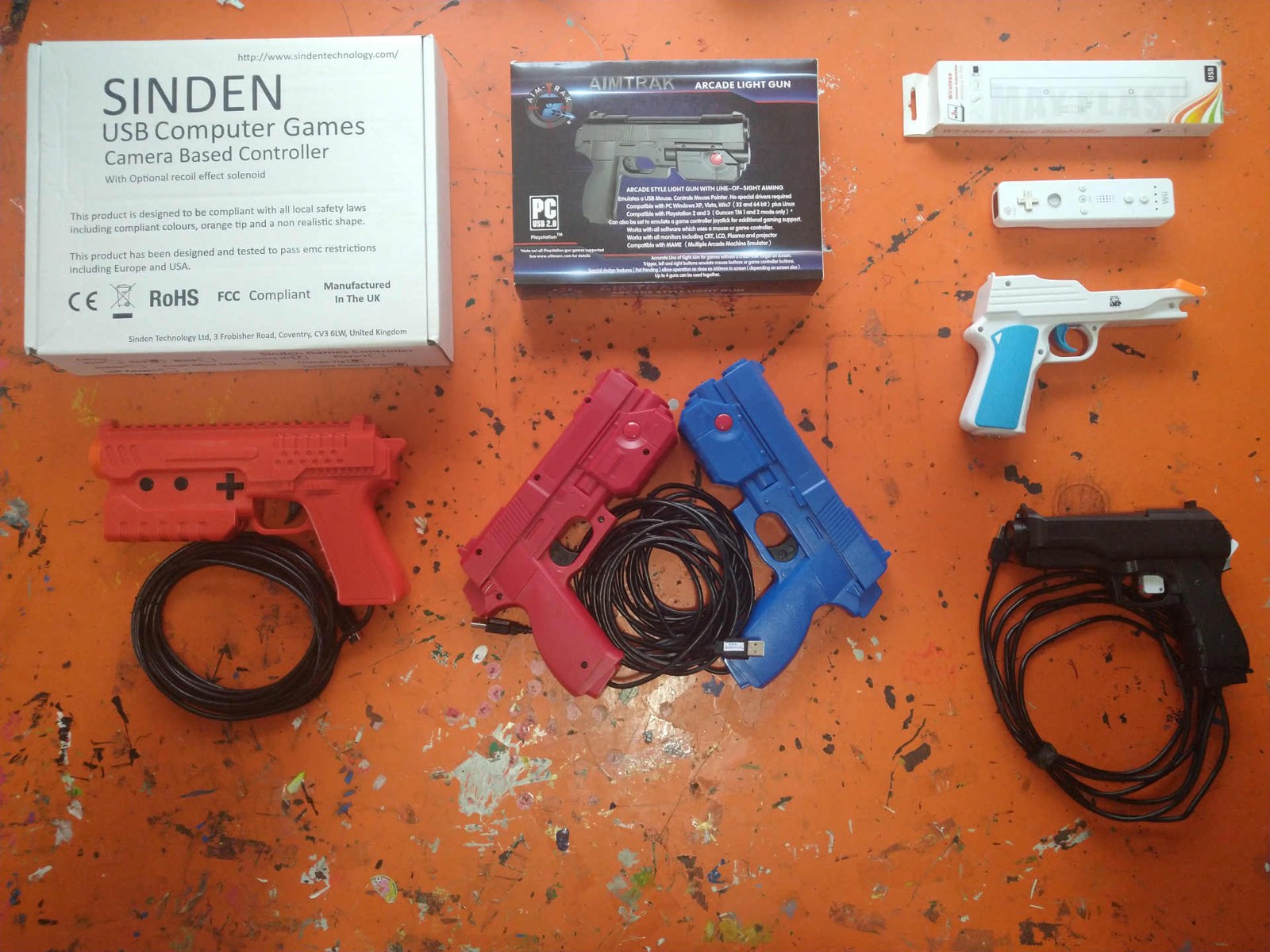
The only published side-by-side of light guns on a Raspberry Pi that this research found is a 2021 forum review on ARPiCADE, a Pi arcade-software project, by its developer. It predates OpenFIRE and the Pi 5, but its findings are about the platform rather than the guns’ firmware, and they hold: the Sinden “is able to be used with line of sight and no onscreen crosshair” once its driver is running; the AimTrak “only accurate from the position it is calibrated from”, and its calibration had to be done from an X11 session “to avoid a wandering cursor”; the DolphinBar and Wii Remote — “On screen cross hairs are basically mandatory with this solution”; and the SAMCO Arduino gun, an ancestor of OpenFIRE (Open-Source Firmware, Volume 1): “It’s definately accurate”, though the least tested. The thread reports no latency measurements and no recoil testing.
4.8 Why this, and why not the others
The question: which Pi for the project’s light-gun machine, if a Pi at all?
Table 3 — 4.8 Why this, and why not the others
| Option | Verdict | Why |
|---|---|---|
| Raspberry Pi 5 with a 5 A supply, Batocera | The Pi to use | Model 2, Model 3, Wii and NAOMI gun games; 1.6 A USB budget; Batocera’s “fast CPU” class |
| Raspberry Pi 4 | Only for 8/16-bit, PlayStation and NAOMI/Dreamcast | No Dolphin, no Model 2, Model 3 dropped from v44 |
| Pi 3 or earlier | Reject | No Flycast; only the legacy DuckStation; the slowest MAME |
| An x86-64 mini-PC with Batocera | Better than any Pi | Adds PlayStation 2, Namco 246/256, PlayStation 3; the platform Batocera tests most (Volume 3, section 3.10) |
The question: which software on the Pi?
Table 4 — 4.8 Why this, and why not the others
| Option | Verdict | Why |
|---|---|---|
| Batocera | Use | Detects the gun, configures every launch, patched emulators (Volume 3) |
| RetroPie | Possible, by hand | No Pi 5 image; no gun automation; AdvanceMAME cannot use a gun |
| Raspberry Pi OS desktop | For the App and bench tests | Wayland by default; one gun through the cursor |
4.9 What could not be verified
- Measured light-gun latency on a Pi 4 or Pi 5: none published by RetroPie, Batocera or RetroArch.
- RetroPie’s own download page (retropie.org.uk/download) could not be read (a browser-verification wall); the image list is taken from the documentation and the GitHub release history.
- Which Batocera v43 images include Supermodel on the Pi 4 in practice: the build rule (Vulkan boards) and the wiki’s “rpi4 and rpi5 starting v41” agree, but the image itself was not inspected.
Sources
- Raspberry Pi Ltd, Raspberry Pi 5 product page, raspberrypi.com/products/raspberry-pi-5/ — read 2026-10-20.
- Raspberry Pi Ltd, documentation,
computers/raspberry-pi/power-supplies.adoc(raspberrypi/documentation master) — read 2026-10-20. - Simon Long, “A new release of Raspberry Pi OS”, raspberrypi.com/news/a-new-release-of-raspberry-pi-os/ (October 2024) — read 2026-10-20.
- Batocera,
package/batocera/core/batocera-system/Config.in,configs/batocera-bcm2711.board,configs/batocera-bcm2712.board, commit c2cb58a39 (2026-10-06), andbatocera-Changelog.md— read 2026-10-20. - Batocera wiki, Light gun guide and Tested games with light gun support — read 2026-10-20.
- RetroPie, First Installation, Manual Installation, Input Lag, Spinners, Trackballs, Lightguns, and other Mouse Devices (RetroPie/RetroPie-Docs);
RetroPie-Setupscriptmodules/system.shand release history — read 2026-10-20. - TeamOpenFIRE, OpenFIRE-App release v3.0.3 assets — read 2026-10-20.
- That One Seong, QMamehook README and release history — read 2026-10-20.
- dee2eR, “Pi4 ‘Lightguns’ testing and comparison”, ARPiCADE forum, 18 July 2021, arpicade.com/forums/viewtopic.php?p=10387 — read 2026-10-20.
Comments (0)