Linux and Retro Distros · Volume 5
Steam Deck, SteamOS and Desktop Linux — Game Mode's Cursor Bug, EmuDeck's Defaults, and a Two-Gun Desktop Recipe
Why an absolute-pointer gun is expected to pin the cursor in the corner in Steam's Game Mode, what EmuDeck and RetroDECK set up and what they leave out, Batocera on a Deck, and the step-by-step set-up for two guns on an ordinary Linux desktop
5.1 The Deck is a PC with two personalities
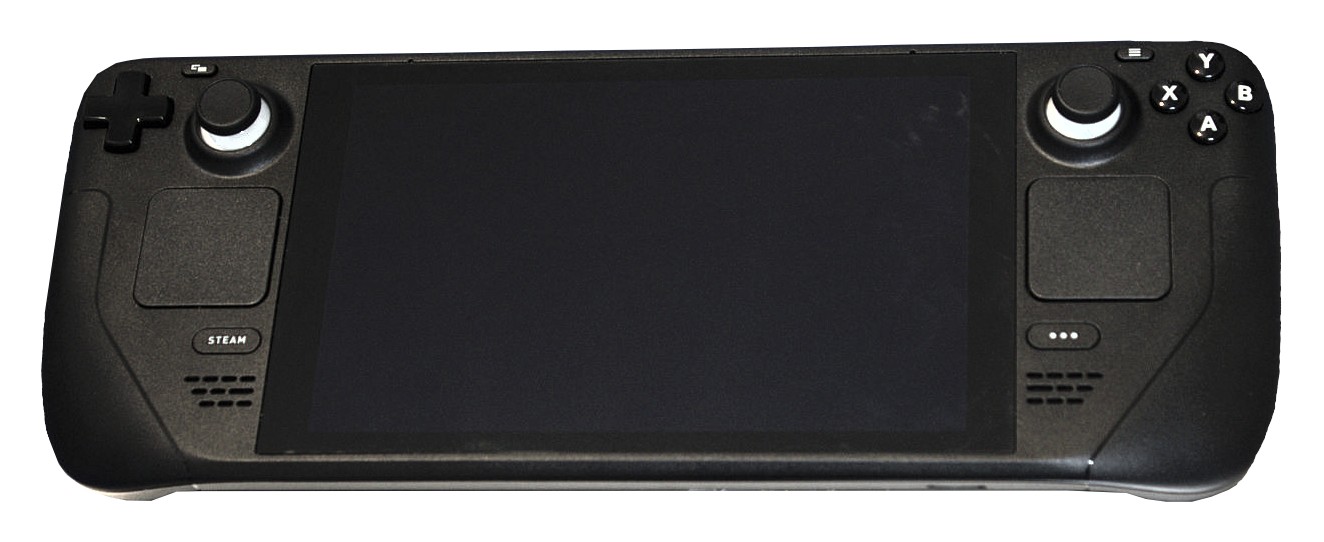
Valve’s Steam Deck runs SteamOS, a Linux distribution, in two very different sessions. Game Mode, the default, is Steam’s full-screen interface running inside gamescope, Valve’s own Wayland compositor, which owns the display and the input and runs each game in a nested X server. Desktop Mode is an ordinary KDE Plasma desktop. Docked to a television, the Deck is a small PC, and a USB light gun plugs into the dock like any mouse.
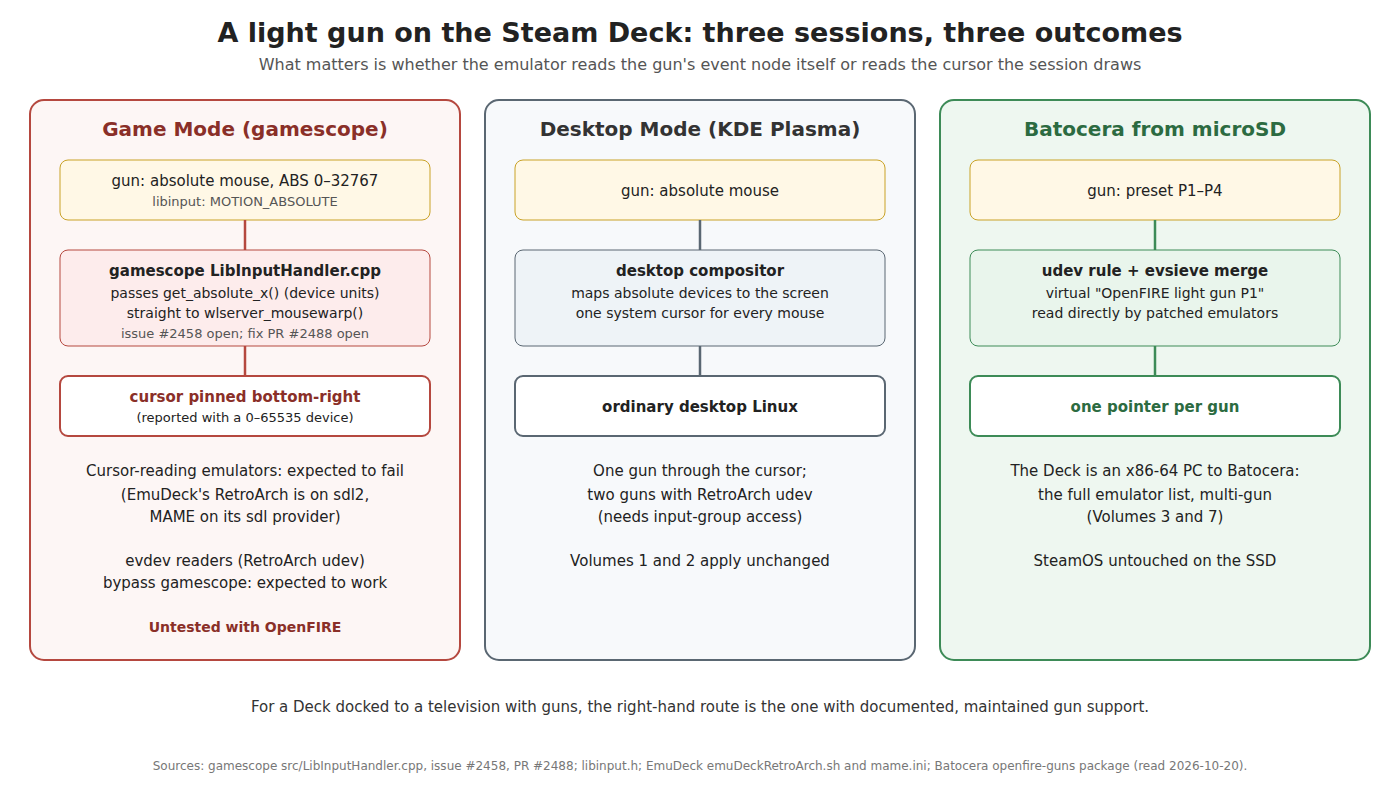
Everything in Volume 1 applies to the hardware. What differs is the session, and the diagram above is the summary: in Game Mode, an emulator that reads the gun through the cursor is expected to fail; in Desktop Mode the Deck is an ordinary Linux desktop; and booted into Batocera from a microSD card it is an x86-64 PC with Batocera’s full light-gun support.
5.2 Game Mode: the absolute-pointer bug
gamescope receives input through libinput. When a pointer reports an absolute position, its handler (src/LibInputHandler.cpp, unchanged since August 2024) does this:
case LIBINPUT_EVENT_POINTER_MOTION_ABSOLUTE:
    double flX = libinput_event_pointer_get_absolute_x( pPointerEvent );
    double flY = libinput_event_pointer_get_absolute_y( pPointerEvent );
    ...
    wlserver_mousewarp( flX, flY, ++s_uSequence, true );
libinput’s own header says what that function returns: “the current absolute x coordinate of the pointer event, in mm from the top left corner of the device. To get the corresponding output screen coordinate, use libinput_event_pointer_get_absolute_x_transformed().” gamescope uses the untransformed value as a screen position. An open gamescope issue (#2458, filed 4 October 2026, gamescope 3.16.9) reports the result with a virtual absolute mouse whose range is 0–65535: in a Steam game-mode session “the pointer stays pinned to the bottom-right corner”, whatever the device reports. A pull request to fix it (#2488, “wlserver: support absolute pointer motion events”, 15 October 2026) was open, not merged, when this was written.
An OpenFIRE gun’s mouse is the same kind of device — ABS_X and ABS_Y, 0 to 32767 (Volume 1, section 1.2). The consequence to expect in Game Mode:
- Any program that reads the gun as the cursor gets nonsense or nothing — SDL programs, RetroArch with its
sdl2input driver, MAME with its defaultsdlprovider, upstream Flycast, DuckStation and PCSX2 on their pointer input. - A program that opens the gun’s event node directly is not affected, because it never asks gamescope where the cursor is. RetroArch with the
udevinput driver is the obvious one, provided it has permission to read the node (section 5.6).
This is read from the code and an issue reported with a different absolute device; it has not been tried with an OpenFIRE gun on a Deck, and it should be, early, because it decides whether Game Mode is usable at all. If the fix is merged, a SteamOS update will carry it.
5.3 EmuDeck and RetroDECK
Most Deck owners who emulate use one of two installers, and neither sets up an external light gun.
EmuDeck (GPL-3.0, active) writes configurations for RetroArch and the standalone emulators. Its RetroArch script sets the input driver to sdl2 (emuDeckRetroArch.sh), which by RetroArch’s own table has no multi-mouse support and a fixed light-gun button map (Volume 2, section 2.1) — and which, in Game Mode, reads the cursor that 5.2 expects to be broken. It does set a few gun-related core options (Beetle PSX’s gun input mode to light gun with a crosshair cursor; Nestopia’s Zapper to light gun; Flycast’s light-gun crosshairs off). Its MAME configuration leaves lightgun 0, multimouse 0 and lightgunprovider auto. Its one light-gun profile is a Steam Input template, “EmuDeck – Steam Deck Light Gun Controls”, which is about the Deck’s own controls: “Right Trackpad set as Mouse, sensitivity increased to 200%. R2 set as Left Click. L2 set as Right Click”, for Flycast, MAME, the Model 2 emulator and Supermodel.
RetroDECK says it plainly on its wiki (updated August 2026): “Not all Lightguns have Linux support and RetroDECK currently does not support lightgun inputs in a easy manner.” Its per-gun pages list, for example, SAMCO with “Steam Input support: No”.
So on SteamOS with EmuDeck, a working gun set-up means changing EmuDeck’s RetroArch input driver to udev and setting the mouse indexes and light-gun binds by hand (Volume 2), with the permission step in 5.6. EmuDeck may rewrite its configuration on update; keep the gun settings in a RetroArch override or reapply them.
5.4 Steam Input and the gun
Steam Input, Steam’s controller-remapping layer, handles game controllers. An OpenFIRE gun’s mouse and keyboard are not controllers and pass through Steam untouched; its third device, the gamepad, is a generic HID gamepad, and Steam may offer to configure it like any unknown controller. Two consequences: in Game Mode, mapping the gun’s buttons through Steam Input is not a route to light-gun play (the aim is the mouse); and if Steam does take the gun’s gamepad, any game reading that gamepad gets Steam’s virtual controller instead. Leaving the gun in mouse-and-keyboard mode (the firmware default) keeps Steam out of the way. RetroDECK’s “Steam Input support: No” for SAMCO-type guns reflects the same point.
5.5 Batocera on a Deck
Batocera boots on a Steam Deck from a microSD card and treats it as an x86-64 PC: every emulator in Volume 4’s table under “x86-64 PC”, PlayStation 2 and Namco System 246 included, with the OpenFIRE detection and per-launch configuration of Volume 3. It has its own Deck support in the light-gun area too: a steamdeckgun package that turns the Deck’s trackpad into a virtual “Steam Gun” with a crosshair (since v37: “steamdeck virtual mouse/gun support from trackpad (left/right hand options)”). SteamOS on the internal SSD is untouched; removing the card returns the Deck to Steam.
Batocera’s wiki has one Deck-specific note on guns, written for Sinden cameras: “Most issues are fixed with a good quality SDCard and the official Steam Deck dock with good amount of power voltage.” The dock’s USB budget matters less for an OpenFIRE gun, which draws little from USB (Volume 4, section 4.5).
For a docked Deck used as a light-gun console, Batocera on microSD is the recommended route: it avoids the Game Mode question entirely and brings the multi-gun emulators that SteamOS does not have.
5.6 Desktop Linux: a two-gun recipe
On an ordinary desktop distribution, or the Deck’s Desktop Mode, the route that gives one gun per player with upstream software is RetroArch with the udev driver for consoles and MAME with the x11 provider (on an X11 session) for arcade games. The steps, each covered in more detail earlier in this dive:
- Give each gun its own preset in the OpenFIRE App: P1 and P2 (Volume 1, section 1.6).
- Permissions. Either add the user to
inputanddialout(sudo usermod -a -G input,dialout $USER, then log out and in), or install the narroweruaccessrule from Volume 1, section 1.8. On SteamOS, Valve’s Desktop FAQ: the default user “is shipped with no password” and cannot usesudountil one is set withpasswd; the system image is read-only,sudo steamos-readonly disableunlocks it (“don’t do the above unless you know what you’re doing”), and “anything you install outside of flatpak (via pacman for instance) may be wiped with the next SteamOS update”. Group membership and a rule in/etc/udev/rules.d/should not need the image unlocked, but whether they survive SteamOS updates was not checked. - Prove the gun with the bench checks in Volume 1, section 1.7.
- RetroArch:
input_driver = "udev"; find each gun’s mouse index in the verbose log; setinput_player1_mouse_indexandinput_player2_mouse_index; bind each player’s light-gun Start and Select to their keys (1/5, 2/6); set each core’s port to its light-gun device (Volume 2, sections 2.2–2.5). Install RetroArch from a source that lets it read/dev/input. The Flathub package (org.libretro.RetroArch) does: its manifest grants--device=alland read-only/run/udev, which is what theudevdriver needs inside the sandbox; the host permissions in step 2 still apply. That also makes it the SteamOS-friendly install, since Flatpak applications survive system updates. - MAME: on an X11 session,
lightgunprovider x11withlightgun_index1andlightgun_index2set to the guns’ device names; on Wayland, one gun only, or use RetroArch’s MAME core (Volume 2, section 2.6). - Feedback:
output networkinmame.iniand QMamehook running, for game-driven recoil (Volume 6). - Standalone Flycast, DuckStation and PCSX2: one gun each on Linux upstream (Volume 1, section 1.4); for two-player NAOMI, Dreamcast or PlayStation gun games, use the RetroArch cores (Flycast, Beetle PSX, SwanStation or PCSX ReARMed) through the
udevdriver, or Batocera.
The OpenFIRE App itself runs on any of these, as an AppImage or from the Arch User Repository (Open-Source Firmware, Volume 4).
5.7 Why this, and why not the others
The question: how should the project’s gun be used with a Steam Deck?
Table 1 — 5.7 Why this, and why not the others
| Option | Verdict | Why |
|---|---|---|
| Batocera on microSD, Deck docked | Recommended | Full x86-64 emulator list; recognises the gun; multi-gun; no gamescope |
SteamOS Desktop Mode, RetroArch udev | Works by hand | Ordinary Linux; every step manual (5.6) |
SteamOS Game Mode, RetroArch udev | Try, then decide | Should bypass the gamescope bug; untested |
| SteamOS Game Mode, EmuDeck defaults | Reject until gamescope is fixed | sdl2 input reads the cursor that gamescope pins (5.2); one gun at most |
| RetroDECK | Reject for guns | By its own wiki, no easy light-gun support |
The question: on a desktop, cursor or event nodes?
Table 2 — 5.7 Why this, and why not the others
| Option | Verdict | Why |
|---|---|---|
Event nodes (RetroArch udev, MAME x11) | Use | One pointer per gun; independent of the compositor |
| System cursor | One player only | Every gun moves the same pointer |
5.8 What could not be verified
- The Game Mode behaviour in 5.2 with an OpenFIRE gun. The code path and the reported symptom are clear; the test has not been done.
- Whether the Deck’s default user is already in the
inputgroup, and whether udev rules in/etcsurvive SteamOS updates. - How Steam treats the gun’s gamepad device in Game Mode (5.4).
- Whether Steam Deck Desktop Mode currently runs Plasma on X11 or Wayland by default;
echo $XDG_SESSION_TYPEanswers it on the machine, and it decides whether MAME’sx11provider is available.
Sources
- Valve, gamescope,
src/LibInputHandler.cpp(ValveSoftware/gamescope master; last change 2024-08-28); issue #2458 “Absolute pointer devices whose axis range exceeds the output never move the cursor” (2026-10-04, open); pull request #2488 “wlserver: support absolute pointer motion events” (2026-10-15, open) — read 2026-10-20. - libinput,
src/libinput.h,libinput_event_pointer_get_absolute_x()documentation (gitlab.freedesktop.org/libinput/libinput) — read 2026-10-20. - EmuDeck (dragoonDorise/EmuDeck, GPL-3.0),
functions/EmuScripts/emuDeckRetroArch.sh,configs/mame/mame.ini,configs/steam-input/emudeck_steam_deck_light_gun_controls.vdf— read 2026-10-20. - RetroDECK Wiki,
wiki-rtd/docs/wiki_controllers/lightgun/about-lightguns.mdandsamco.md(RetroDECK/Wiki, last change 2026-08-17) — read 2026-10-20. - Batocera,
package/batocera/controllers/guns/steamdeckgun/99-steamdeckgun.rules,batocera-Changelog.md(v37), wiki Light gun guide (Steam Deck dock note) — read 2026-10-20. - Valve, Steam Deck and Steam Machine Desktop: FAQ, help.steampowered.com/en/faqs/view/671A-4453-E8D2-323C (page source read with the shared fetcher) — read 2026-10-20.
- libretro, Input and Controller Drivers — read 2026-10-20.
- Flathub,
org.libretro.RetroArch.json(finish-args), github.com/flathub/org.libretro.RetroArch — read 2026-10-20.
Comments (0)