Arcade Hardware · Volume 3
OpenJVS — A Raspberry Pi Becomes the Cabinet's I/O Board
The one working, open route for a modern gun on real JVS hardware: what OpenJVS is, the RS-485 and sense-line hardware it needs, how the project's three-node OpenFIRE gun maps onto its two-stage mapping, game-by-game notes for Sega's and Namco's gun boards, and two limits read in its source that decide what works: one gun position through the light-gun command, and every output write thrown away
3.1 What OpenJVS is
OpenJVS is “an emulator for I/O boards in arcade machines that use the JVS protocol”, written in C by Bobby Dilley and contributors, licensed GPL-3.0, last changed on 15 May 2025 at the commit read for this volume (649ee2f).1 It runs on a Raspberry Pi (or any Linux machine), reads any Linux input device through /dev/input, and answers the game board’s JVS polls as if it were the cabinet’s own I/O board. In Volume 2’s terms it replaces the cabinet’s whole gun system (LED boards, sensor, gun-sense board and I/O) with a Pi and whatever gun Linux can read.
Its own manual draws the architecture as four columns: input devices (gamepads, wheels, light guns, “any device supported by Linux”), the OpenJVS software (JVS slave communication and two mapping layers), the OpenJVS IO hardware (RS-485, sense line, rotary switch) and the arcade board as JVS master. A fifth row, “auxiliary board emulation” over RS-232 for force-feedback and actuator boards, is marked “NOT IMPLEMENTED IN SOFTWARE ATM”.2
3.2 Which boards it runs on
The project’s guide lists the platforms and whether each needs the sense line:3
Table 1 — 3.2 Which boards it runs on
| Platform | Status | Sense line | Gun games relevant here |
|---|---|---|---|
| NAOMI 1 | Working | No | The House of the Dead 2, Confidential Mission, Death Crimson OX, Lupin the 3rd, The Maze of the Kings |
| NAOMI 2 | Working | Yes | |
| Triforce | Mostly | Yes (diodes, not a resistor) | |
| Chihiro | Working | Yes | The House of the Dead 3, Ghost Squad, Virtua Cop 3 |
| Lindbergh | Working | Yes | The House of the Dead 4, Let’s Go Jungle, Rambo, 2 Spicy, Ghost Squad Evolution |
| RingEdge, RingEdge 2 | ”Requires JVS Hat” | Yes | Operation G.H.O.S.T., Let’s Go Island, Transformers |
| Namco System 23 | Working (“Time Crisis 2”) | Yes | Time Crisis 2 |
| Namco System 246 | Working (“Vampire Night”) | No | Time Crisis 3, Vampire Night, Ninja Assault |
| Namco System 256 | Working | Yes | Time Crisis 4 |
| Taito Type X+, Type X2 | Working | Yes | Taito’s Type X gun games |
| exA-Arcadia | Working | No |
The game lists in the last column are which board each game ran on, from Sega’s and Namco’s manuals and the platform lists in PC (Windows) Vol 6; they are not a claim that OpenJVS has been shown to work with each one. Only the boards are OpenJVS’s claim; game profiles exist for some of the games (3.8).
3.3 The hardware: an RS-485 adapter and the sense line, or the HAT
There are two ways to connect the Pi to the cabinet’s JVS cable.
A USB-to-RS-485 adapter plus a sense-line circuit. The guide’s wiring is: cabinet ground to adapter ground, A+ to A+, B− to B−, and the sense wire to Pi GPIO 12, with “a 1KOhm resistor or 4 signal diodes” from that pin to ground “to create a 2.5 volt drop” (four diodes for Triforce).3 On the cabinet side these four wires are the four pins of a JVS cable’s USB-A plug (Volume 2): a cut A-to-B cable, or a USB-A breakout, gives access. The guide is specific about the adapter: “be sure to buy one with an FTDI chip inside. The CP2102 and other chips have been found to not work well.”3 In the configuration file this is SENSE_LINE_TYPE 1: OpenJVS floats the GPIO (input) while unaddressed and drives it low once addressed (setSenseLine() in device.c).4
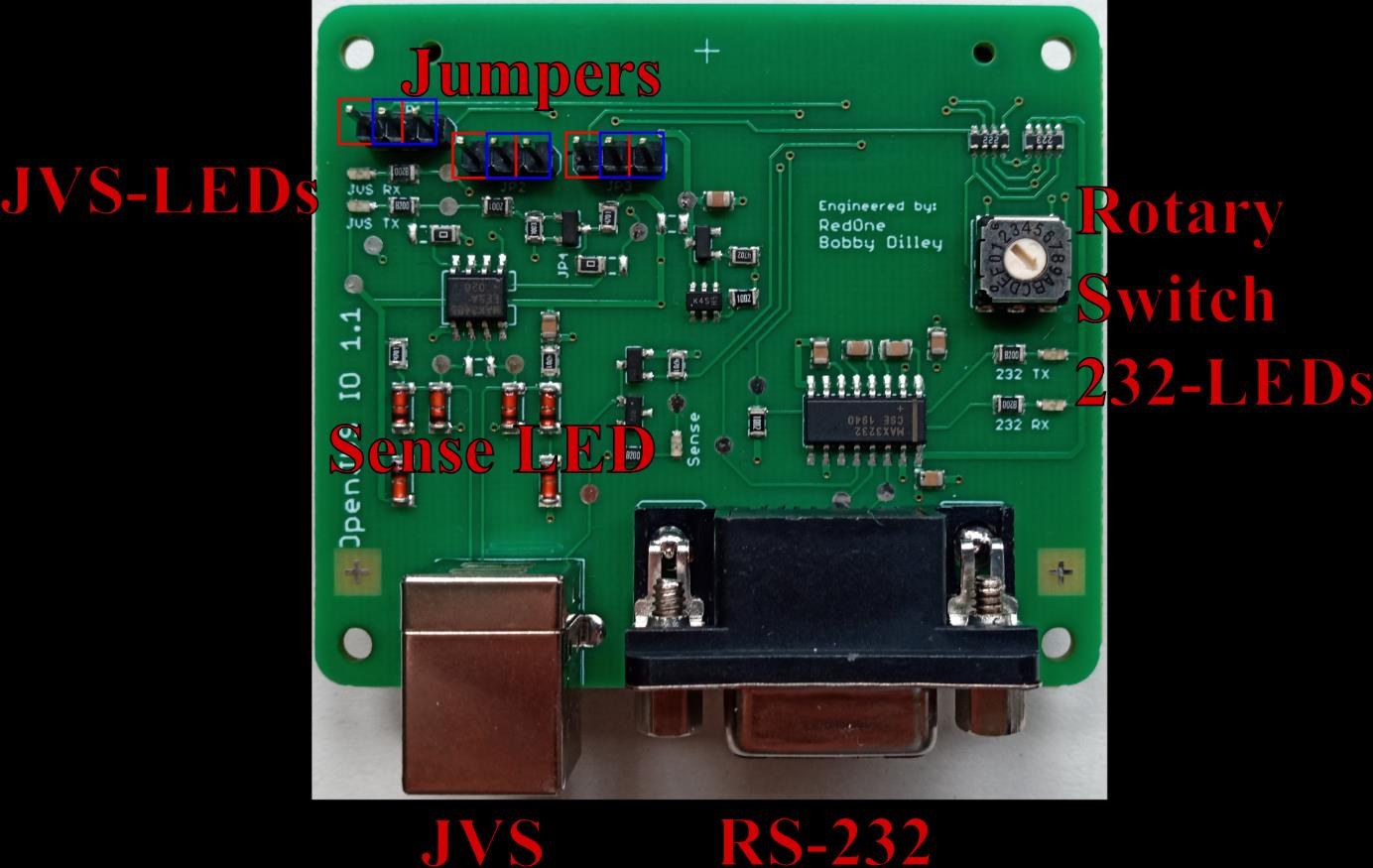
The OpenJVS IO HAT. The HAT puts an RS-485 transceiver, the sense line “with proper signal levels”, reverse-current protection for the Pi, over-voltage protection on RS-485, a MAX3232 RS-232 port and a 16-position rotary switch on one board, with the JVS connector as a USB-B socket.2 It is SENSE_LINE_TYPE 2. On a Pi 4 the manual recommends UART3 (jumpers left, BCM4 and BCM5) so that the serial console and Bluetooth stay free; on a Pi 2 or 3 the jumpers go right, onto UART0, and Bluetooth must be disabled.25 RingEdge and RingEdge 2 need the HAT.3 No shop selling the HAT was found on 2026-10-24, and its design files are not in the repository; for a build, the adapter route is the available one.
An adapter pick. Waveshare’s isolated converter (RobotShop RB-Wav-827, “Industrial USB to RS232/485 Converter, FT232RNL”, $19.53, listed as “Special order”, 2026-10-24) has the FTDI chip the guide asks for and isolates both supply and data.6 Isolation is worth paying for here: the Pi’s ground and the gun’s 24 V brick on one side, the cabinet’s ground and its switching supplies on the other, are otherwise joined through the RS-485 ground wire. A non-isolated FTDI adapter works, as the guide’s own wiring shows; the isolated one removes one ground path that a cabinet with a CRT chassis can make noisy.
Serial latency. OpenJVS sets ASYNC_LOW_LATENCY on the port (device.c), which on Linux’s FTDI driver shortens the adapter’s receive latency timer.4 It matters: Ryan Miceli, driving a real Namco TSS-I/O from a PC through a USB-RS-485 adapter, found the adapter “too slow” for Time Crisis 3’s once-a-frame poll and saw inconsistent recoil timing as a result.7 An adapter that answers late is an I/O board that answers late, and some games treat a late reply as a dead I/O.
3.4 Installing and the configuration file
Installation is from source on Raspberry Pi OS Lite:35
sudo apt install git cmake evtest
git clone https://github.com/openjvs/openjvs
cd openjvs && make && sudo make install
sudo systemctl enable openjvs && sudo systemctl start openjvs
On a Pi using the on-board UARTs (the HAT), config.txt gains dtoverlay=uart3 and dtoverlay=uart4 (Pi 4) or dtoverlay=disable-bt (Pi 2 and 3), and the serial console is removed from cmdline.txt.5 The configuration file, /etc/openjvs/config, holds:8
Table 2 — 3.4 Installing and the configuration file
| Key | Default | Meaning |
|---|---|---|
DEFAULT_GAME | generic-driving | The game profile to load, or rotary to use the HAT’s switch |
EMULATE | sega-type-3 | Which I/O board to impersonate if the game profile does not say |
SENSE_LINE_TYPE | 1 | 0 adapter without sense, 1 adapter with sense, 2 HAT |
SENSE_LINE_PIN | 12 | The GPIO for the sense line |
DEVICE_PATH | /dev/ttyUSB0 | The RS-485 port (/dev/ttyAMA1 for the HAT on a Pi 4) |
AUTO_CONTROLLER_DETECTION | 1 | 0 ignores any device with no map file |
DEBUG_MODE | 0 | 1 shows JVS traffic, 2 raw packets |
One check belongs on the bench before blaming the cabinet. OpenJVS drives the sense pin through the legacy sysfs interface, writing the raw number to /sys/class/gpio/export (device.c).4 Newer Raspberry Pi kernels number sysfs GPIOs from a non-zero base, so a plain 12 may not be the pin it once was. cat /sys/class/gpio/gpiochip*/base on the Pi in use shows the base; if it is not 0, the configured pin needs that offset. This was not tested for this volume; it is a reason to watch the sense LED or meter the pin on the first power-up.
3.5 Two-stage mapping, and the gun’s three devices
OpenJVS maps in two stages.3 A device file (/etc/openjvs/devices/<name>) maps one Linux input device’s events onto a virtual arcade controller (CONTROLLER_BUTTON_A, CONTROLLER_ANALOGUE_X and so on). A game file (/etc/openjvs/games/<name>) maps the virtual controller onto the arcade inputs of a game (BUTTON_1 PLAYER_1, ANALOGUE_1), and names the I/O board to impersonate with EMULATE. Changing gun means one new device file; changing game means one new game file.
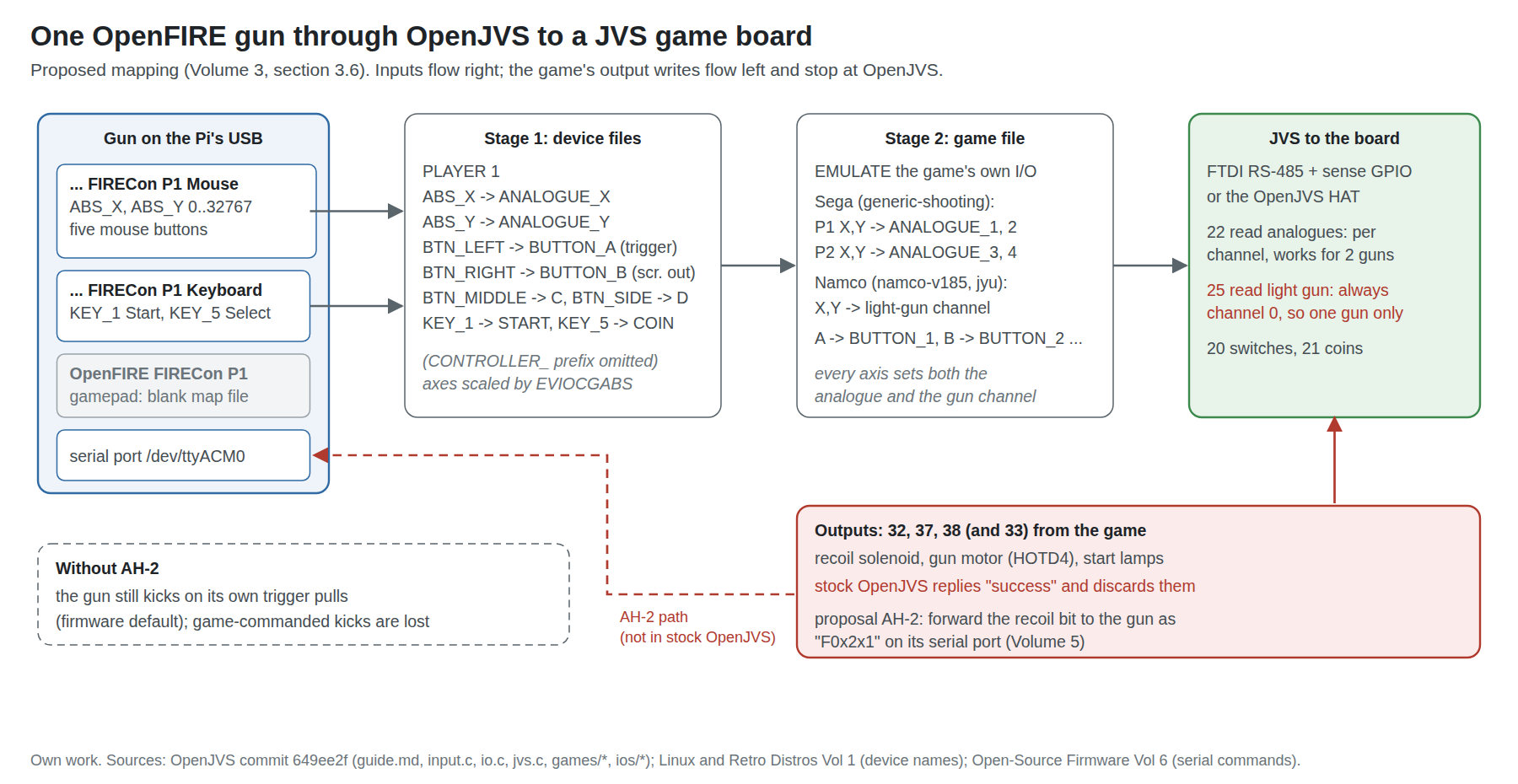
Three details of the device stage decide how the project’s gun behaves:
- The file name is the device’s name, lower-cased, with spaces, slashes and brackets turned into hyphens (
input.c).4 The gun’s three input devices on Linux areOpenFIRE FIRECon P1 Keyboard,OpenFIRE FIRECon P1 MouseandOpenFIRE FIRECon P1(Linux and Retro Distros Vol 1), so their files areopenfire-firecon-p1-keyboard,openfire-firecon-p1-mouseandopenfire-firecon-p1. - “Each new device is seen as a new player.”3 Without files of its own, one gun becomes three players: OpenJVS guesses a keyboard from key-repeat events and a joystick from a Start button, and applies its generic maps. The guide’s advice is to disable unwanted devices (
sudo openjvs --disable <name>) or give them a blank map file. - A
PLAYER nline pins a device to a player regardless of which USB port it is in.3 Without it, players are assigned by port position: top left, bottom left, top right, bottom right.
The axis scaling is right without help: OpenJVS reads each absolute axis’s minimum and maximum with EVIOCGABS and scales into the emulated I/O’s resolution (input.c), so the gun’s 0 to 32767 becomes 0 to 1023 on a 10-bit Sega channel.4
3.6 A mapping for the project’s gun
What follows is a proposed starting point, written from OpenJVS’s documented keywords and the gun’s documented events. It has not been run on a cabinet.
/etc/openjvs/devices/openfire-firecon-p1-mouse:
PLAYER 1
ABS_X CONTROLLER_ANALOGUE_X
ABS_Y CONTROLLER_ANALOGUE_Y
BTN_LEFT CONTROLLER_BUTTON_A
BTN_RIGHT CONTROLLER_BUTTON_B
BTN_MIDDLE CONTROLLER_BUTTON_C
BTN_SIDE CONTROLLER_BUTTON_D
/etc/openjvs/devices/openfire-firecon-p1-keyboard (Start and Select live on the keyboard device; on the P1 preset they are the keys 1 and 5):
PLAYER 1
KEY_1 CONTROLLER_BUTTON_START
KEY_5 CONTROLLER_BUTTON_COIN
/etc/openjvs/devices/openfire-firecon-p1 (the gamepad device, which would otherwise become a second player): an empty file.
The same three files with p2 and PLAYER 2 serve the second gun, set to the App’s P2 preset so that its name, and therefore its file, differ (Open-Source Firmware Vol 6); its Start and Select keys are whatever the P2 preset sends, read off with evtest. On the mouse device the trigger is left button, Button A right, Button B middle and the reload button C mouse button 4 (BTN_SIDE), as PC (Windows) Vol 4 sets out. The virtual controller’s own labels then carry the meanings the game files expect: CONTROLLER_BUTTON_A is “Button 1 / Trigger Button”, B is “Button 2 / Screen In / Out”, C “Button 3 / Action Button 1”.3
If the gun’s App-side button map changes, the device file changes with it. The firmware need not.
3.7 Off-screen reload and the screen-out input
The Sega gun games reload when the player shoots away from the screen, and the cabinet tells the game the gun is off-screen through a “SCREEN IN/OUT” input (Volume 2). OpenJVS’s virtual controller carries it as Button 2, and its Wii Remote support shows the intended use: the Wii device file maps an emulated KEY_O, raised when the remote loses the IR points, to CONTROLLER_BUTTON_B, and its code sets the analogue channels to 0 at the same time.49
The project’s gun never reports “off-screen”. It pins its cursor at the edge of the range when it loses the emitters or points outside the calibrated area (Open-Source Firmware Vol 6). Two ways round that:
- In the App: set the trigger’s off-screen assignment to right click (as for DemulShooter games, PC (Windows) Vol 5). An off-screen pull then arrives as
BTN_RIGHT, mapped above to Button 2. If the game wants screen-out and a trigger pull together, OpenJVS’s game files accept a secondaryBUTTON_*at the end of a line that is pressed with the first (its documented use is H-shifters); a line mappingCONTROLLER_BUTTON_BtoBUTTON_2withBUTTON_1as secondary would give both.3 Untested. - In a fork of OpenJVS: treat an aim pinned at the edge as screen-out. This is the cleaner behaviour and the same rule MAME’s off-screen helper applies on a PC (PC (Windows) Vol 2); it is part of proposal AH-3 (Volume 6).
3.8 Game by game
What OpenJVS ships for gun games, as profiles in docs/openjvs/games/:4
Table 3 — 3.8 Game by game
| Game (board) | OpenJVS profile | I/O emulated | Aim channels | Notes |
|---|---|---|---|---|
| The House of the Dead 2 (NAOMI) | the-house-of-the-dead-2 → generic-shooting | default (Sega) | analogue 1, 2 (P1); 3, 4 (P2) | Two guns; screen-out on Button 2 |
| The House of the Dead 3 (Chihiro) | the-house-of-the-dead-3 → generic-shooting | default | same | Two guns |
| Virtua Cop 3 (Chihiro) | virtua-cop-3 → generic-shooting | default | same | |
| Ghost Squad (Chihiro) | ghost-squad → generic-shooting | default | same | ACTION and CHANGE (Volume 2) come through the generic map as Buttons 3 and 4 only if the game reads them there (unverified) |
| The House of the Dead 4 (Lindbergh) | the-house-of-the-dead-4 | default | analogue 1, 2 (P1); 3, 4 (P2) | Gun speed (shake) channels not mapped (below) |
| Let’s Go Jungle (Lindbergh) | lets-go-jungle | default | analogue 1–4, X and Y swapped and reversed | The profile’s swap is unexplained; check aim direction on first run |
| Rambo (Lindbergh) | rambo | default | analogue 1–4 | Button 3 = “Rage” |
| Operation G.H.O.S.T. (RingWide) | operation-ghost | default | analogue 1–4 | Button 3 action, Button 4 change mode |
| Time Crisis 2 (System 23) | time-crisis-2 | namco-v185 (TSS-I/O) | light-gun channel | One gun per board; the Time Crisis 3 twin Miceli examined is two System 246 units, and the Time Crisis 2 twin is assumed the same |
| Time Crisis 3 (System 246) | time-crisis-3 | namco-v185 | light-gun channel, Y reversed | Same; the profile’s header comment still says “Time Crisis 2” |
| Ninja Assault (System 246) | ninja-assault | namco-jyu (two guns) | light-gun channel | Second gun’s position cannot be returned (3.9) |
The House of the Dead 4. Sega’s manual lists “GUN SPEED X” and “GUN SPEED Y” per gun, resting at 7f, with an adjustment screen that asks the operator to “PLEASE SHAKE THE PLAYER1 GUN” (Volume 2).10 The shake matters for reloading and for escaping grabs.11 OpenJVS’s HOTD4 profile maps only the aim channels, and its mapping language can turn an analogue axis into a button (DIGITAL) but not a button into an analogue swing. So on stock OpenJVS the shake input sits at its resting value. The project’s gun has an IMU on its first carrier (decision D36; Positional and Inertial Vol 6), which is exactly the sensor this input wants; feeding it through needs both a firmware report of the motion and an OpenJVS change, and is proposal AH-4 (Volume 6).
Time Crisis 2 and 3: optical games without a CRT. In both, the CRT timing happens in the gun I/O, and the game board receives only a position (Volume 2).7 OpenJVS’s namco-v185 profile replaces that I/O and supplies the position from whatever gun is attached. On the evidence of the source, then, an infrared gun on OpenJVS frees these two optical games from the CRT that their own guns need: the System 23 or 246 would drive an LCD (through a suitable scaler, since they output 15 kHz RGB) and never know. OpenJVS’s table claims System 23 for Time Crisis 2 as working;3 Time Crisis 3 on System 246 has a profile but no explicit claim. The pedal, a switch, maps like any button. This is the single most useful result in this dive for a builder with a dead Time Crisis CRT, and it is unverified on a real cabinet.
Time Crisis 4 (System 256). No profile ships, but one user-contributed device file describes “Chinese Gun4ir TC4 Style Gun … When using this gun on TC4 Namco 256 edit this map add TEST, UP and A buttons so you can calibrate gun in test menu”.12 It suggests someone has run a USB gun on a real Time Crisis 4; the file uses keywords (CONTROLLER_TRIGGER, REVERSED) that are not in the guide’s lists, so it is evidence of an attempt rather than a working recipe.
3.9 Two limits found in the source
Reading jvs.c at commit 649ee2f turns up two behaviours that the guide does not mention and that decide what works.4
1. The light-gun command returns one gun. The handler for command 25 reads the channel argument’s slot (its size = 2) but always replies with gunChannel[0] and gunChannel[1], that is, one X and one Y, whatever channel the game asks for. On Sega boards this does not matter, because their guns arrive as analogue channels (22), which are handled per channel. On Namco’s light-gun boards it limits each emulated I/O to one gun. For Time Crisis 2 and 3 that is harmless (one gun per board). For Ninja Assault, a two-gun game on one board through the JYU I/O, the second player’s position cannot reach the game; the shipped profile maps both players’ triggers but only player 1’s aim, consistent with that. A fix is a few lines; it is part of proposal AH-3.
2. Every output write is acknowledged and discarded. Commands 32 (write general-purpose outputs), 37, 38 (write one output byte or bit) and 33 (write analogue outputs) each reply “success” and do nothing else. The game’s recoil, gun-motor and lamp commands therefore stop at the Pi. The ffb module is a stub thread for a serial force-feedback board, not for outputs. So on stock OpenJVS a gun game on real hardware runs without game-driven recoil: the project’s gun can still fire its solenoid on its own trigger pulls (Open-Source Firmware Vol 5), which is how its default mode works anyway, but the machine-gun bursts, damage kicks and HOTD4 gun motor that the game commands are lost. Volume 5 lays out the ways to get them back, of which forwarding these writes to the gun’s serial port (AH-2) is the cleanest.
3.10 Calibration: the gun’s, then the game’s
The OpenJVS guide’s instruction for AimTrak applies unchanged: “remember the calibrate the gametrak via the guns calibration setting before calibrating the actual game via the game test menu.”3 The project’s gun is calibrated once to the screen in the OpenFIRE App (Open-Source Firmware Vol 5), on a PC, before it goes into the cabinet, because the App needs a host; the calibration lives in the gun. Then each game’s own gun calibration in its test menu maps what OpenJVS sends onto that game’s picture, exactly as on the emulators (PC (Windows) Vol 4, “two calibrations, not one”). The game’s calibration is stored in the board’s backup memory, so it survives power cycles on a healthy battery.
A cabinet adds one wrinkle the PC does not: the emitters must be fixed to the cabinet’s bezel or monitor surround, and the gun’s calibration is only as good as their not moving. Recalibrate after any bezel work, as the arcade manuals said of their own LED boards (Arcade Light Guns Vol 6).
3.11 Why this, and why not the others
Table 4 — 3.11 Why this, and why not the others
| Choice | Pick | Rejected, and why |
|---|---|---|
| I/O emulator | OpenJVS | No other open JVS I/O emulator with gun support was found. Keeping the cabinet’s real I/O and feeding its analogue inputs from a DAC (Sega only) is possible in principle but keeps the gun-sense board’s job half-done and gives no route for Namco’s light-gun boards |
| Host | Raspberry Pi 4 | Pi 4 is what the HAT manual is written for (UART3 free alongside Bluetooth). Pi 5: not mentioned in the docs, and the sysfs GPIO numbering check (3.4) applies with more force. A desktop PC: works with an adapter but is a lot of machine to bolt into a cabinet for a serial protocol |
| Line interface | Isolated FTDI USB-RS-485 adapter (Waveshare FT232RNL, RB-Wav-827) plus four 1N4148-class diodes on the sense line | The HAT: better integrated, needed for RingEdge, but not found for sale and its design files are not published. CP2102 adapters: the guide says they “have been found to not work well”. A resistor instead of diodes: fails on Triforce |
| Gun mapping | Mouse device for aim and buttons, keyboard device for Start and coin, gamepad device blanked, each pinned with PLAYER | Leaving auto-detection on: one gun becomes three players. Gamepad-mode aim (M0x1): coarser, and OpenJVS reads the absolute mouse correctly already |
3.12 What could not be verified
- Any of this on a real cabinet. The mapping in 3.6 is written from documents, not run.
- That OpenJVS works with Time Crisis 3 on a System 246 (profile exists; no claim in the table) and how well the System 246 tolerates OpenJVS’s reply timing.
- Whether OpenJVS’s player-pinning lets two devices (the gun’s mouse and keyboard) share one player cleanly; the guide implies it, the code was not traced that far.
- The sysfs GPIO base on current Raspberry Pi OS kernels and whether
SENSE_LINE_PIN 12needs an offset. - The behaviour of Sega’s games when the screen-out input is pressed while the aim is still on-screen (the secondary-button trick in 3.7).
- Whether the OpenJVS HAT is sold anywhere.
Sources
Footnotes
-
OpenJVS project,
README.md, GPL-3.0, commit 649ee2f (15 May 2025), https://github.com/OpenJVS/OpenJVS — read 2026-10-24. ↩ -
RedOne and Bobby Dilley, OpenJVS and OpenJVS IO Manual, document version 1.2 (§1.1 concept diagram, §1.2 features, §2 board, §2.4 jumpers, §2.5 Pi pins),
docs/OpenJVS_IO_Manual_1.2.pdfin the repository — read 2026-10-24. ↩ ↩2 ↩3 -
OpenJVS project,
docs/guide.md(requirements, sense line, installation, AimTrak, mapping), same commit — read 2026-10-24. ↩ ↩2 ↩3 ↩4 ↩5 ↩6 ↩7 ↩8 ↩9 ↩10 ↩11 ↩12 -
OpenJVS project, source at commit 649ee2f:
src/jvs/jvs.c(CMD_READ_LIGHTGUN,CMD_WRITE_GPO,CMD_WRITE_GPO_BYTE,CMD_WRITE_GPO_BIT,CMD_WRITE_ANALOG),src/controller/input.c(device naming, type detection,EVIOCGABSscaling, Wii Remote screen-out),src/jvs/io.c(setAnalogue,setGun),src/hardware/device.c(sysfs GPIO,ASYNC_LOW_LATENCY,setSenseLine),src/ffb/ffb.c, anddocs/openjvs/games/*,docs/openjvs/ios/*— read 2026-10-24. ↩ ↩2 ↩3 ↩4 ↩5 ↩6 ↩7 ↩8 -
OpenJVS project,
docs/hat-quickstart.md, same commit — read 2026-10-24. ↩ ↩2 ↩3 -
Ryan Miceli, “Light Gun Hacking Part 1: Using Namco light guns in Unity”, icode4.coffee, 27 October 2022, https://icode4.coffee/?p=655 — read 2026-10-24. ↩ ↩2
-
OpenJVS project,
docs/openjvs/config, same commit — read 2026-10-24. ↩ -
OpenJVS project,
docs/openjvs/devices/nintendo-wii-remote, same commit — read 2026-10-24. ↩ -
Sega, The House of the Dead 4 owner’s manual (2005), INPUT TEST and gun speed adjustment, Internet Archive
ArcadeGameManualHod4-manual— read 2026-10-24. ↩ -
Wikipedia, “The House of the Dead 4” (the gun’s shake sensor and its use for reloading and escapes; secondary), https://en.wikipedia.org/wiki/The_House_of_the_Dead_4 — read 2026-10-24 via search. ↩
-
OpenJVS project,
docs/openjvs/devices/light-gun-p-1-just-to-share-fun(user-contributed), same commit — read 2026-10-24. ↩
Comments (0)