MiSTer FPGA · Volume 6
The Project's OpenFIRE Gun on MiSTer — and Where Every Game Runs
Step by step from plugging in to the first shot, the four things the gun's USB identity must keep for MiSTer's handshake, what that means for decision D24 and the private fork, two guns, recoil without game events, a bench checklist, the full where-it-runs table and the proposed decisions
This volume brings the dive down to one gun: the category’s own, a Raspberry Pi Pico running a private fork of OpenFIRE v6.2 (Our Firmware), an infrared camera and emitters, a regulated 24 V solenoid. The firmware’s account of its MiSTer mode is in Open-Source Firmware, Volume 6, section 6.5; this volume adds what MiSTer’s side of the conversation requires, which that section does not cover, and what follows for the project.
6.1 From plugging in to the first shot
What a first session should look like, assembled from the source and the OpenFIRE v6.0 release notes. None of it has been done yet.
- Calibrate the gun to the screen first, elsewhere. The gun’s own camera calibration, which maps the emitters to the screen edges, is done in the OpenFIRE App. The v6.0 notes: “Proper Display Calibration currently has to be done against the desired display from a different device - ergo, a Pi or PC running on the same display that the MiSTer will be plugged into.” So the display used with the MiSTer must first be calibrated from a PC or Pi (PC (Windows), Volume 1, section 1.8; Linux and Retro Distros).
- Plug the gun into the MiSTer’s USB. Main recognises it and writes
M0x9to its serial port (6.2, 6.3). With the project’s OLED (decision D37), the firmware’s MiSTer icon is the visible sign that the handshake worked. - Load a core with a light gun and set its menu for a joystick-driven gun: Zapper(Joy1) on the NES, Super Scope Joy1 on the SNES, Gun Control Joy1 on the Sega cores, Pad1 GunCon on the PlayStation, Virt LGun on the Saturn (Volume 2).
- Map the buttons for that core in the OSD’s “Define
buttons” screen: the gun’s trigger (gamepad A in MiSTer mode) to the core’s trigger, and Start, Select and reload as the core needs (Volume 5, section 5.7). - Calibrate for that core with F10, from a USB keyboard, on a white screen, with only this gun connected (Volume 5, section 5.6). The calibration is saved for this core and this gun’s vendor and product ID.
- Set the video for latency:
vsync_adjust=2on HDMI if the television accepts it, or the analogue output to a CRT (Volume 5, section 5.8). - Repeat steps 3 to 5 for every core. The release notes say so: “you’ll have to calibrate against the screen dimensions on a per-core basis and map the gun for each core you want to use it with. These are not something we can address without fundamental changes to the MiSTer’s UI/UX.”
6.2 What MiSTer mode changes in the gun
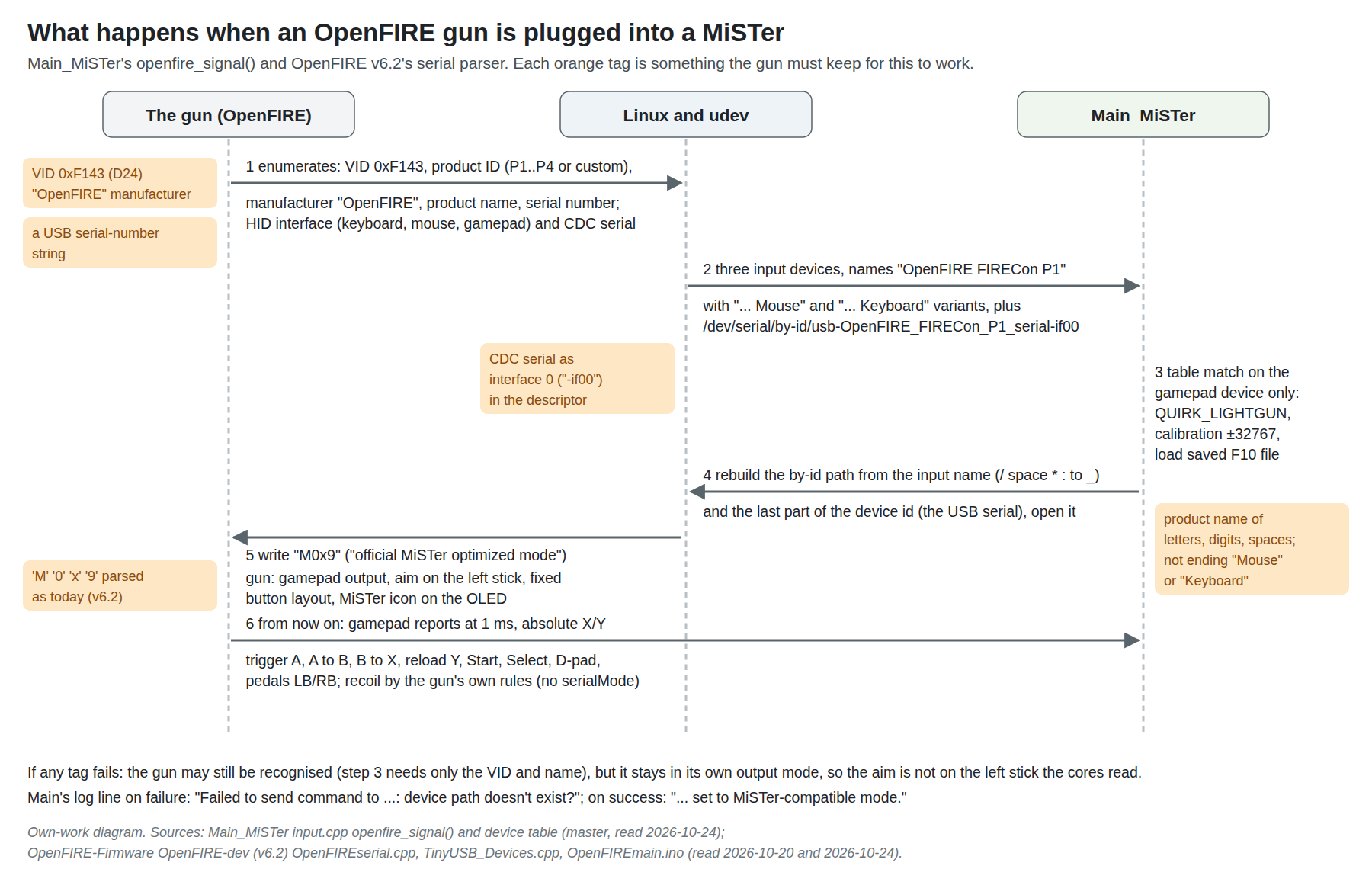
In OpenFIRE v6.2’s serial parser (OpenFIREserial.cpp, branch OpenFIRE-dev, read 20 October 2026), M0x9 is the case commented “official ‘MiSTer optimized’ mode”. It sets:
- Gamepad output (
analogOutput = true), with the aim on the left stick’s X and Y. The flag that does it is namedstickRight, and is set to true; inTinyUSB_Devices.cpptrue puts the camera on X/Y, so the name reads backwards but the effect is the left stick, which is what Main passes to the cores. The range is −32767 to 32767, matching Main’s default calibration for OpenFIRE. - A fixed button layout: trigger to gamepad A, button A to B, button B to X, reload to Y, Start, Select, the D-pad, pedal to LB, second pedal to RB, pump to C.
- The OLED’s MiSTer icon.
It does not set serialMode, the flag that hands the solenoid to a host program. So the gun stays in charge of its own recoil (6.5). Main writes nothing else to the gun’s serial port: openfire_signal() contains the only write, the four characters M0x9.
Two details from Main’s side:
- The handshake is repeated on every device scan.
openfire_signal()is called whenever Main rescans its input devices (after the Joy-Con pairing check), so a gun that is re-plugged or reset is switched back into MiSTer mode without user action. - There is a one-byte buffer overrun in it. The function copies the device name into
char mname[strlen(input[i].name)]withstrcpy, which writes one byte more than the array holds (the terminating zero). It is harmless in practice on most stacks and is noted here only because the project may want to send MiSTer a one-line fix (row MS-7).
6.3 The four things the identity must keep
Main’s recognition (Volume 5’s table) needs only the vendor ID and the name prefix. The handshake needs more, and a gun that is recognised but never receives M0x9 stays in whatever output mode it was in, by default mouse and keyboard, so the cores, which read the left stick, receive nothing. From openfire_signal() (Main_MiSTer master, read 24 October 2026):
- Vendor ID 0xF143, and an input-device name containing “OpenFIRE ” (with the space). On Linux the name is the manufacturer string, a space, and the product string, so the manufacturer must stay “OpenFIRE” and the product name must not be empty. The gamepad device is told apart from the mouse and keyboard devices by its name not ending in “Mouse” or “Keyboard”, so a product name ending in either word would hide the gamepad too.
- A USB serial-number string. Main takes the last part of the device’s identifier, which it builds as
phys/uniq, anduniqis the USB serial number. Without one, the identifier is the physical path alone, its last part is something likeinput2, and the serial path does not exist. OpenFIRE does not set a serial number itself; the Pico’s Arduino core supplies one, and the Linux dive shows it in theby-idpath. A fork, a new board or the ESP32-S3 port must keep a serial number. - The CDC serial interface as interface 0. Main opens
/dev/serial/by-id/usb-<name>_<serial>-if00. The-if00suffix is the USB interface number of the serial function. If a fork reorders the USB descriptors so that HID comes first, the serial port moves to another interface number and the path fails. This is read from the path Main builds; the current interface order of OpenFIRE’s composite device was not checked. - A product name that survives two different clean-ups. Main rebuilds the path from the input name by replacing only four characters,
/, space,*and:, with underscores. Theby-idname itself is made by udev from the manufacturer, product and serial strings with its own rules for unusual characters. The two agree for letters, digits and single spaces; for anything else (punctuation, a colon, accented letters, double spaces) they may not, and the handshake would fail with Main’s message “device path doesn’t exist?”. The safe rule is a product name of letters, digits and single spaces, as the presets’ “FIRECon P1” to “P4” are. This is an inference from the two algorithms and has not been tested.
6.4 What this means for D24 and the private fork
D24 (18 October 2026) keeps 0xF143 for every bench and personal gun. On MiSTer that is the right call, and this dive adds a reason: both recognition and the handshake are keyed to 0xF143 in MiSTer’s compiled main program, so a gun with any other vendor ID gets neither until MiSTer itself is changed, and MiSTer users update Main through MiSTer’s own distribution, not through the gun.
Before a kit is sold, D24 requires an assigned vendor ID, and Our Firmware, Volume 6 proposes the route (FW-7: ask TeamOpenFIRE first; otherwise a product ID under Raspberry Pi’s 0x2E8A, “with a small upstream change so the App and MiSTer accept it”). This dive’s evidence on that “small upstream change” for MiSTer:
- MiSTer accepts gun additions from outside contributors. Every gun in Main’s table after the Wiimote and AimTrak was contributed: GunCon 2 and 3 (2022), GUN4IR (2022), the RetroZord GunCon adapter (2022), Blamcon (December 2024), Retroshooter’s mouse mode (January 2025), OpenFIRE itself (February 2025, by OpenFIRE’s maintainer), Sinden (February 2025) and X-Gunner (9 October 2026). Each is a few lines in one table.
- The change needed is in two places, the recognition table and
openfire_signal(), both of which testvid == 0xf143. If the kit gun keeps the “OpenFIRE ” name prefix, the smallest change is to accept a second vendor ID alongside 0xF143 in both. A change to Main reaches users only after it is merged and released, so it must be made well before the first kit ships (row MS-2). - Avoid pid.codes’ test IDs. If a bench build ever uses vendor 0x1209 with a product ID from 0x0001 to 0x0004, Main will treat it as an X-Gunner gun, a mouse quirk with a 0 to 32767 calibration, and not as OpenFIRE at all (Volume 5, section 5.1). pid.codes reserves those IDs for private testing anyway.
For the private fork (Our Firmware), the MiSTer constraints are the four in 6.3 plus one more: keep the M0x9 case in the serial parser as it is in v6.2, since Main sends exactly those four characters. Our Firmware’s release checklist already has “MiSTer and QMamehook find the gun” (Volume 5, section 5.6, item 5); row MS-1 proposes making that item test the handshake, not just recognition.
For the wireless trial (Open-Source Firmware, Volume 6, section 6.12; decision row WL-9, a dongle identity cloned from the gun): the dongle is what MiSTer sees, so it must carry all four items in 6.3, including a serial number and a CDC serial interface at interface 0, not only the vendor ID and name.
6.5 Recoil without game events
MiSTer has no equivalent of MAME’s outputs or of the hook programs that drive game-synchronised recoil on Windows (PC (Windows), Volume 5): the cores do not publish “the player was hit” or “the gun fired” to Main, and Main sends the gun nothing after M0x9. So on MiSTer the solenoid follows the trigger, not the game.
In OpenFIRE v6.2 (OpenFIREmain.ino), when serialMode is off, an on-screen trigger pull with Start and Select not held calls the firmware’s on-screen feedback routine, which fires the solenoid by the gun’s own settings (single shot, or autofire and burst if those toggles are on), and an off-screen pull calls a separate off-screen routine. The project’s regulated drive and its protections (Solenoid Recoil, decision D13) therefore stay fully in charge on MiSTer, with no host commands to validate. Sinden’s MiSTer README describes the same situation for its gun, with recoil toggled on the gun itself.
What is lost is everything game-specific: no kick when the game says a shot did not count, no machine-gun hold in a game with an automatic weapon unless the gun’s autofire is switched on for it, no rumble on being hit. For the console games MiSTer plays, most of which had no recoil at all, that is a smaller loss than for the arcade games played on Windows.
6.6 Off-screen reload
In MiSTer mode the trigger is always gamepad A, on screen or off. Whether a game sees an off-screen shot depends on the coordinate the gun reports when it loses the screen and on each core’s off-screen test:
- The Sega-family module treats the gun as off-screen only when Y is at the very top or bottom of the picture; the NES module when X or Y is at an extreme (Volume 2).
- OpenFIRE pins the cursor at the screen edge when the emitters leave the camera’s view (PC (Windows), Volume 1), and after F10 calibration that edge value lands at or past the calibrated edge, which Main clamps to the byte’s limit.
So whether an off-screen pull reloads may differ by core and by direction (top and bottom more likely than left and right in the Sega cores). That is an inference from the two pieces of code, not a test. Where a core has an explicit reload input, use it: the PlayStation core forces “no light” when Triangle is pressed, so mapping the gun’s reload button (gamepad Y in MiSTer mode) to Triangle gives a reliable reload in GunCon games.
6.7 Two guns
Everything in Volume 3, sections 3.5 and 3.6 applies:
- Flash the guns with the App’s P1 and P2 presets, which give them product IDs 0x0001 and 0x0002 and the names “FIRECon P1” and “FIRECon P2”; both names pass the 6.3 rules.
- Pin them to players in
MiSTer.iniwithplayer_1_controller=f143_0001andplayer_2_controller=f143_0002(untested). - Calibrate each gun alone in each core (the two-guns-connected hazard, Volume 5, section 5.6); the files are kept per product ID.
- Use cores that offer a second gun: the PlayStation (Pad2 GunCon), the Saturn (LGun P2) and the System 11 arcade core. The NES, SNES, Master System and Genesis cores’ menus offer one virtual gun.
6.8 A bench checklist
When the first gun exists, these checks establish that it works on a MiSTer, in this order. Each names its pass condition.
Table 1 — 6.8 A bench checklist
| # | Check | How | Pass |
|---|---|---|---|
| 1 | Serial path exists | SSH to the MiSTer, ls /dev/serial/by-id/ | an entry usb-OpenFIRE_<product>_<serial>-if00 |
| 2 | Handshake | plug in, watch the OLED; or run Main from SSH and read its output | MiSTer icon; “set to MiSTer-compatible mode” |
| 3 | Aim on the stick | Input-test core, or the NES core with Crosshairs On | the crosshair follows the gun |
| 4 | Calibration | F10 in the NES core on the 240p Test Suite’s white screen | crosshair on the screen corners at two distances |
| 5 | Timing | Duck Hunt (brightness test) and a Genesis game in the per-game table | hits where the crosshair is |
| 6 | Recoil | single shot, then autofire | one kick per pull; no kick on Start+Select |
| 7 | Reload | off-screen pull in each direction; Triangle in a GunCon game | reload registered |
| 8 | Two guns | P1 and P2 with player_N_controller lines | P1 stays player 1 after a re-plug |
| 9 | Latency | the FIGURE SLOT in Volume 5, section 5.8 | recorded for each video mode |
| 10 | Custom name | rename a test gun with punctuation in its product name | documents whether 6.3 item 4 is real |
6.9 Where every game runs
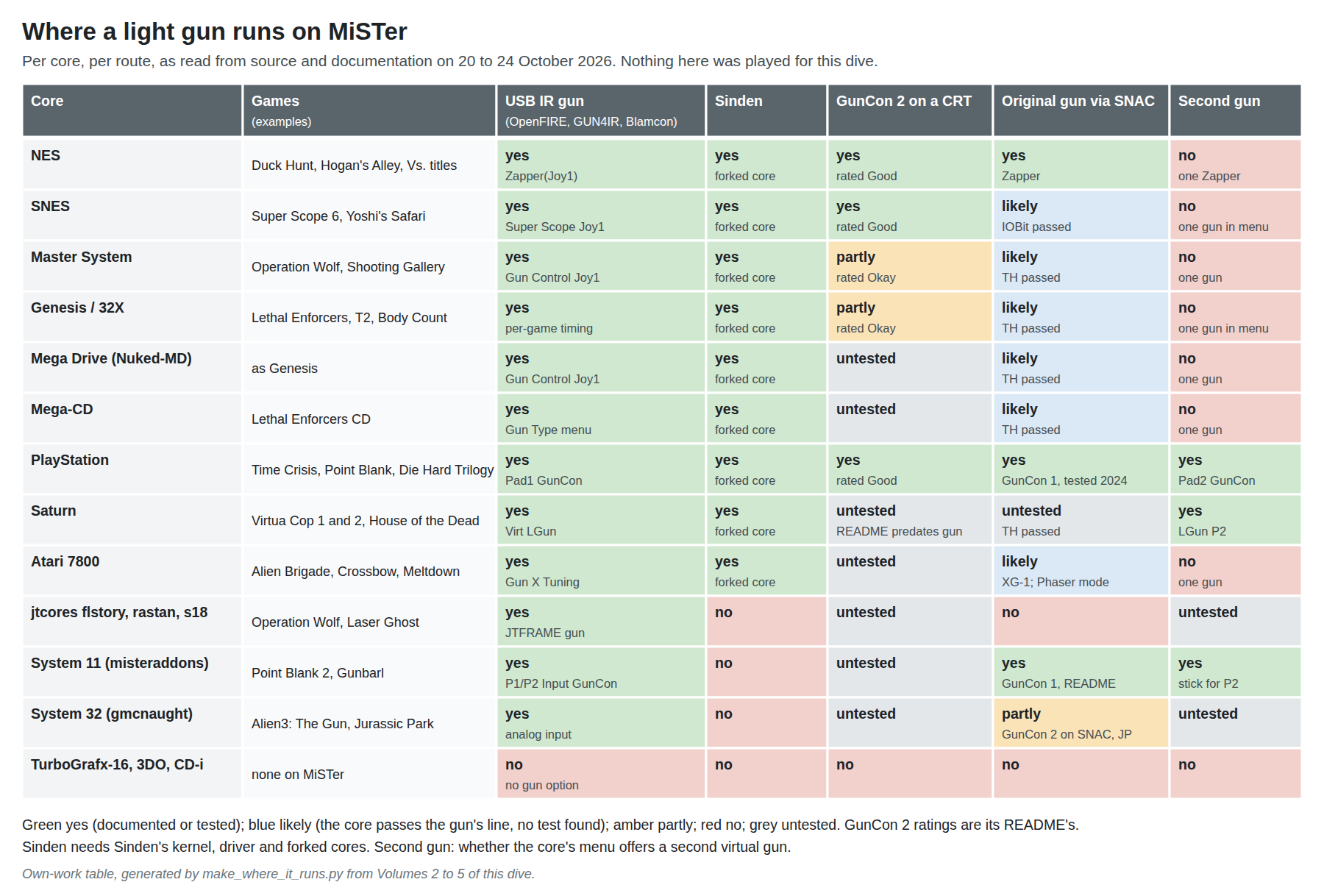
For the project’s gun, the first column is the one that matters, and it is green in every core that has a light gun: once the handshake works, the OpenFIRE gun is a joystick-driven gun like any other, and every gun core takes one. The suggested first cores, in order:
- NES, because its picture is 256 pixels wide (one pixel per step of MiSTer’s 8-bit aim) and its brightness-testing module is the closest to a real light gun of any core.
- PlayStation, because it is the only console core with two guns and the GunCon library (Time Crisis, Point Blank) is the deepest.
- Genesis, because its per-game timing table (Lethal Enforcers, T2, Body Count) is the one place the cores have been tuned game by game.
6.10 Proposed decisions, and why not the alternatives
Table 2 — 6.10 Proposed decisions, and why not the alternatives
| # | Area | Proposal | Why, and why not the alternatives |
|---|---|---|---|
| MS-1 | MiSTer identity rules for the fork | Keep, in every build: VID 0xF143 (D24), manufacturer “OpenFIRE”, a USB serial-number string, the CDC serial as interface 0, product names of letters, digits and single spaces not ending “Mouse” or “Keyboard”, and the v6.2 M0x9 case. Make Our Firmware’s release-checklist item 5 test the handshake (serial path present, OLED MiSTer icon), not just recognition | Recognition alone needs only the VID and name, but without the handshake the cores get no aim (6.3). Testing recognition only would pass a broken gun |
| MS-2 | Kit vendor ID and MiSTer | Whatever VID FW-7 settles, submit a Main_MiSTer change accepting it alongside 0xF143 in both the table and openfire_signal(), merged and released before the first kit ships; never use pid.codes 1209:0001–0004 | Main is compiled into MiSTer’s distribution; a gun cannot teach it a new ID. Outside gun additions are routinely merged (nine since 2022). The test PIDs collide with X-Gunner and are barred from distributed devices |
| MS-3 | MiSTer video for gun play | HDMI with vsync_adjust=2 (VRR as the alternative if the set refuses it); analogue output when a CRT is used; forced_scandoubler=0 | Up to two frames separate the scaler modes, more than everything else MiSTer adds; 2 costs about four lines (5.8) |
| MS-4 | Two guns on MiSTer | P1 and P2 presets; player_1_controller=f143_0001, player_2_controller=f143_0002; calibrate one gun at a time | First-joystick-used ordering swaps players on re-plug; calibration files are per product ID; the calibration screen takes coordinates from any gun (5.6) |
| MS-5 | Recoil on MiSTer | Accept gun-driven recoil (single shot by default, autofire per game by the gun’s own toggle); no host-driven path planned | MiSTer has no game outputs and Main sends only M0x9; the gun’s own drive keeps D13’s protections (6.5) |
| MS-6 | MiSTer’s place in the test plan | After Windows (the reference platform), with NES, PlayStation and Genesis as the first cores | MiSTer cannot exercise game-driven recoil and its aim is 8-bit; it is the best check of timing-faithful console play (6.9) |
| MS-7 | Upstream courtesy fix | Offer Main_MiSTer a one-line fix for the mname buffer in openfire_signal() | A known overrun in the code path the project depends on; costs nothing, builds goodwill before MS-2 |
6.11 What could not be verified
- Nothing in this volume has been run with a gun.
- The OpenFIRE composite device’s interface order (whether CDC is interface 0) and the source of its USB serial number on the Pico.
- Whether udev’s and Main’s name clean-ups differ for any character the App allows in a custom product name.
- How each core treats OpenFIRE’s edge-pinned off-screen coordinate.
- The exact behaviour of the firmware’s off-screen feedback routine on MiSTer.
- The
player_N_controllerlines.
Sources
- MiSTer-devel,
Main_MiSTer,input.cpp(openfire_signal(), the device table, device identifiers),menu.cpp,MiSTer.ini, master, read 2026-10-24; OpenFIRE commit e484d703f7 (2025-02-05, #964). https://github.com/MiSTer-devel/Main_MiSTer - TeamOpenFIRE,
OpenFIRE-Firmware, branch OpenFIRE-dev (v6.2 “Long Bridge”, HEAD 8b651a2514, 2026-04-19):OpenFIREserial.cpp,OpenFIREmain.ino,libraries/TinyUSB_Devices/TinyUSB_Devices.cpp, read 2026-10-20 and 2026-10-24. https://github.com/TeamOpenFIRE/OpenFIRE-Firmware - TeamOpenFIRE, OpenFIRE-Firmware v6.0 release notes, 2025-05-24, read 2026-10-20. https://github.com/TeamOpenFIRE/OpenFIRE-Firmware/releases
- pid.codes, 1209/0001 and 1209/0004, read 2026-10-24. https://pid.codes/1209/0001/
- MrLightgun, “MiSTerSindenDriver”, README, read 2026-10-20. https://github.com/MrLightgun/MiSTerSindenDriver
- This category’s decisions log,
DECISIONS.md(D13, D24, D37, FW-7, WL-9), read 2026-10-24.
Comments (0)