MiSTer FPGA · Volume 5
Modern Guns, Calibration and Latency — Every Gun Main Knows, the F10 Screen, and What HDMI Costs
The modern USB guns MiSTer recognises and how each is set up, the Sinden exception, the Wiimote and other stand-ins, how the F10 calibration screen actually works in the source, and the latency of each video path on a flat panel and on a CRT
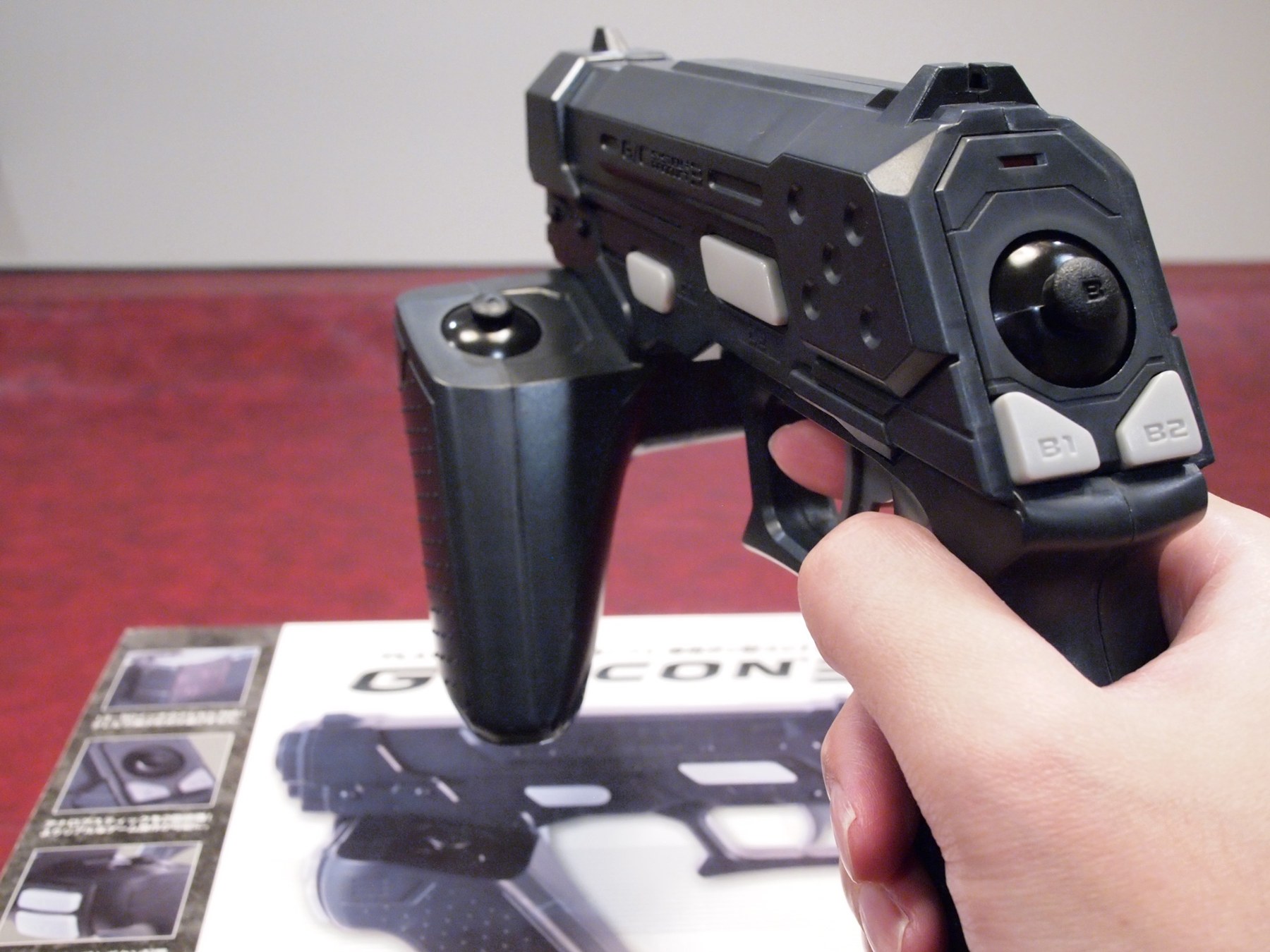
This volume covers Route B from Volume 1 for every gun except the project’s own, which has Volume 6 to itself. Everything here is read from Main_MiSTer master (input.cpp, menu.cpp, MiSTer.ini; latest input.cpp change 18 October 2026, read 24 October 2026) and the guns’ own documentation. How each gun aims (IR points, border, emitters) belongs to Sensing and Aiming; the firmware survey to Open-Source Firmware, Volume 1.
5.1 The recognition table
When a USB input device appears, Main checks it against a list. A match gives the device a light-gun flag, a quirk that enables the calibration screen, and a default calibration, the device’s full range until F10 replaces it. The complete list for guns:
Table 1 — When a USB input device appears, Main checks it against a list. A match gives the device a light-gun flag, a quirk that enables the calibration screen, and a default calibration, the device's full range until F10 replaces it. The complete list for guns
| Gun | Vendor:product match | Quirk | Default calibration (Y range; X range) | Added |
|---|---|---|---|---|
| OpenFIRE | 0xF143, any product, name contains “OpenFIRE ” (gamepad device only) | LIGHTGUN | −32767 to 32767; same | 2025-02-05 |
| GUN4IR | 2341:8042 to 8049 | LIGHTGUN | 0 to 32767; same | 2022-06-05 |
| Blamcon | 3673:0100 to 0103 and 0200 to 0203 | LIGHTGUN | 0 to 32767; same | 2024-12-30 |
| Retroshooter | 0483:5750 to 5753 | LIGHTGUN_MOUSE | 0 to 767; 0 to 1023 | mouse mode 2025-01-19 |
| X-Gunner | 1209:0001 to 0004 | LIGHTGUN_MOUSE | 0 to 32767; same | 2026-10-09 |
| Sinden | 16C0 or 16D0 with 0F01, 0F02, 0F38, 0F39 | LIGHTGUN | 0 to 65535; same | 2025-02-18 |
| GunCon 3 | 0B9A:0800 | LIGHTGUN | −32768 to 32767; same | 2022-03-06 |
| GunCon 2 | 0B9A:016A | LIGHTGUN_CRT | 25 to 245; 145 to 700 | 2022-01-29 |
| GunCon 1 adapters | 2341 or 1209:595A named “RZordPsGun”; 16D0:127E named “ReflexPSGun” | LIGHTGUN | 0 to 32767; same | 2022-03-19 |
| Ultimarc AimTrak | D209:1601 | none (flag only) | device’s own | 2019-05-25 |
| Wiimote | by its IR axes, over Bluetooth | WIIMOTE | 0 to 767; 1 to 1023 | 2019 |
Two consequences are easy to miss:
- The “mouse” quirk is not the mouse path. Retroshooter and X-Gunner present themselves as mice, so Main gives them
QUIRK_LIGHTGUN_MOUSE, which lets their mouse buttons be used for calibration and still sends their absolute axes to the core’s analog stick. Their aim does not go through the merged relative PS/2 mouse that breaks two-gun play (Volume 3, section 3.5). - X-Gunner’s match is pid.codes’ test range. Vendor 0x1209 is the open pid.codes allocation, and its pages say product IDs 0x0001 and 0x0004 are a “Test PID” that is “reserved for use in private testing” and “MUST NOT be used on any device that will be redistributed, sold, or manufactured” (pid.codes, read 24 October 2026; 0x0002 and 0x0003 were not read). So any hobby USB device on the bench using those test IDs, a keyboard project or a test build of a gun, will be treated by MiSTer as an X-Gunner light gun. That matters to this project only if a test build of the fork ever uses them (Volume 6).
5.2 IR camera guns: GUN4IR, Blamcon, Retroshooter, X-Gunner
These are the closest relatives of the project’s gun: an infrared camera in the gun, emitters at the screen, the aim computed in the gun, and absolute axes over USB. On MiSTer they need no driver; the gun must be in a mode that reports absolute axes as a joystick or absolute mouse.
- GUN4IR (closed firmware, Arduino-based boards, Open-Source Firmware, Volume 1). Recognised by its product ID range since June 2022; calibration 0 to 32767.
- Blamcon: eight product IDs in two ranges, recognised since 30 December 2024 (commit
6b9b65bb, pull request 945, “Add support for Blamcon Lightguns”). - Retroshooter (RS3): four product IDs, a mouse quirk since January 2025 (“Retroshooter mouse mode”, Martin Donlon). Its default range of 0 to 1023 by 0 to 767 is far coarser than the others’ 15- and 16-bit ranges, but Main reduces every gun to 256 steps anyway (Volume 1, section 1.3), so it costs nothing on MiSTer.
- X-Gunner: added 9 October 2026 (
42e64002, pull request 1348); see the pid.codes note above.
For all of them, the IR calibration of the gun to the emitters (where the gun’s camera sees the screen edges) is done with each gun’s own tool, on a PC or Pi on the same display, and the F10 calibration on MiSTer then maps the gun’s output range onto each core’s picture (5.6).
5.3 The GunCon 3
Namco’s GunCon 3 for the PlayStation 3 aims from two emitters beside the screen (Console Light Guns), so it works on any display. Main recognises 0B9A:0800 and reads signed axes; the commit that added it in March 2022 also made Main accept negative calibration values, which OpenFIRE’s signed range later relied on. A Linux driver for its encrypted protocol is needed in the kernel; that MiSTer’s kernel includes one is implied by the README of the GunCon 2 project (“drivers for the GunCon 2 and 3” in Modding Classic Light Guns, Volume 5) and was not checked in the kernel source.
5.4 The Sinden, a gun that needs a driver
The Sinden is a webcam that finds the screen by a white border; all of its aiming is computed on the host (Border Tracking, Volume 1). On MiSTer that means a driver running on the ARM processor, and Sinden’s own MiSTerSindenDriver repository (HEAD e66785fa, 13 October 2026, README read 20 October 2026) is the reference. What it requires:
- A custom kernel (supplied in the repository) and forked cores that draw the border: NES, PlayStation (and its dual-SDRAM version), Saturn (and dual-SDRAM), Genesis, Mega Drive, Mega-CD, Master System, SNES, Atari 7800 and an input-test core. Time Extension’s July 2024 announcement listed only NES, PlayStation, Mega Drive/Genesis and SNES at launch, with Master System, Mega-CD and Saturn to follow; the README’s current list includes them.
- Gun firmware v1.09 and joystick mode enabled.
- A choice of processor modes, because the driver competes with Main and the PlayStation core for the ARM: low (processes only on a trigger pull, “4% CPU core usage”), medium (the default), and normal, which the README warns may affect the PlayStation core, “which also relies on ARM”. Border Tracking, Volume 4, section 4.6 works out what the low mode costs in latency.
- Two button maps per gun, a core-specific one and a generic
input_<vid>_<pid>_v3.map.
Two notes from the README matter beyond the Sinden. Recoil is set on the gun, “holding down ‘up’ on the Dpad for 5 seconds” toggles off, single shot and automatic, because, as with every gun on MiSTer, nothing in the game drives it. And “You shouldn’t need to use the MiSTer lightgun calibration tool”, because the driver’s coordinates already map to the border, which is drawn by the core around exactly the game’s picture.
Main also lists the Sinden’s identities in its own table (February 2025, 6bca8265), so a Sinden presenting as a joystick gets the light-gun quirk and the F10 screen.
5.5 Stand-ins: Wiimote, AimTrak, touchpads and touchscreens
- Wiimote. Paired over Bluetooth (the OSD’s F11 pairing screen), recognised by its IR axes. Main uses only the first of the four IR points the Wiimote’s camera reports: the source comment is “other 3 IR tracking aren’t used”, and X is inverted (
absinfo.maximum - ev.value). With a standard two-cluster sensor bar, one point gives no roll correction, and the aim depends on which cluster the camera lists first; that consequence is inferred from the code, not tested. The SNES README names the Wiimote among its gun inputs. - Ultimarc AimTrak. Recognised (D209:1601) and flagged as a gun, but given no quirk, so it gets no F10 calibration: Main’s calibration screen opens only for the quirk types, and the AimTrak’s own range is passed through. The NES README suggests its joystick mode for Zapper(Joy).
- A Mayflash device, 0079:1802. Flagged as a gun and forced to the second joystick slot (“force mayflash mode 1/2 as second joystick”); the product is not named in the code.
- DualShock 4 touchpad and touchscreens. Main has a “Light Gun mode” for both, toggled from the OSD or (on a touchscreen) with three fingers. They aim by touch, not by pointing, and are listed only because the cores cannot tell the difference.
5.6 The F10 calibration screen
The calibration screen is the only calibration MiSTer has, and the source shows exactly how it works (menu.cpp, read 24 October 2026):
- It opens only from the F10 key, and only if a light gun is present. The key handler checks
input_has_lightgun(), which is true only for the Wiimote, touchscreen,LIGHTGUN,LIGHTGUN_CRTandLIGHTGUN_MOUSEquirks. No menu item leads to it, so a USB keyboard is needed to calibrate. - It asks for four edges in a fixed order: top, bottom, left, right. The screen reads “Point to the edge of screen and press trigger to confirm”, and shows the live value for the edge being set.
- The trigger is any of four button codes: 0x130 and 0x131 (the first two gamepad buttons), 0x120 (the first joystick button) and 0x110 (the left mouse button). A press moves to the next edge; the release after the fourth saves. The GunCon 2 instructions say to press A rather than the trigger; for a gun whose trigger reports one of those four codes, the trigger works.
- It is saved per core and per gun:
<core>_gun_cal_<vid>_<pid>_v2.cfg. A gun calibrated in the SNES core is uncalibrated in the NES core until F10 is done there. Two guns with different product IDs keep separate calibrations; two with the same IDs share one. - Calibrate with one gun connected. The screen stores the position from whichever light-gun device last reported a coordinate, while the confirming button press is credited to the device that pressed it. With two guns plugged in and both seeing the screen, the stored edge could come from the other gun. That is read from the code (
menu_lightgun_cbtakes axis events from every gun), not observed; unplugging or pointing away the second gun avoids the question. - Never set both ends of an axis to the same value (GunCon 2 README), which would make the scaling divide by zero.
What to aim at: a white screen with clear edges. The 240p Test Suite, which runs on most console cores, has one; its pattern also shows whether the core’s picture is cropped by overscan settings, which changes where the edges are.
What F10 cannot fix. It is a linear map of four edges. It cannot correct a gun whose own camera calibration is wrong (a curved or keystoned response), and it is per core, not per game, so games on the same core with different picture widths (Volume 2, section 2.7) share one calibration.
5.7 Mapping the buttons
Every core has its own joystick map, defined once per gun per core in the OSD’s “Define menu.cpp) and saved by vendor and product ID. The light-gun-relevant targets are the core’s trigger button (“Zapper/Vaus Btn”, “Gun Fire”, the Super Scope’s buttons, the PlayStation’s O, X and Start), plus Start and coin for arcade cores. For a gun whose trigger reports one of the calibration screen’s accepted codes, the same press both calibrates and fires.
MiSTer.ini has two settings that matter for guns: player_N_controller to pin a gun to a player (Volume 3, section 3.6), and controller_unique_mapping, which makes maps per USB port rather than per vendor and product ID (its example is an Arduino Micro, for “DIY controllers using off-the-shelf boards”).
5.8 Latency
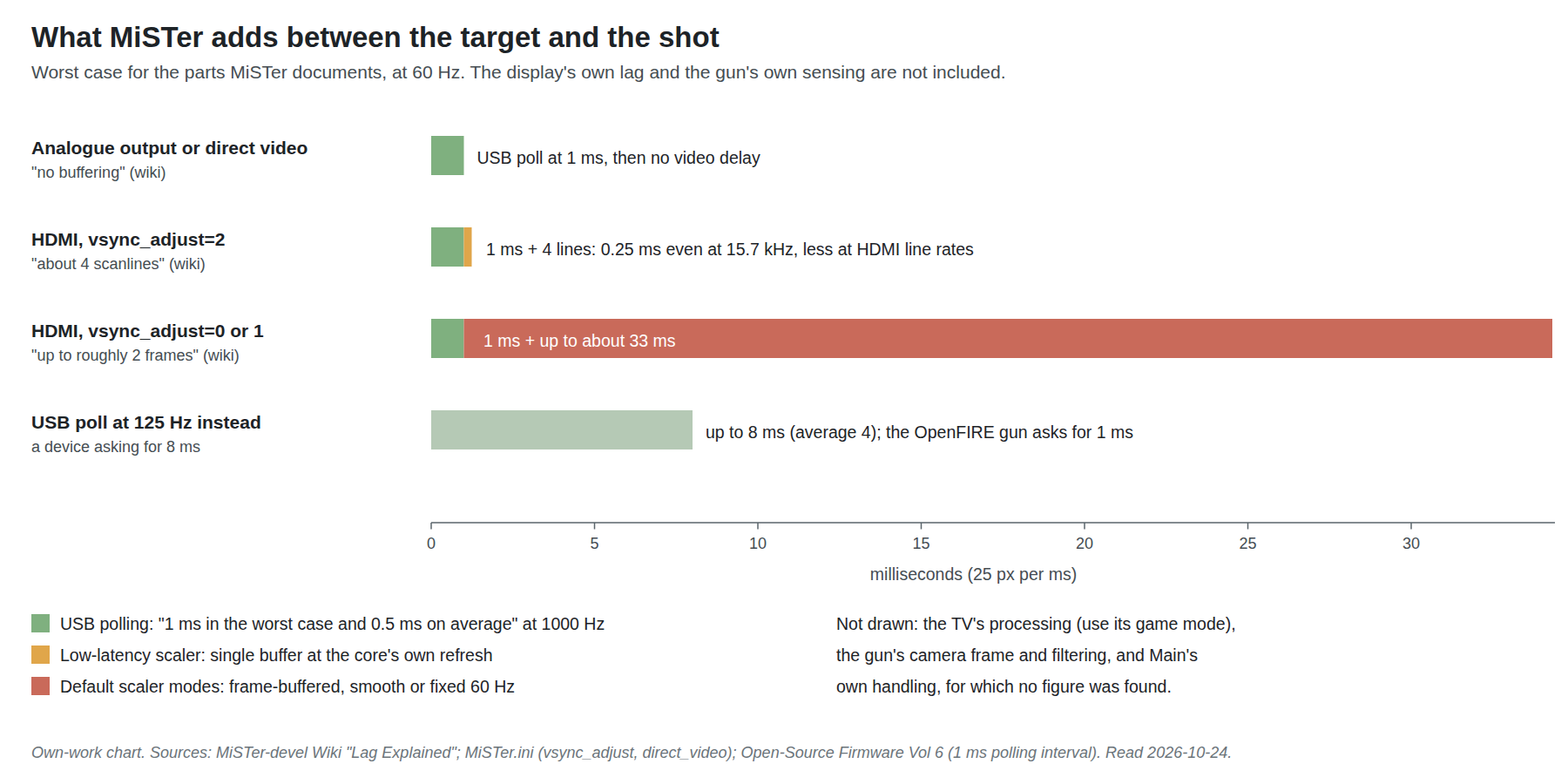
A Route B shot has four delays in a row: the gun’s own sensing and USB report; Main’s handling and the trip to the core; the core’s virtual sensor; and the display showing the target the player aimed at. The core’s part is exact (it fires the sensor when its own raster passes the aim, Volume 2), so what can be managed is the USB poll and the display.
USB polling. MiSTer’s wiki: at 1000 Hz “the additional lag caused by the polling is 1 s / 1000 = 1 ms in the worst case and 0.5 ms on average”, against the 125 Hz default for devices that ask for 8 ms. The fix it documents is the usbhid.jspoll=1 kernel option, set by renaming linux/u-boot.txt_example to u-boot.txt. A gun that already asks for a 1 ms interval, as OpenFIRE does (Open-Source Firmware, Volume 6), should be polled at 1000 Hz without it; that follows from how the kernel honours a device’s requested interval and was not measured on a MiSTer.
The HDMI scaler. The wiki gives the figures: vsync_adjust=2 “will result in about 4 scanlines of latency” and uses “the original refresh rate and pixel clock of the core, resulting in no additional latency”; 0 or 1 “will result in up to roughly 2 frames of latency”. The .ini file calls 2 the “low latency mode (single buffer)” and warns that not every display accepts the variable pixel clock it needs. For a light gun the choice is clear: vsync_adjust=2 if the display accepts it. Up to two frames is 33 ms at 60 Hz, more than everything else MiSTer adds put together. MiSTer’s variable refresh support (vrr_mode) is an alternative route to the same goal on displays that support it; it was not evaluated for this dive.
The analogue output adds nothing (“no buffering”), which is why a modern gun on a CRT is the lowest-latency combination of all (5.9).
The display. A television’s own processing comes on top and is typically the largest single delay; game mode exists to reduce it. PC (Windows), Volume 6 has the general treatment, and its proposed reference display (PW-4) applies here as well.
5.9 CRT or flat panel for a modern gun
A modern IR gun works on either; the emitters go around the screen whatever it is. The trade-offs on MiSTer:
Table 2 — A modern IR gun works on either; the emitters go around the screen whatever it is. The trade-offs on MiSTer
| CRT through the analogue output | Flat panel through HDMI | |
|---|---|---|
| MiSTer’s video latency | none | about 4 lines with vsync_adjust=2; up to about 2 frames otherwise |
| Display’s own latency | none worth counting for a direct-drive set | the panel’s processing, game mode recommended |
| Picture shape | the core’s native picture, overscan included | scaled; integer or full-height options change where the edges are |
| Calibration | edges of the visible tube area | edges of the scaled picture, redone if scaling options change |
| Emitter placement | around a curved tube | around a flat bezel |
| Original guns too | yes, through SNAC or a GunCon 2 (Volume 4) | no |
The one MiSTer-specific trap on a flat panel is that the scaler options (vscale_mode, integer scaling, aspect settings) move the picture’s edges, and the F10 calibration is in the gun’s coordinates, so any change of scaling means recalibrating every core that uses it.
5.10 What could not be verified
- No gun was tried; behaviour is from source and documentation.
- The GunCon 3 driver in MiSTer’s kernel.
- The Wiimote’s single-point behaviour with a two-cluster bar (inferred).
- The two-guns-connected calibration hazard (inferred from code).
- That a gun requesting a 1 ms interval is polled at 1000 Hz without
jspollon MiSTer’s kernel. - pid.codes PIDs 0x0002 and 0x0003 (only 0x0001 and 0x0004 were read).
- The Mayflash product behind 0079:1802.
Sources
- MiSTer-devel,
Main_MiSTer,input.cpp,menu.cpp,MiSTer.ini, master, read 2026-10-24; commits named in 5.1 and 5.2 from theinput.cpphistory, read 2026-10-20. https://github.com/MiSTer-devel/Main_MiSTer - MiSTer-devel Wiki, “Lag Explained”, read 2026-10-24 (github-wiki-see mirror). https://github.com/MiSTer-devel/Wiki_MiSTer/wiki/Lag-Explained
- MrLightgun (Sinden Technology), “MiSTerSindenDriver”, README, HEAD e66785fa43 (2026-10-13), read 2026-10-20. https://github.com/MrLightgun/MiSTerSindenDriver
- Damien McFerran, “MiSTer FPGA Now Supports The Sinden Lightgun”, Time Extension, 4 July 2024, read 2026-10-24. https://www.timeextension.com/news/2024/07/mister-fpga-now-supports-the-sinden-light-gun
- pid.codes, 1209/0001 and 1209/0004, “Test PID”, read 2026-10-24. https://pid.codes/1209/0001/
- Nolan Nicholson, “GunCon2-MiSTer”, README, read 2026-10-24. https://github.com/NolanNicholson/GunCon2-MiSTer
- MiSTer-devel,
NES_MiSTerandSNES_MiSTerREADMEs, read 2026-10-24. - Photo: Chinpokomon5, “Guncon-3”, Wikimedia Commons, CC BY-SA 3.0.
Comments (0)