MiSTer FPGA · Volume 1
How a MiSTer Plays a Light Gun — Two Routes, One Virtual Sensor, 256 Steps
What the MiSTer FPGA platform is from a light gun's point of view, the two ways a gun reaches a core, what the main program does to every coordinate on the way, which guns it recognises, and what that means for the OpenFIRE gun being built
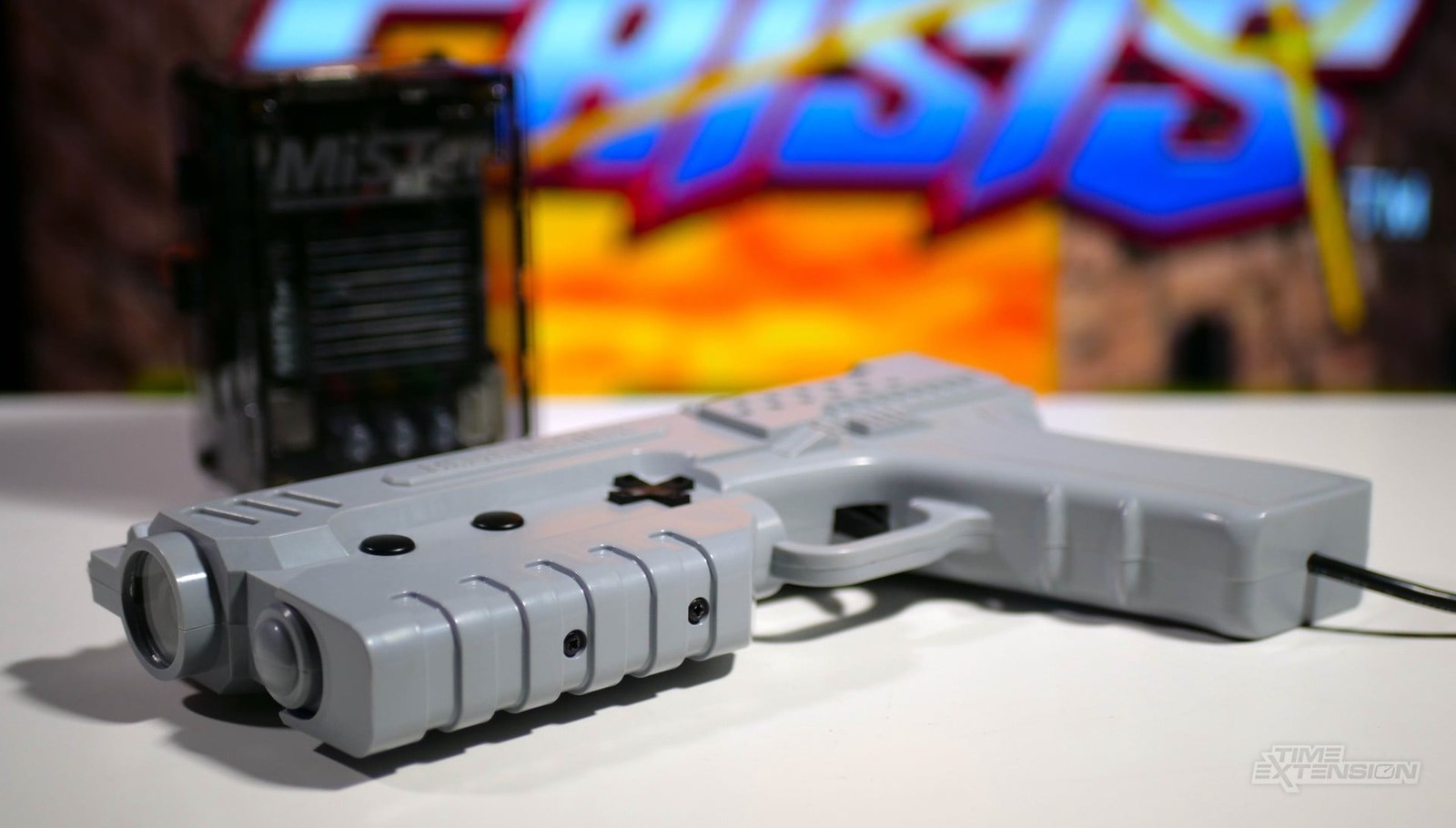
This dive is about one platform: MiSTer, the open-source project that re-implements old consoles, computers and arcade boards in an FPGA rather than emulating them in software. It covers which MiSTer cores play light-gun games, which guns work with them, how to set them up and calibrate them, what latency each video path adds, and, in the last volume, what all of this means for the light gun being built for this category: a Raspberry Pi Pico running a private fork of OpenFIRE, a camera that sees infrared emitters at the screen, and a regulated 24 V solenoid.
It is one of the Platform Support dives. PC (Windows) and Linux and Retro Distros cover the software-emulation platforms; the firmware’s own description of its MiSTer mode is in Open-Source Firmware, Volume 6, section 6.5, and the private fork’s plan is in Our Firmware. Those are linked, not repeated.
Nothing in this dive has yet been tried with the project’s gun. Every behaviour described is read from MiSTer’s and OpenFIRE’s source code or from the projects’ own documentation, each with the date it was read; where a statement is an inference from code rather than a documented or tested behaviour, it says so.
1.1 What a MiSTer is, seen from a light gun
A MiSTer is a Terasic DE10-Nano board, built around an Intel Cyclone V system-on-chip, plus optional add-on boards. The chip has two halves that matter here:
- The FPGA fabric, where a “core” is loaded: a hardware description of a console (NES, SNES, Mega Drive, PlayStation, Saturn and many more) or an arcade board. The core generates the video signal itself, line by line, at the original system’s timing.
- An ARM processor (Sinden’s MiSTer driver README gives it as 800 MHz) running Linux and one program,
Main_MiSTer, usually just called “Main”. Main draws the on-screen menu (the OSD), loads cores and games, and handles every USB device. It is the only part of the system that ever sees a USB light gun.
Two add-on boards decide what a light gun can do:
- The I/O board (Analog or Digital) carries the analogue video output used for CRTs and a user port shaped like a USB 3.0 socket. The user port is not USB: the cores read and drive its seven lines directly as
USER_INandUSER_OUT(visible in every core’s top-level source), which is what lets a SNAC adapter (“Serial Native Accessory Converter”) connect an original console controller, or an original light gun, straight to the core’s emulated controller port. - The USB hub board carries the USB ports for keyboards, pads and modern guns. The GunCon 2 set-up guide warns to use a data-capable port, “not the POWER ONLY one.”
So a light gun can enter a MiSTer in two places, the user port or USB, and leave its effect in one: the core’s emulated controller port. Everything else in this dive follows from that.
1.2 Two routes into a core
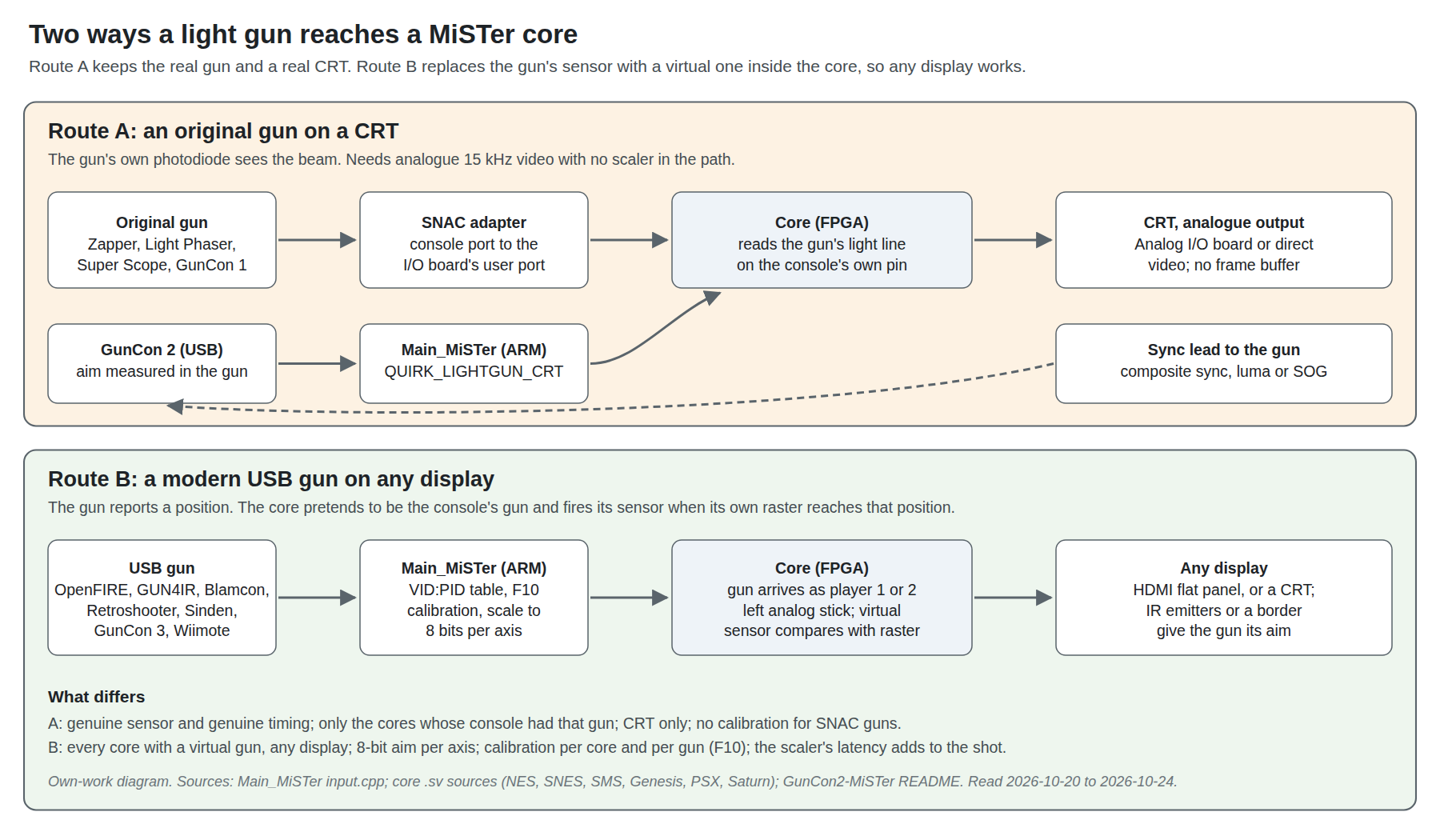
Route A: an original gun on a CRT. The gun’s own photodiode watches a real cathode-ray tube, exactly as it did on the console. Through a SNAC adapter the core receives the gun’s light and trigger signals on the same controller-port pins the console used, so the game’s own code times the shot. A GunCon 2, which measures the beam itself and reports a position over USB, is the in-between case: it still needs a CRT and a video sync signal fed back to it, but its position goes through Main like a modern gun. Volume 4 covers this route: which guns, which cores, which video outputs, and the sync lead.
Route B: a modern gun on any display. The gun works out its own aim, from infrared emitters (OpenFIRE, GUN4IR, Blamcon, Retroshooter, the Wiimote), from a white border in the picture (Sinden), or from emitters beside the screen (GunCon 3), and reports a position over USB. Main converts it and passes it to the core, and the core does the rest: it pretends to be the console’s own light gun and fires that gun’s sensor signal at the moment its own beam passes the reported point. Nothing in the picture needs to be a CRT. Volumes 2, 3 and 5 cover this route, and the project’s gun is a Route B gun.
The two routes are not alternatives for the same games. Route A works only where the console had that gun and the core passes the right pin through (a Zapper only in the NES core, a GunCon 1 only in the PlayStation core); Route B works wherever a core has a virtual gun, including arcade cores whose original guns cannot be connected at all.
1.3 The coordinate’s journey
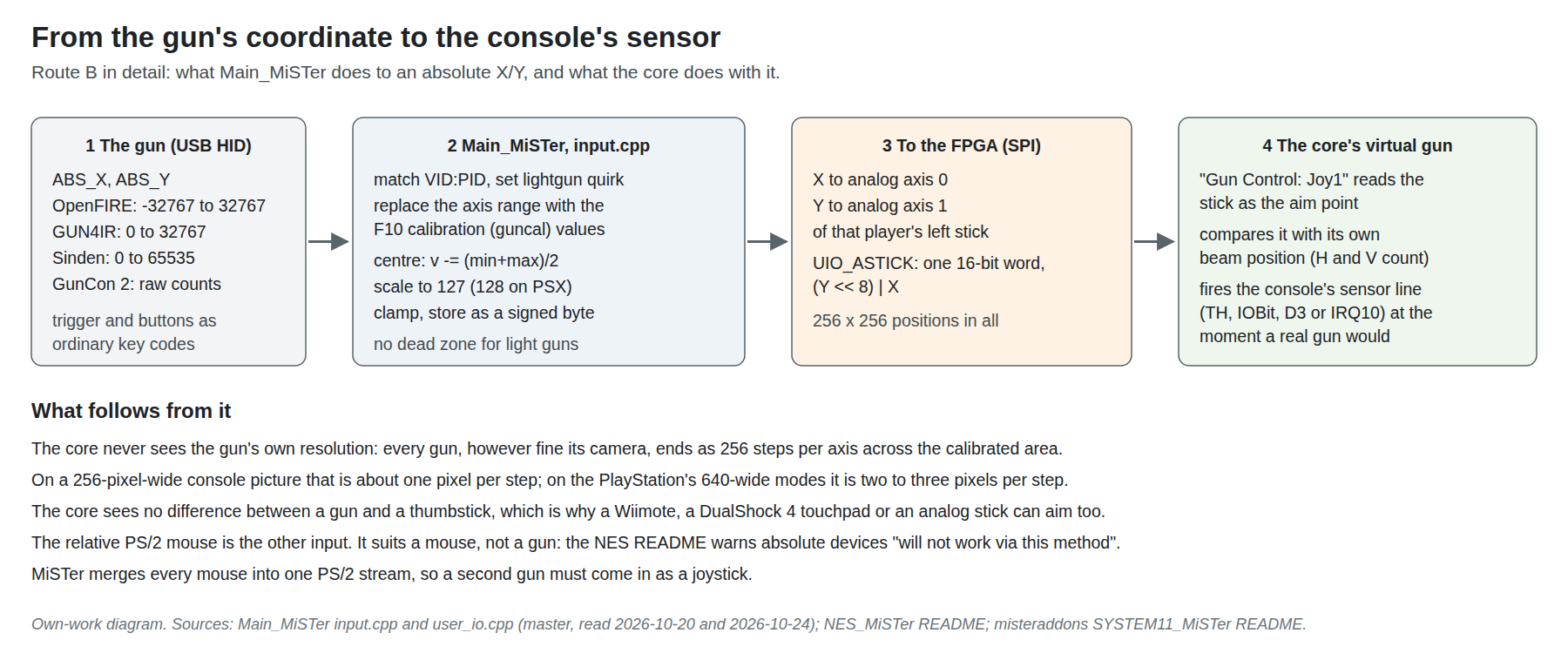
The path a Route B coordinate takes is short and entirely in Main’s input.cpp and user_io.cpp (Main_MiSTer master, read 20 and 24 October 2026):
- Recognition. When a USB input device appears, Main compares its vendor and product ID (and, for two families, its name) against a fixed table and, for a known gun, sets a “quirk” (
QUIRK_LIGHTGUN,QUIRK_LIGHTGUN_CRTorQUIRK_LIGHTGUN_MOUSE) and a default calibration. The table is in Volume 5; the OpenFIRE entry, which matches on the vendor ID and a name prefix rather than a product ID, is in Volume 6. - Calibration. For a gun with a quirk, Main discards the device’s own reported axis range and substitutes four numbers, top, bottom, left and right, from the light-gun calibration screen opened with F10 in the OSD (Volume 5). The saved file is named after the core and the gun’s vendor and product ID (
<core>_gun_cal_<vid>_<pid>_v2.cfg), so a calibration belongs to one gun in one core. - Scaling to a byte. The value is centred on the calibrated midpoint, scaled so the calibrated edges land on ±127 (±128 for the PlayStation core), clamped and stored as a signed 8-bit number. A comment elsewhere in the same file notes that light guns and wheels get no dead zone, which is what a gun needs.
- Delivery. For a device flagged as a light gun, X goes to analog axis 0 and Y to axis 1 of that player’s left stick. Main sends both to the FPGA in one 16-bit word, Y in the high byte and X in the low.
Two consequences matter for every gun:
- Every gun becomes 256 steps per axis. However fine the gun’s camera, the core receives 256 positions across the calibrated width and 256 down its height. On the NES, whose picture is 256 pixels wide, that is about one pixel per step, as fine as the console can use. On the PlayStation’s wider video modes it is coarser than the console could resolve; the PlayStation core maps the byte onto its 8 MHz dot clock as
67 + X + X/2, about one and a half dot-clock units per step. No game in the PlayStation library was examined for whether that is visible. - A gun is a stick. The core cannot tell a light gun from a thumbstick. That is why MiSTer also lets a Wiimote, a DualShock 4 touchpad or a plain analog stick aim in light-gun games, and why the per-core menus in Volume 2 offer “Joy1”, “Joy2” or “Mouse” as the gun’s source rather than any gun by name.
The menus’ third choice, “Mouse”, is a different path: a relative PS/2 mouse. It suits a mouse, not a gun. The NES core’s README says so directly: Zapper(Mouse) “uses relative mouse motion, so devices that rely on absolute coordinates will not work via this method”, and points absolute guns to Zapper(Joy). And a third-party arcade core’s README adds the other limit: “MiSTer exposes a single merged PS/2 mouse stream, so a second mouse is not reachable from a core.” A second gun has to come in as a joystick (Volume 3).
1.4 The virtual sensor
A real CRT light gun does not report a position. It reports a moment: the instant its photodiode sees the beam pass the point it is aimed at. The console turns that moment into a position by reading its own video counters (CRT Timing explains the methods: latched counters, polled flags and flash frames).
A MiSTer core running a Route B gun has the opposite problem. It is told a position and must produce the moment. It can, because it generates its own picture: the core knows at every pixel clock where its beam is, so its light-gun module watches the horizontal and vertical counters, waits until they reach the reported point, and then drives the console’s sensor line exactly as the real gun’s photodiode would have, with a delay tuned to imitate the real gun’s electronics. The game’s code cannot tell the difference. Volume 2 reads each core’s module: the Sega family’s SENSOR_DELAY constants, the SNES module’s 22-clock shift register on the counter-latch line, and the NES module that goes further and checks the colour being drawn under the aim point.
This is why MiSTer is the one modern platform on which CRT-era gun games run unpatched with modern guns and on modern displays: the timing the game expects is produced inside the same hardware that produces the picture. CRT Timing, Volume 7 asked which platforms “generate an analogue raster in real time with the console’s line timing and with the gun’s latch tied to the same counters”; for Route B the answer is that a MiSTer core does not need the analogue raster at all, only its own counters, because the gun’s light is simulated.
1.5 Which guns the main program knows
As of Main_MiSTer master on 24 October 2026 (latest change to input.cpp on 18 October 2026), the recognition table names these guns. Volume 5 has the identifiers, ranges and set-up for each.
Table 1 — 1.5 Which guns the main program knows
| Gun | How Main recognises it | Kind |
|---|---|---|
| OpenFIRE (any OpenFIRE gun) | Vendor ID 0xF143 and a name containing “OpenFIRE “ | IR camera, Route B |
| GUN4IR | Arduino vendor ID with product IDs 0x8042–0x8049 | IR camera, Route B |
| Sinden | Two vendor IDs, four product IDs; needs Sinden’s own driver on the ARM | Border camera, Route B |
| Blamcon | Vendor 0x3673, eight product IDs | IR camera, Route B |
| Retroshooter (RS3) | Vendor 0x0483, product IDs 0x5750–0x5753 | IR camera, mouse quirk |
| X-Gunner | Vendor 0x1209, product IDs 0x0001–0x0004 (added 9 October 2026) | Mouse quirk |
| Namco GunCon 3 | 0B9A:0800 | Emitters at the screen, Route B |
| Namco GunCon 2 | 0B9A:016A | CRT gun over USB, Route A |
| GunCon 1 through RetroZord, Reflex Adapt or an Arduino | Vendor and name (“RZordPsGun”, “ReflexPSGun”) | CRT gun over USB |
| Ultimarc AimTrak | D209:1601 | Flagged as a gun, no calibration quirk |
| Nintendo Wiimote | Bluetooth, by its IR axes | IR camera, Route B |
| DualShock 4 touchpad, touchscreens | Device type, with a light-gun mode toggle | Not guns; aim by touch |
Anything not in the table can still aim if it presents an analog stick, but without the light-gun treatment: no calibration screen, and the default joystick dead zone applies.
1.6 What the display has to do
The two routes put opposite demands on the display, and Volumes 4 and 5 go into each:
- Route A needs a CRT and a real-time analogue picture. The original gun sees light, so it needs a tube, and it needs the picture with no frame buffer between the core and the tube. MiSTer’s analogue output on the I/O board, and HDMI with
direct_video=1into a VGA converter, both carry the core’s own timing. MiSTer’s own wiki describes the analogue output as “driven as the original system would have, with no buffering.” - Route B works on any display, but the display’s lag is added to every shot. The gun aims from the room, not the picture, so a flat panel is fine; but the player sees the target late by whatever the scaler and the panel add. MiSTer’s HDMI scaler adds “up to roughly 2 frames” in its default modes and “about 4 scanlines” with
vsync_adjust=2(wiki, “Lag Explained”). A Route B gun on a CRT through the analogue output is the lowest-latency combination of all.
1.7 What this means for the project’s gun
The project’s gun is an OpenFIRE gun, and OpenFIRE is the only open, maintained gun firmware whose support is written into Main itself, contributed by OpenFIRE’s maintainer in February 2025. The practical result, which Volume 6 takes apart in detail:
- Plug-in recognition. Main finds the gun by its vendor ID and the “OpenFIRE ” prefix in its name, opens its serial port by a path built from its name and USB serial number, and writes the four characters
M0x9. The firmware answers by switching to its “MiSTer optimized” gamepad layout with the aim on the left stick, which is exactly what the cores’ “Joy1” setting reads. - Recoil is the gun’s own, not the game’s. Main sends nothing else to the gun, and MiSTer has no equivalent of MAME’s outputs, so the solenoid fires on every on-screen trigger pull by the gun’s own rules. Game-driven recoil, as on Windows, does not exist on MiSTer.
- Calibration is per core, and the IR calibration is done elsewhere. The OpenFIRE v6.0 release notes say the per-core calibration and mapping “are not something we can address without fundamental changes to the MiSTer’s UI/UX”, and that the gun’s own display calibration “currently has to be done against the desired display from a different device”.
- The identity must not drift. Decision D24 keeps 0xF143 for every bench and personal gun, and the private fork keeps the “OpenFIRE” name. Volume 6 adds two dependencies not yet recorded in the project’s decisions: the USB serial-number string and the characters allowed in a custom product name.
1.8 Why MiSTer, and why not
Why it earns a place in the project. MiSTer is the only platform covered by these dives on which console light-gun games run as written, with the game’s own timing, on a modern gun: the core generates both the picture and the gun’s sensor signal (1.4). It is also the platform on which the project’s OpenFIRE gun needs the least set-up, no driver and no hook program, because recognition is built in. And it can still drive a CRT with original guns, which makes it a useful reference bench: the same game can be shot with an original Zapper on a tube and with the project’s gun on a television, on the same hardware.
Why it is not the reference platform. Windows is (PC (Windows), Volume 1). On MiSTer:
- the gun’s recoil cannot follow the game, so the project’s work on game-driven feedback (QMamehook, the regulated solenoid stage’s pulse timing per game) does not apply;
- the gun’s aim reaches the core at 8 bits an axis;
- arcade gun coverage is a handful of cores (Volume 3), against hundreds of gun games in MAME;
- the gun’s own camera calibration needs a PC or a Pi on the same display first.
Why not a Sinden-style or border gun for MiSTer instead? Sinden’s MiSTer support needs a custom kernel, forked cores that draw the border, and a driver that takes processor time from the same ARM that the PlayStation core also leans on (Volume 5; Border Tracking, Volume 6). An IR gun that computes its own aim, as the project’s does, needs none of that. That comparison is the reason the category chose IR point tracking, not a reason specific to MiSTer, but MiSTer is where the difference is starkest.
1.9 What could not be verified
- No light gun of any kind has been tried on a MiSTer for this dive; everything is read from source and documentation.
- Whether the 8-bit aim is ever visibly coarse in a PlayStation game (an inference from the PlayStation core’s arithmetic).
- The ARM clock and board details are taken from Sinden’s README and the DE10-Nano’s general description, not from a datasheet read for this dive.
Sources
- MiSTer-devel,
Main_MiSTer,input.cpp,menu.cpp,user_io.cpp, master branch, read 2026-10-20 (HEAD d49cd644) and 2026-10-24 (latestinput.cppcommit 396755334e, 2026-10-18). https://github.com/MiSTer-devel/Main_MiSTer - MiSTer-devel,
Main_MiSTer,MiSTer.ini, master, read 2026-10-24. - MiSTer-devel Wiki, “Lag Explained”, read 2026-10-24 via the github-wiki-see mirror. https://github.com/MiSTer-devel/Wiki_MiSTer/wiki/Lag-Explained
- MiSTer-devel,
NES_MiSTerREADME (“Zapper Support”), read 2026-10-24. https://github.com/MiSTer-devel/NES_MiSTer - MiSTer-devel,
PSX_MiSTer,PSX.svandjoypad_pad.vhd, main branch, read 2026-10-20 and 2026-10-24. https://github.com/MiSTer-devel/PSX_MiSTer - misteraddons,
SYSTEM11_MiSTerREADME, read 2026-10-20. https://github.com/misteraddons/SYSTEM11_MiSTer - Nolan Nicholson, “GunCon2-MiSTer”, README, read 2026-10-24. https://github.com/NolanNicholson/GunCon2-MiSTer
- MrLightgun (Sinden Technology), “MiSTerSindenDriver”, README, HEAD e66785fa43 (2026-10-13), read 2026-10-20. https://github.com/MrLightgun/MiSTerSindenDriver
- TeamOpenFIRE, OpenFIRE-Firmware v6.0 release notes (2025-05-24), read 2026-10-20. https://github.com/TeamOpenFIRE/OpenFIRE-Firmware/releases
- Damien McFerran, “MiSTer FPGA Now Supports The Sinden Lightgun”, Time Extension, 4 July 2024 (photo). https://www.timeextension.com/news/2024/07/mister-fpga-now-supports-the-sinden-light-gun
Comments (0)