Modding Classic Light Guns · Volume 4
The GunCon 2 With OpenFIRE — Michael's Fallback Build at Bench Depth
A published, photographed, reversible conversion followed board by board: what comes out, the two plastic tabs that are cut, the three IC pins that are lifted, the camera in a printed coupler behind a phone fisheye, the seven-way ribbon by pin, every GunCon 2 control mapped to OpenFIRE's Pico preset, and where this build departs from the source and why
4.1 The build in one table
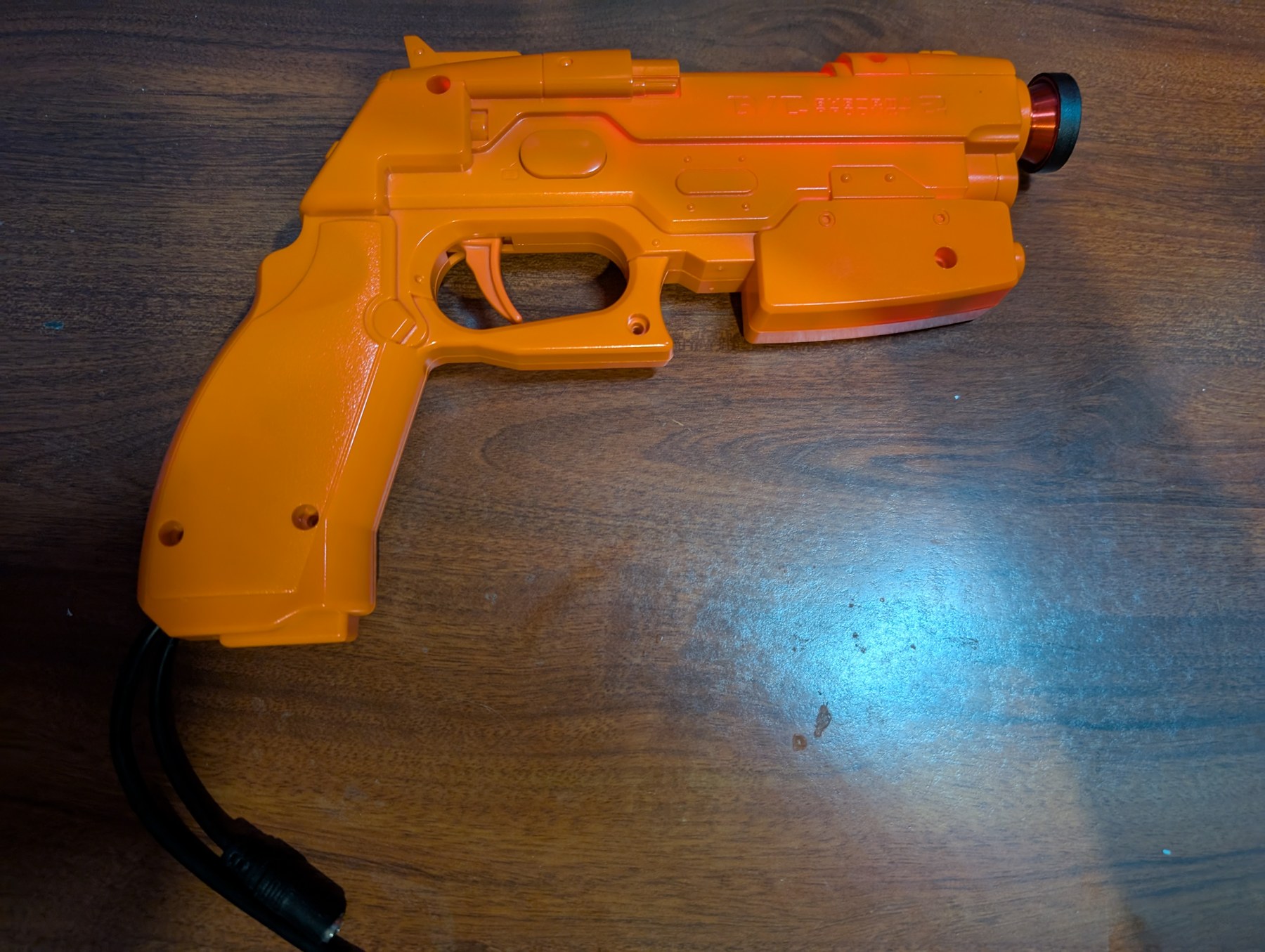
Table 1 — 4.1 The build in one table
| Item | This build | Source |
|---|---|---|
| Host | Namco GunCon 2, preferably one sold for parts | Volume 3 |
| Board | Raspberry Pi Pico (RP2040), on hand (D2, D19) | Fits the grip with two tabs cut1 |
| Firmware | OpenFIRE v6.2 release UF2 to start; the private fork (D10) later | Open-Source Firmware, Volume 4 |
| Camera | Wii-sensor class I2C camera: the bench camera of Reference Electronics, Volume 3 | §4.4 |
| Lens | Clip-on phone fisheye in a printed coupler | Thingiverse thing 64888251 |
| Switches | The GunCon 2’s own: trigger, A, B, C, Start, Select, D-pad | §4.8 |
| Wire | 26 to 28 AWG ribbon, 30 AWG wrapping wire | 1 |
| Emitters | The project’s 850 or 940 nm bar | Reference Electronics, Volume 6 |
| Recoil and rumble | None at first; Volume 6 adds them | — |
| Reversible? | Yes, if the lifted IC pins are re-soldered and the coupler removed | 1 |
4.2 The source build, and how far to trust it
Everything in this volume about the GunCon 2’s inside comes from one published conversion: “GunCon 2 to OpenFIRE Conversion” on The Opponent, posted on 28 July 2025, with eight photographs and its content released under CC0. Its stated aims were a conversion that is “reversible and done as cheaply as possible”, using a single 3D-printed part.1 It is the only complete, photographed GunCon 2 to OpenFIRE write-up found, and it is consistent with what the GUN4IR and SAMCO kits imply about the same shell.
It is one builder’s account of one gun. It gives no screw sizes, no dimensions and no calibration figures beyond a minimum range, and it did not fit a solenoid or rumble motor. Where this volume adds to it, the addition is marked and its basis given. The measurements it does not give are listed in §4.11 as owed from the bench.
4.3 What goes where
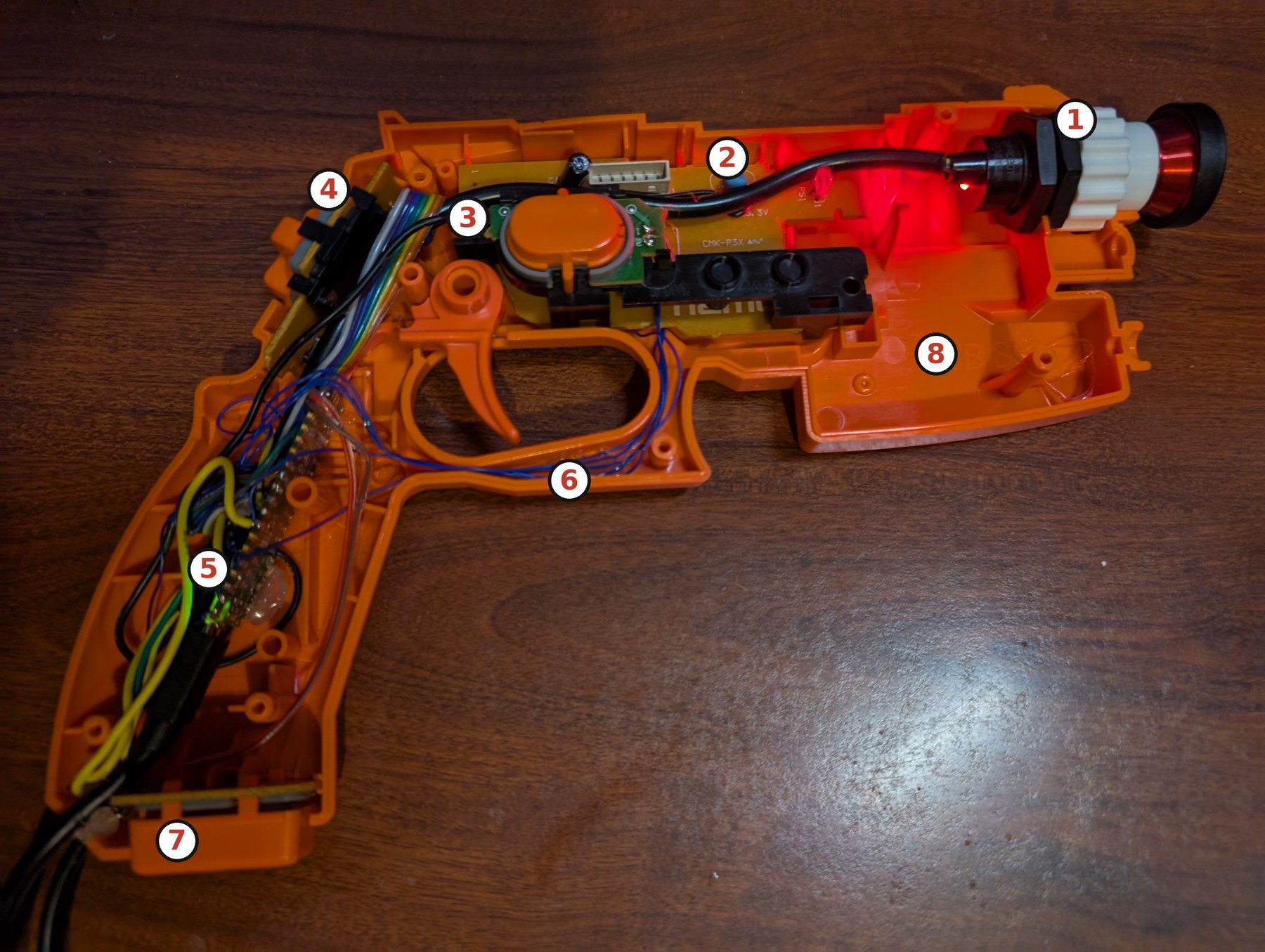
Point 8 is this dive’s observation from the photograph, not the source’s: the build leaves the lower front of the slide almost empty, which matters in Volume 6.
4.4 Parts, and why each
The board. The source build used “a board with a Raspberry Pi Pico footprint” and says any OpenFIRE-supported RP2040 or RP2350 board will do.1 This project already has several Picos (D19), D2 makes the Pico the starting board, and OpenFIRE’s default Pico preset (§4.8) has a pin for every GunCon 2 control with room left for a solenoid, rumble and pedal.
Table 2 — 4.4 Parts, and why each
| Board | Verdict | Reason |
|---|---|---|
| Raspberry Pi Pico | Chosen | On hand (D19); the board of D2; proven in this shell with two tabs cut;1 OpenFIRE default preset |
| Pico 2 | Acceptable drop-in | Pin-identical (OpenFIRE’s board file says so); Reference Electronics, Volume 2 explains the stepping to buy |
| ItsyBitsy RP2040 on a SAMCO 2 board | The tidy alternative | See Volume 3, §3.7; not the D2 board, board price not readable |
| Waveshare RP2040-Zero, KB2040 | Not needed | Fewer pins; useful only if the grip proves too tight |
The camera. The source build used a DFRobot IR positioning camera from an Amazon listing.1 For this project the camera question is settled elsewhere and this build follows it: Reference Electronics, Volume 3 found the DFRobot SEN0158 unbuyable from DFRobot (“Notify Me”) and proposes a harvested Wii Remote camera on a small carrier as the bench camera, while the kit camera is the PixArt PAJ7025R3 (D18, row P-RE16). The PAJ7025R3 is not supported by stock OpenFIRE on the RP2040; only the ESP32-S3 port drives it (Open-Source Firmware, §1.7).
Table 3 — 4.4 Parts, and why each
| Camera for this build | Verdict | Reason |
|---|---|---|
| Wii-sensor class I2C camera (harvested, or a DFRobot SEN0158 bought second-hand) | Chosen | The only cameras stock OpenFIRE on a Pico supports; same 33° × 23° view; this is a personal fallback gun, so D18’s supply rule for kits does not bind it |
| PixArt PAJ7025R3 | Not for this build | Needs the ESP32-S3 port or the fork’s untested port to the Pico (row P-RE18); and its 113° field would make the fisheye pointless |
| GUN4IR camera module | Rejected | Part of a closed system; sold out |
The lens. A Wii-class camera’s 33° view makes the player stand far back from a large television (Reference Electronics, §3.6); a fisheye widens it. The source build fits a clip-on phone fisheye (Amazon B00FTSG35E) in front of the camera with a printed coupler, GCon2_Lens_support_M19.1.25-M18.1.25.stl from Thingiverse thing 6488825.1 The file name suggests metric 19 × 1.25 mm and 18 × 1.25 mm threads for the lens and muzzle; that is a reading of the name, and the Thingiverse page could not be opened to confirm it. With the fisheye fitted, the source build reports “a minimum effective range starting at about 4 feet from the IR emitters”.1
4.5 Taking the GunCon 2 apart
The source’s sequence, in its order:1
- Open the shell and remove all the circuit boards from the chassis.
- Remove the black camera tube “by pulling at the four tabs on the sides”. The original optics are not used again, but keep them: they are what makes the conversion reversible.
- Disconnect the USB cable by unplugging its harness from the main board.
- Desolder the ribbon cables to the B button board and to the D-pad board.
No screw count or sizes are given. Photograph each layer and lay screws out by hole (Volume 1, §1.8).
4.6 What is cut, lifted and kept
Table 4 — 4.6 What is cut, lifted and kept
| Part | What happens | Why | Reversible? |
|---|---|---|---|
| Black camera tube | Removed | Its optics block the IR camera’s view | Yes: refit it |
| Two plastic tabs in the grip | Cut away | Make room for a Pico-footprint board | No, but cosmetic and inside |
| Main board | Kept, with three pins of the large square IC lifted | The A, Start and Select contacts run to that IC; lifting its pins isolates them so the new board alone reads them | Yes: re-solder the pins |
| Ribbon to the D-pad board | Replaced with new ribbon | Brings trigger, D-pad and C to the new board | Yes: the original ribbon is kept |
| B button board | Kept; wired from its own vias | Yes | |
| USB cable | Unplugged from the main board, reused for the new board | Exits through the original outlet | Yes |
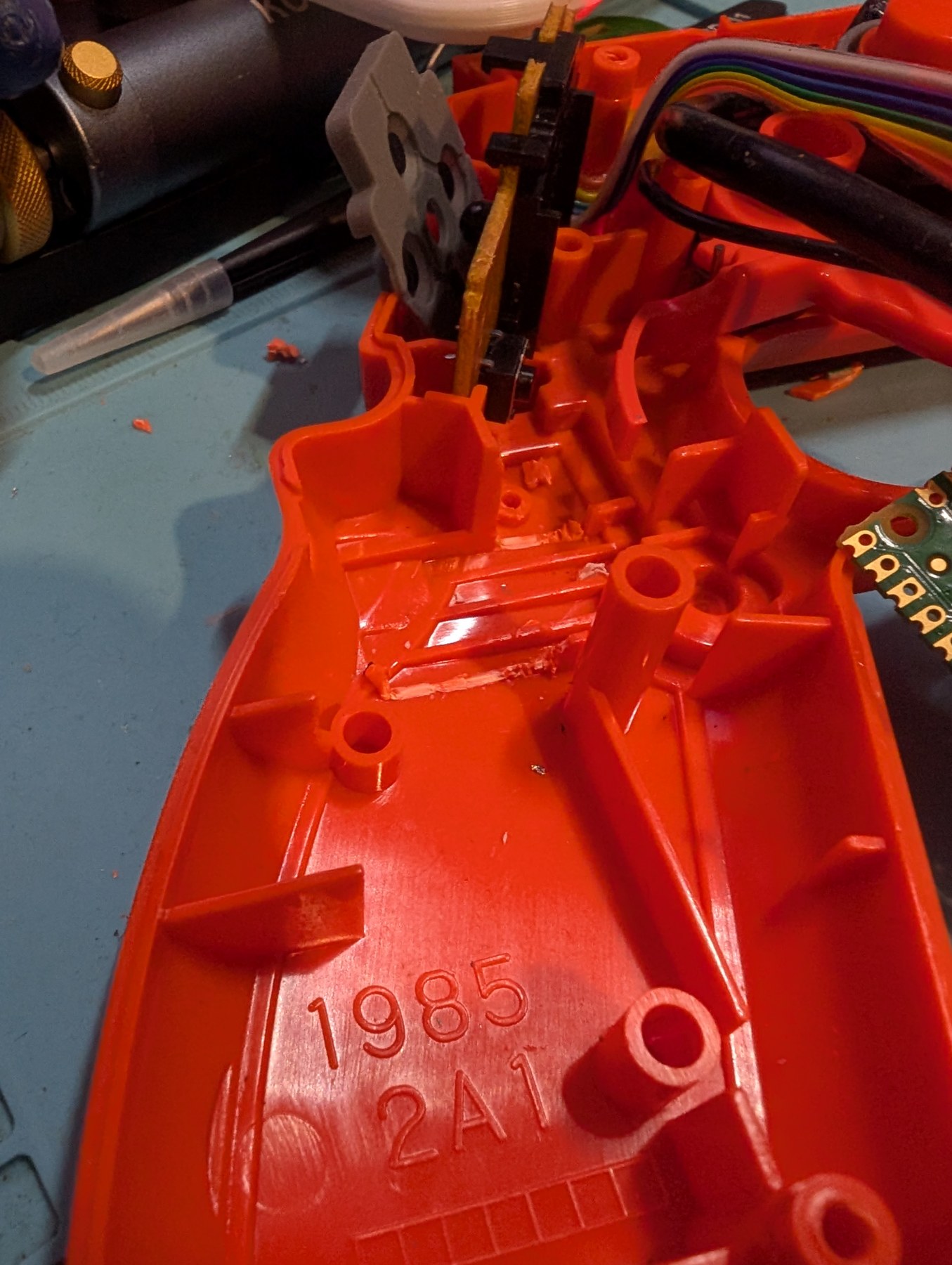
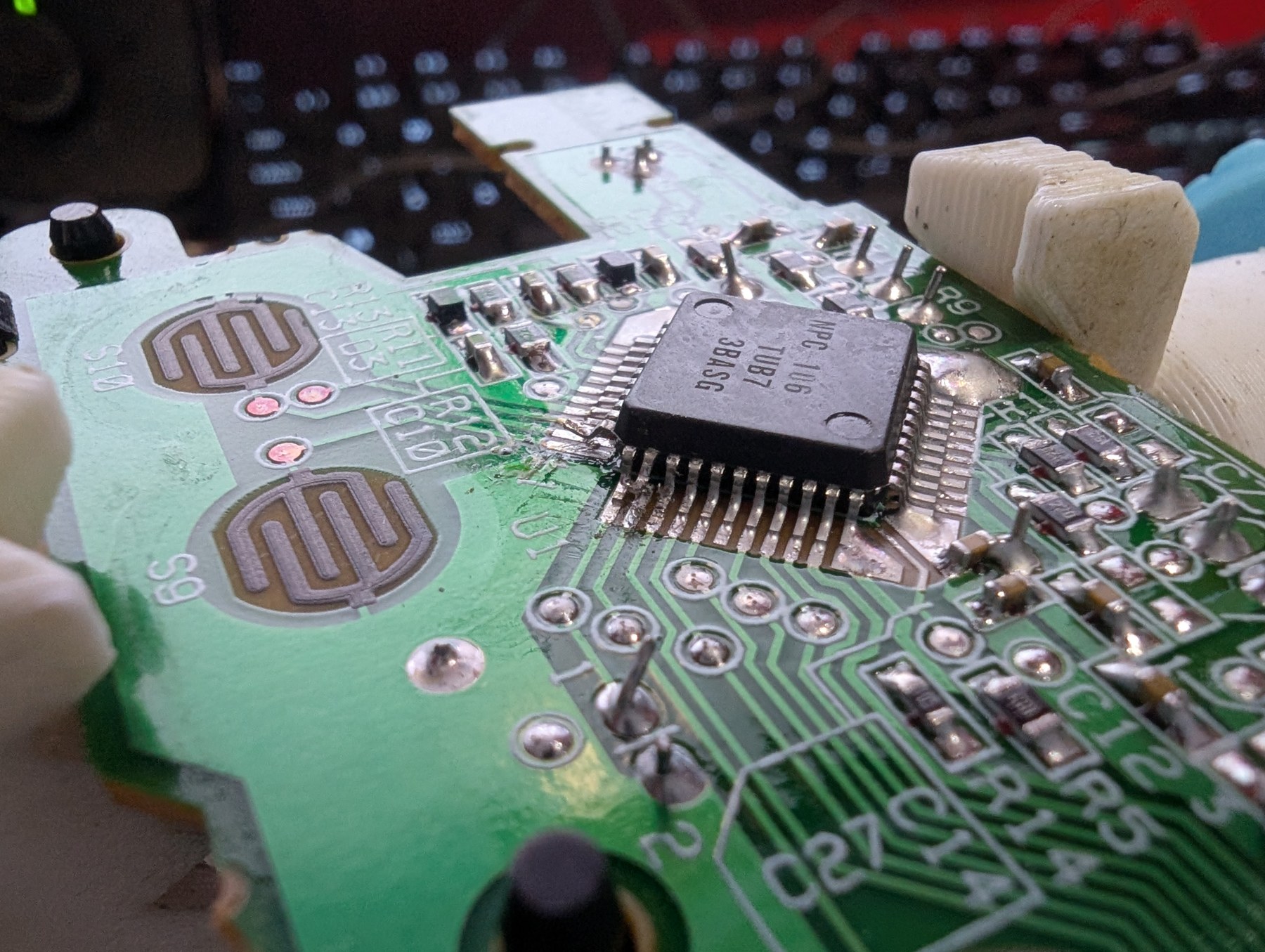
Lifting rather than cutting traces is what keeps the conversion reversible; it is also the one step that takes a fine iron and care, because a lifted pin snapped off ends any chance of restoring the gun. A hot-air pencil to free each pin while it is eased up with a pick is the gentle way; that is general rework practice, not the source’s instruction.
4.7 The camera behind the barrel
- Flash first, then fit. Flash OpenFIRE to the board and wire the camera’s four leads on the bench, then test the orientation in the OpenFIRE App before anything goes into the shell.1
- Orientation. “The LED on the rear of the camera should be on the left side when oriented properly.” Ignore any TOP marking: it is wrong on at least some DFRobot units (Volume 3, §3.6).1
- Into the coupler. The camera goes into the larger end of the printed coupler, which is then secured to the tabs in the muzzle with hex nuts.1
- Lens. The fisheye threads or clips onto the coupler’s front.
The coupler holds the camera on the bore axis because it registers on the same muzzle features that located Namco’s own camera tube. The camera’s four leads (power, ground, SDA, SCL) run back along the slide to the board in the grip; keep them twisted or as a ribbon and away from any future solenoid.
4.8 Wiring the controls
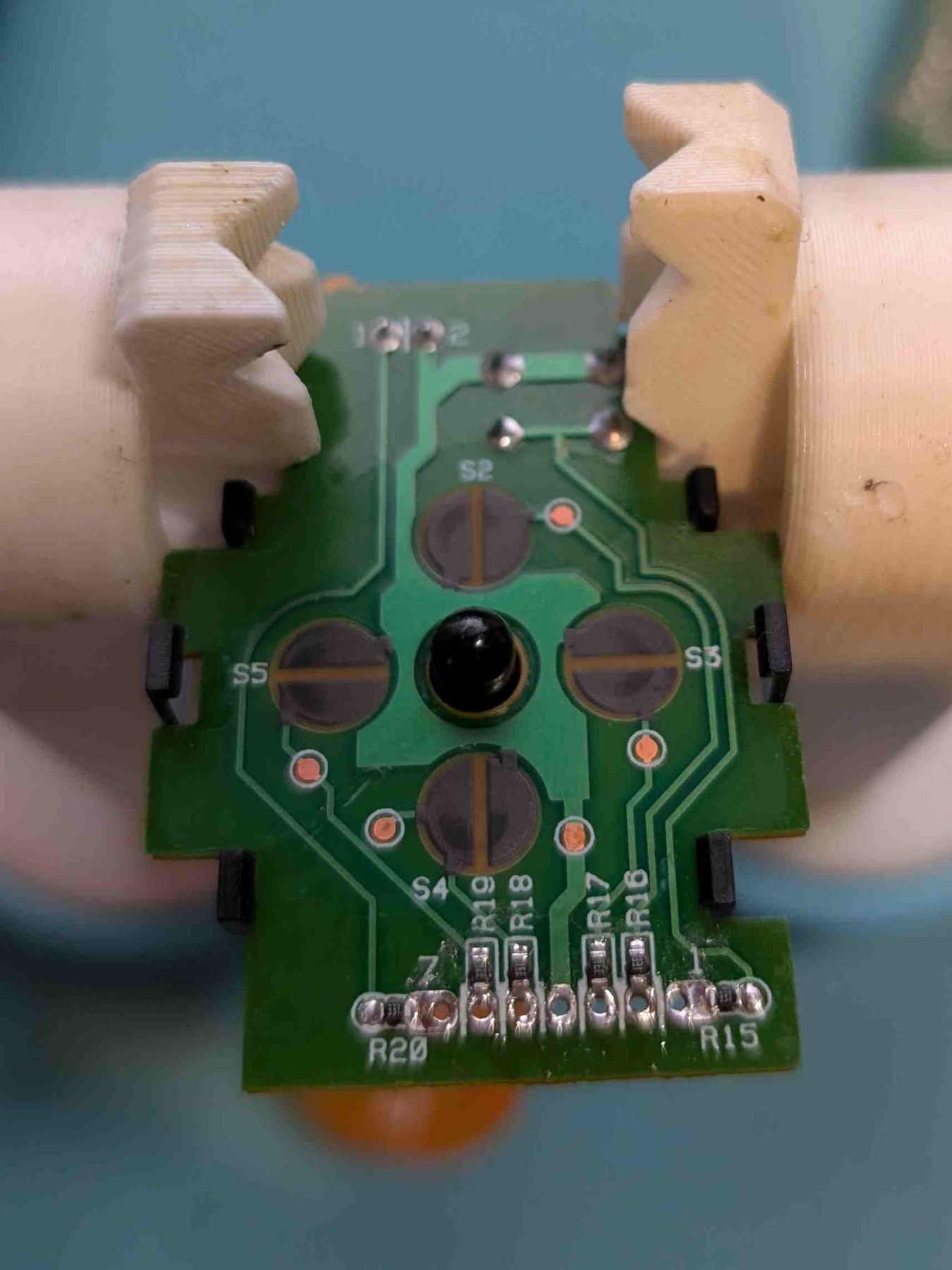
The D-pad board’s ribbon. The trigger microswitch lives on the small D-pad board, which reaches the main board by a seven-way ribbon. The source gives its pin-out, with the vias on the bottom of the board and pin 1 on the right:1
Table 5 — 4.8 Wiring the controls
| Ribbon pin | Signal |
|---|---|
| 1 | Trigger |
| 2 | Down |
| 3 | Left |
| 4 | Ground |
| 5 | Up |
| 6 | Right |
| 7 | C |
A, Start and Select are rubber-dome contacts on the main board. Trace each contact to its pin on the large IC, lift that pin (§4.6), tin the test pad between contact and IC, and run 30 AWG wire from the pad to the new board. Route the wires “upward or downward so they do not obstruct contact with the rubber dome buttons”. The common ground is the centre hole of the ribbon contacts. B is wired from its own board’s vias.1
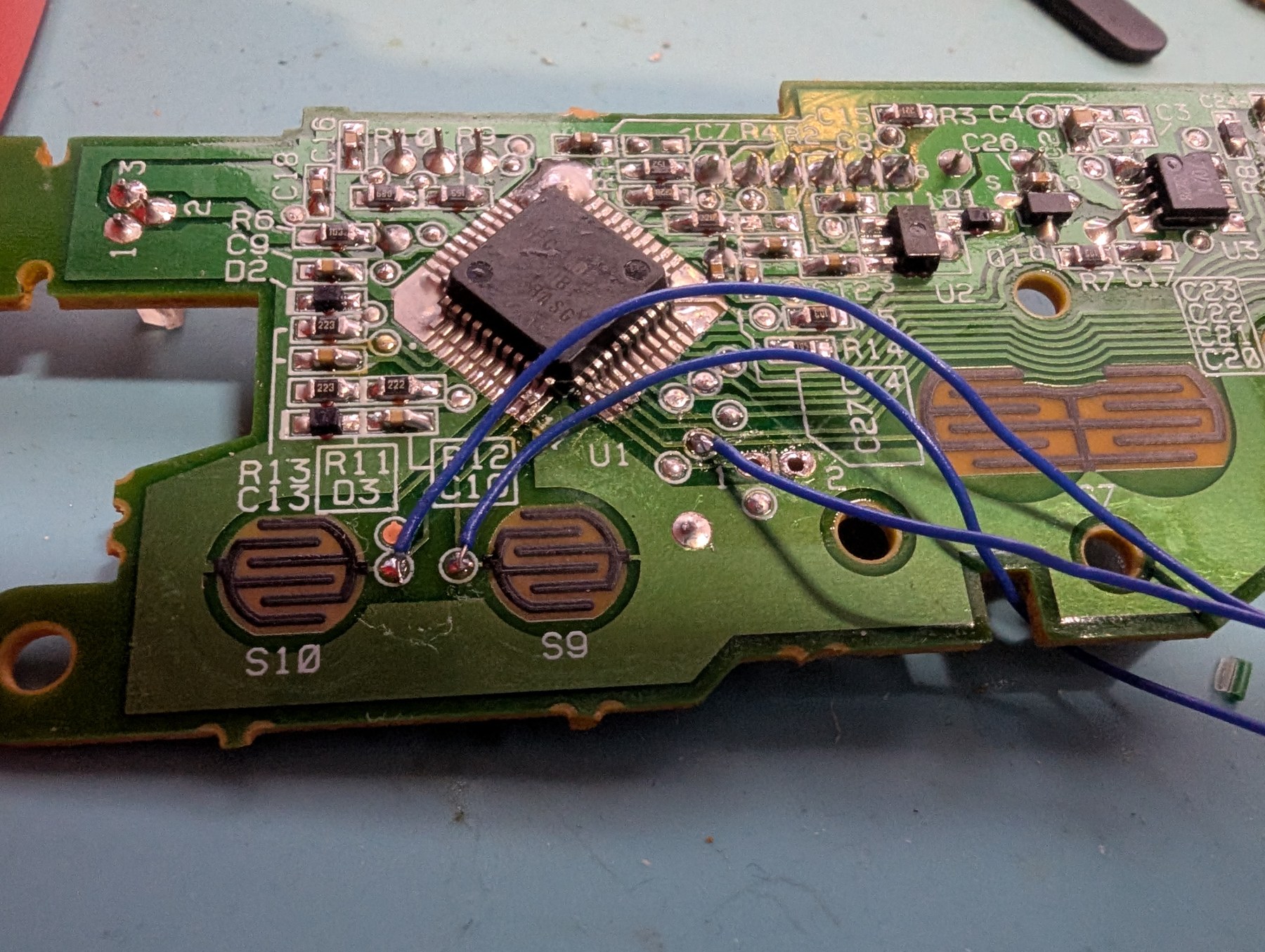
To the Pico. OpenFIRE’s default pin map for the Raspberry Pi Pico, read from its shared board file, assigns a function to each GPIO.2 Mapping the GunCon 2’s controls onto it needs no remapping in the App:
Table 6 — To the Pico. OpenFIRE's default pin map for the Raspberry Pi Pico, read from its shared board file, assigns a function to each GPIO.[^ofboards] Mapping the GunCon 2's controls onto it needs no remapping in the App
| GunCon 2 control | OpenFIRE function | Pico GPIO (default preset) |
|---|---|---|
| Trigger | Trigger | GP15 |
| A | Gun A | GP0 |
| B | Gun B | GP1 |
| C | Gun C | GP2 |
| Start | Start | GP3 |
| Select | Select | GP4 |
| D-pad up / down / left / right | Gun Up / Down / Left / Right | GP6 / GP7 / GP8 / GP9 |
| Pedal (added) | Pedal | GP14 |
| Camera SDA / SCL | Camera I2C | GP20 / GP21 |
| Solenoid / rumble (Volume 6) | Solenoid / Rumble outputs | GP16 / GP17 |
The switches are wired between the GPIO and ground, which is how the firmware expects buttons (Open-Source Firmware, Volume 3). The preset also places a Home button on GP5, which the GunCon 2 lacks; OpenFIRE’s SAMCO 2.0 preset for the ItsyBitsy solves the same shortage by making C the Home button,2 and the App can do the same on the Pico. Which buttons the source build used for what is not stated beyond “following the wiring guide”; the table above is this dive’s mapping, chosen so that the default preset works unchanged.
Routing and fixing. Channel the wires round the inside of the trigger guard, close the shell to check every button presses with no more resistance than before, and only then fix the wires with hot glue.1
4.9 The board in the grip, the cable and the pedal
“Place the microcontroller in the handle with the USB cable oriented downward.”1 The board’s own USB socket then lines up with the original cable outlet, and the GunCon 2’s USB lead, now unplugged from the main board, is replaced by an ordinary micro-USB lead through the same exit.
The source build adds a foot pedal without a microcontroller of its own: a 3.5 mm audio extension lead whose male end is wired to the pedal’s microswitch and whose female end is left a few inches long, hanging from the outlet and wired to the board’s pedal pin; hot glue fills the gap.1
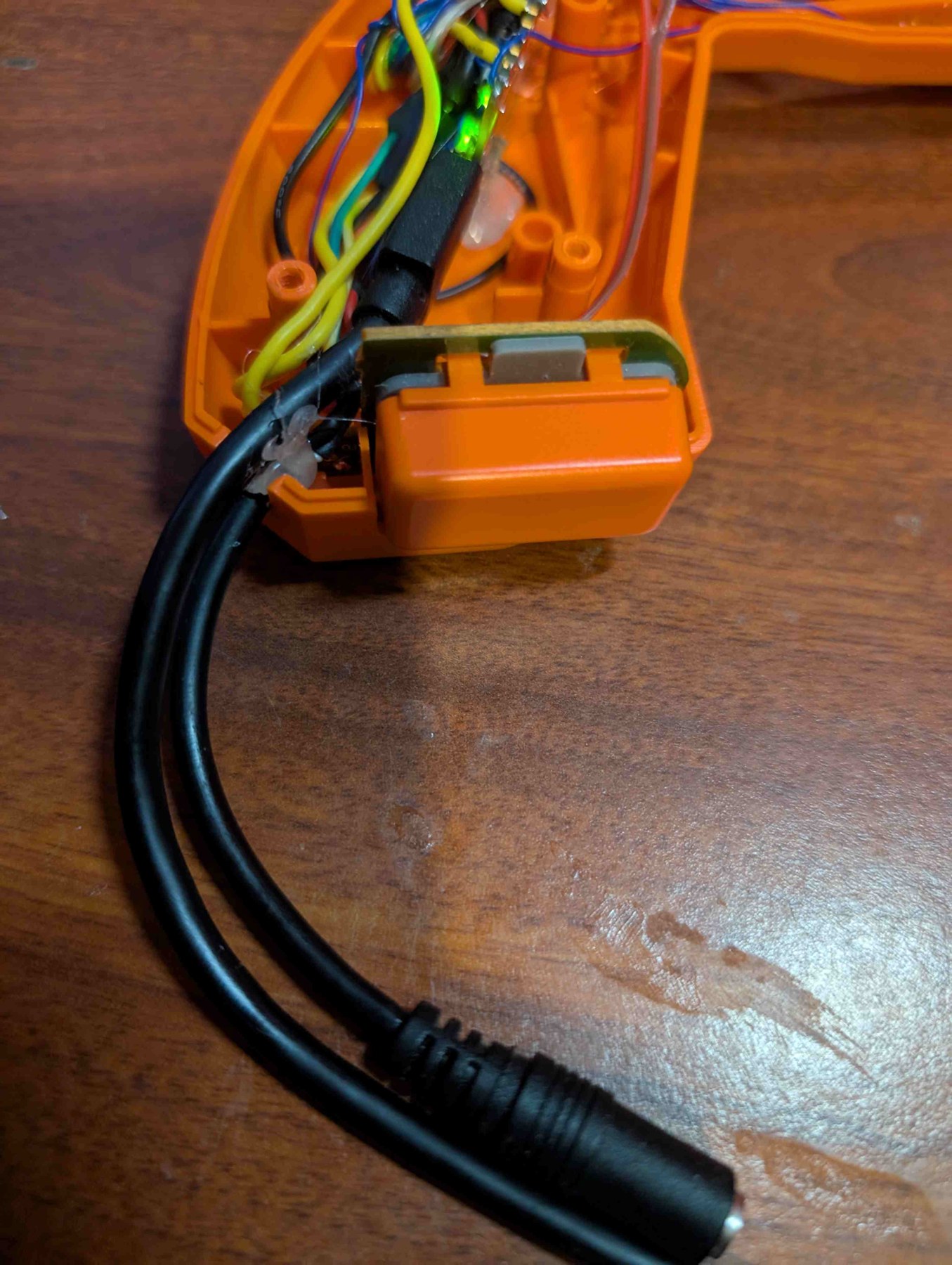
The source notes the outlet has room for “an external power connector for a 12/24V solenoid”, to be added later.1 That is the subject of Volume 6. The MP7 build settled on one locking GX connector for USB and the 24 V rail (D31); in a GunCon a second lead through the outlet is simpler, and Volume 6 weighs the two.
4.10 Bring-up and calibration
Bring-up follows Open-Source Firmware, Volume 4 and the staged bench order of Reference Electronics, Volume 7; calibration and settings are Open-Source Firmware, Volume 5. The steps specific to this shell:
- Before closing: every button in the App’s test view, with the shell halves held together by hand, so a wire under a dome shows up now.
- Camera view: all four emitters visible from the playing position with the fisheye fitted; the source’s minimum of about 4 feet sets how close the player can stand.1
- Calibrate in the App with the shell closed; the coupler fixes the camera, so a calibration made with the shell open is wasted.
4.11 Measurements and photographs owed
Table 7 — 4.11 Measurements and photographs owed
| Owed | How | Why |
|---|---|---|
| Grip cavity length, width and depth with the tabs cut | Calipers | Confirms the Pico (51 × 21 mm) and decides whether a carrier with a driver stage could fit |
| Slide cavity ahead of the trigger guard (point 8) | Calipers | Volume 6’s solenoid placement |
| Muzzle tab spacing and thread, coupler fit | Calipers; thread gauge | Confirms or corrects the file name’s M19/M18 × 1.25 |
| Camera-to-bore offset after fitting | Measure, or read the App’s offset after calibration | How square the coupler holds it |
| Minimum and maximum playing distance on the household TV | Tape measure, App’s camera view | The fisheye’s real effect |
| A photograph of each stage of this build | Bench camera | Replace the source’s photographs with the project’s own |
4.12 What could not be verified
- The Thingiverse coupler’s page (designer, licence, thread sizes) refused automated access; only the file name is known.
- The source build’s button-to-pin mapping: not stated; this volume’s mapping is its own.
- GunCon 2 interior dimensions and screw sizes: not published.
- Whether every GunCon 2 variant (Japanese black, US and European colours) has the same board set and tabs: one gun (an orange one) is documented.
Footnotes
-
The Opponent, “GunCon 2 to OpenFIRE Conversion”, theo.minuspoint.com, 28 July 2025. https://theo.minuspoint.com/2025/07/guncon2-openfire-conversion.html (read 2026-10-19). Content and photographs CC0. ↩ ↩2 ↩3 ↩4 ↩5 ↩6 ↩7 ↩8 ↩9 ↩10 ↩11 ↩12 ↩13 ↩14 ↩15 ↩16 ↩17 ↩18 ↩19 ↩20 ↩21
-
TeamOpenFIRE, OpenFIRE-Boards,
OpenFIREshared.h,boardsPresetsMapentry “rpipico” andboardsAltPresetsfor “adafruitItsyRP2040”. https://github.com/TeamOpenFIRE/OpenFIRE-Boards (read 2026-10-19). ↩ ↩2
Comments (0)